
Power Your Software Testing with AI Agents and Cloud
The Native AI-Agentic Cloud Platform to Supercharge Quality Engineering. Test Intelligently and Ship Faster.


- TestMu AI (Formerly LambdaTest)
- /
- Blog
- /
- 9 Best OpenHands Alternatives for AI Coding in 2026
9 Best OpenHands Alternatives for AI Coding in 2026
Compare 9 OpenHands alternatives, from OpenCode and Cline to Codex CLI and Devin, ranked on self-hosting, model choice, and sandboxing, with a browser test.
Published on:
A platform team runs OpenHands on a workstation, hands it a ticket to fix a signup form, and gets back a change with the unit tests green. Nobody has opened the page in a browser.
That is a known blind spot: the OpenHands guide on when to use OpenHands lists "Visual verification: Can't see rendered UI easily" among its current limitations.
The gap is one reason teams look at OpenHands alternatives, and the project's own changes in 2026 add more. This guide ranks nine of them on the jobs teams use OpenHands for: self-hosting, any-model support, and unattended runs.
It then gives OpenCode and OpenHands the same front-end task, grades both builds in a real browser with TestMu AI's Kane CLI, and runs Agent Assurance on the OpenHands agent itself, so you can repeat both checks on your own repository before you switch.
TL;DR
OpenCode is the closest OpenHands alternative in 2026. It is MIT-licensed, works with 75+ model providers and local models, runs headless for scripts and CI, and plugs into OpenHands Agent Canvas over ACP. Cline and Goose come next for teams that want approvals inside the IDE or an agent governed by the Linux Foundation.
Which OpenHands alternative fits which team?
- Best for a terminal-first open-source agent: OpenCode - MIT license, 75+ providers plus local models, and opencode run for non-interactive jobs; OpenCode documents no execution sandbox, so run it in a container for unattended work.
- Best for approvals inside the IDE: Cline - an Apache 2.0 agent for VS Code, JetBrains, the terminal, and a desktop app, with a headless CLI and cron-scheduled agents; the Cline CLI auto-approves tools by default.
- Best for vendor-neutral governance: Goose - an Apache 2.0 desktop app, CLI, and API now stewarded by the Agentic AI Foundation under the Linux Foundation, with reusable recipes and scheduled headless runs.
- Best for sandboxing without Docker: Codex CLI - Apache-2.0, with OS-level sandboxing on macOS, Linux, and Windows and codex exec for CI; Codex CLI is built around OpenAI models but runs local models with the --oss flag.
- Best for the widest model catalog: Kilo Code - MIT-licensed, with 500+ models through its gateway or your own keys and kilo run --auto for CI; the optional Kilo Code sandbox is not available on Windows.
- Best for benchmark and research work: mini-SWE-agent - an MIT-licensed agent from the SWE-bench team with about 100 lines of Python in its agent class, built for batch runs on SWE-bench.
- Best for git-native pair programming: Aider - an Apache 2.0 terminal tool that commits every edit and scripts with --message; the last tagged Aider release on GitHub dates from August 2025.
- Best for teams on paid Gemini keys: Gemini CLI - Apache-2.0 with headless JSON output and several sandbox backends; Google moved free, AI Pro, and Ultra users to Antigravity CLI on June 18, 2026.
- Best for a managed agent: Devin - Cognition's commercial AI coding agent, where Devin Outposts runs commands on your machines while inference and planning stay in Devin's cloud.
Is OpenHands still maintained?
Yes. Agent Canvas, the main OpenHands repository, released v1.27.1 on October 12, 2026, and the Software Agent SDK released v1.54.0 on October 9, 2026. The OpenHands CLI is the exception: its README says it is no longer actively maintained.
Does switching coding agents change how you verify the result?
No. Whichever agent writes the code, TestMu AI's Kane CLI checks the running app in a real Chrome browser and returns an exit code a CI job can gate on, and Agent Assurance tests what the agent itself does, so the same two checks cover every agent on this list.
What Is OpenHands?
OpenHands is an open-source platform for running AI coding agents and automations on infrastructure you control. Its main repository now ships Agent Canvas, "the self-hosted developer control center for coding agents and automations."
The project was introduced as OpenHands, formerly known as OpenDevin, in its OpenHands paper, an open platform for AI software developers as generalist agents.
- Surfaces - Agent Canvas (labeled beta, installed with npm or run in Docker), the OpenHands CLI, the Python Software Agent SDK, an Automation Server for scheduled and webhook-triggered runs, OpenHands Cloud, and self-hosted Enterprise.
- License - MIT for the main repository, which shows about 90.8k GitHub stars.
- Models - any LLM that LiteLLM supports, though the docs say it "requires a powerful model to work."
- Sandboxes - a Docker sandbox for isolation from the host, a process sandbox with no container isolation, or a remote sandbox for managed deployments.
- Pricing - the open-source version is free for a single user, the hosted Individual plan is free with your own key or at-cost models, and Enterprise is custom.
Why Do Teams Look for an OpenHands Alternative?
Data control is usually the first concern. In the 2025 Stack Overflow Developer Survey, 81% of respondents said they have concerns about the security and privacy of data when using AI agents, and 87% said they are concerned about accuracy.
Those concerns are why many teams chose a self-hosted, open-source agent in the first place, so most alternatives below keep that property. The triggers for moving on are usually these:
- A product in transition - the OpenHands overview points to an archived OpenHands/legacy snapshot of the previous backend and calls the Docker-based Local GUI deprecated.
- A CLI in maintenance - the OpenHands CLI README says the project is "no longer actively maintained."
- Single-user design - the OpenHands FAQ says the local version is meant for one user on their workstation, with "no built-in authentication, isolation, or scalability."
- Windows - native Windows is not officially supported for the CLI, which the docs run under WSL.
- Model cost - the docs advise using "the strongest model you can afford" for long-running or high-stakes tasks.
- Unattended safety - headless mode always runs in always-approve mode, so every action executes without confirmation.
- Front-end checks - the same guidance names "Quality Assurance of Frontend Apps" as a place where agents struggle, and suggests keeping tasks under 100 lines of code.
How These Alternatives Were Ranked
I ranked each agent on how well it covers the jobs OpenHands does, checking every capability against the vendor's own docs and repository. The criteria, in order of weight:
- Openness - an open-source license and code you can run on your own machines.
- Model choice - your own keys, many providers, and local models.
- Unattended runs - a headless command, CI integration, schedules, or an SDK.
- Isolation - a built-in sandbox, or a documented way to add one.
- Maintenance - recent tagged releases and an active repository.
Prices change too often to compare as dollar figures, so each entry describes the billing model. TestMu AI is not ranked, because Kane CLI and Agent Assurance check coding agents rather than writing code; the last two sections show where they fit.
9 Best OpenHands Alternatives in 2026
1. OpenCode
OpenCode is an open-source AI coding agent available as a terminal-based interface, a desktop app, or an IDE extension.
It is the closest match to OpenHands' model-agnostic design, and OpenHands Agent Canvas can run it as an ACP agent, as the swap section below shows.
- License - MIT, with about 213k GitHub stars; v1.19.0 is the latest GitHub release, and the docs now offer OpenCode v2 as well.
- Models - 75+ providers through the AI SDK and Models.dev, plus local models through Ollama or LM Studio.
- Unattended runs - opencode run for scripts, opencode serve for a headless HTTP server with a JS/TS SDK, and opencode github run for GitHub Actions.
- Permissions - each tool is set to allow, ask, or deny in the config.
- Pricing - free with your own provider; OpenCode Zen and the Go subscription are optional paid model access.
- Watch for - the docs describe no execution sandbox, so actions run on the host unless you run OpenCode in a container.
How it compares with a managed agent is covered in OpenCode vs Claude Code.
2. Cline
Cline is an AI coding agent that lives in your editor and your terminal, and every action requires your explicit approval.
- Runs in - VS Code, Cursor, JetBrains, Windsurf, VSCodium, and Antigravity, plus a CLI, a desktop app for macOS and Windows (Windows in beta), and an SDK.
- License - Apache 2.0, with about 70k GitHub stars; the JetBrains plugin is not open source.
- Models - OpenRouter, Cline's own provider, local models through Ollama or LM Studio, and any OpenAI-compatible API.
- Unattended runs - a headless CLI with JSON output and cron-scheduled agents that run independently of any terminal session.
- Pricing - free for individual developers, who pay for inference on a usage basis; credits, ClinePass, and an Enterprise plan are optional.
- Watch for - the CLI's --auto-approve flag defaults to true, and commands run directly in your terminal rather than in a sandbox.
3. Goose
Goose is a general-purpose AI agent that runs on your machine, not just for code, and ships as a native desktop app, a full CLI, and an API you can embed.
Block's goose was one of the founding contributions when the Linux Foundation formed the Agentic AI Foundation, alongside the Model Context Protocol and AGENTS.md.
Foundation stewardship makes Goose the pick for teams that want vendor-neutral governance.
- License - Apache 2.0, with about 55k GitHub stars; the repository moved from block/goose to aaif-goose/goose.
- Models - 15+ providers, existing Claude, ChatGPT, or Gemini subscriptions through ACP, and local models through Ollama or LM Studio.
- Unattended runs - goose run for headless tasks, goose schedule for recurring recipes, and goose serve to run an ACP server.
- Pricing - free; you pay your model provider.
- Watch for - Autonomous mode is the default, and isolation needs the Container Use extension or a Docker setup.
4. Codex CLI
Codex CLI is a coding agent from OpenAI that runs locally on your computer.
Its agent approvals and security defaults include no network access and write permissions limited to the active workspace, enforced with Seatbelt policies on macOS and bubblewrap plus seccomp on Linux.
Isolation without Docker is its main edge over OpenHands.
- Windows - a native Windows sandbox is supported as well.
- License - Apache-2.0, with about 129k GitHub stars; release 0.162.1 shipped on October 9, 2026.
- Models - OpenAI models, custom providers, or local models through Ollama or LM Studio with --oss.
- Unattended runs - codex exec for scripts and CI, and the openai/codex-action GitHub Action.
- Pricing - included with ChatGPT plans, or billed at API pricing with an API key, which drops the cloud features.
- Watch for - inside a Docker container, the Linux sandbox can fail when the container blocks namespaces, setuid bwrap, or seccomp.
Sandbox modes and CI setup are covered in the Codex CLI guide.
5. Kilo Code
Kilo Code is an AI coding agent for VS Code, JetBrains, and the CLI that is open source with open pricing, and the Kilo CLI is a fork of OpenCode.
Its model catalog is the widest on this list.
- License - MIT, including the JetBrains plugin, with about 28k GitHub stars.
- Models - 500+ models through the Kilo AI Gateway at the provider's rate, 30+ providers with your own keys, and local models through Ollama or LM Studio.
- Unattended runs - kilo run --auto for CI, kilo serve for a headless server, and kilo acp for ACP clients.
- Pricing - free and open source with model usage billed separately; Kilo Pass, Teams, and Enterprise are optional.
- Roo Code lineage - Kilo started as a Roo fork in 2025 and the two codebases share git history, according to its Roo to Kilo migration guide.
- Roo Code shutdown - the Roo Code repository was archived by its owner on May 15, 2026, so Roo users need a replacement.
- Watch for - the OS-level sandbox is off by default, does not restrict file reads, and is not available on Windows.
6. mini-SWE-agent
mini-SWE-agent is the minimal agent from the Princeton and Stanford team behind SWE-bench and SWE-agent, and its README says it scores above 74% on SWE-bench Verified.
The SWE-agent FAQ says the original SWE-agent has been superseded by mini-SWE-agent and is now in maintenance-only mode.
It suits teams that used OpenHands for research or model evaluation rather than daily feature work.
- Size - about 100 lines of Python for the agent class, with bash as its only tool.
- Environments - local, Docker or Podman, Singularity or Apptainer, and bubblewrap, with a batch mode for SWE-bench runs.
- License - MIT, with about 8.4k GitHub stars; v2.4.6 shipped on July 23, 2026.
- Models - any model through LiteLLM, OpenRouter, or Portkey.
- Watch for - every action runs independently, so the agent cannot change directories or keep environment variables between steps.
7. Aider
Aider is AI pair programming in your terminal, editing code in your local git repository.
Its git integration commits every file edit with a descriptive commit message, so each agent change can be reviewed or undone like any other commit.
- Scripting - a single --message run applies one change and exits, and --yes-always answers every confirmation.
- License - Apache 2.0, with about 50k GitHub stars.
- Models - almost any LLM, including local models through Ollama, though the docs warn that less capable models may not work well.
- Pricing - free; you pay your model provider.
- Watch for - the last tagged GitHub release, v0.86.0, dates from August 2025, the docs describe no sandbox or MCP support, and Aider skips pre-commit hooks by default.
8. Gemini CLI
Gemini CLI is an open-source AI agent that brings the power of Gemini directly into your terminal.
Google's Antigravity CLI transition stopped Gemini CLI from serving Google AI Pro and Ultra subscribers and free Gemini Code Assist for individuals users on June 18, 2026, while paid Gemini API keys keep working.
The cutoff is why Gemini CLI ranks lower than its feature set suggests.
- Who can still use it - teams with paid Gemini API keys or Gemini Code Assist Standard or Enterprise.
- License - Apache-2.0, with about 107k GitHub stars; v0.63.0 shipped on October 6, 2026.
- Models - Gemini only.
- Unattended runs - headless mode with -p and JSON or stream-JSON output, plus the run-gemini-cli GitHub Action.
- Sandbox - off by default, with macOS Seatbelt, Docker or Podman, a native Windows sandbox, and gVisor on Linux as options; YOLO approval mode turns it on.
9. Devin
Devin is Cognition's autonomous AI software engineer that can write, run, and test code.
It is the managed pick on this list, for teams that want to stop running agent infrastructure and accept a commercial product in place of open source.
- Surfaces - Devin Cloud, Devin Desktop (the new name for Windsurf since June 2, 2026), Devin CLI, and Slack or Teams.
- Self-hosting - Devin Outposts runs command execution, file edits, and repository access on machines you operate, while inference and planning stay in Devin's cloud.
- Models - Devin CLI supports models from Anthropic, OpenAI, Google, and Cognition, plus open models such as DeepSeek, Kimi, and GLM.
- Pricing - Free, Pro, Max, and Teams self-serve plans with included usage, and Agent Compute Units for Enterprise.
OpenHands Alternatives Compared
| Agent | License | Models | Unattended runs | Built-in isolation |
|---|---|---|---|---|
| OpenHands (reference) | MIT | Any LiteLLM model | Headless CLI, SDK, automations | Docker sandbox |
| OpenCode | MIT | 75+ providers, local | run, serve, GitHub | None documented |
| Cline | Apache 2.0 (JetBrains plugin closed) | Many providers, local | Headless CLI, cron, SDK | Cloud Agents only |
| Goose | Apache 2.0 | 15+ providers, local | run, schedule, serve | Opt-in containers |
| Codex CLI | Apache-2.0 | OpenAI, custom, local | exec, GitHub Action | OS sandbox, on by default |
| Kilo Code | MIT | 500+ via gateway, BYOK, local | run --auto, serve | Optional, not on Windows |
| mini-SWE-agent | MIT | LiteLLM, OpenRouter, Portkey | Batch mode | Docker, Podman, bubblewrap |
| Aider | Apache 2.0 | Almost any LLM, local | One-shot --message | None; git commits |
| Gemini CLI | Apache-2.0 | Gemini only | -p headless, GitHub Action | Several backends, off by default |
| Devin | Commercial | Chosen per product, multi-vendor | Cloud sessions | Its own cloud VMs, or Outposts |

Note: Whichever agent you shortlist, check its build the way a user would before it reaches main. TestMu AI runs plain-English checks in a real browser and returns an exit code your CI can gate on. Try TestMu AI free
Swap the Agent Before You Swap the Platform
If OpenHands' sandboxes and automations work for you and the agent is the weak part, change the agent and keep the platform.
The OpenHands guide to ACP agents covers running Claude Code, Codex, Gemini CLI, Pi, or OpenCode in Agent Canvas through the Agent Client Protocol.
- Local backends - all five agents run, and OpenCode starts with npx -y opencode-ai acp by default.
- OpenHands Cloud - runs only Claude Code, Codex, and Gemini CLI.
- Other ACP clients - OpenCode, Cline, Goose, and Kilo Code each ship an ACP mode, so the same agent also runs inside editors such as Zed.
A swap keeps your Automation Server schedules and webhooks in place, so it is the cheapest experiment to run before a full migration.
How to Trial an OpenHands Alternative on One Task
A benchmark score says little about your own repository. Give your current agent and the candidate the same written spec, run both headless on the same model, and grade both builds with the same browser check, because an agent grading its own change is the weak spot covered in can coding agents test their own code.
The walkthrough below uses a small front-end task on purpose, since front-end QA is the gap OpenHands' own guidance flags. OpenCode and OpenHands both run on gemini-3.1-pro-preview.
Step 1: Write One Spec
Save the task as task.txt and pass the same file to every agent. The disabled-button rule and the exact confirmation text are easy to miss, which is what makes it a useful check:
In the current directory, build a single-page web app in one file named
index.html (plain HTML, CSS and JavaScript, no external dependencies).

It is a newsletter signup form titled "TestMu Weekly" with an email input
labeled "Email address", a select labeled "Plan" with the options
"Weekly digest" and "Daily briefing", a checkbox labeled
"I agree to the terms", and a button labeled "Subscribe".

1. The Subscribe button stays disabled until the terms checkbox is checked.
2. If the email is invalid, show "Please enter a valid email address."
   below the email input and do not submit.
3. If the email is valid, hide the form and show exactly:
   "Thanks! <email> is subscribed to the <plan>."

Do not ask me any questions. When index.html is complete, stop.
Step 2: Run Both Agents Headless
OpenCode is one npm package. Set edit and bash to allow in its permission config so the run never stops for a prompt, then call opencode run with the model and the spec:
npm install -g opencode-ai
export GOOGLE_GENERATIVE_AI_API_KEY=<your key>
opencode run -m google/gemini-3.1-pro-preview "$(cat task.txt)"
For OpenHands, the documented headless command is openhands --headless -t, and the CLI docs run it under WSL on Windows.
The OpenHands Software Agent SDK is the engine behind the OpenHands CLI and OpenHands Cloud, and its agents can use the local machine as their workspace, so the same agent also runs from a short Python script:
# pip install openhands-sdk openhands-tools
import os
from openhands.sdk import LLM, Agent, Conversation, Tool
from openhands.tools.file_editor import FileEditorTool
from openhands.tools.task_tracker import TaskTrackerTool
from openhands.tools.terminal import TerminalTool

llm = LLM(model="gemini/gemini-3.1-pro-preview", api_key=os.getenv("LLM_API_KEY"))
agent = Agent(llm=llm, tools=[
    Tool(name=TerminalTool.name),
    Tool(name=FileEditorTool.name),
    Tool(name=TaskTrackerTool.name),
])
conversation = Conversation(agent=agent, workspace=os.getcwd())
conversation.send_message(open("task.txt").read())
conversation.run()
Both agents finished on the first attempt, wrote a single index.html, and exited cleanly. OpenCode took 46 seconds; OpenHands took 66 seconds and ended its run by reporting that every feature was implemented as specified.
Step 3: Grade Both Builds With Kane CLI
An agent's closing summary is a claim about its own work. Kane CLI checks the rendered page instead: it drives a real Chrome browser from a plain-English objective, streams NDJSON in agent mode, and exits with 0 for pass, 1 for a failed assertion, 2 for an environment error, and 3 for a timeout. Serve each build locally and run the identical objective against both:
kane-cli run "go to http://127.0.0.1:8731/openhands-app/index.html, assert the Subscribe button is disabled, check the 'I agree to the terms' checkbox, type 'not-an-email' in the Email address field, click Subscribe, assert the page shows 'Please enter a valid email address.', clear the Email address field and type 'qa@testmu.ai', select 'Daily briefing' in the Plan dropdown, click Subscribe, assert the page shows 'Thanks! qa@testmu.ai is subscribed to the Daily briefing.', store the confirmation message as 'confirmation'" --agent --headless --timeout 400The last line of the stream, the run_end event, carries the verdict and the stored value for the OpenHands build:
{
  "type": "run_end",
  "status": "passed",
  "one_liner": "subscribed qa@testmu.ai to the Daily briefing on the subscription page",
  "reason": "Objective completed",
  "final_state": {
    "confirmation": "Thanks! qa@testmu.ai is subscribed to the Daily briefing.",
    "invalid_email_validation_message": "Please enter a valid email address."
  }
}| Result | OpenCode 1.19.0 | OpenHands SDK 1.54.0 |
|---|---|---|
| Headless entry point | opencode run | Python script, Conversation.run() |
| Agent time | 46 seconds | 66 seconds |
| Output | One index.html, 3,987 bytes | One index.html, 3,236 bytes |
| Kane CLI verdict | Passed, exit code 0 | Passed, exit code 0 |
| Kane CLI run time | 154 seconds | 117 seconds |
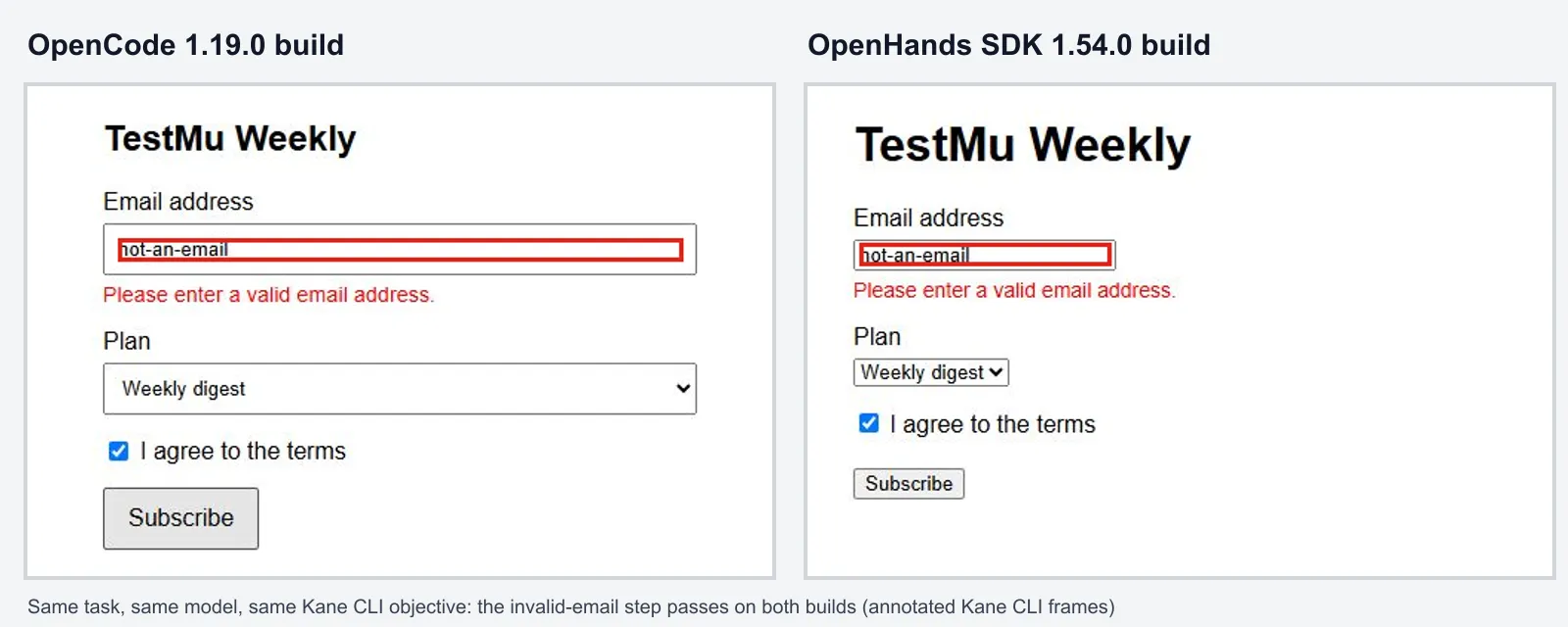
On a fully specified task this small, the two agents tied, and the same browser check confirmed both. What separates them for a migration is everything around the code: OpenCode installs as one package with no platform service to run, while OpenHands brings sandboxes, automations, and Agent Canvas that a swap inside the platform keeps. Run the same steps on a real ticket from your backlog, where specs are vaguer and the gap between agents widens.
Step 4: Keep Kane CLI in the Agent's Loop
A one-off check proves one build. Whichever agent you keep, give it Kane CLI as a tool, so every later change that touches the UI gets the same real-browser check before anyone reviews the pull request:
- One skill install - npx @testmuai/kane-cli-skill installs the Kane CLI skill for Claude Code, Codex CLI, and Gemini CLI in one step, the same three agents OpenHands Cloud runs over ACP.
- An AGENTS.md rule - OpenHands and OpenCode both read AGENTS.md, so a short rule there gives them the same habit (example below).
- Evidence for the reviewer - each run seals an evidence pack with per-step screenshots, a HAR network log, and console output, and saves the test case to TestMu AI Test Manager with a share link for the pull request.
- Saved tests - a passing run can be kept as a _test.md file that replays in seconds on later changes.
- A CI gate - the same command runs headless in GitHub Actions, GitLab CI, Jenkins, or Bitbucket Pipelines, where exit code 1 stops the merge.
## Browser checks
After any change to a page a user sees:
1. Serve the app locally.
2. Run: kane-cli run "<the user journey and what must be true>" --agent --headless --timeout 300
3. Read the last line of output (the run_end event).
   - Exit code 0: the check passed. Include the share link in your summary.
   - Exit code 1: an assertion failed. Fix the code and run the check again.
   - Exit code 2 or 3: an environment problem or timeout. Report it; do not mark the task done.
Test What the Agent Does With Agent Assurance
Kane CLI checks the app the agent built. Agent Assurance tests the agent: how it actually behaves across workflows, tools, and actions, so failures and vulnerabilities show up before a new coding agent reaches your team. It runs from your terminal as rook.
A coding agent acts: it writes files, runs commands, and opens pull requests, and OpenHands' headless mode approves every one of those actions. Agent Assurance grades each criterion against what the run changed, such as files under the paths you declare, exit status, and tool calls checked against the tools the agent declares, never against the agent's own summary of its work.
Run rook explore in a folder holding the OpenHands SDK script from Step 2, and it reads the code before a single scenario runs:
$ rook explore --yes

▸ agents analysed
  AGENT                      FEATURES  FINDINGS  WORST
  newsletter-signup-builder  1         2         medium

1 analysed, 0 unchanged, 6.59 credits
- severity: medium
what: >-
The wrapper exposes terminal execution and file editing without any code-level
scope restriction, refusal logic, or approval gate.
where: agent.py:4-11
why: >-
A model response can potentially execute commands or modify files beyond the
requested index.html, so tests cannot assume the task's single-file and
dependency restrictions are enforced.
- severity: low
what: >-
Startup failures are not handled when task.txt or LLM_API_KEY is missing, or
when the configured LLM cannot be reached.It identified the framework as OpenHands, the write-capable file editor, and the terminal tool, then flagged that nothing in the code keeps the agent to index.html. The same question applies to every alternative you trial: the spec asked for one file, and only an observed run shows whether the agent kept to it.
- Install the CLI with npm install -g @testmuai/rook (Node 22 or later), or through Homebrew.
- Run rook explore in the repository that holds your agent or its wrapper.
- Run rook generate, which writes functional and adversarial scenarios by default, including prompt injection, data exfiltration, and policy violation cases.
- Add a profile that runs the candidate agent as a command against a staging branch, then run rook run.
- Read rook report --json, which gives every criterion a Pass, Fail, or Unable to Verify verdict, and gate CI on those verdicts, because a finished run exits 0 whether its scenarios passed or failed.
Unable to Verify is reported apart from the pass rate, so the number you take to a rollout decision counts only what was observed. To drive the same workflow from Claude Code, Codex CLI, or Gemini CLI, npx @testmuai/rook-skill installs the skill, as rook coding agents shows. Agent Assurance is pre-alpha, so its commands and stored file formats can still change; point it at a staging target.
Which OpenHands Alternative Should You Choose?
Match the alternative to what you need OpenHands to stop doing, or start doing:
- Keep the platform, change the agent - run OpenCode or Claude Code inside Agent Canvas over ACP.
- Open source, any model, terminal-first - OpenCode.
- Approvals in the IDE plus a CI command - Cline, or Kilo Code if you want its gateway's model catalog.
- Foundation governance and a desktop app - Goose.
- Isolation without Docker - Codex CLI.
- Benchmarks and research - mini-SWE-agent.
- No agent infrastructure to run - Devin.
Shortlist two, run the trial on a staging branch, and gate the merge on evidence. Install Kane CLI with npm install -g @testmuai/kane-cli and follow Kane CLI getting started to check each build in a real browser, then install Agent Assurance with npm install -g @testmuai/rook to test what each agent does. For terminal agents beyond this list, see agentic coding CLI tools.
Author

Anubhav Singhmaar
Blogs: 43

Anubhav Singhmaar is an AI Product Manager at TestMu AI driving Kane CLI, the command-line tool that brings browser automation to the terminal, turning natural-language flows into runs in a real Chrome browser that return pass or fail with shareable proof. He owns the roadmap and prioritization and works with engineering to ship developer-facing features. Before TestMu AI, he spent over four years at Sprinklr owning enterprise voice AI across APAC and EMEA. A mechanical engineer turned product manager, he grounds guidance in real QA workflows.
Reviewer

Samyak Goyal
Reviewer
Samyak Goyal is a Senior Member of Technical Staff at TestMu AI engineering Kane CLI, the command-line tool that runs browser automation from the terminal, where a flow described in natural language executes in a real Chrome browser and returns pass or fail with shareable proof. He is a backend engineer with 4+ years of experience, previously an SDE at Innovaccer, where he built APIs, introduced Kafka, and cut deployment from weeks to hours. Samyak also builds multi-agent systems, skill-orchestration frameworks, and a personal copilot that indexes 200+ microservice repositories.


OpenHands Alternatives FAQs
Did you find this page helpful?
More Related Blogs
TestMu AI forEnterprise
Get access to solutions built on Enterprise
grade security, privacy, & compliance
- Advanced access controls
- Advanced data retention rules
- Advanced Local Testing
- Premium Support options
- Early access to beta features
- Private Slack Channel
- Unlimited Manual Accessibility DevTools Tests