

Power Your Software Testing with AI Agents and Cloud
The Native AI-Agentic Cloud Platform to Supercharge Quality Engineering. Test Intelligently and Ship Faster.


- TestMu AI (Formerly LambdaTest)
- /
- Blog
- /
- MCP Testing: How to Test MCP Servers in 4 Layers
MCP testing verifies that an MCP server's tools, schemas, transport, and error handling behave correctly when an AI agent calls them. The Model Context Protocol specification defines two transports, stdio and Streamable HTTP, and requires every HTTP server to validate the Origin header on incoming connections to block DNS rebinding attacks.[1]
This guide explains what the practice covers, the server surfaces you must test, how to drive MCP Inspector, the four testing layers, schema drift checks, agent tool-selection evals, security tests, the failures that recur most, and how to wire the suite into CI/CD.
Key Takeaways
- Two error channels: A failed tool call still returns a successful JSON-RPC envelope with isError set to true, so a suite that only watches for protocol errors reports green while the tool is broken.
- stdout is protocol-only: One stray print statement in a stdio server corrupts the message stream, which is why a server that passes its own tests can fail the moment a client launches it.
- Inspector CLI mode: Adding the --cli flag turns MCP Inspector from a browser tool a human clicks into a scriptable check that returns machine-readable output to a pipeline.
- In-process test client: Connecting a test client straight to the server object removes subprocess spawning from every deterministic test, which is what makes the protocol layer fast enough to run on each commit.
- Schema drift: A parameter marked optional in inputSchema but required by the handler passes discovery and fails at call time, so assert on the schema and the call separately.
- Tool-selection rate: Measuring how often a model picks the correct tool is the only check that catches a badly worded tool description.
What Is MCP Testing?
Testing an MCP server means validating that it correctly implements the Model Context Protocol and returns dependable results to the AI agents that call it. It covers four things: the handler logic behind each tool, the protocol messages the server exchanges, the schemas it publishes, and the behavior it produces once a model is choosing tools on its own.[2]
The distinction that matters is the caller. A REST API is called by code a developer wrote, so the inputs are known in advance. An MCP server is called by a language model reading a text description of each tool, which means the input distribution is decided at runtime by a system nobody controls precisely. That difference, and where the two layers meet, is covered in MCP vs API.
That single difference splits the work into a deterministic half and a probabilistic half. The deterministic half is ordinary software testing and belongs in your existing framework. The probabilistic half asks whether the model understands the tools you exposed, and it needs a pass-rate threshold instead of a boolean assertion.
What Does an MCP Server Expose That You Have to Test?
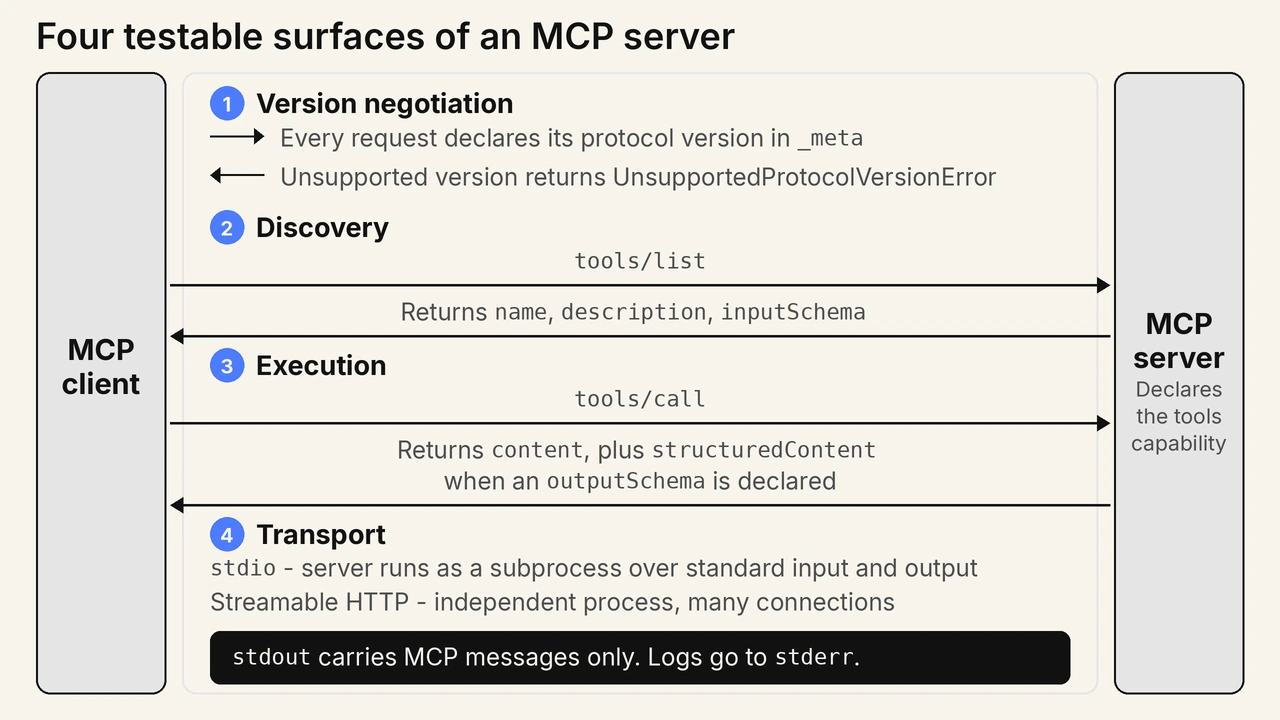
An MCP server exposes four testable surfaces: version negotiation, the discovery endpoints that list tools and resources, the execution path that runs a tool, and the message transport. A suite that only exercises tool execution leaves three of the four untested.
- Version negotiation: Every request declares its protocol version in the _meta field, and a server that does not implement that version must return an UnsupportedProtocolVersionError listing the versions it supports.[3] Servers on revision 2025-11-25 and earlier negotiate once through an initialize handshake instead.
- Capability declaration: A server offering tools must declare the tools capability, and a mismatch between what it declares and what it implements is invisible until a client asks for the missing feature.
- Discovery: The tools/list method returns each tool with its name, description, and inputSchema, and this response is what the model reads before deciding anything.
- Execution: The tools/call method runs the tool and returns content, optionally with structuredContent when an outputSchema is declared.[2]
- Transport: stdio runs the server as a subprocess over standard input and output, while Streamable HTTP runs it as an independent process handling many connections.
The transport surface carries the least obvious rule in the specification. A stdio server must not write anything to stdout that is not a valid MCP message, and it may write logs to stderr instead.[4] A debug print left in a handler is therefore not a cosmetic problem: it adds a non-JSON line to the message stream and breaks the connection.
How Do You Test an MCP Server With MCP Inspector?
Run MCP Inspector with npx and point it at the command that starts your server. MCP Inspector is the reference developer tool for testing and debugging MCP servers, and it ships three clients behind one binary: a web UI for exploration, a CLI for pipelines, and a terminal UI.[5]
# Web UI: explore a local stdio server by hand
npx @modelcontextprotocol/inspector node path/to/server/index.js

# CLI: list the tools and exit, for scripts and CI
npx @modelcontextprotocol/inspector --cli node path/to/server/index.js --method tools/list

# CLI against a deployed HTTP server
npx @modelcontextprotocol/inspector --cli https://api.example.com/mcp --transport http \
  --method tools/call --tool-name get_weather --tool-arg city=Boston
MCP Inspector requires Node 22.19.0 or newer and needs no installation. The web client prints a URL containing a one-time session token, so the session is scoped to the terminal that launched it.
Running that tools/list command against the reference server @modelcontextprotocol/server-everything 2026.7.4, with MCP Inspector 2.1.0 on Node 24.13.1, returned 14 tools. Each entry carries the name, description, and inputSchema a model reads before it picks anything, which is exactly the payload a conformance assertion runs against. The first tool from that run is below, with the other 13 omitted for length.
$ npx @modelcontextprotocol/inspector --cli node node_modules/@modelcontextprotocol/server-everything/dist/index.js --method tools/list
Starting default (STDIO) server...
{
  "tools": [
    {
      "name": "echo",
      "title": "Echo Tool",
      "description": "Echoes back the input string",
      "inputSchema": {
        "type": "object",
        "properties": {
          "message": {
            "type": "string",
            "description": "Message to echo"
          }
        },
        "required": [
          "message"
        ],
        "$schema": "http://json-schema.org/draft-07/schema#"
      },
      "annotations": {
        "readOnlyHint": true,
        "destructiveHint": false,
        "idempotentHint": true,
        "openWorldHint": false
      },
      "execution": {
        "taskSupport": "forbidden"
      }
    }
  ]
}
Two details in that output are what the conformance layer asserts on. The required array names message, so a call omitting it must fail, and the annotations block is server-supplied metadata a client treats as untrusted rather than as a permission grant.
The practical limit is what the web UI can prove. Clicking a tool and seeing a result confirms the path works once, on one machine, with one set of arguments. That is a smoke test. The --cli flag is what converts the same connection into an assertion a pipeline can run unattended, which is why the CLI client belongs in your build and the web client belongs on your desk.
What Are the Four Layers of MCP Testing?
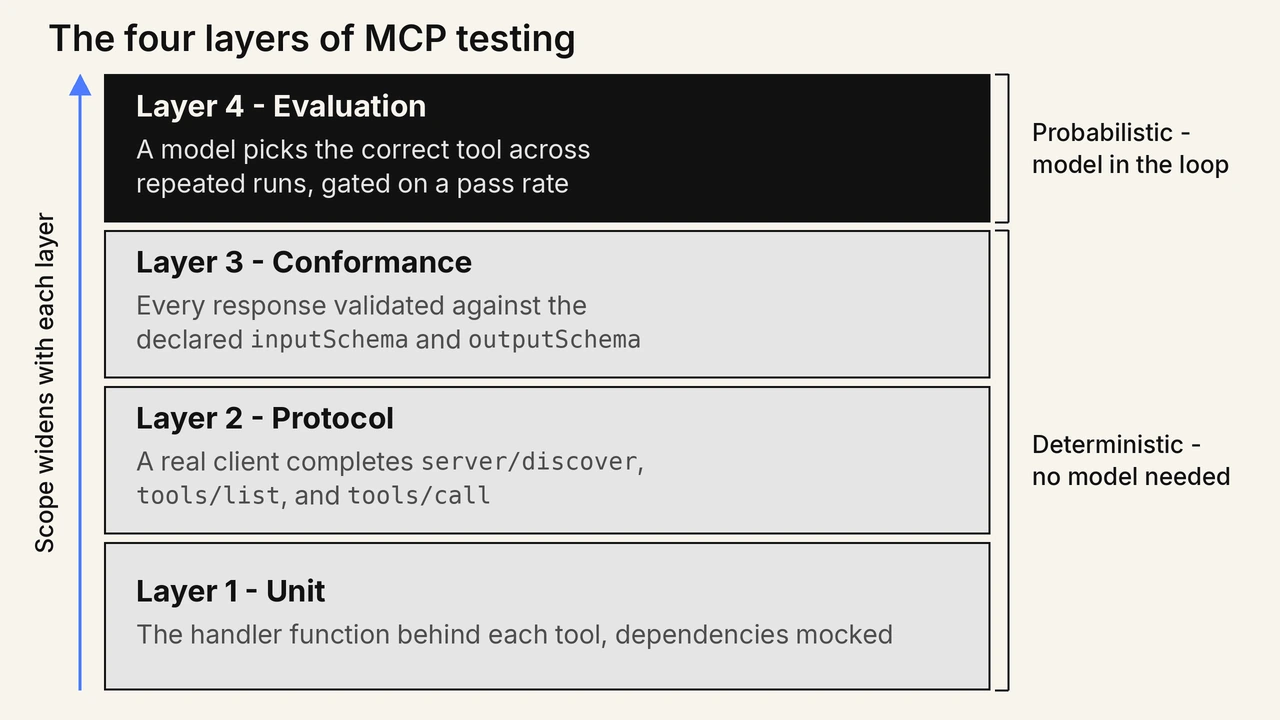
The four layers are unit tests for handler logic, protocol tests for the JSON-RPC exchange, conformance tests for the declared schemas, and evaluation tests for model tool selection. Each layer catches a class of defect the layer below it cannot see, and only the fourth needs a model.
| Layer | What it asserts | What it catches |
|---|---|---|
| Unit | The function behind a tool returns the right value with dependencies mocked. | Bad branch logic, unhandled nulls, wrong upstream error mapping. |
| Protocol | A real client completes server/discover, tools/list, and tools/call. | Capability mismatches, registration gaps, transport faults. |
| Conformance | Every response validates against the declared inputSchema and outputSchema. | Schema drift, breaking field renames, undeclared response shapes. |
| Evaluation | A model picks the correct tool and completes the task across repeated runs. | Ambiguous descriptions, overlapping tools, missing parameter hints. |
How Do You Run Protocol Tests Without Spawning a Subprocess?
The protocol layer is where most teams lose time, because spawning the server as a subprocess for every test makes the suite slow and flaky. A faster pattern connects the test client directly to the server object, which takes the process boundary out of the test path.
FastMCP documents this as a pytest fixture that wraps the server in a client, and states it enables a tight development loop by letting you avoid using a separate tool like MCP Inspector during development.[6]
import pytest
from fastmcp import Client
from server import mcp   # your FastMCP server object

@pytest.fixture
async def mcp_client():
    async with Client(transport=mcp) as client:
        yield client

async def test_tools_are_registered(mcp_client):
    tools = await mcp_client.list_tools()
    assert {t.name for t in tools} == {"get_weather", "search_files"}
Keep the layers separate rather than merging them into one end-to-end suite. A merged suite reports a single red result that could mean a broken handler, a renamed field, or a model that picked the wrong tool, and the triage cost lands on every failure.
How Do You Catch Tool Schema Drift?
Snapshot the tools/list response and fail the build when it changes without review. Schema drift happens when the schema a server advertises stops matching what its handler actually accepts, and it survives unit testing because the handler and the schema are tested separately.
The common shape is a parameter that the inputSchema leaves out of the required array while the handler rejects the call without it. Discovery looks correct, the model omits the field because the schema said it was optional, and the call fails at runtime with an error the model cannot act on.
The reverse case is quieter and more damaging. When a tool declares an outputSchema, the specification requires the server to return structured results that conform to it, and clients should validate against it.[2] A field renamed in the handler but not in the schema breaks every agent already parsing that response, and nothing in the server itself errors.
- Required-array diff: Fail the build when a parameter enters or leaves the required array, because both directions break callers already in production.
- Round-trip validation: Validate each tools/call response against the tool's own outputSchema in the test, rather than trusting that the handler and the schema agree.
- Description diff: Treat a changed tool description as a behavior change, since the description is the only thing the model reads when choosing between tools.
- Enum narrowing: Flag any removed enum value, because an agent that learned the old value will keep sending it.
How Do You Test Whether the Agent Calls the Right Tool?
Run each prompt several times and measure how often the model selects the correct tool, then gate on a pass rate rather than a single result. Tool selection is driven by the name, description, and schema in the tools/list response, so this layer tests your wording, not your code.[2]
Three numbers make the layer actionable. Selection rate is how often the correct tool is chosen for a prompt. Completion rate is how often the task finishes successfully once the right tool is called. Extra-call rate counts invocations the task did not need, which is where latency and token cost accumulate without any visible failure.
A single failing run tells you almost nothing here, because the same prompt can succeed on the next sample. Set the threshold before you run the suite, keep the prompt set in version control, and re-baseline whenever you change a tool description or switch models.
In the Reddit thread "Testing MCPs" on r/mcp, developers separated server testing from model testing. One developer runs unit tests, integration tests through Inspector in CLI mode, and manual prompt-based checks in Claude Desktop and Cursor. The thread resolved on an open-source MCP evals project that simulates a client, grades the response, and runs as a GitHub Action, which the original poster called the closest fit.
Evaluating a full agent raises a harder problem than tool selection alone. Once the agent runs multi-turn conversations, a wrong answer can come from a hallucinated fact, a dropped piece of context, or an unsafe action, and a tool-selection metric records none of those. Teams facing that gap use Agent Testing, which runs specialist evaluators against a live agent through the same channel real users hit:
- Hallucination Detection: Flags responses that state information not supported by the agent's knowledge base or context.
- Context Awareness: Checks whether the agent retains and correctly uses information from earlier turns in the same conversation.
- Completeness: Confirms the response fully addresses what the user asked rather than answering part of it.
Each metric returns a pass or fail per scenario with an evidence excerpt from the conversation, so a failure points at the turn that caused it. The broader methodology behind evaluating autonomous systems, including how to score behavior that changes between runs, is covered in AI agent testing.
How Do You Test an MCP Server for Security Risks?
Test the three places an MCP server accepts untrusted input: the transport, the tool arguments a model generates, and the text the server itself returns. The specification requires servers to validate all tool inputs, implement access controls, rate limit invocations, and sanitize outputs.[2]
- Origin validation: Send a request with a foreign Origin header and assert the server answers 403, since the specification requires this check to prevent DNS rebinding attacks.[1]
- Interface binding: Confirm a local server binds to 127.0.0.1 rather than 0.0.0.0, which the specification recommends so the port is not reachable from the network.[1]
- Argument fuzzing: Call each tool with path traversal strings, SQL fragments, and shell metacharacters, because a model can be talked into generating any of them.
- Annotation trust: Treat tool annotations as untrusted unless the server is trusted, which the specification states explicitly, and assert your client does not grant privileges based on them.[2]
- Legacy session handling: Servers on revisions 2025-03-26 through 2025-11-25 assign a session through the Mcp-Session-Id header, so replay a stale id against those and assert the server rejects it. Revision 2026-07-28 removed protocol-level sessions, and a current server ignores the header instead.[1]
The subtler risk is the tool description itself. A model reads those strings as instructions, so a server that returns attacker-controlled text into a description or a tool result can steer the agent that called it. Testing that path is the same discipline as prompt injection testing, applied to tool output rather than to a chat box. The threat model these checks defend against, including what changes once the model rather than your code decides a tool fires, is set out in MCP security.

Note: Sustaining those adversarial checks by hand is the hard part, since every new tool widens the injection surface. Agent Assurance generates them as a first-class scenario family, prompt injection, tool misuse, and instruction override, alongside the functional suite it derives from the codebase of an agent you own, and its discovery connects to an MCP server to ask what tools it really has rather than trusting the config. Each run invokes the agent for real and grades every criterion against observed evidence such as files changed and tool calls, not the agent's own account. Early access is opening in batches. Join the Agent Assurance waitlist
What Fails Most Often in Production MCP Servers?
Most production failures sit at the boundary rather than inside the tool logic: version negotiation, the transport, the schema contract, and the timeout path. These are exactly the areas a handler-only unit suite never touches, which is why servers that pass every test still break on first connection.
- stdout pollution: A logging line written to stdout instead of stderr corrupts the JSON-RPC stream and the client drops the connection with no useful error.
- Silent tool errors: A handler that catches an exception and returns a text message without setting isError reports success, so the model treats the failure as a valid answer.
- Version rejection: A server that does not implement the version a request declares must answer with an UnsupportedProtocolVersionError listing what it does support, and one that answers anything else leaves the client with no recovery path.[3]
- Missing timeouts: The specification tells clients to implement timeouts for tool calls, and a tool that waits on a slow upstream without one holds the request open indefinitely.[2]
- Environment gaps: A server that reads credentials from the shell works locally and fails under a client that launches it as a subprocess with a different environment.
The environment gap deserves a dedicated test because it is invisible in development. Under stdio the client spawns the server as a child process, so the server inherits the client's environment rather than the shell where it was built. A regression test that launches the server with a deliberately empty environment shows every implicit dependency at once.
How Do You Run MCP Tests in CI/CD?
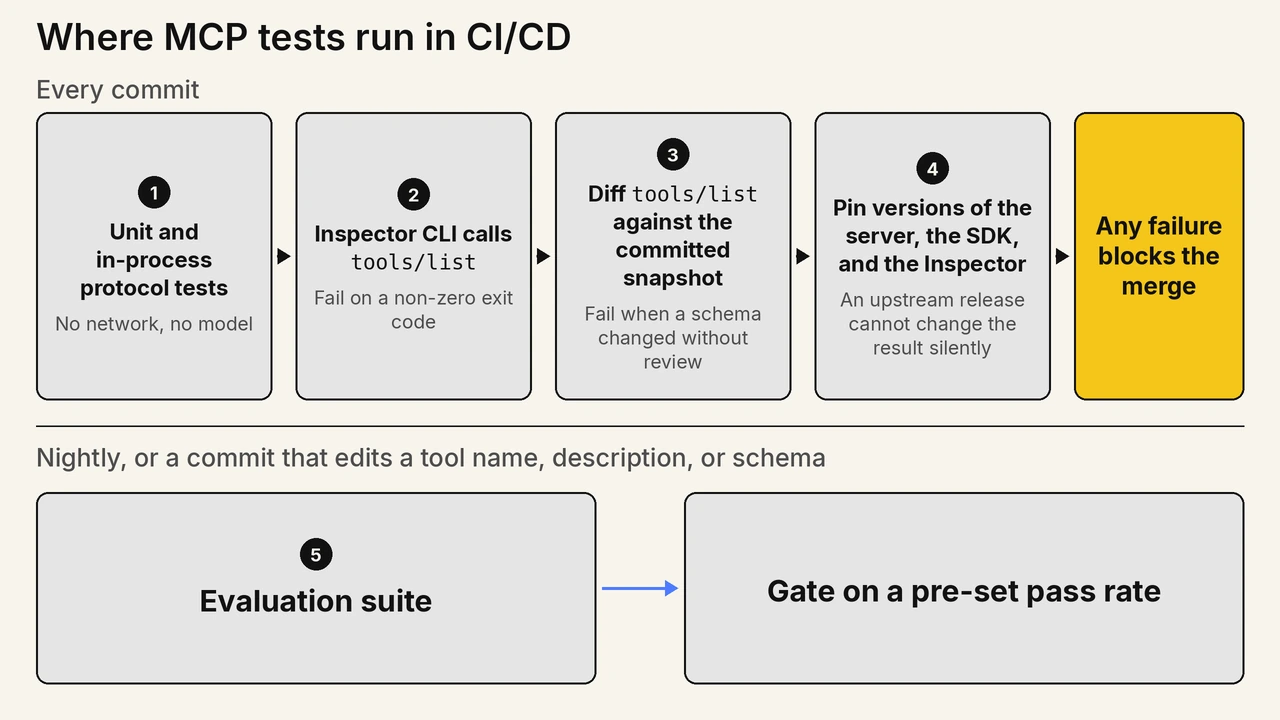
Run the three deterministic layers on every commit and the evaluation layer on a schedule or on tool changes. Unit, protocol, and conformance tests are fast and repeatable, so they gate merges. Evaluation runs cost model tokens and vary between runs, which makes them a poor merge gate.
- Run unit and in-process protocol tests in your existing test job, since neither needs a network or a model.
- Add an Inspector CLI step that calls tools/list against the built server and fails on a non-zero exit code.[5]
- Diff the tools/list output against the committed snapshot and fail the job when a schema changed without review.
- Pin the versions of the server, the SDK, and the Inspector so an upstream release cannot change the result silently.
- Run the evaluation suite nightly and on any commit that edits a tool name, description, or schema.
Keep credentials out of the deterministic job. Protocol and conformance tests should run against stubbed upstreams so the pipeline stays fast and a rate-limited third-party API cannot turn a code review into a red build. Teams comparing this wiring against a command-line workflow will find the trade-offs laid out in MCP vs CLI.

Conclusion
Start MCP testing by writing one protocol test that connects a client in memory and asserts on the exact tool names your server registers. That single test catches registration gaps, capability mismatches, and transport faults on the first run, and it takes minutes to write.
Add the conformance snapshot next, because schema drift is the failure that reaches production most quietly. Leave the evaluation layer until the deterministic three are green, since a model-in-the-loop failure is impossible to triage while a schema mismatch is still live.
Server behavior and agent behavior stay separate problems throughout. Your server tests prove the tools work; your evaluation runs prove the model can use them. Where MCP connects an agent to its tools, the A2A protocol connects agents to each other, and agent-to-agent protocol testing covers the assertions that layer needs. For a catalog of servers already built for QA work, see MCP servers for test automation, and for the architecture behind agent-driven workflows, see MCP and AI agents. The automation MCP server documentation covers connecting an agent to a live test grid.
Sources and References Used
- [1] Streamable HTTP - Model Context Protocol Specification 2026-07-28 (July 2026)
- [2] Tools - Model Context Protocol Specification 2026-07-28 (July 2026)
- [3] Versioning and Compatibility - Model Context Protocol Specification 2026-07-28 (July 2026)
- [4] stdio - Model Context Protocol Specification 2026-07-28 (July 2026)
- [5] MCP Inspector - Model Context Protocol Documentation (2026)
- [6] Testing - FastMCP Documentation (2026)
Author

Sai Krishna
Blogs: 21

Sai Krishna is Director of Engineering at TestMu AI (formerly LambdaTest), where he leads agentic AI for quality engineering, building AI agents that autonomously drive mobile and conversational test automation. His current focus is Agent Testing and Model Context Protocol (MCP) support for mobile. He is a core contributor and member of the Appium open-source project and the creator of AppiumTestDistribution and appium-device-farm. With over 14 years of experience including more than 9 years at Thoughtworks as a Principal Consultant, he holds a BSc in Electronics and speaks regularly at TestMu and Appium Conf on Appium, mobile automation, and agentic AI in testing.


MCP Server Testing FAQs
Did you find this page helpful?
More Related Blogs
TestMu AI forEnterprise
Get access to solutions built on Enterprise
grade security, privacy, & compliance
- Advanced access controls
- Advanced data retention rules
- Advanced Local Testing
- Premium Support options
- Early access to beta features
- Private Slack Channel
- Unlimited Manual Accessibility DevTools Tests