

Power Your Software Testing with AI Agents and Cloud
The Native AI-Agentic Cloud Platform to Supercharge Quality Engineering. Test Intelligently and Ship Faster.


- TestMu AI (Formerly LambdaTest)
- /
- Blog
- /
- Why Is Accessibility Testing Important? 7 Reasons
Why Is Accessibility Testing Important? 7 Reasons
Why accessibility testing is important: 7 reasons, from users and EAA and ADA Title II duties to tool limits, plus a keyboard test of a live store.
Last Updated on:
Accessibility testing is important because it confirms that people with situational, temporary or permanent disabilities can actually use your product, and because conformance is now legally required. The European Accessibility Act, Directive (EU) 2019/882, has applied since 28 June 2025 to banking services, e-commerce, e-books and self-service terminals sold in the EU.
TL;DR
- Accessibility testing checks whether websites and applications can be used by people with situational, temporary or permanent disabilities, using assistive technologies such as screen readers and voice recognition tools.
- The European Accessibility Act, Directive (EU) 2019/882, has applied since 28 June 2025 and covers banking services, e-commerce, e-books, passenger transport, smartphones and self-service terminals sold in the EU.
- WCAG defines three conformance levels, A, AA and AAA, and Level AA is the level most development teams aim for and the level legally required for certain sites.
- WCAG 2.2 is the current W3C Recommendation, adding nine success criteria to WCAG 2.1 and removing success criterion 4.1.1 Parsing, so an older checklist reporting parsing errors is out of date.
- Shifting accessibility testing to the left surfaces accessibility defects earlier in the development lifecycle, lowers the cost of fixing them and supports WCAG compliance.
- W3C states that web accessibility evaluation tools cannot determine accessibility and can only assist, so keyboard and screen reader checks by a person remain part of every accessibility test.

Note: Try the TestMu AI's Accessibility DevTools Chrome extension to resolve your accessibility issues. Add to chrome now!
What Is Accessibility Testing?
Accessibility testing verifies that websites and apps can be used by people with situational, temporary, or permanent disabilities, including people who use screen readers, keyboards, magnification, and voice control. It is a non-functional type of testing, checked against the W3C Web Content Accessibility Guidelines. For methods, tools, and step-by-step instructions, see the full guide to accessibility testing; this article focuses on why it matters.
Key Takeaway: Accessibility testing is a non-functional type of testing that checks a website or application with assistive technologies such as screen readers and voice recognition tools, covering disabilities that are situational, temporary or permanent.
Why Is Accessibility Testing Important?
Accessibility testing is important for seven reasons: people depend on it, the law requires it, barriers are easy to miss, tools cannot decide conformance alone, buyers demand it, it improves the product for everyone, and early fixes cost less.
1. People With Disabilities Depend on It
Disabilities can be permanent, such as blindness, temporary, such as a broken arm, or situational, such as bright sunlight on a phone screen. People in all three groups use keyboards, screen readers, magnification, and voice control, and only testing with those tools shows whether they can complete a task. A product that has never been tested this way has an unknown number of users it silently excludes.
2. It Is a Legal Requirement in Major Markets
In the EU, the European Accessibility Act has applied since 28 June 2025 to products and services such as e-commerce, banking, and e-books. In the United States, the Department of Justice ADA Title II web rule requires state and local governments to meet WCAG 2.1 Level AA, with compliance dates of April 26, 2027 for entities serving 50,000 or more people and April 26, 2028 for smaller ones and special districts, after an April 2026 rule extended the original dates. Testing is how you produce evidence of conformance; the guide to European Accessibility Act compliance covers who must comply and by when.
3. Real Barriers Are Easy to Miss Without Testing
To show how quickly barriers appear, I tested the home page of the TestMu AI ecommerce playground with the keyboard only, in Chrome 154 on Windows 11 on the TestMu AI cloud:
- The page has no skip link, so reaching the search box took 32 Tab presses, starting with the links of the category menu.
- Of 80 focus stops checked, 25 showed no outline or box-shadow, so a keyboard user would not see where focus was on those controls.
Neither issue shows up when someone clicks through the page with a mouse, which is how most manual checks are done. Both are covered by WCAG success criteria: 2.4.1 Bypass Blocks and 2.4.7 Focus Visible.
4. Automated Tools Cannot Decide Conformance
A clean scan is not proof of accessibility. Scanners check rules; people check whether the experience works. That is why an accessibility test plan, such as this web accessibility checklist, combines an automated scan in the pipeline with manual keyboard and screen reader passes, as covered in the section on automation and AI below.
5. Buyers and Public Sector Contracts Require It
Public sector buyers in the EU assess ICT against the harmonized standard EN 301 549, and US federal agencies buy against the Section 508 standards. Business-to-business products are not exempt either: employees and customers of your clients can have disabilities, and an accessibility conformance report is increasingly part of vendor questionnaires.
Key Takeaway: Accessibility matters for business-to-business products as much as consumer products, because colleagues and end clients can have disabilities such as colour blindness, and ignoring accessibility creates legal exposure.
6. Accessible Products Work Better for Everyone
Features built for accessibility help far more people than the group they were designed for: captions help in noisy places, clear focus states help power users who navigate by keyboard, sufficient contrast helps anyone reading outdoors, and well-labeled forms reduce errors for all users.
7. Fixing Issues Early Costs Less
An unlabeled button caught in a pull request is a one-line fix. The same issue found in an audit after release often means redesigning a component that has been reused across dozens of screens. Testing throughout development, described in the shift-left section below, keeps accessibility defects small.
Demystifying the WCAG Standards
The Web Content Accessibility Guidelines (WCAG) are a set of internationally recognized standards and are guide to ensure the accessibility of web content. The best thing you can do is always refer to WCAG when planning accessibility testing and making a checklist of things your code and application has and the criteria you still need to work on. Within the WCAG we have three standards that applications should comply with today and those are known as the conformance levels.
A (Basic) : The success criteria at Level A is designed as the easiest conformance, without much impact on the website design or structure. Many web applications today have this conformance level.
AA(Strong) : This level is like a benchmark conformance Level. AA requires a bit more commitment and complexity. The product has to ensure that all the text meets color contrast requirements. You need to review the contrast across the whole site, and revise colors where needed, even if they are your brand colors. It is a good idea to embed this level for your applications.
AAA(Excellent) : At Level AAA, if we continue to consider the colors on websites, the requirement is taken further with an even more strict color contrast requirement for text. AAA conformance is for specialist sites as the criteria are really strict such as for government websites, news, or medical organisations.
The big question now is what conformance to aim for? Level AA is the level that most development teams are aiming to meet. This is the level that is legally required for certain sites and is the one that is typically referred to when you're tasked with "making a website accessible".
Furthermore, It is always best to go for a conformance level that is a bit higher than A, because if you can comply with all re-requisites of AA that's great, however if you miss one requirement you still have A conformance and the same can work with AAA. If you aim for AAA but miss a requirement then at least you have AA.
Check which version of WCAG you test against, not only the conformance level. WCAG 2.2 is the current W3C Recommendation, and it adds nine success criteria to WCAG 2.1, including Focus Not Obscured (Minimum), Dragging Movements, Target Size (Minimum), Consistent Help, Redundant Entry and Accessible Authentication (Minimum). WCAG 2.2 also removes success criterion 4.1.1 Parsing, so a checklist that still reports parsing errors is out of date.
Key Takeaway: WCAG sets three conformance levels, A, AA and AAA, and Level AA is the benchmark most development teams target because it is the level legally required for certain sites.
Key Principles of WCAG(Web Content Accessibility Guideline)
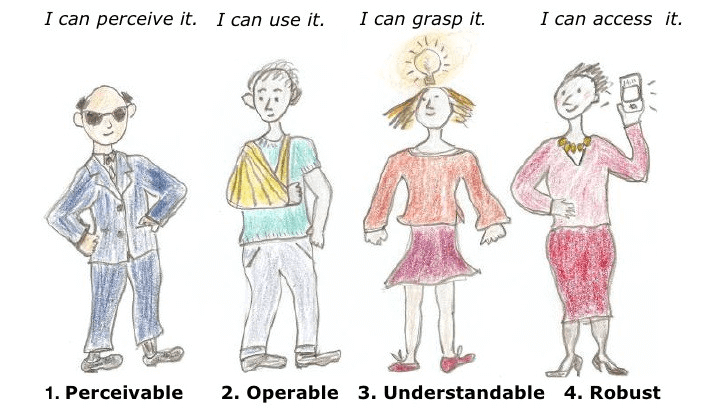
Perceivable: This is the information on a UI that should be presented in a way that users can recognize regardless of the sensory ability of a person.
Operable: Components and the navigation of the application must be easily operable by all users including users who use assistive technologies to help them use your application.Understandable: All the content on your application must be clear and comprehensive to users so that the users can interact with it correctly.
Robust: The content should be robust enough to be interpreted to a wide range of customers as well as via assistive technologies.

Key Takeaway: The four WCAG principles are perceivable, operable, understandable and robust, and web content has to satisfy all four for users of assistive technologies to recognise, operate and interpret the content.
How to Make a Website/Application More Accessible?
There are various things we can do as a team for making an accessible website/content in general. It is important that we identify the need to embed accessibility best practices into our code base as well as for testing the product. The best way would be to have a read of the WCAG guideline and understand where our product sits when it comes to conformance level and then start making a checklist of items that could make the application an accessible one. For instance it would be a good idea to start thinking about:
- Alternative Text for Visual Media - Usage of alternative text for images if your application is heavily based on images/videos as well as for links on your website, make use of descriptive text for it so screen readers can read it
- Keyboard-Only Navigation - Make sure the application can be used with a keyboard only and we don't get trapped on the website
- Use of Semantic HTML for Content Structure - HTML elements to structure the content appropriately when it comes to headings and paragraphs for example
- Content Resizability Across Devices - Allow content to be resizable so users can zoom in and resize the content to different products like phones/tablets/desktop computers
- Transcripts for Audio and Video Content - If you are using videos/news or anything that is providing information to your customers, remember to have a transcript to provide context so someone who may be deaf or temporarily have an affected ear
- Ensuring Sufficient Color Contrast - Make sure you are following the correct colour contrast and have sufficient colour between text and background elements, there are plenty of tools online to support this
- Implementing ARIA for Enhanced Accessibility - Have Accessible rich internet applications(ARIA) embedded into your code to help define structure and functionality of the application with assistive technologies

Austin Siewert
Co-Founder, Steadfast Systems
Discovered @TestMu AI yesterday. Best browser testing tool I've found for my use case. Great pricing model for the limited testing I do 👏
2M+ Devs and QAs rely on TestMu AI
Deliver immersive digital experiences with Next-Generation Mobile Apps and Cross Browser Testing Cloud

Key Takeaway: Practical steps that make a website more accessible include alternative text for images, keyboard-only navigation, semantic HTML structure, resizable content, transcripts for audio and video, sufficient colour contrast and ARIA attributes.
Shifting Accessibility Testing to the Left
Traditionally, accessibility testing has been performed towards the end of the development lifecycle, often as a separate and isolated process. However, the concept of shifting accessibility testing to the left advocates for integrating accessibility considerations early and consistently throughout the development process. Of course, by shifting accessibility to the left we not only embed this as part of our strategies for testing and developing code, but also avoid a monolith being affected in the future.
Some more benefits of shifting accessibility to the left include many things like detecting bugs earlier in the lifecycle and understanding accessibility issues sooner, allowing greater and improved collaboration within the engineering team, fostering a good understanding of all accessibility requirements and best practices. Helps tremendously with cost savings as accessibility is part of the development workflow rather than a monolith. Finally it helps with compliance assurance as organisations follow WCAG standards and regulatory issues as well as work towards an enhanced quality product.
Key Takeaway: Shifting accessibility testing to the left detects accessibility bugs earlier in the development lifecycle, improves collaboration inside the engineering team and saves cost compared with treating accessibility as a separate stage at the end.
How Much of Accessibility Testing Can Automation and AI Cover?
Automated scanners are fast at rule-based checks such as missing alternative text, unlabeled form fields, and low color contrast, and they belong in every build pipeline. They cannot judge whether alternative text makes sense in context, whether focus order is logical, or whether a screen reader announcement is understandable. W3C's guidance on selecting evaluation tools is direct: "Web accessibility evaluation tools can not determine accessibility, they can only assist in doing so."
AI assistants now generate much of the front-end code that gets tested, including ARIA attributes. Generated markup still needs the same review, because a wrong ARIA role can make a control harder to use with a screen reader than no ARIA at all.
Key Takeaway: Automated scanning catches rule-based defects early, but W3C states that tools can only assist in determining accessibility, so keyboard and screen reader checks by a person are still required.
Conclusion
Start with the checks that catch the most barriers for the least effort: tab through your key pages with the keyboard only, run an automated scan in your build pipeline, and test one critical flow with a screen reader before each release. TestMu AI Accessibility Testing combines DevTools scanning, CI/CD automation, scheduled monitoring, and manual testing on real mobile devices, and the accessibility automation documentation covers adding scans to an existing test suite.
Note: AI assistance was used in researching and updating this article. Laveena Ramchandani wrote the original article from experience leading accessibility work in test teams. Legal and standards facts in this update were checked against W3C, ETSI, the European Commission, and ada.gov, following our editorial process and AI use policy.
Author

Laveena Ramchandani
Blogs: 4


Laveena Ramchandani is a passionate Test Manager who has been testing for nearly 10 years and is always seeking to learn and share. She is a community leader for data science testing and testing in general. Her entry on the digital platform has enhanced many individuals to learn a new area within testing. Laveena was a finalist for The Digital Star 2022 at the everywoman in Technology awards. She has also been on various podcasts, international speaker and blogs trains new testers.
Reviewer

Rahul Mishra
Reviewer
Rahul Mishra is a Lead Member of Technical Staff at TestMu AI (formerly LambdaTest), leading frontend engineering and accessibility testing across the quality engineering platform. He mentors frontend engineers, runs code reviews and sprint planning, optimizes React.js rendering performance, and makes product features accessible to users with disabilities through WCAG and ADA-compliant accessibility audits. He brings 10+ years of experience across React.js, VueJS, TypeScript, Swift, Objective-C, and AWS, with earlier work as a Technical Lead at VectoScalar Technologies. Rahul holds a B.E. in Information Technology.


Accessibility Testing FAQs
Did you find this page helpful?
More Related Blogs
TestMu AI forEnterprise
Get access to solutions built on Enterprise
grade security, privacy, & compliance
- Advanced access controls
- Advanced data retention rules
- Advanced Local Testing
- Premium Support options
- Early access to beta features
- Private Slack Channel
- Unlimited Manual Accessibility DevTools Tests