

Next-Gen App & Browser Testing Cloud
Trusted by 2 Mn+ QAs & Devs to accelerate their release cycles


On This Page

Quick Guide To Drupal Testing
In this guide, learn everything you need to get started with Drupal testing.

Harish Rajora
January 12, 2026
Dries Buytaert, a graduate student at the University of Antwerp, came up with the idea of developing something similar to a chat room. Moreover, he modified the conventional chat rooms into a website where his friends could post their queries and reply through comments. However, for this project, he thought of creating a temporary archive of posts.
As the communication channels were minimal and inefficient, it was a convenient method for him to interact with his colleagues. Dries then posted his message box to the public. What happened after that is the central theme of this Drupal testing guide.
Drupal is an open-source content management system for creating websites and applications. It has excellent features like simple content authoring, robust speed, strong security, scalability, and modularity that will help you create dynamic web experiences. Using Drupal as an example, we will discuss how and why it is helpful to know about Drupal development and testing today. Following this, we will explore a few methods to test Drupal applications.
What is Drupal?
Drupal started as a message box but took the shape of something entirely different when it went public. Being a dutch-speaking student, Dries wanted to release the website with the name “dorp,” which in dutch means “village.” He thought that it resembled the working methodology of the website.
However, he mistyped the domain name to “drop” and realized that the drop sounded much better. Since “drop” was an English term, the project was renamed “druppel” in 2001, and then Drupal, which it still carries today.
Starting as a message box, Drupal has converted to a complete content management system that can power a website with all the essential features. The success of Drupal started when it was picked up for powering web applications for communication between the supporters and the campaign managers of the US presidential elections. The people associated with the project kept working on it even after the campaign and made it open-source, inviting more contributions from all around the world.
Drupal is used by 1.8% of all the websites available online. This is significantly less than for WordPress-built websites, slightly less for Shopify-powered websites, and marginally less for Joomla-powered websites.

While Drupal is powerful and efficient, a few reasons restrict individual developers and organizations from opting for it for their projects. We will share these bullets later in this post.
What is Drupal used for?
Since Drupal is a content management system, it has various features specific to certain domains. For example, multilingual support for the marketing team, etc. In this section of the Drupal testing tutorial, we will pick up only generalized features that can be used with every domain.
Open-source
Open-source technologies have become among the top-favorite software types for developers and testers. Drupal is no exception here. The CMS, its founder, and the people behind its development at its early stages have always been vocal about open-source technologies and their support.
While it is popularly known that open-source tools generally come free of cost with a license to modify the software as you like or per your requirements. Along with this, the open-source nature of Drupal brings three important things:
- Inclusion of new tech – Open-source software is developed by the people who also use it. They are independent developers and tech-savvy people who are updated with the latest technologies in the market. As a result, they know their importance and include the same concepts in Drupal to improve it and up to the current standards. These include high-level security standards as well as front-end technologies such as React.
- Large community by our side – Developers and testers starting their Drupal journey will come across questions that will not be available on the official documentation. With Drupal’s large community, you can get answers to your queries and further assistance to help you develop things quickly.
- Contains essential features – Similar to the effect we saw in the first point, another area where open-source developers prove to be the best is in the features. If Drupal does not have a particular feature and the community and its users are eager for it to be present, the open-source community generally develops it. It works based on the audience’s requirements without management or seeking profitable interests.
Customizable
In our recent guide on WordPress testing, we discussed plugins and templates that work as core pillars in a WordPress website. Both of these concepts exist in the Drupal content management system, too, but the “plugin” is replaced with “modules” here.
Drupal modules provide additional functionalities based on the requirements of the developers and the organizations. This plug-in system works as “install only what you need.” Similarly, themes and templates are the visual representation of the web application.
This depends on what type of web application you are thinking of developing. Many Drupal themes and modules are available online to help you lift your web application within a few minutes.
Integrations
Integrations are third-party software that performs specific tasks. For instance, a payment gateway is a software that helps your users execute transactions and give you a complete report as an administrator.
Without integration, Drupal developers would have spent much time reinventing the wheel. But fortunately, all we need is to search for the functionality and install the integration to our CMS backend system.

These integrations may include a chat feature, payment feature, render interactive models, etc. Drupal supports hundreds of integrations for you to satisfy your requirements.
Security
The security of a website is the topmost priority for organizations and individuals. A website contains a lot of sensitive data, and the developers and organizations are responsible for its protection.
Drupal has secure mechanisms built into the platform to prevent attacks and close vulnerabilities. In addition, you can also integrate security features through integrations or modules to add additional security layers.

Popular Drupal-powered websites
According to a source, Drupal maintains its reputation as the finest CMS for heavy-traffic websites. Currently, there are over a million websites on the web that Drupal and its community support.
In this section of the Drupal testing guide, let’s look at the popular websites built on Drupal CMS.
Tesla
Tesla, led by Elon Musk, is one of the most well-known automotive companies specializing in electric car production. Its official website is sleek, clear, and interactive. Tesla is built on Drupal 8 and makes a big impression on users with numerous animations and videos.

Government of Australia’s website
As with many other governments, Australia’s government has also built its website with Drupal CMS. Australia has 100+ government entities scattered across the country. To meet the needs of the users, they chose Drupal to optimize all of the digital services they provide to millions of Australians.

NASA
The space agency of the United States of America has chosen Drupal to build its web application. The NASA website provides a plethora of helpful content to its users and functions as a holistic news and knowledge resource.
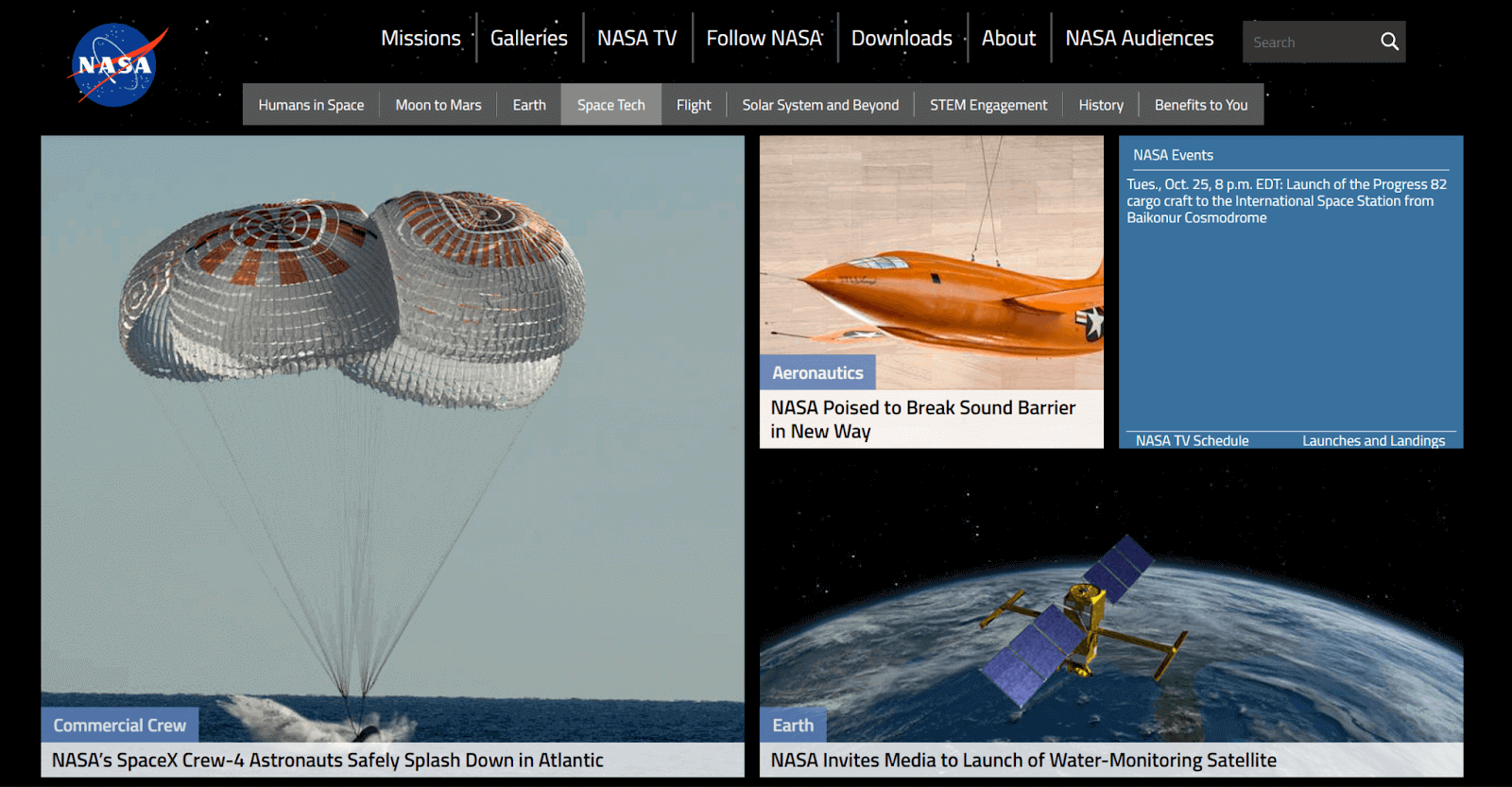
These are three popular organizations that have opt-in for Drupal. Besides, there are tons more that are just a Google search away.
Why perform Drupal testing?
Drupal provides numerous benefits for building an amazing customer experience. However, it also poses different challenges when it comes to testing. Drupal-based websites are packed with content and variations in content.
Therefore, it is crucial to perform Drupal testing of websites and apps across different browsers, devices, and operating systems to ensure they are working as intended before releasing them to customers.
While you perform Drupal testing, it is crucial to ensure the following things are not compromised.
- Content quantity
- Content length
- Internal linking in the content
- Media assets in the content
- Formatting
- Language

Austin Siewert
CEO, Vercel
Discovered @TestMu AI yesterday. Best browser testing tool I've found for my use case. Great pricing model for the limited testing I do 👏
2M+ Devs and QAs rely on TestMu AI
Deliver immersive digital experiences with Next-Generation Mobile Apps and Cross Browser Testing Cloud

Ways to perform Drupal testing
After getting to know the Drupal framework, learning the nuances of testing in it will help us release a robust product to our users.
Since Drupal is a CMS, naturally, all the things that apply to web testing are also used on a higher level. Therefore, discussing them in a post solely dedicated to Drupal might be redundant and boring.
However, if you are interested in it and know more in-depth, we have a detailed guide on the testing website.
Drupal testing is divided into two parts:
- Manual Drupal testing
- Automated Drupal testing
Both have their use cases and take care of things at different levels.
Manual Drupal testing
When you manually test a Drupal-based website, you try to operate on a website similar to a user. Most bugs identified here fall into the user interface or usability domain category.
In addition, we need it to manually inspect the backend technologies as the web app is just the display for the CMS. Before starting automation, it’s important to check if a change in pricing in the backend is reflected on your eCommerce website product page. Also, check whether it is reflected in the product when seen in the pricing section.
Besides the basic twist of backend inspection, you can follow manual testing paradigms in API testing, etc.
Automated Drupal testing
The area that can be challenging in Drupal-based web applications is automated Drupal testing. Drupal offers automated testing that you can leverage for your projects. The following sections of this Drupal testing guide will focus on this aspect.
Types of Drupal testing
In this section of this Drupal testing tutorial, we will discuss the types of testing in Drupal. These types do not contain rules or syntax, as seen in the previous section. All the things done in Drupal testing (syntactically) are with the PHPUnit framework only. Whatever types we discuss below are the types supported and executed using PHPUnit.
In Drupal, we have three types of testing.
- Unit testing
- Kernel testing
- Functional testing
Unit testing is exactly what we discussed in the previous section. But the base class used in the unit testing is Drupal\Tests\UnitTestCase.
Kernel testing makes use of the bootstrapped kernel with minimum enabled extensions. Drupal recommends kernel testing only when the requirements cannot be satisfied using unit testing. Also, if the tests do not need the internal browsers. The base class used in this type of testing is the Drupal\KernelTests\KernelTestBase class.
Finally, the functional testing part combines browser testing and JavaScript testing discussed above. Since it is divided into these two, you need to use the base class accordingly. For browser testing, the base class is Drupal\Tests\BrowserTestBase. For JavaScript testing, it is Drupal\FunctionalJavaScriptTests\WebDriverTestBase.
As we saw above, executing tests with PHPUnit in Drupal requires many setups. A small setting change may result in much debugging and waste time between testers and developers.
A better solution to use here is TestMu AI – an online continuous quality testing platform that provides automated Drupal testing using PHPUnit with automated testing tools like Selenium. With the TestMu AI platform, you can run automation tests at scale of your Drupal website on the fast, scalable cloud infrastructure.
HyperExecute– a unique offering by TestMu AI, allows you to run automation tests at a fast speed that will help you drastically ramp up testing of your Drupal-based websites. HyperExecute has intelligent features like smart test orchestration, report generation, in-built CI features, and much more.
Subscribe to TestMu AI YouTube Channel and get detailed tutorials around Selenium, Cypress automation, Appium, and more.
How to perform automated Drupal testing?
Drupal has a necessary need to perform automated testing on its websites. Hence, they put down a significant amount of focus when they talk about securities and testing. As a result, one can find several automation software integrations associated with Drupal, such as PHPUnit and Behat.
But, on their official website, Drupal states that PHPUnit is the standard they follow for Drupal versions 8, 9, and 10. Before that, Drupal had SimpleTest, which is currently removed from the library.
Drupal recommends the use of PHPUnit for automated Drupal testing. Let’s check out the PHPUnit framework in brief.
What is PHPUnit?
As we dissect the name of the PHPUnit framework, we understand that it is related to “PHP” and “Unit,” i.e., a framework that allows for unit testing in PHP. It is widely used for PHP-based applications and development frameworks that produce PHP code (even if the developer has not written a single line of it).
The power of PHPUnit comes from the usage of three things:
Assertions
As a tester, you must already be familiar with assertions. Many unit testing frameworks, such as JUnit or TestNG, use assertions to test a part of the application and combine them to run regressions.
An example of PHPUnit assertions is as follows:
<?php declare(strict_types=1);
use PHPUnitFrameworkTestCase;

final class ArrayHasKeyTest extends TestCase
{
    public function testFailure(): void
    {
        $this->assertArrayHasKey('foo', ['bar' => 'baz']);
    }
}
Here, the assertion assertArrayHasKey is used to check whether the $array has the $key. As you may find interesting here, the $this->assert function is used to call the assert function, unlike other frameworks like PyUnit that calls self.assert. This is a personal choice provided by PHPUnit with no preference for one over another. The tester is free to change this line to self::assertTrue() if required.
Surprisingly, PHPUnit has a long list of assertions, with each function written to achieve a specific objective. Listing all of them here is not feasible. Therefore, if interested, you can go through their assertion library once.
Annotations
The annotations, as used in JUnit, are a symbol to portray the metadata of the function to follow. For instance, @afterClass or @covers, etc.
An example of annotations in PHPUnit:
<?php declare(strict_types=1);
use PHPUnitFrameworkTestCase;

final class MyTest extends TestCase
{
    /**
     * @afterClass
     */
    public static function tearDownSomeSharedFixtures(): void
    {
        // ...
    }

    /**
     * @afterClass
     */
    public static function tearDownSomeOtherSharedFixtures(): void
    {
        // ...
    }
}
As a note, annotations should be used carefully as they can alter the test execution and sometimes skip them entirely.
XML Config File
The XML configuration file contains different tags that define the settings and configuration of the PHP file during execution. This file is read, and the tests are executed according to the tags the tester has set. For instance, backupGlobals is a tag to back up all global and super-global variables before the test execution. Once the execution is complete, these backups will be restored.
Similar to assertions in PHPUnit, the XML Config File’s attribute list is also very long. Therefore, we recommend going through them on their official website.
PHPUnit with Drupal
Drupal recommends using PHPUnit for applications built on Drupal 8 and above. However, since Drupal is a content management system, there will be many things to take care of. If it had been just the front end, we could have done unit testing and JavaScript testing and been done with it.
But when it comes to a website that is ready for the end-users and has the potential of scaling in the future, you have to take care of the following components with PHPUnit:
- Browser testing
- JavaScript testing
- PHPStorm
- PHP Unit testing
- Mock testing
- PhantomJavaScript, along with PHPUnit
- User session testing
- Kernel testing
All these types of testing may take a considerable amount of time, and a complete post can be dedicated to them. Therefore, this post will pick out the most popular and important testing paradigms – Browser testing, JavaScript testing, and Unit testing.
Browser testing in Drupal
Browser testing in Drupal means testing the browser functionalities and web app functionalities. To accomplish this, Drupal uses BrowserTestBase, where each of your tests will run. As the framework states, the test cases written in BrowserTestBase are not dependent on the module or theme installed. Therefore, your test cases won’t be affected by a change in these two things. Although, if you have any special requirements to write specific test cases, you can achieve that using Behat.
To write a browser test in Drupal using BrowserTestBase, we need to go through the following four steps:
- First, extend the BrowserTestBase class:
namespace DrupalTests
ulesFunctional;

use DrupalTestsBrowserTestBase;
class UiPageTest extends BrowserTestBase {
protected static $modules = ['<module_name', '<module_name>'];
This part is crucial for browser tests because the modules, except the core ones, are not enabled by default. Each Drupal test creates a new Drupal instance that is reset and starts afresh.
protected $defaultTheme = <theme_name>;
protected function setUp(): void {
    parent::setUp();
    $type = $this->container->get('entity_type.manager')->getStorage('node_type')
      ->create([
        'type' => 'article',
        'name' => 'Article',
      ]);
    $type->save();
    $this->container->get('router.builder')->rebuild();
  }
The above snippet is just an example. For your test, please replace the logic written above.
JavaScript testing using PHPUnit and Drupal
JavaScript testing using PHPUnit is very simple in Drupal if you have already done JavaScript testing using WebDriver and Selenium.
The tests will remain the same except for a few syntax changes that PHP can understand. Also, the tests written under this will be executed on a standard browser. To help you out with a few things, please use the following headings as a reference.
Setting up JavaScript tests
To set up the JavaScript tests, we need to use the FunctionalJavascript folder that needs to be created inside the test/src folder. This is typically inside the module tree.
Next, create the test file with the .php extension that will serve as the test case file.
In this file, when the tester creates a test, they must ensure they are extending the WebDriverTestBase class. Inside this, the tester can proceed to develop tests and logic. Make use of assertions discussed in the previous section of this Drupal testing guide to create meaningful tests.
Writing tests to find an element
One of the most common operations while writing a test case is finding an element so the tester can process its logic. In Selenium, we get a rich set of library functions to achieve this using various methods.
Here, you can refer to the following code for the same:
$page = $this->getSession()->getPage();

// Find the submit button labeled 'Submit'
$button = $page->findButton('Submit');

// Find the field with the name 'name'
$field = $page->findField('name[0][value]');

// Find links
$link = $page->findLink('Link text');

// Find using css
$element = $page->find('css', 'css selector');
Writing tests to check if an element exists
The following line of code can be used to check if an element exists or not. It is important to note that the testers should always start their operations on an element after discovering whether it exists.
$this->assertNotEmpty($field);
Writing tests to wait in JavaScript tests
Waiting is an essential operation in web applications these days. Many elements depend on AJAX, Lazy load, or any other element that takes time to load, etc. This makes a web page efficient as it loads the required elements at the start.
The following code will help wait for other elements while performing Drupal testing.
$page->waitFor(10,
      function() use ($type, $selector, $page) {
        return $page->find($type, $selector);
     });
For AJAX requests, use the following code.
$this->assertSession()->assertWaitOnAjaxRequest()
The following functions are available for waiting:
- ::waitForElement()
- ::waitForElementVisible()
- ::waitForButton()
- ::waitForLink()
- ::waitForField()
- ::waitForId()
Unit testing using PHPUnit in Drupal
The final type of testing that almost each of your testing sessions will involve is unit testing. We are discussing unit testing with the PHPUnit framework, which is supported in Drupal 8 and above.
To start the unit testing, first install the composer dependencies. This can be achieved by downloading it from their official website and running the composer install command.
Next, put the phpunit.xml file in the current directory. This file was introduced in the “What is PHPUnit” section above.
Now you can create the unit tests using assertions and annotations and run them on the Drupal web application.

Note: Run Selenium tests with the PHPUnit framework. Try TestMu AI Now!
Automated Drupal testing with PHPUnit using TestMu AI platform
To perform automated Drupal testing with PHPUnit using TestMu AI, you can follow the below steps.
- Install PHP on your system.
- Clone the TestMu AI-PHPUnit GitHub repository.
- Install composer by running the following command:
composer install
Now you can create the tests in PHPUnit for Drupal websites and execute them on the TestMu AI test automation cloud.
You can also run sample test scripts in PHPUnit to start with the TestMu AI Automation platform. From the user Dashboard, go to Automation > Builds and click on PHPUnit framework under the language PHP.
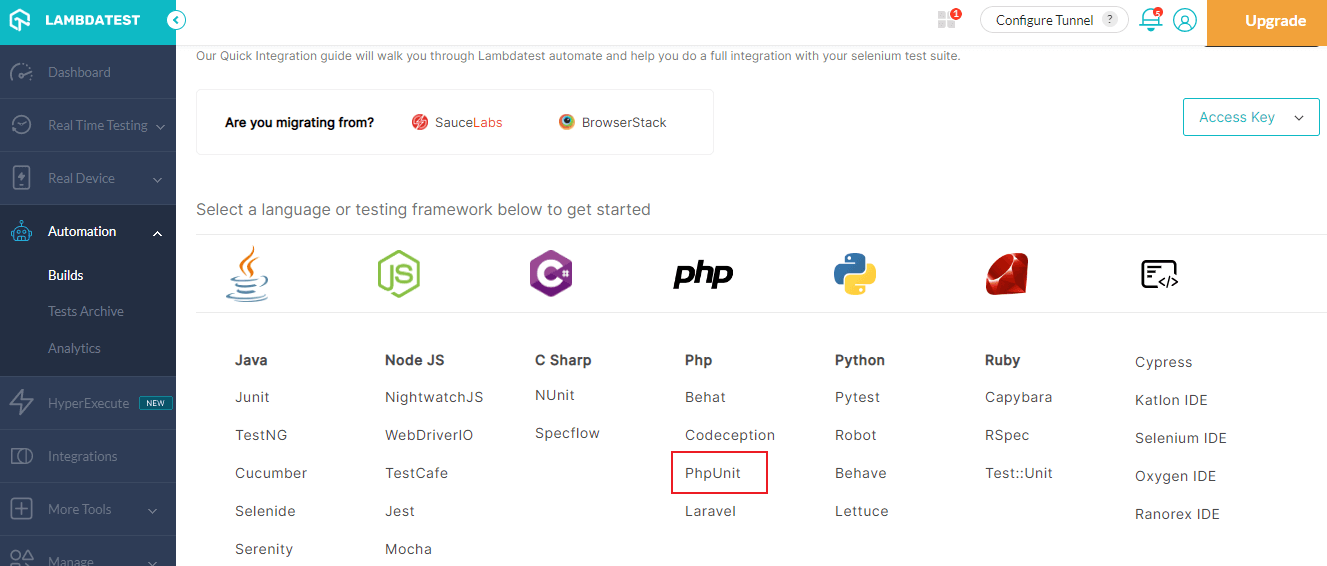
Such an easy setup can help you skip the heavy configurations and take advantage of TestMu AI’s cloud-based test infrastructure.
Manual Drupal testing using TestMu AI
To perform front-end or UI testing of the web application on TestMu AI, you can follow the below steps.
- Sign up for free on TestMu AI and login to your TestMu AI account.
- Navigate to Real Time Testing > Browser Testing from the left sidebar menu.
- Select the platform (Desktop or Mobile), enter your test URL, choose browser, browser VERSION, OS, and RESOLUTION, and click START.
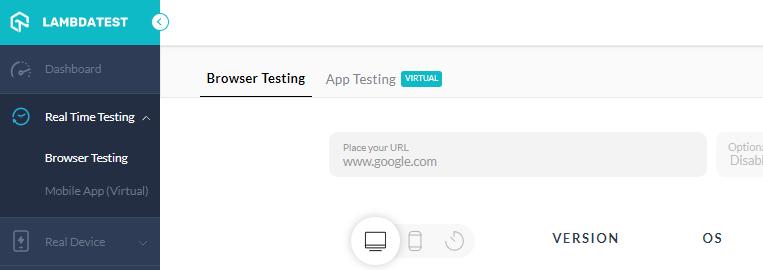
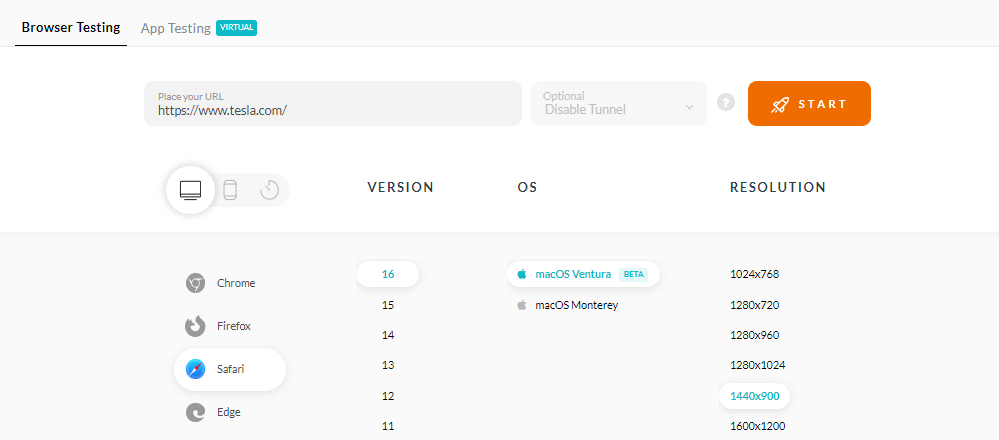
It will route you to a cloud-based machine running a real operating system and browsers.
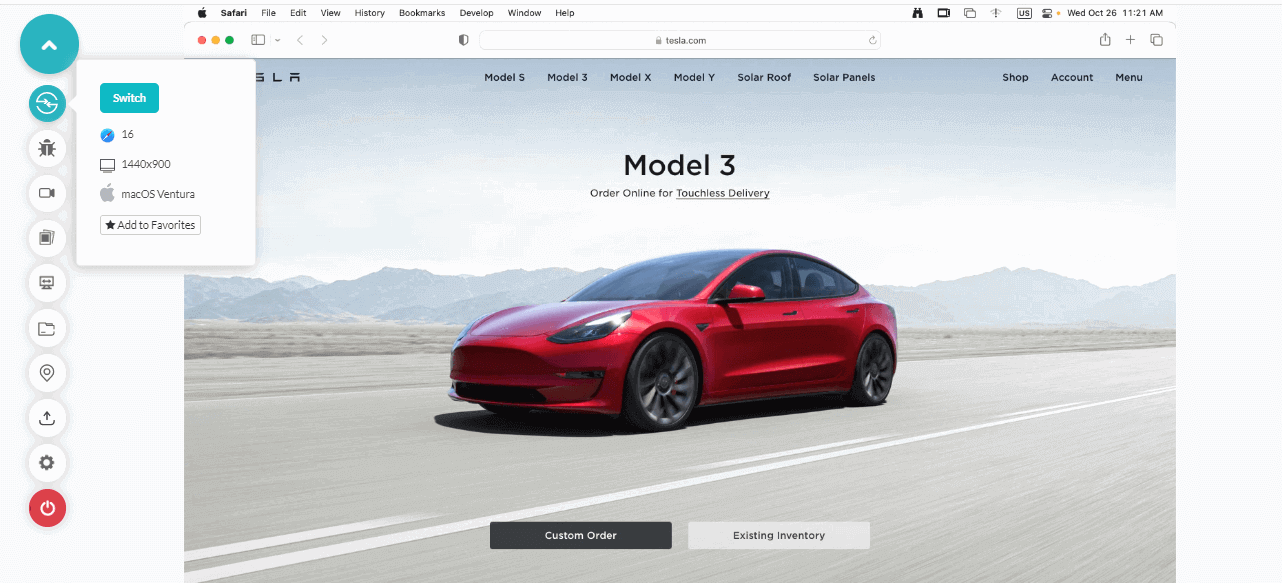
This way, you can test your Drupal-based websites and web application without maintaining your in-house browser or device labs.
Conclusion
In this guide on Drupal testing, we focus majorly on the Drupal website’s testing part. Its association with PHPUnit helps in getting the strengths of PHPUnit, which in turn depends on assertions and associations.
Later, we discussed Drupal’s important testing types and how to create efficient test cases. Combined, this can help you design a good test plan with test cases without external resources.
Hope this quick guide helps you in your future Drupal-based projects.
Happy Drupal testing!
Conclusion


Frequently asked questions
Did you find this page helpful?
More Related Hubs
TestMu AI forEnterprise
Get access to solutions built on Enterprise
grade security, privacy, & compliance
- Advanced access controls
- Advanced data retention rules
- Advanced Local Testing
- Premium Support options
- Early access to beta features
- Private Slack Channel
- Unlimited Manual Accessibility DevTools Tests