

Power Your Software Testing with AI Agents and Cloud
The Native AI-Agentic Cloud Platform to Supercharge Quality Engineering. Test Intelligently and Ship Faster.


- TestMu AI (Formerly LambdaTest)
- /
- Blog
- /
- How to Clear Browsing History on iPhone
How to Clear Browsing History on iPhone
Learn how to clear browsing history on iPhone to protect your privacy and free up space. Follow these easy steps to manage your Safari data efficiently.
Last Updated on:
You clear browsing history on iPhone from two places: the Settings app and Safari itself. In Settings, tap Apps, select Safari, then Clear History and Website Data to wipe history, caches, and cookies on every device signed into the same iCloud account. Safari's own history list removes single visits or a chosen timeframe and leaves cached data in place. This guide covers the Settings steps, deleting single Safari entries, clearing Chrome history, and what recently changed.
Key Takeaways
- Clearing Safari history from the Settings app removes history, caches, and cookies from every device signed into the same iCloud account.
- Deleting a single entry from Safari's history list removes that one visit and leaves cached website data untouched.
- Safari's Clear button offers four timeframes: the last hour, today, today and yesterday, and all history.
- Removing all website data in Safari runs through Settings, Apps, Safari, Advanced, Website Data, then Remove All Website Data.
- Chrome for iPhone keeps a separate history and needs its own Clear Browsing Data pass.
- Clearing Safari history does not remove browsing records held by other apps or by the websites visited.
Steps to Clear Browsing History on iPhone
We will discuss two different ways to clear Safari’s history.
- Setting app – If you clear browser history via the Settings app, all the data, including caches and cookies, will be cleared.
- Browser’s settings – If you clear browser history via the browser settings, only the browser history will be cleared.
Clearing All Safari History
Let’s look at how to clear the history of the Safari browser from the Settings app.
- Go to the Settings app on your iPhone.
- Tap Apps, then select Safari.
- Tap on Clear History and Website Data, confirm the timeframe you want to clear, and then tap Clear History.
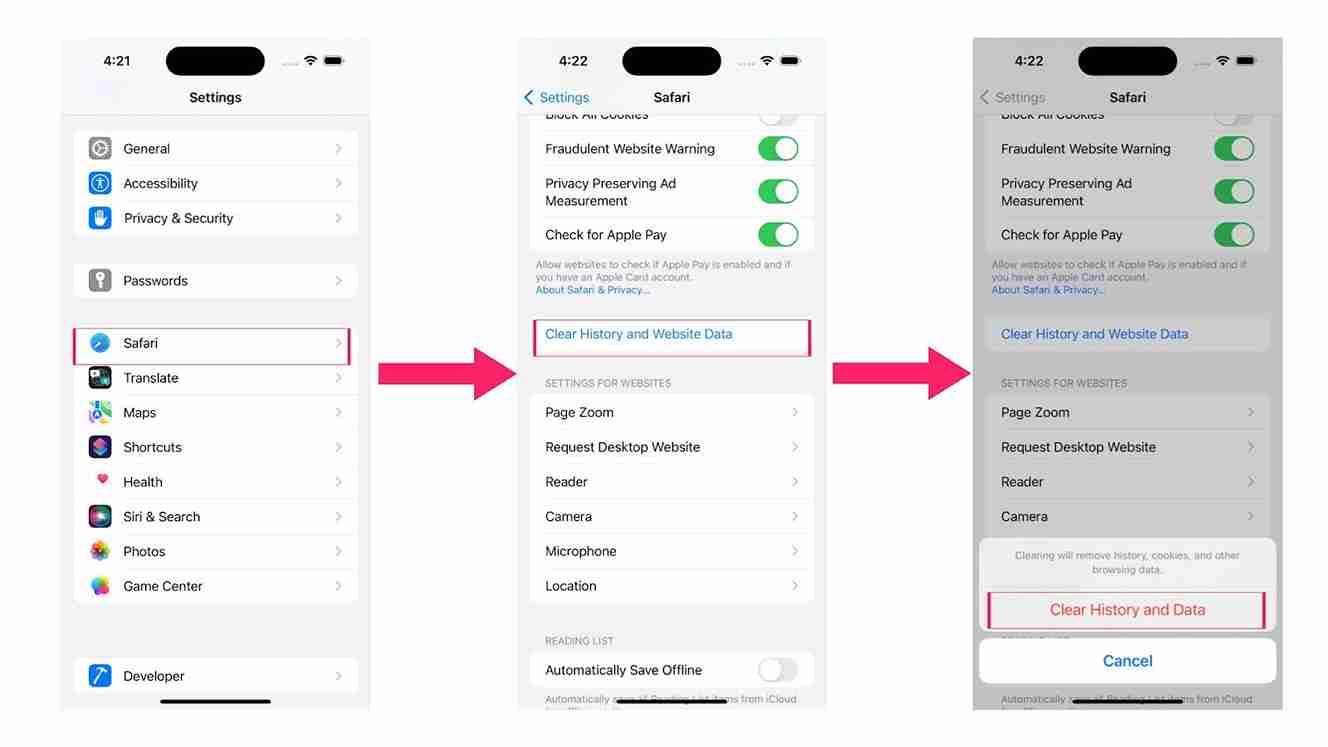
Your Safari data, including searches, caches, cookies, and other browsing history, will be cleared. This method works for iPads too!
Note: Once you clear Safari history, it will clear from every device signed into your iCloud account.
Clearing the same synced record from a Mac reaches identical iCloud data, and those steps are covered in clear history on Safari.
Clearing Specific Website Data in Safari
If you’re looking to clear just the search data in Safari, then proceed with the following steps.
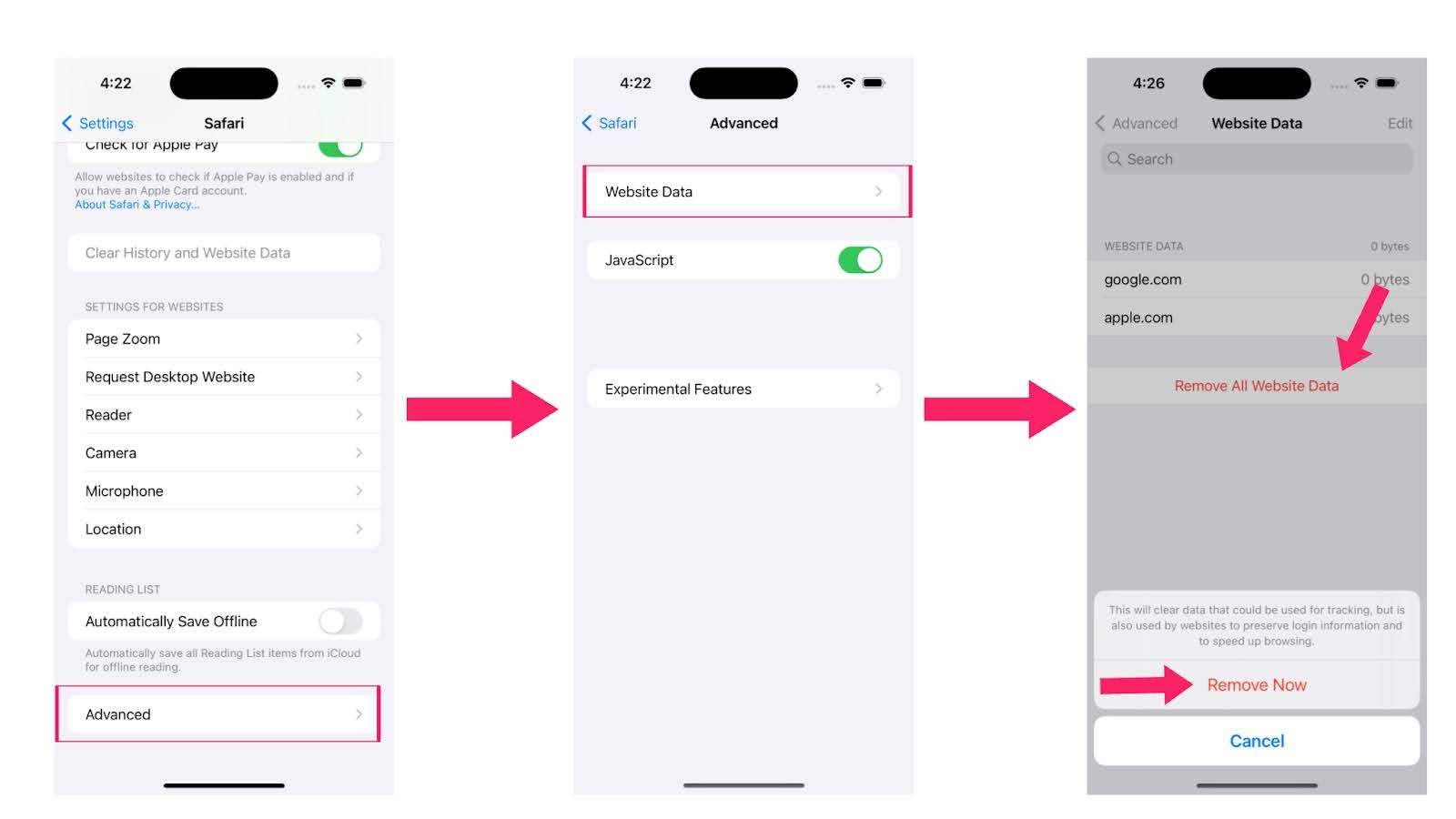
- Open the Settings app on your device.
- Tap Apps, then select Safari.
- Go to the Advanced section and select Website Data.
- Tap on Remove All Website Data and then Remove Now.

Note: Test your web apps on real iOS devices. Try TestMu AI Today!
Deleting Particular Events in Safari on iPhone
To avoid clearing your entire Safari history on your iPhone, you can remove specific site visits by following these steps:
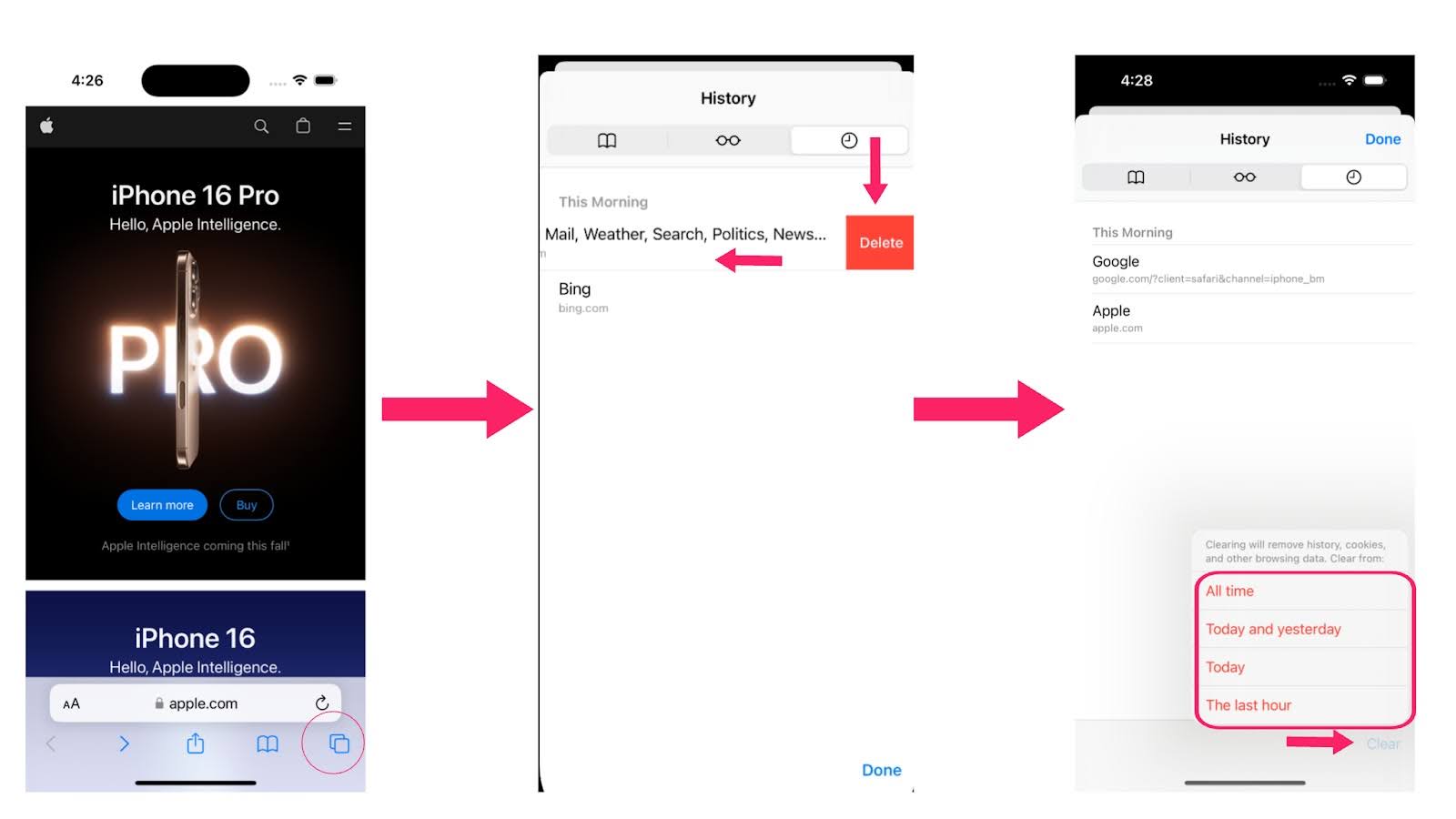
- Open the Safari browser.
- In the bottom panel, select the bookmarks icon.
- Tap the clock icon to see your history. You’ll find a list of websites you’ve visited.
- To delete a specific site, swipe left and tap Delete.
- Tap Clear in the bottom panel to clear data from a specific time period.
- In the popup menu, choose the timeframe for clearing: All time, Today and yesterday, Today, or The last hour.
Clearing Google Search History on iPhone
For those using Google as their default search engine on an iPhone, you may want to clear its search history. Follow these steps:
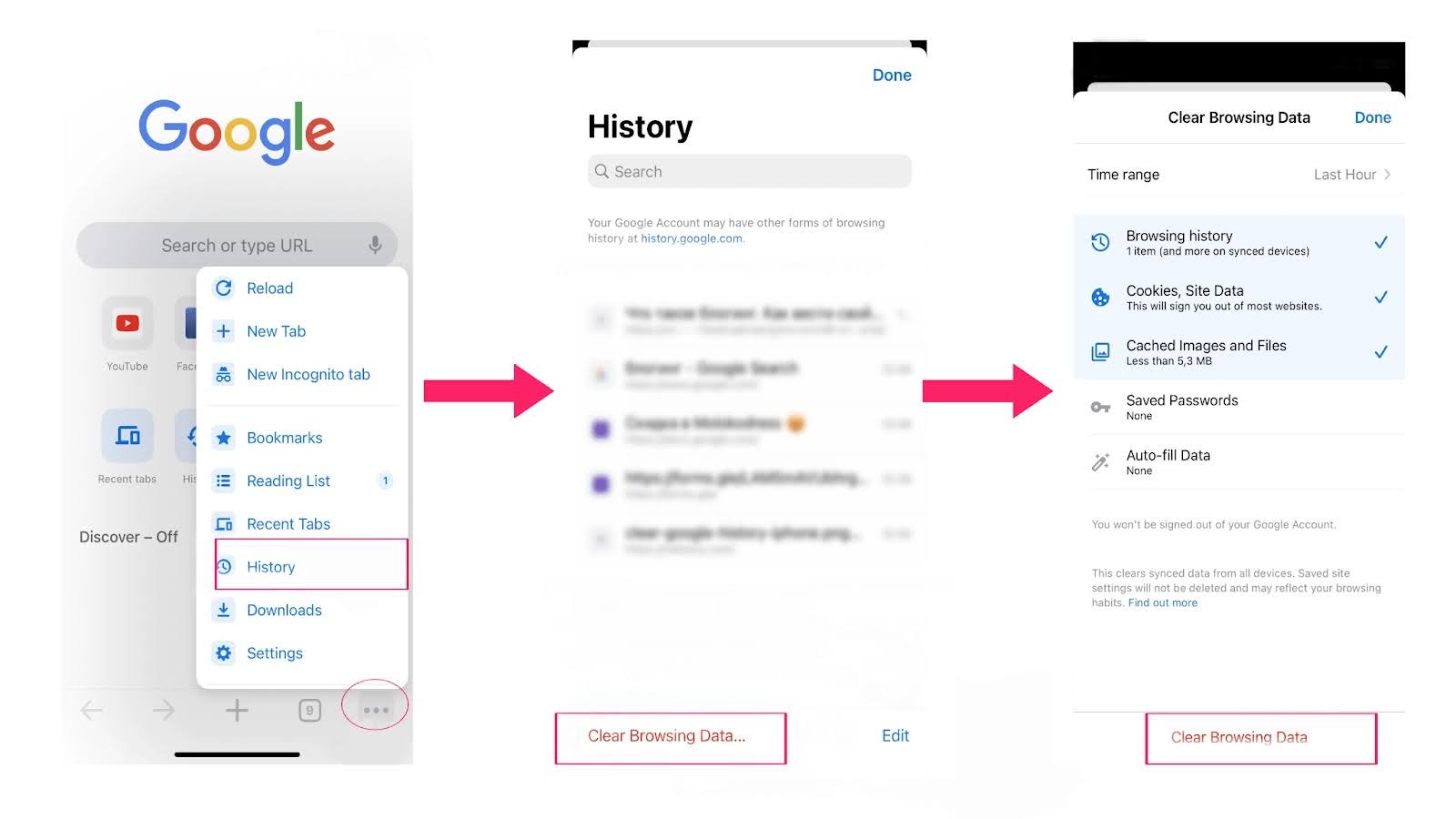
- Open the Chrome browser.
- Tap on the three dots icon in the bottom right corner of the screen.
- Tap on Clear Browsing Data.
- Select the data you want to clear, such as browsing history, cookies, site data, cached images and files, auto-fill data, or saved passwords.
- Tap again on Clear Browsing Data.
Cached images and files can be cleared on their own without touching the history list, a route covered in clear browser cache in Chrome.

What Changed in Clearing iPhone Browsing History?
Apple moved Safari out of the main Settings list into an Apps list, and the Settings route now asks which timeframe to clear before it deletes anything. The points below cover what changed and what a clear does not touch.
- Settings, Apps, Safari: Apple Support now routes the steps through an Apps list. On older iOS versions, Safari appears directly in the Settings list instead.
- Timeframe confirmation: Clear History and Website Data asks for a timeframe before it clears, so the Settings route matches the choices Safari's own history list gives you.
- Cache cleared separately: Clearing history removes the visit list, while Remove All Website Data clears cached files and cookies. Those steps are in clear cache in Safari on iPhone.
- Chrome stays untouched: Chrome for iPhone stores history in its own profile, so a Safari clear leaves it in place. The desktop equivalent is clear history in Chrome.
- Other apps keep records: Clearing Safari history does not remove browsing history stored by other apps or the records the visited websites keep themselves.
Conclusion
It’s a simple process to clear browsing history on iPhone. This blog explains how to clear browsing history in Safari and Google Chrome. It also shows how to delete specific websites, select time periods, or clear all your data. Following these steps can help keep your iPhone running well and protect your privacy.
Author

Tahneet Kanwal
Blogs: 29


Tahneet Kanwal is a freelance technical content writer with over 2 years of hands-on experience in frontend development and technical writing. She holds a B.Tech in Information Technology from University College of Engineering and Technology (UCET). Tahneet creates clear, SEO-optimized content on web technologies, software testing, and automation tools, leveraging her skills in HTML, CSS, JavaScript, React, Tailwind CSS, and various tools like VS Code, GitHub, Figma, and Canva. She is the author of 30+ technical blogs and an open-source contributor through Hacktoberfest. She has also participated in the Google Cloud Arcade Facilitator Program and holds certifications as a Meta Android Developer (Coursera) and in Web Development (Internshala). Over time, she has evolved her writing to prioritize structure, readability, and SEO while maintaining technical depth.


iPhone Browsing History FAQs
Did you find this page helpful?
More Related Blogs
TestMu AI forEnterprise
Get access to solutions built on Enterprise
grade security, privacy, & compliance
- Advanced access controls
- Advanced data retention rules
- Advanced Local Testing
- Premium Support options
- Early access to beta features
- Private Slack Channel
- Unlimited Manual Accessibility DevTools Tests