
Run Web Automation Tests at Scale with Agentic AI
Generate tests with AI agents or automate test suites with Selenium, Playwright and other frameworks. Run tests in parallel on TestMu AI scalable cloud grid.

- TestMu AI (Formerly LambdaTest)
- /
- Blog
- /
- TestMu AI Capabilities Generator
TestMu AI Capabilities Generator
Generate desired capabilities for Selenium and Appium tests instantly. TestMu AI's free Automation Capabilities Generator supports Java, Node JS, C#, PHP, Python, and Ruby.
Last Updated on:
Running automated tests on a cloud platform typically starts with defining your desired capabilities: a set of key-value pairs that specify your test environment, including browser, version, and OS. However, manually configuring these can be tedious and prone to errors that cause sessions to fail silently.
The TestMu AI Capabilities Generator solves this by letting you create the exact capability configuration you need, select your browser/OS options, device configurations, end-user conditions, and more from dropdowns. The generator produces framework-specific capabilities that are ready to use in your automation code and run on the TestMu AI cloud.
TestMu AI – Formerly Known as LambdaTest remains your go-to platform for AI-powered software testing at scale.
For even greater flexibility, especially in mobile app automation, TestMu AI supports Regular Expressions (Regex) in the Capabilities Generator. Using Regex for a capability like deviceName (e.g., Galaxy.*) helps you choose a device that matches the regex, instead of specifying an exact device name.
Overview
The TestMu AI Capabilities Generator is a free, web-based tool that automatically generates error-free, framework-specific capability configurations for Selenium, Appium, and Playwright automation tests. It eliminates manual setup errors by structuring capabilities according to W3C standards for execution on the TestMu AI cloud.
- Framework-aware output: The generator produces correctly structured capability code for Selenium, Appium, and Playwright across multiple languages, including Java, Node JS, C#, PHP, Python, and Ruby.
- W3C compliance: The tool automatically organizes capabilities according to W3C standards, including nesting values within the LT: Options object, to prevent silent session failures and configuration errors.
- Cross-browser and device coverage: Users can configure tests for Chrome, Safari, and Edge on macOS, Windows, or Linux, alongside real and virtual Android and iOS devices.
- End-user condition simulation: The interface allows teams to configure network throttling, geolocation, and time zone settings directly within the capabilities generator without hard-coding them into test scripts.
- Migration support: The tool simplifies transitioning from platforms like BrowserStack and Sauce Labs by removing old configurations and generating equivalent TestMu AI capabilities.
- Regex device selection: Mobile app automation tests can use Regular Expressions in the deviceName capability, such as "Galaxy.*", to select any matching available device instead of a single exact model.
What is the TestMu AI Capabilities Generator?
TestMu AI (Formerly LambdaTest) capabilities generator is a free, visual, web-based tool that generates desired capability configurations for your Selenium, Appium, and Playwright automation tests, so you don't have to configure them yourself.
Pick your framework, browser, OS, device, resolution, and any advanced settings, and it shows the capability you need in the language of your choice.
TestMu AI maintains forward compatibility through beta browser support and day-zero enablement of the latest device models and operating system releases.
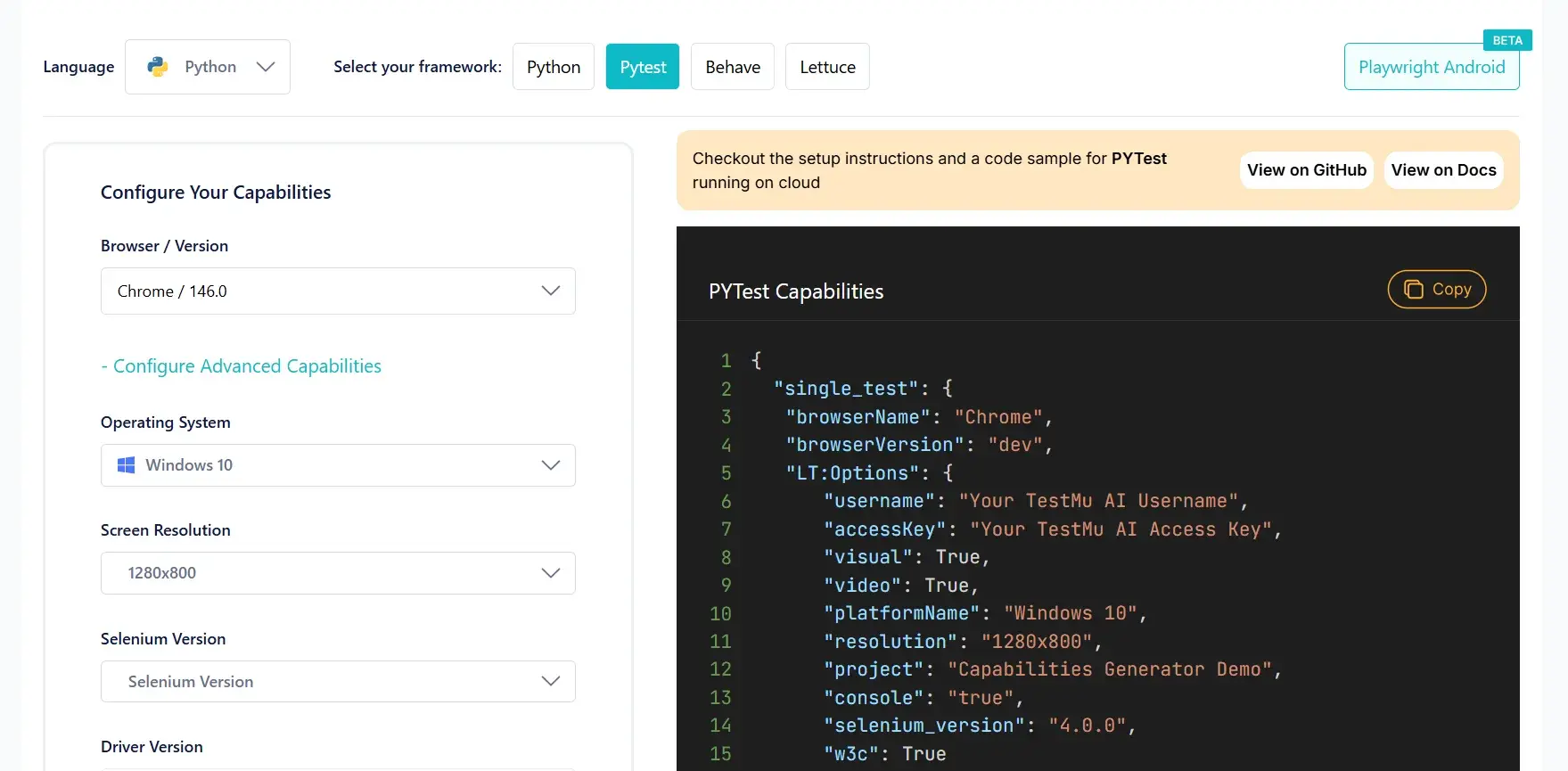
What are the key features of the TestMu AI Capabilities Generator?
There's more to it than generating capabilities. It puts your entire test configuration in your hands:
- Wide browser-OS coverage: Whether you want to test on Chrome, Safari, Edge, or any other browser across macOS, Windows, or Linux, the generator covers every combination available on the TestMu AI cloud.
- Real and virtual device configurations: Supports both real and virtual devices across Android and iOS.
- Custom resolution and screen size: Set specific screen resolutions and viewport sizes for desktop browser sessions to align with your testing requirements.
- Framework-aware output: Different frameworks, different capability formats. The generator produces the right structure for whichever framework and version you're using.
- Multi-language support: Get your snippet in Java, Node JS, C#, PHP, Python, or Ruby, which can be readily added to your test code.
- Seamless migration support: For teams migrating from platforms like BrowserStack, the Capabilities Generator simplifies the transition, removes your old configurations, generates the equivalent TestMu AI capabilities, and starts running tests.
Explore these guides to get started: BrowserStack to TestMu AI and Sauce Labs to TestMu AI.
What makes the TestMu AI Capabilities Generator useful?
Here's what the TestMu AI capabilities generator offers:
- Faster onboarding: Generates accurate, ready-to-use capabilities, reducing manual intervention in setting them up. New members select their respective capabilities from dropdowns and start testing.
- Fewer config failures: Manually writing capabilities often leads to errors, especially around LT: Options nesting, a misplaced key or wrong structure, and you start witnessing errors. The generator reduces configuration errors by automatically organizing capabilities according to W3C standards, including correctly nesting values within the LT: Options object.
- Simplified cross-browser and real device testing: Select the exact browser, OS, or device, and the generator produces the right configuration instantly. No need to hunt through documentation for different framework formats.
- End-user condition simulation: Configure network throttling, geolocation, time zone, and more directly from the Capabilities Generator, no need to hard-code them into your scripts.
How to use the TestMu AI Capabilities Generator?
The TestMu AI capabilities generator walks you through the entire configuration on a single page. Let's look at an example.
A developer wants to run an Appium test on a Samsung Galaxy S25 Ultra running Android 15. Instead of manually writing the capability structure, they open the TestMu AI capabilities generator, select Appium, Java, real device, and the Galaxy S25 Ultra and get these capabilities instantly:
DesiredCapabilities capabilities = new DesiredCapabilities();

HashMap<String, Object> ltOptions = new HashMap<String, Object>();

ltOptions.put("w3c", true);

ltOptions.put("platformName", "android");

ltOptions.put("deviceName", "Galaxy S25 Ultra");

ltOptions.put("platformVersion", "15");

ltOptions.put("app", "app_id");

ltOptions.put("isRealMobile", true);

capabilities.setCapability("lt:options", ltOptions);
To run on any available Samsung Galaxy suite of devices instead, just use a regex pattern, replace "Galaxy S25 Ultra" with "Galaxy.*".
DesiredCapabilities capabilities = new DesiredCapabilities();

HashMap<String, Object> ltOptions = new HashMap<String, Object>();

ltOptions.put("w3c", true);

ltOptions.put("platformName", "android");

ltOptions.put("deviceName", "Galaxy.*");

ltOptions.put("platformVersion", "15");

ltOptions.put("app", "app_id");

ltOptions.put("isRealMobile", true);

capabilities.setCapability("lt:options", ltOptions);
Conclusion
The TestMu AI Capabilities Generator simplifies how you configure your automation tests. Rather than manually defining capabilities, troubleshooting formatting issues, or navigating extensive documentation, the TestMu AI Capabilities Generator instantly generates correctly structured capabilities tailored to your requirements.
Testing web or mobile apps without writing code? KaneAI by TestMu AI turns plain-English instructions into tests.
Author

Naima Nasrullah
Blogs: 17

Naima Nasrullah is a Community Contributor at TestMu AI, holding certifications in Appium, Kane AI, Playwright, Cypress and Automation Testing. She writes practical, hands-on content that helps QA engineers and developers build reliable test automation frameworks across web and mobile platforms. Drawing on her expertise in automation testing, Naima breaks down complex tools and workflows into clear, actionable guidance that readers can apply directly to their own projects and testing pipelines.


Frequently asked questions
Did you find this page helpful?
More Related Blogs

TestMu AI forEnterprise
Get access to solutions built on Enterprise
grade security, privacy, & compliance
- Advanced access controls
- Advanced data retention rules
- Advanced Local Testing
- Premium Support options
- Early access to beta features
- Private Slack Channel
- Unlimited Manual Accessibility DevTools Tests