

Power Your Software Testing with AI Agents and Cloud
The Native AI-Agentic Cloud Platform to Supercharge Quality Engineering. Test Intelligently and Ship Faster.


- TestMu AI (Formerly LambdaTest)
- /
- Blog
- /
- How Async Agents Verify Their Own Work
Software engineering is moving past conversational chatbots toward fully decoupled async agents. The shift is from a tool you talk to in real time toward a process you hand a task and walk away from.
An async agent is an autonomous background process that accepts a high-level task and executes it out of view, with no human watching individual steps. It plans, acts, and finishes on its own schedule.
That only works if the agent can verify its own output. With no human in the loop, its self-evaluation is the only guardrail standing between a good result and a broken one.
The Operational Reality of Async Agents
Async agents work in parallel across deep backlogs. They edit code, provision sandboxes, and run test steps autonomously, all without a person watching each move.
This unlocks real leverage, but it also introduces risk. If no human reviews the intermediate phases, the agent's internal evaluation of success becomes your only guardrail.
The quality of that guardrail decides whether parallel autonomy pays off or quietly ships defects at scale. The signal the agent trusts is the signal you are betting on.
The Blind Spot of Autonomous UI Modifications
When an agent operates asynchronously on browser interfaces, its concept of completion can be disconnected from reality. Coding models declare victory on static metrics, and those metrics are easy to satisfy without shipping anything usable.
- The application compiles: the build finished without errors.
- The linter passes: the code is clean by static rules.
- The types match: the type checker is satisfied.
None of these confirm the rendered layout works under real browser conditions. Run synchronously, a human spots a broken layout the moment it appears. Run asynchronously across dozens of tasks, that blind spot scales with your automation, and the broken UI is only found when a real user hits it in production.

Note: Give your async agent a real browser and a clear pass or fail. Start free. Try Kane CLI
Integrating Kane CLI Into Background Tasks
Kane CLI is a lightweight, machine-readable validation layer for background processes. When an async agent finishes a change, it runs a headless check to confirm the change actually works.
kane-cli run "go to http://localhost:3000/settings, update profile name to 'Test User', assert success alert appears" --agent --headless --timeout 300The --agent and --headless flags optimize output for machine-to-machine parsing. Kane CLI spins up a headless Chrome instance via the Chrome DevTools Protocol, steps through the objective, and streams structured NDJSON logs.
The agent reads the final run_end JSON line and splits its logic on the outcome, with no custom scraping. For the full output contract, see how NDJSON agent mode streams machine-readable events.
Parallel Scaling via Built-In Bifurcation
Async automation often tests multiple scenarios, regions, or data sets at once. Kane CLI handles this natively through bifurcation.
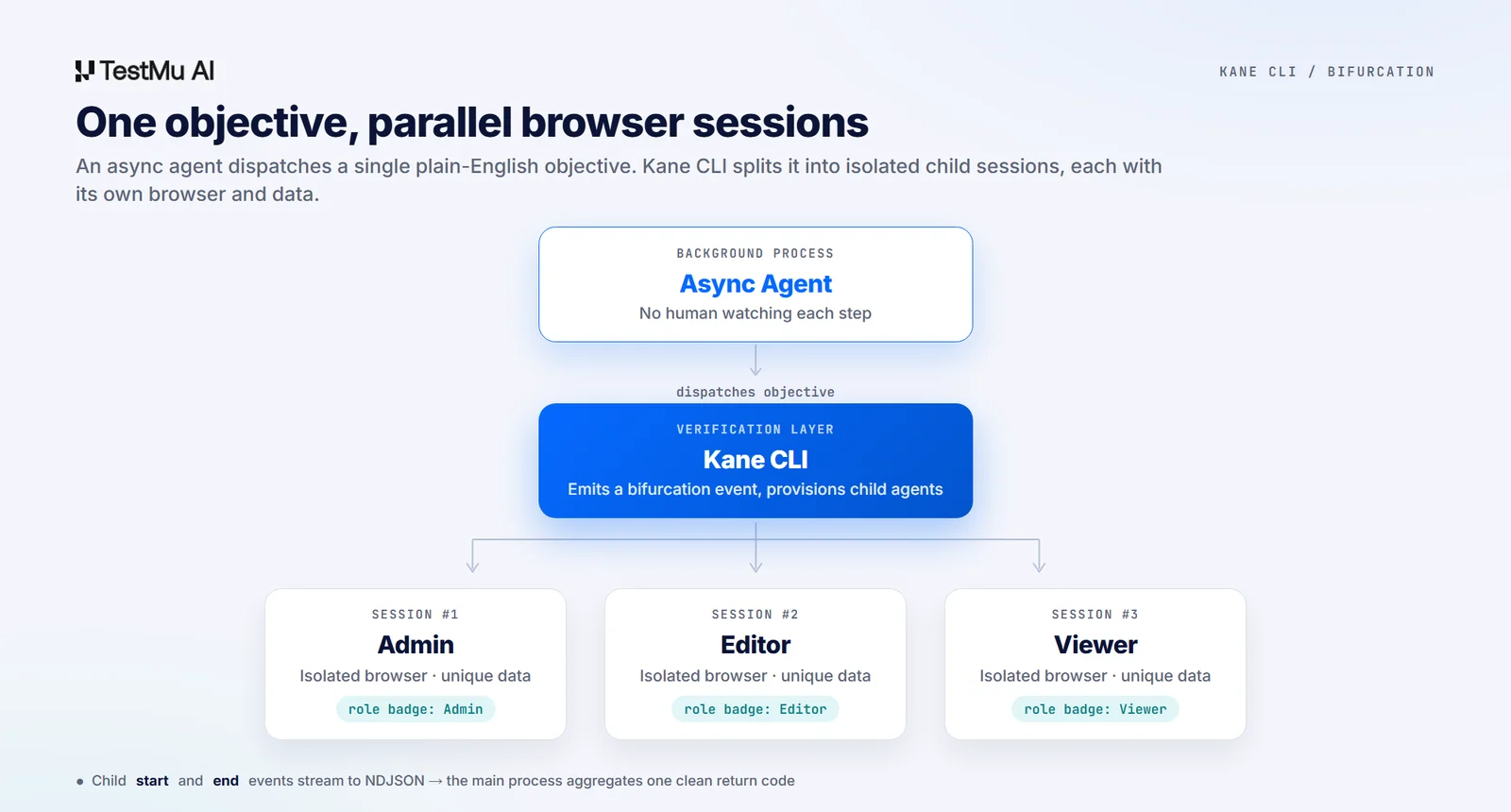
A single high-level objective can split its execution path across target variables. You describe the variants once, and Kane CLI fans the run out for you.
kane-cli run --agent --headless \
  "log in and verify the dashboard works for three users:
   '{{admin_email}}', '{{editor_email}}', and '{{viewer_email}}'.
   For each user, assert the visible role badge matches their account level"
Kane CLI emits a bifurcation event into the NDJSON stream, then provisions isolated concurrent child agent processes, each its own browser session with unique data. It coordinates child_agent_start and child_agent_end events and aggregates a single clean return code the parent agent can act on. A child can also read the parent's API response and pass values back up, so shared state travels through every level of the branch.
Non-Interactive Hardening for Unattended Runs
A common failure mode is a tool stuck waiting for input that no one is there to give. Kane CLI deactivates interactive prompts automatically to keep unattended runs moving.
If it detects that stdin is not an interactive terminal, any ask_user event is disabled. The run does not block. It completes, logs the error, and returns a non-zero exit code so the async agent can react and self-correct.
Note: Want the agent mode and flag setup behind these runs? Read the Kane CLI docs. Read the docs
TestMu AI built Kane CLI for exactly this shape of work. To see where it fits in your stack, read who Kane CLI is for and which teams get the most out of it, or follow a full run where I verified a Claude-built Salesforce clone with Kane CLI. Because every objective is written in plain English, it is also one of the simplest paths to natural language browser testing.
Author

Siddhant Sinha
Blogs: 7

Siddhant Sinha is a Lead Member of Technical Staff at TestMu AI architecting Kane CLI, the command-line tool for browser automation from the terminal, where natural-language flows run in a real Chrome browser and return pass or fail with shareable proof. He has spent over three years at TestMu AI (formerly LambdaTest) building scalable platforms that run tests at scale on real Android and iOS devices. His expertise covers platform architecture, large-scale distributed systems, and CLI design, shaped by earlier cloud-native engineering at Semut.io, including building Elasticsearch as a service.


Frequently asked questions
Did you find this page helpful?
More Related Blogs
TestMu AI forEnterprise
Get access to solutions built on Enterprise
grade security, privacy, & compliance
- Advanced access controls
- Advanced data retention rules
- Advanced Local Testing
- Premium Support options
- Early access to beta features
- Private Slack Channel
- Unlimited Manual Accessibility DevTools Tests