

Next-Gen App & Browser Testing Cloud
Trusted by 2 Mn+ QAs & Devs to accelerate their release cycles


- Home
- /
- Learning Hub
- /
- Angular E2E Testing Tutorial: Performing End-To-End Testing With JavaScript And Karma
Angular E2E Testing Tutorial: Performing End-To-End Testing With JavaScript And Karma
This tutorial will help you get started with Angular E2E testing with popular test runners like Karma using JavaScript.

Solomon Eseme
February 18, 2026
OVERVIEW
In software engineering, testing is one of the crucial aspects of checking the requirements of the software to check the performance and responses of every aspect of the software to make sure it conforms with the defined requirements.
The importance of testing can't be overemphasized, it is very crucial to test every aspect of software before deploying your production environments where users will interact with it.
If the software is deployed without proper testing, it might result in bugs and loss of funds, as in the case of the Bloomberg terminal in London, which crashed due to a software glitch that affected more than 300,000 traders in financial markets. It forced the government to postpone a three billion pound debt sale in April 2015, according to The Guardian.
In most cases, errors and bugs have been affected differently. This makes software testing an important stage in the Software Development Life Cycle (SDLC) phases.
In this Angular E2E testing tutorial, we will explore the end-to-end testing type and show developers how to perform it to ensure the correctness of their codebase.
So, let’s get started!
What's End-to-End Testing?
End-to-end testing (or E2E) is a methodology that assesses the working order of a complex product in a start-to-finish process.
It is a very complex testing method because it assesses the working order of a complex product in a start-to-finish process. For instance, you can use end-to-end testing to work through a complete website or checkout feature exactly how you intend your users to use the product to discover any bugs before pushing it to production for real users.
In most organizations, end-to-end testing is used to access a complete feature after developing in isolation with different developers in the team. A central repository system is used to build and combine the codebase. Next, end-to-end testing runs through the complete feature and ensures it works as intended before approving and pushing it to the stage.
In the next section of this Angular E2E testing tutorial, we will explore the best practice in creating end-to-end test cases and how you can set up end-to-end tests with JavaScript.

Note: Perform Angular E2E testing on the cloud. Try TestMu AI Now!
Best Practices for End-to-End Test Creation
In end-to-end testing, you mimic that user's actions, activities, and the experience of a real user using the application. Below is a list of a few best practices to get the best out of end-to-end testing.
- Test Repeated User scenarios
End-to-end testing is very complex and requires time to test out all the possible edge cases completely. Avoid testing every possible edge case and focus only on the most common and important scenarios.
- Prioritize the Right Aspects
It's important to prioritize what you're testing because it can easily become cumbersome and complex. Therefore, it's important to prioritize business-impacted features before going over other less important edge cases.
- Make Testing Realistic
Sometimes, you want to make end-to-end testing a little realistic. In most cases, real users stop by to look at images or pause and watch a few videos before moving on with their actions. End-to-end testing should mirror real-life interactions as much as possible.
- Error Monitoring
End-to-end testing is a very complex process because it encompasses the walkthrough of the whole application or sometimes only the features that were newly added. However, the complexity can be reduced by ensuring many errors are resolved during coding before end-to-end testing.
- Optimize Testing Environment
You can facilitate the testing process by creating an optimum test environment. Creating an optimum test environment allows for minimal setup when it's time to test and clear out data for your next test.

Getting Started with Angular E2E Testing
Enterprise companies should integrate end-to-end testing into their development pipeline as a necessary component to ensure safe and defect-free applications in production.
It should be part of your day-to-day activities as you code. In JavaScript, you can write end-to-end test suites the same way you write your real code using different testing libraries.
With these testing libraries, testing the functionalities and features of your project becomes very easy because the libraries include different assertion methods to carry out your checks.
Let's explore some of the most popular JavaScript end-to-end testing frameworks you can use to write your end-to-end tests.
Popular JavaScript End-to-End Testing Frameworks
Various frameworks are helpful for end-to-end testing in JavaScript. They are as follows:
- Cypress
- Karma
- TestCafe
- WebDriverJS
- NightwatchJS
Cypress
Cypress is an end-to-end JavaScript-based testing framework that changes how developers approach software testing. It is built on Mocha, making asynchronous testing simple and convenient. In Cypress, unit tests can be configured to execute without running the web server.
This feature makes Cypress the ideal automation testing framework for testing a JavaScript/TypeScript library that is meant to be used in the browser, and setting up automated testing in your enterprise project is a breeze.
Some of the growth statistics of the Cypress library as of the time of writing, according to GitHub, include more than 43.7k GitHub Stars and about 860k GitHub Usage, making Cypress among the most popular testing framework.
Karma
Karma is an end-to-end testing framework that spawns a web server that executes source code against test code for each of the browsers connected. The results are displayed to the developers to see if the test case failed or passed.
The Angular team created the Karma test library to fit their ever-changing testing requirements to make life easier.
Some of the growth statistics of the Karma library as of the time of writing, according to GitHub, include more than 11.9k GitHub Stars and about 3.1m GitHub Usage, making Karma among the most popular testing framework.
TestCafe
TestCafe is an end-to-end testing framework that requires no web driver. Additionally, it is an open-source testing framework that is easy to configure for different browsers. It also allows developers to focus only on testing and has good dashboard reports.
Some of the growth statistics of the TestCafe library as of the time of writing, according to GitHub, include more than 9.7k GitHub Stars and about 12.7k GitHub Usage, making TestCafe among the most popular testing framework.
Selenium WebDriverJS
The WebDriverJS is a Selenium-based framework that uses the Selenium WebDriver to interact with browsers. The library uses a promise manager to ease the pain of working with a purely asynchronous API, and it saves developers from writing a long chain of promises.
Some of the growth statistics of the Selenium WebDriverJS library as of the time of writing, according to GitHub, include more than 26. 9k GitHub Stars and about 209k GitHub Usage, making Selenium WebDriver among the most popular testing framework.
NightwatchJS
The NightwatchJS is a simple but powerful end-to-end testing framework focusing on a mobile-first-driven approach. It has no framework restrictions, and you run your test on real browsers. You can easily integrate Nightwatch with Mocha, Cucumber, Ava, Jest, etc., to carry out your test.
Some of the growth statistics of the Selenium WebDriverJS library as of the time of writing, according to GitHub, include more than 11.4k GitHub Stars and about 142.8k GitHub Usage, making Nightwatch among the most popular testing framework.
In the next section of this JavaScript end-to-end testing tutorial, we will explore how to perform Angular E2E testing with JavaScript and Karma in an Angular project and how to run your test manually. Additionally, we will explore how to automate your testing suite with TestMu AI cloud Grid.
Note: Automate your JavaScript testing with Karma across 3000+ environments. Try TestMu AI Now!
How to write an End-to-End Test in JavaScript with Karma?
Writing an end-to-end test is simpler than you think using some of the popular testing frameworks listed above. In this section of this Angular E2E testing tutorial, we will use the Karma framework to write some basic end-to-end test cases.
We will write some end-to-end test cases to check for ‘TestMu AI’ on Google and print the metadata on the terminal (once the search is completed).
Creating an Angular project with Karma
First, clone the Angular testing repository from GitHub, and add the following libraries to our package.json file.
bash
yarn install
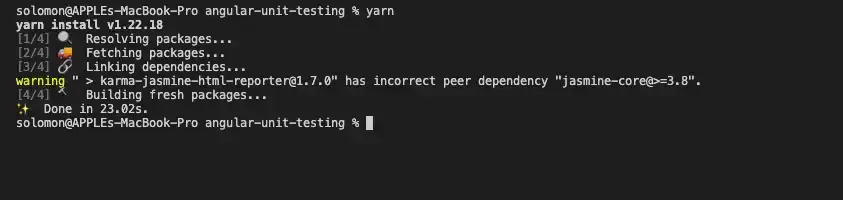
If you're new to Angular, you should see that the package.json file contains all the dependencies to execute Angular, including the dependencies to run your software testing out-of-the-box.
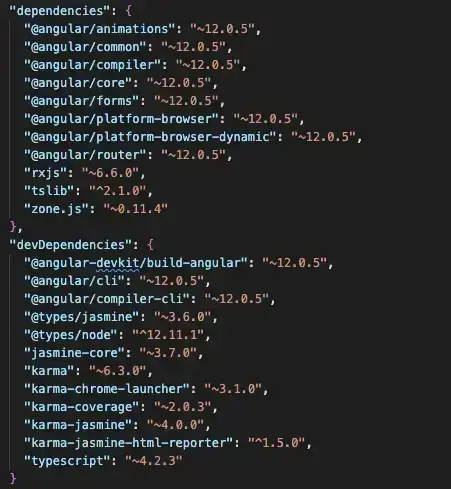
In the image above, you can see all the dependencies installed for testing purposes under the DevDependencies. As shown in the image, we will use Karma and Jasmine to implement the Angular E2E testing.
Karma Config
Let's examine the Karma configuration file created by angular-cli:
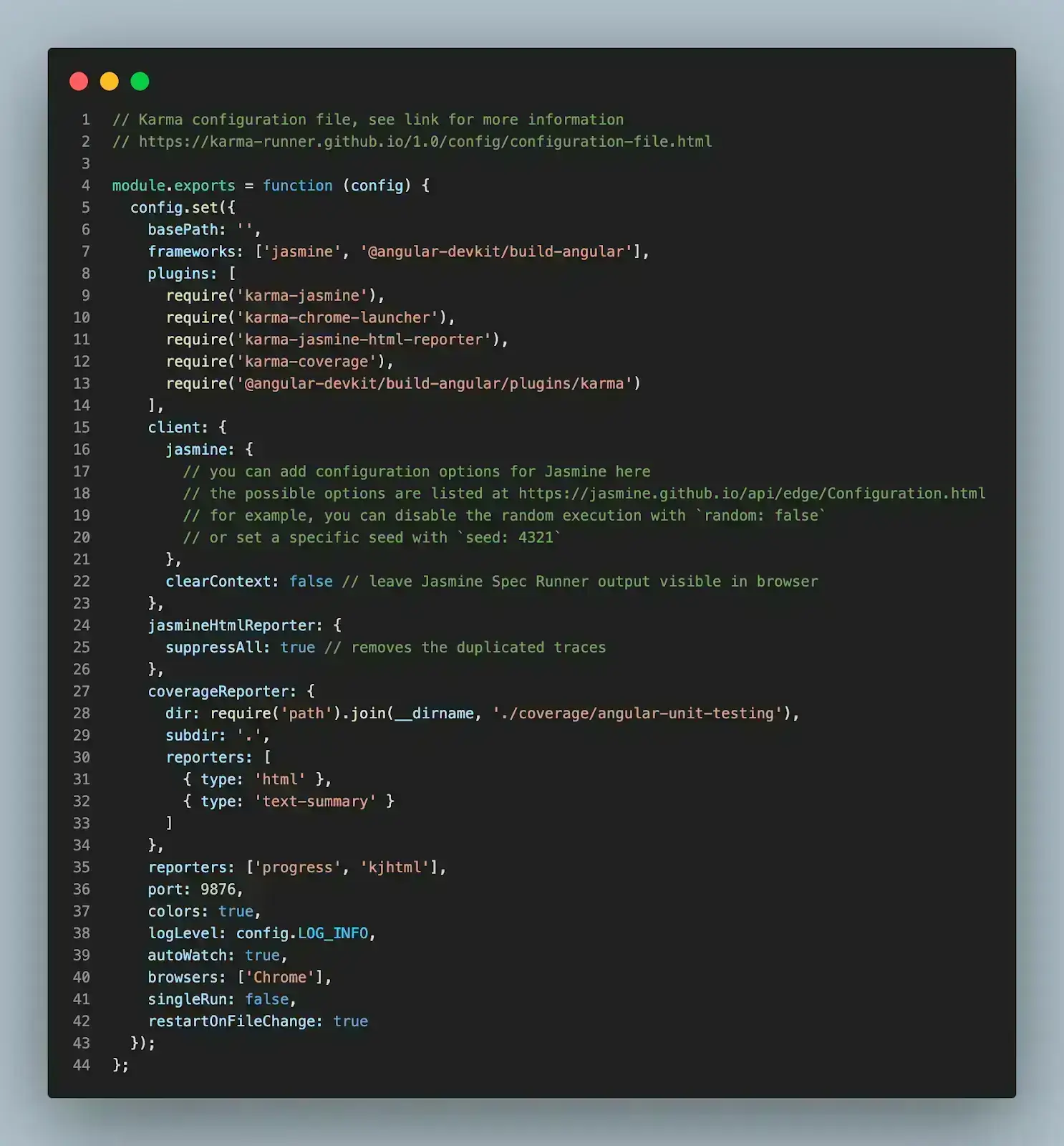
The configuration is clear and easy to understand. First, it specifies the framework that will be used for test execution, and in this case, Jasmine is already specified for us. You can also set more advanced configurations for Jasmine or install a different framework from here.
Next, we have our reporters automatically configured to use `progress` and `kjhtml` to process our reports. You can add more reports to the array if you have another specific need.
Most importantly, angular-CLI configured our test to automatically use `Chrome` as the default browser for our Angular E2E testing and set the `autoWatch` true to watch and update automatically each time we change and save anything in our files.
Test Entry File
When it comes to testing with Angular, one of the most important files is the "test.ts" because it is the entry point of the tests for the application. Let's look at this file and open your "src/test.ts" file.
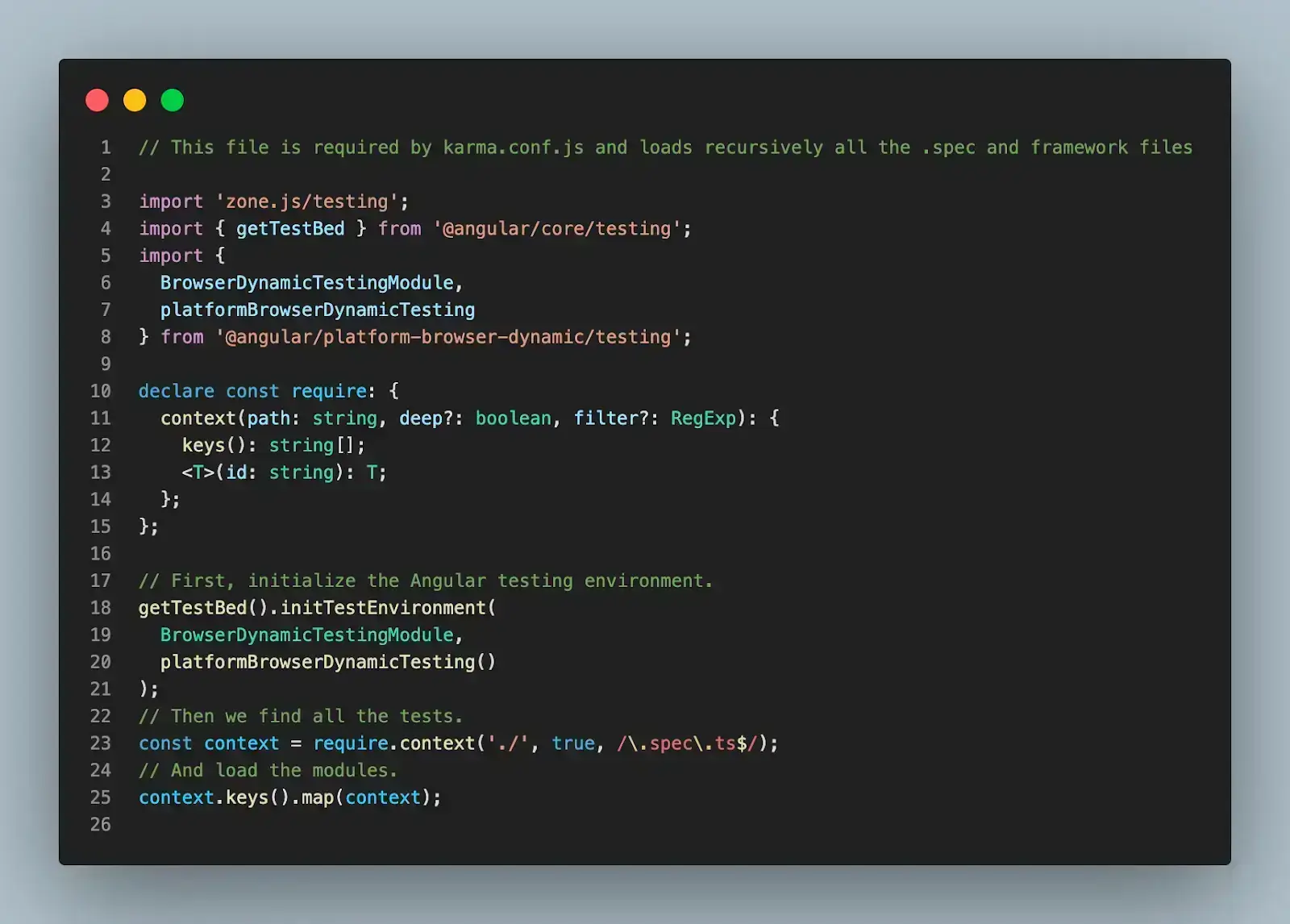
You won't be changing anything in this file in this demo, but what's happening here is Angular setting up your test environment by importing and using all the imports at the beginning of the file. Next, Angular uses a powerful unit testing tool called TestBed, provided by Angular.
Lastly, Angular loads all the test files of the application matching their names against a regular expression, so you don't have to worry about importing any test file individually.
Once you are happy with the default configurations, let's create simple Angular E2E testing using Karma. In this demo, we are going to test and validate Angular forms.
Testing a Form
First, we will create the HTML part to represent a simple HTML form. Create the "contact.component.html" file and add the following code.
<div>{{ text }}</div>
<form
 (ngSubmit)="onSubmit()"
 novalidate
 [formGroup]="contactForm"
 id="contact-form"
>
 <div class="form-group">
   <label class="center-block" for=""
     >Name:
     <input formControlName="name" class="form-control" />
   </label>
   <label class="center-block" for=""
     >Email:
     <input formControlName="email" class="form-control" />
   </label>
   <label class="center-block" for=""
     >Text:
     <input formControlName="text" class="form-control" />
   </label>
 </div>


 <button type="submit" [disabled]="!contactForm.valid" class="btn btn-success">
   Save
 </button>
</form>
The code snippet above represents a simple HTML form with "name", "email", and "text" fields. Lastly, we have a Submit button to submit the details of the form.
Next, let's create a "contact.component.ts" file to add actions to the form and create a Contact component. Add the following code to your new file.
import { Component } from '@angular/core';
import { FormControl, FormGroup, Validators } from '@angular/forms';
@Component({
 templateUrl: './contact.component.html',
 styleUrls: ['./contact.component.css'],
})
export class ContactComponent {
 text = 'contact page';
 contactForm!: FormGroup;
 contact = {
   name: '',
   email: '',
   text: '',
 };
 submitted = false;
 constructor() {
   this.createForm();
 }
 createForm(): void {
   this.contactForm = new FormGroup({
     name: new FormControl(this.contact.name, [
       Validators.required,
       Validators.minLength(4),
     ]),
     email: new FormControl(this.contact.email, [
       Validators.required,
       Validators.email,
     ]),
     text: new FormControl(this.contact.text, [Validators.required]),
   });
 }
 onSubmit(): void {
   this.submitted = true;
 }
}
The code snippet is straightforward. In the snippet, we validate the form input and change the "submitted" variable to true if everything is valid.
Lastly, we will create the "contact.component.spec.ts" file for writing all the Angular E2E testing suites and test cases. Open the file and add the following code snippet.
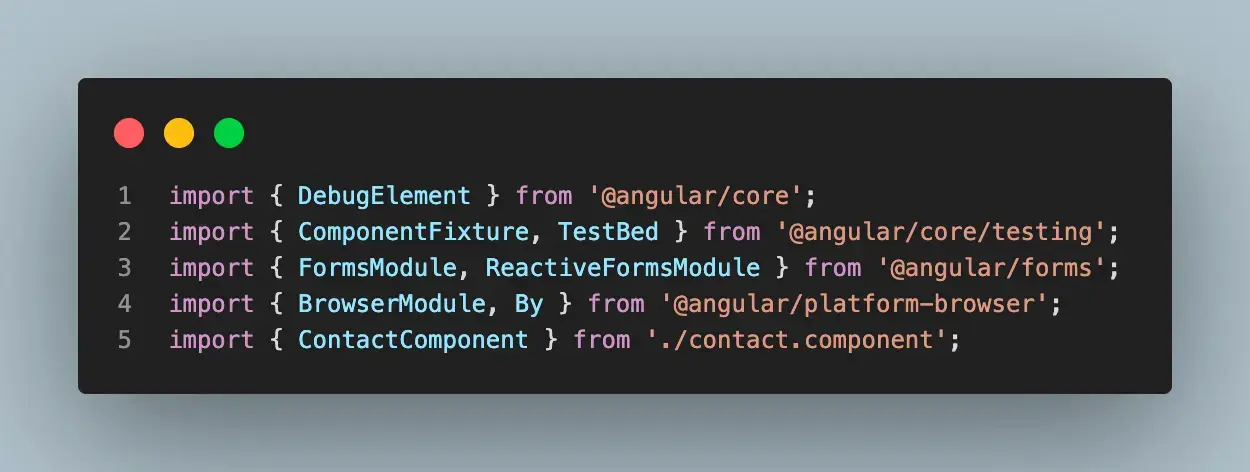
import { DebugElement } from '@angular/core';
import { ComponentFixture, TestBed } from '@angular/core/testing';
import { FormsModule, ReactiveFormsModule } from '@angular/forms';
import { BrowserModule, By } from '@angular/platform-browser';
import { ContactComponent } from './contact.component';
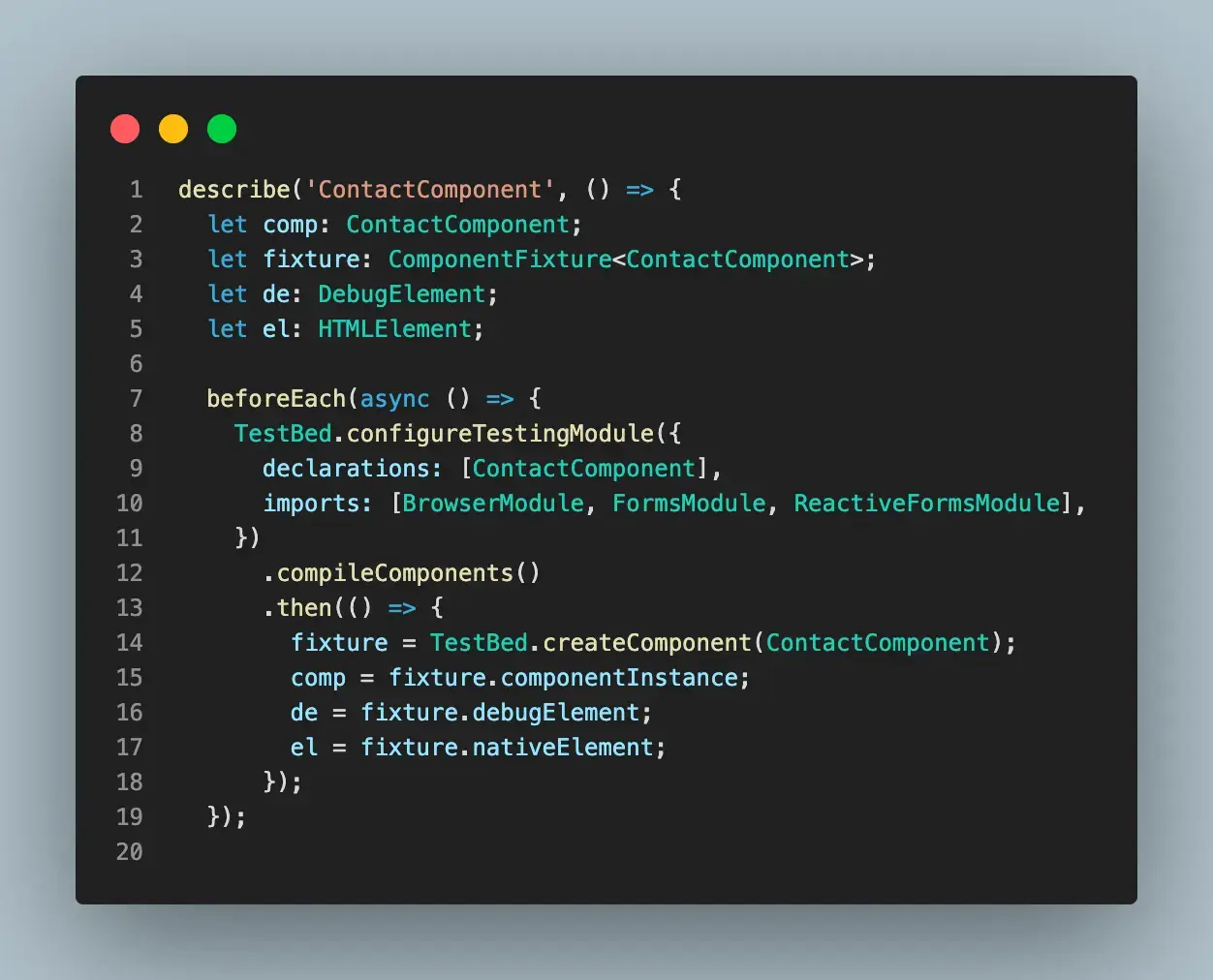
describe('ContactComponent', () => {
 let comp: ContactComponent;
 let fixture: ComponentFixture<ContactComponent>;
 let de: DebugElement;
 let el: HTMLElement;
 beforeEach(async () => {
   TestBed.configureTestingModule({
     declarations: [ContactComponent],
     imports: [BrowserModule, FormsModule, ReactiveFormsModule],
   })
     .compileComponents()
     .then(() => {
       fixture = TestBed.createComponent(ContactComponent);
       comp = fixture.componentInstance;
       de = fixture.debugElement;
       el = fixture.nativeElement;
     });
 });
 it('should have as text "contact page"', async () => {
   expect(comp.text).toEqual('contact page');
 });
 it('should set submitted to true', async () => {
   comp.onSubmit();
   expect(comp.submitted).toBeTruthy();
 });
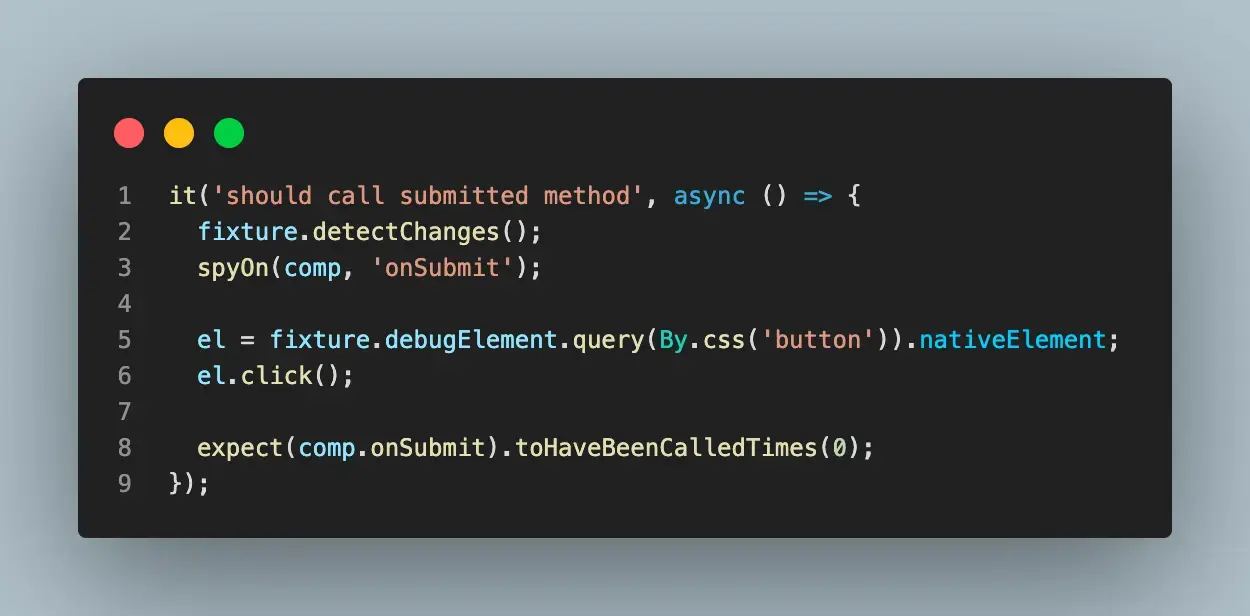
 it('should call submitted method', async () => {
   fixture.detectChanges();
   spyOn(comp, 'onSubmit');
   el = fixture.debugElement.query(By.css('button')).nativeElement;
   el.click();
   expect(comp.onSubmit).toHaveBeenCalledTimes(0);
 });
 it('form should be invalid', async () => {
   comp.contactForm.get('name')?.setValue('');
   comp.contactForm.get('email')?.setValue('');
   comp.contactForm.get('text')?.setValue('');
   expect(comp.contactForm.valid).toBeFalsy();
 });
 it('form should be valid', async () => {
   comp.contactForm.get('name')?.setValue('kapper');
   comp.contactForm.get('email')?.setValue('[email protected]');
   comp.contactForm.get('text')?.setValue('text');
   expect(comp.contactForm.valid).toBeTruthy();
 });
});

Code Walkthrough
Let’s walk through the code together and understand the nitty-gritty of it.
Step 1: Add the required packages and Set Up Express Server.
First, we imported all the required packages and created the describe block, which helped us organize our test suites.
Step 2: Creating the beforeEach.
Inside the beforeEach block, we initialized all the variables that will be used through the test and configured our TestBed to work accordingly.
Step 3: Write each test case.
Lastly, we start writing each test case and defining what we expect to test. Below is an example of using end-to-end testing to submit a button in our contact form.
Running the Test
To run your test, type the following command into your root terminal.
bash
npm start
npm run test
After successfully performing running the test, you should be greeted with green passes for your test, like the screenshot below:
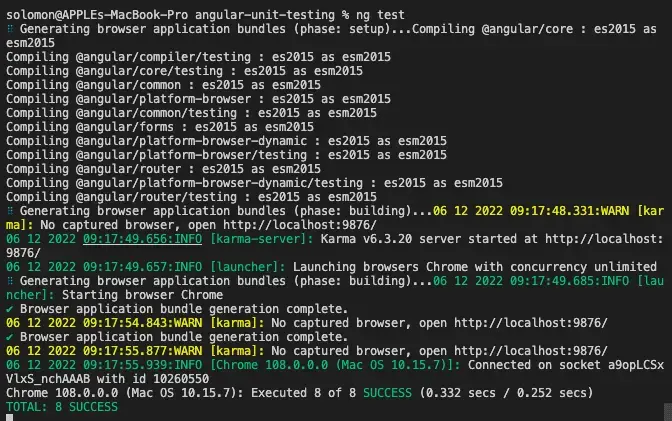
So far, we have manually run the test with the command above to make sure that our test is passing before we move ahead to deploy.
We can also automate this process with a cloud-based grid like TestMu AI, making it possible to implement a test strategy during deployment.
TestMu AI is a cloud-based digital experience testing platform that allows automated testing of websites and web applications on an online browser farm of 3000+ environments. Using TestMu AI, you can perform Angular E2E testing on real browsers and operating system combinations. In addition, you can accelerate your release cycles with the help of parallelization.

Want to kick start your Angular E2E testing using TestMu AI Automation Platform? Check out the below tutorial to get started with automation testing on TestMu AI.
Subscribe to our TestMu AI YouTube Channel to get the latest updates on tutorials around Selenium testing, Cypress testing, and more.
Summary
Software testing is a very important aspect of software development. It ensures that the software under test meets the intended requirement and is free of errors and bugs.
End-to-end testing makes it simpler to catch problems before releasing the software to end users. It improves the experience of the users, especially for applications requiring a lot of user interaction. These user expectations become the basis for the test cases.
In this Angular E2E testing tutorial, we discussed end-to-end software testing and how developers should perform it to ensure the correctness of their codebase. We explored the different JavaScript end-to-end testing libraries and showed their popularity using GitHub usage and stars.
We implemented a simple web form validation in Angular and tested the functionality using Karma.
About The Author
Solomon Eseme is a Software Engineer and Content Creator who is geared toward building high-performing and innovative products following best practices and industry standards. He also loves writing about it at Masteringbackend.com. You can also follow him on Twitter.


Frequently asked questions
Did you find this page helpful?
More Related Hubs
TestMu AI forEnterprise
Get access to solutions built on Enterprise
grade security, privacy, & compliance
- Advanced access controls
- Advanced data retention rules
- Advanced Local Testing
- Premium Support options
- Early access to beta features
- Private Slack Channel
- Unlimited Manual Accessibility DevTools Tests