

Power Your Software Testing with AI Agents and Cloud
The Native AI-Agentic Cloud Platform to Supercharge Quality Engineering. Test Intelligently and Ship Faster.


- TestMu AI (Formerly LambdaTest)
- /
- Blog
- /
- TestMu AI vs Steel.dev
TestMu AI vs Steel.dev: Browser Infrastructure for AI Agents Compared (2026)
A clear comparison of TestMu AI's Browser Cloud and Steel.dev as browser infrastructure for AI agents. It compares architecture, features, pricing, and session limits so you can match the right one to your workload.
Last Updated on:
TestMu AI's Browser Cloud and Steel.dev are both browser infrastructure your AI agents use to act on the web. TestMu AI's Browser Cloud runs and maintains the browser servers for you on the cloud that executes 1.5 billion tests a year for 18,000+ enterprises, so your agents run on infrastructure already proven reliable at scale, while Steel.dev is an Apache 2.0 open-source browser API you self-host.
This guide covers what each is, how their architectures differ, feature and pricing comparisons, which one fits your use case, what practitioners report, and how to choose.
Key Takeaways
For AI agent browser infrastructure, choose TestMu AI if you require a fully managed, SOC-certified cloud with built-in tunnels to access internal applications, or use Steel.dev if you need an open-source, Apache 2.0-licensed browser API that you can self-host on your own machines.
- Best for managed infrastructure: TestMu AI - This platform runs and maintains browser servers for you on a cloud executing 1.5 billion tests annually, absorbing Chrome crashes and memory spikes so your team avoids operational overhead.
- Best for open-source control: Steel.dev - This platform provides an Apache 2.0-licensed browser API that you can self-host on your own machines using a single Docker command, allowing complete code inspection and local deployment.
- Best for reaching internal applications: TestMu AI - The platform includes a built-in tunnel that lets cloud browsers securely access localhost, staging environments, and VPN-gated dashboards with no extra setup, whereas Steel.dev's cloud cannot reach them.
- Best for compliance and enterprise scale: TestMu AI - This service operates with SOC 1 and SOC 2 certifications, provides automatic per-session video and logs, and routes traffic through 180+ geolocations, while Steel.dev leaves compliance to its Enterprise plan.
- Best for low-cost public-web sandboxes: Steel.dev - The free Hobby plan offers 100 browser hours per month with a 15-minute session cap, making it highly cost-effective for public-web testing if you manage your own operations.
- Self-hosting Steel.dev requires your team to manually handle operational tasks including proxy rotation, fingerprint upkeep, separate CAPTCHA billing, and Chrome memory and process health.
What Is TestMu AI's Browser Cloud?
Browser Cloud by TestMu AI is a fully managed cloud browser for AI agents, with stealth (features that keep sites from detecting and blocking the agent as a bot), session persistence, geo proxies, a built-in tunnel, and full session logging operated for you.
TestMu AI's Browser Cloud runs on the same cloud that executes 1.5 billion tests a year for 18,000+ enterprises, and it drives sessions with Puppeteer, Playwright, or Selenium over the Chrome DevTools Protocol. That proven, multi-year track record across thousands of enterprises signals reliability: your agent runs on infrastructure already battle-tested at scale, not on an unproven new platform.
You run no browser infrastructure. The Browser Cloud documentation describes TestMu AI's Browser Cloud as "a scalable browser designed for AI agents to handle scraping, testing, and automation, without the overhead of managing infrastructure."
An agent opens a live session with one SDK call from the @testmuai/browser-cloud package and releases it when the task is done. TestMu AI handles provisioning, scaling, and cleanup.
import { Browser } from '@testmuai/browser-cloud';

const client = new Browser();
const session = await client.sessions.create();
// the agent browses, clicks, and extracts on a live cloud Chrome
await client.sessions.release(session.id);
Three capabilities matter most for agent teams. The built-in TestMu AI Tunnel lets cloud browsers reach localhost, staging, and internal dashboards behind a firewall or VPN with no third-party setup, so agents can test internal apps before you ship them. Every session records video replay, console logs, and full network logs, so you can see and fix silent agent failures instead of guessing at the cause.
The same Browser Cloud infrastructure is SOC 1 and SOC 2 certified, supports sessions up to 24 hours, and routes through 180+ geolocations. The certifications remove audit and compliance work for regulated teams. Stealth covers fingerprint masking (hiding the browser signals sites use to spot automation), CAPTCHA solving, and ad blocking, so there is no separate proxy vendor, bill, or bot-evasion engineering to own.

Note: Give your AI agents managed, enterprise-grade browser sessions without running any browser servers yourself. Explore TestMu AI Browser Cloud
What Is Steel.dev?
Steel.dev is an open-source browser API that lets AI agents control cloud browsers through a Sessions API. The Steel Browser runtime is licensed under Apache 2.0, has roughly 7,200 GitHub stars and 939 forks as of June 2026, and runs either as a self-hosted Docker container or on Steel.dev's managed cloud.[1]
Steel.dev describes a session directly: "Each session is like a fresh incognito window, but running in our cloud and controlled through code."[2] You connect Puppeteer or Playwright over a WebSocket and Selenium through the Chrome DevTools Protocol, then drive the page like any automation script.
Steel.dev runs as a self-hosted container. You launch it with one command, docker run -p 3000:3000 -p 9223:9223 ghcr.io/steel-dev/steel-browser, and the API is live on port 3000 with a session inspection UI at /ui.[1] The runtime is identical whether you host it yourself or use Steel.dev's cloud.
Steel.dev offers many agent-framework clients, including Browser Use, LangGraph, CrewAI, Pydantic AI, Mastra, and Stagehand.[2] Steel.dev notes one limit: its Selenium integration "does not support all the features" of its CDP-based sessions API, so Selenium-first teams should test their exact flow first.[1]
How Do TestMu AI and Steel.dev's Architectures Differ?
TestMu AI's Browser Cloud and Steel.dev both expose Chrome over the Chrome DevTools Protocol and connect through Playwright, Puppeteer, or Selenium, so the way an agent drives the browser is the same on both. The difference is who runs the browser servers and where they sit.
TestMu AI runs and maintains the browser servers for you, outside your network. Steel.dev gives you the browser software to place anywhere, including a self-hosted container inside your own network next to your internal services.
| What to compare | TestMu AI's Browser Cloud | Steel.dev |
|---|---|---|
| Who runs and maintains the browser servers | TestMu AI runs them for you | You run them yourself, or use Steel.dev's cloud |
| Where the browsers run | TestMu AI's managed cloud, outside your network | Your own machines (self-host) or Steel.dev's cloud |
| Reaching localhost and internal apps | Built-in tunnel reaches them with no extra setup | Works only when you self-host inside your network; the cloud has no managed tunnel |
| Who handles scaling up sessions | TestMu AI scales them for you | Your team (self-host); Steel.dev (cloud) |
| Who handles proxy rotation | Included and managed by TestMu AI | You build it (self-host); metered and billed (cloud) |
| Who keeps anti-detection (fingerprints) current | Managed by TestMu AI | Your team (self-host); built in (cloud) |
| Who handles Chrome crashes and memory | TestMu AI absorbs crashes and memory spikes | Your team (self-host); Steel.dev (cloud) |
| Compliance certification | SOC 1 and SOC 2 certified | You manage it, or get it through the Enterprise plan |
| How an agent controls the browser | Chrome DevTools Protocol via Playwright, Puppeteer, Selenium | Chrome DevTools Protocol via Playwright, Puppeteer, Selenium |
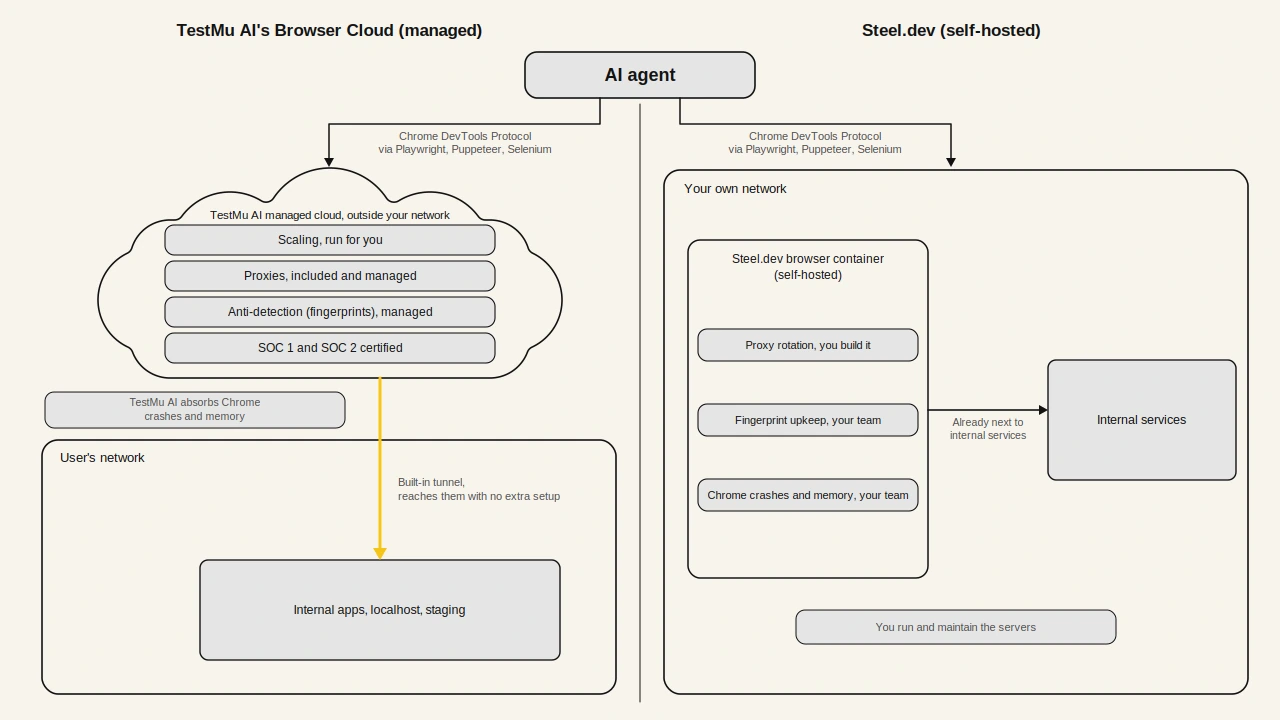
Session state behaves the same on both platforms. Cookies, local storage, and login state persist across sessions, so an agent logs in once and resumes later. The difference shows up when something breaks: TestMu AI's managed cloud absorbs a Chrome crash or a memory spike for you, while a self-hosted Steel.dev setup does not. The practitioner section below covers those operational failures in detail.
How Do TestMu AI and Steel.dev Compare on Features?
The architecture table above covered who runs the browser servers, internal-app reach, and compliance. This table compares the remaining features: hosting model, observability, frameworks, session length, stealth, and geolocation. Where a feature depends on whether you self-host Steel.dev or use its cloud, both are noted.
| Feature | TestMu AI's Browser Cloud | Steel.dev |
|---|---|---|
| Hosting model | Fully managed, proprietary cloud | Open source (Apache 2.0); self-host or managed cloud |
| Self-hosting | Not available | Yes, one Docker command |
| Observability | Auto video replay, console logs, network logs per session | Session viewer for live and recorded sessions |
| Frameworks | Puppeteer, Playwright, Selenium | Puppeteer, Playwright, Selenium (Selenium partial); plus Browser Use, LangGraph, CrewAI, Stagehand SDKs |
| Max session length | Up to 24 hours, no tier ceiling | Up to 24 hours, tier-gated (15 min free, 24h only on Pro) |
| Stealth and anti-bot | Fingerprint masking, CAPTCHA solving, ad blocking | Fingerprint management, CAPTCHA solving, routing through multiple proxies |
| Geolocation | 180+ geolocations | Proxy-based; bandwidth metered per plan on cloud |
| Best fit | Internal-network access, compliance, scale-without-re-platforming | Open-source control, self-host, budget-bound public-web prototypes |
Best fit: TestMu AI's Browser Cloud is the stronger fit for enterprise and production agent workloads on the strength of SOC 1 and SOC 2 compliance, the built-in internal-app tunnel, and managed operations with included proxies, while Steel.dev fits open-source self-hosting needs.
The frameworks row favors Steel.dev on agent-SDK breadth; the observability row favors TestMu AI's Browser Cloud. Steel.dev leads on agent-SDK breadth and open-source control; TestMu AI's Browser Cloud leads on managed operations, per-session observability, and reaching internal apps.
In my experience, per-session observability is the feature that quietly decides whether an agent is debuggable. I once had an agent that filled a multi-step form and then silently stopped on the final submit. The agent's own logs showed no error, because the page never threw one, so the agent reported success.
The session video showed the cause: the submit button was hidden under a cookie-consent banner, so the click hit the banner instead. The network log confirmed no submit request ever left the browser.
Without that recorded video and network log, the failure would have been invisible and I would have re-run the agent blind. Recorded sessions show the cause, which matters more for real agent work than any benchmark score.
This is why a managed browser infrastructure like TestMu AI's Browser Cloud fits production agent work. It records the session video, network log, and console output automatically on every run, so a silent failure like this is visible and fixable with no extra setup. On a self-hosted browser such as Steel.dev, you would first have to build and maintain that recording layer yourself.
How Do TestMu AI and Steel.dev Pricing and Limits Compare?
TestMu AI's Browser Cloud sells one flat paid plan at $29 per month. Steel.dev's cloud meters browser hours and gates concurrency and session length by tier. The table below sets the entry tiers side by side, verified against each vendor's live pricing page in June 2026.
| What to compare | TestMu AI's Browser Cloud | Steel.dev cloud |
|---|---|---|
| Free tier | $0: 100 minutes, 2 parallel sessions | Hobby $0: $10 credits, 100 browser hours, 5 concurrent |
| Entry paid plan | $29/mo (billed annually) | Starter $29/mo: 290 browser hours, 10 concurrent |
| Top published plan | Custom Enterprise | Pro $499/mo: 9,980 browser hours, 100 concurrent |
| Max session length | Up to 24 hours, no tier ceiling | 15 min (Hobby) to 24 hours (Pro) |
| CAPTCHA solving | Included in managed plan | Metered: $3 to $4 per 1,000 solves by tier |
| Proxy bandwidth | Included, 180+ geolocations | Metered: $5 to $10 per GB by tier |
TestMu AI's Browser Cloud figures come from the Browser Cloud page. The full Steel.dev cloud tier list, with CAPTCHA solves and proxy bandwidth per plan, is below.[3]
| Steel plan | Price | Browser hours | Concurrent sessions | Max session |
|---|---|---|---|---|
| Hobby | Free ($10 credits) | 100 | 5 | 15 minutes |
| Starter | $29/mo | 290 | 10 | 1 hour |
| Developer | $99/mo | 1,238 | 20 | 6 hours |
| Pro | $499/mo | 9,980 | 100 | 24 hours |
| Enterprise | Custom | Custom | Unlimited | Custom |
On the free tier, Steel.dev is more generous: 100 browser hours against TestMu AI's 100 minutes. That gap matters for a hobbyist running an agent on the public web. TestMu AI's $29 plan buys internal-app access, SOC 1 and SOC 2 compliance, and scaling you do not operate yourself.
Self-hosting Steel.dev adds costs the cloud table does not show. Steel.dev's own pricing meters CAPTCHA solving at $3 to $4 per 1,000 solves and proxy bandwidth at $5 to $10 per GB by tier.[3] Steven Gonsalvez, writing on running agent browsers in production, adds the rest: proxy rotation you build in-house, fingerprint upkeep as detection changes, and Chrome memory leaks that crash containers under load.[4]
Give your AI agents a managed cloud browser

Which One Fits Your Use Case, TestMu AI or Steel.dev?
TestMu AI's Browser Cloud fits agents that must reach internal apps, meet compliance requirements, or scale from prototype to production without re-platforming. Steel.dev fits teams that want open-source control, self-hosting, or a low-cost public-web sandbox. The lists below match each product to the one requirement you cannot give up.
Where TestMu AI's Browser Cloud is the better fit
- Reaching internal apps: The built-in tunnel lets an agent reach localhost, staging, and VPN-gated dashboards with no extra setup, which Steel.dev's cloud cannot do unless you self-host inside your own network.
- Managed compliance: SOC 1 and SOC 2 certification is operated for you, which removes a large body of audit and infrastructure work for regulated teams.
- Scaling without running operations: Spinning up many concurrent sessions is one SDK call, with no provisioning, cleanup, proxy upkeep, or Chrome memory management on your side.
- Scaling without rebuilding your setup: A prototype and an enterprise workload run on the same managed cloud, so you do not switch tools or rebuild your setup as you grow.
Where Steel.dev is the better fit
- Open-source control: Steel.dev's Apache 2.0 core can be self-hosted, inspected, and forked. If a security review requires reading the runtime, or you cannot send traffic to a third-party cloud, Steel.dev is the option that qualifies.
- Generous free cloud hours: The Hobby plan's 100 browser hours per month are enough to build and demo a public-web agent without paying.
- Agent-framework breadth: Ready-made clients for Browser Use, LangGraph, CrewAI, Pydantic AI, Mastra, and Stagehand mean less integration code for developers building on those frameworks.
- Low cost at small scale when you run the operations: For a low-volume public-web workload on infrastructure you already run, self-hosting Steel.dev is usually the cheapest option in direct cost.
In my experience wiring agent automations to internal staging dashboards, the built-in tunnel is the deciding feature. With TestMu AI's Browser Cloud, the cloud session reached a VPN-gated dashboard once I enabled the tunnel, where a plain browser infrastructure could not, and wiring up a separate third-party tunnel took longer than the rest of the integration. If your agents only touch the public web, that advantage does not apply.
What Do TestMu AI and Steel.dev Practitioners Report?
Practitioners report that the choice turns on operational reality more than on a feature list. Self-hosting Steel.dev trades cloud fees for operational work your team takes on, while a managed cloud removes that work but gives up code ownership. The two sources below show both sides.
Two findings recur in Steven Gonsalvez's write-up on running agent browsers in production:[4]
- Self-host failure modes: Proxy rotation you build yourself, fingerprint maintenance as detection changes, and Chrome memory leaks that crash containers under load. These are the cost of control, not reasons to avoid Steel.dev.
- The self-host vs managed rule: The same write-up states it plainly, "If your use case is 'I need browsers on my own infrastructure and I'm fine being the ops team,' Steel wins." If you are not fine being the ops team, a managed cloud like TestMu AI's Browser Cloud takes that work off your plate.
The same trade-off appears in community threads. On r/webscraping, a developer found two browser-as-a-service tools too slow or unreliable and moved to self-hosting, which added per-browser Chrome memory cost:

I have tried browser-as-a-service solutions like Browserbase and Hyperbrowser but they are not good enough. Hyperbrowser keeps erroring out my runs due to speed and weird unwanted navigations in the browser, and Browserbase was just really slow (both used with a paid plan) ... So now I am considering hosting my own headless browsers on my backend servers with proxy plans. For that I need to reduce the memory consumption of each chrome browser instance as much as possible.
- u/definitely_aagen, r/webscraping (Source)
The above Reddit thread discussion highlights the exact failures a managed cloud is built to remove, which is why a managed cloud matters for production agent work. TestMu AI's Browser Cloud runs on the cloud that executes 1.5 billion tests a year for 18,000+ enterprises, with proxies and anti-detection included, so per-instance Chrome memory tuning stops being your problem.
Which Should You Choose, TestMu AI or Steel.dev?
Choose TestMu AI's Browser Cloud when agents must reach internal apps, when SOC 1 and SOC 2 compliance is a requirement, or when one managed cloud must carry a workload from prototype to scale without re-platforming. Choose Steel.dev when open-source control, self-hosting, or a generous free public-web sandbox matter more than offloaded operations, and your team is ready to run proxies, fingerprints, and Chrome process health itself.
- Choose Steel.dev if you must read or self-host the runtime: A security review that requires inspecting the code, or a policy against sending traffic to a third-party cloud, makes Steel.dev's open-source core the only fit.
- Choose Steel.dev for a low-cost public-web sandbox: The free Hobby plan's 100 browser hours suit building and demoing a public-web agent when you are comfortable owning the operations.
- Choose TestMu AI's Browser Cloud when agents must reach internal apps: The built-in tunnel reaches localhost, staging, and VPN-gated dashboards with no extra setup.
- Choose TestMu AI's Browser Cloud for SOC-certified compliance: SOC 1 and SOC 2 certification is operated for you, which removes audit and infrastructure work for regulated teams.
- Choose TestMu AI's Browser Cloud for scaling you do not operate: One managed cloud runs a workload from first prototype to production, so you do not switch tools or rebuild your setup as you grow.
Decide based on the one requirement you cannot give up, not on which tool lists more features. For a managed-versus-managed angle, the Browser Cloud vs Browserbase comparison puts two cloud options head to head, and if you are weighing browser-as-a-service options, the Browser Cloud as a HyperBrowser alternative comparison covers that angle, while the Browser Cloud product page documents the SDK, tunnel, and session features in full. Both products are credible; match the one you pick to the job it has to do.
The Verdict
For enterprise and production AI-agent work, TestMu AI's Browser Cloud is the stronger choice: SOC 1 and SOC 2 compliance, a built-in tunnel to internal apps, included proxies, managed operations, and the proven scale of 1.5 billion tests a year for 18,000+ enterprises. Steel.dev wins for open-source self-hosting, code ownership, and a generous free public-web sandbox.
Citations
- [1] steel-browser: Open Source Browser API for AI Agents and Apps - Steel.dev, GitHub repository (June 2026)
- [2] Steel Documentation: Sessions API and Agent Integrations - Steel.dev (June 2026)
- [3] Pricing and Limits - Steel Docs (June 2026)
- [4] Browser Tools for AI Agents Part 3: Managed Infrastructure and When DIY Stops Making Sense - Steven Gonsalvez, DEV Community (2025)
Author

Prince Dewani
Blogs: 30

Prince Dewani is a Community Contributor at TestMu AI specializing in AI agents, software testing, QA, and SEO. He is certified in Selenium, Cypress, Playwright, Appium, Automation Testing, and KaneAI, and presented academic research on AI agents at PBCON-01. At TestMu AI, he has also carried out extensive cross-browser research on the support of modern web technologies such as WebGPU, WebAssembly, WebXR, WebGL2 and other web technologies, validating their compatibility and feature parity across major browsers and rendering engines through rigorous hands-on testing. Prince has hands-on experience building AI agent workflows using Anthropic Claude, Google Antigravity, n8n, LangChain, and other agentic frameworks, and works regularly with MCP and A2A protocols. He shares his work with 5,500+ QA engineers, developers, DevOps experts, tech leaders, and AI agent practitioners on LinkedIn.


TestMu AI vs Steel.dev FAQs
Did you find this page helpful?
More Related Blogs
TestMu AI forEnterprise
Get access to solutions built on Enterprise
grade security, privacy, & compliance
- Advanced access controls
- Advanced data retention rules
- Advanced Local Testing
- Premium Support options
- Early access to beta features
- Private Slack Channel
- Unlimited Manual Accessibility DevTools Tests