
Power Your Software Testing with AI Agents and Cloud
The Native AI-Agentic Cloud Platform to Supercharge Quality Engineering. Test Intelligently and Ship Faster.


- TestMu AI (Formerly LambdaTest)
- /
- Blog
- /
- How to Test SAP Applications Without Code
How to Test SAP Applications Without Code (2026 Guide)
Test SAP Fiori and GUI transactions, multi-screen posting flows, approvals, and master data in plain English. No Selenium, no Playwright, and no code.
Published on:
SAP applications can be tested without code by describing a transaction, such as raising a purchase requisition and confirming it routes to the right approver, in plain English that KaneAI runs by locating Fiori tiles by meaning rather than SAPUI5 control IDs. The same approach chains a sales order through delivery and billing as a connected flow across support-pack upgrades.
Why SAP applications are hard to test
A single SAP screen looks like a form, but real coverage has to survive the way SAP is actually built and upgraded:
- SAPUI5 and Fiori generate dynamic control IDs such as __field0-inner and __button-post that shift between renders and releases, so a selector written today rarely survives the next transport
- A single business process spans many screens, from a sales order to a delivery, a goods issue, and a billing document, so the test has to carry data across separate transactions
- Classic SAP GUI, Fiori launchpad tiles, and Web Dynpro screens often coexist in one landscape, so a single flow can cross three very different UI technologies
- Transactions depend on backend state, where an order needs a customer, a material, and stock that actually exists in the client you are testing against, so data setup is half the work
- Approvals and workflow put a human in the middle, where a purchase requisition sits until a manager releases it before the process can move on
- Every upgrade, support package, and custom Z-transaction can relabel fields, add mandatory entries, or reorder screens, multiplying regression scope across finance, procurement, and HR at the same time
And that is one process in one module. Real coverage means testing order-to-cash and procure-to-pay, standard SAP and your custom transactions, and every landscape from sandbox to production copy.
The old way: brittle SAP automation scripts
Here is what a simple create-a-sales-order-and-check-the-result scenario looks like in a typical Selenium setup against a Fiori app:
WebDriverWait wait = new WebDriverWait(driver, Duration.ofSeconds(20));
driver.get("https://sap.yourcompany.com/fiori#Shell-home");
wait.until(ExpectedConditions.elementToBeClickable(
    By.cssSelector("[data-help-id='CreateSalesOrder']"))).click();
wait.until(ExpectedConditions.presenceOfElementLocated(
    By.id("__field0-inner"))).sendKeys("Customer-1001");
driver.findElement(By.id("__field2-inner")).sendKeys("MATERIAL-500");
driver.findElement(By.id("__field3-inner")).sendKeys("5");
driver.findElement(By.id("__button-post")).click();
WebElement toast = wait.until(ExpectedConditions.visibilityOfElementLocated(
    By.cssSelector(".sapMMessageToast")));
String message = toast.getText();
assertTrue("Expected the order to be created, got: " + message,
    message.contains("Sales Order") && message.contains("created"));
Even this short script is already fragile. Those __field0-inner and __button-post IDs are generated by SAPUI5 at render time, so the next support pack can renumber them and every locator in the suite goes stale at once. Re-pointing selectors after each SAP update is the dominant cost of a large SAP regression suite, and teams spend a large share of every sprint keeping the scripts alive instead of covering new transactions. It also needs someone who writes Java or Python and knows SAP, a rare and expensive combination, which is the core tradeoff behind code-based vs. codeless test automation.
If you are a functional consultant, a business analyst, or a QA lead without a dedicated SAP automation engineer, that code wall usually means transactions get tested by hand, slowly, inconsistently, and only when someone finds time before a release.
The no-code way: write the test the way you would explain it
With KaneAI, you write the same test in plain English:
- Open the Fiori launchpad and click the Create Sales Order tile
- Enter the customer Customer-1001
- Add the material MATERIAL-500 with a quantity of 5
- Post the order
- Verify the confirmation shows a new sales order number
- Verify the order status reads created
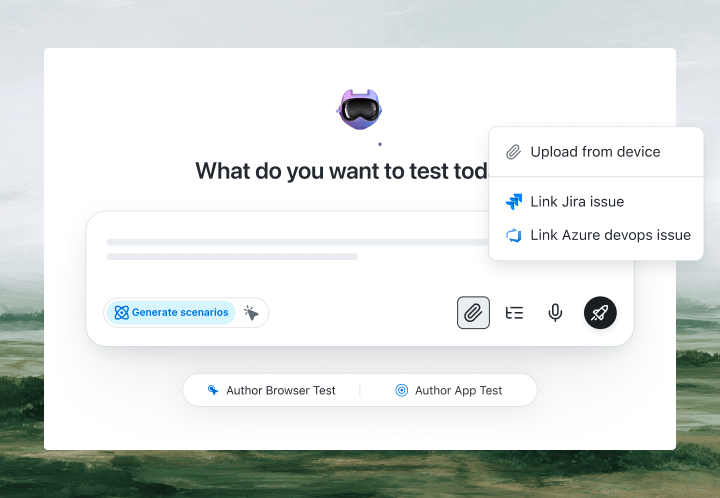
That is the whole test. KaneAI reads each step, finds the right tile and field on your live SAP system the way a functional tester would, by understanding the screen rather than matching a generated ID like __field0-inner, and runs the transaction. When a support pack renumbers those controls or an upgrade moves a field, the step self-heals and re-anchors instead of breaking, which significantly reduces maintenance. Long multi-screen transactions, from sales order to delivery to billing, run as one connected flow. Shared steps like logging into the launchpad or selecting a company code become reusable modules you fix once and reuse everywhere. And when a step needs a manager to release an approval, human-in-the-loop lets a reviewer step in mid-run and then hand control back.

The SAP scenarios that actually break
Once the happy path works, real coverage is just more English. Here are the SAP scenarios worth adding, each takes a few minutes to write:
Order-to-cash across screens
- Create a sales order for an existing customer and material
- Create the outbound delivery and post the goods issue
- Create the billing document and verify the accounting document posts
Purchase requisition with approval
- Raise a purchase requisition against a cost center
- Verify it routes to the approver and waits for release
- Release it as the approver and verify a purchase order is created
Master data validation
- Create a new material master with a required field left blank
- Verify SAP blocks the save and shows the correct error message
- Complete the field and verify the record saves with a new number
Finance posting and reversal
- Post a journal entry to a general ledger account
- Verify the document number is returned and the account balance updates
- Reverse the document and verify the balance returns to its original value
Run each of these across Chrome, Edge, Firefox, and real mobile devices for Fiori from the same plain-English steps, with no per-browser rewrites.
Putting it on autopilot
SAP tests earn their keep when they run without anyone watching:
- Schedule the suite nightly, so a transport moved on Tuesday cannot quietly break order-to-cash before anyone logs in
- Trigger on transport or deploy via Kane CLI, which runs the same tests from your pipeline and pauses for an OTP or a required approval instead of failing
- Alert on failure in Slack, with a full replay of what the agent saw when the step failed, including screenshots, video, and the reason in plain English
When a test fails, you do not get a NoSuchElementException on a generated control ID. You get a plain-English reason for the exact step that failed. A functional consultant can read that, and anyone on the team can fix the test, because the test is just English.
Try it on your own SAP system in 10 minutes
- Sign up for KaneAI free, with no credit card
- Point it at your SAP Fiori launchpad or a test client
- Write your first transaction test in plain English, or let KaneAI suggest one from the screen
- Run it and watch the transaction get tested end to end
Your SAP landscape is too critical to test by hand and too dynamic for brittle scripts. Test it in the language your functional team already speaks. Once your core transactions are covered, see how the same approach works for other enterprise platforms in how to test Salesforce without code and how to test ServiceNow without code.

Note: Test your SAP transactions without writing a line of code. Start with KaneAI free.
Author

Kavita Joshi
Blogs: 14


Kavita Joshi is a Senior Marketing Specialist at TestMu AI, with over 6 years of experience in B2B SaaS marketing and content strategy. She specializes in creating in-depth, accessible content around test automation, covering tools and frameworks like Selenium, Cypress, Playwright, Nightwatch, WebdriverIO, and programming languages with Java and JavaScript. She has completed her masters in Journalism and Mass Communication. Kavita’s work also explores key topics like CSS, web automation, and cross-browser testing. Her deep domain knowledge and storytelling skills have earned her a place on TestMu AI’s Wall of Fame, recognizing her contributions to both marketing and the QA community.
Reviewer

Shahzeb Hoda
Reviewer
Shahzeb Hoda is the Associate Director of Marketing and a Community Contributor at TestMu AI, leading strategic initiatives in developer marketing, content, and community growth. With 10+ years of experience in quality engineering, software testing, automation testing, and e-learning, he has authored and reviewed 70+ technical articles on software testing and automation. Shahzeb holds an M.Tech in Computer Science from BIT, Mesra, and is certified in Selenium, Cypress, Playwright, Appium, and KaneAI. He brings deep expertise in CI/CD pipeline automation, cross-browser testing, AI-driven testing practices, and framework documentation. On LinkedIn, he is followed by 3,700+ engineers, developers, DevOps professionals, tech leaders, and enthusiasts.


SAP Testing FAQs
Did you find this page helpful?
More Related Blogs

TestMu AI forEnterprise
Get access to solutions built on Enterprise
grade security, privacy, & compliance
- Advanced access controls
- Advanced data retention rules
- Advanced Local Testing
- Premium Support options
- Early access to beta features
- Private Slack Channel
- Unlimited Manual Accessibility DevTools Tests