
Power Your Software Testing with AI Agents and Cloud
The Native AI-Agentic Cloud Platform to Supercharge Quality Engineering. Test Intelligently and Ship Faster.


- TestMu AI (Formerly LambdaTest)
- /
- Blog
- /
- How to Test Checkout Flows Without Code
How to Test Checkout Flows Without Code (2026 Guide)
Test your entire checkout flow, cart, coupons, payments, confirmation, in plain English. No Selenium, no Playwright, no code.
Last Updated on:
KaneAI tests a checkout flow by writing plain-English steps that add a Blue T-Shirt to the cart, apply a coupon, and confirm the total recalculates correctly, without a Selenium script tied to the add-to-cart button. It also covers edge cases most scripts skip, like applying a coupon twice or emptying the cart mid-checkout.
Why checkout flows are the hardest thing to test
Checkout is deceptively complex. A single happy-path purchase touches:
- Cart state, so add, remove, update quantities, and the totals must stay correct through all of it
- Discount code application, including valid codes, expired codes, stacking rules, and minimum-order thresholds
- Address and shipping logic, meaning validation, shipping-cost recalculation, and region-specific rules
- Payment, where card fields live inside iframes, alongside wallets, failure, and retry states
- Confirmation, covering order-summary accuracy, the confirmation email, and inventory decrement
And that is one path. Real coverage means testing storefront guest checkout vs. logged-in checkout, mobile vs. desktop, and edge cases like emptying the cart mid-checkout or applying a coupon twice.
The old way: a brittle Selenium script per scenario
Here is what verifying a simple apply-coupon-and-check-the-total scenario looks like in a typical Selenium setup:
wait = WebDriverWait(driver, 10)
driver.get("https://yourstore.com/products/blue-tshirt")
add_btn = wait.until(EC.element_to_be_clickable((By.CSS_SELECTOR, "[data-testid='add-to-cart']")))
add_btn.click()
driver.get("https://yourstore.com/cart")
coupon_field = wait.until(EC.presence_of_element_located((By.ID, "coupon-code")))
coupon_field.send_keys("SAVE20")
driver.find_element(By.CSS_SELECTOR, ".apply-coupon-btn").click()
wait.until(EC.text_to_be_present_in_element((By.CSS_SELECTOR, ".discount-row"), "-$"))
total = driver.find_element(By.CSS_SELECTOR, ".order-total").text
assert total == "$31.99", f"Expected $31.99, got {total}"
Even this short script is fragile. The moment a developer renames the add-to-cart selector or moves the total into a new component, the test breaks. Maintenance like this is the dominant cost of a large automation suite: teams spend a large share of every sprint keeping existing scripts alive instead of writing new coverage. And this approach requires someone on the team who writes Python or JavaScript in the first place, which is the core tradeoff behind code-based vs. codeless test automation.
If you are a manual QA engineer, a PM, or a founder without a dedicated automation engineer, the code wall means checkout usually gets tested by hand, slowly, inconsistently, and never at 2 a.m. before a release.
The no-code way: write the test the way you would explain it
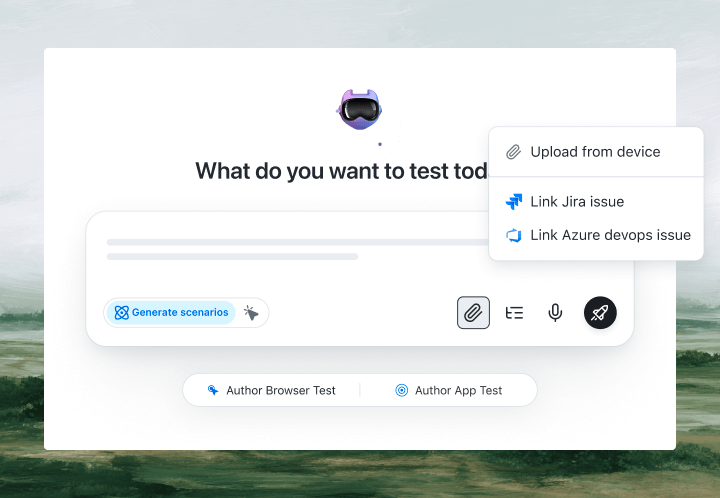
With KaneAI, you write the same test in plain English:
- Go to yourstore.com and open the Blue T-Shirt product page
- Add it to the cart
- Go to the cart page
- Apply the coupon code SAVE20
- Verify a discount is applied
- Verify the order total is $31.99
- Proceed to checkout as a guest
- Fill in the shipping form with test address details
- Verify the shipping cost is added to the total
- Complete the purchase using the test card
- Verify the order confirmation page shows the correct total
That is the entire test. KaneAI's AI agent reads each step, finds the right elements on your live site the way a human tester would, by understanding the page rather than matching brittle CSS selectors, and executes the flow. When your developer renames a button or redesigns the cart page, the test adapts instead of breaking.

Covering the scenarios that actually break
Once the happy path works, real coverage is just more English. Here are the checkout scenarios worth adding, each takes about two minutes to write:
Coupon edge cases
- Apply the expired coupon code SUMMER24
- Verify an expired coupon error message is shown
- Verify the order total has not changed
Cart manipulation mid-checkout
- Add 3 items to the cart and start checkout
- Go back and remove 1 item
- Return to checkout
- Verify the total reflects only 2 items
Payment failure handling
- Complete checkout using the declined test card
- Verify a payment failure message appears
- Verify the cart still contains the items
- Verify no order confirmation email was triggered
Guest vs. logged-in parity
- Run the full purchase flow as a guest
- Run the same flow logged in as a returning customer
- Verify saved addresses appear for the logged-in user
- Verify both flows reach confirmation with the same total
Run all of them across Chrome, Safari, Firefox, and real mobile devices from the same plain-English steps, with no per-browser rewrites.
Putting it on autopilot
Checkout tests are most valuable when they run without you:
- Schedule the suite nightly, so Monday's deploy cannot silently break Friday's revenue
- Trigger on deploy via CI, where Kane CLI runs the same tests from your pipeline or from agentic coding tools
- Alert on failure in Slack, with a full replay of exactly what the AI saw when the step failed: screenshots, video, and the reason in plain English
When a test fails, you do not get a stack-trace exception at line 47. You get a plain-English reason for the exact step that failed. Anyone on the team can read it, and anyone can fix the test, because the test is just English.
Try it on your own checkout in 10 minutes
- Sign up for KaneAI free, with no credit card
- Paste your store URL
- Write your first checkout test in plain English, or let KaneAI suggest one from your site
- Run it and watch your checkout get tested end to end
Your checkout flow is too important to test by hand and too dynamic for brittle scripts. Test it in the language you already speak. You can also read how to test login flows without code to cover the step before checkout.

Note: Test your checkout flow without writing a line of code. Start with KaneAI free.
Author

Devansh Bhardwaj
Blogs: 80


Devansh Bhardwaj is a Community Evangelist at TestMu AI with 4+ years of experience in the tech industry. He has authored 30+ technical blogs on web development and automation testing and holds certifications in Automation Testing, KaneAI, Selenium, Appium, Playwright, and Cypress. Devansh has contributed to end-to-end testing of a major banking application, spanning UI, API, mobile, visual, and cross-browser testing, demonstrating hands-on expertise across modern testing workflows.
Reviewer

Saniya Gazala
Reviewer
Saniya Gazala is a Product Marketing Manager and Community Evangelist at TestMu AI with 2+ years of experience in software QA, manual testing, and automation adoption. She holds a B.Tech in Computer Science Engineering. At TestMu AI, she leads content strategy, community growth, and test automation initiatives, having managed a 5-member team and contributed to certification programs using Selenium, Cypress, Playwright, Appium, and KaneAI. Saniya has authored 15+ articles on QA and holds certifications in Automation Testing, Six Sigma Yellow Belt, Microsoft Power BI, and multiple automation tools. She also crafted hands-on problem statements for Appium and Espresso. Her work blends detailed execution with a strategic focus on impact, learning, and long-term community value.


Checkout Testing FAQs
Did you find this page helpful?
More Related Blogs

TestMu AI forEnterprise
Get access to solutions built on Enterprise
grade security, privacy, & compliance
- Advanced access controls
- Advanced data retention rules
- Advanced Local Testing
- Premium Support options
- Early access to beta features
- Private Slack Channel
- Unlimited Manual Accessibility DevTools Tests