


World’s largest virtual agentic engineering & quality conference




- TestMu AI (Formerly LambdaTest)
- /
- Blog
- /
- Intelligent Automation Tools: 5 Types and How to Choose
Intelligent Automation Tools: 5 Types and How to Choose
Not all intelligent automation tools work the same way. Compare 9 platforms across 5 categories with a real KaneAI demo and a selection framework.

Naima Nasrullah
Author
Last Updated on: June 5, 2026
Intelligent automation tools exist because scripted automation has a hard ceiling. Change a UI element, receive a document in a different format, or hit an exception no rule anticipated - and the script breaks.
Maintaining those scripts at scale becomes a full-time job. AI, ML, and NLP let automation adapt to change, process variable inputs, and handle exceptions without constant human intervention - which is the gap these tools are built to close.
AI Overview
What Are Intelligent Automation Tools?
Software platforms that combine AI, ML, RPA, and NLP to automate tasks requiring judgment, adaptation, or unstructured data - going beyond what fixed scripts can handle. See our full overview of intelligent automation for broader context.
What Are the 5 Types of Intelligent Automation Tools?
Each type is designed for a different class of problem - they are not interchangeable.
- RPA (Robotic Process Automation) tools: Automate rule-based, repetitive digital tasks across systems with no API.
- BPM (Business Process Management) and workflow tools: Orchestrate multi-step processes across teams and decision points.
- IDP (Intelligent Document Processing) tools: Extract and classify data from unstructured documents using OCR and NLP.
- AI-powered testing tools: Self-heal broken scripts, generate tests from natural language, and prioritize by ML risk score.
- Cognitive automation tools: Handle judgment-heavy tasks that require context interpretation.
How Do Intelligent Automation Tools Differ from Traditional Automation?
The core difference is adaptability - traditional automation executes; intelligent automation learns and adjusts.
- Traditional automation breaks when inputs change; intelligent automation adapts.
- Traditional automation requires scripting skills; intelligent automation supports NLP authoring.
- Traditional automation runs everything on every trigger; intelligent automation uses ML to select high-impact tasks.
- Maintenance cost grows with traditional automation; it stabilizes with intelligent automation.
What Are Intelligent Automation Tools?
Intelligent automation tools are software platforms that use AI to automate tasks requiring judgment, adaptation, or unstructured data.
The "intelligent" part comes from three mechanisms: ML for prediction and pattern recognition, NLP for understanding text and human instructions, and computer vision for interpreting visual state.
The category grew because modern software ships continuously. Applications that once released quarterly now deploy daily, and UIs and APIs change with every release.
Scripted automation built for stable environments became a maintenance liability at that pace - every deployment risked breaking dozens of scripts. Intelligent automation tools were built for that operating reality.
5 Types of Intelligent Automation Tools
Not all intelligent automation tools solve the same problem. Each of the five categories below is built for a different class of task - using the wrong type adds overhead without solving anything.
1. Robotic Process Automation (RPA) Tools
RPA tools execute rule-based digital tasks by mimicking human interactions - clicking buttons, copying data, entering form fields - across applications that expose no API.
They work best for structured, high-volume, low-variation processes: invoice processing, employee onboarding, legacy system data migration, and scheduled report generation.
Typically used by: Operations, IT, and finance teams handling repetitive data-entry or system-integration tasks.
2. BPM and Workflow Automation Tools
BPM tools model and automate multi-step workflows spanning systems, teams, and decision points - orchestrating who acts, in what order, with what data.
AI layers add process mining to surface real bottlenecks, predictive routing to assign cases optimally, and anomaly detection to flag deviations before they fail.
Typically used by: IT, shared services, and operations teams that own cross-department workflows like approvals, onboarding, and procurement.
3. Intelligent Document Processing (IDP) Tools
IDP tools use OCR, NLP, and ML to extract, classify, and validate data from unstructured documents - invoices, contracts, medical records, claims.
Because formats vary across vendors, IDP models train on samples to recognize field positions even when layouts change, removing the manual template mapping that pure OCR requires.
Typically used by: Finance, legal, HR, and logistics teams processing high volumes of invoices, contracts, claims, or records.
4. AI-Powered Testing Tools
AI-powered testing tools apply intelligent automation to software quality - using ML to predict which tests catch regressions, NLP to convert plain-language steps into executable test code, and computer vision to detect visual regressions across browsers and devices.
The standout capability is self-healing: when a UI element's selector changes, the AI recalculates the correct locator from the DOM context and continues without human intervention. See our article on intelligent test automation for a deeper look.
Typically used by: QA engineers and dev teams responsible for software release quality and regression coverage.
5. Cognitive Automation Tools
Cognitive automation tools combine vision, NLP, and ML to handle tasks requiring interpretation - complaint routing, medical coding, legal clause extraction.
Unlike pure ML models, they produce actions rather than just predictions, making them the right fit when variability is high and every case needs a contextual decision no fixed rule can cover.
Typically used by: Customer service, compliance, underwriting, and legal teams handling high-variability, judgment-intensive exceptions.
How Intelligent Automation Tool Types Combine
Most organizations end up needing more than one type. IDP without RPA leaves extracted data with nowhere to go. RPA without BPM has no orchestration layer to route decisions.
Buying one type in isolation often reveals the next gap immediately. Understanding the chain before you start saves integration cost and avoids redundant purchases.
IDP
Extracts document data
RPA
Moves data into systems
BPM
Routes for approval
AI Testing
Validates after every update
Example: IDP reads a supplier invoice PDF and extracts vendor, amount, and line items. RPA enters that data into the ERP and matches it against the purchase order.
BPM routes it to the right approver and escalates if it sits unanswered. AI testing confirms the invoice processing UI still works after every software release.
One practical complication: each type usually belongs to a different team. IDP and RPA sit with operations or finance, BPM with IT or shared services, AI testing with QA and engineering.
If those teams are not aligned on the handoff points before rollout, the chain breaks at the seams. Make cross-team integration a selection criterion, not an afterthought.

Note: TestMu AI's KaneAI brings NLP test authoring, self-healing maintenance, and AI-driven test execution together across 10,000+ real devices and browsers. Try it free.
Intelligent Automation Tools vs. Traditional Automation
Intelligent automation tools are not a replacement for traditional automation - they are what traditional automation evolves into as AI capabilities mature. The table below shows where the two approaches diverge in practice across the attributes that matter most for teams evaluating a switch.
| Attribute | Traditional Automation | Intelligent Automation Tools |
|---|---|---|
| Script maintenance | Manual - every UI or process change requires a developer to update scripts | AI detects changes and self-heals locators or process steps without human intervention |
| Input handling | Structured inputs only - any variation in format breaks the process | Handles variable and unstructured inputs using NLP and ML classification |
| Task selection | Run all scripts on every trigger, or rely on manual tagging to define subsets | ML selects high-impact tasks or tests per commit, reducing total execution time |
| Authoring | Requires coding or scripting skills to write and maintain automation logic | NLP authoring converts plain-English descriptions into executable automation steps |
| Failure analysis | Each failure investigated manually with no automated pattern grouping | AI clusters failures by root cause, reducing investigation time significantly |
| CI/CD fit | Runnable in CI but slow - full regression runs take 30-60+ minutes per build | Risk-based selection reduces per-commit execution time without reducing defect detection |
| Cost over time | Maintenance cost grows proportionally as the application and script suite expand | Maintenance cost stabilizes as AI absorbs routine script and process upkeep |
Top Intelligent Automation Tools and Platforms
The tools below represent the leading platforms across each of the five categories. No single tool covers all five - the list is organized by what each one does best.
1. Automation Anywhere
Category: RPA + Agentic Automation
Automation Anywhere is an enterprise agentic process automation platform that combines RPA, AI orchestration, and natural language workflow building. It serves enterprise customers across financial services, healthcare, and manufacturing.
2. TestMu AI (Formerly LambdaTest)
Category: AI-Powered Testing
TestMu AI is a cloud-based test automation platform covering cross-browser testing, real-device testing, visual regression, and AI-driven test analytics across 10,000+ real devices and browsers.
Its intelligent automation capability is KaneAI - a GenAI-native agent that authors tests from natural language, self-heals when the application changes, and uses ML-based selection to run only the tests most likely to catch regressions in each build.
3. Microsoft Power Automate
Category: RPA + Workflow Automation
Microsoft Power Automate is a low-code automation platform covering desktop RPA, cloud flows, and AI-powered document processing.
It integrates natively with Microsoft 365, Azure, and thousands of third-party connectors, making it the default starting point for organizations already running the Microsoft stack.
4. Appian
Category: BPM + Low-Code
Appian is a low-code BPM platform that combines process automation, case management, and AI to orchestrate workflows across people and systems.
Its data fabric layer connects to existing systems without requiring data migration, making it a common choice in regulated industries like financial services and government.
5. ServiceNow
Category: Workflow Automation + BPM
ServiceNow automates IT, HR, customer service, and operations workflows on a single platform. Its Now Intelligence layer adds AI-powered routing, predictive analytics, and automated resolution, and it is the dominant platform for enterprise IT service management.
6. IBM watsonx Orchestrate
Category: Cognitive + Agentic Automation
IBM watsonx Orchestrate is an agentic AI control plane that manages and orchestrates multi-agent workflows across enterprise systems.
It connects to systems of record, coordinates handoffs between automated and human tasks, and is built for enterprises deploying AI agents at scale across complex operations.
7. Pega
Category: BPM + AI Decisioning
Pega is a BPM and AI decisioning platform built for customer engagement and operations workflows. Its Next-Best-Action AI engine makes real-time decisions across customer service, sales, and back-office operations, with deep adoption in financial services, insurance, and telecommunications.
8. ABBYY Vantage
Category: Intelligent Document Processing
ABBYY Vantage extracts structured data from 150+ document types - invoices, contracts, purchase orders, claims - using pre-trained AI skills that adapt to layout variations without manual template configuration. It has been named a Leader in the Everest Group IDP PEAK Matrix for eight consecutive years.
9. Rossum
Category: Intelligent Document Processing
Rossum is a cloud-native IDP platform focused on transactional document automation - invoices, purchase orders, and remittance advice. Its transformer-based AI adapts to new document layouts without manual template creation, aimed at finance and accounts payable teams processing high document volumes.
AI-Powered Testing Tools in Practice
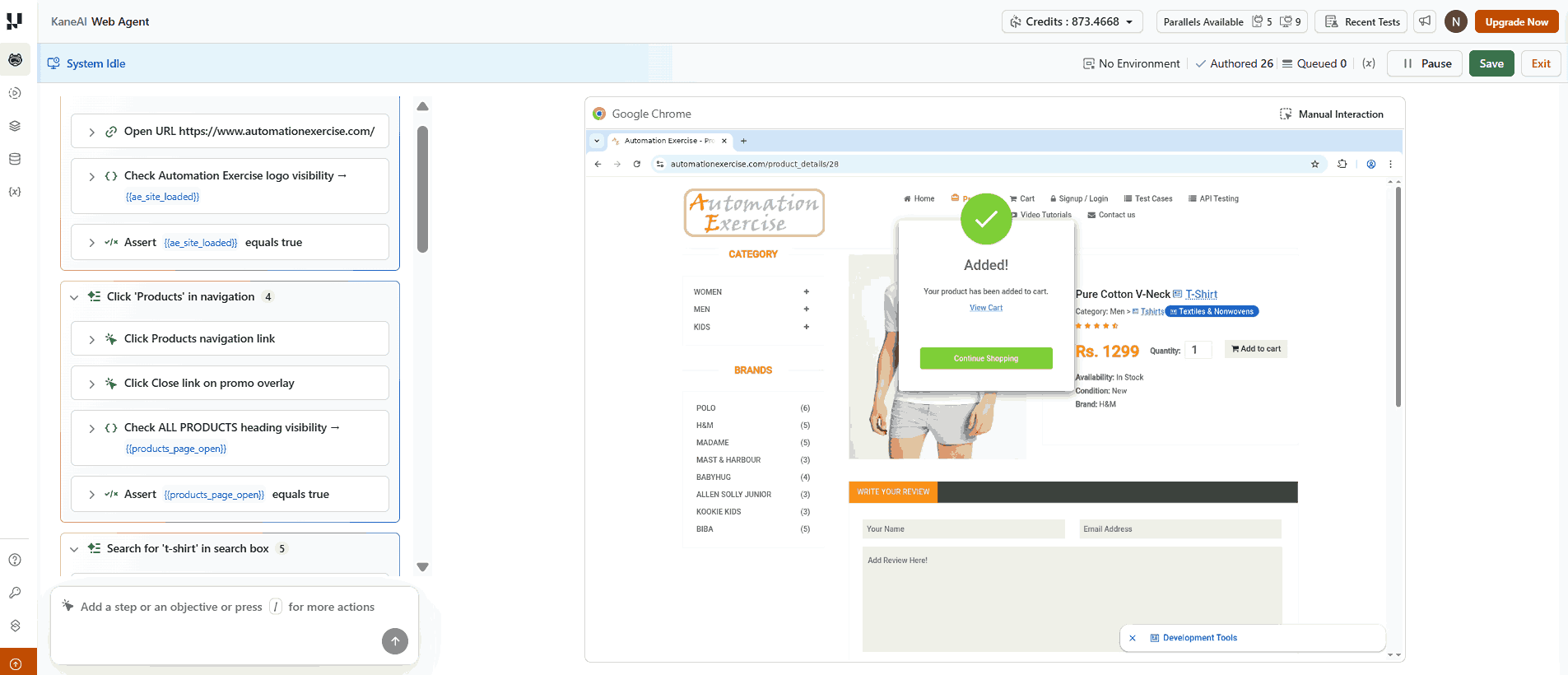
The tool descriptions above cover what each platform does. This section covers what using one actually looks like - a full KaneAI session on a public e-commerce site, from writing steps in plain English to watching self-healing handle a selector change.
Here is what a KaneAI authoring session looks like for a product search flow:
# Test: Verify Product Search and Add to Cart

step_1: Navigate to https://www.automationexercise.com/
step_2: Click on "Products" in the navigation
step_3: Search for "t-shirt" in the search box
step_4: Click the first product result
step_5: Verify the product name and price are visible
step_6: Click "Add to Cart"
step_7: Verify the cart modal appears with the product
KaneAI converts these steps into executable test code and runs the test on TestMu AI's cloud. If the "Add to Cart" button's selector changes in the next deployment, KaneAI detects the mismatch, resolves the correct selector from the surrounding DOM context, and updates the affected step.
The build does not fail because of a renamed attribute. Maintenance stays off the team's plate.
A Canadian fintech company running 100,000+ merchants saw this directly. Before KaneAI, almost half of QA time went to fixing broken scripts. After switching to NLP-authored tests with self-healing, results over six months included:
- 3X faster test creation: from 30 minutes to 10 minutes per test
- 65% reduction in maintenance: monthly manual update hours dropped from 85 to 30
- 6X test velocity: new tests created monthly rose from 40 to 240
"KaneAI actually let us describe our payment flows in plain English and get reliable tests out of it." - QA team, fintech customer story
The pattern holds across industries: teams that replace manual script maintenance with AI-driven self-healing consistently report shorter regression cycles and fewer defects reaching production.
For context, I have an economics background and had never written a test before trying this. Those seven steps above were enough. KaneAI ran the test without me touching any code, and the screenshot below is from that actual session.
The getting started with KaneAI guide walks through setup on an existing TestMu AI account in under 10 minutes, including how to connect to a real device or browser configuration for the first run.

How to Choose Intelligent Automation Tools
The five types above are not interchangeable. The right tool depends on what you are automating, not on which platform lists the most features. These six criteria narrow the decision to the right category first, then the right tool within it.
When not to use intelligent automation tools: If the process changes faster than a model can stabilize, if volume is too low to justify setup overhead, if every instance requires a human judgment call with no pattern, or if upstream data quality is inconsistent - automate nothing yet.
Fix the process or the data source first. Intelligent automation amplifies what is already working; it does not fix what is broken.
Once that bar is cleared, evaluate candidates against these criteria:
- Process structure: Structured, rule-based inputs point to RPA or BPM. Variable inputs like documents or free text point to IDP or cognitive automation.
- Stack integration: A tool only delivers value if it connects to what your team already uses. Evaluate API depth and native integrations before features.
- Team authoring skills: Low-code and NLP platforms lower the entry barrier but may limit flexibility for complex logic. Assess where your maintenance burden actually lives before choosing based on demos.
- Self-healing confidence thresholds: Any tool that auto-updates scripts needs a configurable confidence threshold above which changes apply automatically. Check how low-confidence decisions are surfaced for human review.
- ML training data: Risk-scoring models need historical outcome data. New setups need tools with sensible defaults while the model builds on your data over the first 4-6 weeks.
- Compliance and data residency: In regulated environments, verify SOC 2 compliance and whether process or test data is stored outside your approved boundary. For test intelligence, confirm failure data stays within your tenancy.

Conclusion
Match the tool type to the problem it was built for - each of the five categories above maps to a distinct class of task.
If you are not sure where to start, find the process generating the most manual rework on your team right now.
If that rework is fixing broken test scripts, the AI-powered testing category applies. If it is moving data between systems, RPA applies. If it is routing and approving documents, IDP and BPM apply together.
Do not start with the most capable tool available. Start with the narrowest tool that solves the specific problem, collect outcome data, and expand from there.
For software testing teams, the getting started with KaneAI guide covers the AI-powered testing category with a hands-on setup walkthrough. The automation testing overview covers the broader platform if your team needs cloud execution alongside the AI layer.
Note: This article was researched and drafted with AI assistance, then reviewed, fact-checked, and published by Naima Nasrullah, Community Contributor at TestMu AI, whose listed expertise includes Automation Testing and Software Testing. Every statistic, link, and product claim was verified against primary sources. Read our editorial policy and processes for details.
Author
Naima Nasrullah
Blogs: 13

Naima Nasrullah is a Community Contributor at TestMu AI, holding certifications in Appium, Kane AI, Playwright, Cypress and Automation Testing. She writes practical, hands-on content that helps QA engineers and developers build reliable test automation frameworks across web and mobile platforms. Drawing on her expertise in automation testing, Naima breaks down complex tools and workflows into clear, actionable guidance that readers can apply directly to their own projects and testing pipelines.







Intelligent Automation Tools FAQs
Did you find this page helpful?
More Related Blogs
TestMu AI forEnterprise
Get access to solutions built on Enterprise
grade security, privacy, & compliance
- Advanced access controls
- Advanced data retention rules
- Advanced Local Testing
- Premium Support options
- Early access to beta features
- Private Slack Channel
- Unlimited Manual Accessibility DevTools Tests