

Power Your Software Testing with AI Agents and Cloud
The Native AI-Agentic Cloud Platform to Supercharge Quality Engineering. Test Intelligently and Ship Faster.


- TestMu AI (Formerly LambdaTest)
- /
- Blog
- /
- Desired Capabilities in Selenium: Are They Deprecated?
What Are Desired Capabilities in Selenium Webdriver? Are They Depricated?
Understand Desired Capabilities in Selenium, why they are deprecated, and how to use modern Options classes for stable test automation.
Last Updated on:
Desired Capabilities is the class Selenium has historically used to declare a set of basic requirements such as combinations of browsers, operating systems, browser versions, and other session-level settings for automated cross browser testing of a web application.
In Selenium 4 the picture changed. The DesiredCapabilities class is deprecated and the recommended approach is to use the browser-specific Options classes (ChromeOptions, FirefoxOptions, EdgeOptions, SafariOptions). The official Selenium Browser Options documentation states that as of Selenium 4 you must use the browser options classes.
When we automate test scripts through Selenium automation testing, we still need a way to describe the test environment, whether that environment is a desktop browser, a mobile browser, a real device, or a remote cloud grid. To declare these environments we use Desired Capabilities (in legacy code) or Options (in modern code), and that is exactly what we will cover here.
This guide explains what Desired Capabilities are, how they work in Selenium and Appium, why the legacy class is now deprecated, how to migrate to the modern Options classes, and how to run capabilities-based tests on the cloud Selenium Grid using TestMu AI capabilities.
Key Takeaways
To configure Selenium 4 test sessions, you must use browser-specific Options classes like ChromeOptions instead of the deprecated DesiredCapabilities class. These modern Options classes automatically format W3C-compliant capabilities, ensuring stable test execution across local browsers and remote cloud grids like TestMu AI.
- DesiredCapabilities: This deprecated class historically defined browser, version, and platform settings as key-value pairs before starting a Selenium session.
- Options classes: These modern classes automatically handle W3C-compliant capability structures, including vendor namespaces like goog:chromeOptions and LT:Options, replacing the deprecated DesiredCapabilities class.
- ChromeOptions: This class replaces DesiredCapabilities for Chrome, allowing you to set browser-specific arguments like incognito mode or headless execution directly.
- FirefoxOptions: This class manages Firefox-specific settings, serializing command-line arguments and preferences into the W3C-compliant moz:firefoxOptions vendor namespace.
- EdgeOptions: This class configures Chromium-based Microsoft Edge sessions, replacing legacy Internet Explorer capabilities with modern, W3C-compliant settings.
- SafariOptions: This class defines session requirements for Safari browsers in Selenium 4, ensuring compliance with W3C standards without using deprecated classes.
- W3C-compliant keys: Modern configurations replace older keys like version and platform with standardized keys such as browserVersion and platformName.
- TestMu AI: This platform executes Selenium tests across 3,000+ browser/OS combinations, using the LT:Options vendor namespace to handle grid-specific configurations.
- TestMu AI Capabilities Generator: This tool generates ready-to-paste, W3C-compliant Selenium 4 Options code snippets for multiple programming languages.
- Legacy DesiredCapabilities code may still run in Selenium 4 for backward compatibility, but it does not support newer features and can cause session failures on modern grids.

What Are Desired Capabilities in Selenium?
Desired Capabilities in Selenium are key-value pairs used to customize and configure a testing environment, including browser type, version, and operating system, for Selenium test scripts. The legacy DesiredCapabilities class is part of the org.openqa.selenium.remote.DesiredCapabilities package. It helped Selenium WebDriver set browser properties such as browser name and browser version as key-value pairs.
For the original public API reference, see the archived SeleniumHQ DesiredCapabilities wiki. For the current recommended pattern, see the Selenium Browser Options docs.
How Do Desired Capabilities Work?
Capabilities are the contract a Selenium client sends to a WebDriver session at startup. The client serializes the contract as a JSON object, the driver validates it against the W3C standard plus any vendor extensions it supports, and the session either starts with the requested settings or fails with a clear error.
How Capabilities Talk to the WebDriver
In every Selenium run we have a different requirement: which browser to launch, which OS and version to target, whether to enable proxy or accept insecure certificates. Capabilities are the mechanism that communicates those requirements from the client to the WebDriver, whether the WebDriver is local or running on a remote Selenium Grid.
W3C Standard vs Vendor-Prefixed Capabilities
Selenium ships with a defined set of W3C capabilities, including browser name, browser version, platform name, proxy, timeouts, page load strategy, and accept insecure certs. Browser-specific options layer on top through vendor-prefixed keys: goog:chromeOptions, moz:firefoxOptions, ms:edgeOptions, safari:. Cloud grids like TestMu AI add their own vendor namespace, LT:Options, for grid-specific behavior such as build name, video recording, and network logs.
TestMu AI (Formerly LambdaTest) continues to deliver the same trusted cross-browser testing platform you know, now AI-powered.
Selenium 3 vs Selenium 4 Call Style
In Selenium 3, you would call setCapability on a DesiredCapabilities instance to set every key. In Selenium 4 you do the same conceptually, but on a browser-specific Options instance such as ChromeOptions, and you pass the Options object directly to RemoteWebDriver on your Selenium Grid.

Are Desired Capabilities Deprecated in Selenium?
Yes. The DesiredCapabilities class is deprecated as of Selenium 4. The Selenium project documentation says it directly: "In Selenium 3, capabilities were defined in a session by using Desired Capabilities classes. As of Selenium 4, you must use the browser options classes."
In practice the legacy class still compiles. Selenium kept it for backward compatibility, so a Selenium 3 codebase will continue to run after upgrading to Selenium 4. The IDE will show the class with strikethrough formatting, you will see deprecation warnings at compile time, and any feature added to Selenium after the 4.0 release is not exposed through DesiredCapabilities.
What changed under the hood: Selenium 4 is fully W3C WebDriver compliant. The W3C protocol uses a strict set of standard capability names plus vendor-prefixed extensions. Mixing standard and non-standard keys on a single flat capabilities map (the Selenium 3 pattern) is no longer guaranteed to work. The Options classes know which keys belong in the W3C standard set and which need a vendor prefix, so they serialize correctly without manual effort.
What still works: calls like capabilities.setCapability("browserName", "chrome") still execute. What stops working is non-W3C key names like "version" (now "browserVersion"), "platform" (now "platformName"), and arbitrary keys placed at the top level instead of under a vendor namespace such as LT:Options.
Migration to Options Classes (Selenium 3 to Selenium 4)
The migration is mechanical. Replace the DesiredCapabilities instance with the browser-specific Options class, then pass the Options object directly to RemoteWebDriver. Cloud-grid keys move under a vendor namespace such as LT:Options for the TestMu AI grid.
Side-by-side mapping
| Concern | Selenium 3 (deprecated) | Selenium 4 (recommended) |
|---|---|---|
| Class | DesiredCapabilities | ChromeOptions, FirefoxOptions, EdgeOptions, SafariOptions |
| Browser version key | setCapability("version", "77.0") | options.setBrowserVersion("latest") |
| Platform key | setCapability("platform", "win10") | options.setPlatformName("Windows 11") |
| Vendor extensions | Flat keys at top level | Nested under goog:chromeOptions, moz:firefoxOptions, LT:Options |
| Driver constructor | new RemoteWebDriver(url, capabilities) | new RemoteWebDriver(url, options) |
| Merging capabilities | capabilities.merge(options) | Configure directly on the Options instance |
Selenium 4 example targeting the TestMu AI cloud grid
import org.openqa.selenium.MutableCapabilities;
import org.openqa.selenium.chrome.ChromeOptions;
import org.openqa.selenium.remote.RemoteWebDriver;

import java.net.URL;
import java.util.HashMap;

ChromeOptions options = new ChromeOptions();
options.setBrowserVersion("latest");
options.setPlatformName("Windows 11");

HashMap<String, Object> ltOptions = new HashMap<>();
ltOptions.put("username", System.getenv("LT_USERNAME"));
ltOptions.put("accessKey", System.getenv("LT_ACCESS_KEY"));
ltOptions.put("build", "Capabilities Demo");
ltOptions.put("name", "Selenium 4 ChromeOptions Test");
ltOptions.put("video", true);
ltOptions.put("network", true);
ltOptions.put("console", true);
options.setCapability("LT:Options", ltOptions);

RemoteWebDriver driver = new RemoteWebDriver(
    new URL("https://hub.lambdatest.com/wd/hub"), options);
driver.get("https://www.testmuai.com/selenium-playground/");
driver.quit();
Note that the cloud hub URL still uses the hub.lambdatest.com hostname and that credentials are read from environment variables instead of hardcoded strings. The W3C-compliant pattern keeps standard keys (browserName, browserVersion, platformName) at the top level and groups grid-specific keys under LT:Options.

Note: TestMu AI runs your Selenium 4 tests on a cloud Grid of 3000+ browser and OS combinations. The grid is W3C compliant out of the box, so the same Options object works locally and on the cloud. Start a free trial.
Types of Desired Capabilities Methods (Legacy)
The methods below belong to the deprecated DesiredCapabilities class. They are documented here because legacy Selenium 3 codebases still use them and you will see them in older tutorials. For new code use the browser-specific Options classes from the migration table above.
getCapability()
public java.lang.Object getCapability(java.lang.String capabilityName)
getCapability() returns the value of a capability previously set on the DesiredCapabilities instance.
setCapability()
public void setCapability(java.lang.String capabilityName, java.lang.Object value)
setCapability() assigns a value to a named capability key. In Appium contexts it sets device name, platform name, platform version, app path, app activity, and app package.
getBrowserName()
public java.lang.String getBrowserName()
getBrowserName() returns the browser name configured on the capabilities object.
setBrowserName()
public void setBrowserName(java.lang.String browserName)
setBrowserName() sets the browser name. The Selenium 4 equivalent is the constructor of each browser-specific Options class.
getVersion()
public java.lang.String getVersion()
getVersion() returns the browser or platform version. The Selenium 4 equivalent is options.getBrowserVersion().
setVersion()
public void setVersion(java.lang.String version)
setVersion() sets the browser or platform version. The Selenium 4 equivalent is options.setBrowserVersion("latest").
getPlatform()
public Platform getPlatform()
getPlatform() returns the configured platform. The Selenium 4 equivalent is options.getPlatformName().
setPlatform()
public void setPlatform(Platform platform)
setPlatform() sets the platform. The Selenium 4 equivalent is options.setPlatformName("Windows 11").
For the full Java API surface, see the Selenium DesiredCapabilities Javadoc.
Capabilities for Different Browsers
Below is the per-browser pattern, written first in legacy Selenium 3 style and then in modern Selenium 4 style. New code should use the Selenium 4 patterns; the legacy snippets are included for engineers maintaining older suites.
Desired Capabilities in Selenium WebDriver for Chrome
Chrome capabilities are configured through ChromeOptions. In Selenium 3 you wrapped ChromeOptions inside a DesiredCapabilities object; in Selenium 4 you pass ChromeOptions directly.
Commonly used ChromeOptions arguments:
- --disable-infobars: Suppresses the "Chrome is being controlled by automated software" notification.
- --make-default-browser: Marks Chrome as the default browser.
- --disable-popup-blocking: Disables popups in Chrome.
- --incognito: Opens Chrome in incognito mode.
- --start-maximized: Opens Chrome maximized.
- --headless=new: Runs Chrome in the modern headless mode introduced in Chrome 109.
Selenium 3 pattern (deprecated) with an ad-blocker extension. Prerequisite: a .crx file of the extension downloaded locally.
// Selenium 3 - DesiredCapabilities (deprecated in Selenium 4)
ChromeOptions options = new ChromeOptions();
options.addExtensions(new File("path/to/extension.crx"));

DesiredCapabilities capabilities = new DesiredCapabilities();
capabilities.setCapability(ChromeOptions.CAPABILITY, options);

ChromeDriver driver = new ChromeDriver(capabilities);
Selenium 4 pattern (recommended) for the same scenario:
// Selenium 4 - ChromeOptions only, no DesiredCapabilities
ChromeOptions options = new ChromeOptions();
options.addExtensions(new File("path/to/extension.crx"));
options.addArguments("--start-maximized", "--disable-infobars");

ChromeDriver driver = new ChromeDriver(options);
driver.get("https://www.testmuai.com/selenium-playground/");
Desired Capabilities in Selenium WebDriver for Firefox
For Firefox, FirefoxOptions serializes to the moz:firefoxOptions vendor namespace. Use it to set binary path, command-line arguments, profile path, and preferences.
Common moz:firefoxOptions fields
- binary (string): Absolute path to a custom Firefox binary. By default GeckoDriver locates Firefox automatically.
- args (array of strings): Command-line arguments. Use leading hyphens, for example
["-headless", "-profile", "/path/to/profile"]. - profile (string): Path to a Firefox profile directory. For overriding individual preferences prefer the prefs map below instead of switching the whole profile.
- prefs (map): Override individual
about:configpreferences without changing the profile.
W3C JSON capabilities (Firefox)
{
  "capabilities": {
    "alwaysMatch": {
      "browserName": "firefox",
      "moz:firefoxOptions": {
        "binary": "/usr/local/firefox/bin/firefox",
        "args": ["-headless", "-profile", "/path/to/profile"],
        "prefs": {
          "dom.ipc.processCount": 9,
          "javascript.options.showInConsole": true
        },
        "log": { "level": "trace" }
      }
    }
  }
}
Selenium 4 Java equivalent
FirefoxOptions options = new FirefoxOptions();
options.addArguments("-headless");
options.addPreference("dom.ipc.processCount", 9);
options.addPreference("javascript.options.showInConsole", true);

WebDriver driver = new FirefoxDriver(options);
Desired Capabilities in Selenium WebDriver for Edge
Internet Explorer reached end of support on June 15, 2022, and is no longer the right target for new automation work. Microsoft Edge replaced it. Edge uses EdgeOptions, which serializes to the ms:edgeOptions vendor namespace and shares most of its surface area with ChromeOptions because Edge is Chromium-based.
Selenium 4 Java example for Edge
import org.openqa.selenium.edge.EdgeDriver;
import org.openqa.selenium.edge.EdgeOptions;

EdgeOptions options = new EdgeOptions();
options.setBrowserVersion("latest");
options.setPlatformName("Windows 11");
options.addArguments("--start-maximized", "--inprivate");

EdgeDriver driver = new EdgeDriver(options);
driver.get("https://www.testmuai.com/selenium-playground/");
If you maintain a legacy IE test suite, Microsoft documents an "IE mode" inside Edge that lets you run IE-only sites through Edge using the ie.edgechromium capability on InternetExplorerOptions, but greenfield work should target Edge directly.

Examples of Desired Capabilities in Selenium With Different Languages
Selenium ships official bindings for Java, C#, Python, JavaScript, and Ruby. Below is the same TestMu AI cloud-grid setup in Java, C#, and Python using Selenium 4 Options classes. Each example reads credentials from environment variables and groups grid-specific keys under the LT:Options vendor namespace.
Desired Capabilities in Selenium WebDriver for Java
import org.openqa.selenium.chrome.ChromeOptions;
import org.openqa.selenium.remote.RemoteWebDriver;

import java.net.URL;
import java.util.HashMap;

@BeforeClass
public void setUp() throws Exception {
    ChromeOptions options = new ChromeOptions();
    options.setBrowserVersion("latest");
    options.setPlatformName("Windows 11");

    HashMap<String, Object> ltOptions = new HashMap<>();
    ltOptions.put("username", System.getenv("LT_USERNAME"));
    ltOptions.put("accessKey", System.getenv("LT_ACCESS_KEY"));
    ltOptions.put("build", "Capabilities Demo");
    ltOptions.put("name", "Java Sample");
    ltOptions.put("network", true);
    ltOptions.put("visual", true);
    ltOptions.put("video", true);
    ltOptions.put("console", true);
    ltOptions.put("selenium_version", "4.27.0");
    ltOptions.put("timezone", "UTC+05:30");
    ltOptions.put("geoLocation", "IN");
    options.setCapability("LT:Options", ltOptions);

    driver = new RemoteWebDriver(
        new URL("https://hub.lambdatest.com/wd/hub"), options);
}
Desired Capabilities in Selenium WebDriver for C#
// Selenium 4 with C# - ChromeOptions, no DesiredCapabilities
using OpenQA.Selenium;
using OpenQA.Selenium.Chrome;
using OpenQA.Selenium.Remote;
using System;
using System.Collections.Generic;

ChromeOptions options = new ChromeOptions();
options.BrowserVersion = "latest";
options.PlatformName = "Windows 11";

// Accept self-signed certificates
options.AcceptInsecureCertificates = true;

// Add a Chrome extension
options.AddExtensions("path/to/extension.crx");

// Disable JavaScript at the profile level (Firefox example shown for parity)
// FirefoxOptions ffOptions = new FirefoxOptions();
// ffOptions.SetPreference("javascript.enabled", false);

// LT:Options vendor capability for the TestMu AI grid
Dictionary<string, object> ltOptions = new Dictionary<string, object>();
ltOptions.Add("username", Environment.GetEnvironmentVariable("LT_USERNAME"));
ltOptions.Add("accessKey", Environment.GetEnvironmentVariable("LT_ACCESS_KEY"));
ltOptions.Add("build", "Capabilities Demo");
ltOptions.Add("name", "C# Sample");
options.AddAdditionalOption("LT:Options", ltOptions);

IWebDriver driver = new RemoteWebDriver(
    new Uri("https://hub.lambdatest.com/wd/hub"), options);
Desired Capabilities in Selenium WebDriver for Python
# Selenium 4 with Python - Options class, no DesiredCapabilities
import os
from selenium import webdriver
from selenium.webdriver.chrome.options import Options as ChromeOptions

def build_driver(browser, browser_version, platform_name):
    options = ChromeOptions()
    options.browser_version = browser_version
    options.platform_name = platform_name

    lt_options = {
        "username": os.environ["LT_USERNAME"],
        "accessKey": os.environ["LT_ACCESS_KEY"],
        "build": "Capabilities Demo",
        "name": "Python Sample",
        "network": True,
        "video": True,
        "console": True,
    }
    options.set_capability("LT:Options", lt_options)

    return webdriver.Remote(
        command_executor="https://hub.lambdatest.com/wd/hub",
        options=options,
    )

driver = build_driver("chrome", "latest", "Windows 11")
driver.get("https://www.testmuai.com/selenium-playground/")
driver.quit()
Setting Selenium Capabilities with the TestMu AI Capabilities Generator
TestMu AI is a cloud-based cross-browser testing platform that lets you execute Selenium automation on an online Selenium Grid covering 3000+ browser and OS combinations, plus a separate real device cloud of 10,000+ iOS and Android devices for mobile work. Every Selenium-supported language and framework runs against the grid, including Java, C#, Python, JavaScript, and Ruby.
Writing capability blocks by hand for every browser plus OS combination is error prone, especially when migrating from the deprecated DesiredCapabilities pattern to Selenium 4 Options. The TestMu AI Capabilities Generator generates ready-to-paste capability snippets for multiple languages from a point-and-click selection.
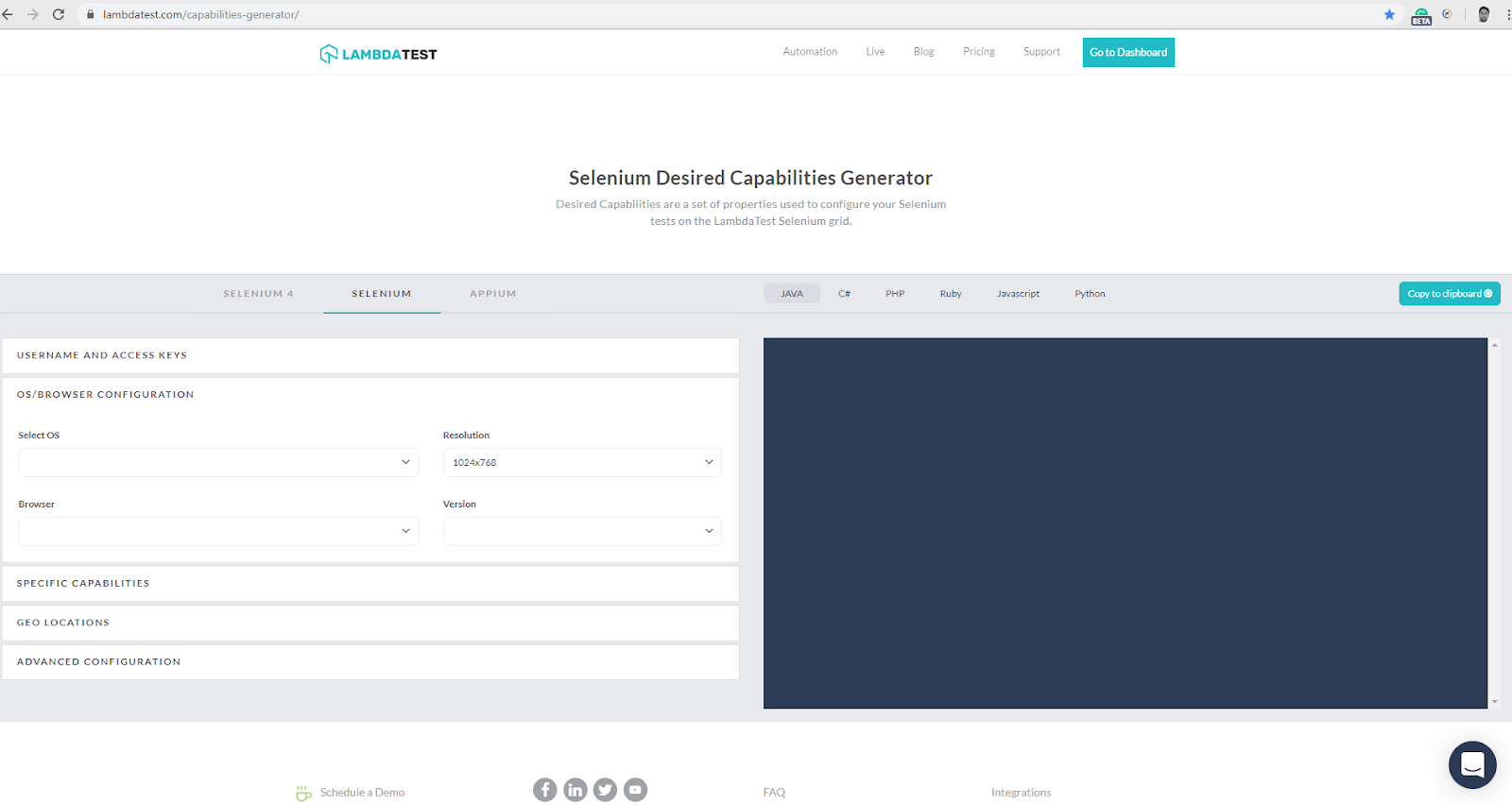
Pick the browser, OS, version, Selenium version, and grid options you need; the generator produces the corresponding capability block. The Selenium 4 tab outputs Options-class snippets with vendor-prefixed keys (goog:chromeOptions, moz:firefoxOptions, LT:Options) so the result drops into a W3C-compliant Selenium 4 codebase without changes. Pair it with the TestMu AI integrations for CI/CD, project management, and collaboration tools to wire the generated config into your pipeline.
Full Example Script Incorporating Desired Capabilities
Below is an end-to-end TestNG sample using Selenium 4 ChromeOptions, parameterized over browser and version through TestNG, and pointed at the TestMu AI Selenium Grid.
package com.testmuai;

import org.openqa.selenium.By;
import org.openqa.selenium.JavascriptExecutor;
import org.openqa.selenium.WebDriver;
import org.openqa.selenium.WebElement;
import org.openqa.selenium.chrome.ChromeOptions;
import org.openqa.selenium.remote.RemoteWebDriver;
import org.testng.annotations.AfterClass;
import org.testng.annotations.BeforeClass;
import org.testng.annotations.BeforeMethod;
import org.testng.annotations.Parameters;
import org.testng.annotations.Test;

import java.net.URL;
import java.time.Duration;
import java.util.HashMap;

public class CapabilitiesDemoTest {

    public static RemoteWebDriver driver = null;
    private final String username = System.getenv("LT_USERNAME");
    private final String accessKey = System.getenv("LT_ACCESS_KEY");
    private final String gridUrl = "https://hub.lambdatest.com/wd/hub";
    boolean status = false;

    @Parameters(value = { "browser", "version" })
    @BeforeClass
    public void setUp(String browser, String version) throws Exception {
        ChromeOptions options = new ChromeOptions();
        options.setBrowserVersion(version);
        options.setPlatformName("Windows 11");

        HashMap<String, Object> ltOptions = new HashMap<>();
        ltOptions.put("username", username);
        ltOptions.put("accessKey", accessKey);
        ltOptions.put("build", "Capabilities Demo");
        ltOptions.put("name", "Selenium 4 Java Sample");
        ltOptions.put("network", true);
        ltOptions.put("visual", true);
        ltOptions.put("video", true);
        ltOptions.put("console", true);
        ltOptions.put("selenium_version", "4.27.0");
        ltOptions.put("timezone", "UTC+05:30");
        ltOptions.put("geoLocation", "IN");
        options.setCapability("LT:Options", ltOptions);

        driver = new RemoteWebDriver(new URL(gridUrl), options);
    }

    @BeforeMethod
    public void openPlayground() {
        driver.get("https://www.testmuai.com/selenium-playground/");
        driver.manage().timeouts().implicitlyWait(Duration.ofSeconds(15));
        driver.manage().timeouts().pageLoadTimeout(Duration.ofSeconds(15));
    }

    @Test
    public void verifyPlaygroundLoaded() {
        WebElement heading = driver.findElement(By.tagName("h1"));
        assert heading.isDisplayed();
        status = true;
    }

    @AfterClass
    public void tearDown() {
        if (driver != null) {
            ((JavascriptExecutor) driver).executeScript("lambda-status=" + status);
            driver.quit();
        }
    }
}
<?xml version="1.0" encoding="UTF-8"?>
<!DOCTYPE suite SYSTEM "https://testng.org/testng-1.0.dtd">
<suite thread-count="3" name="CapabilitiesDemoSuite" parallel="tests">
  <test name="ChromeLatestWin11">
    <parameter name="browser" value="chrome"/>
    <parameter name="version" value="latest"/>
    <classes>
      <class name="com.testmuai.CapabilitiesDemoTest"/>
    </classes>
  </test>
</suite>
Output on the TestMu AI Automation Dashboard
After execution, the TestMu AI dashboard surfaces network logs, command logs, metadata, video recording, and screenshots for the build. The capability values you set (build, name, browserVersion, platformName, LT:Options keys) are echoed back in the build metadata so you can correlate failed runs with the exact capabilities that produced them. For dashboard setup and walkthroughs, see the TestMu AI Selenium capabilities documentation.
Desired Capabilities in Appium for Mobile Automation
Selenium covers desktop browsers. For native mobile apps and mobile browsers we use Appium, which extends the WebDriver protocol to iOS and Android. Appium uses the same desired capabilities concept Selenium does, with one large catch: Appium 2.x requires the appium: prefix on any capability that is not in the W3C standard set.
Capabilities that are part of the W3C standard, such as browserName and platformName, do not need the prefix. Everything else does, including appium:deviceName, appium:platformVersion, appium:app, appium:automationName, appium:appActivity, and appium:appPackage. This is the single largest migration breakage between Appium 1.x and 2.x and is also the most common source of "Capability not recognized" errors after upgrading.
For mobile cross-browser and native-app coverage on real devices instead of simulators, the TestMu AI real device cloud exposes 10,000+ iOS and Android devices over a hosted Appium grid. The capability shape on the grid mirrors Appium 2.x: standard W3C keys at the top level, vendor keys under LT:Options.

Looking to automate mobile apps on real devices? The walkthrough below shows the end-to-end flow.

Example for Desired Capabilities in Appium Testing
When a new automation session is requested, the Appium client sends a JSON object to the Appium server containing the desired capabilities as key-value pairs. Those values tell the Appium driver how to start the session and which device, OS, app, and automation engine to use.
Capabilities can be defined inside a desired capabilities file on the Appium server or passed at session creation from the WebDriver client. The example below uses the Appium 2.x JSON shape with the appium: prefix on non-W3C keys.
{
  "platformName": "Android",
  "appium:platformVersion": "14.0",
  "appium:deviceName": "Samsung Galaxy S24",
  "appium:automationName": "UiAutomator2",
  "appium:app": "/absolute/path/to/app-under-test.apk"
}
This block instructs the Appium driver to start a session on a Samsung Galaxy S24 running Android 14, use the UiAutomator2 automation engine, and install the APK at the given path.
General or Standard Desired Capabilities in Appium
- appium:automationName: Selects the automation engine. Common values:
UiAutomator2orEspressofor Android,XCUITestfor iOS. - platformName: Mobile OS,
iOSorAndroid. W3C standard, no prefix. - appium:platformVersion: Mobile OS version on which the test should run.
- appium:deviceName: Target mobile device name, for example
Samsung Galaxy S24. - appium:app: Absolute local path or HTTP URL to the application under test.
- browserName: Use this for mobile web tests, for example
Safarion iOS orChromeon Android. W3C standard, no prefix. Leave empty for native app tests. - appium:language: Sets the device language for Android or iOS.
- appium:newCommandTimeout: Seconds Appium waits for a new command before ending an idle session.
Other general capabilities include appium:noReset, appium:fullReset, and appium:eventTimings. Refer to the official Appium docs for the complete list of vendor-prefixed keys.
Desired Capabilities in Appium for Android
- appium:appActivity: Android activity to launch from the package, for example
.MainActivityor.Settings. - appium:appPackage: Java package of the Android app to launch, for example
com.example.android.testApp. Defaults to the value in the package manifest. - appium:appWaitActivity: Activity to wait for after launch.
- appium:appWaitPackage: Java package to wait for after launch.
- appium:appWaitDuration: Milliseconds to wait for the appWaitActivity to launch.
- appium:deviceReadyTimeout: Seconds the driver waits for the device under test to become ready. Other Android-only keys include
appium:adbPort,appium:systemPort,appium:remoteAdbHost, andappium:androidInstallPath.
Desired Capabilities in Appium for iOS
- appium:calendarFormat: Calendar format for the iOS simulator, for example
Gregorian. - appium:launchTimeout: Milliseconds the driver waits before treating an iOS session as failed.
- appium:autoAcceptAlerts: Auto-accepts iOS system alerts (location, contacts, notifications).
- appium:autoDismissAlerts: Auto-dismisses iOS system alerts when they appear.
- appium:safariInitialUrl: Initial URL Safari opens to when launched.
- appium:appName: Display name of the application under test.
Other iOS-only keys include appium:safariAllowPopups and appium:customSSLCert. The pattern is consistent: any key not in the W3C standard set takes the appium: prefix in Appium 2.x.
TestMu AI Capabilities Generator for Appium
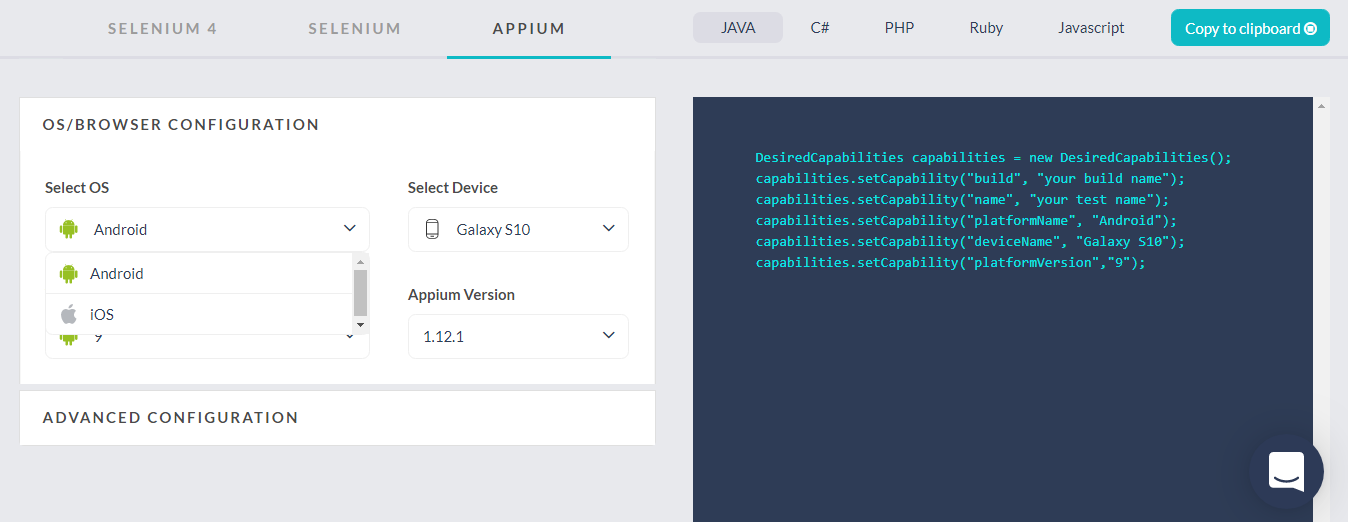
The TestMu AI Capabilities Generator also covers Appium under its Appium tab. You can pick the OS (Android or iOS), OS version, device model, automation engine, and app source, and the generator returns the corresponding capability block in your chosen language with the correct appium: prefixes already applied.
Configure your mobile automation tests on the TestMu AI cloud grid using the real device capabilities generator.
Final Thoughts
Desired Capabilities are the contract between a Selenium or Appium client and the WebDriver session: which browser, which version, which platform, which vendor extensions. The mechanism still exists in Selenium 4, but the legacy DesiredCapabilities class is deprecated. New code should use the browser-specific Options classes (ChromeOptions, FirefoxOptions, EdgeOptions, SafariOptions) and group cloud-grid keys under a vendor namespace such as LT:Options.
Three concrete next steps:
- Open one Selenium 3 test file from your suite and convert its DesiredCapabilities block to the matching Options class using the migration table above.
- Generate a Selenium 4 capability block for your target browser plus OS pair from the TestMu AI Capabilities Generator and run it against the cloud Selenium Grid.
- For mobile, audit your Appium 1.x capabilities for any non-W3C keys that need the
appium:prefix before upgrading to Appium 2.x.
If you are preparing for an interview on this topic, the Selenium interview questions guide covers capability and Options-class questions in detail.
Note: This article was researched and drafted with AI assistance, then reviewed, fact-checked, and published by Ramit Dhamija, Community Contributor at TestMu AI, whose listed expertise includes Selenium and Automation Testing. Every code snippet, capability key, and product claim was verified against the official Selenium and Appium documentation. Read our editorial process and AI use policy for details.
Author

Ramit Dhamija
Blogs: 10


Ramit Dhamija is a DevOps Engineer with 6+ years of experience in software testing, Java-based test automation, and cloud infrastructure. At TestMu AI, he contributed to automation frameworks that enhanced cross-browser testing reliability. Skilled in Java, Selenium, Kubernetes, and AWS, he also holds certifications including CKA and ISTQB. Ramit earned his MCA in Computer Science from Birla Institute of Technology, Mesra, and specializes in bridging QA practices with modern DevOps pipelines.
Reviewer

Srinivasan Sekar
Reviewer
Srinivasan Sekar is Director of Engineering at TestMu AI (formerly LambdaTest), where he leads engineering and open-source initiatives behind the Selenium and Appium automation grid and owns TestMu AI's MCP Server. A committer to Appium and a contributor to Selenium, WebdriverIO, Taiko, and AppiumTestDistribution, he brings over 15 years of experience in quality engineering and open-source technologies. He is the author of the Apress book 'The MCP Standard: A Developer's Guide to Building Universal AI Tools with the Model Context Protocol,' a Certified Kubernetes and Cloud Native Associate, and an international conference speaker. Before TestMu AI he spent over eight years at Thoughtworks as a Principal Consultant and Quality Architect. Srinivasan holds a B.Tech in Information Technology from Anna University.


Desired Capabilities in Selenium FAQs
Did you find this page helpful?
More Related Blogs
TestMu AI forEnterprise
Get access to solutions built on Enterprise
grade security, privacy, & compliance
- Advanced access controls
- Advanced data retention rules
- Advanced Local Testing
- Premium Support options
- Early access to beta features
- Private Slack Channel
- Unlimited Manual Accessibility DevTools Tests