

Next-Gen App & Browser Testing Cloud
Trusted by 2 Mn+ QAs & Devs to accelerate their release cycles


On This Page

Cypress End to End Testing Tutorial: A Detailed Guide
Cypress End-to-end testing is a tool for web apps. Read now for efficient browser automation and reliable tests.

Kailash Pathak
January 30, 2026
Software applications nowadays have become increasingly complex, and maximizing test coverage is one of the key aspects for every testing team. Testers globally rely upon different testing types using testing tools and frameworks. But there is an urgent need to test software systems (along with all their sub-systems) from beginning to end.
End to End (E2E) testing permits testing teams to drive quality throughout the pipeline by replicating critical real-user scenarios. In addition, it enables teams to validate software systems and their sub-systems for data integrity. End to End testing isn’t easy.
Cypress makes setting up, writing, running, and debugging tests easy. We usually neglect End to End testing because it requires a large part of the effort to implement. Performing End to End tests using the manual approach can be a tedious and error-prone task. With Cypress visual regression testing, you can verify the graphical component of a web application.
Cypress is one of the options when it comes to End to End testing. With Cypress, you don’t need to install ten different things to set up your test suite. In minutes, you can start writing your test cases with the help of Cypress API. Cypress runs test cases inside the browser, which makes it different from other frameworks (e.g., Selenium). Cypress uses Chai, which is a popular assertion library. It also uses Mocha, a framework that provides the syntax for testing in a Behavior-Driven Development (BDD) style.
In this Cypress tutorial on End to End testing, we will deep dive into performing Cypress End to End testing on a local Cypress grid and over a cloud Cypress grid like TestMu AI.
So, let’s get started!
What is End to End testing?
End to End (E2E) testing is a way of testing an application from start to finish using a testing flow. The flows are predefined according to the functions/conditions that need to be checked for the application to run successfully. End to end flows are usually based on how users interact with the application and perform various actions on it.
The E2E test flow goes through every operation within the application scope and tests the correct functionality of all connected peripherals within the application. To perform E2E tests you need to prepare a well documented and structured test flow. The test flow must include the specific requirements of the testing scope, clearly defined functionality for the application, the testing method for testing the specified requirements and acceptance criteria for those.
With end to end testing, we can verify that all the necessary elements are being tested and that the connected peripherals are all working together to accomplish the application’s purpose.
What is Cypress?
Cypress is a Java-Script based end to end testing framework. It is based on Mocha JS and is built on top of it. Cypress gives the testers the opportunity to run their tests in real-time using TDD/BDD assertion library and real-time browser interaction.
End-to-end automation testing with the help of cypress simulates real-world human interactions within the UI part of the browser. Once the test executions have been completed, a tester can perform the test steps again as a real-time intervention.
This allows the tester to debug as well as document or analyze the test results.
In addition to the other features like automatic waiting and real-time reloading, cypress saves the time and effort that would otherwise go into legacy testing methods.
Why End to End Testing?
Most of the End to End application testing used to be performed manually, with a QA team understanding the requirements, making test cases, executing the test cases, and recording the results. In modern software development, automation has become the foundational part of testing.
The software can and must be tested on many tiers. When you design a system, you begin with a small piece of software, for which unit testing is sufficient. However, testing software at the unit level isn’t enough, and it does not guarantee that these small units should work perfectly when combined.
This is where integration testing comes into the picture. In integration tests, two or more components are used together in a test, and the result is validated. Though all these tests run perfectly fine, integration testing can’t guarantee that the system will work as expected. This is where End to End testing comes into the picture.
End to End testing is closest to real user testing. Cypress is one of the best automation testing frameworks for E2E testing because Cypress runs the application in the browser, thereby providing the experience as if the application is running inside the actual browser. The closer the test is to mimic the user, the more likely it will locate issues that the user(s) might experience.
To understand End to End testing, let’s deep dive into the test automation pyramid introduced by Mike Cohn. It makes testing efficient. All levels of testing mentioned in this pyramid we usually do when running automated Cypress testing.
In automation, we start by automation of lower units; once they are ready, we write our integration automation scripts. Finally, once the integration test is done, we do End to End testing to ensure our script works correctly together, including third-party code.
Layers of the Testing Pyramid
Test pyramid is an empirical concept formulated by Mike Cohn and was introduced in his book, ‘Agile Estimating and Planning’. The test suite is organized into three layers – Unit, Integration, and E2E testing. Let’s learn more about them.
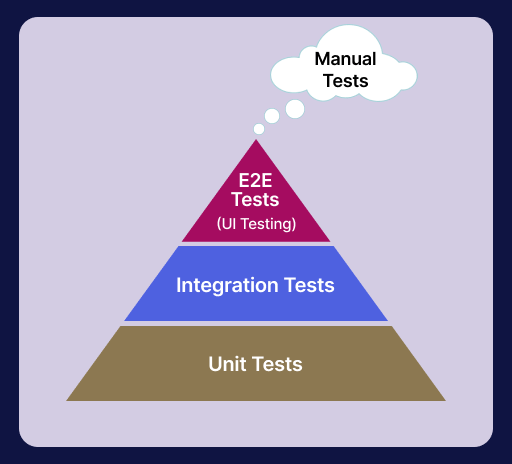
- Unit Tests
- Integration Tests
- End to End Tests
Unit testing is a technique where individual modules are tested to determine whether they are suitable for use. The main aim of unit testing includes segregating each part of the system and ensuring that the individual components are working efficiently.
Integration testing specializes in the interaction between two or more components used together in a test, and the result is validated. They are generally slower to run because it involves a complex setup.
Finding the problem could be a bit more complicated if integration tests fail because the failure range is greater. They’re also harder to code and maintain because they have more advanced mocking and increased testing scope. You can refer to this JUnit 5 Mockito tutorial to learn more about mocking.
End to End testing is a technique used to test whether the flow of an application right from start to end is behaving as expected.

Austin Siewert
CEO, Vercel
Discovered @TestMu AI yesterday. Best browser testing tool I've found for my use case. Great pricing model for the limited testing I do 👏
2M+ Devs and QAs rely on TestMu AI
Deliver immersive digital experiences with Next-Generation Mobile Apps and Cross Browser Testing Cloud

Benefits of End to End Testing
There are several benefits of End to End testing. When discussing the worth of End to End testing for a business, the benefits are often boiled down to some key points.
- Testing from an end-user’s perspectiveIn unit tests, you verify each component in isolation, and end to end testing examines the application from the perspective of the end-users.
- Health of the applicationIn End to End testing, the application is tested at all the layers – the business, data, integration, and presentation. This helps ensure the application being tested is free from bugs and works seamlessly across the lifecycle.
- Increased test coverageEnd to End tests can verify that each one of an application’s dependencies works correctly together, including third-party code.
- Decrease future risksIn End to End testing, the application is tested in-depth after every sprint and iteration. This helps testers locate defects faster and earlier in the life cycle. The chances of application failure in the testing (or production) process are prominently decreased.
- Increases Confidence in product qualityEnd to End testing additionally increases the confidence in the functioning and performance of the application as the application is tested across multiple devices, browsers, and operating systems comprehensively.
Since End to End testing validates the health of your application at every level, it keeps the health and well-being of your application at all times. Testing applications at the unit level rather than at the integration level provides a much-needed perspective on software overall performance throughout different levels and environments.
End to End testing helps us to test the entire application, both at the API and UI layers, from start to finish. Using automated UI testing and manual testing practices aids in maximizing test coverage. You can learn more about it through this blog on how to move from manual testing to automation.
Detection of bugs and issues sooner within the application development lifecycle minimizes testing efforts and costs. Extensive testing at every step ensures fewer bugs in the system and earlier identification of breakdowns in the software. This will reduce the repetition of tests and, therefore, ultimately, the associated effort, time, and costs.
End to End web application testing frameworks
Let’s look at some of the popular web frameworks for End to End testing.
Cypress
Cypress is a next-generation front-end testing framework built with modern JavaScript frameworks. Cypress comes with a bundle of test runners and a dashboard service that records and displays test results.
Cypress is most often compared to Selenium; however, Cypress is both fundamentally and architecturally different. Cypress is not coercible by the same restrictions as Selenium. Cypress allows us to write several types of tests: end-to-end, integration, and even unit tests. You can learn more about the differences with this Cypress vs Selenium comparison.
Cypress runs tests inside the browser, giving results almost identical to what the users would experience when using the application.
Cypress Trends on GitHub
The data below is gathered from the official site of Cypress GitHub repository:
- Stars: 39.5k
- Forks: 2.5k
- Used By: 490k
- Releases: 273
- Contributors: 368

If you’re a developer or a tester, the Cypress 101 certification will prepare you to write tests faster and with greater confidence by giving you a clear understanding of the fundamentals of Cypress End to End testing.
WebdriverIO
WebdriverIO is a progressive automation framework built to automate modern web and mobile applications.
It simplifies the interaction with the app and provides a set of plugins that help you create a scalable, robust, and stable test suite.
WebdriverIO Trends on GitHub
The data below is gathered from the official site of WebdriverIO GitHub repository:
- Stars: 7.6k
- Forks: 2.1k
- Used By: 43.1k
- Releases: 209
- Contributors: 424
Nightwatch.js
Nightwatch.js is an integrated, easy-to-use End to End testing solution for web applications and websites, written in Node.js. It uses the W3C WebDriver API to drive browsers and perform commands and assertions on DOM elements.
Nightwatch.js Trends on GitHub
The data below is gathered from the official site of Nightwatch.js GitHub repository:
- Stars: 11.1k
- Forks: 1.1k
- Used By: 135k
- Releases: 182
- Contributors: 94
Protractor
Protractor is an End to End test framework for Angular and AngularJS applications. Protractor runs tests against your application running in a real browser, interacting with it as a user would.
Protractor Trends on GitHub
The data below is gathered from the official site of Protractor GitHub repository:
- Stars: 8.8k
- Forks: 2.4k
- Used By: 1.8m
- Contributors: 260
TestCafe
TestCafe framework is an open-source automation framework built with NodeJS. It supports JavaScript, TypeScript, and CoffeeScript out of the box, which means zero configuration is needed. TestCafe is distributed under an open-source MIT license and is managed by DevExpress.
TestCafe Trends on GitHub
The data below is gathered from the official site of TestCafe GitHub repository:
- Stars: 9.4k
- Forks: 655
- Used By: 10.6k
- Releases: 351
- Contributors: 112

Benefits of Cypress End to End Testing
Before we look at the benefits of performing Cypress End to End testing, let’s look at a simple Cypress End to End testing scenario:
Suppose you have to login into the application, and search for some product on the site https://ecommerce-playground.lambdatest.io/ and then log out from the application. Here are the steps for the above scenario, which cover End to End flow from Log-in to → Product search → Logout.
Test Scenario
- Open the URL https://ecommerce-playground.lambdatest.io/index.php?route=account/login.
- Enter email “[email protected]”.
- Enter password “lambdatest”.
- Click on Login.
- Search for the product “VAIO”.
- Verify the correct product is searched.
- Click on My Account.
- Click on the “Logout” link.
- User logs out from the application.
Now let us look at the benefits of Cypress End to End testing. Cypress is a fast, easy, and reliable End to End testing framework. Cypress tests anything that runs on a web browser.
Traditionally, End to End tests are slower and more expensive. With Cypress version 9.2.0, there is a significant improvement in the End to End testing experience. Now we can automate the whole testing process from unit level testing to system testing. Using the dashboard feature of Cypress, we can track our test results easily.
Cypress is very easy to set up. Just install and start writing the test cases. You can integrate custom reporters with Cypress to view the results.
It has a dashboard feature for CI integration. You can record test results in Dashboard when running Cypress tests from your CI provider.
As per my experience, here are some of the awesome features of Cypress End to End testing:
- Easy to set upYou can install Cypress using NPM or their desktop application too. Also, you don’t need to install any additional libraries, dependencies, drivers, servers, etc., as you have to do in the case of Selenium. Cypress is very easy to set up compared to other automation testing tools (or frameworks).
- Write test case fasterCypress is faster, and within a few min, you can start to write the test case. Cypress runs tests inside the browser, giving results almost identical to what the users will experience. It also has access to the network layer over the application, which allows us to control all the network requests.
- Automatic waitingIn Cypress, we don’t need to add waits or sleeps to your tests. Cypress automatically waits for commands and assertions before moving on to the next step. Cypress not only waits for elements to be visible or AJAX to load but also for different requests to be sent or returned. You can go through this tutorial on the types of Waits in Selenium to learn more about waits.
- Real-time reloadsIn Cypress, you don’t need to reload the test case. As you make changes to your test case, it is intelligent enough to automatically trigger and run the test. This saves a lot of time in other tools we have to save and rerun the test case
- Screenshots and videosScreenshots are captured automatically on failure, or videos of your entire test suite when run headlessly, and this is extremely useful when tests are failed. Since we can watch what happens when a series of test steps are running, it becomes very easy to track down the exact step when some test case fails.
- Informative DashboardUsing the Cypress dashboard, we can run our test cases in CI/CD providers and record test results. The Dashboard provides you insight into what happened when your tests ran. The dashboard lets you see the number of failed, passing, pending, skipped tests and the entire stack trace of failed tests. The screenshot captures itself when any test case fails, and by running the video, we can see the step of failure.
- Integration with cloud testing platformWe can integrate Cypress with the various cloud-providing testing platforms. One of them is TestMu AI. Using Cypress automation tools like TestMu AI, you can execute & analyze Cypress test scripts online. You can run End to End tests on a blazing-fast Cypress test execution cloud. TestMu AI is a reliable, scalable, secure, and high-performing test execution platform built for scale. Perform Cypress UI testing on 40+ different browsers and browser versions, including headless versions.

Note: Run End-to-End Cypress tests on cloud grid. Try TestMu AI Now!
Getting Started with Cypress End to End Testing
Follow the below-mentioned steps to create a new project for Cypress automation testing.
Step 1: Create a folder and generate package.json.
- Create a project, here naming it as Cypress_Lambdatest.
- Use the npm init command in the terminal to create a package.json file
Step 2: Install Cypress.
To install Cypress, run this command in the newly created folder:
npm install cypress —save-dev
This command will install Cypress locally as a dev dependency for your project.
OR
yarn add cypress --dev
This command will install Cypress locally as a dev dependency for your project.
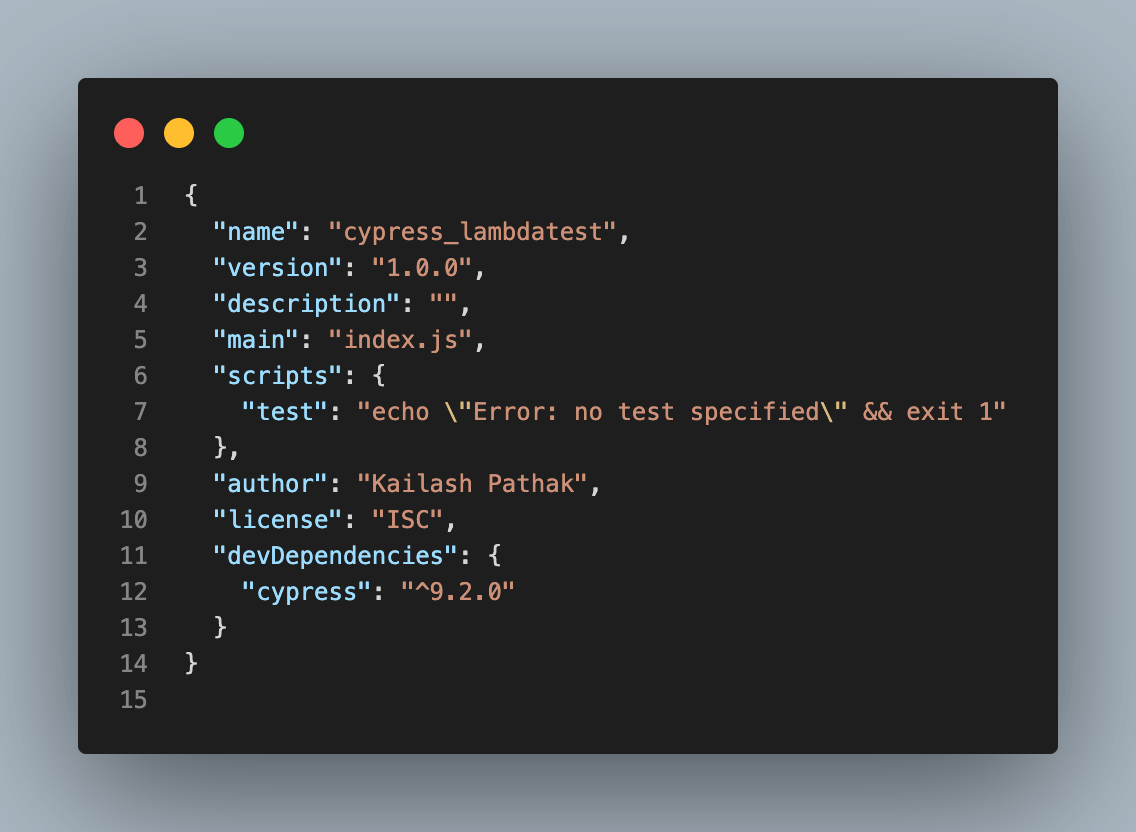
Once installed, Cypress version 9.2.0 is reflected, as seen below. The latest version of Cypress is 10.3.0
The default folder structure of Cypress is shown below. You can create test cases under the folder “integration”.
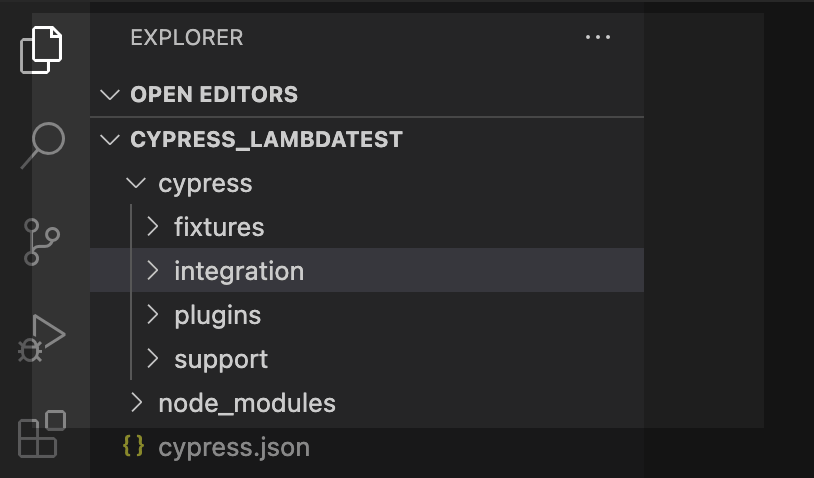
Project structure of Cypress
From the screenshots, you can see that Cypress has created a default folder hierarchy when it opens the first time. Below are the details for each of these folders/files created by Cypress.
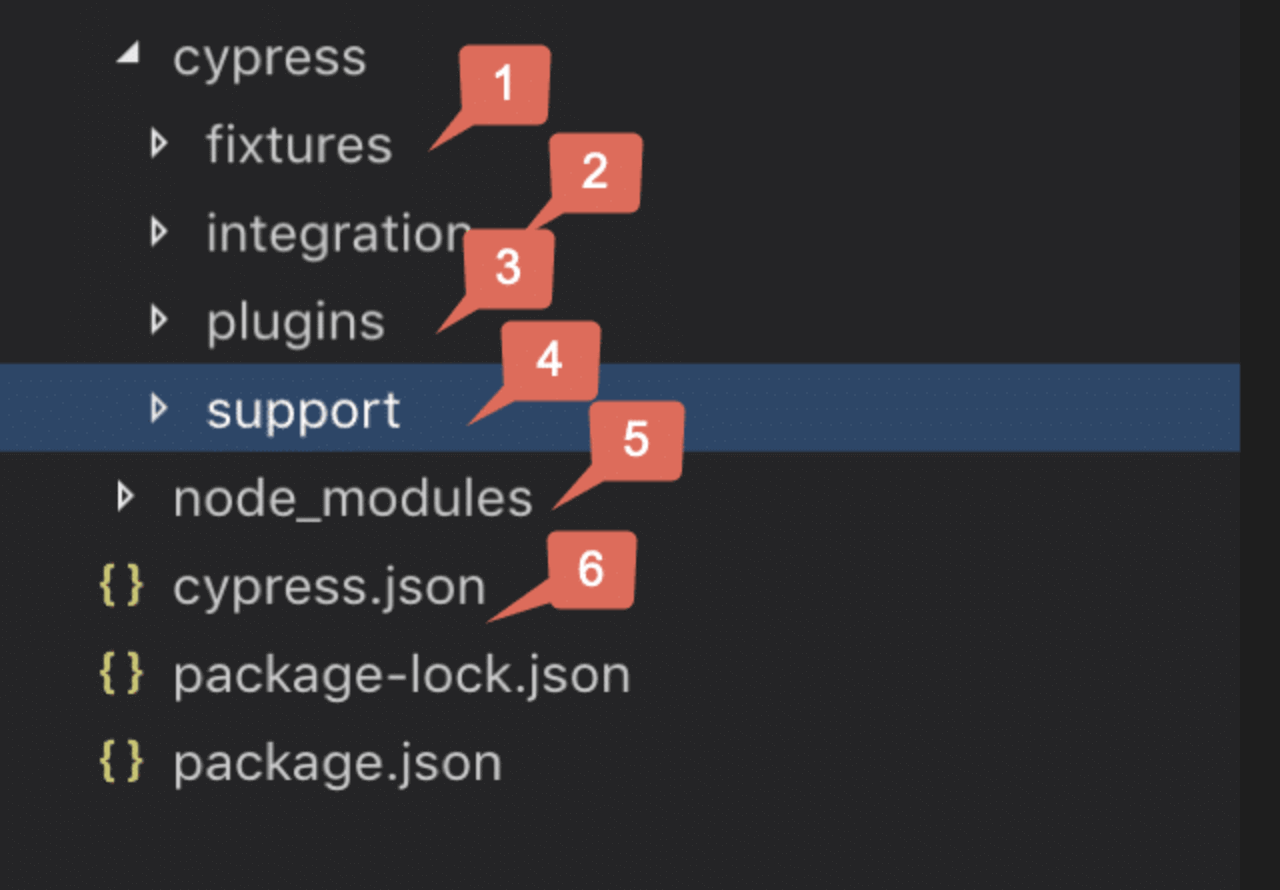
- Fixtures: Fixtures are external pieces of static data that your tests can use. It is recommended not to complex code data in the test case. It should be driven from an external source like CSV, HTML, or JSON.
- Integration: This is the main folder to store all your tests. We add the Basic, End to End Test, Visual or Cucumber test here. All your spec files will be here.
- Plugins: The Plugin folder contains the plugins or listeners. Cypress will automatically include the plugins file “cypress/plugins/index.js”.
- Support: There are two files inside the support folder: commands.js and index.js
- command.js: is the file where you add your commonly used functions and custom commands. It includes functions you may call to use in different tests, such as the login function. Cypress created some functions for you, and you can override them here if you want.
- index.js: This file runs before every single spec file. This file is a great place to put global configuration and behavior that modifies Cypress like before or before. By default, it imports only commands.js, but you can import or require other files to keep things organized.
- Node_Modules: All the node packages will be installed in the node_modules directory and available in all the test files. So, in a nutshell, this is the folder where NPM installs all the project dependencies.
- Cypress.json: It is used to store different configurations. e.g., timeout, base URL, test files, or any other configurations we want to override for tweaking the behavior of Cypress. We can also manage the customized folder structure because it is part of, by default, Cypress Configurations.
- command.js: is the file where you add your commonly used functions and custom commands. It includes functions you may call to use in different tests, such as the login function. Cypress created some functions for you, and you can override them here if you want.
- index.js: This file runs before every single spec file. This file is a great place to put global configuration and behavior that modifies Cypress like before or before. By default, it imports only commands.js, but you can import or require other files to keep things organized.
Apart from the above four folders, we have some more folders like Screenshot, Download, and Video to store different related files, which we will discuss later.
Basic constructs of Cypress
Cypress has adopted Mocha’s syntax for developing test cases. Below are a few main constructs that are majorly used in Cypress test development:
- describe(): It is used to group our tests. It takes two arguments, the first is the name of the test group, and the second is a callback function.
- it(): It is used for individual test cases. It takes two arguments, a string explaining what the test should do and a callback function that contains our actual test.
- before(): It runs once before all tests in the block.
- after(): It runs once after all tests in the block.
- beforeEach(): It runs before each test in the block.
- afterEach(): It runs after each test in the block.
- .only(): It is used to run a specified suite or test; append “.only” against the .it() block.
- .skip(): It is used to skip a specified suite or test; append “.skip()” against the .it() block.
Demonstration: Cypress End to End Testing
Let’s create a new folder under the integration folder named “cypress_lambdatest” to perform Cypress End to End testing.
Cypress End to End Testing: Case Example 1
Create the first spec with the name login_searchproduct.spec.js under the folder TestMu AI.
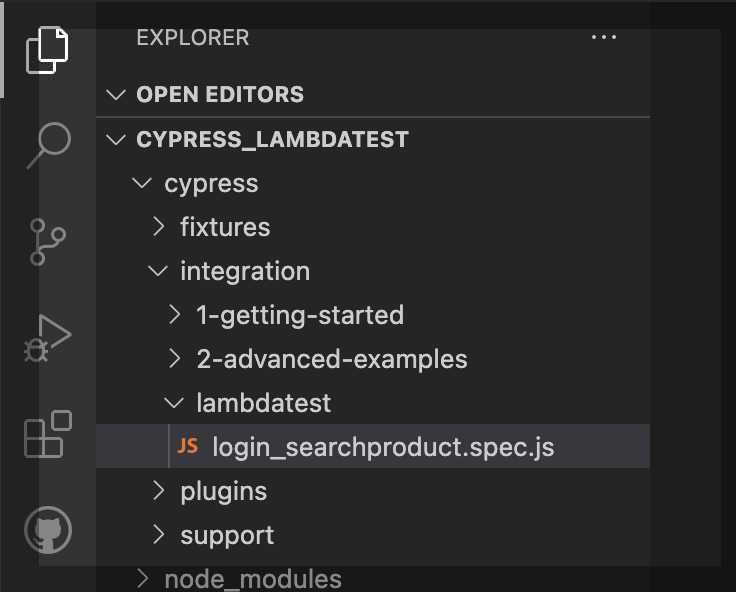
Write the script below in the login_searchproduct.spec.js file, which covers login into the application and searching for the product. After the search, verify the correct product should be displayed.
In the code snippet below:
- First, we open the site URL using cy.visit().
- Second, it() block is used for log-in into the application by entering email and password.
- Third, it() block is used for searching the product, and the last it() block is used for searching the product.
/// <reference types="cypress" />
it("Open the Url", () => {
 cy.visit(
   "https://ecommerce-playground.lambdatest.io/index.php?route=account/login"
 );
});
it("Login into the application", () => {
 cy.get('[id="input-email"]').type("[email protected]");
 cy.get('[id="input-password"]').type("lambdatest");
 cy.get('[type="submit"]').eq(0).click();
});
it("Search the Product", () => {
 cy.get('[name="search"]').eq(0).type("VAIO");
 cy.get('[type="submit"]').eq(0).click();
});
it("Verify Product after search ", () => {
 cy.contains("Sony VAIO");
});
Code Walkthrough
A new Cypress chain always starts with cy.[command], where what is yielded by the command establishes what other commands can be called next (chained).
Some methods, such as cy.get() or cy.contains(), yield a DOM element, allowing further commands to be chained onto them (assuming they expect a DOM subject) like .click() or even cy.contains() again
Cypress End to End Testing: Case Example 2
Create the second spec with the name ScrollAnd_ClickProduct.spec.js under the folder TestMu AI. Log in to → scroll to the bottom → and click on the product.
In the code snippet below:
- First, we open the site URL using cy.visit().
- Second, it() block is used for log-in into the application by entering email and password.
- Third, it() block will click on the logo of TestMu AI.
- Fourth, it() block will scroll to the particular product and click on it.
/// <reference types="cypress" />
it("Open the Url", () => {
 cy.visit(
   "https://ecommerce-playground.lambdatest.io/index.php?route=account/login"
 );
});
it("Login into the application", () => {
 cy.get('[id="input-email"]').type("[email protected]");
 cy.get('[id="input-password"]').type("lambdatest");
 cy.get('[type="submit"]').eq(0).click();
});
it("Click on Lambdatest Logo", () => {
 cy.get('[title="Poco Electro"]').click();
});
it("Scroll to bottom and Click on Product 'iPod Touch' ", () => {
 cy.get('[title="iPod Touch"]').eq(0).scrollIntoView().click();
});
How to perform Cypress End to End Testing on local Cypress Grid?
You can run the test case from the command line or use Cypress runner. Let’s run test cases using Cypress runner. To open the Cypress test runner, run the following command.
yarn run cypress open
The above command will open the Cypress test runner with the existing test cases. You can select the browser on which you want to run the test case.
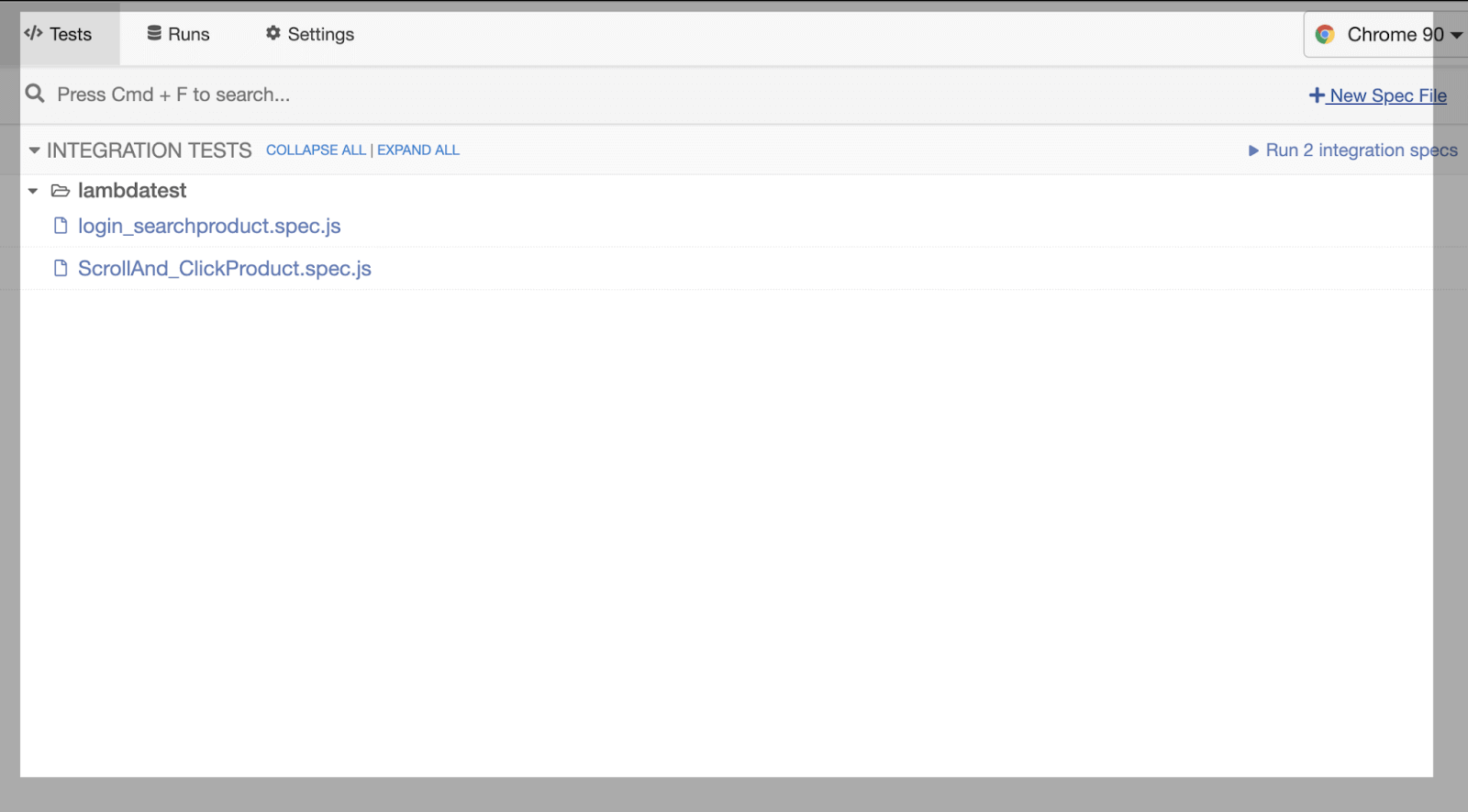
Performing first Cypress End to End Testing on local Cypress Grid
Clicking on the first .spec, the first test case starts executing. Below is a screenshot of when the test case ran successfully.
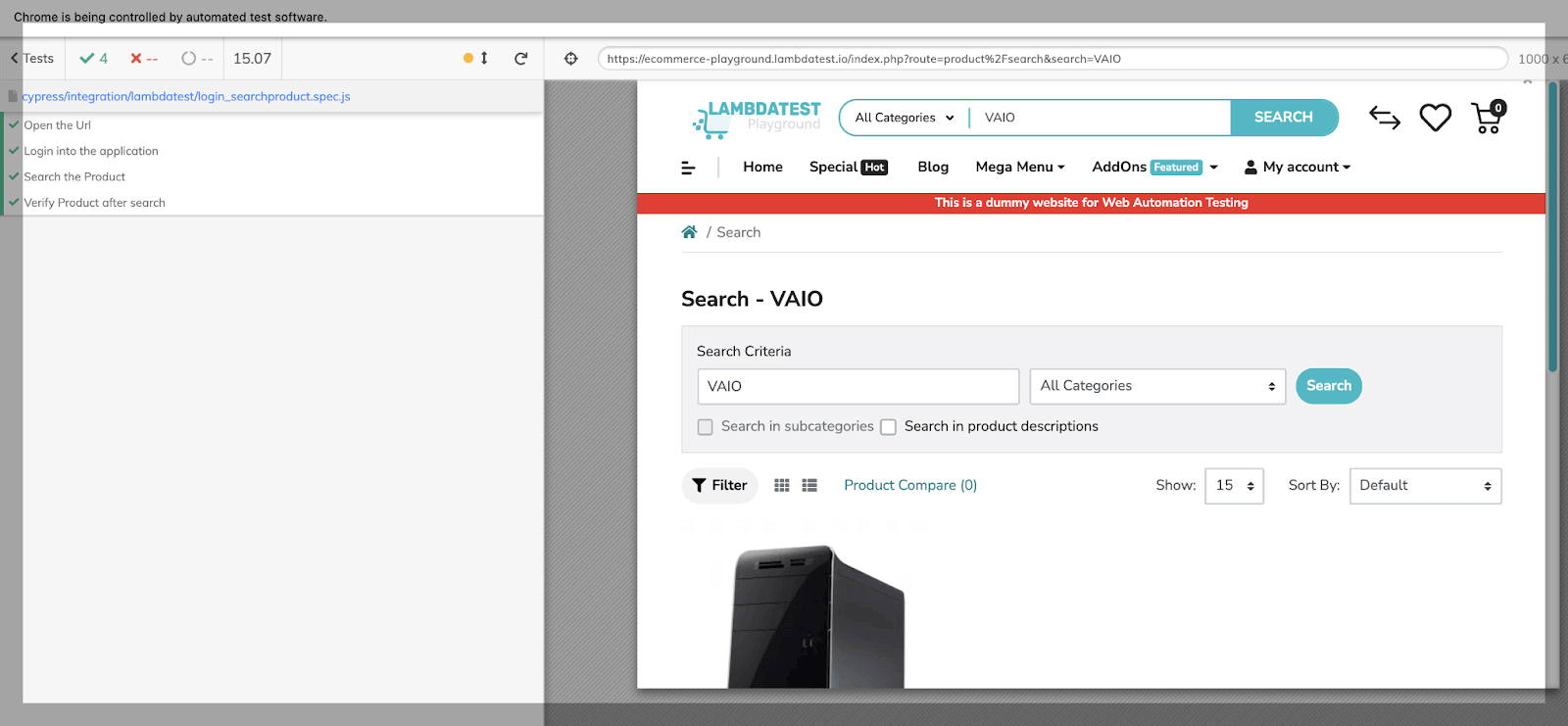
Performing second Cypress End to End Testing on local Cypress Grid
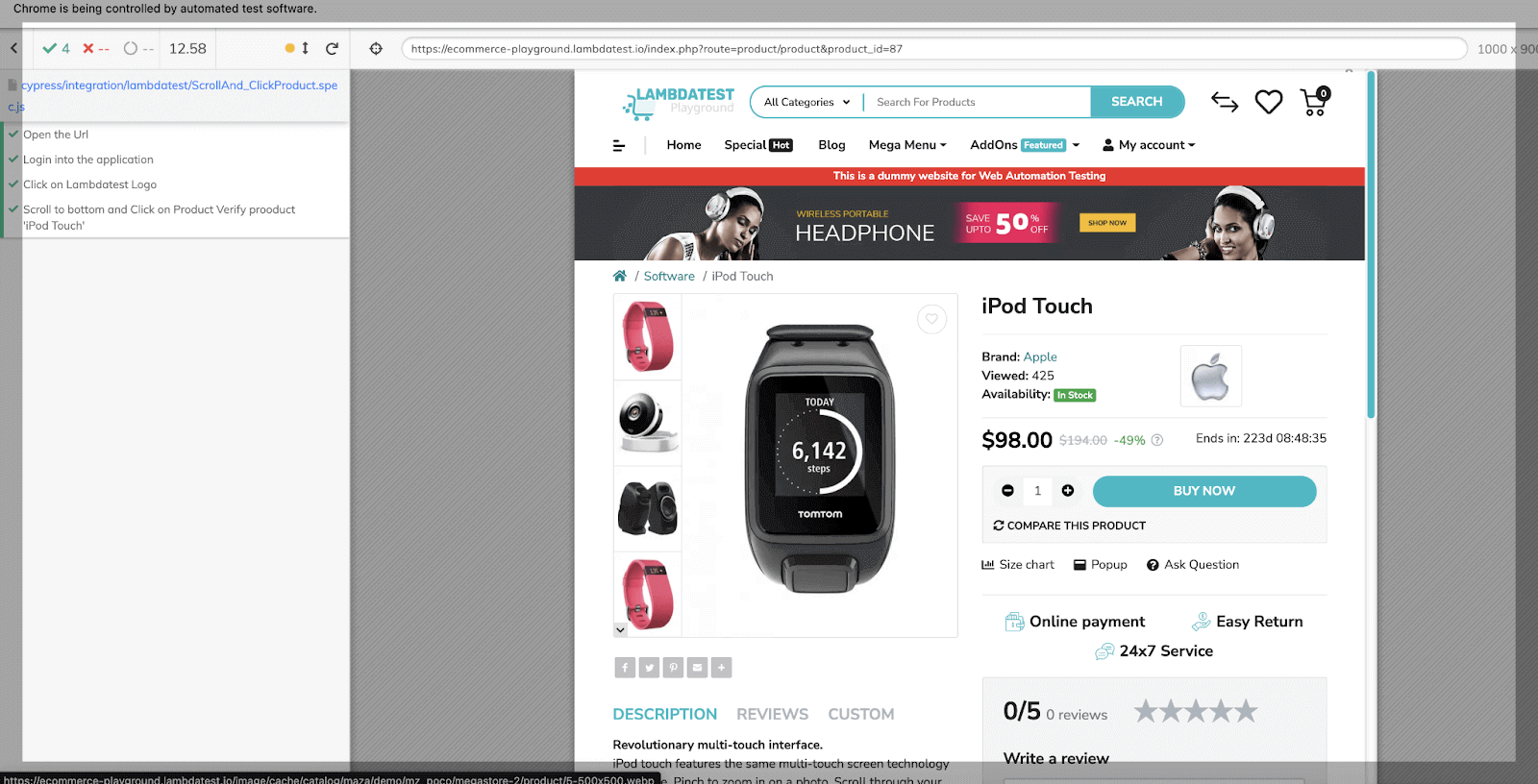
Clicking on the second .spec, the second test case starts executing. In the below screenshot, we can see products are loading.
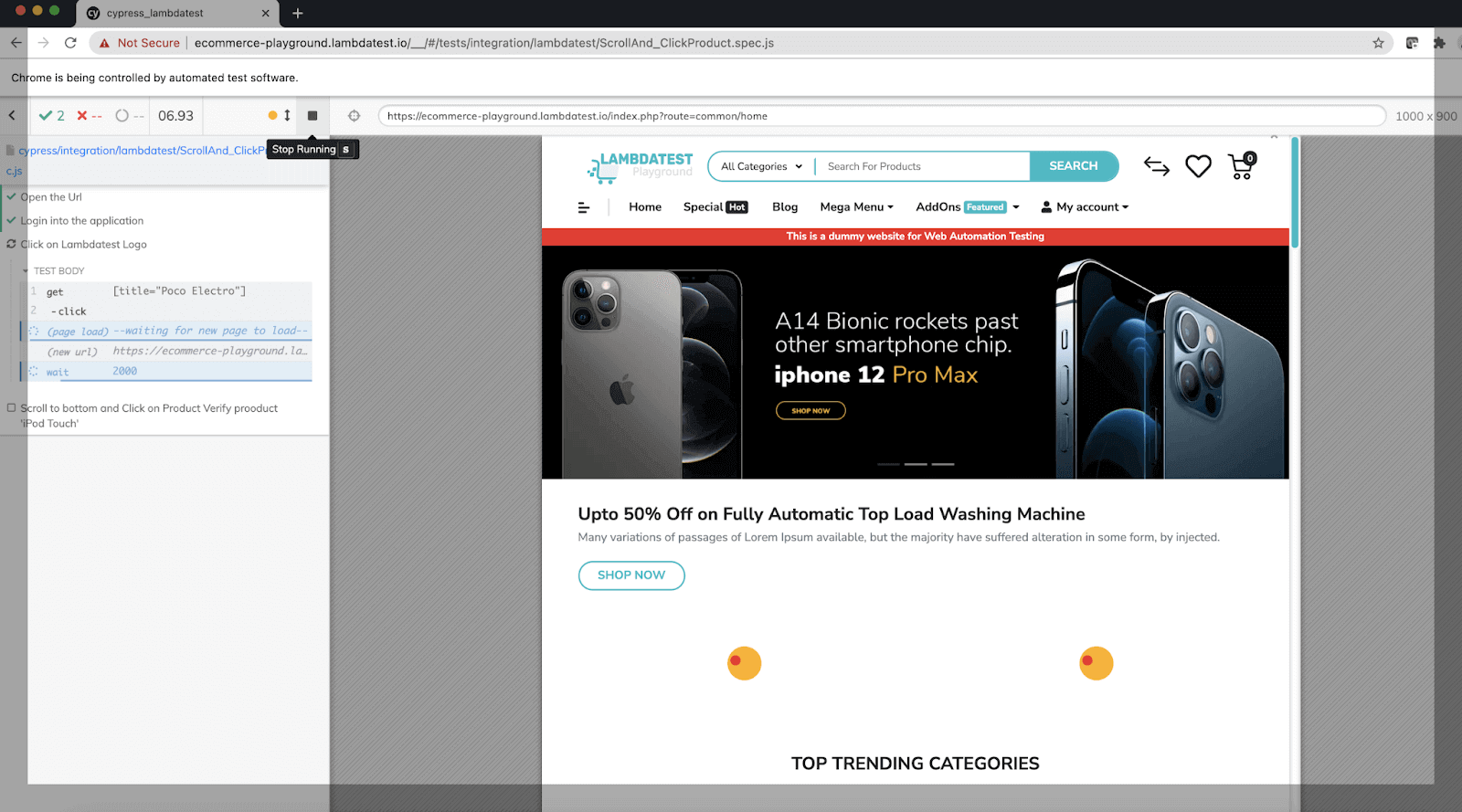
In the below screenshot the test case ran successfully.
How to perform Cypress End to End Testing on cloud Cypress Grid?
We have performed Cypress End to End testing on the local Cypress Grid. We can perform Cypress parallel testing on multiple browsers, versions, and operating systems using the cloud platform. Cloud-based platforms like TestMu AI allows you to automate web testing with Cypress on an online browser farm of real browsers and OS. We can perform Cypress End to End testing on a blazing fast test execution cloud.
TestMu AI offers high-scale parallelization with easy integration with CI/CD pipeline. Cypress test results will appear in real-time through the lambdatest-Cypress CLI. Once all test cases are executed, you can see the Cypress test results on the TestMu AI Dashboard. On TestMu AI, we can also see screenshots, videos, and logs for all test cases.
You can also Subscribe to the TestMu AI YouTube Channel and stay updated with the latest tutorials around automated browser testing, Selenium testing, CI/CD, and more.
Step-up lambdatest for Cypress test case execution
Step 1: Install the CLI.
Install the TestMu AI using Cypress CLI command via npm. TestMu AI’s command-line interface allows us to run your Cypress tests on TestMu AI.
npm install -g lambdatest-cypress-cli
Step 2: Generate lambdatest-config.json.
Under the root folder, configure the browsers that we want to run the tests. Use the init command to generate a sample lambdatest-config.json file or create one from scratch. Use the below command.
lambdatest-cypress init
In the generated lambdatest-config.json file, pass the below information.
Fill required values in the section lambdatest_auth, browsers, and run_settings to run your tests.
{
 "lambdatest_auth": {
   "username": "username",
   "access_key": "access_key"
 },
 "browsers": [
   {
     "browser": "Chrome",
     "platform": "Windows 10",
     "versions": ["latest-1"]
   },
   {
     "browser": "Firefox",
     "platform": "Windows 10",
     "versions": ["latest-1"]
   }
 ],
 "run_settings": {
   "cypress_config_file": "cypress.json",
   "build_name": "build-name",
   "parallels": 2,
   "specs": "./cypress/integration/lambdatest/*.spec.js",
   "ignore_files": "",
   "feature_file_suppport": false,
   "network": false,
   "headless": false,
   "reporter_config_file": "",
   "npm_dependencies": {
     "cypress": "9.2.0"
   }
 },
 "tunnel_settings": {
   "tunnel": false,
   "tunnel_name": null
 }
}
Note: Cut test execution time with Cypress Parallel testing. Try TestMu AI Now!
How to perform Cypress End to End Testing in Parallel on cloud Cypress Grid? Run the below command to perform Cypress UI automation on TestMu AI.
lambdatest-cypress run
As we run the above command, test case execution starts on your local and parallelly on the TestMu AI platform.
Cypress End to End Testing Report on local environment
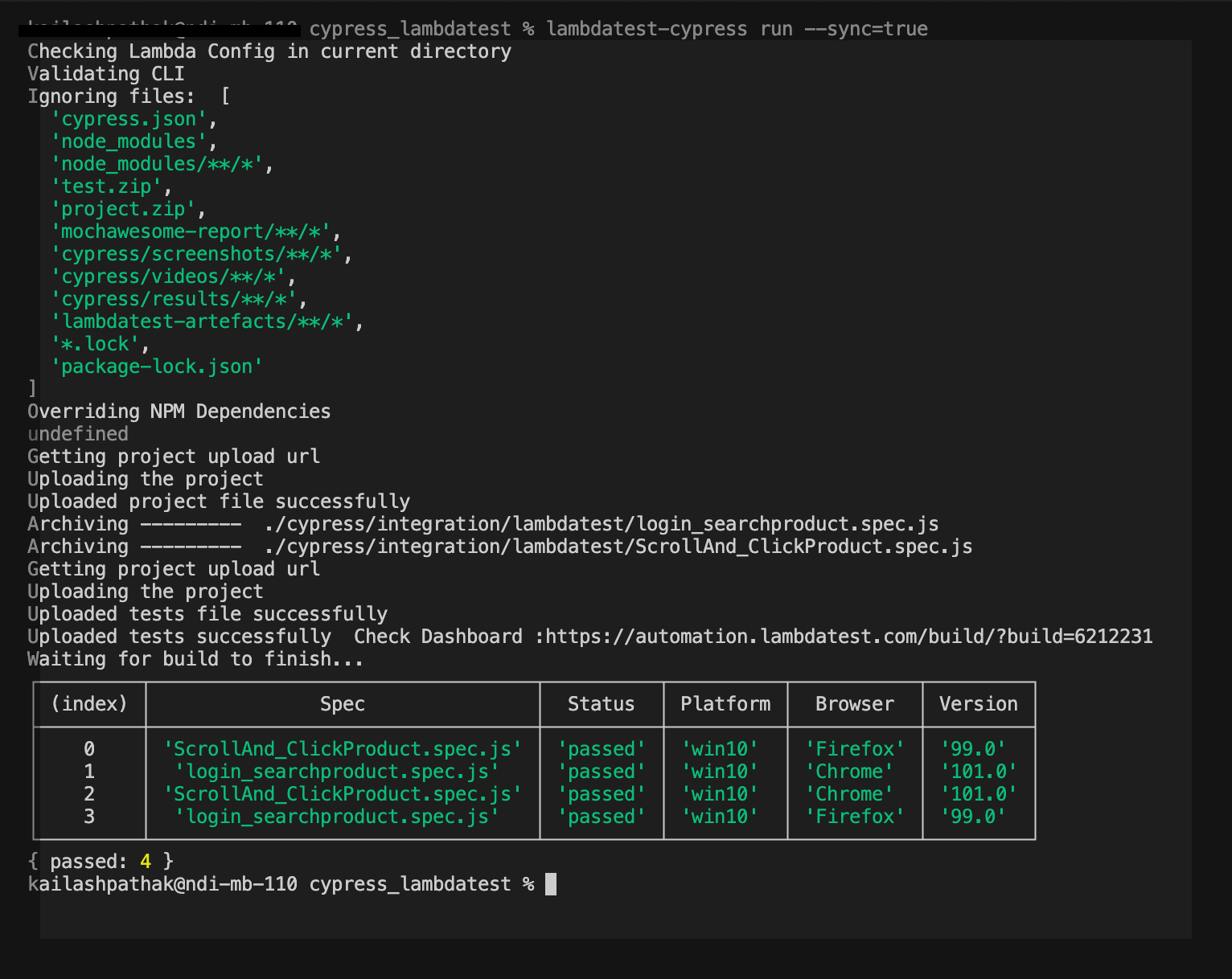
Below report is generated when we run the command lambdatest-cypress run in the local terminal.
In the below report, we can see test case login_searchproduct.spec.js and ScrollAnd_ClickProduct.spec.js successfully run on Firefox and Chrome.
Cypress End to End Testing Report on TestMu AI
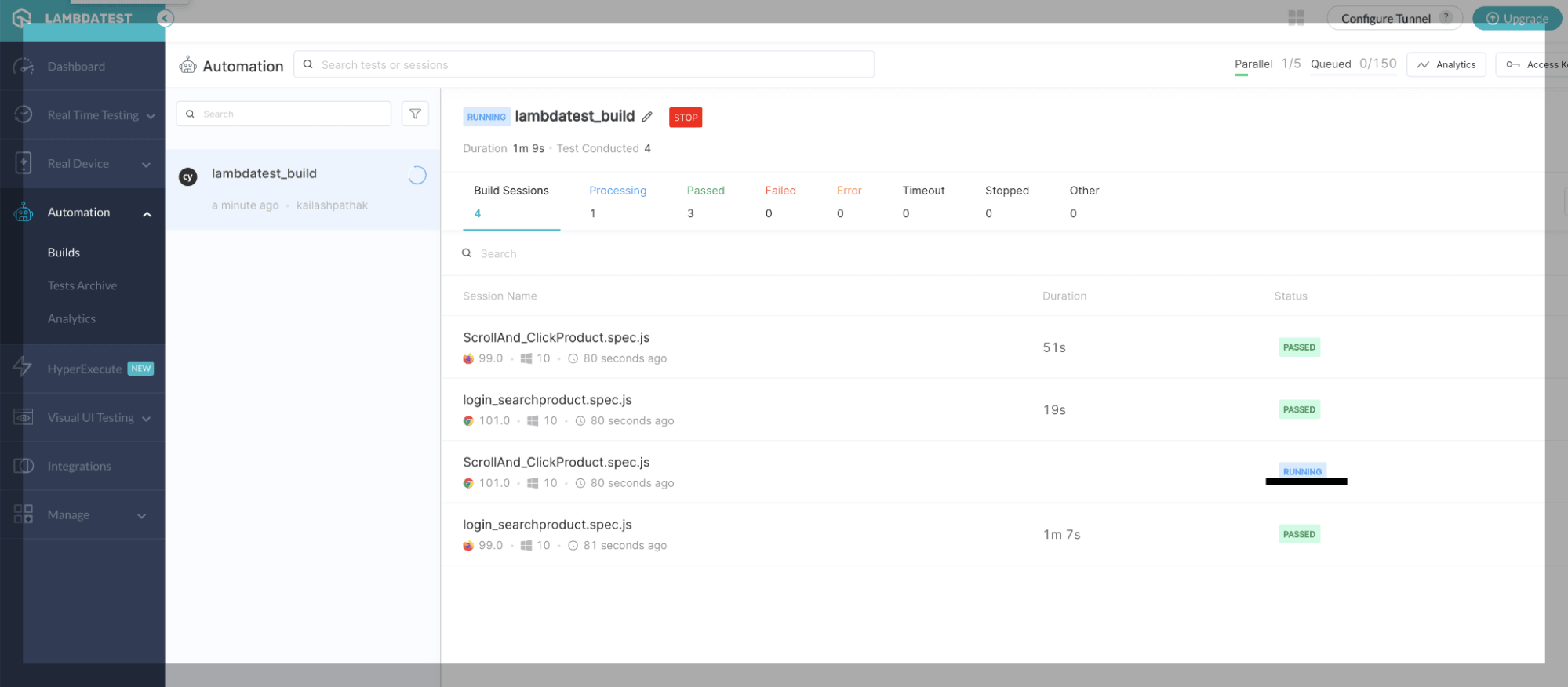
In the below screen, you can see test cases start running on the Firefox browser.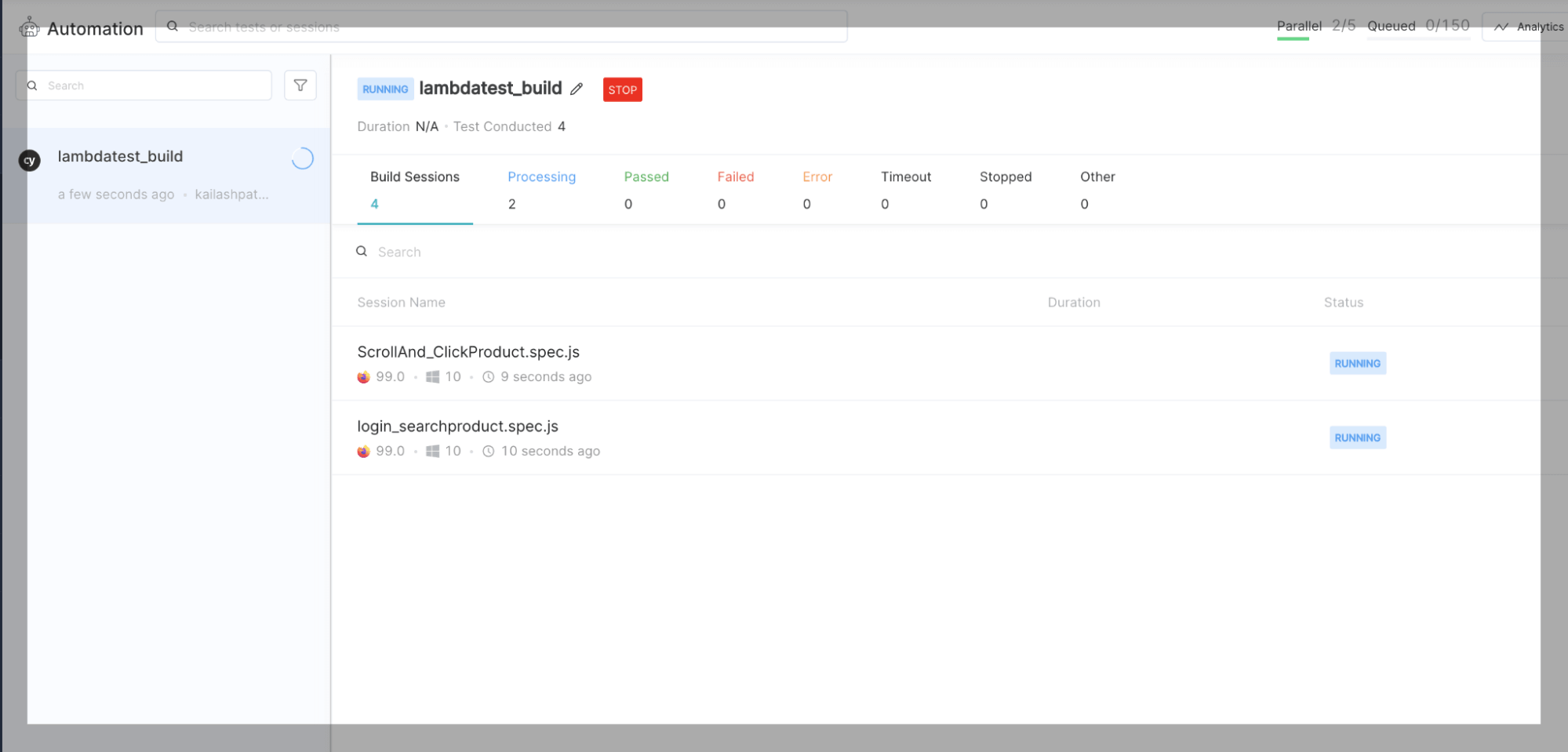
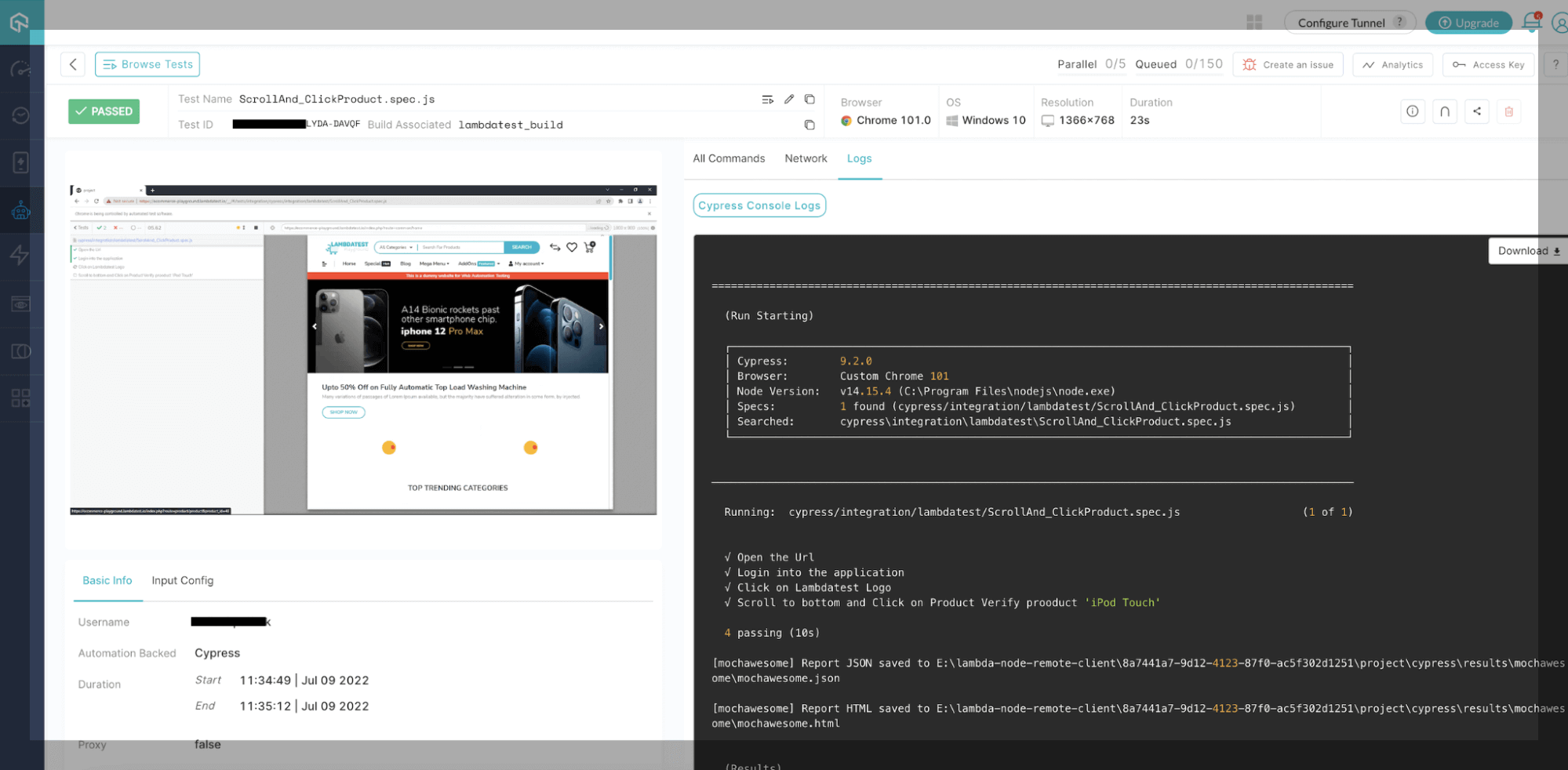
You can see in the below console that log test cases are passed on the Firefox browser.
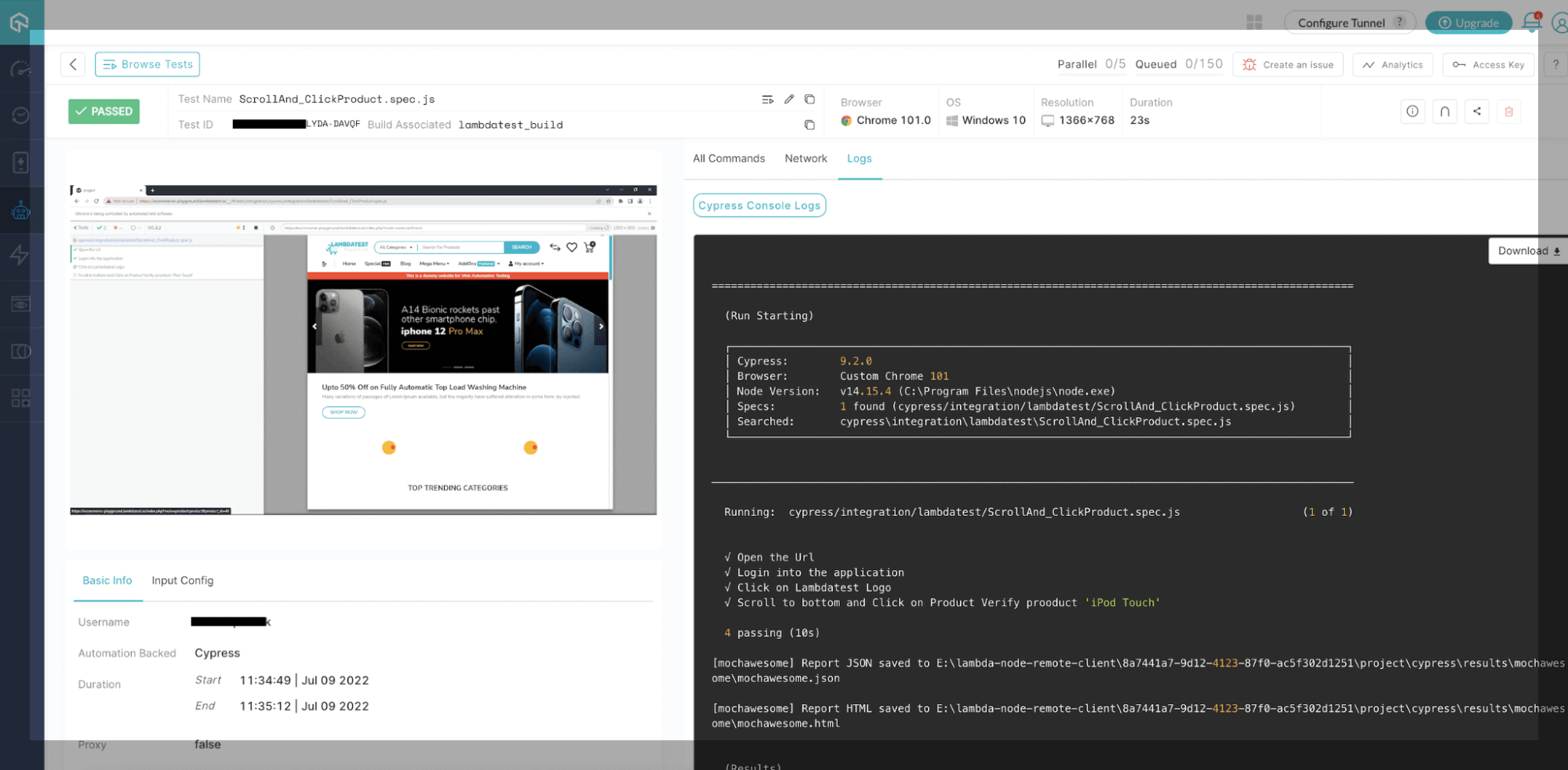
In the below screen, you can see test cases start running on the Chrome browser as well.
You can see in the below console that log test cases are passed on the Chrome browser.
For more detail, you can read through this blog on How To Perform Cypress Testing At Scale With TestMu AI.

Here’s quick video if you have doubts regarding how to handle iframes in Cypress.
Summary
There are pros and cons to each testing method. Cypress End to End testing is the closest to real user testing, which is one of its main advantages. The closer the test is to mimic the user, the more likely it will catch issues the user might experience.
Overall, Cypress is a solid choice if you want to take your testing to the next level with some End to End tests
To deepen your Cypress automation expertise, don’t miss our comprehensive guide on the top Cypress interview questions packed with insights to help you shine in your next interview.


Frequently asked questions
Did you find this page helpful?
More Related Hubs
TestMu AI forEnterprise
Get access to solutions built on Enterprise
grade security, privacy, & compliance
- Advanced access controls
- Advanced data retention rules
- Advanced Local Testing
- Premium Support options
- Early access to beta features
- Private Slack Channel
- Unlimited Manual Accessibility DevTools Tests