

Power Your Software Testing with AI Agents and Cloud
The Native AI-Agentic Cloud Platform to Supercharge Quality Engineering. Test Intelligently and Ship Faster.


- TestMu AI (Formerly LambdaTest)
- /
- Blog
- /
- Continuous Integration Explained With Jenkins Deployment
Continuous Integration Explained With Jenkins Deployment
Learn how continuous integration works and how to deploy Jenkins end to end on an AWS EC2 Ubuntu instance, from the bootstrap script to the first admin login.
Last Updated on:
Continuous integration with Jenkins means developers commit small changes to a shared repository, and Jenkins builds, packages, and tests every commit automatically.
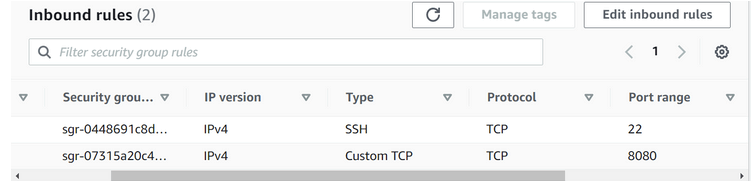
Jenkins serves its web UI on port 8080, which AWS EC2 blocks by default until you add an inbound TCP 8080 rule to the instance security group.
This guide covers why continuous integration is required, its features, benefits, and challenges, the best CI tools, how AI assistants connect to a Jenkins CI server, and Jenkins installation on Ubuntu using an AWS EC2 instance.
Explore 50+ Commonly Asked Jenkins Interview Questions. Perfect for interview prep or boosting your Jenkins knowledge.
Key Takeaways
- Continuous integration is the practice of having every developer commit small code changes to a shared version control repository often, so each change is built, packaged, and tested automatically.
- A continuous integration tool monitors the central code repository, runs all automated tests on every commit, and accepts or rejects that commit based on the test results.
- Early bug detection is the main payoff of continuous integration, because a defect caught on a small recent commit is cheaper and faster to fix than one found after a long integration.
- Adopting continuous integration meets real obstacles: developer resistance to relearning processes, an organizational culture shift, the cost of DevOps hiring and infrastructure, and the effort of keeping the automated test suite stable.
- Installing Jenkins on an AWS EC2 Ubuntu instance means pasting a bootstrap script that installs the JDK, Maven, and Jenkins into the EC2 User data field, then opening port 8080 in the security group so the Jenkins web UI is reachable.
- Jenkins dropped Java 8 after LTS 2.346.1 and LTS 2.555.1 runs only on Java 21 or Java 25, so an EC2 bootstrap script should install openjdk-21-jre instead of the openjdk-8-jre used in older Jenkins tutorials.
Why is Continuous Integration required?
In business, especially in new product development, we rarely have the time or ability to figure everything out ahead of time. Taking smaller steps allows us to make more accurate estimates and validate them more frequently. A shorter feedback loop implies more iterations. And learning is driven by the number of iterations rather than the number of hours invested.
Working in long feedback loops is risky for software development teams because it increases the likelihood of errors and the amount of work required to integrate changes into a working version of the software.
Small, controlled changes can be made regularly. Developers can avoid repetitive work and human error by automating all integration steps. A CI tool monitors the central code repository and runs all automated tests on every commit, rather than having people decide when and how to run tests. It accepts or rejects the code commit based on the results of all tests.
Key Takeaway: Continuous integration is required because long feedback loops increase both the chance of errors and the work needed to merge changes, while small commits validated automatically on every push keep that integration effort small.
Features of CI
Here are some crucial characteristics and advantages of continuous integration:
- To all holders of a stack, the entire build, testing, and deployment process should be visible.
- The built environment ought to be close to the area used for production.
- You can test the production CI environment's clone.
- Constant availability of a current build is one of the benefits of continuous integration.
- permits you to only maintain one source repository
Key Takeaway: A continuous integration setup should keep the whole build, test, and deployment process visible to every stakeholder, run in an environment close to production, and maintain a single source repository with a current build always available.
Benefits of continuous integration
To understand more about the importance of CI, here are some of its benefits:
Reduces Risk
The frequent testing and deployment of code reduce the risk level of the project because code defects and bugs can now be detected earlier. This means that these bugs and errors are simple to fix and take less time, making the overall process less expensive. The general operation accelerates the feedback mechanism, making communication smoother and more effective.
Early bug detection and quick bug fixes
Numerous different kinds of checks may be included in the automated testing process:
- Validate application behavior from the viewpoint of the customer;
- contrasting coding practices with accepted industry practices;
- Check code for typical security flaws;
- Find security updates in dependencies on third parties;
Including these tests in your CI pipeline, tracking their results, and improving them is probably the easiest way to keep your software at an excellent standard. A CI tool gives developers immediate feedback on whether the new code they wrote works, introduces bugs, or represents a quality regression. Early errors are the easiest to correct.
Increase the frequency with which working software is delivered
Continuous integration allows your team to automatically build and test every source code change. This serves as the foundation for your overall software delivery process to be efficient, resilient, fast, and secure.
Reduced Waiting
The interval between the development, integration, testing, and deployment of the application is drastically shortened. When this period is shortened, any potential waiting periods in the middle are also shortened. No matter what, CI makes sure that all these processes continue to take place. Continuous Integration, Continuous Deployment, and Continuous Delivery are the three terms we came across. We need to consider how the three differ from one another.
Higher Product Quality
The detection of errors is made simple by features like code review and code quality detection that are provided by continuous integration. Emails or SMS messages will alert the user if the code does not conform to the standard level or contains an error. Developers can continually hone their coding skills with the aid of code reviews.
Better Communication
Code sharing is made simple and regularized by the Continuous Delivery workflow, which works in conjunction with the Continuous Integration process. As a result, team members can work together more openly during the process. Long-term, this increases communication efficiency and ensures that everyone in the organization is speaking the same language.
Key Takeaway: The benefits of continuous integration are lower project risk, earlier bug detection with quicker fixes, more frequent delivery of working software, less waiting between stages, higher product quality, and better communication across the team.
Challenges of Continuous Integration
Here are some of the challenges of continuous integration:
Internal Resistance
That is most likely a subjective disadvantage, but it is still a common one. Not all developers are willing to take on the challenge of relearning processes to save time. They may prefer to complete their tasks without the use of bureaucratic procedures. The practices outlined above, however, should overcome the unwillingness to learn something new.
Organizational Culture Shifts
When it comes to software development, many businesses still favor traditional methodologies. They would need to retrain their staff and alter current procedures to implement continuous integration. Most businesses tend to be resistant to change and want to quickly achieve their goals.
Higher Costs
Adopting CI/CD-based development necessitates significant effort, time, and financial investment. Hiring and retaining DevOps engineers, as well as putting your repositories in Git, are just a few of the processes that must be completed. However, there is some good news. All of the processes are manageable. All you need is a good budget planning strategy.
Not Easy to Maintain
It is not easy to create an automated code repository. Teams must create the appropriate testing infrastructure and devote more time to writing test cases than to writing code. At first, this might cause them to lag and lose hope of finishing their projects on time. If the testing suite isn't stable, it might perform flawlessly on some days but not on others. The investigation into what happened would then require more time from the team.
Key Takeaway: The main challenges of continuous integration are developer resistance to relearning processes, the culture shift away from traditional methodologies, the cost of DevOps hiring and tooling, and the effort of building and maintaining a stable automated test suite.
Best Continuous Integration Tools and Services
You can currently choose from a wide range of continuous integration tools.
Jenkins, GitHub Actions, GitLab CI/CD, CircleCI and TeamCity are the tools most teams shortlist. Jenkins is self hosted and extended through plugins, GitHub Actions and GitLab CI/CD run inside the repository host itself, and CircleCI is a hosted service. The walkthrough later in this article uses Jenkins because it runs on any Linux machine you control, including the AWS EC2 instance created below.
Their number is so large that managers are frequently stunned as to how to select the best continuous integration tools for their projects. If the tool you've chosen lacks the following technical features, keep looking.
Features of ideal continuous integration tools include:
- Cloud compatibility - A good CI tool should make it simple to transfer data to and from the cloud.
- Deployment options - A CI tool must be simple to use and enable trouble-free deployment.
- Safety and security - Whether it is open-source or commercial, a practical CI tool shouldn't pose any security risks to the project data.
- Integration options - Your CI tool should be able to connect to other project-related software and services.
- Robust ecosystem - A CI tool aims to expedite project release and eliminate additional development efforts. Make sure the tool won't cause any bottlenecks for your project before implementing it.
A CI tool needs to be both technically sophisticated and meet the needs of your project and business. You might want to get a paid-for CI solution or a free open-source one depending on your business plan. Additionally, you should confirm that the tool of choice enables simple project management and transfer. Choosing a tool that can visualize the content is another smart move.
Key Takeaway: Pick a continuous integration tool on cloud compatibility, easy deployment, security, integration with other project software, and a robust ecosystem, then confirm the tool also suits the budget and project management needs of the business.
How do AI assistants connect to a Jenkins CI server?
They connect through the MCP Server plugin, which turns a Jenkins controller into a Model Context Protocol server that an MCP client can query over HTTP. The plugin is published on the Jenkins plugin site under the id mcp-server, it is released under the MIT licence, and it requires Jenkins 2.541.3 or newer. That version floor matters for the EC2 build described below, because an older controller cannot run it.
Once the plugin is installed, Jenkins serves MCP on /mcp-server/mcp for streamable HTTP and on /mcp-server/sse for server sent events. Authentication reuses the accounts you already have. You generate an API token from your Jenkins user profile and send it in an HTTP Basic header, so the client only sees the jobs that user can see. The plugin repository records that it implements MCP specification version 2025-06-18.
The plugin exposes a fixed set of tools rather than shell access on the controller. getJobs and getJob list and describe jobs, triggerBuild starts a build, getBuild and getBuildLog return a build and its console output, searchBuildLog searches that output, getTestResults returns the test report, and getBuildChangeSets returns the commits included in a build. Those tools map onto the questions a continuous integration user asks every day: which commit broke the build, which test failed, and what the console printed. The practical change is that a developer can read a failing build from the editor instead of opening the Jenkins web UI. Teams that need more can implement the McpServerExtension interface and register their own tools.
Treat the token as a write credential. triggerBuild, rebuildBuild and replayBuild all change the state of the instance, so give the account behind the token only the permissions you are willing to hand to an assistant.
Key Takeaway: AI assistants connect to a Jenkins CI server through the MCP Server plugin, which needs Jenkins 2.541.3 or newer and authenticates with a Jenkins API token that should be treated as a write credential because it can trigger builds.
Jenkins installation on Ubuntu using AWS Ec2 instance
I'll show how to install Jenkins using an E2E process on an AWS EC2 Linux instance. It is advised that we read the official Jenkins deployment guide before we start the deployment process to know all the precise requirements and processes, we must meet to set up and execute Jenkins.
Check the Java version before you run the script below. The script installs openjdk-8-jre, and current Jenkins releases will not start on it. Jenkins dropped Java 8 after LTS 2.346.1 in June 2022. LTS 2.555.1, released in April 2026, runs only on Java 21 or Java 25, as recorded in the Jenkins Java support policy. On a current Ubuntu instance, install openjdk-21-jre in place of openjdk-8-jre.
The apt setup has changed as well. The official Jenkins Linux install guide now writes a dated signing key, jenkins.io-2026.key, to /etc/apt/keyrings/jenkins-keyring.asc rather than to the undated key path used in the script below. Jenkins rotates that key, so copy the key URL from the current guide instead of from an older tutorial, then point the signed-by option of your sources.list.d entry at the same file.
Phase 1: Creating the configuration script
So, the Jenkins deployment on Linux is what we're looking for. The commands that we must execute are listed below:
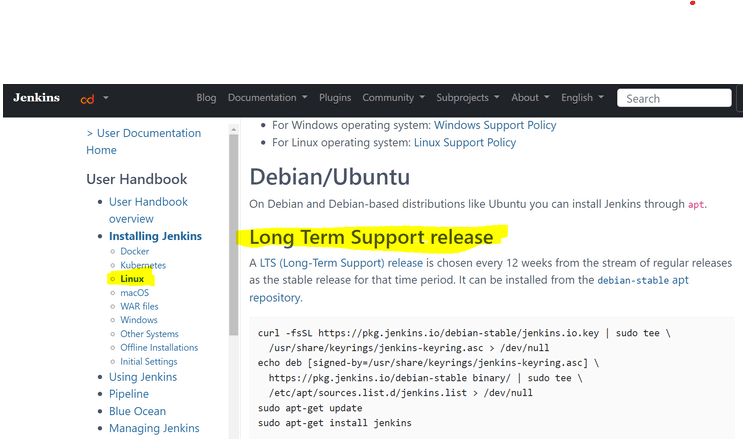
Let's write the script we'll use to set up the Linux machine.
Part1: Deploying JDK
JDK deployment as it was one of the requirements for installing Jenkins sudo apt update -y sudo apt install openjdk-8-jre -y
Part 2: Deploying Maven
We also need to install Maven to enable Jenkins' build creation process (Otherwise this step will fail) $ sudo apt install maven -y
Part 3: Deploying Jenkins
curl -fsSL https://pkg.jenkins.io/debian-stable/jenkins.io.key | sudo tee  /usr/share/keyrings/jenkins-keyring.asc > /dev/null
echo deb [signed-by=/usr/share/keyrings/jenkins-keyring.asc]
https://pkg.jenkins.io/debian-stable binary/ | sudo tee
/etc/apt/sources.list.d/jenkins.list > /dev/null
sudo apt-get update
sudo apt-get install jenkins
The final script:
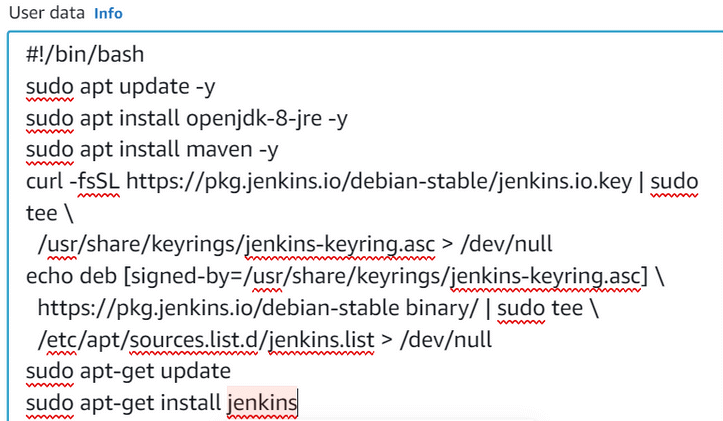
#!/bin/bash
sudo apt update -y
sudo apt install openjdk-8-jre -y
sudo apt install maven -y
curl -fsSL https://pkg.jenkins.io/debian-stable/jenkins.io.key | sudo tee  /usr/share/keyrings/jenkins-keyring.asc > /dev/null
echo deb [signed-by=/usr/share/keyrings/jenkins-keyring.asc]
https://pkg.jenkins.io/debian-stable binary/ | sudo tee  /etc/apt/sources.list.d/jenkins.list > /dev/null
sudo apt-get update
sudo apt-get install jenkins
Phase 2: Creating the EC2 instance
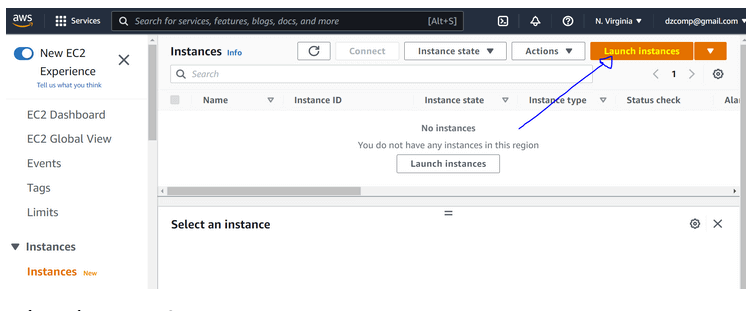
This stage involves setting up and configuring the Ubuntu instance: Open AWS EC2 instance creation page : https://us-east1.console.aws.amazon.com/ec2/v2/home?region=us-east-1#Instances: and launch a new instance:
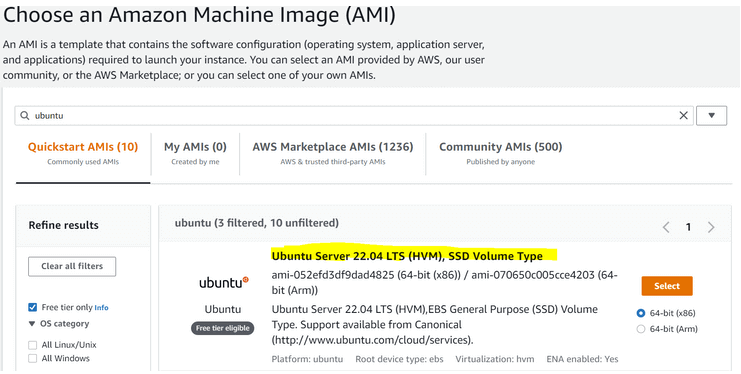
Select the ubuntu version:
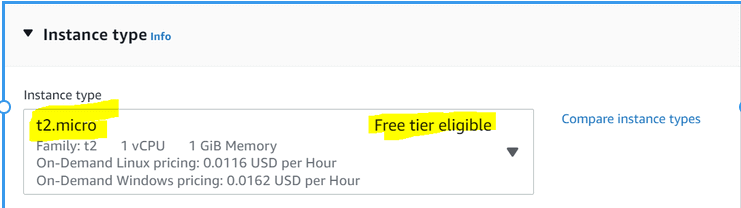
Select instance type:In this example, I will use the primary t2.micro instance type as it covers all the prerequisites to install Jenkins.
Open the "Advanced details" section and copy the script details under "User data"
Configure security groupSo, Jenkins is a web server, and we can access it from the web using port 8080
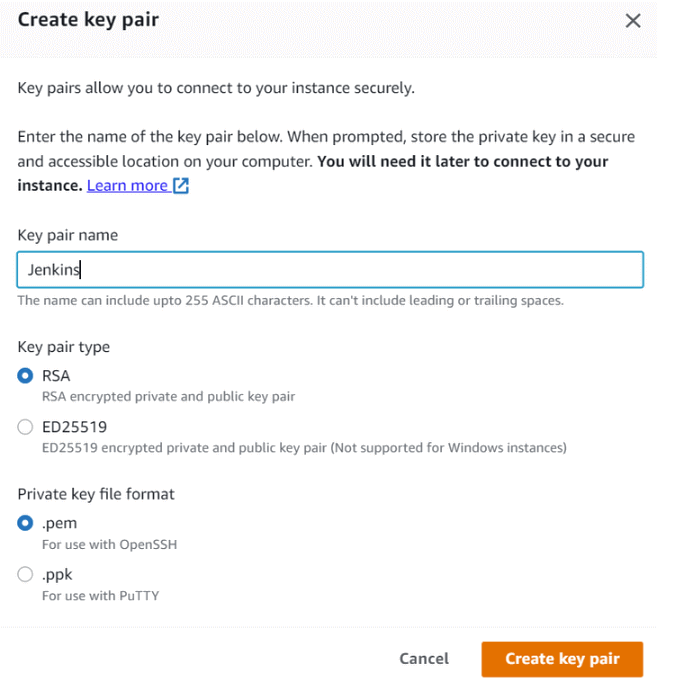
Create a new Key Pair:
Create an instance and access Jenkins:
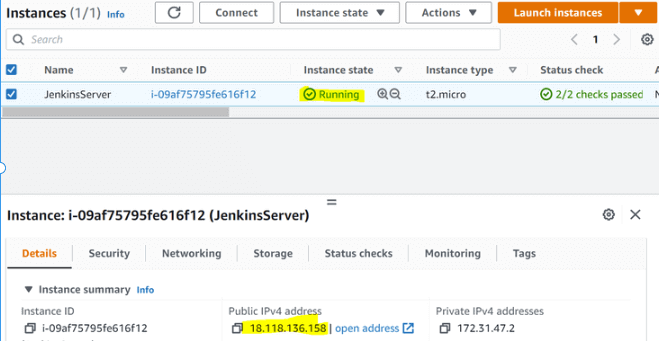
Open a browser and go to http://<your-instance-public-ip>:8080. The screenshot below uses the public IP of the instance created for this walkthrough, and yours will differ.
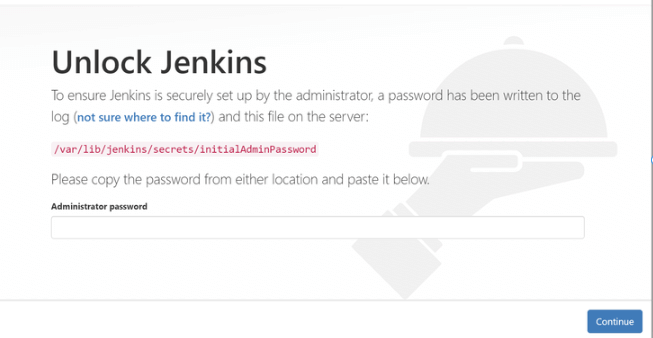
The retrieval of Jenkins credentials will be the following step that is required. We'll need to use an SSH connection to get access to the instance to do that.
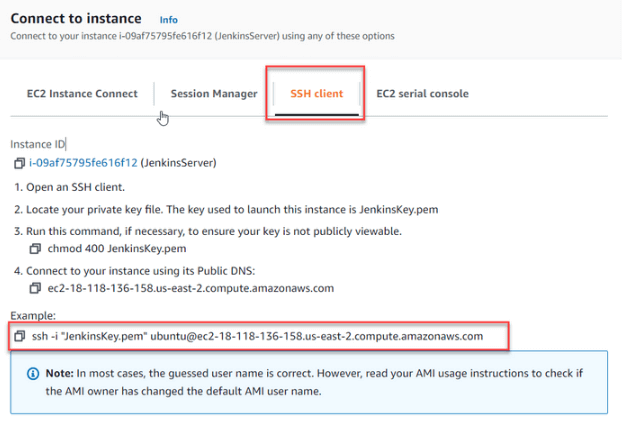
Once you have access to the instance, use cat to open the security file and get the pass:
root@ip-172-31-47-2:/var/lib/jenkins# cat
/var/lib/jenkins/secrets/initialAdminPassword
e12e28a79e4b48e8a7b1c6979965960a
root@ip-172-31-47-2:/var/lib/jenkins#
Copy it to the Jenkins log-in page and click "Continue"
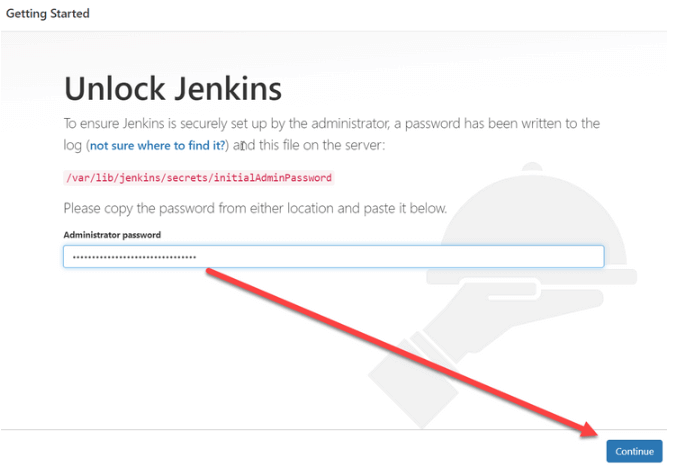
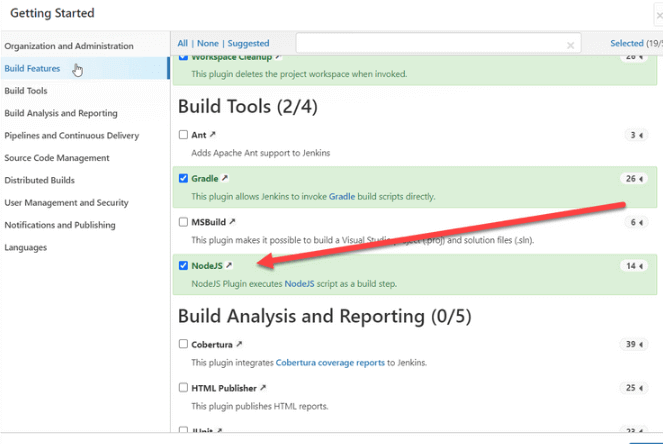
The ability of Jenkins to use plug-ins to carry out laborious and time-consuming tasks is thus its main strength. Let's add NodeJS as our build tool and start the deployment.
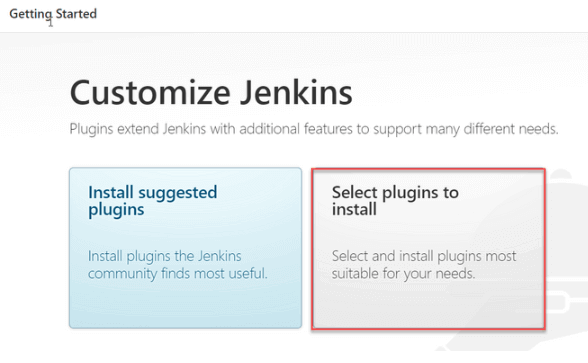
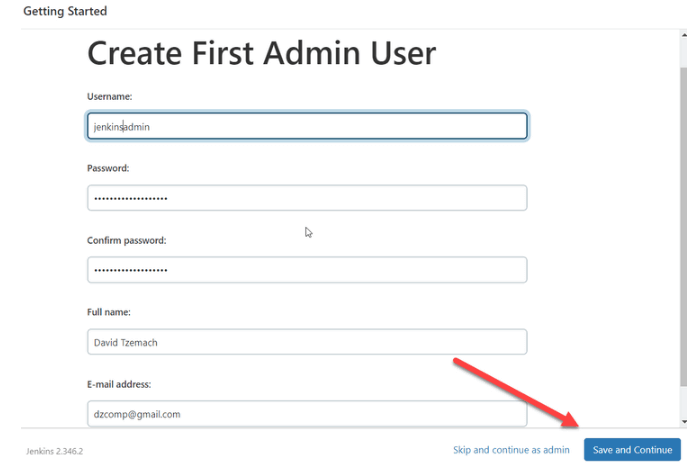
After the installation is finished, you will be prompted for your credentials:
Now we all set, press "Save and Finish"
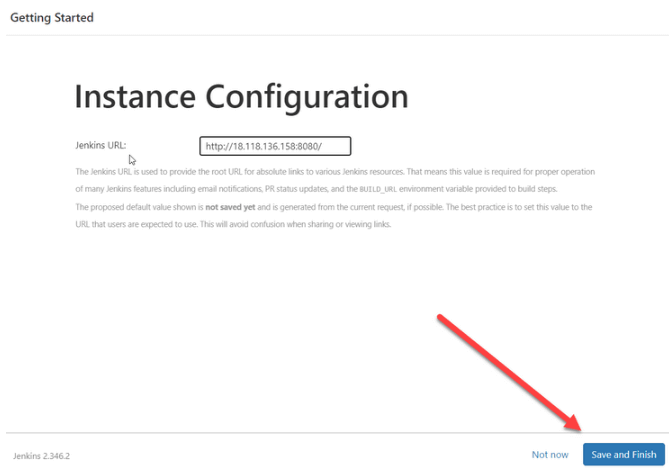
Important clarification regarding the EC2 instances that we are using is that the IP is changing after each reboot (we can fix it using Elastic/static IPs but that is in future articles). So once you reboot your machine, please remember to retrieve the new IP so you can still get access to your Jenkins server (This is for learning purposes only).

Key Takeaway: Deploying Jenkins on an AWS EC2 Ubuntu instance runs a bootstrap script for the JDK, Maven, and Jenkins from the User data field, opens port 8080 in the security group, and unlocks the web UI with the password stored in /var/lib/jenkins/secrets/initialAdminPassword.
Author

David Tzemach
Blogs: 46


David Tzemach is a software quality and engineering leader with 19+ years of experience in software testing, quality assurance, and large-scale R&D operations. He specializes in building QA organizations from scratch, defining quality frameworks, and implementing agile and shift-left testing practices across enterprise environments. David has served as Head of QA and QA Architect, authored multiple books on agile quality and testing, and actively contributes to the testing community through his QualityBreach platform and publications.


Continuous Integration With Jenkins FAQs
Did you find this page helpful?
More Related Blogs
TestMu AI forEnterprise
Get access to solutions built on Enterprise
grade security, privacy, & compliance
- Advanced access controls
- Advanced data retention rules
- Advanced Local Testing
- Premium Support options
- Early access to beta features
- Private Slack Channel
- Unlimited Manual Accessibility DevTools Tests