
Test Your Website on Real Desktop and Mobile Browsers
Run live and automated cross browser tests on Chrome, Safari, Firefox, and Edge across 3,000+ browser-OS combinations. No setup, no device lab.

- TestMu AI (Formerly LambdaTest)
- /
- Blog
- /
- Top differences in Web Browsers While Testing
Browser Differences to Look Out for While Testing Cross Browser Compatibility
When it comes to a web application, before it goes into production, the developer must make sure that it works properly in all browsers. The end user should be able to experience a fully functional site that is able to handle all critical functionalities irrespective of the browser or device used by the end user. The behavior of an application is different in different operating systems, browsers and even devices based on their resolution.
Last Updated on:
On This Page
When it comes to a web application, before it goes into production, the developer must make sure that it works properly in all browsers. The end user should be able to experience a fully functional site that is able to handle all critical functionalities irrespective of the browser or device used by the end user. The behavior of an application is different in different operating systems, browsers and even devices based on their resolution. Most developers usually a prefers to work on a single browser, even if multiple browsers are installed in the workstation.
This sometimes leads the application to cause breakage in other browsers. During testing phase, all the dimensions must be covered before the application is deployed in productio
Let’s discuss the testing strategies that are required to perform while testing an application across the 4 major browsers, common problems faced by testers and how to resolve them.
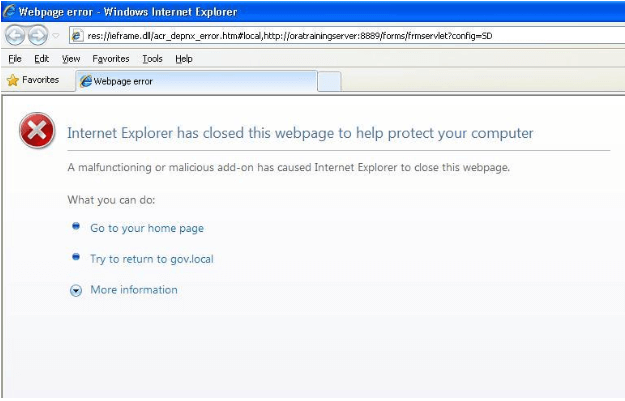
Internet Explorer and Microsoft Edge
Microsoft ended support for Internet Explorer in June 2022, so a browser test matrix that still budgets separate time for IE 8 through IE 11 is checking a browser real users no longer run. If a client's SRS still names IE for a specific compliance reason, treat that as an exception to confirm case by case, not a default part of the test plan.
Since January 2020, Microsoft Edge has run on the same Chromium engine as Google Chrome, so it renders pages the same way Chrome does. The old Edge-specific quirks that once needed separate CSS workarounds belonged to the earlier EdgeHTML version of Edge, which is now retired. A current cross-browser test plan can group Edge with Chrome and spend its separate testing time on Firefox and Safari instead, where real engine differences still show up.
Mozilla Firefox
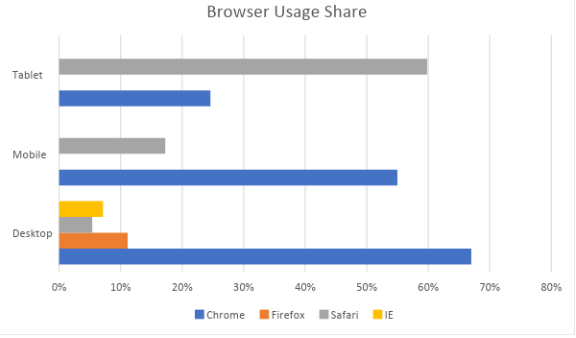
When Firebug was introduced about 10 years ago, it was the best browser integrated developing tool available in the industry. Mozilla Firefox became immensely popular worldwide. Although the speed of its developing tools is surpassed by Google Chrome, it is still a reliable browser, offering customization of user interface and a vast catalog of plugins. To overcome its performance issues, a new version was released recently that uses a multi-process architecture. A statistic published in June 2018 shows that Firefox is a preferred browser of 10% desktop users and 17% mobile users. Before deploying an application, proper browser testing should be performed in Firefox also.

Common problems found while you test on Firefox browsers include not supporting modern features like CSS grids, HTML5 video or audio as well as flexbox, the css3 feature on which Bootstrap 4 is entirely based. Using vendor specific CSS prefix like -moz gets rid of most CSS3 tags. For supporting Bootstrap, instead of CDN, developers may need to manually download and use Bootstrap libraries in their code. When any proper working solution is not found to render any CSS property, developer may need to change it and find another way of implementing the feature.
Google Chrome
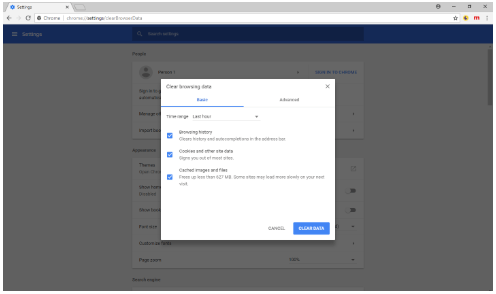
In terms of developer tools, Google Chrome is leading the market with almost 63% users in desktop, 55% in mobile and close to 58% in tablets. It’s the most popular browser among developers as well because of its wide range of debugging and development tools. To improve the speed, chrome developers recently made some changes that allows rendering of web pages in mobile devices operating under poor network coverage.
However, a drawback of chrome is that, the browser validates main resource only once during page load. Often developers or testers may face issues where code changes are not reflected. Plugins are available in the chrome web store that uses a cache-busting procedure. Using that, code changes can be viewed by just refreshing, without reloading the entire page.
Image orientation issues are another common problem in Chrome. Images that appear right side up in other browsers may be displayed upside down in chrome. This is not a bug. It happens only when the EXIF orientation of an image does not match the actual orientation. Processing the images on the server side will resolve this issue.
Safari
With a majority of desktop users preferring Windows, Safari covers only 3% of the usage share. However, because of the wide usage of iPhone and iPad, it covers 17% usage share in mobile devices and 35% in tablets and hence, an important browser to perform testing. However, desktop and mobile Safari should be treated as different browsers altogether, since iPads and iPhones are operated using touch and not click. Safari’s mobile version is also optimized to reduce load on the processor.
There is a built-in feature in Safari to prevent phishing. The drawback of this feature consists exclusion of metadata in files uploaded via browser. For example, if any photos are uploaded, GPS coordinates will be removed. There is no fix yet, to this bug, although missing coordinates can be replaced by the geolocation API.
In mobile browser, elements that don’t have a cursor style set by CSS, hover or click animations fail during rendering. To fix this, event listeners should be declared directly on the parent element instead of its child. Otherwise, buttons or list items that were supposed to be interactive on touch, will not work at all.
It does not matter how many test cases are performed on the browser. A bug may arise again when a new version of a browser is released. The best solution is to always keep an eye for new releases and run test cases on the application in a production environment.
Browser usage share figures obtained from – here

Austin Siewert
Co-Founder, Steadfast Systems
Discovered @TestMu AI yesterday. Best browser testing tool I've found for my use case. Great pricing model for the limited testing I do 👏
3M+ Devs and QAs rely on TestMu AI
Deliver immersive digital experiences with Next-Generation Mobile Apps and Cross Browser Testing Cloud

How Do AI Testing Agents Handle Cross-Browser Differences in 2026?
AI testing agents in 2026 replay the same test across multiple browser engines automatically, but a person still reviews any visual difference they flag. The mechanism is real: an agent can run one script against every engine and diff the results in minutes.
- Cross-engine replay: The Playwright MCP server and browser-use let an agent drive Chromium, WebKit, and Firefox with the same recorded steps and report exactly which engine failed.
- Natural-language triage: Claude Code and Cursor can read a failing test's error output and point to the likely cause, such as a missing vendor prefix or an API only one engine supports.
- Visual-diff limitation: An agent can flag that a layout shifted between browsers, but it cannot judge whether the new layout still looks right. A person still signs off on the visual diff.
- Net effect in 2026: agents cut down the manual browser-by-browser checking this article describes, but final visual judgment calls stay with a human tester.
This does not remove the underlying browser differences this article covers. It changes who catches them first, an agent instead of a tester manually clicking through each browser.
Testing web or mobile apps without writing code? KaneAI by TestMu AI turns plain-English instructions into tests.
Author

Arnab Roy Chowdhury
Blogs: 68


Arnab Roy Chowdhury is a community contributor with 10+ years of experience working across software development, web UI engineering, and technical content writing. Currently a Senior Consultant at Capgemini, he has hands-on experience in building and maintaining cross-browser compatible web interfaces using HTML5 and modern frontend practices. Arnab has also contributed as a freelance web developer and writer, combining practical development expertise with clear technical documentation. He holds a Bachelor’s degree in Computer Engineering.


Did you find this page helpful?
More Related Blogs

TestMu AI forEnterprise
Get access to solutions built on Enterprise
grade security, privacy, & compliance
- Advanced access controls
- Advanced data retention rules
- Advanced Local Testing
- Premium Support options
- Early access to beta features
- Private Slack Channel
- Unlimited Manual Accessibility DevTools Tests