

Power Your Software Testing with AI Agents and Cloud
The Native AI-Agentic Cloud Platform to Supercharge Quality Engineering. Test Intelligently and Ship Faster.


- TestMu AI (Formerly LambdaTest)
- /
- Blog
- /
- What Are The Benefits Of Website Testing On The Cloud
What Are The Benefits Of Website Testing On The Cloud
Website testing on the cloud runs tests on shared, on-demand browser and device grids instead of local hardware. Here are 11 benefits for QA teams.
Last Updated on:
Website testing on the cloud gives QA teams parallel execution, on-demand browser and device coverage, and no local test hardware to maintain. Hosted website testing software runs test sessions on a cloud-based Selenium Grid across many operating system, device and browser combinations, and the vendor adds each new browser build centrally. This guide covers collaboration, cost, 24/7 access, speed, automatic device updates, simulators, Selenium Grid automation, pre-production testing, reporting, IT management, parallel execution, the limits of a shared grid, and how AI agents change online web testing.
Key Takeaways
- Website testing on the cloud runs test sessions on shared, on-demand browser and device grids, so a QA team does not buy, upgrade or maintain local test hardware.
- A pay-as-you-go cloud test grid replaces the capital cost of test hardware with a variable bill, which suits a startup that only needs the grid during active test cycles.
- A cloud-based Selenium Grid runs test sessions in parallel, so total execution time is no longer capped by the hardware of a single local machine.
- Cloud grids add new browser builds centrally and keep older versions available, which matters because Chrome ships a new stable milestone every two weeks.
- Testers in different time zones can reach a cloud test grid 24/7 from any device with an internet connection, which widens test coverage within a single day.
- Test data should be masked or synthetic before a suite runs on a vendor grid, because running it there moves that data across an organisational boundary governed by GDPR and PCI DSS.
1. Better Team Collaboration For Agile Workflows
Agile thrives on collaboration between teams and members of the same team. Website testing on the cloud provides a collaborative platform. Thus, it boosts agile ideas and supports the new approach to testing. Different cloud assets undergo regular updates. So, if the team needs any important information, it is available immediately.
If different teams are working on the same app, it becomes easier to monitor different activities. This approach reduces errors and redundancies. Cloud-based website testing also facilitates continuous integration. This means that the teams can carry out the deployment of new pieces of code faster. It helps teams in maintaining a schedule and deliver important functionalities and features on time.
Key Takeaway: A shared cloud test platform lets several teams working on the same application follow each other's test activity, which cuts duplicated effort and supports continuous integration.
2. Cost-Effective Infrastructure
Website testing tools on-cloud are more cost-effective when it comes to your own testing infrastructure. The reason being the resources on the cloud is being shared by a pool of users. So say you are cross browser testing on the cloud, then you are leveraging a machine hosted on cloud-based servers. Now, after you terminate the session, the cache of the particular machine will get will be cleared and then provided to some other user, as per their demands.
Upgrading the infrastructure or hardware doesn't cost as much as one would normally expect. Moreover, the total ownership cost of cloud-based website testing tools is also less than the traditional ones. They have limited hardware needs. As a result, the depreciation costs are not high and capital expenditure is minimal.
Website testing in the cloud also allows you to 'pay as you go' model. It lets the team use tools only when necessary. This feature implies that you can save costs when the tool is not in use. If you are a startup looking forward to cutting down expenses, this feature can come in handy. And of course, even if you have a pretty decent flow of finances, you can divert the excess funds saved to the further development of the firm. Looks like an opportunity to crank things up a notch, doesn't it?
Key Takeaway: Cloud test machines are shared between users and billed pay-as-you-go, so a team carries minimal capital expenditure and little hardware depreciation for its test infrastructure.
4. Enhanced Speed
When you are onto website testing using a local infrastructure then the speed at which you can execute your test case will be proportional to the device being used by you and your team. For instance, if we talk about automated browser compatibility testing then Selenium Grid is considered as the most viable option to go with because it offers the ability to run parallel testing with Selenium. However, the time consumption for test execution and the number of test sessions that you can run in parallel will depend on the hardware capabilities of your machine.
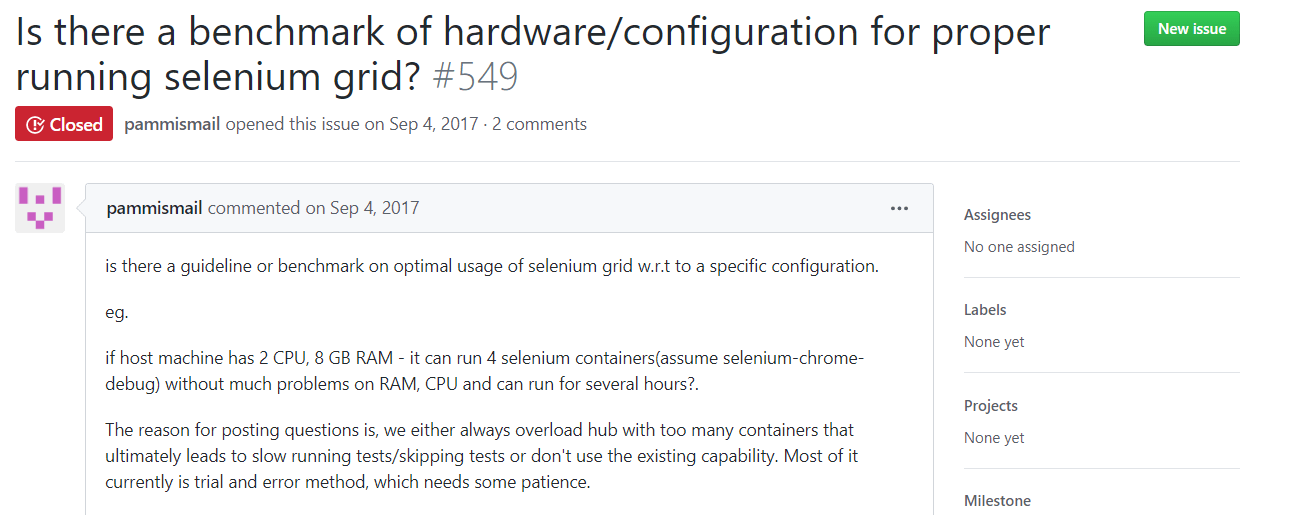
Src: https://github.com/SeleniumHQ/docker-selenium/issues/549
The software run on local hardware doesn't provide as much speed and efficiency as those hosted on the cloud. Initially, you may even have to perform a hit and trial to find the right infrastructure set up for your website testing requirements. The cloud-based test grid helps you carry out parallel testing without many constraints. This way, the testers don't have to wait around for a single test to come to a halt before moving on to the next one.
The unlimited test infrastructure capacity also contributes to increased testing speed while using the cloud. Sometimes, tests can require a lot of resources for successful running. When you are testing on the cloud, you don't have to fret over any compromise in speed. However, you would have to consider latency based upon the network.

Key Takeaway: Test execution speed on a local grid is limited by the hardware of the machine running it, while a cloud grid runs sessions in parallel without that limit, subject to network latency.
5. Automatic Updates For New Devices And Browsers Over The Cloud-Based Website Testing Grid
When a testing framework lets out an upgraded framework, testers ought to add tests for different devices and OS. It's a significant change and the team needs to carry out the configuration of a local test grid. Of course, this requires time and you might also need to get some new hardware. But when you are testing on the cloud, the updates occur automatically.
As new devices keep coming to the market, they are automatically added to the cloud. In fact, cloud test vendors free you of the responsibility to carry out updates. This way, you can focus on other aspects of your web application without worrying about keeping your Selenium Grid updated.
Browser release speed is what makes this benefit bigger in 2026 than it was a few years ago. The Chromium project's release cycle documentation states that Chrome ships a new milestone to the stable channel every two weeks, and the Chromium Dash schedule lists stable dates of 8 September, 22 September and 6 October 2026 for milestones 153, 154 and 155. A local grid has to download, install and validate each of those builds on every machine you own. A cloud grid adds them centrally and keeps older versions in place, so you can still reproduce a defect on the exact browser version a user reported it on.
Key Takeaway: A cloud grid adds each new browser build centrally and keeps older versions in place, so a team can reproduce a defect on the exact browser version a user reported it on.
6. Cloud-Based Simulators Can Save You Money & Time
On a local grid, testing on real devices comes with its own limits. Not every firm has the funds to purchase new devices and test on them. Moreover, managing and hosting tests requires a significant portion of the budget. Using simulators can help you combat the limitations and cut costs at the same time. Cloud-based website testing tools such as TestMu AI can help you perform testing on real desktop devices and simulators for mobile testing, allowing you to perform cross browser testing over a wide range of browsers and operating systems.
Key Takeaway: Cloud-based simulators let a team test mobile browsers without buying and hosting its own device lab, which removes most of the device purchase cost.
7. Automated Website Testing Using An Online Selenium Grid
As new devices enter the mainstream every day, QA teams need to ensure the proper functioning of websites on all of them. Businesses nowadays have to ensure that they facilitate mobile testing and are not glued to their desks. But when the teams don't specifically test for particular hardware, problems can arise and your users can start using alternative apps due to compromised user experience. Which is why you need to ensure that your test coverage is as wide as possible. However, performing manual website testing can be exhausting and monotonous over time, and this is where automation testing can help you pace your release cycles. There are many cloud-based website testing tools to help you perform automation testing over different areas such as performance testing, accessibility testing, cross browser testing, and more. These website testing tools on the cloud can help you boost your go-to-market rate and deliver web applications much faster.
If we talk about browser compatibility testing then TestMu AI allows you to perform interactive testing over different browsers and OS test environments. This ensures that your web application runs flawlessly by every visitor on your website. And you can fast track your test validation by implementing automation testing from scratch using our Selenium Grid.
Check protocol support before you commit to a grid. The W3C published an updated WebDriver BiDi working draft on 16 September 2026. The protocol runs over a WebSocket connection, so a test can intercept network requests, stream console logs and answer authentication prompts while the session is still open. Classic WebDriver uses a request and response model and cannot do any of that. Ask a vendor whether its grid passes BiDi sessions through to the browser, because a grid that only proxies classic WebDriver commands blocks that whole class of test.
Key Takeaway: Ask a cloud grid vendor whether it passes WebDriver BiDi sessions through to the browser, because a grid that proxies only classic WebDriver cannot intercept network requests or stream console logs during a session.
8. Test Your Changes Even Before They Go Live In The Production Environment
Bad internal communication has been a cause for so many outages. Especially, if your process and pipeline aren't made transparent during the test cycles. To make sure your code changes don't end up abrupting the functionality of your web application, you opt for a locally hosted web applications. The problem of doing it on-site is that every tester is busy with testing their locally hosted web application's module and then they encounter a UI bug, collect screenshots, write a bug report regarding that and then write email chains regarding the bug, or push it over an agile dashboard. That is a lot of tasks and when too many bugs are encountered then there is a good chance that one of your testers would end up reporting something critical.
Performing locally hosted web application testing on the cloud using website testing tools such as TestMu AI can take away this problem with integrations to multiple third-party tools for CI/CD, project management, bug tracking, instant messaging and so on.
Key Takeaway: Testing a locally hosted build on a cloud grid sends UI bugs straight into CI/CD, project management and bug tracking tools, which replaces manual screenshot and email bug reports.
9. Consistent and Detailed Test Reporting Dashboard
The secret to successful website testing lies in quickly identifying and addressing issues. But if the testing report comes after the process is complete, it delays the resolution of problems. Website testing on cloud enables real-time report generation. The project team members can collaborate on a test in real-time. This means that the team members can generate test reports at any point during STLC(Software Testing Life Cycle). As a result, it identifies any problems quickly and focuses on rapid resolution.
Another factor is the consistency in test reports when you are working with a pool of remote testers then everyone will prepare a bug and test report according to their own perception and comfort. You are their managing consistency standards before sending the reports to the higher-ups. Website testing tools on cloud offer a consistent dashboard using which you can extract reports for every tester working under your organization.
Key Takeaway: A single cloud reporting dashboard generates test reports in real time during the STLC and keeps report format consistent across every remote tester in an organization.
10. Better Efficiency and IT Management
Cloud-based tools offer better productivity but don't take as much time as traditional testing tools. They are also free of lengthy setups and installations. As a result of quick testing, the time to market is reduced. Such efficiency provides firms with a major competitive advantage.
In cloud-based testing, employees don't have to dedicate a lot of time to IT management. With the cloud taking care of installation, adding and replacing users, licensing, and upgrades, employees are free to focus on core company activities. Cloud also offers better reliability than a locally maintained server. This frees up the time of the IT department and enables them to concentrate on improving the end product.
Key Takeaway: Cloud-based testing hands installation, user administration, licensing and upgrades to the vendor, which frees an in-house IT team to work on the product instead of test servers.
11. Parallel Execution and Generating Real-Time Reports
Website testing on cloud-based Selenium Grid can help you trim down your test execution time by multiple folds, with the help of parallel test execution. This means that you can run tests on multiple configurations and environments simultaneously. A cloud offers simulated network conditions to try different OS, device, and browser combinations for testing. To top it off you can leverage Selenium automation testing tools for leveraging parallel testing to reduce your go-to-market launch time.
Key Takeaway: Parallel execution on a cloud Selenium Grid runs a suite across many operating system, device and browser combinations at the same time, which cuts total execution time by several times.
How Jack Benefitted From Website Testing On The Cloud?
Let us understand this with the help of a story where Jack is a QA Lead who wishes to perform cross browser testing for his web application. However, Jack works in a startup who manages a team of freelance web testers who are testing different modules of the application remotely. Jack is troubled while managing these different testers and is spending most of his time in managing different bugs reported by different testers until he landed on TestMu AI.
TestMu AI provided Jack the option to perform cross browser testing on the cloud across a wide range of real browsers and operating systems. He was able to add all of his remote testers under a single organization and could collaborate with them better by leveraging web browsers online for cross browser testing with in-built functionality to highlight and mark any UI bug that is encountered while testing. Jack was also impressed by the feature to log any UI bug directly onto his favorite project management tool, in just a single click.
That wasn't all. Jack wanted to make up for the loss of time that happened due to mismanagement in the past, so he leverages TestMu AI's Selenium Grid to allow his pool of testers to perform Selenium automation testing in parallel. To his surprise, he favored the website testing on the cloud a lot more than how he used to do, on-site. Especially, due to the hassle of eliminating the need of IT professionals to make sure the requirements of Selenium Grid infrastructure are not failing. Also, the hassle of keeping track of new devices and browsers that were launched in the market. TestMu AI addressed all the latest additions of browsers and operating systems as soon as they were introduced in the market, allowing his team to focus only on testing, without worrying about anything else.
Key Takeaway: Jack, a QA lead managing freelance remote testers, used cloud testing to bring every tester into a single organization, log UI bugs into his project management tool in one click and run Selenium tests in parallel.
How Do AI Agents Change Website Testing On The Cloud?
AI agents change what a cloud session is used for. A grid used to receive a finished script and hand back a result. An agent instead drives the session while it is open, reads the page and decides the next step. Playwright ships three such agents. The planner explores an application and produces a test plan for one or many scenarios. The generator turns that plan into executable Playwright tests and verifies selectors and assertions live as it performs the scenarios. The healer replays the failing steps, inspects the current UI to locate equivalent elements and suggests a patch such as a locator update, a wait adjustment or a data fix, as the Playwright test agents documentation describes.
The Chrome DevTools team publishes chrome-devtools-mcp, a Model Context Protocol server that lets a coding agent control and inspect a live Chrome browser. An agent using it records performance traces, reads network requests, captures screenshots and pulls console messages with source mapped stack traces, then acts on what it finds. Both patterns need a session that stays addressable for the whole run, so ask a grid vendor whether it keeps one open instead of only accepting a script and returning an artifact.
Plan around the documented limits. The chrome-devtools-mcp README warns that the server exposes the content of the browser instance to MCP clients, which can inspect, debug and modify any data in it, so never point an agent at a session holding real credentials. It also supports only Google Chrome and Chrome for Testing officially, and states that other Chromium based browsers may work but are not guaranteed. A healer that quietly rewrites a locator can hide a real regression, so review every suggested patch before it reaches the repository.
Key Takeaway: An AI agent needs a cloud session that stays open and addressable for the whole run, because planning, generating and healing all depend on reading the live page rather than replaying a finished script.
Website Testing On the Cloud: Paving The Way For Enhanced Web Applications
Cloud-based testing combats traditional testing as the scaling capacity is greater than conventional testing. This way, the return on investment is higher. As firms move towards agile, teams can adopt website testing on the cloud to achieve faster and efficient workflows. Every firm is looking forward to building cost-efficient apps with less operation and maintenance expenses. But the key is to achieve that goal without any compromise in quality. Therefore, to ensure building high-quality apps without breaking your bank, you must give cloud-based testing a try!
Now execute test scripts faster than any other automation testing grid on TestMu AI's automated cloud test platform.

Author

Praveen Mishra
Blogs: 23


Praveen Mishra is a community contributor with 7 years of experience in B2B SaaS, specializing in testing automation and data-driven testing strategies. He holds a Bachelor's degree in Computer Applications (Computer Science) and has written 25+ technical articles on automation testing, CI/CD, cross-browser testing, and related topics. Praveen is followed by over 10,000 professionals from the QA community, including QA engineers, tech leaders, AI enthusiasts, and DevOps professionals, on LinkedIn.


Cloud Website Testing FAQs
Did you find this page helpful?
More Related Blogs
TestMu AI forEnterprise
Get access to solutions built on Enterprise
grade security, privacy, & compliance
- Advanced access controls
- Advanced data retention rules
- Advanced Local Testing
- Premium Support options
- Early access to beta features
- Private Slack Channel
- Unlimited Manual Accessibility DevTools Tests