
Terminal testing without leaving your shell
Run a browser test straight from your terminal. Describe the flow in plain English, Kane CLI drives your local browser and streams the result back to the same shell you already work in. No GUI, no context switch. Free to install.
or read the documentation
Keep testing where the rest of your work already is
Your git commands, your build, and your logs already live in the terminal. Bouncing to a recorder or a GUI just to check a flow breaks the inner loop and leaves a brittle script behind for someone to maintain.
Kane CLI from TestMu AI keeps the check in the shell. You describe the flow in one plain-English sentence and it drives your local browser through the Chrome DevTools Protocol, limited to what a real user could do on the page.
Progress streams back to the terminal as it happens. It runs headless over SSH on any server, re-resolves elements when the page shifts, and returns a verified pass or fail with a typed exit code and a shareable link.
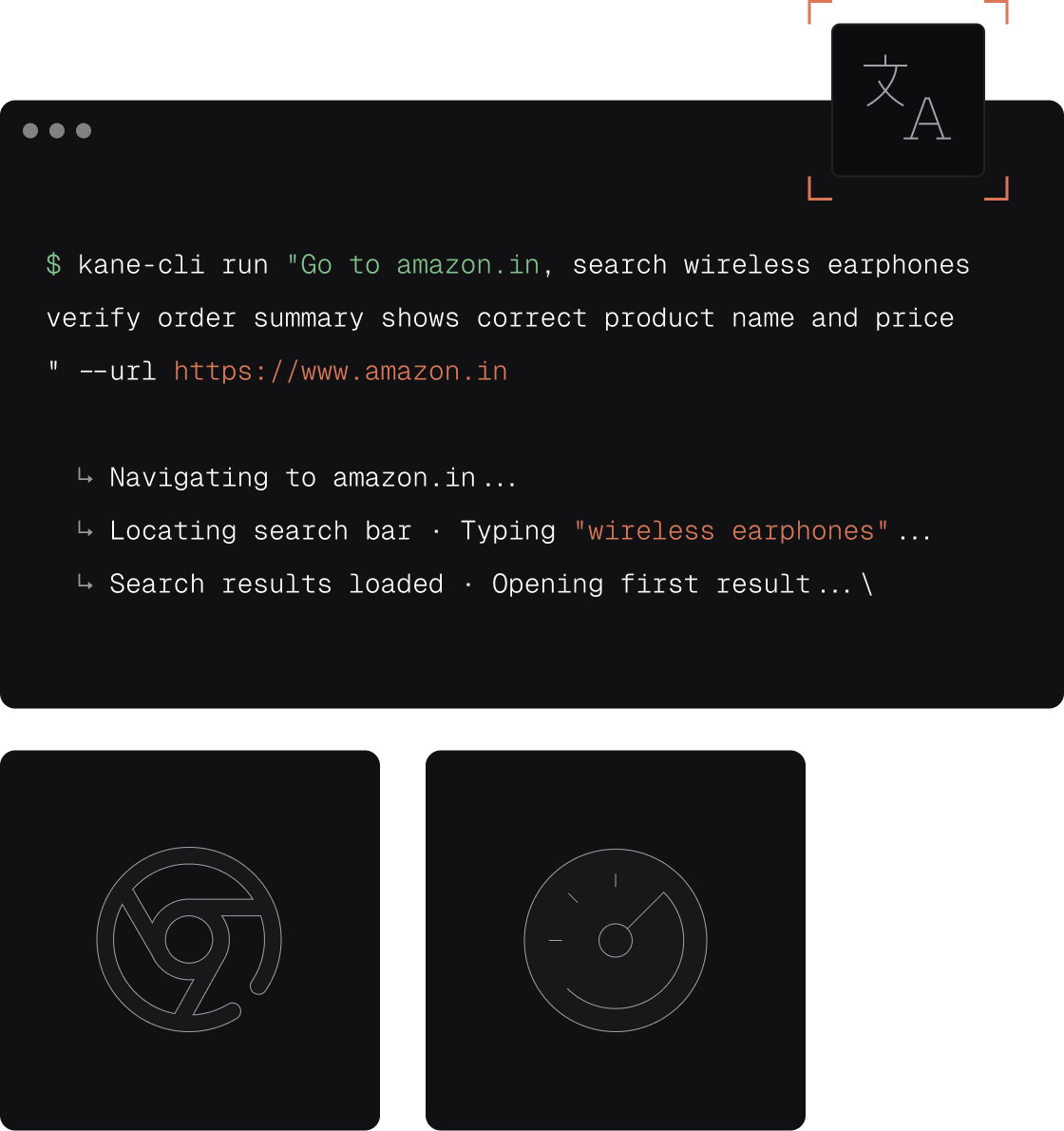
What terminal testing looks like with Kane CLI
Stay in the shell, drive a real browser, and read a verdict where you launched it.

Never leave the shell
Run a flow between a git commit and a build without opening an IDE or a recorder. The check lives next to the code, in the same terminal as the rest of your inner loop, so nothing pulls you out of context.

Live progress in your terminal
Each action prints as it happens, so you watch the flow reason through the page without a separate window. Read the verdict where you launched it, then move straight to the next command.

Runs over SSH and headless
A single binary that runs with no display attached, so it works on a build box, a container, or a remote server over SSH. Test a staging deploy from the machine it runs on, not just a laptop.

Scriptable in your own shell
Every run ends in a typed exit code, so it drops into a shell script, a Makefile, or a one-line loop. Chain it with your existing commands the way you would any other terminal tool.

Watch it or run it dark
Debug in a visible browser, then pass --headless for the same command in CI or on a server. One terminal syntax covers both, with no second script to keep in sync.

Plain English, no selectors
Describe the flow in one sentence and Kane CLI resolves the path itself. The objective anchors to the user-facing element, so a reworded label does not send you back to a recorder to re-capture selectors.
From a shell command to a verified flow
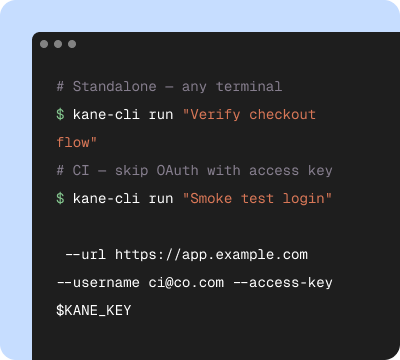
Start in your terminal
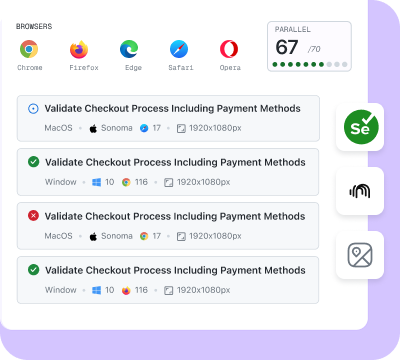
Validate on the cloud
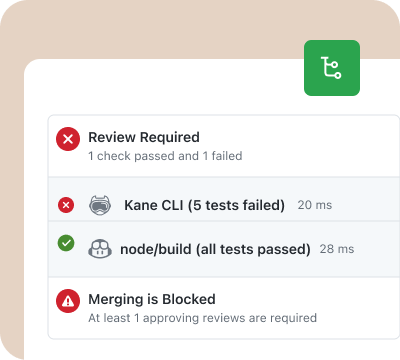
Release with confidence
The terminal is the only surface you need
The terminal is the whole workflow
Install, authenticate, describe the flow, and read the result, all from the shell you already live in. There is no dashboard to open just to run a check, and no window to tab away to while you wait.
One command, laptop to server
The same command runs headed on your machine and headless on a build box over SSH. Terminal testing with Kane CLI moves with you from the inner loop to CI without a rewrite or a second tool.
Proof without leaving the shell
Every run still captures video, a step trace, and a 7-day ShareLink synced to Test Manager. You get a link to drop into a PR, without having to open a browser to generate it.
Run a terminal test in three steps
Install Kane CLI
Run npm install -g @testmuai/kane-cli and sign in from the terminal. Node 18 or higher and Chrome on PATH are all it needs. No GUI to launch, no runner to configure.
Type the flow in plain English
Describe the journey in one sentence: open the app, sign in, and confirm the dashboard loads. Run it yourself, or hand it to Claude Code, Cursor, or Codex in the same terminal.
Read the result in your shell
Kane CLI drives the browser, checks each step against the page, and prints a verified pass or fail with a ShareLink. Run it locally, or scale to the cloud for cross-browser coverage.
Get Started With Kane CLI
🎉 Launch offer: Bonus credits for the first 3 months on paid plans
Choose the right plan for you
Local test authoring via CLI
Auto-heal & vision
View test cases on UI
Test Manager

Free
$0
/month
200 Credits
Resets in every
30 days

Starter
$19
/month
2000 Credits
Launch: 4,000 Credits (+100%)
Bonus for first 3 months

Pro
$99
/month
10,000 Credits
Launch: 15,000 Credits (+50%)
Bonus for first 3 months

Enterprise
Get access to solutions built on Enterprise-Grade Security, Privacy, and Compliances.
Need more credits?
Got a bigger use case in mind?
Let’s talk
Choose the right plan for you
Free
$0
/month
200 Credits
Resets in every
30 days
Starter
$19
/month
2000 Credits
Launch: 4,000 Credits (+100%)
Bonus for first 3 months
Pro
$99
/month
10,000 Credits
Launch: 15,000 Credits (+50%)
Bonus for first 3 months
Enterprise
Get access to solutions built on Enterprise-Grade Security, Privacy, and Compliances.
Need more credits?
Got a bigger use case in mind?
Let’s talk
Get the technical rundown

Documentation
Everything you need to install, configure, and run Kane CLI in under 2 minutes.
Frequently asked questions
Terminal testing means running a browser test from the same shell you already work in, without switching to an IDE, a recorder, or a browser dashboard. With Kane CLI by TestMu AI you type a plain-English objective, for example "log in and confirm the dashboard loads," and the flow runs in your local browser while progress streams back to the terminal. You stay in the shell, keep your keyboard on the keys, and read a verified pass or fail where you launched it.
The terminal is where the rest of the inner loop already lives: your git commands, your build, your logs. Bouncing to a recorder or a GUI to check a flow breaks that loop and leaves a brittle script behind. Terminal testing with Kane CLI keeps the check next to the code. You describe the flow once, run it between commits, and the objective anchors to the user-facing element, so a reworded label does not send you back to a recorder to re-capture selectors.
Yes. Kane CLI is a single binary that runs headless, so it works over SSH on a build box, a container, or any server with no display attached. Pass --headless and it drives the browser without a GUI, streaming the same typed output back through your session. That makes it a fit for testing a staging deploy straight from the server it runs on, not just from a laptop.
Yes. Every run ends in a typed exit code, so it drops straight into a shell script, a Makefile, or a pipeline step: 0 pass, 1 assertion failed, 2 setup or auth error, 3 timeout. Add --agent and Kane CLI streams newline-delimited JSON you can pipe into jq. The command you run in your terminal is the same one GitHub Actions, GitLab CI, Jenkins, or Bitbucket runs, with no separate script to maintain.
Yes. Terminal-based AI agents like Claude Code, Cursor, and Codex CLI can drive Kane CLI directly, because the verdict is a machine-readable exit code plus NDJSON. The agent assembles the command, runs the objective, and reads the result to decide what to do next. Point it at the guide at testmuai.com/kane-cli/agents.md and it installs, authenticates, and tests the flow from your terminal on its own.
Kane CLI is free to install. Runs use KaneAI credits from your TestMu AI account, on your own machine or on the TestMu AI cloud grid. Start free with 10,000 credits, valid for 30 days, and run a real browser test from your terminal in under five minutes, without a credit card.
Let your terminal agent run the test
Point your coding agent at the Kane CLI guide and it will install, authenticate, and run a browser test from your terminal on its own, then read the verified result and close its own loop.
 Point your agent to: testmuai.com/kane-cli-agent/AGENTS.md