

Next-Gen App & Browser Testing Cloud
Trusted by 2 Mn+ QAs & Devs to accelerate their release cycles


On This Page
- What is a Web Application?
- Types of Web Applications
- What is a Mobile Application?
- Types of Mobile Applications
- Difference Between Web App vs Mobile App
- Why Testing of Web and Mobile Applications is Important?
- Popular Frameworks for Conducting Web Application Testing
- Popular Frameworks for Conducting Mobile Application Testing
- Cloud Based Testing Solutions for Web and Mobile Applications
- Advantages of Cloud-Based Application Testing
- Conclusion

Web App vs Mobile App: Types, Testing, and Tools
Explore differences in web and mobile apps, delve into testing methods, and discover key differences for successful development.

Tanay Kumar Deo
January 31, 2026
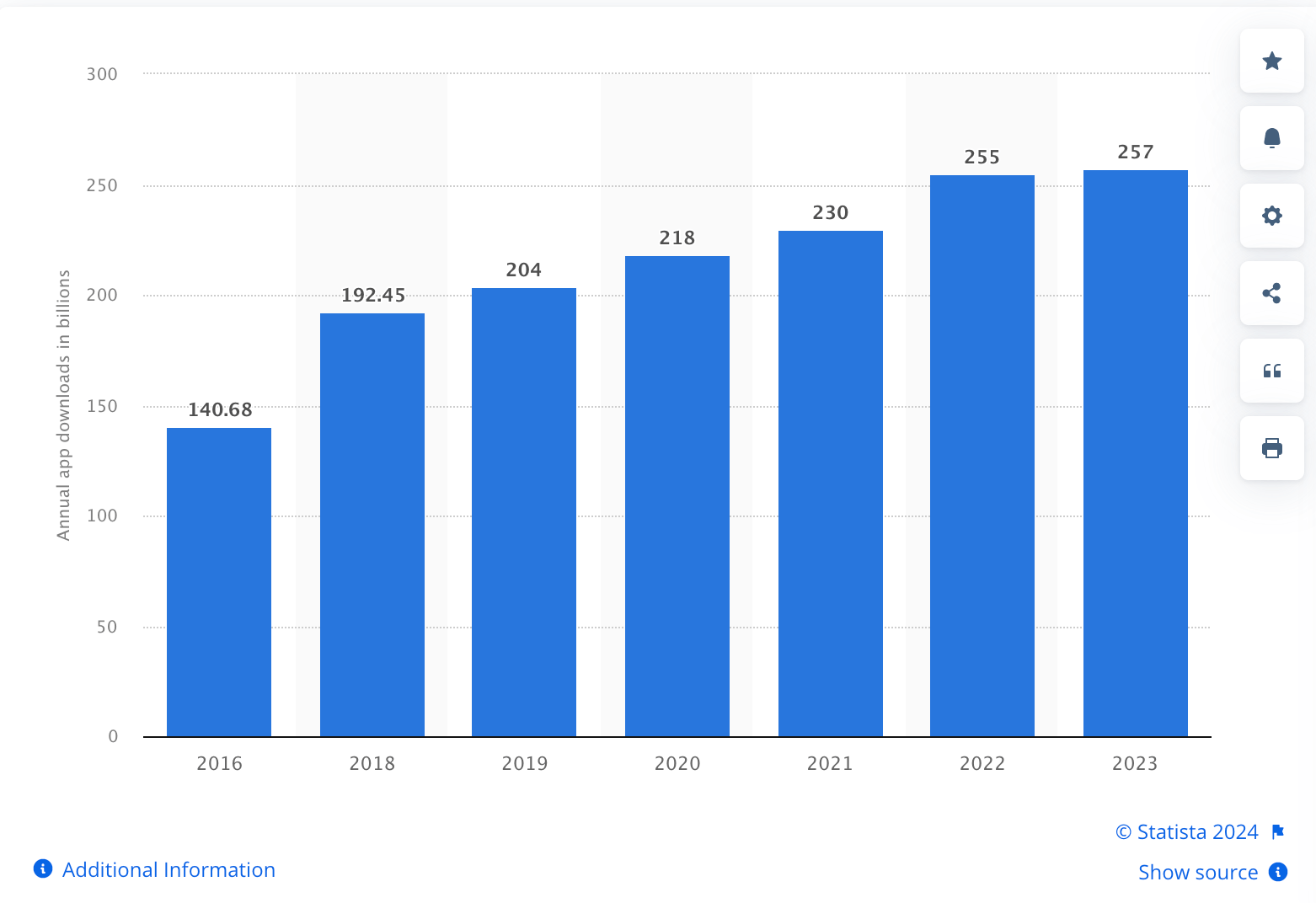
In today’s dynamic business landscape, enterprises grapple with pivotal choices regarding their online presence. The strategic decision between adopting a web or mobile application has become critical for companies navigating the digital realm. With the global mobile app market experiencing unprecedented growth, as evidenced by a staggering 257 billion downloads in 2023, according to Statista, businesses must carefully weigh their options to harness the full potential of their online ventures.
On average, within three days of installation, an app experiences a 77% drop in its daily active user base. According to Forbes, there are 1.13 billion websites globally, but 82% are inactive. In light of these insights, we will delve deep into the key factors businesses should consider when choosing between web apps vs mobile apps.
What is a Web Application?
A web application is a program that users can access through a web browser on any internet-connected device. Unlike traditional applications, web apps do not require separate installations on users’ devices. They are developed using web technologies such as HTML, CSS, and JavaScript. As a result, they are compatible with popular browsers like Chrome, Safari, and Firefox.
Examples of web apps include WhatsApp Web, Instagram, and Facebook, each offering a separate platform from their mobile app. These web apps enable users to connect, share content, and communicate with friends worldwide, enhancing global interaction and connectivity.
Types of Web Applications
The four types of Web Applications are:-
- Static Web Applications: A static web app consists of a user interface with static content that users cannot change through their actions. It is designed to load quickly, maintain stability, and ensure security. It’s great for showing consistent data without server-side processing or dynamic content.
- Dynamic Web Applications: Dynamic Web Applications use server-side technologies like PHP, ASP.NET, Ruby on Rails, etc. They can communicate with users, retrieve data from databases, and change in response to input from the user. Dynamic websites suit applications like e-commerce sites, social media platforms, and content management systems.
- Single-Page Applications (SPAs): A Single-Page Application (SPA) is like a super-smooth web experience. SPAs only get the necessary data from the server instead of reloading the whole website when we click something. It’s akin to possessing software on our PC but within our internet browser. Developers often use tools like React, Angular, or Vue to build these slick SPAs.
- Multi-Page Applications (MPAs): Multi-Page Applications (MPAs) are like the classic websites we often visit. When we select an item, it causes a server request and reloads the entire page. This approach is great for websites like news or blogs, where every page is different and packed with content.
What is a Mobile Application?
A mobile app is software designed for tablets and smartphones that users can download from app stores. Developers use languages such as Swift, Objective-C (for iOS), Java, and Kotlin (for Android) to develop these apps. They also have the option to utilize cross-platform frameworks such as React Native and Flutter.
Examples of mobile apps are Ola, Rapido, Uber, etc. They have a mobile app for booking rides, but there isn’t a dedicated web version for requesting rides directly from a browser.
Types of Mobile Applications
The three types of Mobile Applications are:-
- Mobile Web Apps: Mobile Web Apps are optimized and provide responsive website access through web browsers on mobile devices. They do not need installation and work across platforms. Web developers build them using web technologies like HTML, CSS, and JavaScript. Example: Web version of Netflix and Google Maps on mobile devices.
- Native Mobile Apps: Native Mobile Apps are apps that users install directly on their iOS or Android devices. Developers build native mobile apps in a platform-specific language, such as Swift (for iOS) or Java (for Android). These are quick, responsive, and user-friendly, utilizing all the device’s features. Example: Splitwise and Snapchat mobile apps.
- Hybrid Mobile Apps: A hybrid mobile app is a type of mobile application that combines elements of both web and native app development. It is built using web technologies such as HTML, CSS, and JavaScript, similar to a web app. These web technologies are encapsulated within a native app shell using frameworks like React Native or Flutter that allow it to be distributed and installed through app stores, just like a native app. Example: Twitter and Evernote mobile apps.

Note: Parallel testing on Appium Mobile Device Cloud of 3000+ different real devices speeds up testing by 10X and saves time. Try TestMu AI Today!
Difference Between Web App vs Mobile App
We will see the difference between Web App vs Mobile App based on the factors listed.
| Factors | Web App | Mobile App |
|---|---|---|
| Access | It is accessed via web browsers. | It is downloaded and installed on mobile devices. |
| Platform | Cross-platform (works on all devices). | Platform-specific (iOS, Android, etc.). |
| Development Language | HTML, CSS, JavaScript. | Swift/Obj-C (iOS), Java/Kotlin (Android), or cross-platform frameworks (e.g., React Native, Flutter). |
| Offline Functionality | It requires an internet connection to function. | It can operate without an internet connection. |
| Offline Data Storage | Limited local storage using technologies like IndexedDB, Web Storage, and Service Workers. | Can store large amounts of data locally for offline use. |
| Updates | Instantly updated for all users when changes are made to the web server. | Users must manually update the app through app stores. |
| Cost of Development | Generally more cost-effective to develop. | It is expensive due to separate development for different platforms. |
| Examples | Gmail, Google Docs, Twitter (web version) | Instagram, WhatsApp, Spotify, Uber |
Why is Testing of Web and Mobile Applications Important?
Testing Web and Mobile Applications is essential for several reasons:
- Reliability and Stability: Testing Web and Mobile Apps helps identify and fix bugs, glitches, and errors that could lead to crashes or malfunctions. It also ensures the application works reliably and provides a stable user experience.
- Optimizes Performance: Performance testing assesses the mobile and web application’s speed, responsiveness, and resource usage. This ensures it performs efficiently, even under high load or adverse network conditions.
- Enhances User Experience: UI testing helps ensure the application is user-friendly, intuitive, and responsive. This contributes to a positive user experience, increasing user satisfaction and retention.
- Verifies Functionality: Functional testing ensures that all features, buttons, forms, and functionalities in mobile and app applications work correctly. It also ensures that they meet user requirements and expectations.
- Compatibility Assurance: Compatibility testing ensures the application functions correctly on different devices, browsers, and operating systems.
Popular Frameworks for Conducting Web Application Testing
Some widely used tools or frameworks for conducting web application testing are:-
- Selenium: Selenium is an open-source framework for automation testing. It provides tools to automate interactions with web elements, perform functional testing, and validate web applications. Selenium works with many programming languages (Java, Python, C#, Ruby, Kotlin, JavaScript) for testing on different platforms and browsers.
- Cypress: Cypress is an open-source end-to-end testing framework designed for modern web applications. It enables developers and QA engineers to write and execute automated tests in JavaScript, ensuring the functionality and reliability of web applications.
- Playwright: Playwright is an open-source automation framework for web browsers. It allows developers to write browser automation scripts in multiple programming languages like Java, C#, JavaScript, and Python. It supports Chromium, Firefox, and WebKit, enabling cross-browser testing with consistent APIs.
The software has several useful features. These features include live preview, automatic waits, and a built-in test runner. These features make the software great for debugging and test creation.



Popular Frameworks for Conducting Mobile Application Testing
Some widely used tools or frameworks for conducting mobile application testing are:-
- Appium: Appium is an open-source, cross-platform mobile automation framework that enables the automation of native, hybrid, and mobile web apps for both Android and iOS platforms. It provides a standard way to interact with mobile devices regardless of the operating system or platform.
- Espresso: Espresso is an open-source UI testing framework for Android applications developed by Google. It excels in automating interactions with UI components like buttons, text fields, and more. It helps make reliable and easy-to-understand UI tests by offering synchronization features.
- Calabash: Calabash is an open-source mobile testing framework that allows us to automate testing for native and hybrid mobile applications on Android and iOS platforms. It supports programming languages like Ruby, Java, Flex, and .NET. It allows native APIs to interact with app elements and supports testing on real devices and simulators/emulators.
- XCUITest: XCUITest is a testing framework developed by Apple for automating the testing of iOS applications. It is specifically designed to interact with the user interface elements of iOS apps, allowing for comprehensive functional testing. It helps write test scripts in Swift or Objective-C, giving developers and QA engineers a strong tool for UI testing.
- Selendroid: Selendroid is an open-source test automation framework designed for testing Android applications. It allows testers to interact with and automate the user interface of Android apps using Selenium WebDriver APIs. It supports both native and hybrid mobile applications for testing.


Cloud Based Testing Solutions for Web and Mobile Applications
While frameworks like Selenium, Cypress, and Appium offer powerful testing capabilities, they come with their own set of challenges. Setting up and maintaining local testing environments can be time-consuming and resource-intensive. Additionally, ensuring compatibility across a wide range of devices, browsers, and operating systems requires significant effort and infrastructure. Cloud based testing platforms offer a streamlined solution to these challenges.
TestMu AI is an AI-powered test orchestration and execution platform that lets you run manual and automated tests at scale on over 3000 real devices, browsers, and OS combinations. With TestMu AI, scaling your testing infrastructure is as simple as a few clicks. Whether you need to run tests on a handful of devices or thousands, TestMu AI provides the necessary resources on-demand, eliminating the need for costly hardware investments and infrastructure management.

Advantages of Cloud-Based Application Testing
Cloud-based web and mobile application testing is essential for several reasons:
- Reduced Setup Time: Setting up a cloud testing environment is faster and easier than setting up a local test environment, which speeds up the testing process.
- Backup and Recovery: Cloud platforms offer robust backup and recovery mechanisms. This ensures that we protect testing environments and data against unforeseen events.
- Security and Compliance: Cloud providers invest heavily in security measures and compliance standards. This can provide a secure testing environment, often with features like encryption, access controls, and compliance certifications.
- Global Testing: Cloud providers have data centers in different areas, allowing organizations to test performance and load from nearby locations. This helps in simulating real-world scenarios more accurately.
- Cost-effective: Testing based on the cloud is economically efficient, removing the requirement for dedicated physical infrastructure. Organizations pay only for the resources they use, avoiding upfront hardware expenses. Additionally, cloud providers handle infrastructure upkeep, reducing maintenance costs.
Conclusion
Understanding the differences between web app vs mobile app is essential to modern software development. We develop mobile applications for smartphones and tablets. Nonetheless, the web application is accessible on any gadget equipped with a web browser. To guarantee functionality, performance, and security, both require thorough testing.
Cloud-based testing solutions meet the changing needs of the digital world by being flexible and easily accessible. They assist in building great apps for various platforms and devices by offering a dependable testing framework.
To further strengthen your expertise in mobile app development and mobile testing, be sure to check out our comprehensive guide on top asked mobile testing interview questions. This resource will equip you with the knowledge needed to excel in this dynamic field.


Frequently asked questions
Did you find this page helpful?
More Related Hubs
TestMu AI forEnterprise
Get access to solutions built on Enterprise
grade security, privacy, & compliance
- Advanced access controls
- Advanced data retention rules
- Advanced Local Testing
- Premium Support options
- Early access to beta features
- Private Slack Channel
- Unlimited Manual Accessibility DevTools Tests