

Next-Gen App & Browser Testing Cloud
Trusted by 2 Mn+ QAs & Devs to accelerate their release cycles


On This Page
- Understanding Virtual Machines
- Need for Virtual Machines
- Features of Virtual Machines
- Advantages of Virtual Machines
- Limitations of Virtual Machines
- Types of Virtual Machines
- Use of Virtual Machines
- Categories of Virtual Machines
- Common Applications of Virtual Machines
- What Problems Can Virtual Machines Solve?
- Virtual Machines Software
- Use Cases of Virtual Machines
- What is Virtualization?
- Types of Virtualization
- Virtual Machines Management
- Containers and Virtual Machines
- Virtual Machines and Cloud Computing
- Platforms Offering Virtual Machines on Cloud

What Are Virtual Machines And How Do They Work?
Learn about virtual machines (VMs), their significance, and how they leverage virtualization for efficiency, scalability, and resilience in the digital era.

Nazneen Ahmad
December 22, 2025
A virtual machine (VM) operates solely on software rather than physical hardware. It uses software within a physical computer to imitate or reproduce another computer’s or operating system’s capabilities. With organizations seeking ways to optimize resource utilization and stay aligned with advancing technology and user demands, the adoption of virtual machines (VMs) is experiencing significant growth.
According to Global Market Insight, the virtual market size was US $9.5 billion in 2023 and is expected to surge at a CARG of 12% between 2024 and 2032.
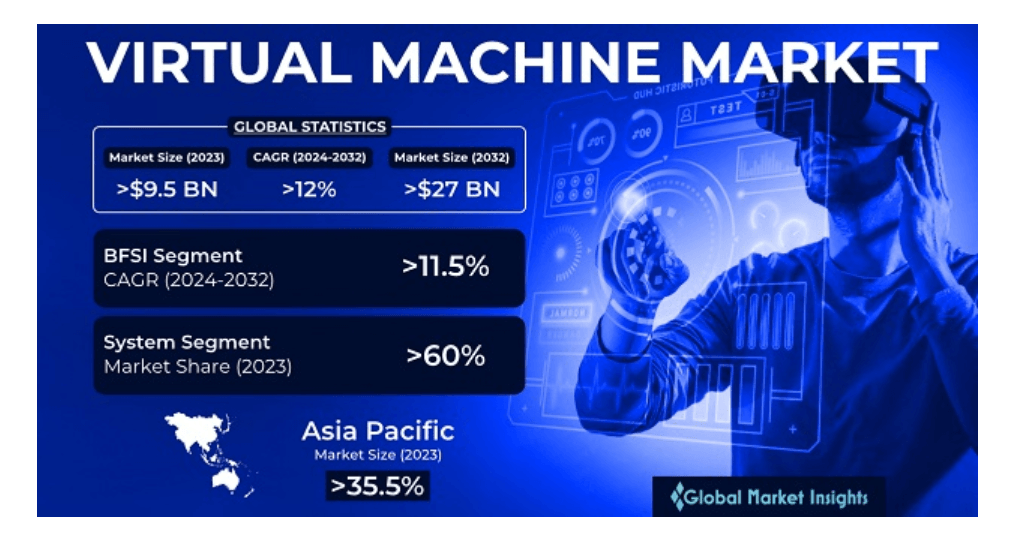
The main reason for such an increase is the organization’s adoption of cloud computing to achieve scalable, flexible, and cost-efficient computing resources. To this evolution in software technology, virtual machines have been a keystone that offers a robust solution that better aligns with the need for cloud-based infrastructure.
In this blog, we will discuss virtual machines while focusing on how they work. You will gain a comprehensive understanding of virtual machines, their significance, and how they can leverage virtualization for enhanced efficiency, scalability, and operational resilience in the digital era.
So, let us get started with this.
Understanding Virtual Machines
A virtual machine (VM) emulates or virtualizes an actual computer system. It provides all the functionalities of a physical computer but exists as a software-based emulation rather than a tangible object. In technical terms, the virtual machine is a computer system emulation that replaces the need for physical computing infrastructure or hardware, creating an environment for deploying software applications. In simpler terms, they are just like a computer present only in digital form. This computing resource utilizes software instead of a physical computer to run programs and deploy applications.
A virtual machine, also called a “guest,” is constructed on a physical computer known as a “host,” using resources like a computer’s CPU core and memory. A single server or host can host multiple VMs or guests simultaneously. Each VM operates independently, having its own operating system, memory, storage, CPU, and network interfaces, running autonomously from other VMs on the hardware host. For instance, a physical PC could run a macOS or Linux VM effortlessly without significant complications.
With VMs, you can run simultaneous operations of various operating systems on a single computer. Each operating system functions similarly to how it would on the host hardware, providing an end-user experience almost identical to using an operating system on a physical machine. Thus, each VM gives a better end-user experience, similar to the non-virtual machines or individual OS to specific physical machines.
However, a VM cannot directly interact with a physical computer; instead, it depends on a lightweight software layer called a hypervisor to coordinate communication between the VM and the underlying physical hardware. The hypervisor allocates physical computing resources, such as processors, memory, and storage, to each VM while maintaining their separation to prevent interference.
Understanding how virtual machines operate can also prepare you for common operating system interview questions about OS virtualization and resource management.
Need for Virtual Machines
The need for virtual machines can be illustrated through an example: software development and software testing for a cross-platform application.
Imagine developers and testers working on a software application that needs to be tested for functionality and performance on operating systems like Windows, macOS, and Linux.
Developers may prefer different development environments, such as Windows or macOS, during the coding stage. However, replicating these environments on a single physical machine can be challenging. VMs solve this issue by creating similar development environments that can be easily replicated across different machines. It ensures consistency and reduces the “it works on my machine” problem.
Additionally, software applications need to function across different platforms. Creating a physical system for each operating system is impractical. VMs allow the team to develop isolated environments with standardized Windows, macOS, and Linux configurations on a single physical system.
In this scenario, virtual machines streamline the software development and testing processes by providing a flexible, reproducible, and resource-efficient solution.
Features of Virtual Machines
Some of the key features of virtual machines include the following:
- It allows the generation of snapshots, representing instantaneous replicas of the current state of the VM.
- It supports live migration, meaning they can be moved from one host to another.
- Its essential component is a hypervisor that allows for better management and allocation of resources for virtual machines.
- It has features like Secure Boot and Virtual Trusted Platform Module (VTPM) to enhance the security of virtualized environments.
- It can be configured with virtual network interfaces and connect to virtual networks.
Advantages of Virtual Machines
Virtual machines offer remarkable versatility, serving various purposes for businesses and professionals. The key advantages of virtual machines include:
- Resource expansion: It enables the use of software incompatible with the host machine, expanding the capabilities of a single device.
- Efficiency: It saves money, physical space, and time by running macOS and Windows on a single device.
- Innovation: It allows developers to test software on different operating systems without concerns about malware or bugs affecting their physical computers.
- Enhanced security: It ensures more robust security; if one VM is attacked, it does not compromise other VMs on the same machine.
- Scalability: It facilitates the easier scaling of cloud computing workloads as organizations grow, providing a scalable way to manage and test operating systems, apps, and software updates in diverse hardware environments.
- Flexibility: It is faster and simpler than installing an OS on a physical server, as VMs can be cloned with the OS pre-installed. It allows for the creation of new environments on demand to address emerging tasks.
- Security measures: It enhances security compared to operating systems running directly on hardware. External programs can scan VMs for malicious software, and the ability to create snapshots enables the restoration of a VM to a previous, uninfected state if malware is detected, effectively rolling back the VM in time.
Limitations of Virtual Machines
The limitations of virtual machines vary based on your use case and workload, and they may only sometimes be applicable. Here are general considerations to keep in mind:
- Performance overheads: It depends on the host computer’s finite computing power and resources. Running multiple VMs on a single host can impact overall performance. Further, as VMs interact with the host system through a software layer, this may lead to latency issues, particularly with heavier workloads.
- Compatibility issues applications: It causes compatibility problems for applications dependent on specific hardware configurations, drivers, or dependencies. Software heavily reliant on graphics processing may not function optimally in virtualized environments, making VMs less suitable for activities like gaming.
- Licensing limitations: It results in some software vendors requiring separate licenses for each VM, as virtual machines function similarly to actual computers. Examples include Microsoft SQL Server, Adobe Creative Cloud, and virtualization software like VMware vSphere.
- Single point of failure: It poses a single failure risk by concentrating all virtual machines on one physical computer. Mitigating risks involves creating VM backups and alternative solutions to ensure operational continuity in case of a malfunctioning host machine. It is essential to be familiar with the term “virtualization” to better understand the workings of a virtual machine.
With the above-mentioned limitations, VMs offer numerous challenges over physical host machines. Some of the challenges are given below.
- Performance may be inferior to physical machines, depending on configurations and the number of VMs utilized on a single host.
- A malfunctioning physical host can negatively impact numerous VMs, leading to significant consequences when multiple VMs rely on the operation of a single server.
- Securing VMs can be intricate, demanding a high level of skill for effective management.
- Managing virtual disk consolidation involves merging VM disk files created after the system takes VM snapshots, which can be intricate and pose administration difficulties.

Note: Create and Manage VMs effortlessly to streamline your testing processes. Try TestMu AI Today!
Types of Virtual Machines
There are different types of virtual machines that developers can use for their specific software projects:
- Windows virtual machines: Most hypervisors support Windows OS as a guest, with Microsoft’s Hyper-V integral to the Windows operating system. Once installed, it establishes a parent partition containing both the hypervisor and the primary Windows OS, giving access to the hardware. Windows guests and other operating systems operate in child partitions, communicating with the hardware through the parent partition.
- Android virtual machines: Google’s open-source Android OS is primarily designed for mobile and connected home devices and typically runs on ARM architecture. However, Android gamers or developers may want to run it on PCs using virtualization technology.
- Mac virtual machines: Apple’s end-user license agreement restricts running macOS on non-Apple hardware. However, Type 2 hypervisors on Mac hardware allow the creation of VMs with a macOS guest.
- iOS virtual machines: Running iOS in a VM is currently not feasible due to Apple’s strict control over the iOS, limiting its use to iOS devices. The closest alternative is the iPhone simulator in the Xcode integrated development environment, which simulates the entire iPhone system in software for development and testing purposes.
- Java virtual machines: The Java platform utilizes the JVM, known for its “write once, run anywhere” capability. Java programs, written in bytecode, are compiled by the JVM into machine code compatible with the host computer’s processor. Unlike other virtual machines, the JVM doesn’t run an entire OS; instead, it translates application-level software for specific hardware.
- Python virtual machines: The Python VM facilitates executing programs written in Python on various CPUs. It translates Python programs into bytecode, which is stored for execution, and translates the bytecode into machine code for swift execution without relying on a hypervisor or containing a guest OS.
- Linux virtual machines: Linux is a familiar guest OS and host OS. It features a hypervisor called the kernel-based virtual machine (KVM). Integrated into the mainstream Linux kernel in 2007, KVM is now owned by Red Hat and widely used.
- VMware virtual machines: VMware is a leading provider of Type 1 and Type 2 hypervisors and VM software for enterprise customers.
- Ubuntu virtual machines: Ubuntu, a Linux distribution by Canonical, comes in desktop and server versions suitable for VM installation. Ubuntu can be a guest OS on Microsoft Hyper-V, offering optimized versions that integrate well with Hyper-V’s Enhanced Session Mode. These versions support features like clipboard integration, dynamic desktop resizing, shared folders, and seamless mouse movement between host and guest desktops.
Having understood the features and importance of virtual machines (VMs), let’s explore their diverse VM uses in the section below.
Use of Virtual Machines
The use of virtual machines is diverse and versatile. It enhances the computational capabilities of a single device, improving the capacity and adaptability of existing hardware. For example, if a Mac user needs access to Microsoft tools, you can use a Windows virtual machine instead of buying a new computer. Similarly, a PC developer wanting to preview their software application on a Mac can do so through a virtual machine. It allows users to run different operating systems on a Windows PC without needing additional hardware.
Virtual machines also help public cloud services more effectively meet the needs of multiple users. They enable organizations to develop robust Operational Security (OPSEC) strategies and continuity plans with minimal disruption to their IT infrastructure.
Another common use of virtual machines is creating “dummy” versions of software or operating systems that don’t affect host machines. This capability allows developers and security experts to test software and isolate corrupt files in a secure environment, reducing the risk of malware or bugs affecting other parts of their system or network.
In the next section, we will learn about the categories of virtual machines.
Categories of Virtual Machines
Virtual machines can be categorized based on their use case and functionality. Here are some common categories:
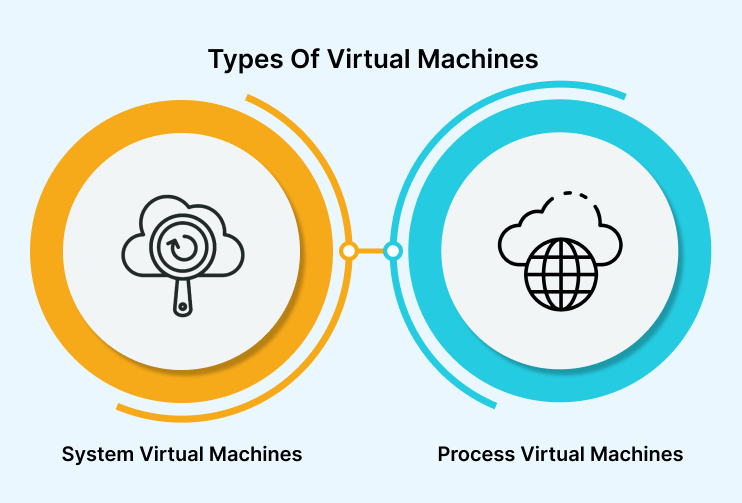
System virtual machines
This category of virtual machines emulates complete operating systems by providing access to the physical features of the host, such as RAM and storage. For example, they allow a Windows PC to imitate a Mac computer by running macOS. These virtual machines are located in isolated partitions on a physical server or computing workstation, each with its own independent operating system, configurations, applications, and services. It is made possible through a hypervisor that allocates resources from the shared pool to specific virtual machines.
The primary advantages of system virtual machines include:
- It can simulate a hardware environment, utilizing emulators or just-in-time compilation.
- It provides users with features like application provisioning, enabling the creation of packages, high availability, maintenance, and disaster recovery.
- It facilitates the coexistence of multiple OS environments on the same primary drive, allowing the sharing of files between the host and guest operating environments.
- It allows developers to execute tasks without changing operating systems; all generated data is stored on the host’s hard drive.
However, there are drawbacks of system virtual machines:
- It decreases efficiency when virtual machines indirectly access the host’s hard drive compared to actual machines.
- It varies the performance of several virtual machines running on the same host depending on the system.
- It may result in the guest operating system not being inherently compatible with the malware protections offered by the host resources.
Process virtual machines
This category of virtual machines, also known as application virtual machines or Managed Runtime Environments (MREs), allows the execution of specific tools as if they were inherent or integrated functionalities of the PC. For example, a Windows host computer can utilize a Java virtual machine to run Java applications. Process virtual machines are configured to temporarily execute a singular process as an application, such as running Java programs or utilizing the Microsoft .NET Framework. Another example is the Parrot virtual machine operating on the Common Language Runtime VM.
The primary advantages of process virtual machines include:
- It is platform-independent, allowing programs to run on different hardware platforms without modification. It provides a consistent environment regardless of the underlying hardware.
- It uses interpreters and offers a high level of abstraction that works to conceal the host’s operating system and underlying hardware.
- It provides a standardized environment for testing and deployment, allowing developers to write code once and run it on any system that supports the virtual machine.
- It allows for easy portability, which means you can quickly move between different systems, making it easier to deploy applications across various environments.
- It provides interfaces for various programming languages, including Fortran and C. Unlike other process VMs, they have unrestricted access to all OS services and aren’t confined by the system model. Consequently, they cannot be strictly classified as virtual machines.
However, there are drawbacks of process virtual machines:
- It may need more access to system resources and APIs compared to running code directly on the host operating system, which can lead to restricting certain functionalities.
- It can sometimes be complex, especially in environments with multiple virtual machines, where understanding the interactions between the virtual machines and the host operating system is required.
Now that we have learned about VMs and their categories in detail let’s explore their advantages and limitations. Understanding these can help us decide whether to use a virtual machine.
Common Applications of Virtual Machines
Now let us learn some of the typical applications of virtual machines:
- It is mainly used to consolidate multiple virtual machines on a single physical server, significantly reducing the need to distribute workloads across multiple servers—a costly and inefficient approach from an administrative and resource perspective.
- It allows a single physical machine to be virtualized to house multiple virtual machines that can handle increased demand when necessary.
- It can be quickly deleted, minimizing damage and the risk of exposure to other entities in the physical and virtual environment. It leverages its use to enhance cybersecurity, as restoring a VM to its most recent backup is less cumbersome and time-consuming.
- It allows different operating systems (e.g., guest or virtual operating systems) to be operated on multiple virtual machines on the same physical computer, unlike a physical computer with a single host operating system dictating software, tasks, and administration.
The applications mentioned above offer several benefits:
- Legacy system support:
- Operating system migration:
What Problems Can Virtual Machines Solve?
Virtual machines are versatile tools that address different types of issues. Here are some of the critical problems that virtual machines can solve:
- Underutilized servers: It aims to enhance server utilization by running multiple applications on a single server. Consolidating underutilized servers contributes to enhanced operational efficiency and cost reduction for organizations.
- High hardware costs and resource inefficiency: By consolidating multiple applications onto a single server, organizations can decrease hardware costs and significantly reduce space and power requirements. For example, an organization can place ten virtual machines on a single server instead of having ten applications running on a separate server with low utilization rates.
- Mobile apps and flexible work demand cost-effective solutions: It helps cost management for computing environments as organization deployments expand to meet the demands of dynamic mobile applications and flexible work arrangements.
- Downtime during maintenance or updates affecting multiple applications: It minimizes downtime by enabling the updating of a single application without impacting the entire server, thus ensuring continuous operation during maintenance or updates affecting various applications.
- Collateral damage from errors or breaches in one application: It isolates applications, mitigating errors or breaches without affecting other dependencies, thereby reducing collateral damage.
- Challenges in managing large-scale enterprise systems with numerous applications: It makes managing them more manageable by providing an efficient system for management, scaling, and responding to evolving business objectives.
- Difficulty optimizing resources in third-party cloud computing environments: It helps optimize resources in third-party cloud computing environments by offering advantages such as deployment flexibility and scalability. However, careful attention is required to deploy, resource sizing, and manage costs to prevent cost escalation.
Now that we have learned about the problems that VMs help resolve let’s explore the various available VM software options.
Virtual Machines Software
Here are some of the well-known virtual machine software that you can use for your software project:
- VMware Workstation Player: This software is a virtualization tool supporting various operating systems on a single machine, eliminating the need for a reboot. It allows for efficient data sharing between hosts and guests and is specifically designed for IT professionals.
- Parallels Desktop: This software enables hardware visualization, allowing Windows to operate on a Mac without rebooting. It is considered one of the most effective options for this purpose, recognized for its superior power, speed, and user-friendliness.
- Oracle VM VirtualBox: This software is an open-source virtualization application for home and enterprise users. It supports X86 and AMD64 architectures and features an intuitive layout and a guide for adding new virtual machines. It delivers high performance for enterprise users and extensive compatibility with most Windows versions.
- Citrix Hypervisor: This software streamlines operational administration, allowing users to perform resource-intensive tasks within a virtualized environment, which is particularly beneficial for Windows 10. Key features include support for enhanced graphic workloads and a secure environment for storing, accessing, and working on large files.
Now, let us deep dive into learning the workings of the virtual machine.
In the above section, we have highlighted the different virtual machine software. Now, let’s examine and understand these uses through use cases.
Use Cases of Virtual Machines
Virtual machines have various purposes for both enterprise IT administrators and users.
- Cloud computing: VMs have been the primary computing unit in the cloud, supporting a wide range of applications and workloads over the past decade or more. The cloud enables businesses to scale their computing resources dynamically, allowing for the efficient allocation of resources based on demand. This flexibility has revolutionized how organizations approach IT infrastructure, offering cost-effective solutions and enhancing overall operational efficiency.
- Supporting DevOps: VMs offer valuable support for enterprise developers by allowing them to configure VM templates with settings according to their software development and testing processes. Developers can create VMs for specific tasks, such as static software tests, seamlessly integrating these steps into automated development workflows. It helps streamline the DevOps toolchain.
- Testing a new operating system: VMs allow users to test a new one on their desktop without impacting their primary OS.
- Investigating malware: VMs are beneficial for testing malicious programs, as they frequently require fresh machines.
- Running incompatible software: VMs allow users to prefer one OS while needing a program available only on another. For instance, a desktop-focused hypervisor like VMware Fusion or Parallels will enable Windows to run in a VM on macOS, providing access to the desired software version.
- Browsing securely: VMs are used for browsing to ensure that sites are visited without concerns about being infected. Users can take a snapshot of their machine and revert to it after each browsing session. This setup can be done independently using a Type 2 desktop hypervisor or provided by an admin as a temporary virtual desktop on the server.
What is Virtualization?
Virtualization is the process of using software to create an abstraction layer. It decouples the operating system from the physical hardware platform and associated applications. Virtualization forms the foundation of cloud computing, allowing you to generate virtual resources such as servers, desktops, operating systems, files, storage, and networks.
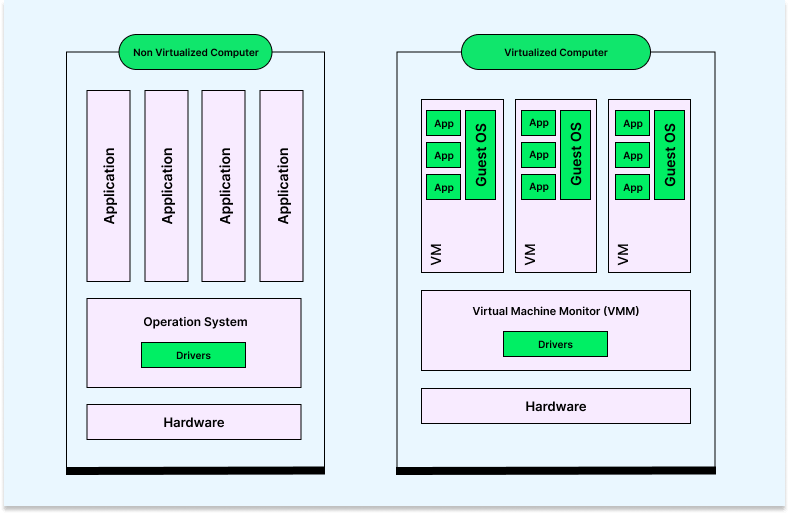
The image below illustrates that a non-virtualized computer maintains a direct connection between its single operating system, with drivers, and the physical hardware. Individual applications then interact with this single operating system.
However, the Virtual Machine Monitor (VMM) software is an intermediary in the virtualized computer, separating software applications’ hardware and operating systems. Thus, VMM software facilitates the creation, management, and regulation of virtual machines, overseeing the operation of a virtualized environment atop a physical host machine.
Benefits/Features of Virtualization
- It allows the creation of multiple VMs on a single physical server, making it easy for testers to simulate diverse test environments.
- It allows easy testing across various operating systems and hardware configurations.
- It offers snapshot functionality, which helps save a VM’s current state and revert to it later if needed. Testers can use this functionality to run destructive or risky tests and quickly reset the test environment.
- It allows for easy scalability, helping testers quickly spin up additional VMs as needed for testing. It is mainly helpful for load testing, where multiple instances of an application are needed to emulate heavy traffic.
- It plays an essential role in DevOps practices as VMs can be easily managed through tools like Docker, Kubernetes, and Vagrant, allowing for easy integration into the development and testing workflow.
With all the benefits and features mentioned above, it becomes increasingly important to understand how virtual machines play an important role in software testing. To learn more about it, follow this guide on using virtualization in software testing.
In the following section, we will learn more about the different types of virtualization in detail.
Types of Virtualization
Different virtualization types exist, including applications, desktops, networks, hardware, storage, servers, and data centers. The most critical types of virtualization are outlined below.
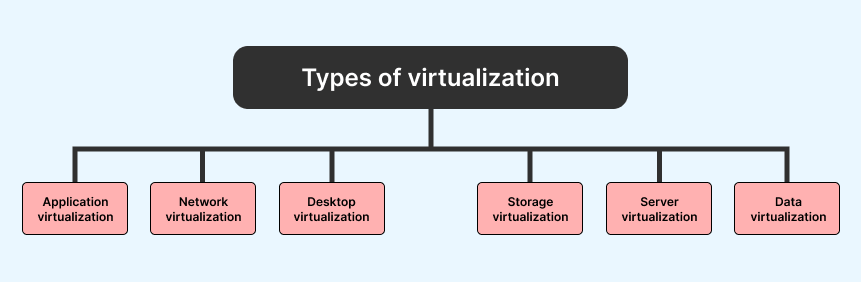
- Application virtualization: It allows users to access applications remotely from a server. The server stores all personal information and other application characteristics, but the application can still run on a local workstation online. For example, a user may need to run two different versions of the same software. Technologies that use application virtualization include hosted applications and packaged applications.
- Network virtualization: It enables the creation of multiple virtual networks, each with a separate control and data plane, on top of a single physical network. These virtual networks can be managed by individual parties that require confidentiality from each other. Network virtualization provides the capability to create and provision virtual networks, logical switches, routers, firewalls, load balancers, Virtual Private Networks (VPNs), and workload security within days or weeks.
- Desktop virtualization: It enables users to store their operating system remotely on a server in a data center. It lets users access their desktops virtually from any location using a different machine. Users who require specific operating systems other than Windows Server can benefit from virtual desktops. The primary advantages of desktop virtualization include user mobility, portability, and simplified software installation, updates, and patch management.
- Storage virtualization: It enables the management and utilization of storage from multiple sources as a single repository. The software for storage virtualization ensures smooth operations, consistent performance, and a continuous suite of advanced functions, even in the face of changes, breakdowns, and differences in the underlying equipment.
- Server virtualization: It involves masking server resources to create multiple virtual servers from a central physical server. Each virtual server operates with its identity number and processors, allowing them to run their operating systems in isolation. Despite this, each sub-server is aware of the central server’s identity. This approach improves performance and reduces operating costs by efficiently deploying primary server resources into sub-server resources. It offers benefits such as facilitating virtual migration, reducing energy consumption, and lowering infrastructure costs.
- Data virtualization: It involves collecting data from various sources and managing it in a centralized location. It abstracts the technical details of how data is gathered, stored, formatted, and arranged, providing a logical view of the data that can be accessed remotely by interested parties, stakeholders, and users through various cloud services. Major data virtualization services companies include Oracle, IBM, AtScale, and CData.
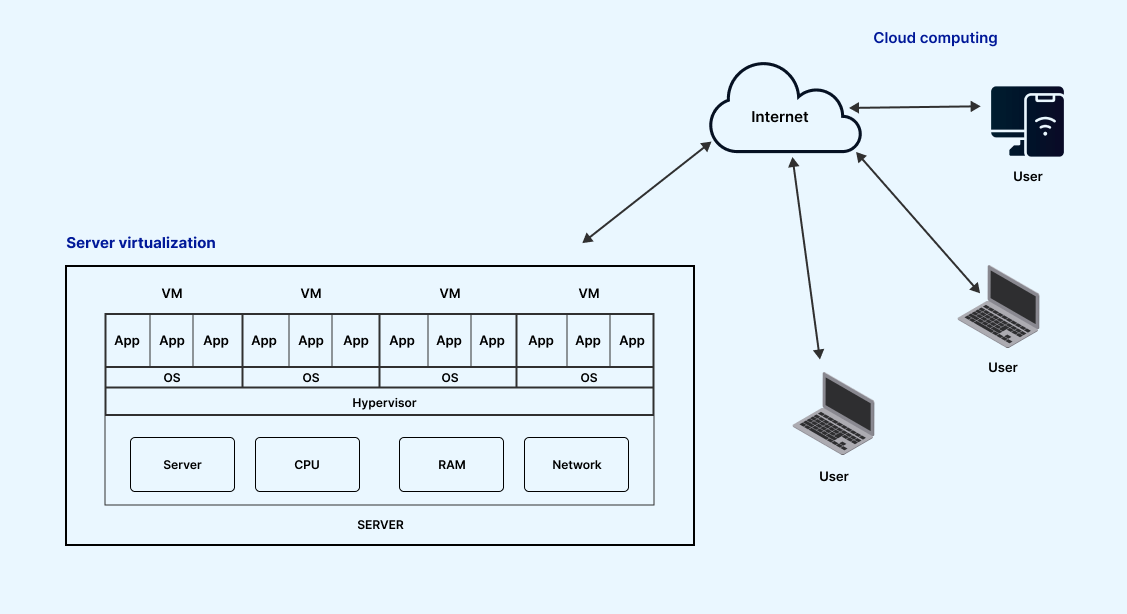
As mentioned earlier, there are other types of virtualization, such as service virtualization and paravirtualization. You may wonder if server virtualization and service virtualization are the same thing. They might be confusing at times, but they have unique differences.
Server virtualization is a process where the physical devices are divided into multiple unique and isolated virtual servers. On the other hand, service virtualization creates and replicates the systems that new applications depend on. It duplicates the behavior of dependencies such as databases, services, or APIs and allows testers to simulate the behavior of these dependencies when they are not readily available.
How do virtual machines work?
VMs use a hypervisor, a Virtual Machine Monitor or Manager (VMM), to transform real hardware into a virtual counterpart for use in a virtual environment. The hypervisor emulates the primary components and hardware resources of a host computer. It acts as an intermediary between the physical host computer and the guest virtual machine, allocating resources to the VM based on specific requirements and host capacity. As a result, the hypervisor can fragment into multiple independent “virtual machines.”

These newly formed VMs can operate independently, running their operating systems and applications. However, they still share the original resources from the bare metal server, expertly managed by the hypervisor. These resources include memory, RAM, storage, and more.
Role of virtualization in virtual machine working
As explained in the section above, it enables the creation of a software-based computer with designated amounts of memory, storage, and CPU from the host computer. The hypervisor software manages this process, shifting resources from the host to the guest as required. It also orchestrates operations within VMs to prevent conflicts and interference when utilizing resources.
For instance, if a virtual machine is running and the user or application commands an action requiring more resources than currently available, the hypervisor promptly recognizes the demand and reallocates a portion of the host’s resource pool to meet the requirement.
The role of hypervisors in virtualization
For the hardware hypervisor to function appropriately, the processor and motherboard must support virtualization at the hardware level. This integration requires special commands that allow the hypervisor to distribute processor power effectively and control access to the memory of different systems.
- It ensures that the guest system operates solely within the assigned resources, avoiding interference with the host system.
- It monitors the well-being of the guest system and notifies of any anomalies.
- It can provide direct access to disk sectors or processor registers, although this is sometimes true.
- It operates differently; instead of running on a host system, a hardware hypervisor assumes the role of the host itself.
It does not require specialized hardware components. However, the hypervisor’s PC should have adequate hardware to support virtual machines, the hypervisor’s operations, and the host’s inherent operations.
Most hypervisors can be classified into one of two categories:
- Type 1 Hypervisor
- Type 2 Hypervisor
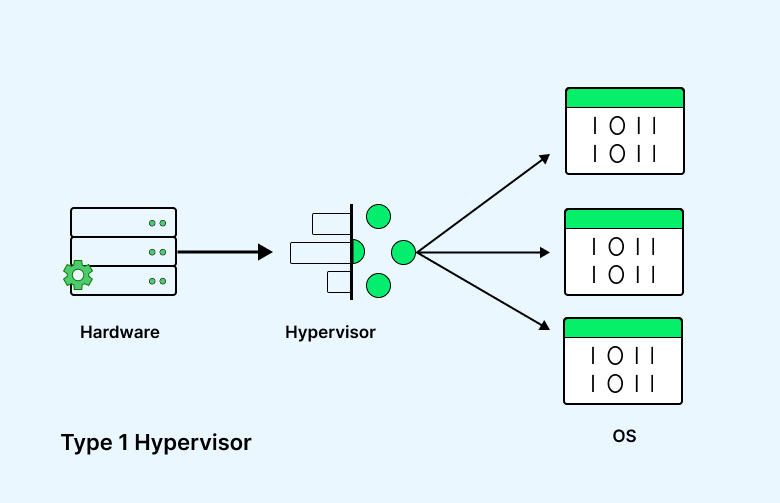
Type 1 Hypervisor: They operate directly on the physical hardware, typically in servers, and can access all physical computer resources. This hypervisor replaces the operating system, and a separate software tool is used to create and manage VMs on the hypervisor. Management tools, such as VMware’s vSphere, allow users to choose a guest OS for installation within the VM.
One VM can be utilized as a model for others, allowing duplication to generate new instances. Depending on specific requirements, multiple VM templates may be established for diverse purposes, including software testing, production databases, and development environments.
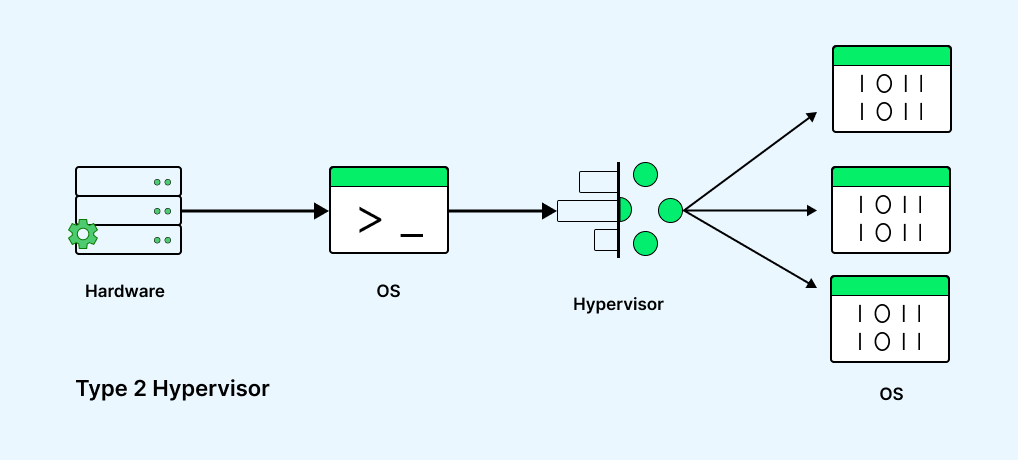
Type 2 Hypervisor: They function as applications within a host OS and are generally designed for single-user desktop or notebook platforms. In this scenario, a VM is manually created, and a guest OS is subsequently installed. The hypervisor enables the allocation of physical resources to the VM, with users manually configuring parameters such as processor cores and memory allocation. Depending on the hypervisor’s capabilities, additional options like 3D acceleration for graphics can also be configured.
Virtual Machines Management
Managing VMs includes several tasks, such as starting and stopping them, adjusting their settings, and other similar tasks.
Once you have set up the virtual machine, you can manage it using the virtualization software’s interface. It includes creating, configuring, monitoring, and maintaining a virtualized environment. Proper management ensures stability, security, and system performance.
Here is a general guide that covers common aspects of virtual machine management.
- You should choose the best virtualization platforms that align with your requirements and test environment.
- You must install the hypervisor software on your chosen physical host machine. This software allows you to create and manage.
- You can create new VMs using the chosen virtualization platform’s management interface. In this interface, you specify details like the virtual machine’s name, OS, etc.
- You should always install the operating system on the virtual machine for better management. Eventually, the OS on a physical machine will be similar to that on a virtual machine.
- You also have to set up the network for your virtual machine. It can be done by assigning dynamic or static IP addresses, configuring DNS settings, and other methods.
- You can adjust settings like allocated RAM, CPU core, and disk space when configuring the virtual machine.
- You should take a snapshot of the virtual machine at critical points. It will help to save the current state of a virtual machine so that you can review any specific points in time if required.
- You can keep the documentation of your virtual machine configuration for effective management.
In the next section, we will learn about containers and VMs, exploring the differences in their structures.
Containers and Virtual Machines
When learning about VMs, it’s essential to understand the main difference between containers and VMs. While both serve similar functions, their core workings differ. VM can emulate the entire computer system, including modeling the virtual hardware unit, whereas containers only virtualize software applications and their associated files.
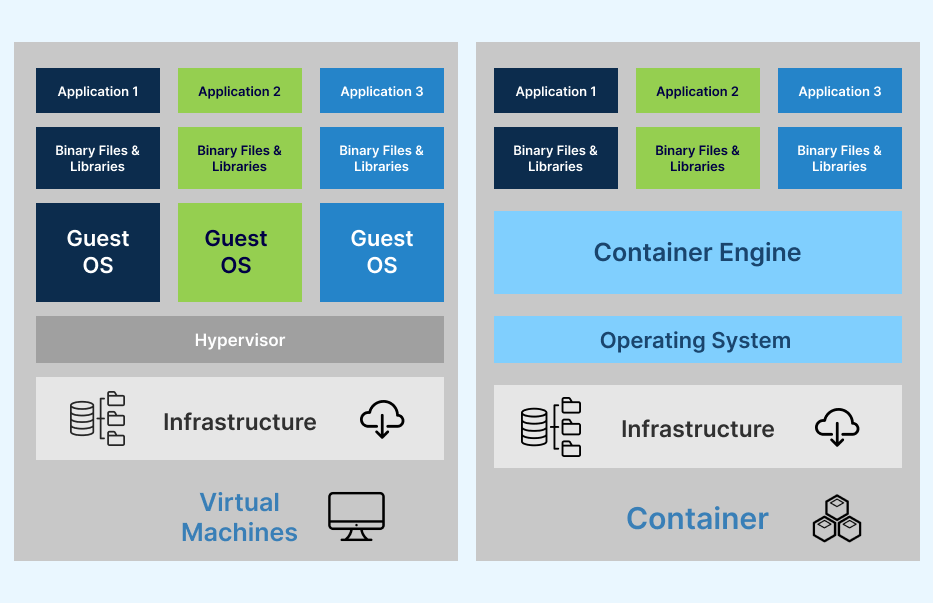
Commercially available VMs like VMWare or Parallels utilize the physical resources of a host computer to create a virtualized computer with its operating system. In contrast, containers are designed to execute individual programs and lack the same virtual infrastructure level, sharing the OS kernel with their host.
Despite these differences, containers are lighter and faster than VMs, making them well-suited for supporting microservices, where distinct containers manage separate app components or services. Since multiple containers can operate within a VM, these two technologies are often used together.
The combination of containers and VMs offers several advantages. Although it introduces additional overhead, it provides an extra layer of security that containers alone lack. This combination also facilitates the deployment of infrastructure capable of supporting modern and traditional workloads.
While most Hyper-Converged Infrastructure (HCI) platforms rely on virtualization technologies, many have incorporated support for Kubernetes, which is implemented within the VM structure. As a result, all containerized workloads run within VMs, benefiting from the isolation offered by VMs while coexisting with traditional workloads.
Virtual Machines and Cloud Computing
Public cloud providers increasingly integrate cloud computing technologies, including virtualization and virtual machines (VMs), to enhance flexibility and scalability across various workloads. The goal is to support different software applications on various operating systems.
In the cloud, a virtual machine operates similarly to a virtual machine on a server within an organization’s data center. The main difference is that a cloud virtual machine is hosted in a data center provided by a cloud service provider rather than the organization’s own data center.
Cloud-based platforms like TestMu AI can help you set up and manage VMs for various testing needs. TestMu AI is an AI-powered test orchestration and execution platform that lets you run manual and automated tests at scale with over 3000+ real devices, browsers, and OS combinations.
This platform provides an easy and convenient way to access a variety of virtual machine configurations, which helps you save the time and hassle of setting up and maintaining your testing infrastructure. Additionally, it offers scalability and on-demand access for quick spin-up virtual machines as needed for testing. This can benefit teams that test their applications across multiple environments or configurations, including cross-browser testing to ensure compatibility and functionality across different browsers and devices.
To learn more about using virtual machines with cross-browser testing, follow this guide on how to use how to use virtual machines for cross-browser testing for web application.
Some of the applications of virtual machines in the cloud include the following:
- It is utilized for tasks such as developing and deploying apps to the cloud, running software incompatible with the host operating system, and backing up existing operating systems.
- It is applicable both on-premises and in the cloud, where public cloud services frequently utilize virtual machines to grant multiple users access to cost-effective virtual application resources.
- It promotes seamless application scaling and adaptation to varying workloads, essential in cloud computing and systems like HCI.
- It allows IT teams to quickly move, duplicate, and reassign VMs between host servers, on-premises, and cloud environments. It enhances hardware resource utilization and simplifies application scaling.
Some of the applications of virtual machines in TestMu AI include the following:
- It allows scalable provisioning and management, enabling users to access real browsers, devices, and operating systems on demand.
- It enables automated test scripts to be run using various frameworks, such as Selenium, Playwright, Cypress, Appium, and more.
- It allows the execution of automation tests in different programming languages and automation testing frameworks across various desktop and mobile environments.
- It provides real-time testing capabilities on a cloud infrastructure, allowing users to test their applications on real device cloud and various test environments.
- It allows leveraging AI-powered technologies like HyperExecute to accelerate test automation.
- It allows VMs to be used for visual regression testing using various visual testing tools.
- It enables integration with various third-party tools for CI/CD, project management, codeless automation, and more.
To learn more about the TestMu AI platform, watch the complete video tutorial and get valuable insights.
You can also subscribe to the TestMu AI YouTube Channel to gain access to more tutorials on automation testing, including topics around Selenium testing, Cypress testing, Appium testing, and more.
Category of cloud virtual machine
In the domain of cloud computing, VMs are commonly provided in both single-tenant and multi-tenant configurations.
- Multi-tenant virtual machines: They involve the sharing of common physical infrastructure by multiple users. This method is a cost-effective and scalable way to provision virtual machines but may lack some isolation features preferred by organizations with strict security or compliance requirements.
- Single-tenant virtual machines: They are created for a single user, typically an organization. These VMs can manifest as either a dedicated host or a dedicated instance:
- A dedicated host includes renting a physical machine and ensuring continuous access and control over the machine, hardware, and installed software. This model delivers maximum hardware flexibility, transparency, and workload control and also provides certain advantages for specific bring-your-own-license software.
- Conversely, a dedicated instance offers the same single-tenant isolation and control over workload placement but is not tied to a specific physical machine. For example, if a dedicated instance is rebooted, it might end up on a new physical machine—dedicated to the individual account but still a new machine, potentially in a different physical location.

Virtual machines and security
VMs are essential for developers to create cybersecurity solutions and manage threats. They play a crucial role in fighting computer viruses and blocking hacking attempts. VMs help IT professionals establish secure sandbox environments, allowing them to safely open and check potentially dangerous files without impacting their devices or the broader network.
The rapid spread of a single infected file within a network can cause significant damage and disruption. By utilizing VMs, developers or IT teams can isolate infected applications or files, protecting host computers and preventing the dissemination of malicious software.
Platforms Offering Virtual Machines on Cloud
The first step to setting up a virtual machine is gaining access to a physical server with a hypervisor installed. Here are the top five alternatives for configuring a Online Virtual Machines.
AWS
Amazon Web Services (AWS), Amazon’s cloud computing service, operates on a pay-as-you-go model, allowing users to pay only for the resources they utilize. Setting up a VM on AWS involves multiple steps, necessitating a detailed guide for configuring VMs with AWS.
Google Cloud Platform
Google Cloud Platform, Google’s clot After installation, provides a range of computing services accessible through the web-based GUI called the Google Cloud Console. Users can refer to Google Cloud’s guide for developing and launching a VM instance on Google Cloud.
Microsoft Azure
Azure, Microsoft’s cloud computing service, offers access to all cloud services through the web-based Azure portal.
VMware
It is well-known as one of the leading companies in cloud computing and virtualization techno. Itware was among the early successful commercializers of server virtualization. VMware provides a cloud infrastructure featuring its hypervisor, VMware ESXi, for creating and deploying VMs in a VMware workspace. The above section demonstrates that setting up virtual machines differs for diverse virtualization platforms. Hence, we should review the platform’s documentation form before deploying virtual machines.
Conclusion
In this tutorial, we have discussed virtual machines (VMs) and how they work. Let’s summarize the key points. A VM is the virtualization or emulation of a physical computer system, providing all the functionalities of a physical computer without being a physical object itself. VMs are created on a physical machine, typically a server with essential computer components such as CPU cores, a motherboard, RAM, storage disks, a GPU, and more. Depending on the hypervisor type, the server may have an operating system (OS) or operate with a bare-metal hypervisor that functions without an OS.
The key to virtualization is the hypervisor, the software responsible for creating, running, and managing VMs and the underlying shared physical resources. It enables a physical machine to support multiple virtual machines simultaneously.


Frequently asked questions
Did you find this page helpful?
More Related Hubs
TestMu AI forEnterprise
Get access to solutions built on Enterprise
grade security, privacy, & compliance
- Advanced access controls
- Advanced data retention rules
- Advanced Local Testing
- Premium Support options
- Early access to beta features
- Private Slack Channel
- Unlimited Manual Accessibility DevTools Tests