
Power Your Software Testing with AI Agents and Cloud
The Native AI-Agentic Cloud Platform to Supercharge Quality Engineering. Test Intelligently and Ship Faster.


- TestMu AI (Formerly LambdaTest)
- /
- Learning Hub
- /
- What Is Integration Testing? Types, Examples, and Best Practices
What Is Integration Testing? Types, Examples, and Best Practices
Learn what integration testing is, its types, examples, and best practices. Understand how modules interact to ensure reliable software performance.
Last Updated on:
A green test suite is not the same as a working application. Modules that each pass unit testing in isolation can still break the moment they are wired together, because nothing has yet checked the assumptions they make about each other.
A typical application has a login module, a payment module, and a notification module. Each passes on its own, then payment sends an amount in cents where notification expects rupees, and the customer gets an email for a hundred times what they paid. Integration testing is the level that catches exactly this class of defect.
TL;DR
Integration testing is the level where individually unit-tested modules are combined and verified as a group, confirming that data crosses the interfaces between them correctly. It runs after unit testing and before system testing, and it catches the contract mismatches that mocked unit tests structurally cannot see.
- Unit testing vs integration testing - Unit testing fixes the boundary and varies the logic; integration testing fixes the logic and varies the boundary. Unit tests are white box and run first, integration tests are black box and run after.
- Real boundaries instead of mocks - An integration test crosses a database, message broker, internal service, or third-party API. Crossing that boundary is what makes these tests slower than unit tests and what lets them catch contract drift.
- Incremental integration testing - Modules are combined a few at a time in top-down, bottom-up, or sandwich order. Fault localization stays straightforward because each step adds only a known set of modules. Stubs or drivers required: yes.
- Big bang integration testing - Every module is combined and tested in one step. Stubs or drivers required: no, but a failure can originate in any module, and testing cannot start until all of them are complete.
- Stubs vs drivers - Stubs replace the modules below the one under test and are used in top-down integration. Drivers replace the modules above it and are used in bottom-up integration.
- Running an integration suite at scale - Integration suites are the slow stage of most pipelines. TestMu AI's automation cloud executes them in parallel across 3,000+ browser and OS combinations. Local grid to maintain: none.
What is Integration Testing?
Integration testing is the software testing level where individually tested modules are combined and verified as a group, confirming that the interfaces between them pass data correctly and behave as specified. It runs after unit testing and before system testing.
These defects live at the interface rather than inside any single module. A module can compute the correct result on its own and still fail once connected, because it sends a date as a string where the receiver expects an epoch, or assumes a field that the caller sometimes omits. Every module passes its own unit tests and the combined flow still breaks.
An integration test crosses a real boundary: a database, a message broker, an internal service, or a third-party API. Crossing that boundary is what makes these tests slower to run than unit tests, and what lets them catch the contract mismatches that mocks hide.
Difference Between Unit Testing and Integration Testing
The two levels differ in what they hold constant: unit testing fixes the boundary and varies the logic, integration testing fixes the logic and varies the boundary. Our guide on unit testing vs integration testing covers the trade-off in depth, and module and API seams are where enterprise application testing concentrates its effort.
| Unit testing | Integration testing |
|---|---|
| It is a white box testing process. | It is a black box testing process. |
| It is performed by developers. | It is performed by testers. |
| Finding defects is easy as each unit is tested individually. | Finding defects is hard as all modules are tested together. |
| It is always performed first before going through any other testing process. | It is performed after unit testing and before system testing. |
| Developers are aware of the internal design of the software while testing. | Testers are not aware of the internal test design of the software. |
Difference Between Integration Testing and System Testing
| Integration testing | System testing |
|---|---|
| It ensures all combined units can work together without errors. | To ensure that the total build fills the business requirements and specifications. |
| It is black box testing. | It is a white box and black box testing or grey box testing. |
| It does not fall in the acceptance testing class and performs functional types of tests. | It falls in the acceptance testing class and performs functional and non-functional tests. |
| It is level two testing. | It is level three testing. |
| It identifies majorly interface errors. | It helps to identify system errors. |
Where integration testing checks module pairs, system integration testing validates whole subsystems against each other, which is the level enterprise teams reach once several independently built systems have to interoperate.
What is the Purpose of Integration Testing?
Integration testing sits in the middle layer of the test pyramid, above unit tests and below end-to-end tests. Its role is to validate that modules which work in isolation also work correctly together. The pyramid itself is one of 11 test design patterns we cover with code examples, including when each pattern stops paying off and which anti-patterns to fix.
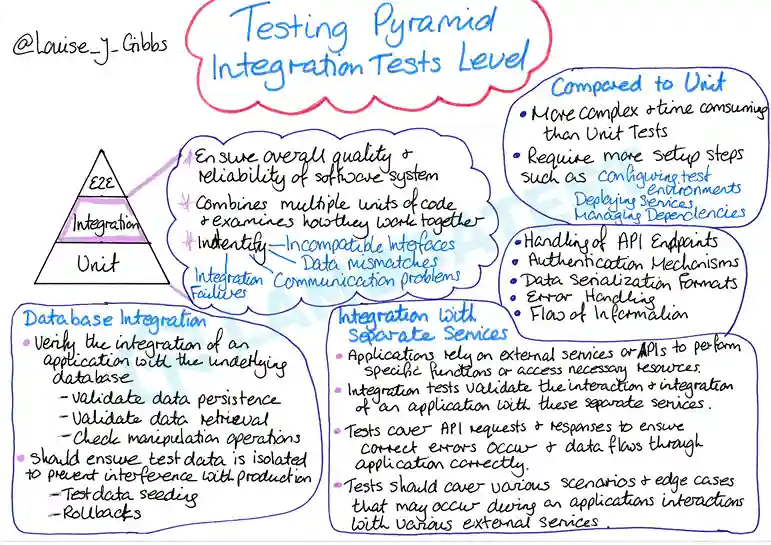
By Louise J Gibbs
- Confirming connectivity between modules - integration testing checks the values modules exchange and how each one acts on them, against the interfaces agreed in the test plan.
- Validating third-party data exchange - the data an API accepts has to be correct for the response to match the requirement, so integration tests cover traffic in both directions between internal modules and external tools.
- Surfacing exception-handling gaps - finding the weak paths before the final build keeps unhandled exceptions out of production, where diagnosing them costs more than catching them in a test environment.
Integration Testing Examples
Every integration test names a seam, sends real data across it, and asserts on what comes back. The four examples below cover the seams most applications actually have, and each one names the specific defect it catches.
Ride-Sharing App: Four Services, One Booking
In a ride-sharing app, a single booking crosses four services: user authentication, location tracking, ride matching, and payment processing. Integration testing follows one ride through all four and checks the handoffs:
- When a user requests a ride, the app sends location data to the matching service in the coordinate format that service expects.
- The matching service assigns a driver and returns those details to the user interface.
- Once the ride ends, the calculated fare reaches the payment service as a single authoritative amount.
- Payment success triggers trip completion, receipt generation, and the ride history update, and a failure at this step rolls all three back rather than leaving a paid ride with no receipt.
Each handoff is a place where two teams agreed on a contract months apart. The test proves the contract still holds under real timing, rather than proving each service works alone.
API and Database
This is the most common integration seam and the one most often faked with mocks. The test posts a new order through the API, then reads the row back from a real database rather than from the response body. Reading it back is the whole point, because the response only proves what the service intended to save.
Defects it catches that a mocked test cannot: a decimal column silently truncating a currency value, a timestamp stored without a timezone, a unique constraint that only fires on the second identical request, and a transaction that commits the order but not its line items. Pair this with database testing when the schema itself is under active change.
Frontend and Backend
Here the seam is the JSON contract. The frontend renders a checkout summary from a payload the backend builds, and both sides were written against a schema document that has since drifted. The test drives the real UI against the real service and asserts on what the user sees, not on the payload.
Typical catches: a field renamed from totalAmount to total, a number arriving as a string so the UI concatenates instead of adding, and a null the frontend never guarded against rendering as the literal text "null" on the page. Because this example needs a browser, it is the one most teams run on a grid rather than locally, and it overlaps with API testing at the contract layer.
Third-Party Payment Gateway
Third-party seams differ from internal ones because you cannot change the other side and it can change without telling you. Run these against the provider's sandbox, and cover the failure paths rather than only the successful charge: a declined card, a timeout after the charge succeeded, and a duplicate webhook for the same transaction.
The timeout case is the one that matters most and the one most suites skip. If the gateway charges the customer but the response never arrives, the order must not be left unpaid in your system, and a retry must not charge twice. That is an idempotency assertion, and it is only testable across the integration boundary.
Integration Test Case Example
Written up as formal test cases, the examples above look like this. The expected result names the observable outcome, so a reviewer can tell a pass from a fail without reading the code:
| Test case ID | Objective | Steps | Expected result |
|---|---|---|---|
| IT-01 | Order persists correctly from API to database | POST a valid order, then query the orders table directly by the returned ID | The stored row matches the submitted total to two decimal places, and its line items are present in the same transaction |
| IT-02 | Checkout summary renders the backend payload | Log in, add one item to the cart, open the checkout page against the live service | The displayed total equals the service total, and no field renders as empty, "null", or "undefined" |
| IT-03 | Payment is idempotent when the gateway response is lost | Charge a sandbox card, force a timeout on the response, then retry the same request with the same idempotency key | The customer is charged once, and the order reaches the paid state on the retry rather than duplicating |
| IT-04 | Declined payment leaves no partial order | Submit checkout using the provider's decline-test card | The user sees the decline message, no order row is created, and reserved stock is released |
Benefits of Integration Testing
Integration testing catches defects at the module boundary, where assumptions made by two teams meet for the first time. The Capgemini World Quality Report 2024-25 reports more acknowledgment of the importance of quality but finds organizations still need to put their objectives to work, and a defined integration stage is one of the places that gap closes.
- Interface defects surface early, in data passing, API contracts, and module communication, rather than in production where reproducing them costs more.
- Third-party connections get validated in both directions, so modules calling external APIs, payment gateways, or notification services are checked against what those services actually return.
- Testing runs alongside development. Once a pair of modules passes its unit tests, that pair can be integrated and tested without waiting for the full system.
- Errors that unit tests structurally cannot see get caught: mistaken assumptions about method signatures, return types, and data formats between modules.
- Coverage extends to module combinations, exercising paths that no single-module test reaches.
- CI/CD pipelines gain a real quality gate, since integration tests block broken builds from reaching staging or production. See continuous testing for how this fits a wider pipeline.

While the ideal Test Pyramid suggests a 60-30-10 split (Unit/Integration/E2E), modern testing approaches are shifting toward a "Testing Honeycomb" structure. This is because in distributed systems, integration tests often become the largest layer as the most significant risks reside in the network boundaries and API contracts rather than isolated logic.
Murli Pawar, Vice President - Digital Engineering Division at SunTec India, with over 20 years of experience in software architecture and AI integration.
Types of Integration Testing
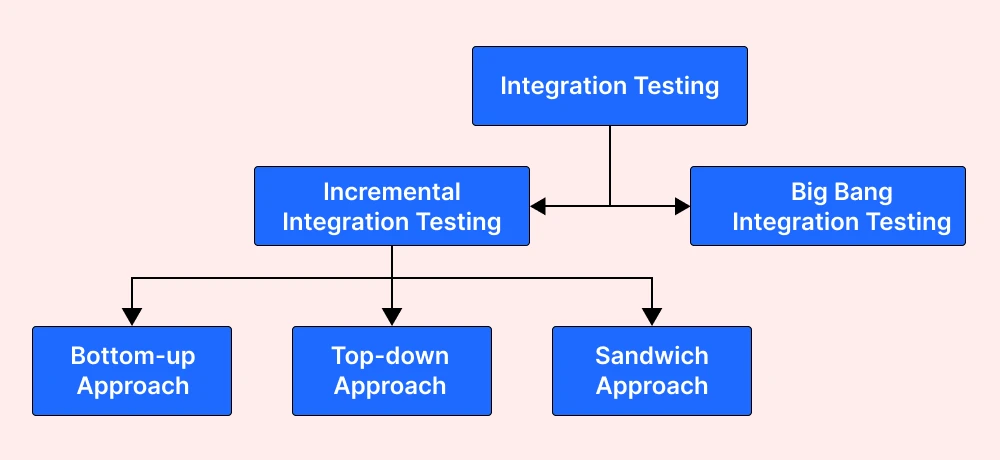
Integration testing types are grouped by how modules are brought together, either a few at a time or all at once:
- Incremental integration testing
- Non-incremental/Big bang integration testing
Incremental Integration Testing
In the incremental testing approach, all logically related modules are integrated and tested to check proper functionality as per the requirement. After this, other related modules are integrated incrementally, and the process continues until all integrated, logically related modules are tested successfully.
The incremental approach is carried out by three different methods:
- Top Down Approach
- Bottom Up Approach
- Sandwich Approach
Top Down Approach
The top-down integration testing approach involves testing top-level units first, and lower-level units are tested step-by-step. Test Stubs are needed to simulate lower-level units that cannot be available during the initial phases.
Advantages
- Design faults in the top-level control logic surface first, when changing them is still cheap.
- A working skeleton of the system exists early, which gives stakeholders something to review before the lower layers are finished.
- Testing can start before the lower-level modules are written, because stubs stand in for them.
Disadvantages
- Every lower-level module needs a stub, and that is throwaway code which can carry bugs of its own.
- Low-level modules often hold the most intricate logic, and this approach exercises them last, so their defects surface late in the cycle.
- Fault localization gets complicated in large-scale systems, where many stubbed dependencies are in play at once.
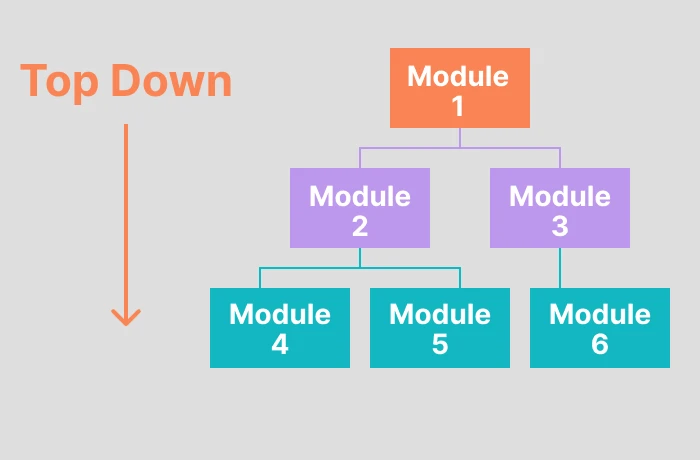
For a step-by-step walkthrough of this approach, see the dedicated top down integration testing guide.
Bottom Up Approach
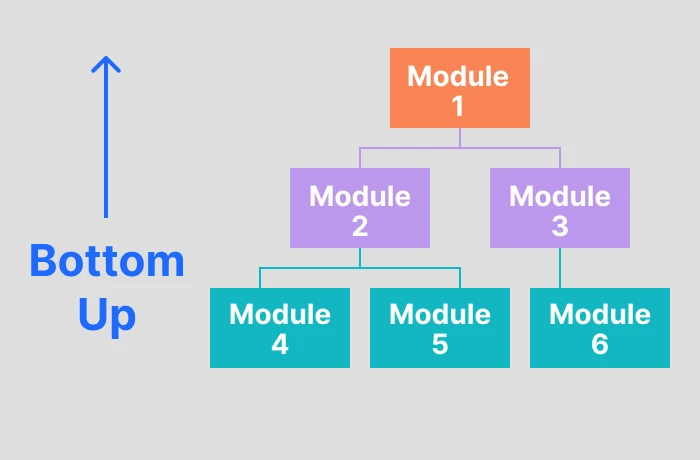
Bottom-up approach involves testing bottom-level units first, followed by upper-level units. In the bottom-up testing approach, test drivers are needed to simulate higher-level units, which may not be available during the initial phases.
Advantages
- Fault localization is much easier based on the application's control flow.
- This approach allows you to develop and test simultaneously to meet customer specifications efficiently.
- By the end of the testing cycle, you can quickly identify defects between interfaces.
Disadvantages
- All modules except the top control need to have test drivers.
- Modules that control the application flow are tested last and may contain defects.
Sandwich Approach
The Sandwich testing approach is known as "hybrid testing" because it combines top-down and bottom-up testing approaches. In this strategy, the low modules are tested in conjunction with the higher-level modules and vice versa. This strategy uses both stubs and drivers.
Advantages
- Sandwich testing approach allows parallel performing of both top-down and bottom-up approaches.
- It is suitable for large-scale applications.
Disadvantages
- It is an expensive approach.
- Not suitable for small-sized applications.
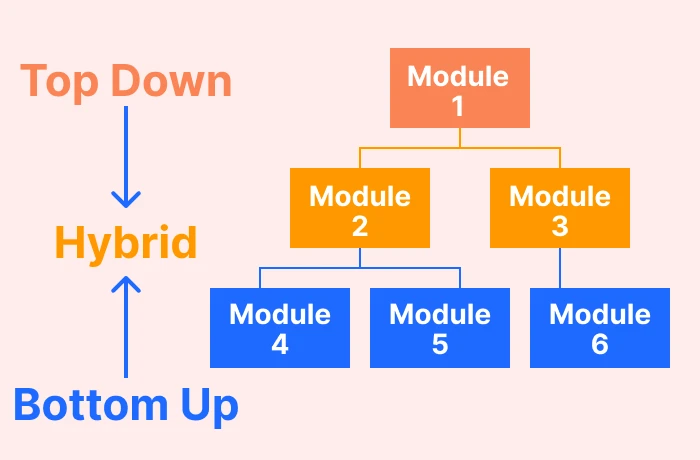
Difference Between Stubs and Drivers
Top-down and bottom-up approaches both need placeholder code to stand in for modules that are not ready yet. Stubs replace the modules below the one under test, drivers replace the ones above it.
| Stubs | Driver |
|---|---|
| They are mainly used in top-down integration testing. | They are mainly used in bottom-up integration testing. |
| Stubs can be understood as modules of software during the development process. | Drivers are used to invoke the component individually that requires testing. |
| They are crucial to test different features and functionalities of modules. | They are used when the main module of the software is not ready or developed for testing. |
| Stubs play a crucial role when low-level modules are not available. | Drivers get crucial when high-level modules are unavailable or sometimes in the absence of low-level modules. |
| In the case of a partially developed low-level module, you can use Stubs to test the main module. | In the case of a partially developed high-level module, you can use Drivers to test the main module. |
| Stubs are only considered when the upper levels of modules are done. | Drivers can be considered in both cases - when upper-level or lower modules are done. |
Non-Incremental/Big Bang Integration Testing
In this non-incremental testing approach, all the developed modules are tested individually and then integrated and tested once again. This is also known as big bang integration testing.
This type of integration testing involves coupling most of the developed modules into a larger system, which is then tested as a whole. This method saves time on small projects. Test cases and their results must be recorded correctly so a failure can be traced back to the module that caused it.
Advantages
- Works well for small systems that can be assembled in a single step.
- Needs no stubs or drivers, so there is no scaffolding code to write and later discard.
Disadvantages
- Fault localization is hard, because a failure can originate in any of the modules combined in that single step.
- Testing cannot begin until every module is complete, which pushes integration defects to the end of the schedule where they are most expensive.
Testing whether modules deliver the behavior the requirements describe, rather than only that they connect, is covered separately in functional integration testing.

Note: Run integration tests across 10,000+ real devices and 3,000+ browser and OS combinations on TestMu AI, with no grid to maintain. Try TestMu AI free!
How Is Integration Testing Done?
Once the units have passed their individual tests, they can be integrated and tested as a group in this sequence:
- Prepare an integration test plan and the required frameworks.
- Decide the type of integration testing approach: Bottom-Up, Top-Down, Sandwich testing, or Big Bang.
- Design test cases, scripts, and scenarios.
- Deploy the chosen components to run the integration testing.
- Track and record the testing results whether there are errors, bugs, or the test goes bug-free.
- Repeat the same process until the entire system is tested.
Entry and Exit Criteria for Integration Testing
Entry Criteria
- The integration test plan document has been signed off and approved.
- Integration test cases have been prepared.
- Test data is created.
- Unit testing of each developed module or component is complete.
- All the high-priority and critical defects are closed.
- The test environment is set up for integration testing.
Exit Criteria
- All the integration test cases on different parameters have been successfully executed.
- All critical and priority P1 and P2 defects are closed.
- The test report has been prepared.

Integration Testing Tools
The tool you need depends on which boundary you are crossing: a browser-driving framework for UI-to-service flows, a Python runner for service-to-service tests, or a static-analysis suite for safety-critical embedded code. See our dedicated guide on integration testing tools for the full comparison.
TestMu AI (Formerly LambdaTest) is a cloud-native test execution platform for running integration suites at scale. Instead of maintaining a local Selenium Grid or device lab, teams execute integration tests across 10,000+ real devices and 3,000+ browser and OS combinations on TestMu AI's cloud. It supports Selenium, Playwright, Cypress, Pytest, Appium, Espresso, and WebdriverIO. Key capabilities include:
- Parallel test execution across browser and OS combinations to reduce total run time.
- Real-time test logs, screenshots, and video recordings for debugging failed integration tests.
- CI/CD integration with GitHub Actions, Jenkins, CircleCI, GitLab, and more.
- HyperExecute orchestration, which the platform documents as running suites up to 70% faster than a traditional grid setup.
Selenium drives a real browser, which makes Selenium the common choice when an integration test suite has to exercise the UI-to-backend path rather than call services directly. Key features include:
- Official language bindings for Java, Python, C#, Ruby, and JavaScript.
- Runs across Mac, Windows, and Linux environments.
- Works with all popular browsers including Firefox, Safari, Chrome, and Headless.
- W3C WebDriver standardization keeps the same script working across browser vendors.
- Allows running parallel tests with different hybrid test data.
Pytest is the usual runner for Python integration testing, where fixtures handle the setup and teardown that database and API tests need. That guide covers the fixture patterns and runnable examples in full. Key features:
- Fixtures with function, module, or session scope, so an expensive database or container starts once and is shared across tests.
- Automatic discovery of test files and functions that follow the naming convention, with no registration step.
- Parallel execution through the pytest-xdist plugin, which is installed separately rather than built in.
Safety-critical and embedded teams work under different constraints, where certification evidence matters as much as pass or fail. Tools built for that context, including VectorCAST and LDRA, combine static and dynamic analysis with requirements tracing, and IBM Rational Integration Tester targets service and message-layer integration. Our test tool overview covers how to evaluate them.
Note: Integration suites are the slow stage of most pipelines. TestMu AI's HyperExecute orchestrates them across parallel runners, with test execution up to 70% faster and CI/CD support built in.
Challenges of Integration Testing
- Environment complexity is the usual first obstacle, since databases, message queues, and external APIs all have to be coordinated at once. A misconfigured environment produces false failures that mask real defects.
- Legacy systems absorb effort out of proportion to the change, because integrating a new module means reconstructing undocumented interface behaviour before a test can be written against it.
- Modules built by different teams or vendors misalign on data formats and interface contracts, and those defects are only visible at the integration boundary.
- The number of integration paths grows combinatorially with the number of modules, so full coverage stops being practical and test prioritization becomes the deciding factor.
Best Practices for Integration Testing
These five rules keep an integration suite maintainable as the number of modules grows:
- Isolate the data. Never run integration tests against a shared development database, because a row left behind by someone else turns a passing test red. Ephemeral containers give every run a clean state.
- Tag integration tests so they run separately from unit tests. They are slower by design, and they should not block a developer's local save-and-run loop.
- Make every test responsible for its own setup and teardown. If one test leaves a user record in the database, the next test should not fail because of it.
- Log the payload that crossed the wire. When an integration test fails, the exact JSON sent and received is what turns a two-hour investigation into a two-minute one.
- In microservices architectures, contract testing validates that service interfaces still meet the agreed contract, which is lighter than standing up the full system for every check.

Conclusion
Start by picking the approach that matches how your modules actually ship. Teams delivering top-down from a stable interface layer need stubs and can begin before the lower modules exist; teams building upward from shared services need drivers; a system already assembled and failing at the seams is a sandwich or big bang case. Write the entry criteria down before the first test, since an integration suite entered without completed unit tests reports module bugs as interface bugs.
To run that suite without maintaining a grid, use TestMu AI's cloud-based test automation platform for Selenium, Pytest, Playwright, and Cypress integration tests across 10,000+ real devices and 3,000+ browser and OS combinations. The HyperExecute getting started guide walks through the first pipeline, and end-to-end testing vs integration testing covers where each layer stops and the next begins. If the integration runs on an iPaaS rather than in your own code, Workato workflow testing shows how recipe-level test cases and mocks change what a passing suite proves.
Author

Himanshu Sheth
Blogs: 142


Himanshu Sheth is the Director of Marketing (Technical Content) at TestMu AI, with over 8 years of hands-on experience in Selenium, Cypress, and other test automation frameworks. He has authored more than 130 technical blogs for TestMu AI, covering software testing, automation strategy, and CI/CD. At TestMu AI, he leads the technical content efforts across blogs, YouTube, and social media, while closely collaborating with contributors to enhance content quality and product feedback loops. He has done his graduation with a B.E. in Computer Engineering from Mumbai University. Before TestMu AI, Himanshu led engineering teams in embedded software domains at companies like Samsung Research, Motorola, and NXP Semiconductors. He is a core member of DZone and has been a speaker at several unconferences focused on technical writing and software quality.
Reviewer

Sai Krishna
Reviewer
Sai Krishna is Director of Engineering at TestMu AI, where he leads agentic AI for quality engineering, building AI agents that autonomously drive mobile and conversational test automation. His current focus is Agent Testing and Model Context Protocol (MCP) support for mobile. He is a core contributor and member of the Appium open-source project and the creator of AppiumTestDistribution and appium-device-farm. With over 14 years of experience including more than 9 years at Thoughtworks as a Principal Consultant, he holds a BSc in Electronics and speaks regularly at TestMu and Appium Conf on Appium, mobile automation, and agentic AI in testing.


Integration Testing FAQs
Did you find this page helpful?
More Related Learning Hubs

TestMu AI forEnterprise
Get access to solutions built on Enterprise
grade security, privacy, & compliance
- Advanced access controls
- Advanced data retention rules
- Advanced Local Testing
- Premium Support options
- Early access to beta features
- Private Slack Channel
- Unlimited Manual Accessibility DevTools Tests