
TestMu AI App For Microsoft Teams
Run Cross Browser Tests, Perform Screenshot Testing and Ship
Quality Builds Faster With TestMu AI App for teams.
View On App StoreEnhanced Cross Browser Testing Experience On Cloud

TestMu AI + Microsoft Teams: How Does It Help?

Live Testing
instantly

Get Screenshots
on the fly

Re-Usable Cards
you repeat

Collaborate Better
faster
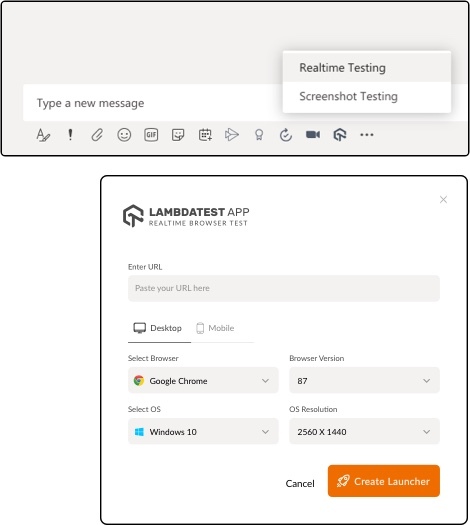
Launch Your Tests Directly Form Microsoft Teams
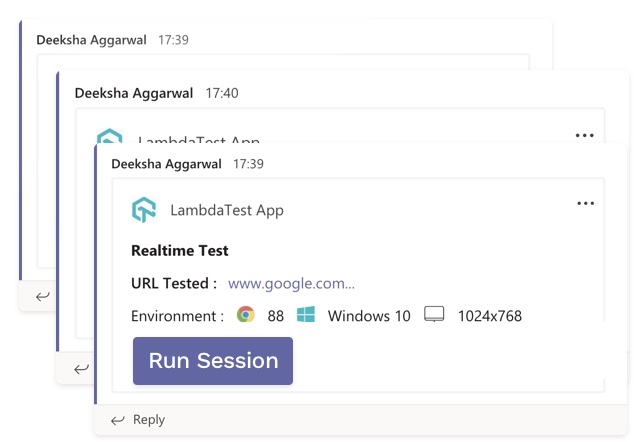
Run Tests Faster By Using Test Cards On Microsoft Teams
Walkthrough: TestMu AI Microsoft Teams App
Watch the video and get started with our MS Teams App
More Reasons To Love TestMu AI
It's not just about infrastructure, you get a whole range of complimentary features that will make your cross browser testing experience smoother and help you ship products faster.

Integrated Debugging

Testing Locally Hosted Pages

Geolocation Testing
TestMu AI Reviews

Julien Desrosiers
@hellodesro

devices without having to subscribe to a relatively expensive monthly subscription on browserstack or the likes.

Ben Pritchard
@yesiamben
Super top notch customer support from - just throwing it out there if you're looking for a decent browser testing platform, they get my full double thumbs up. Thumbs upThumbs up

Jette Thrane
@Jette_Thrane
I discovered today... Incredible easy to use. Understandable docs and great support. They called me up from India to ask if I got everything working. Never again will I buy a device, just for testing. Finding this service made my day... no, the whole year!

Matthew Bryson
@mbrysonuk
second-day using and it's already proven itself a lot faster than Cross Browser Testing and BrowserStack, at half the price! bargain


FREQUENTLY ASKED QUESTIONS
Have a specific question? Check out our Support Center.
- Enhanced cross browser testing experience with 3000+ browser versions on cloud.
- Better collaboration for developers, QA, product managers and testers to work as a team and solve issues faster.
- Perform tests on Real Time or set up Screenshot tests by simply clicking on the TestMu AI icon within the conversation.
- Allows you to run tests directly from the dedicated channel or personal chat with any team member.
- Save time with reusable test cards. Once tests are initiated, pin the card to run tests quickly at a click of the button.