
Power Your Software Testing with AI Agents and Cloud
The Native AI-Agentic Cloud Platform to Supercharge Quality Engineering. Test Intelligently and Ship Faster.


- TestMu AI (Formerly LambdaTest)
- /
- Blog
- /
- Voice Observability: Monitor AI Voice Agents in Production
Voice Observability: Monitor AI Voice Agents in Production
Voice observability tracks your AI voice agent pipeline in production, from ASR to LLM to TTS. Learn key metrics, failure patterns, and how to implement it.
Last Updated on:
Voice observability is the practice of monitoring and analyzing every layer of a voice AI agent in production. Where standard monitoring only tells you if the system is up, voice observability gives you turn-by-turn insight into conversation quality, audio fidelity, model reasoning, and latency.
The need for it is hard to ignore: callers hang up, satisfaction scores drop, yet the dashboards show green and no errors are logged. As the voice AI agents market grows from $2.4 billion in 2024 toward $47.5 billion by 2034, silent failures at this scale translate directly into lost customers and rising support costs. Observability picks up where pre-launch testing stops; that earlier half is in the voice agent testing guide.
Overview
To monitor AI voice agents in production, implement voice observability by tracing every pipeline layer using TestMu AI for automated pre-production testing and production call analysis. This process requires tracking critical metrics like Time-to-First-Word and Word Error Rate to catch silent failures before they affect callers.
Key Voice Observability Metrics
- Key responsiveness metric: Time-to-First-Word (TTFW) measures the duration from the end of caller speech to the agent's first audio byte, which should remain under 800ms to avoid noticeable pauses.
- Key transcription metric: Word Error Rate (WER) tracks the percentage of words incorrectly transcribed by speech recognition, which must remain below 5% to prevent the agent from responding to incorrect inputs.
- Key outcome metric: First Contact Resolution (FCR) measures the percentage of customer issues resolved in a single interaction without human handoff, serving as the primary outcome metric for voice agents.
How to Implement Voice Observability
- Best for turn-by-turn replay: Assigning a unique trace ID combining the call ID and turn index to every call turn groups all telemetry from a single interaction for detailed debugging.
- Best for isolating latency bottlenecks: Recording timestamps at each stage boundary - including speech recognition, language model response, and audio playback - calculates precise per-stage latency to identify performance bottlenecks.
- Best for catching slow calls: Alerting on P95 latency thresholds instead of averages ensures that the slowest 5% of calls are captured before performance degradation affects the majority of callers.
Recommended Voice Observability Tools
- Best for automated agent testing: TestMu AI provides autonomous AI evaluators to score responses across 10 quality metrics before launch and analyzes production call recordings across 30+ metrics to detect regressions.
- Best for natural language test authoring: KaneAI enables teams to author and update voice agent test scenarios using natural language, eliminating the need to manually maintain test scripts.
- Best for existing conversation intelligence stacks: Observe.AI offers voice agent testing for teams whose conversation intelligence workflows already run on a vendor stack.
What Is Voice Observability?
Voice observability is the continuous monitoring and tracing of every component in a voice agent's pipeline: telephony, speech recognition (ASR), language model (LLM), and speech synthesis (TTS). It lets teams diagnose why a conversation failed, not just that it did.
Standard monitoring tells you a service threw an error. Voice observability tells you something subtler: that speech recognition struggled with a regional accent, heard the wrong words, and the AI responded to something the caller never said.
Even a 94% transcription accuracy rate means roughly 1 in every 17 words is wrong, and nothing in the pipeline flags it.
Three structural differences separate voice observability from standard test observability:
- The tracing unit is a conversation turn, not an HTTP request. A single call spans ASR, LLM, and TTS; each stage must be traced individually to pinpoint which one slowed or failed.
- Failures are often silent. A voice agent can give the caller a completely wrong answer and show no errors at all. The only signal is a caller who hangs up confused.
- Cascade failures compound across components. A small degradation in one layer, like poor audio quality on the network, triggers errors in every layer after it, and the root cause sits upstream from where the symptom appears.
What Voice Observability Actually Captures
A complete voice observability system captures four categories of data. Missing any one creates a blind spot that slows root cause analysis.
- Conversation transcripts. Turn-by-turn text of every exchange: what the user said, what the agent responded, timestamps, and intent classifications. Searchable across thousands of calls by phrase or outcome without replaying audio.
- Raw audio recordings. Audio reveals background noise, tone, pacing, and interruptions that transcripts cannot capture. Essential for diagnosing speech recognition failures on specific accents or audio quality issues.
- Performance metrics. Per-stage latency (ASR, LLM, TTS), WER, confidence scores, MOS, and TTFW. Pinpoints which stage failed and by how much.
- Outcome data. FCR, task completion rate, escalation rate, and CSAT. Ties every pipeline metric to real business impact; a latency spike only matters if callers abandon.
The Voice Agent Stack You Need to Monitor
A voice agent is a pipeline of four distinct layers, each with its own failure modes and latency contribution. Monitoring only the caller experience tells you a problem exists, not where it originated.
| Layer | What It Does | Common Failure | What to Monitor |
|---|---|---|---|
| Telephony / SIP | Routes the call; handles audio streaming via WebRTC or SIP | Packet loss introduces noise that degrades ASR accuracy downstream | Jitter, packet loss rate, MOS score, call setup latency |
| ASR (Speech-to-Text) | Converts caller audio to text for the LLM | Low accuracy transcription from accents or noise; the AI receives the wrong words and responds incorrectly | WER, transcription confidence score, TTFW |
| LLM Inference | Generates the agent's text response from the transcript and context | Hallucination, intent misclassification, or context overflow on long calls | Intent accuracy, hallucination rate, token usage, inference latency |
| TTS (Text-to-Speech) | Synthesizes the LLM response into spoken audio | Synthesis lag creates dead air that callers interpret as a dropped call | TTS processing lag, audio start latency, MOS score, synthesis failure rate |
Key Voice Observability Metrics
Each metric maps to a specific pipeline layer. Tracking only overall satisfaction scores makes it hard to pinpoint what went wrong; per-stage metrics make it fast. The table below shows what each metric measures and the target range to set your alerts against.
| Metric | What It Measures | Target / Alert Threshold |
|---|---|---|
| TTFW (Time-to-First-Word) | Time from end of user speech to first audio byte of agent response. The metric callers perceive as responsiveness. | P50 under 500ms; P95 under 800ms. Beyond 800ms feels like a noticeable pause to callers. |
| P95 Turn Latency | 95th percentile of end-to-end turn latency. Tracks the slowest 5% of calls that average latency hides. | Under 800ms. Alert on P95, not average, to catch carrier- or region-specific degradation. |
| Word Error Rate (WER) | Percentage of words speech recognition transcribed incorrectly. Each wrong word sends bad input to the AI. | Under 5% for enterprise production. Alert when a rolling 100-call window exceeds baseline by 2 points. |
| MOS (Mean Opinion Score) | Perceptual audio quality score (1-5 scale). Proxy for telephony layer health and codec performance. | Above 4.0 for acceptable intelligibility. Below 3.5 signals degraded audio affecting speech recognition. |
| Intent Recognition Accuracy | Rate at which the agent correctly identifies the caller's goal. | Alert when any specific intent drops more than 5 points below your pre-production baseline. |
| First Contact Resolution (FCR) | Percentage of calls resolved without human handoff. The primary outcome metric. | Baseline from pre-production testing. Alert on any week-over-week drop of 3+ points. |
| Hallucination Rate | Rate at which the LLM generates factually wrong or off-topic responses. | Zero tolerance for regulated topics. Alert immediately on any confirmed hallucination in healthcare or finance flows. |
| TTS Processing Lag | Time between LLM completion and start of audio synthesis. Isolates synthesis bottlenecks. | Typically under 300ms when the synthesis engine is warmed. Alert consistently above 400ms. |
Voice observability metrics such as TTS processing lag show where a voice agent is slow in production, but they cannot show whether its answers were correct.
The Agent Testing Certification by TestMu AI covers voice and phone agent testing on the Agent Testing platform, and helps you check answer quality before release and on recorded production calls.

Pre-Production Testing vs. Production Monitoring
Most teams treat voice observability as a production-only concern: ship the agent, monitor live calls, react to failures as they appear. This catches real problems but at the worst possible time, after real callers have already experienced them.
- Pre-production testing simulates synthetic call scenarios before launch. Vary accent profiles, inject noise, and test unusual caller requests. The suite generates go-live verdicts so the team ships with a known baseline.
- Production monitoring traces live calls, measuring actual WER, P95 latency, and hallucination rates. It catches failures no synthetic suite predicts and feeds them back into the pre-production suite to prevent recurrence.
The two modes form a continuous improvement loop. Pre-production catches known types of failures before they reach users; production monitoring catches the unknowns and adds them to the next pre-production run. The same loop applies beyond voice; our guide to conversational AI testing covers testing chat and phone agents before launch.
TestMu AI's Agent Testing platform covers both halves. Before launch, it deploys autonomous AI evaluators that score every response across 10 quality metrics.
In production, it analyzes uploaded call recordings in batch and applies the same evaluation across 30+ call metrics to surface regressions. Pair this with AI voice agent regression testing to catch quality drops before each release.
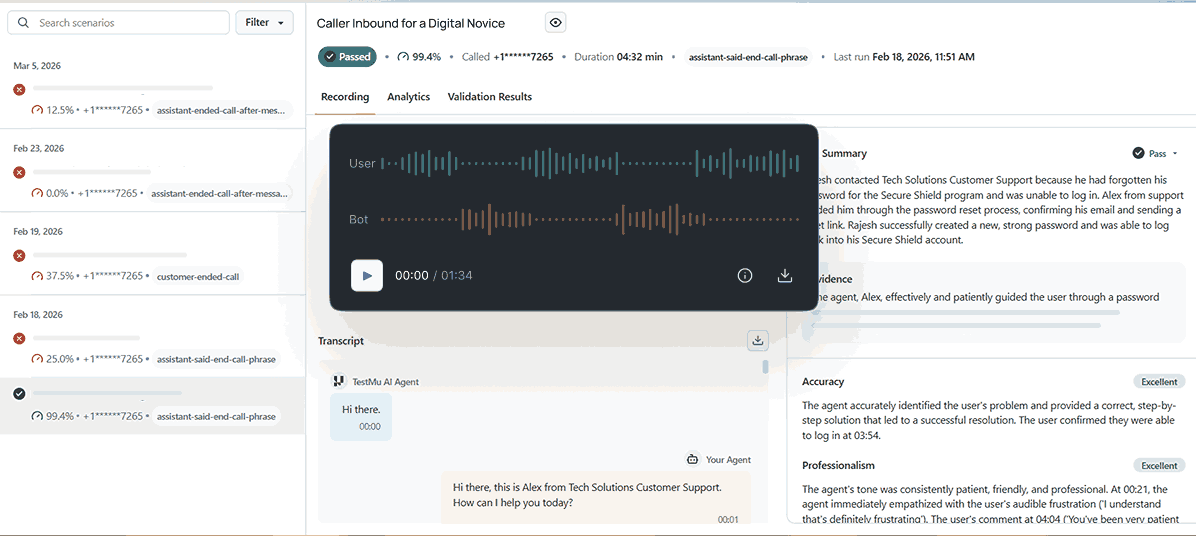
This is distinct from the standard AI agent evaluation approach, which reviews results only after a conversation ends. Voice observability requires continuous, per-turn tracing, not a post-call summary.
For voice AI deployments at high call volumes, every percentage point of call resolution that pre-production coverage recovers is one fewer human escalation per hundred calls.

Note: TestMu AI's Agent Testing simulates hundreds of call scenarios before your voice agent goes live and delivers a green, yellow, or red go-live verdict. Run your first voice agent evaluation free.
How to Implement Voice Observability
Setting up voice observability means adding monitoring at each step in the pipeline. A single end-to-end number tells you a problem exists; per-stage timing tells you exactly which component to fix.
- Assign a trace ID to every call turn. Use a call ID plus turn index (e.g., call_abc123_turn_3) to group all telemetry for a single interaction and enable turn-by-turn replay.
- Record a timestamp at each stage boundary. Capture ASR start and end, LLM completion, and TTS audio start. The difference between each is your per-stage latency; silence to first audio byte is your TTFW.
- Emit structured logs per turn. Include call ID, turn index, stage name, latency, ASR confidence, MOS, and intent. This lets you slice by stage or region without post-processing.
- Establish a pre-production latency baseline. Before going live, run a simulated test suite on TestMu AI's agentic testing platform to capture your expected per-stage latency ranges. The Playwright example below shows how to measure TTFW and latency at each stage:
const { chromium } = require('playwright');

// Configure TestMu AI cloud capabilities
const ltCapabilities = {
  browserName: 'chrome',
  browserVersion: 'latest',
  'LT:Options': {
    platform: 'Windows 11',
    build: 'Voice Observability Baseline',
    name: 'Turn latency benchmark',
    username: process.env.LT_USERNAME,
    accessKey: process.env.LT_ACCESS_KEY,
  }
};

async function measureVoiceAgentTurn(agentUrl, userInput) {
  const wsEndpoint =
    'wss://cdp.lambdatest.com/playwright?capabilities='
    + encodeURIComponent(JSON.stringify(ltCapabilities));

  const browser = await chromium.connect({ wsEndpoint });
  const page = await browser.newPage();
  const timings = {};

  await page.goto(agentUrl);
  timings.turnStart = Date.now();

  // Simulate user utterance via text input
  await page.fill('[data-testid="user-input"]', userInput);
  await page.keyboard.press('Enter');

  // Stage 1: ASR resolves transcript (TTFW starts here)
  await page.waitForSelector('[data-testid="transcript"]', { timeout: 5000 });
  timings.asrComplete_ms = Date.now() - timings.turnStart;

  // Stage 2: LLM inference completes
  await page.waitForSelector('[data-testid="agent-text"]', { timeout: 8000 });
  timings.llmComplete_ms = Date.now() - timings.turnStart;

  // Stage 3: TTS audio begins (TTFW ends here)
  await page.waitForSelector('[data-testid="audio-playing"]', { timeout: 10000 });
  timings.ttfw_ms = Date.now() - timings.turnStart;

  console.log('Stage latencies (ms):', {
    asr: timings.asrComplete_ms,
    llm: timings.llmComplete_ms,
    ttfw: timings.ttfw_ms,
  });

  await browser.close();
  return timings;
}

// Replace with your voice agent URL
measureVoiceAgentTurn('https://your-voice-agent.example.com', 'What are your business hours?');
Replace the data-testid selectors with the actual attributes your voice agent interface exposes. The timing pattern applies to any voice agent stack. See the KaneAI documentation for AI-native test authoring.
- Set alert thresholds at P95 using two modes.
- Static thresholds catch hard regressions: alert when P95 TTFW exceeds 800ms, WER rises above baseline by 2 points, or FCR drops below your floor. They fire immediately on model or provider changes.
- Anomaly-based thresholds catch gradual drift: alert when any metric deviates 2 standard deviations from a rolling 7-day baseline. This catches WER creeping from 4% to 8% over two weeks, which static thresholds miss entirely.

Common Voice Observability Failures and How to Fix Them
Every failure below has a specific observability signal. Knowing what to watch means catching it before it reaches real callers.
- ASR cascade failure. Packet loss causes the speech recognition to mishear words; the AI responds incorrectly with no error raised. Signal: WER spikes by carrier. Fix: alert at the ASR stage, not LLM output.
- Silent TTS failure. TTS returns a success status with an empty audio payload; the caller hears silence. Signal: TTFW jumps to a timeout on specific response patterns. Fix: validate audio payload size, not just the status code.
- Intent misclassification. Callers phrase requests differently from training data, routing to the wrong branch. Signal: accuracy drops on a specific intent class. Fix: add failing phrasings to your test suite.
- Performance drift. A model or provider change causes WER to creep upward over weeks, invisible to static thresholds. Signal: anomaly alert fires at 2 standard deviations. Fix: gate every change behind your pre-production suite.
- LLM context overflow. After many turns, older context is truncated and the agent re-asks for information already given. Signal: success rate drops only on long calls. Fix: add context compression and log token usage.
The AI testing methodology for voice agents follows the same diagnostic logic as traditional software testing: measure at the stage boundary where behavior changes, not just at the final output.
Conclusion
Voice observability is not a feature you add after your voice agent ships. Start by capturing the four data categories: transcripts, audio, performance metrics, and outcome data. Instrument TTFW and per-stage latency at each pipeline boundary.
Set P95 alert thresholds and pair them with anomaly-based detection for gradual drift. Feed production failures back into your pre-production suite to close the continuous improvement loop and prevent recurrence.
TestMu AI's Agent Testing is built for exactly this: structured evaluation before launch, continuous monitoring in production, and test scenarios that evolve as your voice agent does. Use KaneAI to author and update those scenarios in natural language, without maintaining test scripts manually. Teams whose conversation intelligence already runs on a vendor stack can start from Observe.AI testing for their voice agents.
Note: This article was researched and drafted with AI assistance, then reviewed, fact-checked, and published by Devansh Bhardwaj, Community Evangelist at TestMu AI, whose listed expertise includes Software Testing and Automation Testing. Every statistic, link, and product claim was verified against primary sources. Read our editorial process and AI use policy for details.
Author

Devansh Bhardwaj
Blogs: 80


Devansh Bhardwaj is a Community Evangelist at TestMu AI with 4+ years of experience in the tech industry. He has authored 30+ technical blogs on web development and automation testing and holds certifications in Automation Testing, KaneAI, Selenium, Appium, Playwright, and Cypress. Devansh has contributed to end-to-end testing of a major banking application, spanning UI, API, mobile, visual, and cross-browser testing, demonstrating hands-on expertise across modern testing workflows.
Voice Observability FAQs
Did you find this page helpful?
More Related Blogs

TestMu AI forEnterprise
Get access to solutions built on Enterprise
grade security, privacy, & compliance
- Advanced access controls
- Advanced data retention rules
- Advanced Local Testing
- Premium Support options
- Early access to beta features
- Private Slack Channel
- Unlimited Manual Accessibility DevTools Tests