

Next-Gen App & Browser Testing Cloud
Trusted by 2 Mn+ QAs & Devs to accelerate their release cycles


- Home
- /
- Blog
- /
- Mar’22 Updates: Cypress Testing On Latest OS, New Devices, Browsers In Automation, And Much More!
Mar’22 Updates: Cypress Testing On Latest OS, New Devices, Browsers In Automation, And Much More!
Last month, we released several exciting new features like support for macOS Monterey and Windows 11 in Cypress testing, new devices, integrations, the latest features in mobile app automation, manual app testing, etc. See what's new at TestMu AI in March 2022.

Salman Khan
January 27, 2026
Happy April to our beloved users. Despite the lingering summer heat, our incredible team of developers continues to grind. Throughout this month, we released several new features in automation testing, manual app testing, and app test automation on real devices, rolled out new devices, browsers, integrations, and much more.
Automated Browser Testing with Cypress is now available on AWS Marketplace. The TestMu AI Cypress cloud platform is now available on the Amazon Web Services Marketplace. You can increase your test coverage by using more than 40 different browsers and browser versions for Cypress, including headless browsers.
Without further ado, let’s skim the major highlights of the last month!
Run Cypress test Automation on the latest OS
Recently, we released macOS Monterey and Windows 11 for Selenium automation testing. We are happy to announce that Cypress testing now supports these two operating systems as well. To get started, please refer to the Cypress testing documentation.
You can also refer to the below Cypress tutorial.
Please visit our TestMu AI YouTube channel for more videos on mobile app testing tutorials, responsive testing, mobile testing, and Cypress testing.
New Android devices & browsers in Automation
There has been a recent improvement in automation. However, when it comes to mobile testing, we’ve put a lot of effort into making automation testing work well. Here’s what we’ve got for you:
- Perform Android automation testing on new emulators –
- OnePlus 9, 8, 7, 6
- Vivo Z1 Pro
- Vivo Y15
- HUAWEI Mate 40, 8
- HUAWEI Mate 30 Pro
- Nokia G10, G50
- Nokia 9 PureView
- Xiaomi 8
- Oppo A7, A9, A72, A91
- Conduct automated browser testing of websites and web applications on the newly added browser versions.
- Chrome 100 Beta, 99 98
- Firefox 99 Beta, 98, 97
- Edge 99 Beta, 98
- Opera 84, 83
Let’s analyze the browser compatibility of the above browsers between Chrome 100 Beta, Firefox 99 Beta, and Edge 99 Beta.
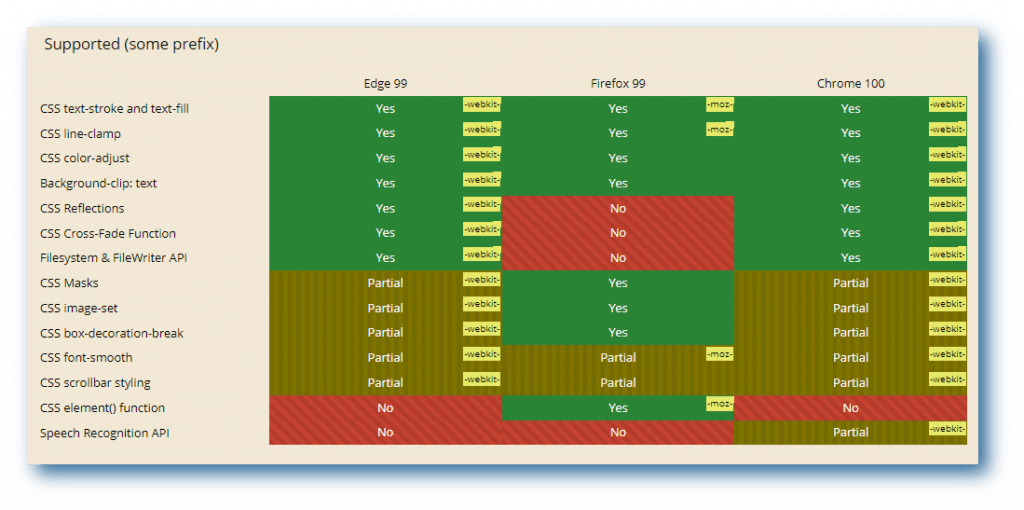
You can generate Selenium capabilities from the TestMu AI Desired Capability Generator.

Screenshot testing on macOS Monterey
Now take cross browser screenshots on macOS Monterey to quickly identify cross browser compatibility bugs. You can generate automated screenshots across the latest and old Mac Safari, Chrome, Firefox, and Opera browsers running on macOS Monterey.
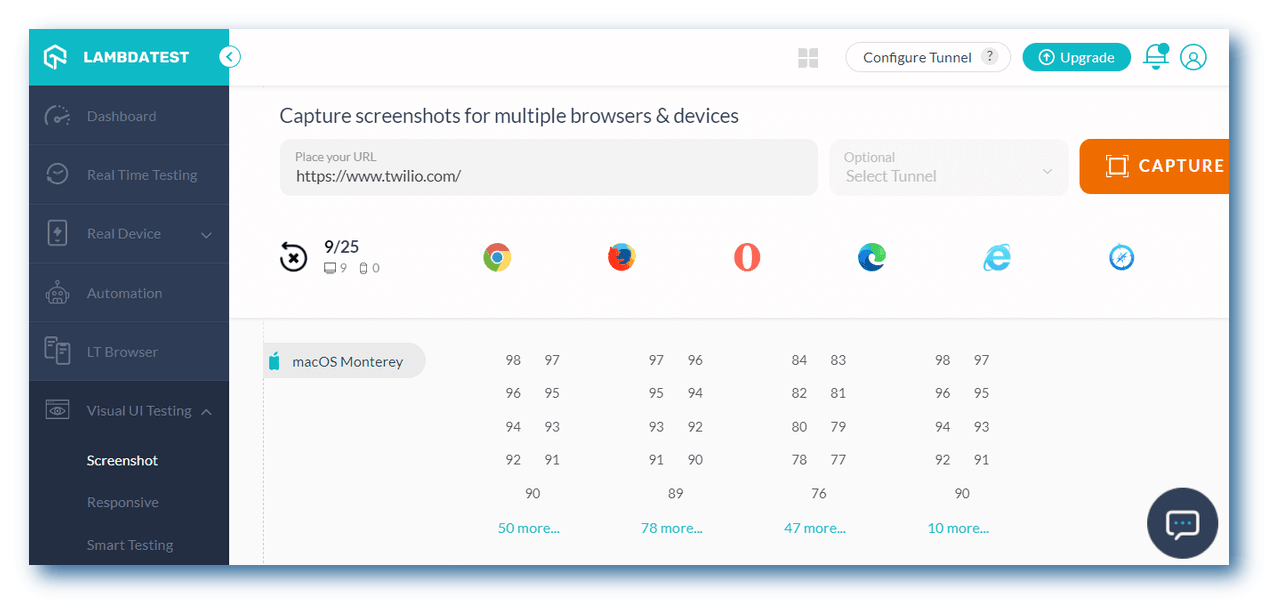
Check out some more additions to Screenshot testing –
- We’ve also added the latest browsers in Screenshot to test on macOS Big Sur.
- Chrome 98, 97, 96, 95
- Firefox 98, 97, 96, 95
- Edge 98, 97, 96, 95
- Opera 84, 83, 82, 81
- Capture automated browser screenshots on the latest browsers – Firefox 97 and Opera 84.
Latest features in App Automation [Real device]
To make your mobile app automation even more optimized, we have added a bunch of new features –
- Change the device’s timezone by passing the timezone capability in Android devices
- Pass mobile OS and version details and get allocated a device having that version
- Support for otherApps capability to download other apps in the same script
- Appium Java Client 8.0.0 support for W3C commands
- Ability to stop running tests for app test automation
- Share test logs via a shareable link to your team members or colleagues.
- Construct a URL for the App automation dashboard by entering the session ID below
https://appautomation.lambdatest.com/test?testID={Session_ID}
Looking to automate mobile apps on real devices, check out our video below –
New additions in Manual app testing [Real device]
TestMu AI’s manual app testing on real device cloud lets you test mobile apps on an online device farm of 3000+ devices and OS. Here are some of the latest feature additions in Manual app testing on real devices.
- Log level – “Notice” is now set to Default in iOS DevTools
- Download the App and Device logs in DevTools
- Change orientation to Landscape in iOS devices
- Upload apps from App Centre directly on TestMu AI real device cloud.
- Introducing new features for managing apps:
- Visibility: Share the app with team members
- Rename: Rename the app
- Delete: Delete the app
- Visibility: Share the app with team members
- Rename: Rename the app
- Delete: Delete the app

Live with the newest integrations
We are pleased to announce that the two new TestMu AI integrations – Zoho BugTracker and Flock are now live on the TestMu AI platform.
Zoho BugTracker: The Zoho BugTracker is a robust cloud-based bug tracking tool that lets you keep track of bugs and fix them quickly. It offers many customizations and automation features that make issue tracking simple and effective.
Check our documentation on Zoho BugTracker integration.
Flock: Communication and collaboration are made easy with Flock, a platform for cross-functional teams. Flock streamlines all communication and decision-making processes. The features offered by Flock include easy file sharing and management, an easy onboarding process, 24×7 support, and data security & privacy.
Check our documentation on Flock integration.
Bonus additions
We have also added new browsers in real-time browser testing: Chrome 100 Beta and Chrome 99. Also, you can perform mobile browser and app testing on Appium (AWS Marketplace) on the new Android emulator – Samsung A10s and Realme Pad
That’s All
That’s it for today! Stay tuned for even more amazing features. We hope you enjoy our brand-new additions. We’d love to hear what you think of our newly added features.
We appreciate all responses and feature requests from our loyal users. Please share your feedback on the TestMu AI community. You can also contact us through our 24*7 chat portal or our support email at support @lambdatest.com.
For now, have a great testing day!


Did you find this page helpful?
More Related Hubs
TestMu AI forEnterprise
Get access to solutions built on Enterprise
grade security, privacy, & compliance
- Advanced access controls
- Advanced data retention rules
- Advanced Local Testing
- Premium Support options
- Early access to beta features
- Private Slack Channel
- Unlimited Manual Accessibility DevTools Tests