

Next-Gen App & Browser Testing Cloud
Trusted by 2 Mn+ QAs & Devs to accelerate their release cycles


Difference Between Web And Mobile Application Testing
Learn how to strategize your mobile and web application testing for maximum results by understanding the difference between web and mobile application testing.

Kritika Murari
December 19, 2025
Smartphones have changed the way humans interact with technology. Be it travel, fitness, lifestyle, video games, or even services, it’s all just a few touches away (quite literally so). We only need to look at the growing throngs of smartphone or tablet users vs. desktop users to grasp this reality.
According to a survey, there were over 54.57% mobile users compared to 42.66% of desktop users from April 2021 to April 2022. With easy access to fast Internet and the massive variety of cheaper smartphones available today, these numbers are bound to bend significantly towards mobile usage in the future too.
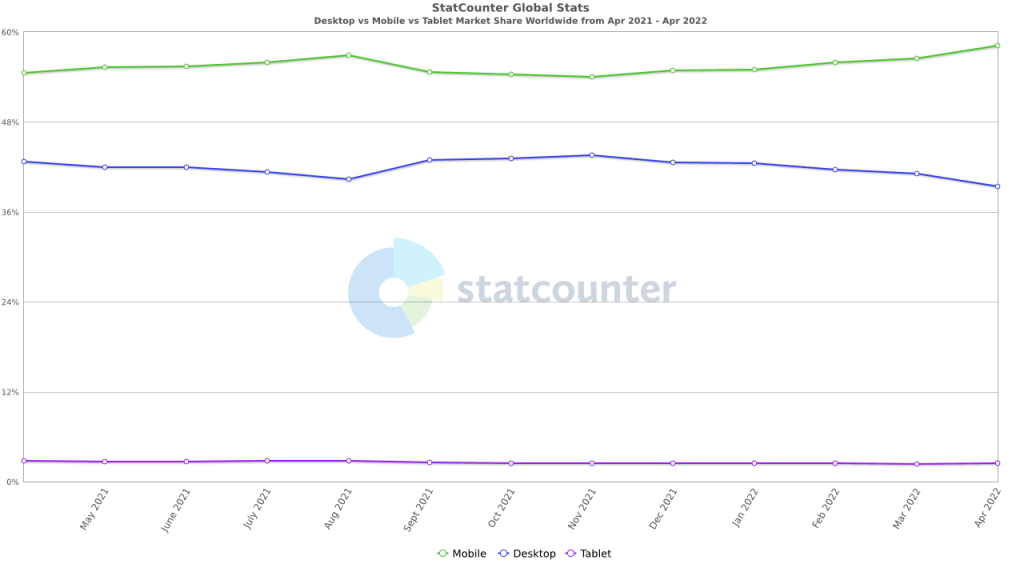
Traditionally, web applications were the significant application type in most businesses. However, unlike run-of-the-mill HTML, JavaScript, and CSS web apps that run on a browser, there are now mobile applications capable of running on hand-held devices. This has also led to a rapid change to a mobile first strategy for business across all industries.
But conquering the mobile-app-focused market isn’t so easy, especially when it comes to mobile app testing, which is essential in building a top-notch mobile app. Even more interesting is there’s a whole world of difference between web and mobile application testing!
In this article on the difference between web and mobile application testing, we explore the difference between web and mobile application testing to help you strategize your mobile and web app testing for maximum results.
How different are Web Apps and Mobile Apps?
Both web applications and mobile apps are indeed used to improve the efficiency of business processes. However, they are different in terms of their architecture and delivery mechanism, which leads to a difference between web and mobile application testing.
Before we deep-dive into the difference between web and mobile application testing, let’s see what web and mobile applications are.
What are Web Applications?
A web application is an application that runs in the browser and does not need to be downloaded. Web applications are a collection of programs or services that use the Internet to deliver information to users. Each web application consists of an interface, which can be accessed via a web browser, and a back-end server that manages the data and executes specific processes.
Web applications can create powerful, stand-alone tools for a specific purpose. For example, Gmail is an email web application that replaces the need for a desktop mail client and stores emails on Google’s servers. Another example of a web application is the OTT (over-the-top) platform Netflix built with the sole purpose of media streaming through a browser.
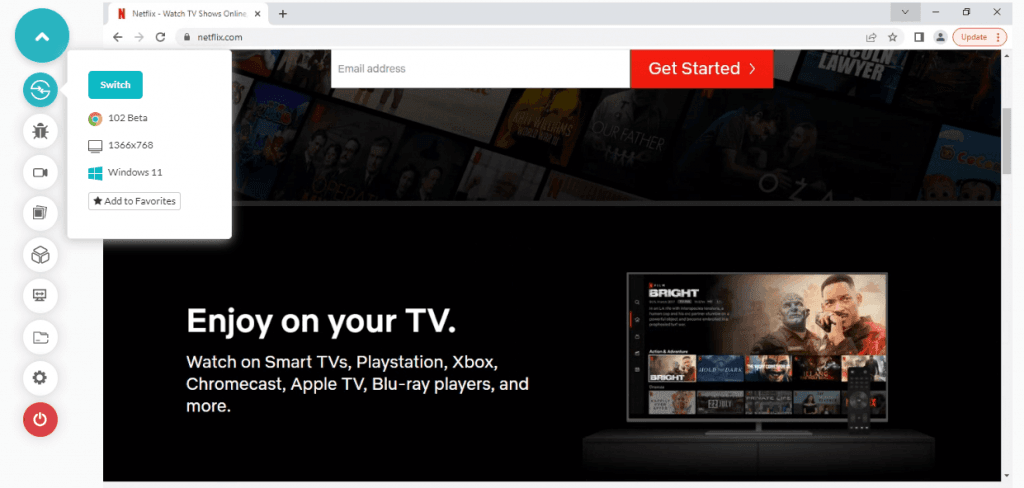
Applications are usually built in some specific programming language. The most popular are JavaScript, C#, Python, and PHP. Web applications can also be standalone programs accessed from a web browser but run on servers elsewhere. Some specific web applications are also called “Rich Internet Applications” (RIAs), especially when they employ advanced technologies like AJAX, Flash, or Silverlight.
What are Mobile Applications?
Mobile applications, also referred to as apps, are software programs designed to run on small mobile devices like tablets and smartphones. Mobile apps run on an operating system and can be downloaded from a store, such as the Apple App Store or Google Play Store. These programs provide users with tools and services to help them accomplish tasks.
Mobile applications extend the functionality of mobile devices, such as providing the ability to run a wide range of applications, use Internet services, send and receive emails, and text messages, take pictures and videos, play games, calculate mathematical problems, read books, access social networking sites and much more.
Mobile apps are usually made for specific mobile operating systems, such as iOS, Android, Windows, and specific devices like tablets or phones. They can be free or paid and may or may not require a subscription. Applications are either pre-installed on phones during manufacture or installed later.
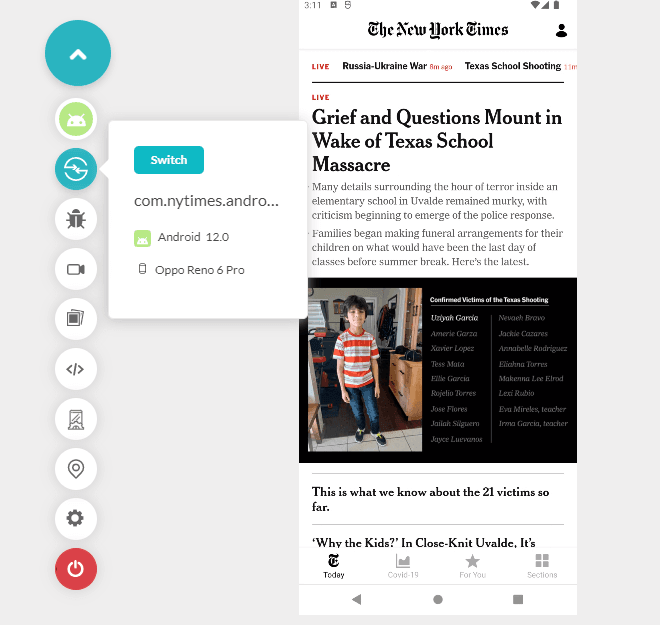
Mobile apps can be further categorized as mobile web applications, native applications, and hybrid applications.
- Mobile web applications are similar to web applications, only that they run on a mobile browser. These web applications don’t require any downloads or installations. In simple terms, these applications can be defined as super-responsive websites that are very flexible when adapting based on user expectations or requirements. While this is a significant plus point for mobile web applications, there is a dark side as well- the performance of these apps entirely relies on a device’s browser and an Internet connection, which could impact the user experience for every other user. Progressive Web Apps (PWAs) are among the most commonly used types of mobile web applications.
- Native mobile applications are designed to run on specific devices. They can be developed using native languages for each platform (Objective C for iOS and Java for Android) or cross-platform development tools (Phone Gap). These are standalone applications explicitly built for different mobile OS such as iOS or Android. Native apps are often built to be reliable and faster than other applications. But that also leads to a higher cost of native app development and production.
- Hybrid applications are built like mobile web apps with the capability of running like native mobile apps, i.e., in a native environment. These apps often look like web applications yet have all the perks and features offered by native mobile applications. Hybrid applications offer users the best of both worlds- minimum load time and consistent user experience even during poor Internet connection.
To know more about web, native and hybrid applications, please check our blog on the Difference Between Web vs Hybrid vs Native Apps.

Difference between Web and Mobile Application Testing
Testing is the process of evaluating a software application for compliance with specific criteria. This process helps ensure that software- be it a web app or a mobile app, meets the required standards and performs as expected. In the last section of this article on the difference between Web and Mobile Application testing, we explained how different web and mobile apps are. Hence, it’s easier to understand that the difference between web and mobile applications comes down to their complexity, purpose, and intended users.
Web application testing involves testing web applications for quality, functionality, usability, etc. This could involve testing the web app’s performance across different operating systems, browsers, and versions. and cross browser compatibility testing both help ensure that a web app is providing a consistent user experience across every possible combination of OS and browsers.
Mobile app testing is verifying whether or not an application works as intended. Therefore, before releasing a mobile app, it is essential to ensure that it performs up to quality standards and does not contain any bugs that could hinder the user experience.
While web application testing has been an essential part of conventional software testing, mobile app testing is often left wanting more. Even though mobile application development is a booming business, many well-known companies like Instagram, Snapchat, Twitter, and Facebook are ruling with their apps.
There are many essential differences between web and mobile application testing.
- Compatibility– The most crucial difference is the screen size. A web app can be viewed on various devices and screen sizes, whereas a mobile app will only fit perfectly on its target platform, i.e., a mobile device. The battery life and storage capacity of desktop computers or mobile devices also impact the performance of respective apps. Web apps are pretty easy to test owing to a lack of compatibility issues. On the other hand, mobile apps are built with complex architecture. They are expected to be compatible with multitudes of devices, making mobile app testing quite intricate.
- User Interactions– Web apps are built to offer a limited variety of user interactions, with a keyboard and mouse input still being the standard. These interactions are pretty easy to predict and comparatively easy to test. On the other hand, the expected user interactions for mobile apps are almost labyrinthine- be it swiping, pinching, voice-based interactions, or even hand wave gestures, complicating mobile app testing further.
- Internet Speed/Availability– When it comes to web applications, there are two types: those that need to be online to work and those that can function offline. The vast majority of web applications – around 95% – are of the first type and require a constant Internet connection to work. The same rule applies to mobile applications, and most of them don’t work offline. Therefore, to ensure a web app or mobile app performs well regardless of the Internet connection speed (or the lack of it), it becomes imperative to test it with different speeds.
To ensure that users get the most of your web app or mobile app, it is essential to pick the right tool, especially after considering the complications associated with mobile apps.
Watch this video to learn about some exciting features offered by Playwright, like recording tests, taking screenshots of tests, auto-wait mechanism, and much more.
Choosing the Best Tool for Mobile and Web Application Testing
Despite the difference between mobile application and web application testing, they still have some tests in common. For example, both require functionality, performance, change-related, usability, compatibility, localization, recovery, and even certification testing. Based on this information, allow us to help you choose the best tool for mobile and web application testing.
Frameworks for testing Web Applications
Web application testing is primarily done on desktops or laptops. However, various commercial tools are available for doing the same, and they have their advantages.
Listed below are some of the best automation frameworks used for web application testing.
Selenium
Selenium is a popular open-source automation testing framework for web application testing. Selenium is used to automate web application testing across different browsers and platforms. In addition, it supports various programming languages, including Java, C#, Python, and Ruby. Selenium has become very popular with web developers and QA professionals because it is easy to use, flexible, and provides good coverage of the functionality of web applications.
If you are new to Selenium, check our guide on what is Selenium.
Selenium supports the recording and playback of test cases, making it easy for beginners to get started. However, the more experienced users can also use Selenium’s powerful programming features to create sophisticated test scripts. So if you’re looking for a powerful yet affordable solution, Selenium is the way to go.
Cypress
Cypress is the new kid on the block when it comes to front end testing frameworks. It has quickly gained popularity due to its powerful and flexible testing capabilities. Cypress allows you to write tests in your own language, which gives you a lot of flexibility and makes the tests more readable. Cypress test automation framework makes it easy for you to write powerful and flexible tests for your web applications.
Playwright
Playwright is a framework for end-to-end testing and manages modern web apps. You can perform Playwright testing across various browsers and platforms. There is no need to worry about flaky tests.
Puppeteer
Puppeteer is a Node package for automating web tests using the Chrome browser. By using the DevTools Protocol, it provides a high-level API for controlling headless Chrome or Chromium. Alternatively, you can set it up to run full (headless) Chrome or Chromium.
TestCafe
TestCafe is a prevalent test automation framework widely used in the industry. It is an open-source Node.js automation testing tool for web application testing. It enables you to write tests for your web application using familiar JavaScript. In addition, tests run in a browser, so you don’t need to install and learn any new software.
Web testing with TestCafe offers several features such as running tests in parallel, recording and playback, and automatic waits for AJAX calls and page loads. In addition, TestCafe has a wide range of plugins to support different frameworks and libraries.
When testing large web applications, it is practically impossible for businesses to afford separate infrastructure or resources. This is where you need a robust cloud testing platform to help you handle day-to-day testing challenges.

Note: Get faster release velocity with blazing fast test automation. Try TestMu AI Now!
Accelerate Web Application testing using TestMu AI
TestMu AI is a cloud-based web testing platform that allows devs and testers to perform manual and automated web testing on an online browser farm of 3000+ browsers and OS combinations. You can perform the below web testing options based on the requirement:
- Manual Testing
- Automation Testing (Selenium, Cypress, Playwright automation, and Puppeteer)
- HyperExecute testing for faster test automation.
- Test At Scale
To make things easier for your team- from grid setup to device labs, TestMu AI’s online Selenium Grid allows you to test your Selenium web automation tests on a wide range of real desktop and mobile browsers.
An online Selenium Grid for automation testing offered by TestMu AI is shown in the video below.
You can also subscribe to the TestMu AI YouTube Channel to keep up to date on the latest Selenium testing, Cypress E2E testing, Real Time Testing, CI/CD, and more
Frameworks for testing Mobile Applications
The key factors to consider while choosing the right mobile app testing tool includes compatibility with browser, network, and device, device bandwidth/capacity, user expectations, frequent software upgrades, and security.
Considering all this, here is a list of the best mobile app testing frameworks.
Appium
Appium is a powerful open-source framework for app test automation on iOS, Android, and Windows devices. It uses the WebDriver protocol to control apps on these platforms, making it a versatile and efficient tool for testers. It’s especially effective for web and mobile applications and automated functional testing.
XCUITest
Apple unveiled XCUITest, an automated app testing framework for iOS automation testing of apps. It is not a cross-platform framework, so tests performed here cannot be used to test Android applications.
Espresso
Espresso is an Android-specific automation framework for creating and deploying user interface tests. Developers can use Espresso to design a test scenario and record their interactions with a mobile device.
Robotium
Robotium is a free and open-source Android app testing framework. It aids in creating simple automation test scripts and is well-known for its ability to generate automated test cases. In addition, Robotium allows test case developers to construct function, system, and acceptability test scenarios that span multiple Android activities.
Selendroid
Selendroid is an Android-based mobile application testing framework. It also allows hybrid and native app test automation. Selendroid can also run parallel test cases on several devices simultaneously.
Watch this video to learn how to write a basic script with Playwright using functions & selectors and then launch the browser to execute the test.
Running Mobile application testing on TestMu AI
As mentioned above, maintaining an in-house device lab can be cumbersome. Therefore, a feasible option is to harness the immense capabilities offered by a cloud-testing platform like TestMu AI. With TestMu AI, you can test your mobile apps on iOS simulators, Android emulators, and real device cloud.
It also lets you perform manual app testing and app test automation of your native apps on an online device farm of 3000+ Android and iOS devices. The TestMu AI Mobile testing lab will eliminate your in-house device testing needs. With Appium testing, you can also run tests across multiple devices and achieve faster feedback times on code commits.
Watch this quick video tutorial on using TestMu AI to perform mobile app testing on real devices.
You can also Subscribe to the TestMu AI YouTube Channel and stay updated with the latest tutorials around automated browser testing, Cypress UI automation, CI/CD, and more.
Achieve the highest browser coverage, accurate testing, and easy debugging with the Real Time Testing feature on TestMu AI! TestMu AI allows you to perform Website and App Testing on Vivo online. It is easy to use, saves time and money.
Conclusion
Mobile application testing and web application testing are essential to ensure an app’s quality. Different mobile devices and operating systems need to be tested to ensure an app works correctly. Similarly, different web browsers and their versions need to be tested for compatibility with a website.
One of the most pertinent distinctions is that mobile app testing is done on real devices, while web app testing is done on emulators or simulators. Additionally, mobile app testing is more complex as it requires different devices, OS versions, and screen sizes.
To perform mobile app testing, you’ll need an on-premise device lab to perform mobile app testing, which can be prohibitively expensive for small businesses. However, a cloud-based infrastructure like TestMu AI can reduce costs and get the best results. I hope you like this article on the difference between web and mobile application testing.
Also, read our short guide on what is a mobile application?
Pick wisely, and happy testing!

Austin Siewert
CEO, Vercel
Discovered @TestMu AI yesterday. Best browser testing tool I've found for my use case. Great pricing model for the limited testing I do 👏
2M+ Devs and QAs rely on TestMu AI
Deliver immersive digital experiences with Next-Generation Mobile Apps and Cross Browser Testing Cloud



Frequently asked questions
Did you find this page helpful?
More Related Hubs
TestMu AI forEnterprise
Get access to solutions built on Enterprise
grade security, privacy, & compliance
- Advanced access controls
- Advanced data retention rules
- Advanced Local Testing
- Premium Support options
- Early access to beta features
- Private Slack Channel
- Unlimited Manual Accessibility DevTools Tests