

Next-Gen App & Browser Testing Cloud
Trusted by 2 Mn+ QAs & Devs to accelerate their release cycles


On This Page
- Agent to Agent Testing Platform
- Playwright Auto Heal Capability
- Google Pixel 10 Series
- iOS Assistive Touch Support
- SmartUI Web Scanner
- SmartUI Visual AI Agent
- Root Cause Analysis With SmartUI
- Fresh Set of Features in KaneAI
- New Features in Accessibility Testing
- Latest HyperExecute Features and Enhancements
- Integration With Appcircle

- Home
- /
- Blog
- /
- August’25 Updates: Agent to Agent Testing, Playwright Auto Heal, Google Pixel 10 Series, and More!
August’25 Updates: Agent to Agent Testing, Playwright Auto Heal, Google Pixel 10 Series, and More!
Discover TestMu AI August 2025 updates that includes new features such as Agent to Agent Testing, SmartUI Visual AI Agent, Playwright auto-heal, new KaneAI features, HyperExecute enhancements, and much more.

Salman Khan
January 10, 2026
We’ve rolled out a set of updates to make your testing faster, smarter, and more reliable. From Playwright auto-heal and AI visual testing with SmartUI to real-device testing on Pixel 10 and iOS with Assistive Touch, plus mobile CI/CD with Appcircle, these features help you catch issues earlier and debug faster.
With improvements across KaneAI, HyperExecute, and accessibility testing, you can focus on fixing real-world problems instead of chasing false positives.
Live With Agent to Agent Testing Platform
We’re live with the industry’s first platform Agent to Agent Testing for testing AI agents, chatbots, voice assistants, and more under real-world conditions. This lets you test accuracy, reliability, efficiency, and overall performance, giving you confidence that your AI behaves as expected at scale.
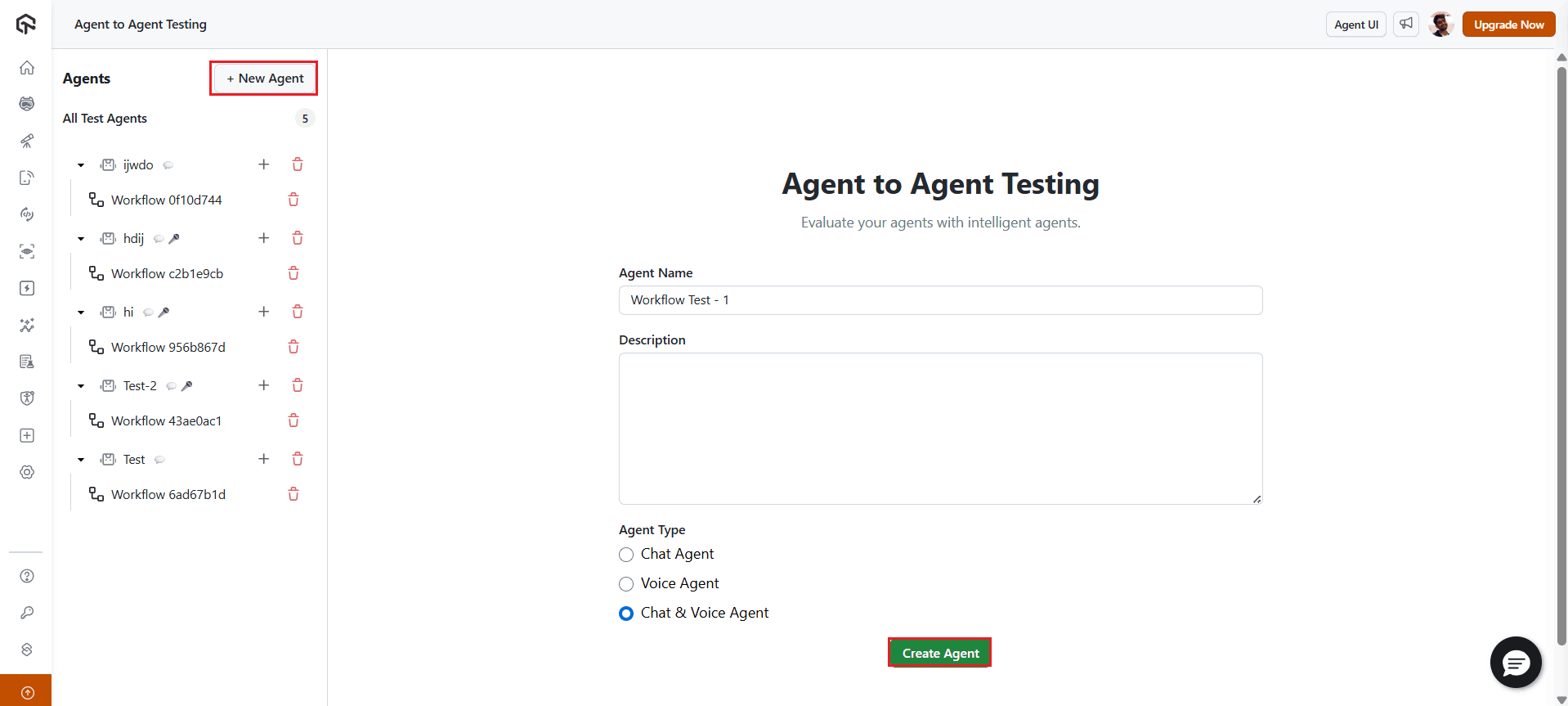
Features:
- AI-Driven Test Generation: Automatically generate thousands of diverse test scenarios, extending coverage beyond manual approaches.
- Multi-Modal Testing: Test against inputs from documents, APIs, logs, images, audio, and more.
- Scalable Execution: Run tests in parallel using HyperExecute for rapid feedback and seamless CI/CD integration.
- Actionable Insights: Get detailed analytics on bias, hallucinations, completeness, behavior consistency, and security vulnerabilities.
- Smarter QA for AI: Continuously test AI agents at scale to reduce unpredictable behavior risks.
To get started, check out this Agent to Agent Testing guide.
Auto Heal Capability for Playwright Testing
We’ve added Auto Heal support in Playwright to address one of the most common pain points in automation testing: fragile locators.
You’ve likely had a test fail simply because a button ID changed or an element’s structure shifted after deployment. The feature worked, but your test suite still flagged a failure.
With Auto Heal enabled, Playwright automatically evaluates alternate locators at runtime and continues execution without interruption. This keeps your pipelines green when functionality is intact, reduces time spent identifying false failures, and helps you focus on testing actual defects.

Note: Run automated tests across 3000+ desktop & mobile browsers. Try TestMu AI Today!
Test on Google Pixel 10 Series
We’ve added the Google Pixel 10 series to our real device cloud, which allows you to test on Google Pixel. You can test both web and native apps on them right away. By covering Pixel 10 early, you’ll catch OS- and device-specific bugs before your users do.
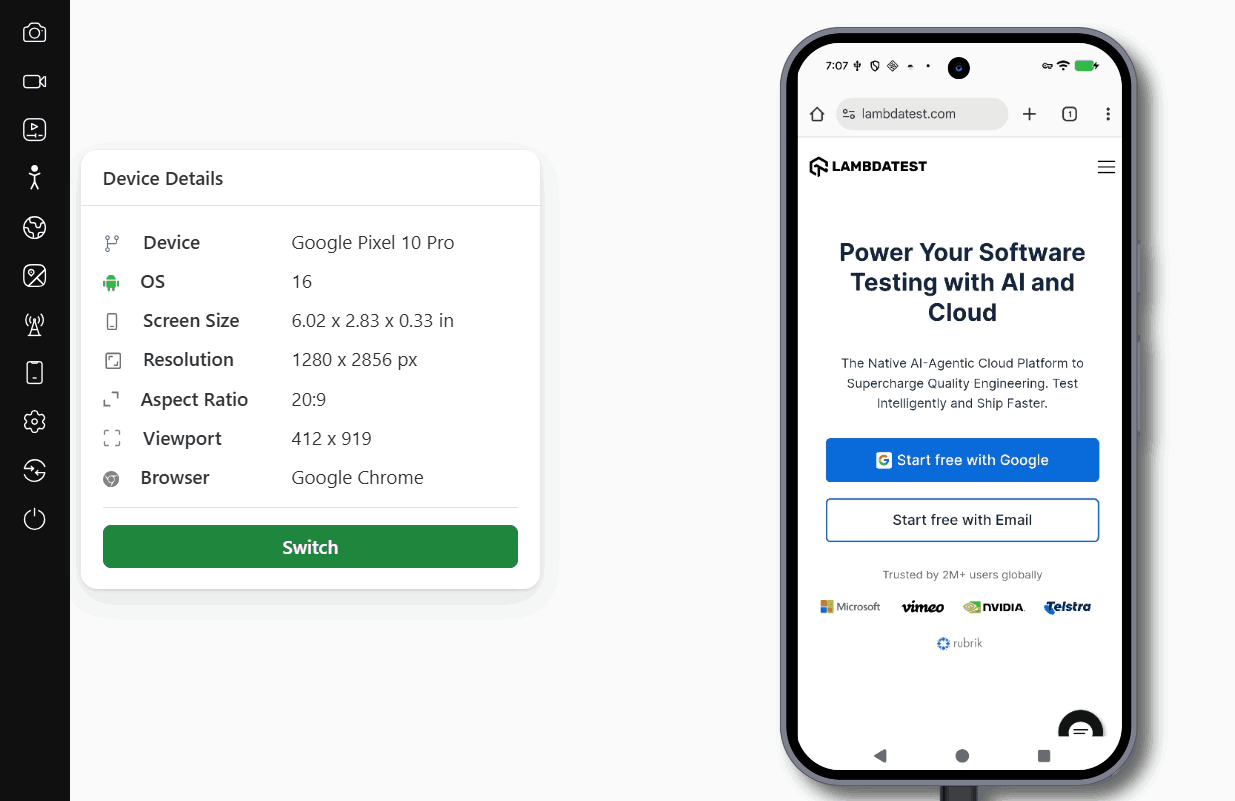
Benefits:
- Test web and mobile apps on real Google Pixel 10 devices.
- Reproduce issues tied to the latest Android releases.
- Expand coverage to a critical segment of early adopters.
- Test on real Android devices instead of relying on emulators.
Assistive Touch Support on Real iOS Devices
We’ve added support for Assistive Touch on real iOS devices. If you’ve ever tried to check accessibility flows without the right setup, you know it’s a hassle. Now you can turn on Assistive Touch during your sessions, run through those scenarios, and see exactly how your app behaves for users who rely on it.
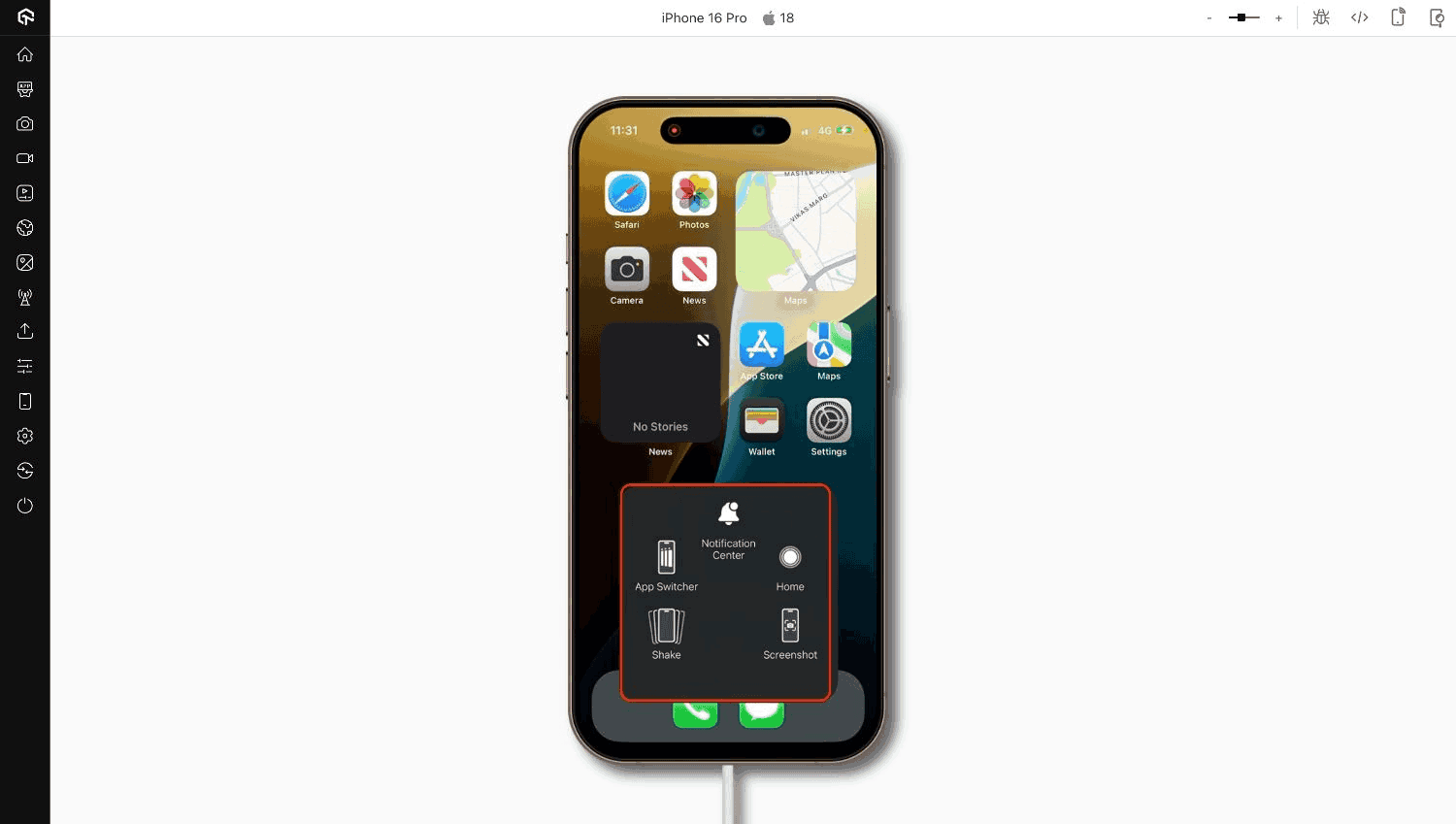
Benefits:
- Enable Assistive Touch directly on real iOS hardware.
- Run accessibility checks as part of your regular testing flow.
- Spot usability gaps that affect users with assistive needs.
Test Visual and Accessibility Issues With SmartUI Web Scanner
We’ve released a SmartUI Web Scanner feature so you can catch both visual and accessibility issues directly from your browser.
Instead of manually checking pages one by one, you can scan thousands of URLs, compare builds with pixel-level accuracy, and run WCAG accessibility checks in the same flow. This helps you spot layout shifts, broken visuals, or accessibility violations before they reach production.
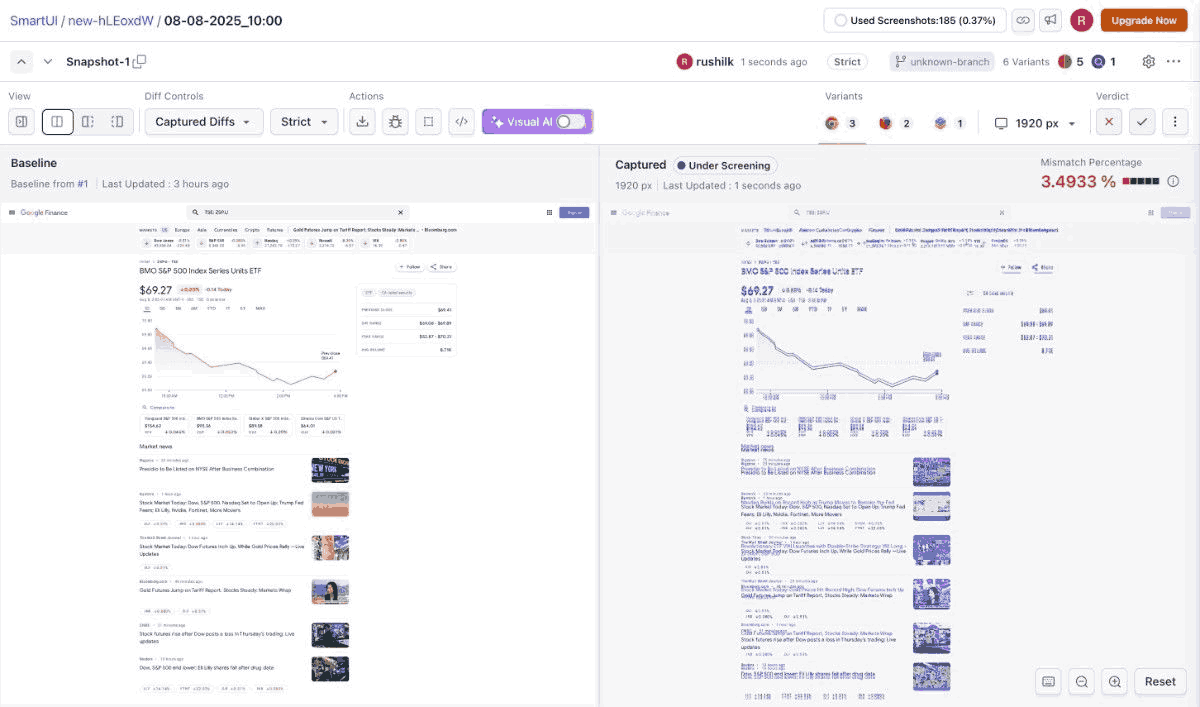
Benefits:
- Perform WCAG-compliant accessibility checks at scale.
- Schedule one-time or recurring scans on public or local websites.
- Test authenticated pages without extra configuration.
- Get direct access to SmartUI and Accessibility dashboards for detailed reports.
Live With SmartUI Visual AI Agent
SmartUI now comes with a Visual AI agent that rethinks visual regression testing by simulating human perception.
Instead of flagging every tiny pixel change, SmartUI Visual AI feature highlights only the differences that truly matter, so you can focus on meaningful UI changes and make faster, more accurate decisions.
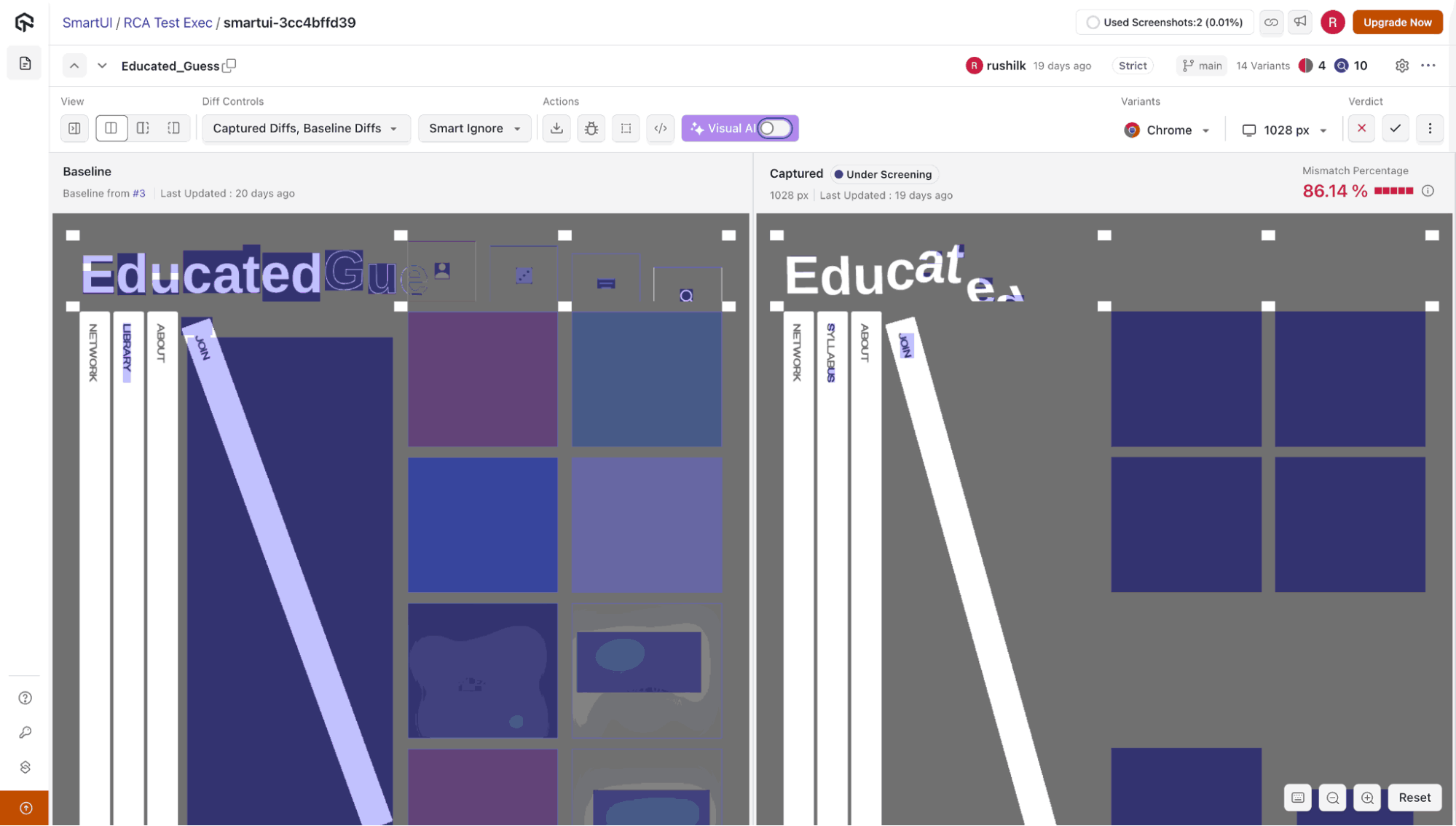
Benefits:
- Focus on significant UI shifts without being distracted by minor pixel changes.
- Understand visual differences in a human-centric, context-aware way.
- Eliminate noise in test results to boost productivity and efficiency.
- Quickly pinpoint impactful UI updates for faster debugging and review.
- Streamline visual regression testing across multiple browsers and devices.
Intelligent Root Cause Analysis With SmartUI
We have rolled out a Smart Root Cause Analysis (RCA) feature. It is an intelligent assistant that turns visual test failures into actionable insights. Instead of spending hours debugging UI issues, Smart RCA identifies the exact DOM and CSS changes causing visual differences, letting you fix issues faster and with precision.
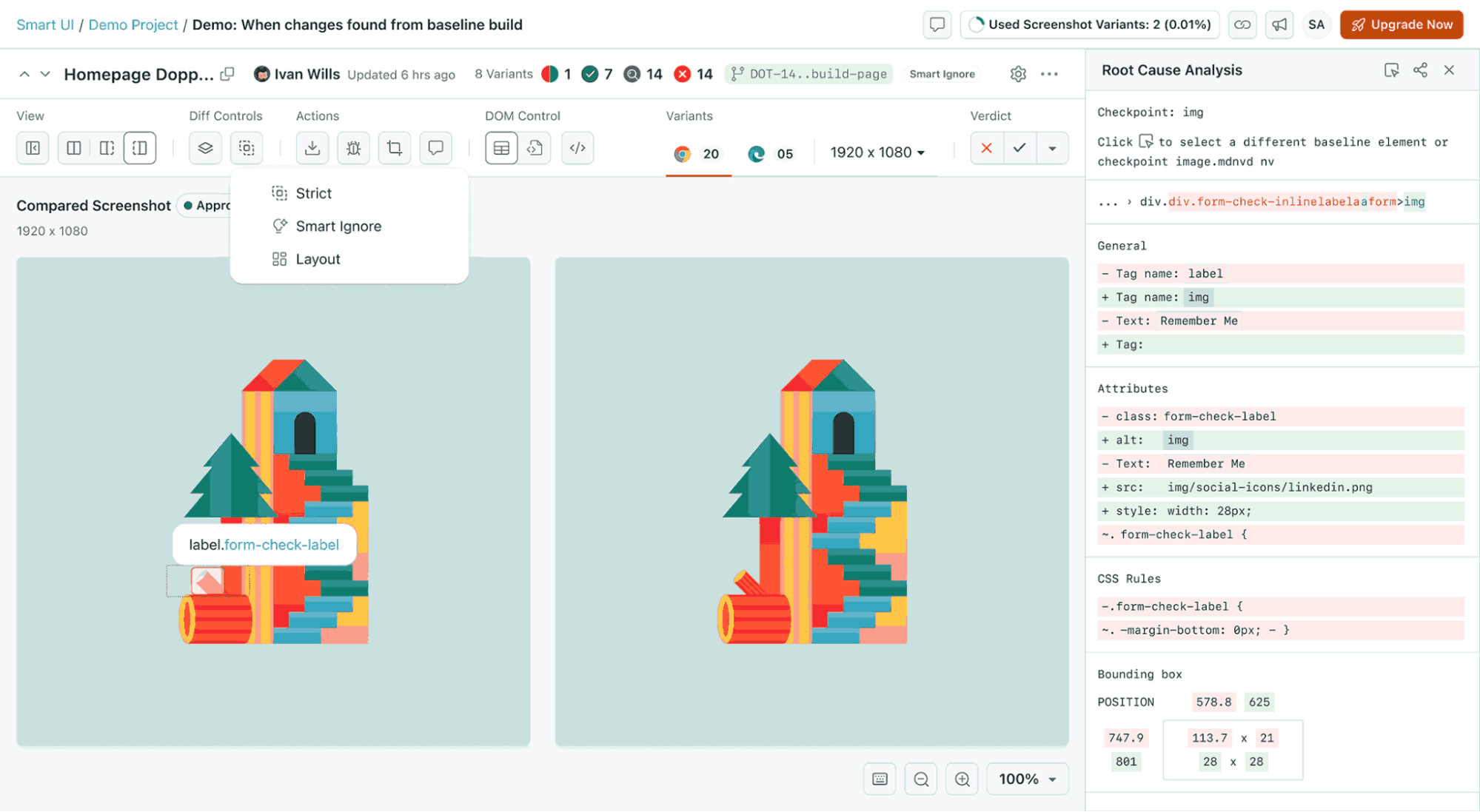
Benefits:
- Inspect exact HTML, CSS, and text changes between baseline and captured screenshots.
- Hover over different regions to highlight changes and click for detailed information.
- Access a structured RCA panel showing DOM path, computed styles, bounding boxes, attribute changes, tag transforms, text modifications, and layout shifts.
- Integrate seamlessly with the TestMu AI SmartUI dashboard and CLI tools.
- Quickly pinpoint the root cause of visual regressions to accelerate debugging and decision-making.
Fresh Set of Features in KaneAI
We’ve rolled out a new set of capabilities in KaneAI that help you create, manage, and run tests with greater precision and efficiency.
Generate Visual Tests
Creating visual tests just became more intuitive. With KaneAI’s integration into SmartUI, you can now define visual checkpoints using natural language commands like /Visual Comparison.
This streamlines the process of capturing baseline screenshots and comparing them against new ones, all without the need for complex scripting.
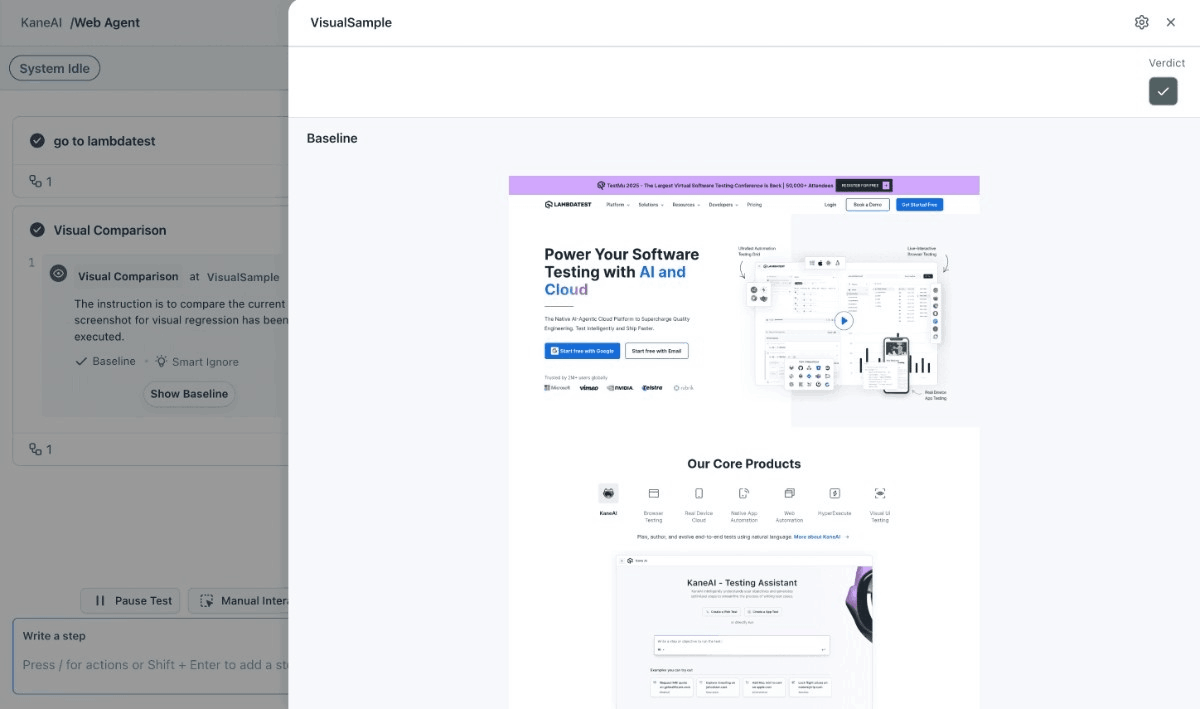
To get started, check out this guide on visual test creation with KaneAI.
Benefits:
- Use natural language commands to initiate visual comparisons.
- Automatically capture baseline screenshots during the first test run.
- Detect even the smallest UI discrepancies with AI-driven analysis.
- Customize tests across various browsers, viewports, and devices.
Retry on Failure Support
Flaky tests can impact your CI/CD pipeline. To mitigate this, we’ve introduced a retry mechanism for KaneAI test runs. By setting retry_on_failure: true, you can automatically rerun failed tests up to a specified number of times, reducing false negatives and enhancing test reliability.
Benefits:
- Automatically retry failed tests to account for transient issues.
- Configure the number of retries to suit your testing needs.
- Improve the stability of your CI/CD pipeline by reducing manual interventions.
- Ensure more consistent test results across multiple runs.
Check out this guide to configure the API call for retrying failed tests.
Move KaneAI Test Cases Across Projects
Managing test cases across different projects can be cumbersome. We’ve simplified this by allowing you to move KaneAI test cases between projects seamlessly. This feature enhances test reuse and organization, ensuring that your test suite remains efficient and scalable.
Benefits:
- Move test cases between projects without the need for recreation.
- Reuse existing tests across different modules.
- Maintain a clean and organized test suite as your projects evolve.
- Save time and effort in managing test cases across multiple projects.
Support for Full HAR Network Logs and Timezone
Understanding network interactions and time-dependent behaviors is crucial for comprehensive testing. We’ve enhanced KaneAI test runs by adding support for full HAR (HTTP Archive) network logs and customizable time zones. This allows for detailed analysis of network requests and accurate validation of time-sensitive features.
Benefits:
- Capture detailed HAR network logs for in-depth analysis of network requests.
- Specify time zones for test runs to simulate user interactions across different regions.
- Debug network-related issues more effectively with comprehensive logs.
- Test time-dependent features under various timezone settings.
Head over to this guide to configure the API call for HAR network logs.

New Features in Accessibility Testing
Say goodbye to scattered audits – our latest updates in accessibility testing give you clearer insights, better visual context, and more precise tracking across your web pages.
Merge Accessibility Reports
We’ve added the ability to merge multiple accessibility reports into a single, consolidated report. If you’re testing multiple URLs or running several accessibility scans, this means you no longer have to juggle separate reports.
Simply select the reports, choose bulk actions, give your new report a name, and save. You now get a unified view of all accessibility findings, making analysis faster and reducing redundant data.
Benefits:
- Combine two or more accessibility reports into a single consolidated report.
- Automatically remove duplicate issues across overlapping URLs.
- Name merged reports with default timestamps for easy tracking.
- See which team member initiated the merge for accountability.
View Passed Test Cases
We now show passed accessibility checks alongside violations in your Web reports. This gives you a complete view of your app’s compliance, so you can track what’s working well in addition to what needs fixing.
It works for both manual and automated testing, helping you spot regressions, validate compliance, and provide clear feedback to developers.
Benefits:
- Display passed accessibility checks to give a full picture of compliance.
- Track previously passing tests to detect regressions over time.
- Generate comprehensive reports that highlight both successes and violations.
Screenshot Capability in Accessibility
We’ve added an accessibility automatic screenshot capture feature in both manual and automated accessibility tests. Screenshots highlight exactly where accessibility issues occur using annotated red bounding boxes.
This gives you immediate visual context, makes debugging faster, and ensures your documentation is accurate and actionable.
Benefits:
- Automatically capture full-page screenshots with visual annotations.
- Highlight accessibility violations with red bounding boxes for instant clarity.
- Reduce time spent manually pinpointing and describing issues.
- Available across all supported testing frameworks.
Fragment Identifiers
We have added a fragment identifier feature that allows you treat URLs with different fragment identifiers (the portion after the # in URLs) as separate entities. This is useful for single-page applications or complex pages with section-based navigation.
You can now track and resolve accessibility issues on specific sections, not just the page as a whole, which makes your audits more precise and actionable.
Benefits:
- Categorize accessibility issues by specific sections of a page.
- Track issues accurately in SPAs using hash-based routing.
- Generate detailed reports for individual page segments.
- Prioritize fixes efficiently by focusing on section-specific issues.
Latest HyperExecute Features and Enhancements
Our latest updates in HyperExecute bring more reliable waits, emulator support, BiDi testing, and language flexibility to help you catch issues faster and streamline test automation.
SmartWait Support
We now support SmartWait functionality on HyperExecute. SmartWait intelligently checks element actionability before performing actions, so your Selenium scripts run only when elements are ready. This reduces flakiness and improves efficiency, especially in parallel and distributed test environments.
Benefits:
- Perform actions only when elements are ready, improving reliability.
- Reduce reliance on explicit and implicit waits.
- Optimize test scripts for readability and maintainability.
- Improve test stability in parallel and distributed execution.
Chrome Browser Automation on Android Emulators
We’ve added Android emulator support for Chrome browser automation on HyperExecute, allowing you to test mobile browser workflows without physical devices.
This initial release focuses on Chrome emulation for Android, providing flexible options for mobile web testing.
Benefits:
- Test Chrome browser workflows on Android emulators (Android 11 & 12).
- Access command logs to debug automation steps.
- Record full session videos for detailed analysis.
- Capture screenshots at multiple stages of execution.
- View Appium, console, network, and device logs for troubleshooting.
You can generate automation capabilities using the TestMu AI automation capability generator.
Language Support for Maestro Android Automation
HyperExecute now lets you set language parameters for Maestro tests on Android devices. This is useful for testing applications in non-English locales, ensuring your app behaves correctly across different languages and regions.
Benefits:
- Configure language and locale in a hyperexecute.yaml file.
- Run tests in non-English environments (e.g., Spanish, French).
- Test localized behavior of apps without modifying scripts.
- Ensure consistency across internationalized user workflows.
BiDi Testing Support With Selenium WebDriver
HyperExecute now supports Bi-Directional testing with Selenium WebDriver. BiDi enables two-way communication between your tests and the browser, letting you capture real-time events like console logs, network traffic, and JavaScript exceptions directly from your scripts.
Check out this guide to begin HyperExecute BiDi testing.
Benefits:
- Interact with real-time browser events beyond standard WebDriver commands.
- Capture console logs, network activity, and JavaScript exceptions.
- Improve debugging and observability during test execution.
- Enhance test reliability by validating runtime browser behavior.

TestMu AI Integration With Appcircle
Siloed workflows can slow down development and make it harder to maintain quality. To tackle this, TestMu AI integration with Appcircle for Espresso automation testing brings enterprise-grade mobile app testing directly into your CI/CD pipeline.
Benefits:
- Automate Espresso tests on real Android devices within your CI/CD pipeline.
- Eliminate infrastructure overhead and simplify mobile test management.
- Streamline workflows by integrating testing directly into your DevOps process.
- Catch issues earlier, improving both speed and quality of mobile releases.
Wrapping Up
With these latest updates, TestMu AI continues to make testing faster, smarter, and more reliable across web and mobile, and agent testing. From real-device testing and AI-infused visual testing to enhanced automation features in KaneAI and HyperExecute, everything is designed to reduce friction and give you actionable insights.
Dive in, explore the new capabilities, and let these tools help you catch issues earlier, debug smarter, and ship with confidence.


Did you find this page helpful?
More Related Hubs
TestMu AI forEnterprise
Get access to solutions built on Enterprise
grade security, privacy, & compliance
- Advanced access controls
- Advanced data retention rules
- Advanced Local Testing
- Premium Support options
- Early access to beta features
- Private Slack Channel
- Unlimited Manual Accessibility DevTools Tests