

Next-Gen App & Browser Testing Cloud
Trusted by 2 Mn+ QAs & Devs to accelerate their release cycles


On This Page
- What is TeamCity?
- Top Features of TeamCity for Scaling CI/CD
- How to Download and Set Up TeamCity
- TeamCity Pricing Models: Flexible for Teams of All Sizes
- What Users Say: TeamCity Reviews from Gartner, Capterra & More
- TeamCity vs Other CI/CD Alternative Tools
- How Engineering Teams Achieve 40,000+ Daily Builds with TeamCity
- Additional Reference

- Home
- /
- Learning Hub
- /
- What is TeamCity: Features, Setup, Reviews & CI/CD Benefits
What is TeamCity: Features, Setup, Reviews & CI/CD Benefits
Learn what is TeamCity and how it simplifies CI/CD pipelines with key features, easy setup, seamless integrations, and benefits for DevOps and dev teams.

Bhavya Hada
January 13, 2026
TeamCity is a Java-based CI/CD platform by JetBrains, designed to help teams automate their build, test, and deployment processes with speed and confidence.
Development teams today need to ship software faster while maintaining high quality and stability. CI/CD tools like TeamCity are critical in achieving this balance. TeamCity has deep IDE integration and support for both simple and complex workflows.
Overview
TeamCity, initially released in 2006, is a CI/CD platform that helps teams automate their build, test, and deployment processes. TeamCity is recognized for its strong out-of-the-box functionality helps development teams strive to ship software faster.
Key Features:
- Smart CI/CD Pipelines: Automate build chains with dependencies and triggers.
- Kotlin DSL: Code-based configuration for full control.
- Test Intelligence: Detect flaky tests and speed up execution.
- IDE Integration: View results in IntelliJ, Visual Studio, and Eclipse.
How to download and set up:
- Download & Install:Choose your OS and run the setup wizard.
- Configure Agents : Set up agents and integrate with VCS.
- Create a Project:Link your repository and define build steps.
- Deployment: Use on-premises, cloud, or Docker-based agents.

What is TeamCity?
TeamCity is a CI/CD and build management system developed by JetBrains, the company behind popular tools like IntelliJ IDEA, PyCharm, and WebStorm.
TeamCity helps automate the process of building, testing, and deploying code, making it easier for development teams to deliver high-quality software at speed.
Key Highlights:
- Developed by: JetBrains
- Programming languages and frameworks: Java, .NET, Ruby, and more
- License: Freemium (Free for up to 100 build configurations and 3 agents)
- Supported OS: Windows, Linux, macOS
Top Features of TeamCity for Scaling CI/CD
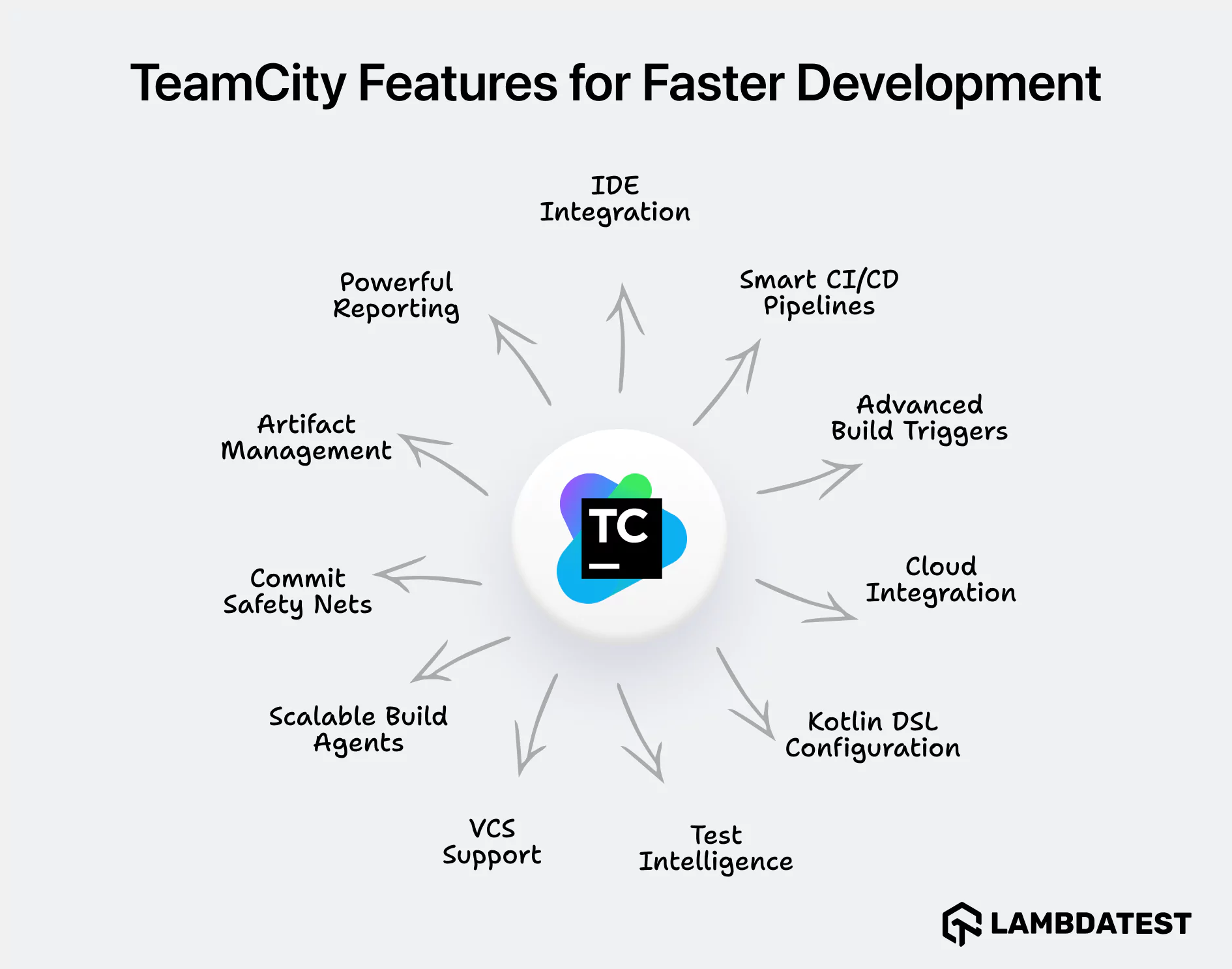
Here are some of the most notable features that make TeamCity stand out:
- Smart CI/CD Pipelines: Define flexible build chains with dependencies, triggers, parallel test execution, and conditional logic.
- Kotlin DSL Configuration: Allows you to define your entire CI/CD configuration as code, providing version control, reusability, and excellent tooling support (like auto-completion) within IDEs.
- Commit Safety Nets: Use pre-tested commits and personal builds to avoid breaking main branches.
- IDE Integration: View build results and test reports directly in IntelliJ, Visual Studio, or Eclipse.
- Advanced Build Triggers: Automate builds based on events like code changes, schedules, or custom criteria, ensuring timely execution.
- Cloud Integration: Deploy TeamCity on cloud platforms like TestMu AI, AWS, Azure, and GCP, dynamically scaling resources for faster builds.
- Test Intelligence: Detect flaky tests, auto-retry failures, and run only relevant tests to improve speed and reliability.
- Scalable Build Agents: Run multiple agents across OSs, VMs, or containers for faster builds.
- VCS Support: Integrates with Git, Mercurial, SVN, Perforce, and more. Supports PR workflows, branch filters, and commit tracking.
- Artifact Management: Store, manage, and clean up build artifacts with built-in tools and external storage support.
- Powerful Reporting: Generate detailed reports on builds, tests, and code quality, visualizing trends to drive informed decisions and improve quality.
How to Download and Set Up TeamCity
Step 1: Download the Server
Start by visiting the TeamCity Download Page. Choose the appropriate version for your system:
- Windows: Installer or ZIP distribution
- Linux/macOS: TAR.GZ package
- Docker: Official images available on Docker Hub
Step 2: Install and Launch
Unpack the archive or run the installer. Once complete, launch the TeamCity server. By default, it runs on http://localhost:8111.
The first time you launch the server, TeamCity will walk you through a simple setup wizard where you’ll:
- Choose a database (HSQLDB for testing or PostgreSQL/MySQL for production)
- Create the first administrator account
- Connect to your version control system
Step 3: Set Up the Build Agent
Build agents run the actual jobs defined in your pipelines. You can install them on the same machine or across different environments. The agent installer is available from the TeamCity web UI, under Agents > Install Build Agent.
Each agent can be configured with its own capabilities, such as installed SDKs, operating system details, or Docker support.
Step 4: Create Your First Project
Once your server and at least one agent are online:
1. Connect your GitHub, GitLab, or Bitbucket repository.
2. TeamCity will automatically detect build steps (e.g., Maven, Gradle, npm).
3. You can customize the steps or use the suggested configuration.
Step 5: Deployment Options
You can run TeamCity in whatever environment fits your team:
- On-Premises: Install and manage your own infrastructure. Useful for regulated environments or teams with custom requirements.
- Cloud Agents: Spin up build agents dynamically on AWS, Azure, or GCP.
- Docker-Based: Run TeamCity inside containers to isolate builds and simplify updates.
- Kubernetes-Friendly: Use Helm charts to manage TeamCity installations on Kubernetes clusters.
(Optional) Step 6: Connect to TestMu AI
Add TestMu AI commands in your build steps to bring speed, scalability, and AI-native intelligence to your testing process.
- Run tests on 3000+ real browsers, devices, and OS combinations.
- Trigger Selenium, Cypress, Playwright, and Appium tests from TeamCity.
- Speed up execution with HyperExecute (TestMu AI next-gen test execution cloud).
- View reports with logs, videos, and screenshots.
- Detect flaky tests and get AI-native insights.
- Debug faster with browser logs and performance data.
Integrating TeamCity with TestMu AI ensures higher test coverage, faster feedback cycles, and more reliable releases, directly from your TeamCity environment.
Step 7: Explore TeamCity Plugins and Extensions
- Extend functionality with plugins for Jira, YouTrack, Slack, FOSSA, and more.
- Use plugins for license compliance, security scanning, and code quality checks.
- Integrate with build tools like NUKE, MSBuild, Ant, Gradle, and custom CLI runners.
TeamCity Pricing Models: Flexible for Teams of All Sizes
TeamCity delivers the flexibility of both self-hosted and fully managed cloud options, allowing teams to choose the plan that suits their needs.
Self-Hosted (On-Premise):
| Plan | What's Included | Best For |
|---|---|---|
| Free Tier | 3 build agents, 100 build configurations | Startups, small projects |
| Professional | Purchase additional build agents and configs | Mid-size teams scaling builds |
| Enterprise | High-performance CI with advanced user controls | Large orgs with custom infra |
- One-time license with optional yearly renewal for support and updates.
- Unlimited users, scalable by adding agents/configs.
Saas (TeamCity Cloud):
| Plan | Highlights | Best For |
|---|---|---|
| Pay-as-you-go | Managed hosting, automatic scaling, usage-based pricing | Teams preferring zero setup |
- Powered by JetBrains infrastructure.
- Ideal for teams seeking fast CI/CD without infrastructure overhead.
What Users Say: TeamCity Reviews from Gartner, Capterra & More
TeamCity receives consistently high ratings across software review platforms, with users praising its reliability, flexibility, and developer-centric features.
Gartner: 4.5/5 (15+ reviews)
Capterra: 4.5/5 (49+ reviews)
SoftwareWorld: TeamCity is listed in SoftwareWorld’s Top CI/CD Tools list for:
- Native IDE integrations
- Powerful configuration-as-code
- Scalability for large teams
What Users Appreciate:
- Flexible configuration options using Kotlin-based DSL and templates
- Broad integration ecosystem, supporting Git, Docker, AWS, Azure, Selenium, and more
- Responsive support and documentation, especially for enterprise clients
“TeamCity Helps Optimize CI/CD processes with powerful capabilities and features.” — Sr. DevOps Engineer, SaaS Platform |
Areas for Improvement:
- Kotlin DSL has a learning curve for teams unfamiliar with the language
- The plugin ecosystem is smaller than Jenkins or GitHub Actions, requiring more manual setup in certain cases
- More expensive than other industry alternatives like Jenkins
TeamCity vs Other CI/CD Alternative Tools
Let’s compare TeamCity with a few popular CI/CD alternatives:
| Feature | TeamCity | Jenkins | GitLab CI | CircleCI |
|---|---|---|---|---|
| Setup | Easy out-of-the-box | Requires manual configuration | Git-native, simple setup | Cloud-first setup |
| UI | Modern and intuitive | Dated interface | Clean GitLab UI | Clean and simple |
| Config as Code | Kotlin DSL | Jenkinsfile (Groovy) | YAML | YAML |
| Plugins | 400+ official plugins | 1800+ community plugins | GitLab native features | Third-party orbs |
| IDE Integration | Tight integration (IntelliJ, VS, Eclipse) | Limited | Limited | Limited |
| Hosting | On-prem and cloud | On-prem and cloud | SaaS and self-hosted | SaaS |
| Cost | Free (up to 3 agents) +paid plans | Free, open-source + paid plans | Free for public repos + paid plans | Free with 1,000 build minutes + paid plans |
Verdict: Choose TeamCity for developer-focused CI/CD with powerful defaults, strong IDE support, and minimal plugin maintenance. Jenkins may suit open-source enthusiasts, while GitLab CI and CircleCI offer good cloud-native options for Git-centric teams.
How Engineering Teams Achieve 40,000+ Daily Builds with TeamCity
Top engineering teams use TeamCity to scale CI/CD, speed up builds, and bring stability to complex pipelines across gaming, developer tools, and enterprise systems:
- Playrix: Migrated to AWS and implemented auto-scaling agents with TeamCity, achieving 10× cost efficiency and eliminating build queue delays across mobile game teams. Now runs 10,000 builds every day using 220 TeamCity build agents, managing CI/CD processes for 2,500+ projects.
- Gradle Inc.: Uses TeamCity to manage CI for Gradle Build Tool and Gradle Enterprise, running 30,000 green builds per day using reusable configurations, scalable agent pools, and Kotlin DSL for configuration as code.
- Gearbox Publishing: Migrated to TeamCity Cloud in 6 weeks, managing 138 projects and 340 committers with self-hosted AWS agents. Achieved significant EC2 cost savings, faster project setup with templating, and improved build reliability using build chains and snapshot dependencies.
These examples highlight how teams across industries use TeamCity to scale and stabilize their CI/CD workflows. Read detailed TeamCity case studies.
Conclusion
TeamCity is a mature, developer-first CI/CD platform that strikes a great balance between usability and power. For teams that prioritize stability, intelligent test feedback, cloud flexibility, and seamless IDE integration, it’s one of the strongest contenders in the CI/CD space.
If you're a solo developer, a growing startup, or an enterprise DevOps team, TeamCity has the scalability, support, and ecosystem to build reliable pipelines fast.
Additional Reference
- JetBrains Official Docs: For complete setup guides, Kotlin DSL examples, and CI/CD best practices, explore the TeamCity documentation.
- TeamCity Tutorials – JetBrains: Explore beginner to advanced features of TeamCity through step-by-step tutorials.
- Instructor-led course: Set up and use the TeamCity course by DevOpsSchool.


Frequently asked questions
Did you find this page helpful?
More Related Hubs
TestMu AI forEnterprise
Get access to solutions built on Enterprise
grade security, privacy, & compliance
- Advanced access controls
- Advanced data retention rules
- Advanced Local Testing
- Premium Support options
- Early access to beta features
- Private Slack Channel
- Unlimited Manual Accessibility DevTools Tests