

Next-Gen App & Browser Testing Cloud
Trusted by 2 Mn+ QAs & Devs to accelerate their release cycles


- Home
- /
- Learning Hub
- /
- How Playwright and AI Make End-to-End Testing Smarter
How Playwright and AI Make End-to-End Testing Smarter
Learn how to use Playwright with AI and explore how intelligent test automation is driving faster, smarter, and more efficient software testing.

Paulo Oliveira
March 28, 2026
Playwright is a framework for automating end-to-end testing across multiple web browsers and operating systems. To further enhance your web automation, you can integrate Playwright with AI tools, agents or LLMs.
The AI interprets instructions, generates test scripts, and adapts them if the application changes. It can detect broken selectors, update them automatically, and understand the context of the UI to keep tests accurate. This approach speeds up test creation, reduces maintenance, and enables smarter test automation.
Overview
Using Playwright with AI is the technique of enhancing web automation processes and testing capabilities by leveraging artificial intelligence to generate, maintain, and optimize test scripts.
Why Use Playwright With AI?
Running Playwright tests leveraging AI makes web testing faster and more intelligent. It can generate tests, self-heal broken locators automatically, and help find hidden issues.
- Self-Healing Tests: Automatically detects changes in UI elements and updates selectors, keeping tests running without manual fixes. This reduces maintenance and improves stability across your automation suite.
- Smart Test Generation: Creates tests, test data, and edge-case scenarios automatically, expanding coverage efficiently while saving time on building and maintaining test suites.
- Code and Test Analysis: Checks application code and test flows to identify bugs and inconsistencies that standard scripts often miss, improving defect detection and overall reliability.
- Reduced Repetitive Work: Automatically generates page objects, mocks, and API helpers, letting your team focus on exploratory testing and complex scenarios instead of setup and configuration.
- Intelligent Test Execution: Uses historical test results and recent code changes to predict likely failures, helping teams prioritize high-risk areas and catch defects earlier.
How to Perform Playwright AI Testing?
There are several AI agents and tools that enhance Playwright testing, from generating scripts to analyzing results and improving test reliability.
- AI Agents and Tools: Generative AI testing tools like TestMu KaneAI convert natural language prompts into automated test scripts. Also, you can leverage AI tools like ChatGPT and Claude to generate Playwright scripts or outline test flows.
- Playwright MCP: Lets AI interact directly with browsers via a controlled protocol, executing tests, analyzing results, and triaging failures efficiently.
- Playwright Codegen: Records user interactions into executable scripts, speeding up test creation; manual adjustments are required for complex logic or fragile selectors.
Why Use AI for Playwright Automation?
Using AI can enhance Playwright automation. It fixes broken tests automatically and generates tests and data for you. It also spots hidden bugs, handles repetitive setup, and predicts where failures might happen so you can focus on real testing.
- Self-Healing (Auto Healing) Tests: Detects changes in UI elements and updates selectors automatically. Using auto heal in Playwright keeps your tests continue running without failures, reducing maintenance effort and improving stability across the automation suite.
- Smart Test Creation: Generates tests, test data, and edge scenarios. Playwright automation coverage expands efficiently, while teams reduce the time required to build and maintain test suites.
- Code and Test Analysis: Inspects application code and test flows to identify bugs and inconsistencies. It highlights areas standard scripts often miss, improving defect detection and overall reliability of your Playwright tests.
- Less Repetitive Work: Creates Playwright page objects, mocks, and API helpers automatically. You can focus on exploratory testing and complex scenarios instead of repetitive setup and configuration tasks.
- Intelligent Test Execution: Analyzes historical Playwright test runs and recent code changes to predict likely failures. Teams prioritize high-risk areas, improving testing efficiency and early defect detection. You can also leverage Playwright Skills (a collection of markdown guides) for AI agents to streamline your test generation process.
How to Use Playwright With AI?
You can use AI with Playwright by leveraging agents like TestMu AI KaneAI, ChatGPT, or Claude to generate test scripts via natural language. Playwright MCP then lets the AI execute these tests, analyze results, and efficiently triage failures.
Using AI Agents/Tools
Natural Language Processing (NLP) is at the core of AI test generation. AI agents support NLP testing that can interpret prompts and convert them into functional Playwright test scripts.
Let’s explore three leading tools: KaneAI, ChatGPT, and Claude, and compare how they work when applied to Playwright test automation.
TestMu AI KaneAI
TestMu AI KaneAI is a Generative AI test agent that helps you plan, author and evolve tests for web and mobile apps with natural language prompts. Instead of writing test scripts, you just describe what you want to test in plain language. KaneAI understands your intent, generates automated tests, and runs them across different browsers and devices.
Features:
- Intelligent Test Generation: You can describe what you want to test in plain language, and KaneAI instantly converts it into an automated, executable test script.
- Multi-Language Code Export: KaneAI lets you export generated tests into popular programming languages and frameworks, so you can customize, extend, or integrate them with your existing codebase.
- 2-Way Test Editing: You can switch between natural language and code views while keeping both synchronized, allowing collaboration between technical and non-technical team members during test creation.
- Auto-Healing Tests: KaneAI automatically updates and fixes failed tests when your application’s UI or workflows change, minimizing test failures and reducing time spent on maintenance or debugging tasks.
- Deep Debugging and Observability: KaneAI captures logs, screenshots, and network data, providing detailed failure analysis, root-cause detection, and actionable insights for faster, more accurate debugging.
- Data-Driven Testing: KaneAI supports parameterized inputs, dynamic data generation, and CSV uploads, allowing you to simulate complex real-world scenarios and validate multiple test cases efficiently.
- Seamless Workflow Integration: KaneAI integrates with tools like Jira, GitHub, and Slack, enabling automated test execution, result tracking, and reporting directly within your existing development environment.
Example:
The snap below shows the TestMu AI KaneAI Web Agent interface interpreting user-provided actions as test creation steps. It’s the phase where you build or record your test flow before running it. It displays each step on the left as structured actions, while the browser on the right shows what’s happening visually.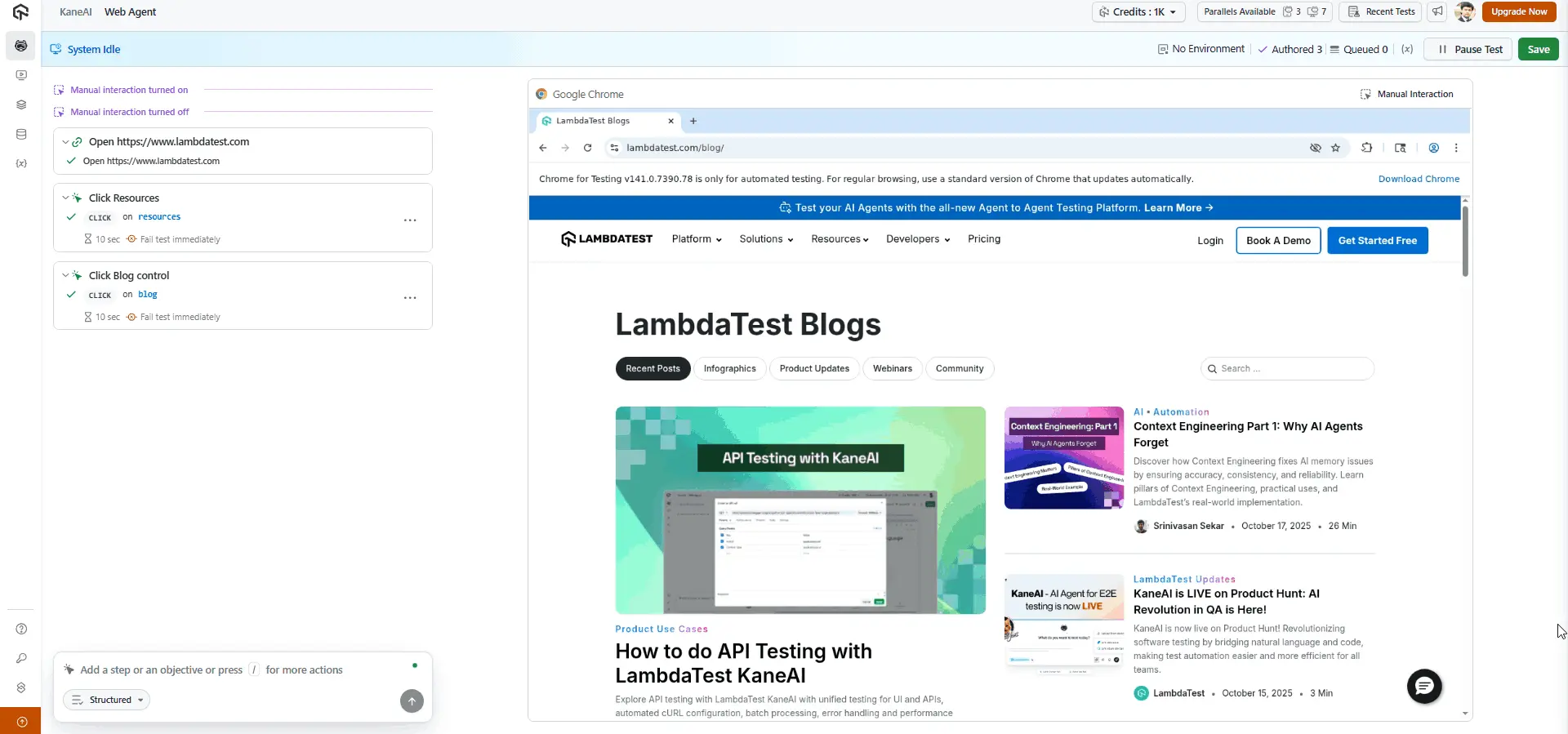
Once you finish adding your steps, you can save the test, and KaneAI will automatically generate the corresponding test scripts. You can also export or generate these tests in your preferred automation framework, such as Playwright and in the programming language you use, making it easy to integrate with your existing testing environment.
To get started, refer to this guide on TestMu AI KaneAI.

ChatGPT
ChatGPT, developed by OpenAI, is an AI chatbot capable of understanding and generating human-like text across many domains, including software development. Although it wasn’t solely for testing, it can generate detailed Playwright scripts.
Its coding ability allows testers and developers to quickly draft end-to-end tests, experiment with automation flows, or translate testing steps into executable code. However, ChatGPT’s output still needs manual review and adjustment.
Since it doesn’t execute code or interact with a live browser directly, it can sometimes create selectors that are unstable or rely on outdated Playwright methods. To ensure reliability, you need to run the generated test scripts, validate selectors, and refine them to match the current UI.
Example:
Prompt: Write a Playwright test in JavaScript to test user login and validate the success toast notification.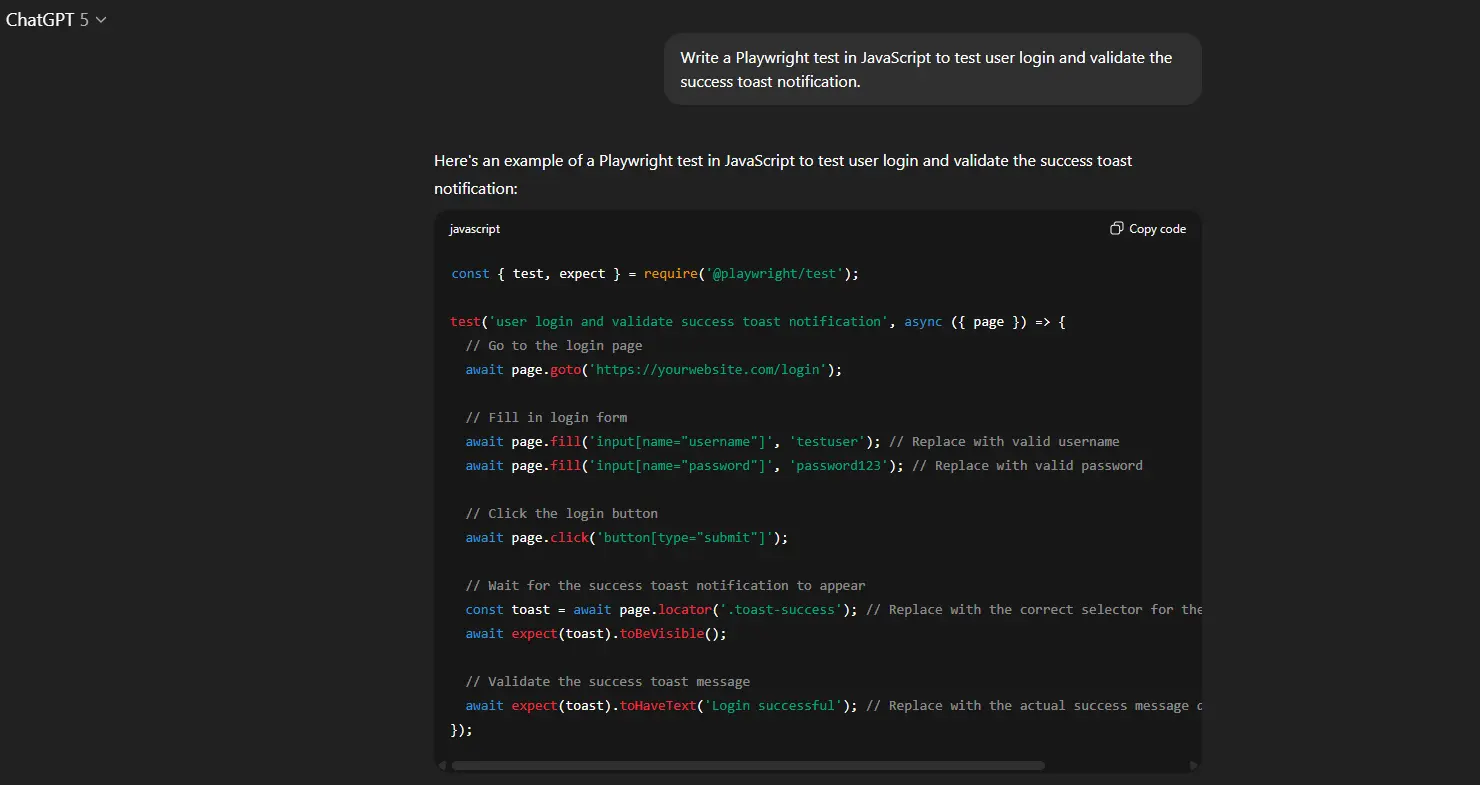
ChatGPT returns a complete script with page navigation, data entry, click actions, and toast visibility assertion, often with helpful comments.
Claude
Claude, built by Anthropic, is an AI assistant that can understand natural language and write code in many programming languages. It isn’t a dedicated testing tool, but it’s surprisingly useful for test automation.
You can ask Claude to write Playwright scripts, outline end-to-end test flows, or turn manual testing steps into runnable code. It’s especially handy when you need to prototype a test quickly or explain testing ideas in plain English and get usable code back.
That said, Claude doesn’t actually run the code or interact with a browser. It can make small mistakes, like using unstable selectors or outdated methods. So the tests it generates always need a human review. Before adding anything to your test suite, run the script, check the selectors, and make sure the logic fits your app.
Example:
Prompt: Write a test in TypeScript using Playwright that tests a multi-step checkout process, with data entry, payment mock, and confirmation.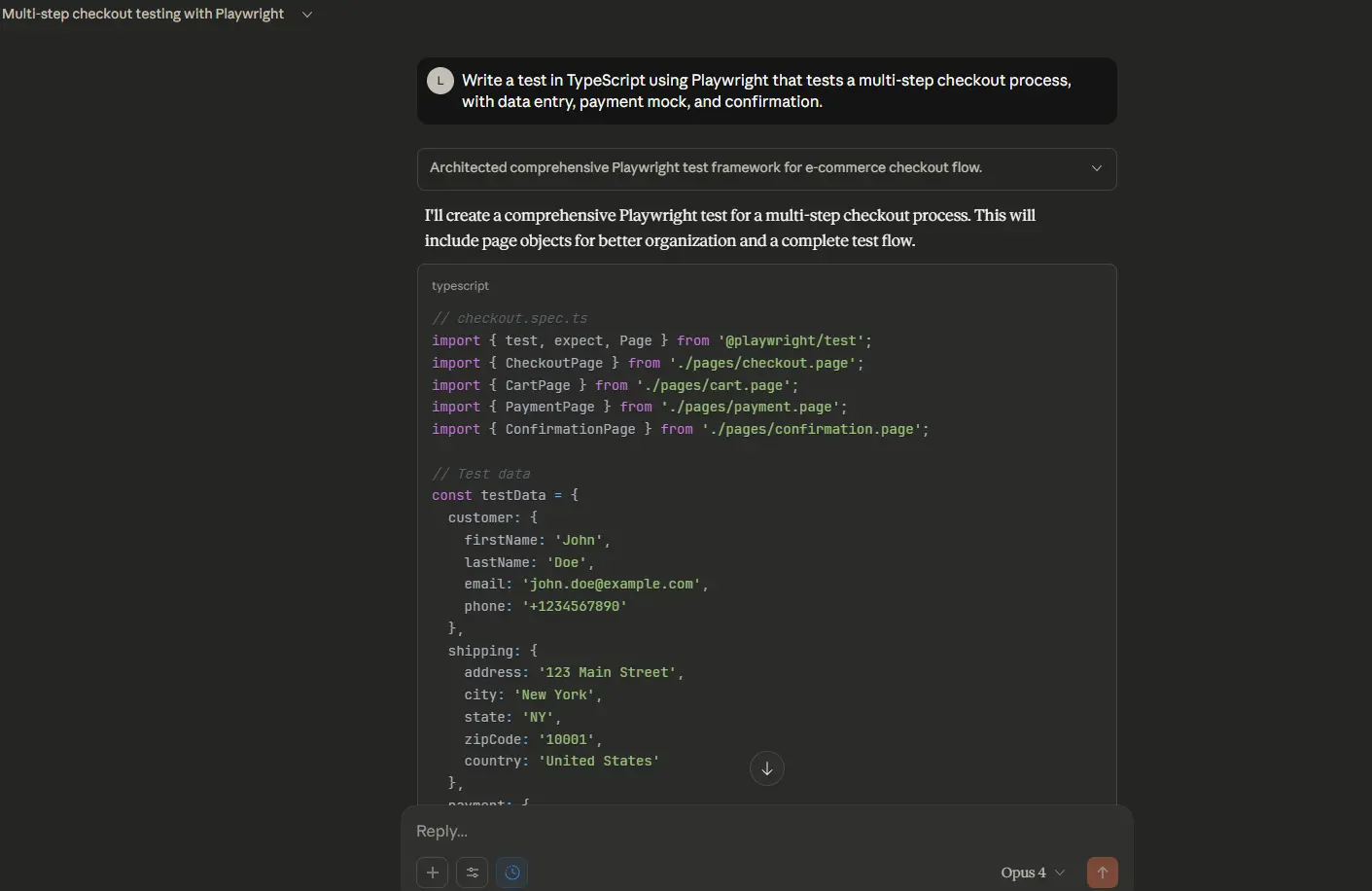
Claude generates a multi-part script with a logical structure and clear separation of steps.
Playwright MCP (Model Context Protocol)
The Model Context Protocol (MCP) lets AI agents work directly with browsers through the automation APIs of Playwright. The AI communicates with an MCP server, which turns its instructions into Playwright commands. This gives the model controlled access to an active browser, allowing it to open pages, click buttons, enter data, and record results.
Developed with Microsoft, Playwright MCP integrates language models and browser automation in a structured way. It manages sessions, shares context between components, and enforces access rules so the AI can perform browser actions without overstepping limits.
Building on this, AI agentic cloud platforms such as TestMu AI offer an Automation MCP Server for automation testing that uses the same protocol to connect AI assistants directly with test sessions running on TestMu AI.
By leveraging TestMu AI MCP Server, the AI can access and interact with test execution data, analyze results, identify failures, and provide actionable insights. This structured access reduces the time and effort required for triaging and troubleshooting test failures.
To get started, check out this guide on TestMu AI Automation MCP Server.
Playwright Codegen
Although Playwright Codegen, a built-in tool, doesn’t use AI, it behaves much like an assistant. It captures user interactions in real time and translates them into executable Playwright test scripts.
It helps speed up test creation and reduces manual scripting errors. Codegen does not handle complex logic, loops, or conditional flows automatically.
It works like a screen recorder, capturing each interaction and translating it into code. The generated selectors can be too specific or unstable, so they often require manual review and adjustment.
To use Codegen, run the following command:
npx playwright codegenWhen you start Playwright Codegen, it opens a browser along with an interactive Playwright Inspector. As you move through the application, it logs your actions and converts them into test scripts.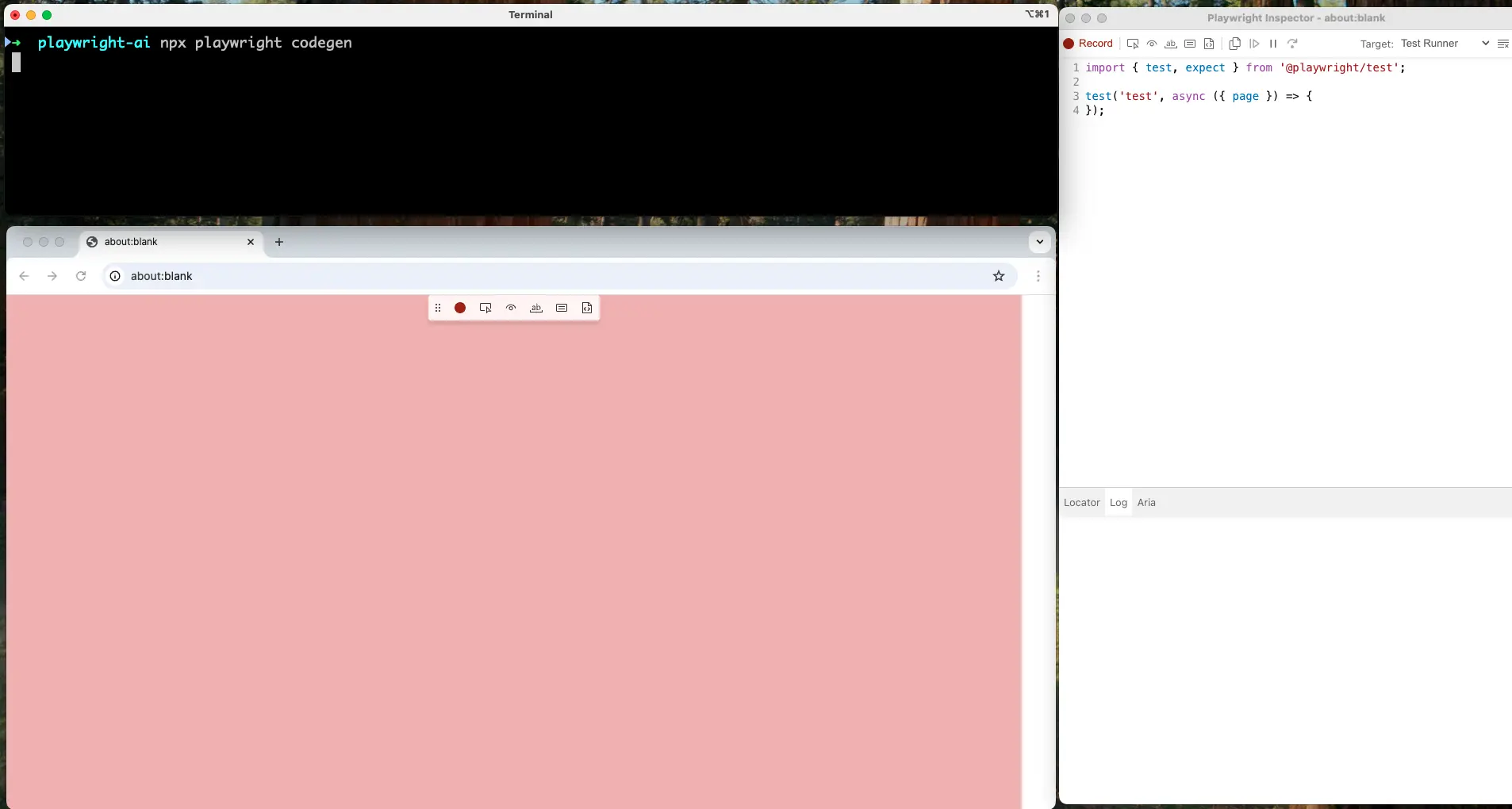
They usually include auto-generated selectors and simple assertions for the recorded steps. Any complex validations or custom logic you need to add manually. Still, Playwright Codegen has some limitations. Because it records actions as they occur, the resulting selectors might be too specific or fragile.
Moreover, while the tool adds basic validation steps (like confirming an element is visible), it may not capture the full scope of logic required for more complex test scenarios.
How TestMu AI Test Manager Streamlines Playwright Test Management?
Managing Playwright test suites is crucial to keep tests organized, maintainable, and reliable as applications evolve. Platforms like TestMu AI Test Manager help by centralizing test cases, tracking execution, and leveraging AI to generate, analyze, and prioritize tests efficiently.
Features:
- Create and Manage Test Cases: Write, organize, and maintain automated test cases in one centralized repository, enabling teams to standardize testing and improve collaboration across projects.
- Generate Test Cases With AI: Automatically transform requirements from text, Jira tickets, PDFs, or spreadsheets into structured test cases, accelerating test creation while reducing manual effort and human errors.
- Import and Export Test Cases: Easily import existing test cases via CSV or API, and export them for reporting, backups, or migration to another test management system efficiently.
- Link Automated Test Cases: Integrate automation scripts from supported frameworks to existing test cases, ensuring traceability between manual and automated tests and improving overall test coverage reliability.
- Issue Tracker Integration: Seamlessly integrate with Jira and Azure DevOps, linking test cases and test runs to bugs, features, and tasks for complete end-to-end visibility.
- Insights and Reports: Access real-time dashboards, analytics, and detailed reports to monitor test execution, coverage, trends, and quality metrics, supporting data-driven decisions for project management.
To begin with, head over to this TestMu AI Test Manager guide.
Third-Party AI Tools to Use With Playwright
There’s a growing ecosystem of third-party AI testing tools to enhance the Playwright experience.
Let's explore these third-party tools: Auto Playwright and ZeroStep.
- Auto Playwright: It is for developers and QA engineers looking for AI assistance within code. It introduces the auto() function, a unique way to describe test steps in plain text that are interpreted and executed by the Auto Playwright engine. The tool is open source and integrates directly into your Playwright projects.
- ZeroStep: It is an AI-driven testing platform that allows users to generate Playwright-based tests through natural language instructions, removing the need to write any code manually.
Once set up, you can use the auto() method inside your Playwright tests to automate common actions, and the tool will handle the rest. However, more complex logic may still require manual implementation.
Designed with accessibility in mind, ZeroStep is ideal for product managers, manual testers, or business analysts who want to contribute to automated testing without writing a single line of code.

Note: Run Playwright tests across 50+ browser environments. Try TestMu AI Now!
Challenges With Playwright AI Testing
While the integration of AI into Playwright testing offers clear benefits, it is essential to recognize the key challenges that teams may face.
- Accuracy of AI-Generated Code: AI-generated Playwright scripts can sometimes include fragile or incorrect code, especially when prompts are vague or unclear, requiring careful validation and manual adjustments to ensure reliable execution.
- Flaky Test Scripts from Over-Reliance on Auto-Generated Logic: Tests created solely by AI may rely on unstable locators or assumptions, increasing maintenance overhead if scripts are not manually validated and refined for real-world application scenarios.
- Limited Context Awareness: AI tools typically lack a deep understanding of the full application context, which can lead to incomplete or inaccurate Playwright test coverage, missing critical edge cases, or user flows.
- Security and Privacy Considerations: Sending sensitive application data through external AI services or APIs may introduce privacy, security, or compliance risks, requiring careful handling of credentials, user data, and confidential test information.
- Learning Curve and False Expectations: Teams may assume AI can fully replace testers, but effective usage still requires prompt engineering, human oversight, and understanding that AI is assistive, not a replacement for QA expertise.
- Dependency on External APIs and Costs: Relying on third-party AI tools can incur ongoing costs, usage limits, or downtime, which may impact scalability, project timelines, and long-term sustainability of AI-assisted Playwright automation.
You can also watch the video below where Andrew Knight, Senior Director of Product Management at Cycle Labs, deep dives into advanced Playwright techniques, leveraging AI to write more advanced, scalable tests together.
Conclusion
Using Playwright with AI offers significant advantages, from speeding up test creation to improving accuracy and reducing manual effort. Using AI with Playwright allows teams to automate repetitive tasks, generate test scripts intelligently, and adapt quickly to changes in the application.
Platforms like TestMu AI AI Test Manager enhance test management by providing smart organization, reporting, and actionable insights, making it easier to maintain high-quality software. Also, integrating third-party AI tools can extend Playwright’s capabilities, enabling more sophisticated testing scenarios.
However, challenges remain, including ensuring AI-generated tests are reliable, managing tool compatibility, and maintaining human oversight to avoid errors. Overall, leveraging AI in Playwright testing can boost efficiency and coverage, but careful planning and monitoring are essential for optimal results.
Citations
- Playwright Official Documentation: https://playwright.dev/docs/intro
- Playwright Codegen Guide: https://playwright.dev/docs/codegen
- Playwright MCP GitHub Repository: https://github.com/microsoft/playwright-mcp


Frequently asked questions
Did you find this page helpful?
More Related Hubs
TestMu AI forEnterprise
Get access to solutions built on Enterprise
grade security, privacy, & compliance
- Advanced access controls
- Advanced data retention rules
- Advanced Local Testing
- Premium Support options
- Early access to beta features
- Private Slack Channel
- Unlimited Manual Accessibility DevTools Tests