

Next-Gen App & Browser Testing Cloud
Trusted by 2 Mn+ QAs & Devs to accelerate their release cycles


Introducing The TestMu AI VS Code Extension
With TestMu AI VS Code Extension, trigger real-time cross-browser tests right from VS Code Editor to test your public and local websites across 3000+ browsers, real devices, and operating systems.

Salman Khan
March 7, 2026
A productive workspace is crucial in crafting code rather than just finding the right IDE. After several generations of IDEs and code editors, Visual Studio Code is considered one of the best web development IDEs used by developers.
According to the 2022 StackOverflow survey, 74.48% of the respondents use Visual Studio Code as their IDE of choice.
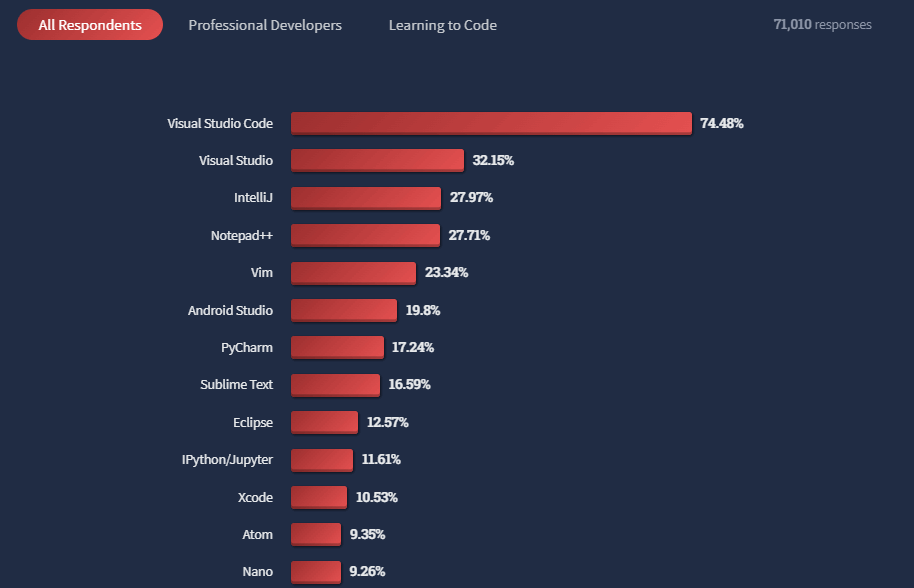
VS Code has a solid community and an umpteen list of extensions available at Visual Studio Code Marketplace for developers. With many developers using VS Code as their favorite IDE, we at TestMu AI have decided to make the life of Visual Studio users easier by developing an extension for .
With the brand-new TestMu AI VS Code Extension, we aim to jazz up the development workflow for developers and testers to quickly test their code and designs across different desktop and mobile browsers.
This VS Code Extension enables you to perform cross browser testing of your public and locally hosted web applications right from the VS Code Editor. Visit our guide to get started with TestMu AI VS Code Extension.
What is TestMu AI VS Code Extension used for?
The TestMu AI Extension for VS Code lets you perform live-interactive cross browser testing of your public websites and web apps on an online browser farm of 3000+ real mobile and desktop browsers. All you can do this in a jiffy right from your VS Code Editor. Using TestMu AI’s high-performing cloud testing platform, you get instant access to the latest and legacy browsers running across real OSes like Windows, macOS, Android, and iOS.
While performing live-interactive manual testing, you can leverage the following features using the TestMu AI VS Code Extension.
- Geolocation testing across different screen resolutions.
- Integrate with 120+ third-party tools for bug tracking, project management, and more.
- Mobile web testing on Android emulators and iOS simulators online.
- One-click bug logging to mark and share bugs to your favorite bug tracking tools and collaborate better.
- Pre-installed native developer tools to help you quickly debug cross browser compatibility issues.
Using TestMu AI VS Code Extension, you can effortlessly test your locally hosted websites or privately hosted projects without triggering the TestMu AI Tunnel from the Command Prompt.
Other than that, you can also test your local files and folders across different desktop and mobile browsers. Through the secure shell tunneling feature, you can also perform localhost testing of plain HTML, CSS, PHP, Python, or other files on your local machine. Whenever you launch the extension, the tunnel gets initiated automatically. You can also trigger multiple tunnels based on your requirements.
Subscribe to the TestMu AI YouTube Channel and stay up to date with the latest tutorials around test automation, automated app testing, Playwright browser testing, and more.

How to use TestMu AI VS Code Extension?
You can install the TestMu AI VS Code Extension either from the Visual Studio Marketplace or inside the VS Code Editor.
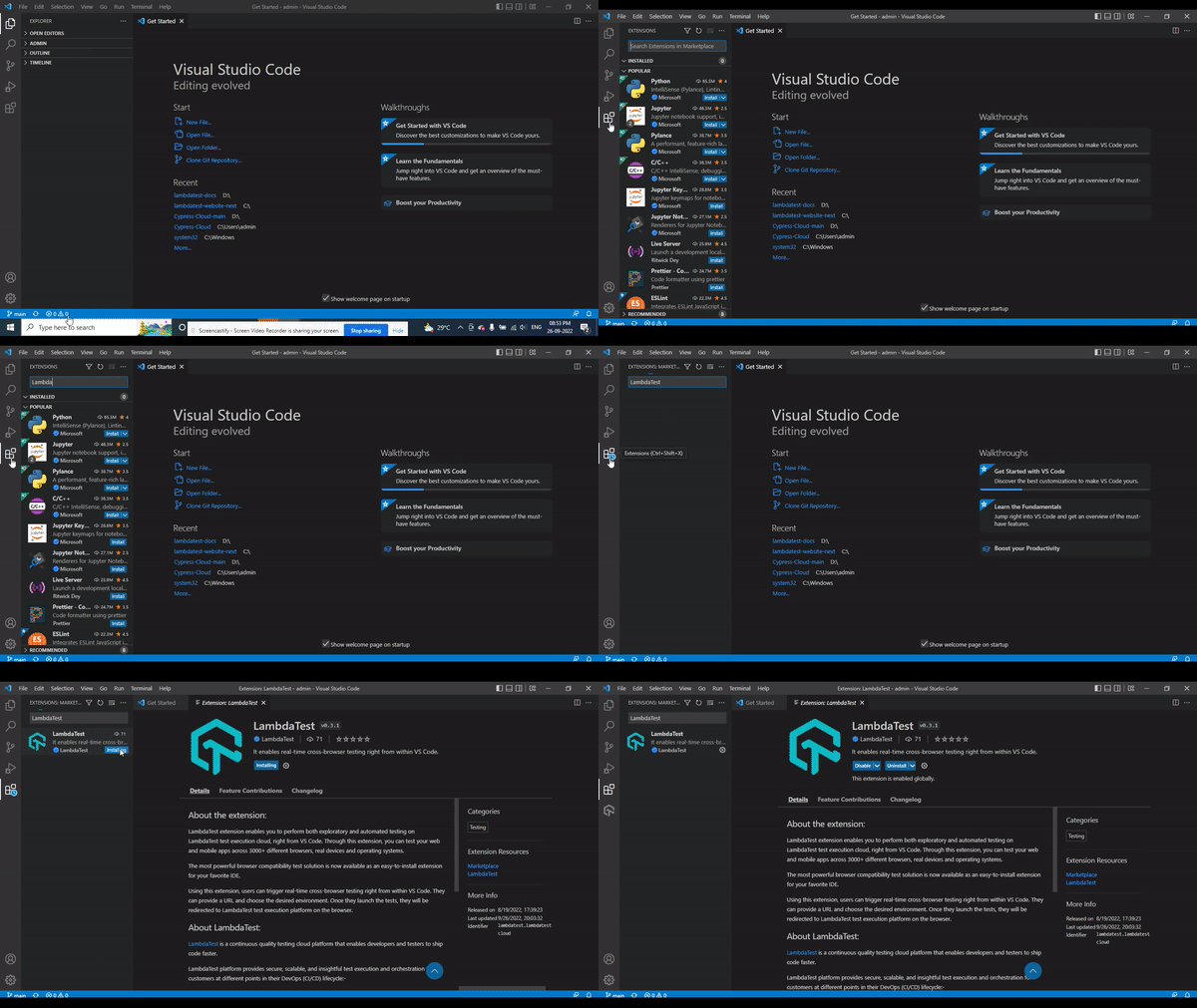
Once you install the extension, it requires a couple of configuration steps, like entering your TestMu AI e-mail and an access key.
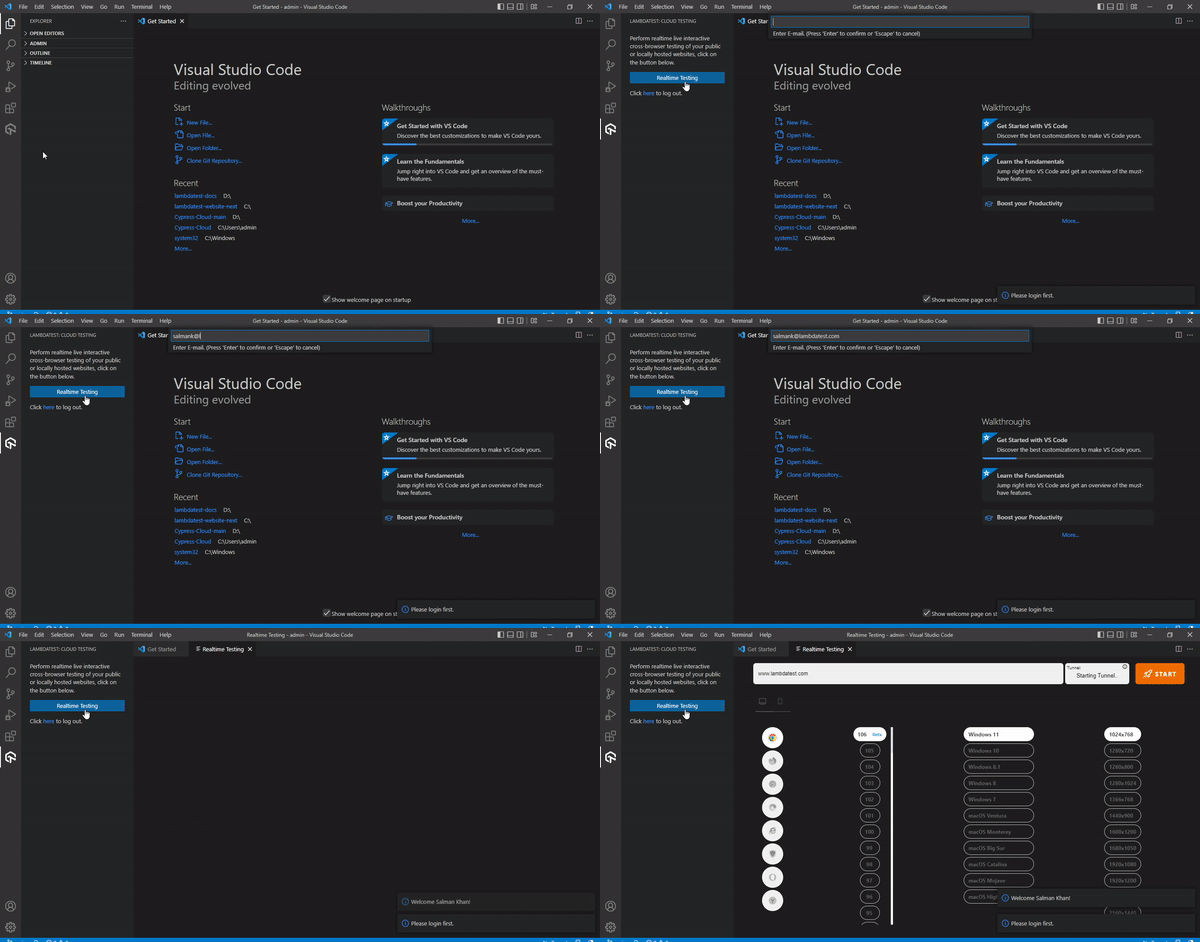
Let’s start Cross browser testing.
To start testing, select the different browser and OS combinations like browser, browser versions, and operating system, and hit the START button. A cloud-based virtual machine will fire up where you can perform cross browser testing of your public and locally-hosted web applications.
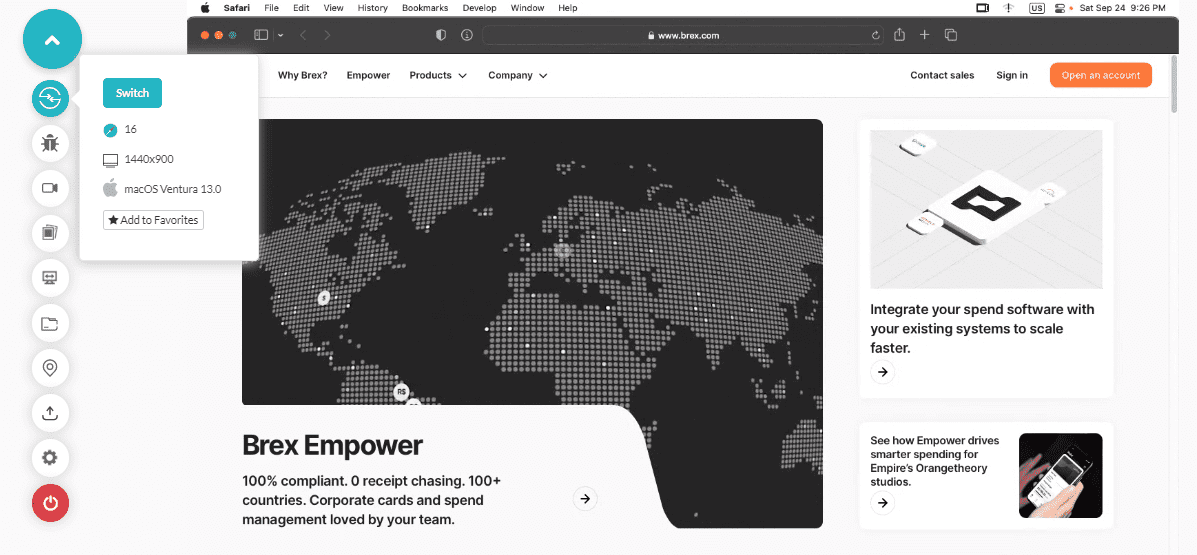
Ready to test?
At TestMu AI, we are dedicatedly working to sprucing up your testing workflow. We hope the new TestMu AI VS Code Extension will escalate your productivity. Liked the new extension and want to share feedback? Drop them on the TestMu AI Community.
For further updates and announcements around our product offerings, visit TestMu AI Changelog.
Happy Testing!


Did you find this page helpful?
More Related Hubs
TestMu AI forEnterprise
Get access to solutions built on Enterprise
grade security, privacy, & compliance
- Advanced access controls
- Advanced data retention rules
- Advanced Local Testing
- Premium Support options
- Early access to beta features
- Private Slack Channel
- Unlimited Manual Accessibility DevTools Tests