

Next-Gen App & Browser Testing Cloud
Trusted by 2 Mn+ QAs & Devs to accelerate their release cycles


Selenium WebDriver Architecture Explained
Discover the inner workings of Selenium Architecture: Learn about Selenium 3 and Selenium 4 and how they revolutionize automated testing. Perfect your understanding today!

Tanay Kumar Deo
March 25, 2026
When it comes to automation testing for web apps, a few frameworks in the market, like Selenium, Puppeteer, Cypress, Playwright, etc., make it to the ‘favored list’ of top automation frameworks. The choice of test automation framework counts on a range of parameters like language support, complexity, and scale, along with the framework expertise available within the testing team. However, it’s no wonder Selenium is still the most preferred framework among automation testers and developers.
Testing the web app against all odds is challenging, and we need a tool to help us in this process. One such primarily used tool by automation testers and developers is Selenium WebDriver. If you wish to know about Selenium Architecture internally, you have landed at the ideal place.
In this blog on Selenium Architecture, I will go into detail regarding Selenium Architecture and Selenium WebDriver; we will look at the functioning of Selenium WebDriver, its advantages, and limitations. If you are preparing for an interview you can learn more through Selenium interview questions.
Overview
What Is Selenium?
Selenium is an open-source automation testing framework for web applications that supports multiple browsers and platforms. It allows testers and developers to write automation scripts in languages like Java, Python, C#, Ruby, and JavaScript.
What Are the Components of Selenium?
The Selenium framework comprises four main components that work together to enable comprehensive test automation.
- Selenium IDE: A browser plugin that allows testers to record and playback test scripts without programming knowledge.
- Selenium WebDriver: The core component that acts as a bridge between test scripts and browsers, enabling browser-based automation.
- Selenium RC: Now obsolete and merged with WebDriver to form Selenium 2.
- Selenium Grid: Enables parallel test execution across multiple browsers, devices, and operating systems simultaneously.
What Is the Difference Between JSON Wire Protocol and W3C Protocol?
The two protocols differ in how they handle communication between test scripts and browsers.
- JSON Wire Protocol: Converts test commands into HTTP requests before communicating with the browser driver. This encoding/decoding process can slow execution and cause flakiness.
- W3C Protocol: Enables direct communication between test scripts and browser drivers. It offers faster execution, better stability, and consistent behavior across browsers.
What Are the Advantages of W3C Protocol in Selenium 4?
The W3C Protocol brings several improvements over the older JSON Wire approach.
- Cross-Browser Consistency: Both browsers and WebDriver use the same protocol, ensuring stable test execution.
- Improved Stability: Tests are less flaky and more reliable, reducing false failures.
- Richer Actions API: Supports multi-touch actions, zoom, simultaneous key presses, and advanced interactions.
- Reduced Maintenance: W3C compliance produces cleaner code with enhanced readability and easier upkeep.
What is Selenium?
Selenium is an automation testing framework that automates the testing of web applications on different browsers. Selenium empowers testers and developers to write automation test scripts effortlessly in multiple programming languages, like Java, Ruby, NodeJS, Python, C#, PHP, Perl, and many more.
Selenium supports cross browser testing on almost all popular web browsers, such as Google Chrome, Apple’s Safari, Mozilla Firefox, Microsoft Edge, Opera, etc., wherein the Selenium test scripts, written in different programming languages, can run smoothly. It also supports cross platform testing, i.e., the test cases can run simultaneously across multiple supported operating systems. The platforms supported by Selenium include Windows, Linux, Mac OS, and Solaris. Selenium is one of the top automation testing tools as it allows developers and automation testers to create flexible and robust automation test cases.

What are the Components of Selenium?
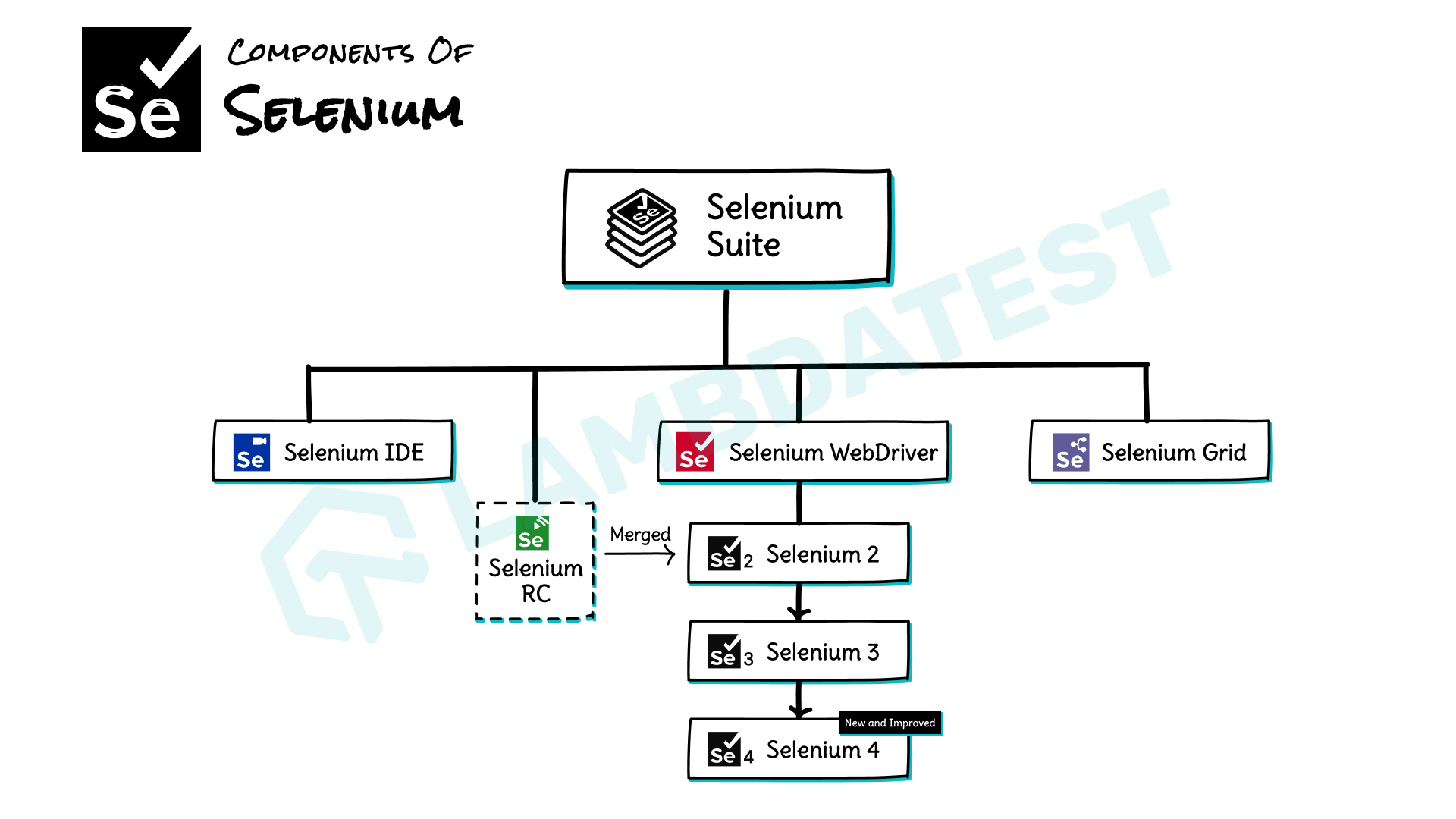
As we already know, Selenium is not just a test automation framework. It is a suite of testing tools, and every tool in the suite has unique capabilities that help in the development and designing of automation frameworks. All these components can be used individually or can be paired with one another to achieve a greater deal. The Selenium framework mainly comprises four components as listed below:
- Selenium IDE
- Selenium WebDriver
- Selenium RC(Obsolete now and merged with WebDriver)
- Selenium Grid
By Sathwik Prabhu
Now let us comprehend each of these components one by one briefly:
Selenium IDE
Selenium IDE refers to Selenium Integrated Development Environment. It is a Firefox plugin that allows testers and developers to record and playback test scripts. It does not require any prior programming understanding. Usually, the Selenium IDE is a prototyping tool.
Selenium WebDriver
Selenium WebDriver is one of the most important components of the entire Selenium framework that supports overall browser-based automation tests. WebDriver is the remote control interface component that allows test programs to instruct and interact with browsers, manipulate DOM elements in a web page, and control the user agent’s behavior. In a nutshell, it is the bridge between the Selenium framework and the browser over which the test cases run.
After Selenium 1, Selenium RC was merged with the Selenium WebDriver and formed Selenium 2. This was later upgraded to Selenium 3 and further to Selenium 4. We will learn about these in detail in the upcoming sections.
Selenium Grid
This component of the Selenium suite is used to run parallel tests on machines against multiple supported browsers. Since almost all modern browsers and operating systems are supported by Selenium, it is easier for the Selenium Grid to run numerous tests simultaneously on different operating systems with different browsers.

Note: Run your Selenium test scripts on TestMu AI’s Cloud Grid. Try TestMu AI Today!
Selenium Architecture

By Sathwik Prabhu
In this blog on Selenium Architecture so far, we have covered the basics of Selenium and its various components. Now, let’s try to understand the Architecture of Selenium WebDriver in a detailed manner.
As mentioned earlier, Selenium WebDriver and Selenium RC were merged into one single unit called Selenium 2 or Selenium WebDriver 2.0. Over time it has been constantly enhanced for more functionalities and features and was upgraded to Selenium 3. In Selenium 3, the primary mode of communication between the automation test script and web browser was the JSON Wire protocol.
With the introduction of Selenium 4, the JSON Wire protocol is replaced with the W3C protocol as the mode of communication. This means that encoding and decoding of test case requests are no longer required in Selenium 4. We will learn about these protocols in a detailed fashion in the upcoming sections. So, Let’s start with the Selenium Architecture of WebDriver in Selenium 3 and then look at the Selenium Architecture of WebDriver in Selenium 4.

Selenium Architecture of WebDriver in Selenium 3
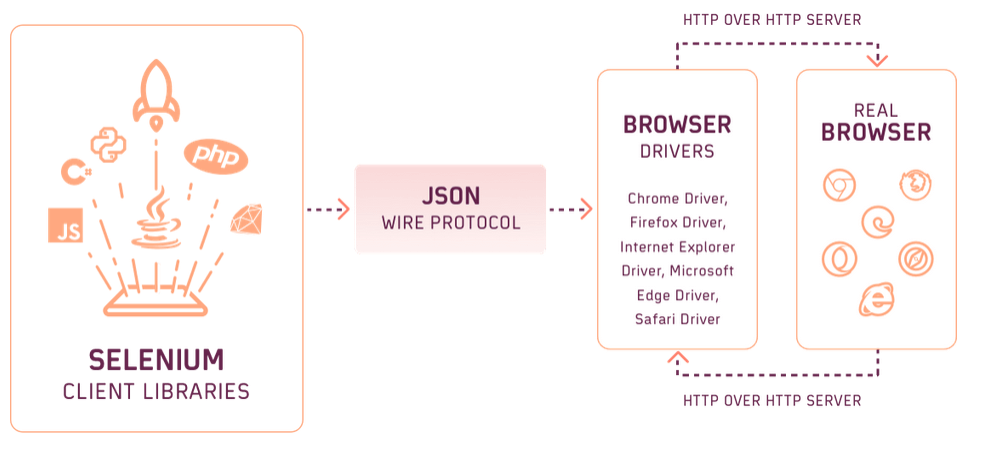
Selenium 3 primarily uses the JSON Wire protocol to communicate between the user test script and the browser. This wire protocol represents a RESTful web service using JSON over HTTP. In Selenium 3, the Selenium WebDriver architecture consists of four major components:
- Selenium Client Libraries/ Language Bindings
- JSON Wire Protocol
- Browser Drivers
- Real Browsers
The image below represents the Selenium Architecture of WebDriver in Selenium 3.
Now let us discuss each of these components in Selenium 3 one by one:
Selenium Client Libraries:
Automation scripts that interact with the Selenium framework through Selenium WebDriver, can be programmed in multiple programming languages such as Ruby, Java, C#, Python, Javascript, etc. Hence, Selenium developers have chosen to develop Selenium client libraries or language bindings that permit Selenium to support multiple languages.
A Selenium Client Library is nothing but a different kind of Jar file. It contains methods and classes of Selenium WebDriver that are required to create test automation scripts.
Selenium core libraries can be installed easily using package installers available with the respective languages. Also, all the supported Selenium client libraries can be downloaded from the official download page of Selenium.
A Selenium client library is not a testing framework but it provides an application programming interface (API), i.e., a set of functions that performs the Selenium commands from the test script. For example, Java bindings provide APIs to perform the Selenium commands written in the Java language.
JSON Wire Protocol
JSON or JavaScript Object Notation is a very famous data interchange format based on a subset of the JavaScript Programming Language. Selenium WebDriver 3.0 uses JSON to communicate between Selenium client libraries and browser drivers. It provides support for data structures like arrays and objects, making data reading and writing more comfortable.
The JSON requests sent by the client are altered into HTTP requests for the server to understand and converted back to JSON format while sending it back to the client again. This process of data transfer is serialization. In this method, the internal logic of the browser is not disclosed, and the server can communicate with the Selenium client libraries, even if it is unfamiliar with any programming language.
Browser Drivers
Browser drivers act as a bridge between the Selenium client libraries and the real browsers, translating test script commands into actions like mouse clicks, page navigation, button clicks, etc the browser can execute. Each supported browser has its own dedicated driver. These browser drivers take commands from the Selenium test scripts and pass them to the respective browsers.
Whenever a Selenium automation test is triggered, the following series of actions are performed:
- Every test command generates a corresponding HTTP request using the JSON Wire Protocol, which is then sent to the browser driver.
- This HTTP request is routed through the HTTP Server.
- The HTTP Server directly drives the command execution on the real browser.
- The browser then sends back the test status to the HTTP Server, which is responsible for forwarding it to the test automation script.
In this way, these browser drivers permit communication between the Selenium automation script with different browsers. Also, the browser driver ensures that communication happens without disclosing the internal logic of those browsers.
Some popular browser drivers in Selenium are ChromeDriver, FirefoxDriver, SafariDriver, OperaBrowser, EdgeDriver, and HtmlUnitDriver.
Real Browsers
A real browser is an application or a software program used for searching and seeing content on the World Wide Web (WWW). This component of the Selenium Webdriver architecture in Selenium 3 is pretty straightforward. The browser receives the command and calls the respective functions or methods to perform the desired automation task.
Selenium framework supports almost all popular and modern-age browsers like Google Chrome, Mozilla Firefox, Microsoft Edge, Apple’s Safari, etc.
Selenium Architecture of WebDriver in Selenium 4
In Selenium 3, the JSON Wire Protocol acted as an intermediary between the client libraries and the browser driver, converting commands into HTTP requests the server could understand. This encoding and decoding process slowed test execution and made tests more prone to flakiness and exceptions.
This problem was solved with the introduction of W3C (World Wide Web Consortium) in Selenium WebDriver 4, where WebDriver W3C Protocol supersedes the older JSON Wire protocol, eliminating the encoding and decoding step entirely. Test scripts now communicate directly with the browser driver without going through HTTP request and response cycles, making execution faster and more reliable.
The image below represents the Selenium Architecture of WebDriver in Selenium 4 onwards.
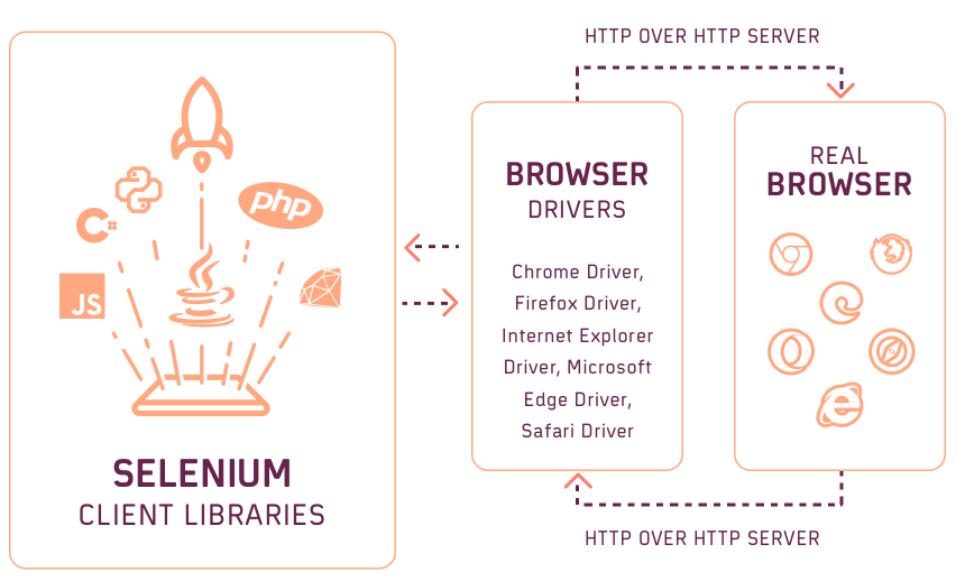
In Selenium 4, the Selenium WebDriver architecture consists of the following four major components:
- Selenium Client Libraries/ Language Bindings
- WebDriver W3C Protocol
- Browser Drivers
- Real Browsers
Basically, all the components in Selenium WebDriver 4 are similar to the components in Selenium 3 except that the JSON Wire protocol is replaced with the new W3C WebDriver protocol. So, let’s discuss this protocol in detail.
Difference Between JSON Wire Protocol and WebDriver W3C Protocol
Till now we have clearly understood the Selenium Architecture in Selenium 3 and Selenium 4. This section will discuss the primary differences between the JSON Wire protocol used in Selenium 3 and the WEbDriver W3C protocol used in Selenium 4.
| JSON Wire Protocol | WebDriver W3C Protocol | |
|---|---|---|
| Retirement | Permanently retired in Selenium 4. | Active and current protocol. |
| Role | This was mainly responsible for communication in Selenium WebDriver Architecture 3 | Current protocol responsible for communication in Selenium WebDriver Architecture 4 |
| Test Script Compatibility | JSON Wire protocol first converts the test commands into HTTP protocol and then communicates with the server to execute test actions. | With WebDriver W3C protocol test scripts can directly command the browser driver to execute test actions. |
| Test Execution Time | Because of the encoding and decoding of the commands in JSON, the test execution sometimes becomes very slow. | Test Execution is faster because of the direct interaction of test scripts with the browser driver. |
| Element Interactions | Element interactions have different implementations | Updated implementation using Actions API |
Other than these differences, the WebDriver W3C protocol also introduced some changes in error codes, data structures, and response status codes. More detail on these changes can be found on the official Selenium Changelog page.
How Selenium WebDriver Works Internally?
In a real-time scenario, when we run a Selenium script written in any language using any one of the supported Selenium client libraries (say Java), the browser will launch and starts behaving as directed by the script. Now let’s understand what is occurring internally after the Run button is clicked till the launch of the real browser.
- As we click on the Run button, the Selenium client library runs Selenium commands from the automation script and converts them in a serialized JSON format (for example https://www.lambdatest.com will be serialized to {“url”: “https://www.lambdatest.com”} )using JSON Wire protocol over HTTP sent to the browser driver (say ChromeDriver) for each command. Every browser driver uses the HTTP server to receive an HTTP request.
- JSON Wire Protocol is responsible for communicating between any client and the server by sharing the data. The browser driver receives the HTTP request via the HTTP Server. This HTTP Server performs all the typical actions or instructions on the browser driver and then the browser driver will send a request to load the URL on the real browser.
- After performing all instructions and commands, the execution status is sent back to HTTP Server over the HTTP. The browser driver furthermore uses the HTTP server to receive the HTTP request and then send it back to the client library via the JSON Wire Protocol.
In Selenium 4, the role of JSON Wire protocol is completely removed. And the browser driver directly communicates with the Selenium client libraries to execute various Selenium commands on the real browser.

Advantages of Selenium WebDriver W3C Protocol in Selenium 4
The introduction of WebDriver W3C protocol in Selenium 4 offers several advantages that include the following points:
- The automated Selenium testing will run more stably and consistently across browsers as both the browsers and Selenium WebDriver is using the same protocol.
- With WebDriver W3C Protocol, automated Selenium testing will be less unreliable and more stable. Stability in automation testing is a major reason to shift to Selenium 4.
- The new WebDriver W3C protocol uses the Actions API, which is richer in comparison to the one in JSON Wire Protocol, to interact with the browser. Action APIs would now let us perform multi-touch actions, zoom-out, zoom-in, pressing two or more keys simultaneously, and many more.
- For example, the Pinch-in sequence in W3C Protocol is defined by an action sequence consisting of three ticks with two-pointer devices of type-touch, each performing a series of actions pointerDown, followed by the pointerMove, and then pointerUp.
- Standardization of W3C unlocks the opportunities for promoting compatibility beyond WebDriver API implementations.
- Web applications with W3C compliance help in reducing maintenance efforts, as cleaner code results in enhanced readability.
Key Takeaways
- Selenium WebDriver is the core of the Selenium suite. Selenium IDE, Selenium Grid, and the now-deprecated Selenium RC are the supporting components.
- WebDriver architecture in Selenium 3 has four layers: client libraries, JSON Wire Protocol, browser drivers, and real browsers. The browser driver handles all communication between the test script and the browser.
- Selenium 4 replaced the JSON Wire Protocol with the W3C WebDriver protocol, enabling direct communication between test scripts and browser drivers — resulting in faster, more stable, and consistent cross-browser test execution.
- Each browser requires its own dedicated driver. ChromeDriver, GeckoDriver, SafariDriver, and EdgeDriver are the most commonly used.
- Running Selenium tests on local infrastructure limits scalability and increases maintenance overhead. Pairing Selenium with a cloud grid gives you parallel execution across thousands of browser and device combinations without managing any infrastructure. Learn how in the Cross Browser Testing in Selenium tutorial.


Frequently asked questions
Did you find this page helpful?
More Related Hubs
TestMu AI forEnterprise
Get access to solutions built on Enterprise
grade security, privacy, & compliance
- Advanced access controls
- Advanced data retention rules
- Advanced Local Testing
- Premium Support options
- Early access to beta features
- Private Slack Channel
- Unlimited Manual Accessibility DevTools Tests