

Next-Gen App & Browser Testing Cloud
Trusted by 2 Mn+ QAs & Devs to accelerate their release cycles


- TestMu AI (Formerly LambdaTest)
- /
- Blog
- /
- Real Estate Web Scraping: Extracting Listing Data That Actually Renders
Real Estate Web Scraping: Extracting Listing Data That Actually Renders
A vertical-specific engineering guide to scraping property listings: rendering JS-heavy portals, handling map-bound pagination and lazy galleries, deduping syndicated data, and respecting MLS terms.

Ini Arthur
Author

Sri Harsha
Reviewer
Last Updated on: July 6, 2026
You point a scraper at a listing portal, request the search page, parse the HTML, and get back almost nothing. No prices, no photos, no beds or baths. The listings you can see in your own browser are simply not in the response your code received.
That is the real estate scraping problem in one paragraph. Property portals are among the most JavaScript-heavy sites on the web: single-page apps that hydrate results client-side, galleries that lazy-load one photo at a time, results bound to a map viewport instead of page numbers, and the same home syndicated across a dozen sites. This guide is a vertical-specific walkthrough of each of those, with a real cloud browser run and the licensing constraints that make real estate different from generic scraping.
Overview
What Is Real Estate Web Scraping?
Automated extraction of property listing fields (price, beds, baths, square footage, address, photos, and status) from portals and brokerage sites. Because listings hydrate client-side, it needs a real browser rather than a plain HTTP request.
Which Real-Estate-Specific Problems Does It Add?
- Lazy-loaded galleries: a detail page ships one hero image and loads the rest only on interaction.
- Map-bound pagination: results come by geographic bounding box, not page number, so tile the region into a grid.
- Syndication: the same home appears on many portals, so dedupe on the MLS number or a normalized address. TestMu AI Browser Cloud renders these JavaScript-heavy portals on real cloud Chrome sessions.
Where Is the Licensing Line?
MLS-sourced data is governed by licensing agreements that REALTOR associations and MLSs enforce, so scraping a display site is not the same as being licensed. Where data is MLS-sourced, obtain it through a licensed feed and read each portal's terms of use first.
Why Real Estate Portals Break Naive Scrapers
A plain HTTP request to a modern listing portal returns a shell of HTML and a bundle of JavaScript. The browser then executes that JavaScript, calls the portal's search API, and paints the results. Your fetch or requests call stops at the shell, so the listing data never appears in what you parsed.
This is the same wall that other dynamic sites hit, and the underlying fix is the same one covered in the guide to scraping dynamic web pages: run a real browser so the app hydrates. Real estate simply stacks several of these hard cases on top of each other.
- Client-side rendered results: The search grid, prices, and status badges are assembled in the browser after an XHR or fetch to an internal API, so they are absent from the initial HTML.
- Lazy-loaded galleries: A listing detail page ships one hero image; the remaining 20 to 40 photos load only when the carousel opens or the user scrolls.
- Map-bound results: Results are tied to a geographic bounding box the map is showing, not to a sequential page index, so page=2 may not exist at all.
- Syndication and duplication: The same property appears on the MLS, the brokerage site, and multiple aggregators, each with slightly different field values.
- Anti-bot defenses: High-value portals apply rate limits, fingerprinting, and challenge pages that break unattended runs.
The takeaway for this section: treat a listing portal as an application to drive, not a document to download. Everything below assumes a real, rendering browser is doing the work. The Browser Cloud platform from TestMu AI provisions real, full-featured Chrome sessions on demand for exactly this class of JavaScript-heavy target.
The Listing Fields That Actually Matter
Before writing a single selector, decide which fields you need and how volatile each one is. Real estate data has a wide freshness spread: some fields change hourly, others never change. That spread should drive both your schema and your refresh cadence.
| Field group | Examples | Volatility |
|---|---|---|
| Price and status | List price, price cuts, active / pending / sold | High - can change intraday |
| Core attributes | Beds, baths, square footage, lot size, year built | Low - rarely changes after listing |
| Location | Address, latitude, longitude, parcel or MLS number | Static once resolved |
| Media | Photo gallery URLs, floor plans, virtual tours | Medium - photos get added or reordered |
| Agent and source | Listing agent, brokerage, source portal, syndication date | Medium - source-dependent |
One field deserves special attention: the MLS number. Where a portal exposes it, it is the single most reliable identity key for a property, which makes deduplication across portals far easier. The RESO Data Dictionary describes MLS data as the real estate industry's shared vocabulary, and standardized fields are exactly what let you join records that came from different sites. More on that in the dedup section.
Practical takeaway: split your schema into a slow-changing core record and a fast-changing status record. You then re-crawl status frequently and core attributes rarely, which cuts request volume without letting price and availability go stale.
Rendering Listings and Lazy Galleries
Getting the listing grid to render is step one; getting the full photo set is step two, and it is where most scrapers quietly drop data. A gallery that shows 30 photos to a human often ships one image URL in the initial DOM.
In a real browser you can wait for the results, open the gallery, and let the lazy loads resolve before reading image URLs. The pattern below uses Playwright against the Ecommerce Playground, a public listing-style grid that stands in for a portal you are authorized to test, since it has the same card-grid-plus-detail shape.
// Drive a real browser: wait for the grid, then trigger lazy media.
// Illustrative shape - confirm the SDK surface against the Browser Cloud docs.
const { Browser } = require('@testmuai/browser-cloud');

async function extractListings(page) {
  await page.goto(
    'https://ecommerce-playground.lambdatest.io/index.php?route=product/category&path=57',
    { waitUntil: 'networkidle' }
  );

  // Wait for client-side rendered cards, not the empty shell.
  await page.waitForSelector('.product-layout');

  // Scroll to force lazy-loaded images to resolve before reading them.
  await page.evaluate(async () => {
    for (let y = 0; y < document.body.scrollHeight; y += 600) {
      window.scrollTo(0, y);
      await new Promise(r => setTimeout(r, 250));
    }
  });

  return page.$$eval('.product-layout', cards => cards.map(c => ({
    title: c.querySelector('.title, h4')?.innerText?.trim() || null,
    price: c.querySelector('.price')?.innerText?.trim() || null,
    detailUrl: c.querySelector('a')?.href || null,
    image: c.querySelector('img')?.getAttribute('src') || null,
  })));
}- Wait on content, not time: Wait for the results selector to exist rather than sleeping a fixed number of seconds, which is both faster and less flaky.
- Trigger lazy media deliberately: Scroll the page or open the carousel so image and floor-plan requests fire, then read the resolved URLs.
- Read the network, not just the DOM: When the app calls a JSON search endpoint, capturing that response is cleaner than parsing rendered cards.
For a deeper Playwright foundation - selectors, waits, and headless configuration - the hub guide to Playwright for web scraping covers the mechanics this section assumes. This article focuses on the real-estate-specific layer on top of it.

Note: Listing portals are exactly the JavaScript-heavy, real-browser workload Browser Cloud is built for: real Chrome, parallel sessions, and automatic session recording. Start free with TestMu AI
Handling Map-Bound Pagination
Classic scrapers assume pages are numbered: page 1, page 2, page 3. Many real estate portals do not work that way. The map drives the results, so what the API actually returns is every listing inside the current bounding box, capped at some maximum count.
That cap is the trap. If a dense metro area holds far more listings than the API will return in a single query, incrementing a page number just re-requests the same truncated set. The fix is spatial: cover the region with a grid of smaller boxes so no single box exceeds the cap.
// Cover a region with bounding boxes so no box exceeds the result cap.
function tileRegion(bounds, cols, rows) {
  const { minLat, minLng, maxLat, maxLng } = bounds;
  const latStep = (maxLat - minLat) / rows;
  const lngStep = (maxLng - minLng) / cols;
  const tiles = [];
  for (let r = 0; r < rows; r++) {
    for (let c = 0; c < cols; c++) {
      tiles.push({
        minLat: minLat + r * latStep,
        maxLat: minLat + (r + 1) * latStep,
        minLng: minLng + c * lngStep,
        maxLng: minLng + (c + 1) * lngStep,
      });
    }
  }
  return tiles;
}

// If a tile still hits the cap, subdivide it further and retry.
async function crawlTile(tile, fetchBox, cap, seen) {
  const results = await fetchBox(tile);
  if (results.length >= cap) {
    for (const sub of tileRegion(tile, 2, 2)) {
      await crawlTile(sub, fetchBox, cap, seen);
    }
    return;
  }
  for (const r of results) seen.set(r.listingKey, r); // dedupe overlaps
}- Detect the cap first: Query one wide box and check whether the returned count equals a suspiciously round number. That number is your per-query ceiling.
- Subdivide adaptively: Only split boxes that hit the cap. Rural areas stay as one box; dense downtowns recurse into a fine grid.
- Dedupe on merge: Adjacent boxes overlap at their edges, so key every result by a stable listing identifier as you collect it.
Takeaway: think in geography, not page numbers. A quadtree over the map, driven by the same search endpoint the portal already calls, is how you get complete coverage of a dense market without tripping the result cap.
Deduping Syndicated Listings Across Portals
Syndication means one physical home shows up on the MLS display, the listing brokerage's own site, and several aggregators, each with its own formatting and sometimes conflicting values. If you store each occurrence as a separate record, your dataset inflates and your counts lie. Deduplication is not optional in real estate; it is core to the pipeline.
The RESO Data Dictionary exists precisely because thousands of REALTOR associations and MLSs adopted systems that could not talk to each other, per the Real Estate Standards Organization. Where standardized fields like the MLS number are exposed, deduping is trivial. Where they are not, you match on identity.
- Prefer the MLS number: When present, it is the strongest join key across portals. Two records with the same MLS number are the same listing.
- Normalize the address: Uppercase, expand abbreviations (St to Street), strip unit punctuation, and compare the canonical form rather than the raw string.
- Round the coordinates: Latitude and longitude rounded to about five decimals cluster records at the same point even when addresses format differently.
- Compare within tolerance: Match price and square footage within a small band, since portals round and update on different schedules.
- Keep the freshest, richest record: On a match, retain the entry with the most recent status and the most complete field set, and log the sources you merged.
This same identity-matching discipline shows up in adjacent verticals. The approach to consolidating records in scraping local business listings and in price scraping at scale uses the same normalize-then-match pattern, tuned to different fields.

A Real Cloud Browser Run
To show the render gap concretely, here is an actual run against a listing-style grid on the Ecommerce Playground using the TestMu AI Browser Cloud SDK. A plain HTTP fetch of this page returns a near-empty shell; the cloud browser executed the JavaScript, hydrated the grid, and returned rendered content with real prices and titles.
const { Browser } = require('@testmuai/browser-cloud');

const client = new Browser();
const data = await client.scrape({
  url: 'https://ecommerce-playground.lambdatest.io/index.php?route=product/category&path=57',
  format: 'text',
  lambdatestOptions: {
    'LT:Options': {
      username: 'YOUR_USERNAME',
      accessKey: 'YOUR_ACCESS_KEY',
    },
  },
});
// data now contains the RENDERED listing text, not the empty HTML shell.
The actual console output from that run, executed while writing this article:
[run] scraping listing grid at https://ecommerce-playground.lambdatest.io/index.php?route=product/category&path=57
[run] rendered DOM captured in 7.7s
[run] characters returned: 2157
[run] price tokens found in rendered output: 17
[run] sample prices: $146.00  $337.99  $134.00  $98.00  $194.00
[run] sample listing titles: Apple | Canon | HTC | Nikon
Seventeen price tokens and named listings came back from a page that returns almost nothing to a raw request. Below is the actual rendered listing grid captured from the same cloud session, the visual proof that the browser painted what a static parse would miss.
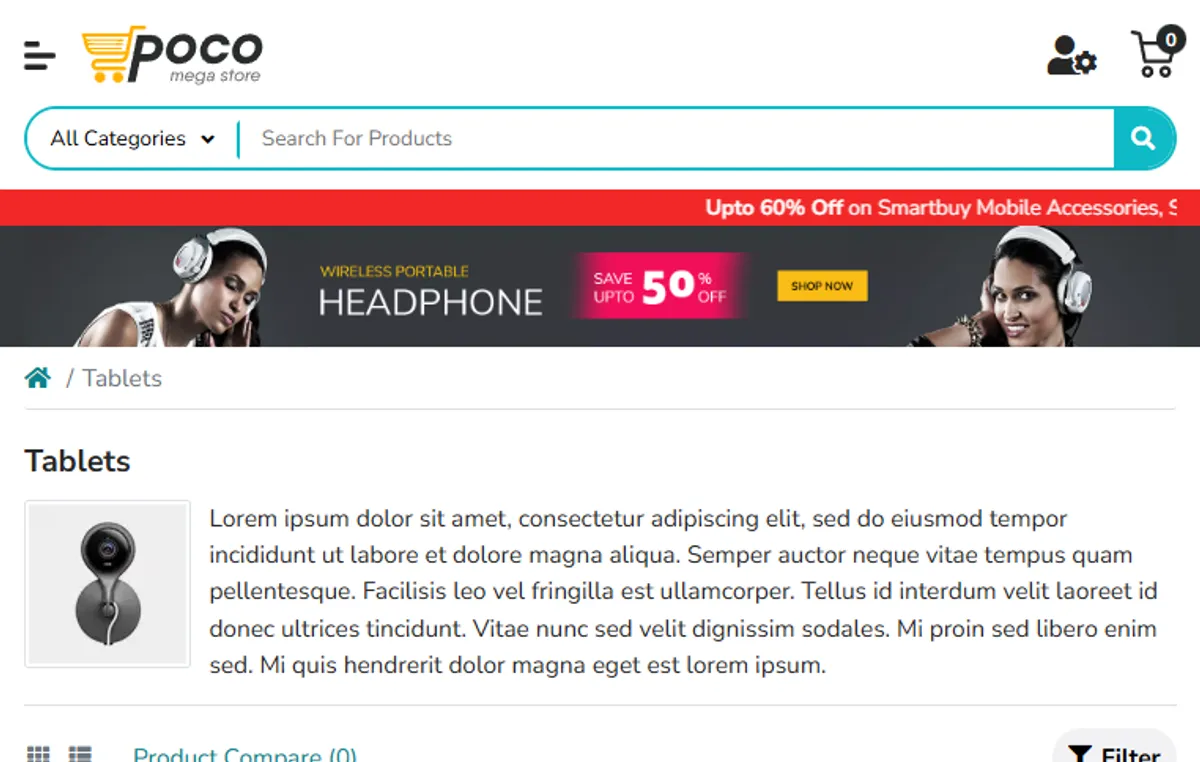
Because every Browser Cloud session automatically records video, console logs, and network logs, a run that misses a price cut or a moved gallery is debuggable from the captured evidence rather than a re-run guess. That session transparency is what turns a flaky portal scraper into one you can actually maintain, and the Browser Cloud documentation covers the session lifecycle in full.
For teams that prefer the terminal, TestMu AI also ships Kane CLI, a deterministic browser agent that takes natural-language objectives and returns structured, machine-parseable results. Instead of maintaining selectors that break when a portal reskins its cards, you write an objective such as store the first listing price as 'price', and it drives a real Chrome session and extracts the value into a field your pipeline reads.

MLS Licensing, Terms of Use, and Ethics
Real estate is the vertical where the legal layer is not a footnote. Much listing data originates from a Multiple Listing Service, and that data is governed by licensing agreements that REALTOR associations and MLSs enforce, so scraping a display site is not the same as being licensed to use the data behind it.
- Read the target's terms of use: Many portals explicitly restrict automated collection. The terms, not your scraper's cleverness, define what is permitted.
- Separate facts from copyrighted media: Objective attributes such as beds and square footage differ legally from photos and marketing descriptions, which are typically copyrighted.
- Prefer a licensed feed for MLS data: Where the underlying data is MLS-sourced, obtaining it through a licensed data feed is the compliant path, not scraping a consumer display site.
- Respect robots and rate limits: Honor robots directives and keep request rates modest, both to stay compliant and to avoid degrading the source site.
The Real Estate Standards Organization frames standardized listing data as the industry's shared language, which is also why licensed feeds built on those standards are the reliable, sanctioned way to consume MLS data at scale. Treat licensing as a design input, not an afterthought: decide up front which fields you may legally use and which sources you may draw from, and build the pipeline around that boundary.
Getting Started
Start with one market and one portal you are authorized to scrape, and get a single rendered listing end to end before scaling. That first loop - render the grid, open a gallery, extract a clean record - surfaces every hard case this guide covers in miniature.
- Confirm you are allowed: Read the portal's terms of use and, for MLS-sourced data, plan for a licensed feed before writing code.
- Render, do not fetch: Install the SDK with npm install @testmuai/browser-cloud and drive a real Chrome session so the app hydrates.
- Model volatility: Split the schema into slow core attributes and fast status fields, and set refresh cadence per field.
- Tile the map: Cover dense regions with an adaptive bounding-box grid instead of numbered pages.
- Dedupe early: Key every record by MLS number or normalized address so syndicated copies collapse into one.
When the single-listing loop is solid, scale it on real Chrome without operating a browser fleet yourself on TestMu AI Browser Cloud, following its getting-started documentation. Render the page, capture the network, dedupe on identity, and stay inside the terms - that is a real estate scraper that survives contact with production. For the related dynamic-content and JavaScript techniques, the JavaScript and Selenium scraping guide is a useful companion.
Author
Ini Arthur
Blogs: 5


Iniubong Arthur is a Software Engineer and Technical Writer with 5+ years of experience in software engineering, web development, and content creation. Skilled in Django, Flutter, and React, he focuses on building practical solutions that address real-world problems. He has served as Editor-in-Chief at NaijaMusicDotComDotNG, Freelance Technical Writer at SitePoint, and Software Engineer at Semicolon, and developed content for Jaguda.com. Proficient in JavaScript, Python, SQL, Java, and Dart, he blends technical expertise with strong documentation skills.
Reviewer
Sri Harsha
Reviewer
Sri Harsha is Engineering Manager of the Open Source Program Office at TestMu AI (formerly LambdaTest), where he leads open-source engineering behind the Selenium and Appium automation grid and builds agentic AI systems for quality engineering. He is a member of the Selenium Technical Leadership Committee and a committer to WebdriverIO and Appium, and was recognized with the LambdaTest Delta Award 2023 for Best Contributor in open-source testing. He brings over 10 years of experience in software testing and automation, with earlier roles at EPAM Systems and ZenQ. Sri Harsha holds a B.Tech in Computer Science from Jawaharlal Nehru Technological University.




Real Estate Web Scraping FAQs
Did you find this page helpful?
More Related Blogs
TestMu AI forEnterprise
Get access to solutions built on Enterprise
grade security, privacy, & compliance
- Advanced access controls
- Advanced data retention rules
- Advanced Local Testing
- Premium Support options
- Early access to beta features
- Private Slack Channel
- Unlimited Manual Accessibility DevTools Tests