

Next-Gen App & Browser Testing Cloud
Trusted by 2 Mn+ QAs & Devs to accelerate their release cycles


Scaling End-To-End Web Testing With Grafana k6 And TestMu AI
TestMu AI now allows you to perform k6 browser testing on multiple real browser and operating system combinations. Read more!

Salman Khan
January 29, 2026
Howdy techies! With our continuous efforts to empower the QA community, we are thrilled to announce the support for Grafana k6 Browser, an open-source tool for browser automation and end-to-end web testing, on the TestMu AI automation testing cloud.
Yes, you read that right! On TestMu AI, you can now accelerate web automation testing by leveraging immense k6 core capabilities to perform k6 browser testing at scale across different browsers and OS combinations.
Dive in to see what k6 browser testing on TestMu AI can do for you.
Overview of k6
Developed by Grafana Labs and its community, Grafana k6 is an open-source tool to perform load testing. It streamlines and helps engineering teams in their performance testing efforts. k6 is a flexible solution that is developer-focused, allowing you to test the reliability and efficiency of your software applications quickly.

Besides enabling teams to identify performance bottlenecks and regression bugs at an earlier stage of the Software Development Life Cycle, k6 lets developers build scalable, high-performing websites and applications. k6 comes with several features, including:
- An easy-to-use CLI tool with a developer-friendly API.
- You can write JavaScript ES2015/ES6 scripts with support for local and remote modules.
- The use of Checks and Thresholds can help you achieve goal-oriented, automated-friendly load testing.
Developers and testers mainly use k6 to test the performance and reliability of APIs, microservices, and websites. The following are some of the most common uses of k6:
- Load testing
- Browser testing
- Chaos and resilience testing
- Performance and synthetic monitoring

Note: Test your web apps across 3000+ real browser environments. Try TestMu AI Today!
What is the k6 Browser Module?
With the k6 Browser Module, you can perform browser automation and end-to-end web testing via Chrome DevTools Protocol while leveraging the core k6 features. The k6 Browser module adds a slew of browser-level APIs to interact with browsers and collect metrics about front-end performance while running k6 tests.
k6 Browser Module supports Chromium-based browsers.
A browser module serves the purpose of running performance tests at the browser level. By performing tests at this level, you can evaluate the user experience and identify any issues that might be difficult to detect at the protocol level. Using browser testing to analyze different aspects of your website can provide you with valuable information that can answer questions such as:
- How does the front end of an application behave when it receives a massive chunk of simultaneous requests at the protocol level?
- What are the specific metrics related to browser performance, such as total page load time?
- Are all the front-end elements functioning in an interactive manner as intended?
- Are there any loading spinners that remain visible for an extended period?

Austin Siewert
CEO, Vercel
Discovered @TestMu AI yesterday. Best browser testing tool I've found for my use case. Great pricing model for the limited testing I do 👏
2M+ Devs and QAs rely on TestMu AI
Deliver immersive digital experiences with Next-Generation Mobile Apps and Cross Browser Testing Cloud

How to scale your k6 Browser Testing with TestMu AI?
Even though k6 has a powerful feature set, the true potential of k6 testing can only be tapped by running tests on a scalable and reliable cloud grid. Are you planning to perform cross browser testing with k6 at scale by avoiding endless investments in setting up an in-house testing infrastructure?
TestMu AI offers a cloud-based digital experience testing platform that seamlessly integrates with k6, enabling you to perform web automation and end to end testing on an online browser farm of real browsers, operating systems, and devices. With TestMu AI, you can effortlessly run your k6 tests in parallel, saving cost and resources.
TestMu AI supports k6 browser testing on Chrome and Edge.
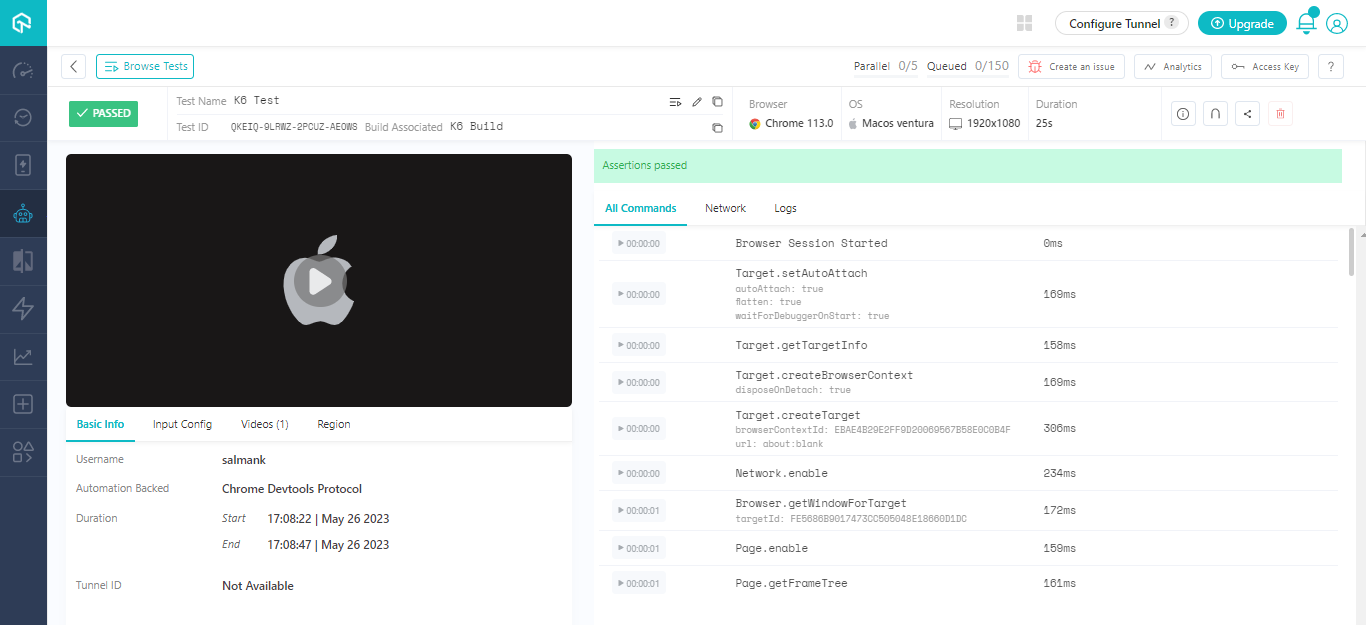
Using TestMu AI for k6 testing, you can capture screenshots, record videos, debug web issues with Command Logs, Network Logs, etc., and collaborate effectively with your team to streamline the testing workflow. Furthermore, TestMu AI seamlessly integrates with popular CI/CD tools, allowing you to effortlessly incorporate k6 tests into your existing pipelines.
By choosing TestMu AI for automation testing with k6, you can focus on delivering high-quality web applications while TestMu AI takes care of your scalable testing needs.
Note: Check out our guide to get started with k6 Browser Testing
Summing up
Performing k6 testing on TestMu AI will empower you to uncover the true potential of your web applications by simulating real user interactions, analyzing performance metrics, and pinpointing bottlenecks, all within a single platform.
Give this new feature a spin and share your feedback on the TestMu AI Community. You can also drop your suggestions or queries at our in-app Chat Support or mail us directly at [email protected].


Did you find this page helpful?
More Related Hubs
TestMu AI forEnterprise
Get access to solutions built on Enterprise
grade security, privacy, & compliance
- Advanced access controls
- Advanced data retention rules
- Advanced Local Testing
- Premium Support options
- Early access to beta features
- Private Slack Channel
- Unlimited Manual Accessibility DevTools Tests