

Next-Gen App & Browser Testing Cloud
Trusted by 2 Mn+ QAs & Devs to accelerate their release cycles


July’25 Updates: TestMu AI AI Test Manager Extension, Playwright SDK, and More!
Explore TestMu AI July ’25 updates with AI Test Manager extension, Playwright SDK, live step editing in KaneAI, Detox iOS testing on HyperExecute, and more.

Salman Khan
March 2, 2026
This release introduces the Playwright Node SDK and enhanced Insights dashboards. KaneAI now supports live step editing, and Test Manager offers better tracking. HyperExecute adds real iOS device testing and Detox support. Plus, TestMu AI now integrates with Zoho Project and ServiceNow for faster, seamless bug tracking and incident management.
Run Web Automated Tests With Playwright SDK
We have released the Playwright Node SDK that allows you to run existing Playwright tests on the TestMu AI cloud grid without requiring any code changes. The TestMu AI Playwright SDK provides you with a configuration-driven approach, allowing test execution to be managed entirely through a lambdatest.yml file.
Features:
- Single-Command Execution: Run complete Playwright test suites on TestMu AI without manual configuration steps.
- No Code Modifications: Existing test scripts remain unchanged, with all settings stored in the lambdatest.yml configuration file.
- Centralized Environment Control: Define and update browser, OS, and resolution combinations from a single configuration file.
- Local Testing: Use the TestMu AI Tunnel to run tests on staging, local, or private environments, with automatic tunnel management by the SDK.
- Detailed Test Reporting: View execution results in the TestMu AI Web Automation dashboard, including video recordings, screenshots, browser console logs, and network logs.

Note: Test your websites and web applications across real desktop and mobile browsers. Try TestMu AI Today!
New Features in TestMu AI Insights
We’ve added new capabilities to TestMu AI Insights to give you deeper visibility into your testing activities. These enhancements help you track performance trends, uncover bottlenecks, and take faster, more informed actions to improve release quality.
Dynamic Data Retention Configuration
Managing large volumes of test data across multiple types can be costly and difficult to handle. Without clear retention rules, organizations risk compliance issues and inefficient storage use.
The new dynamic data retention configuration feature in TestMu AI Insights addresses this by giving organizations precise control over how long different types of data are stored.
Retention periods can now be set in days, months, or years, with automated purging once data reaches its defined limit. Built-in notification alerts ensure that you are aware of upcoming deletions, helping you act before data is removed.
Project Insights Dashboard
C-Suite executives and senior leadership often need a clear, concise view of testing operations across multiple projects. Gathering insights from various dashboards and reports can be time-consuming and make it difficult to monitor progress in real time.
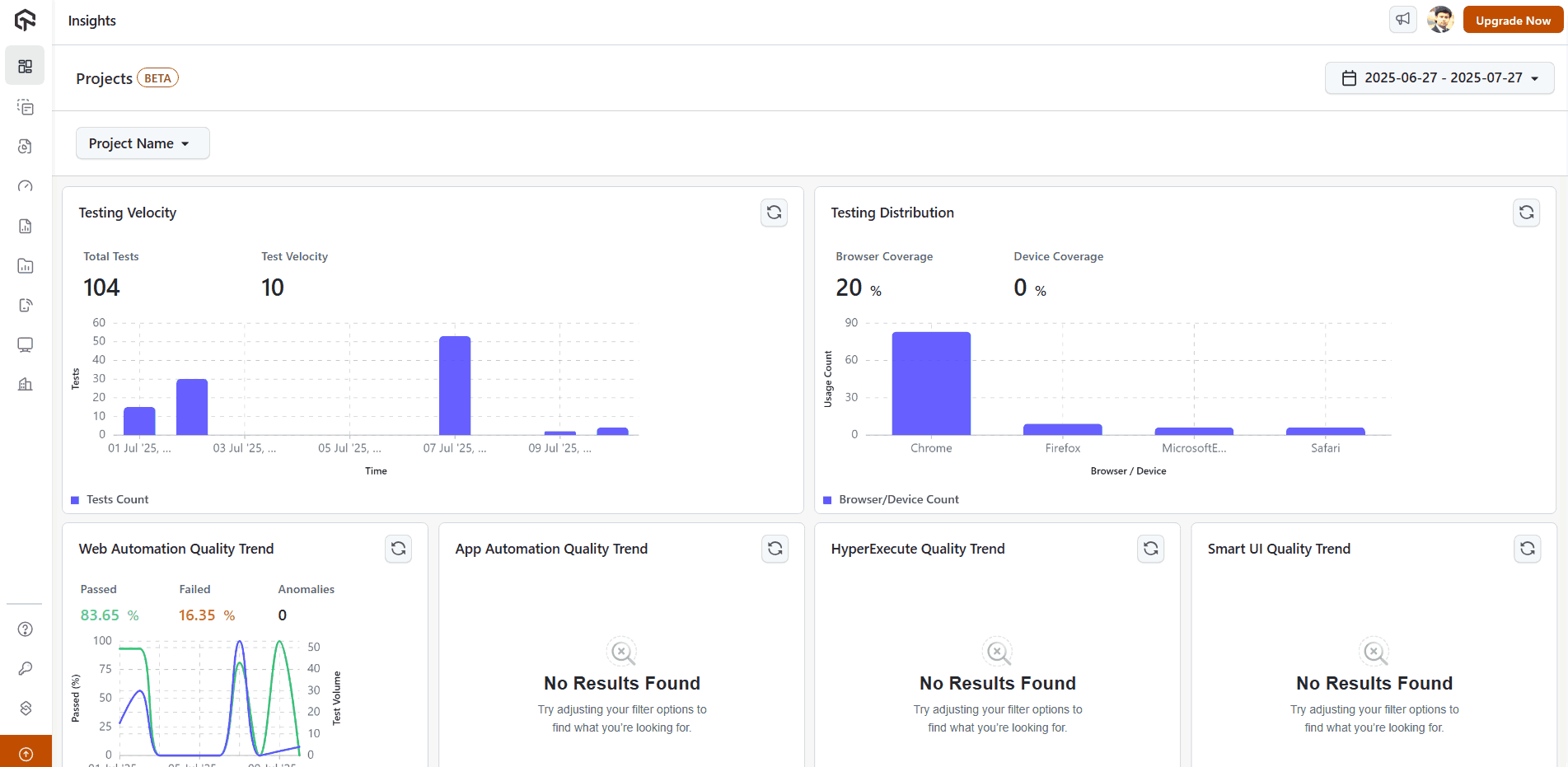
The new Projects dashboard in Insights provides a centralized analytics solution, giving leaders immediate visibility into testing activities across all projects. The dashboard features 8 advanced visualization widgets, including:
- Latest test execution monitoring.
- Testing velocity tracking.
- Browser compatibility analysis.
- Device performance insights.
Export Sub-Organization Reports to CSV
Accessing and analyzing detailed sub-organization data can be cumbersome when restricted to on-screen dashboards. Exporting data for offline use is often needed for deeper analysis or reporting purposes.

With the sub-organization insights, you can now download sub-organization reports in CSV format directly from the analytics dashboard. This enhancement provides greater data accessibility and enables offline analysis, supporting better organizational insights and streamlined data management.
Integrate MS Teams for Insights Notifications
Keeping teams updated on key analytics often requires multiple communication channels. Until now, notifications were limited to Slack and email.
This release adds MS Teams support in Insights. You can configure notifications with the same frequency and date range options as before, enabling real-time alerts and dashboard updates directly within MS Teams.
Auto-Heal Widgets With Command-Level Drilldown Support
Tracking auto-healed tests and understanding why they passed or failed can be challenging without detailed visibility. Identifying which commands or locators were adjusted often requires manual inspection.
This update introduces new widgets on the Auto-Heal dashboard to make analysis easier:
- Auto-Healed Tests Widget: Displays test cases grouped by name with execution results for the last 10 runs, providing a clear overview of healed tests.
- Command-Level Drilldown: Offers a detailed panel showing exactly which locator was auto-healed and on which command, enabling faster root cause analysis and better evaluation of auto-heal effectiveness.
Fresh Batch of Features in KaneAI
KaneAI just got more powerful with a new set of features designed to make your workflows smarter and faster.
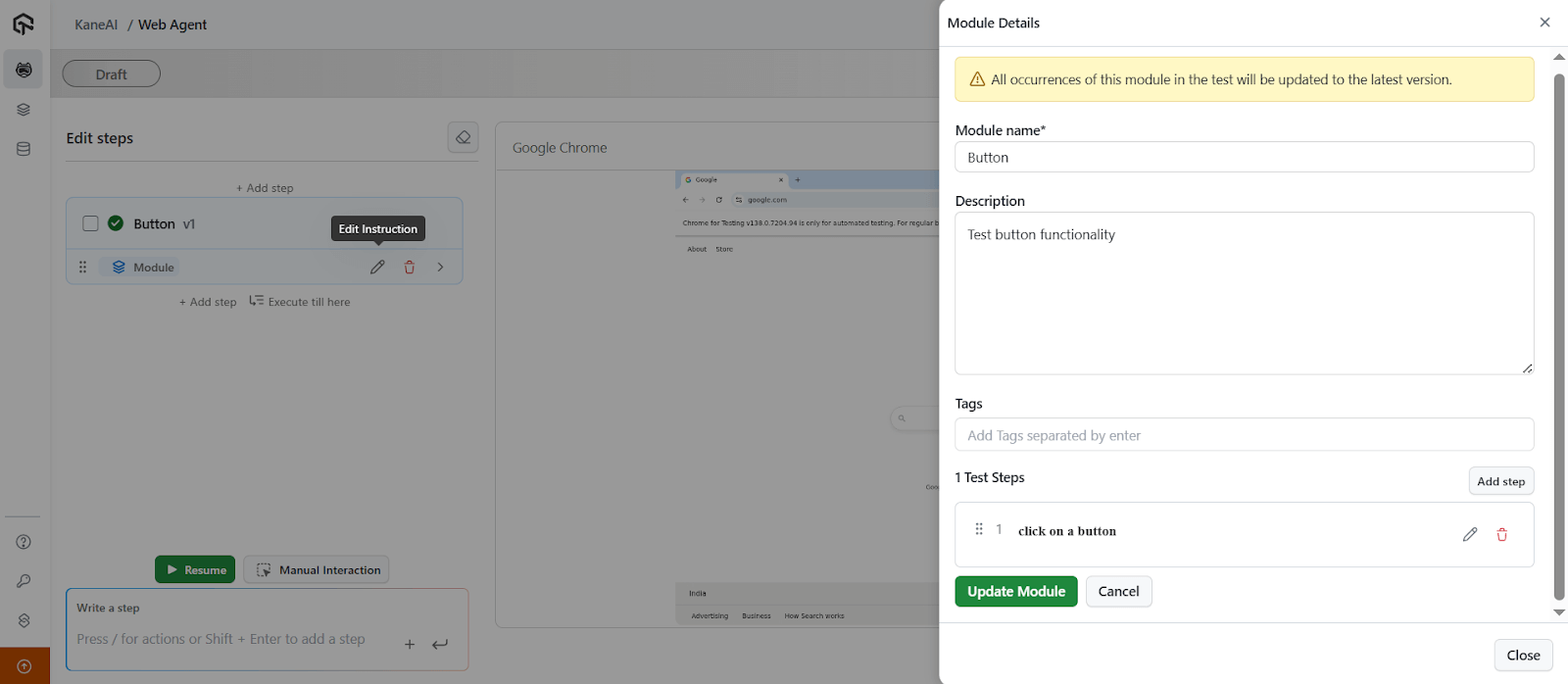
Update Module Steps Within the Session
You can now update module steps directly during a test run in edit mode, without stopping execution.
Key capabilities include:
- Edit On the Fly: Adjust steps quickly while in edit mode without restarting the test.
- Rerun From First Modified Step: KaneAI resumes execution from the first edited step automatically.
- Fix via Manual Mode: If a step fails, switch to manual mode to correct it; KaneAI learns and updates the module.
- Insert New Steps: Add actions during the run using manual interaction.
Additional Configuration Options for Test Runs
New configuration options in KaneAI make both UI and API testing more flexible and environment-aware:
- Geolocation testing and mobile app testing across regions.
- Dedicated proxy support.
- Lighthouse reports for web tests.
- Mobile app performance profiling.
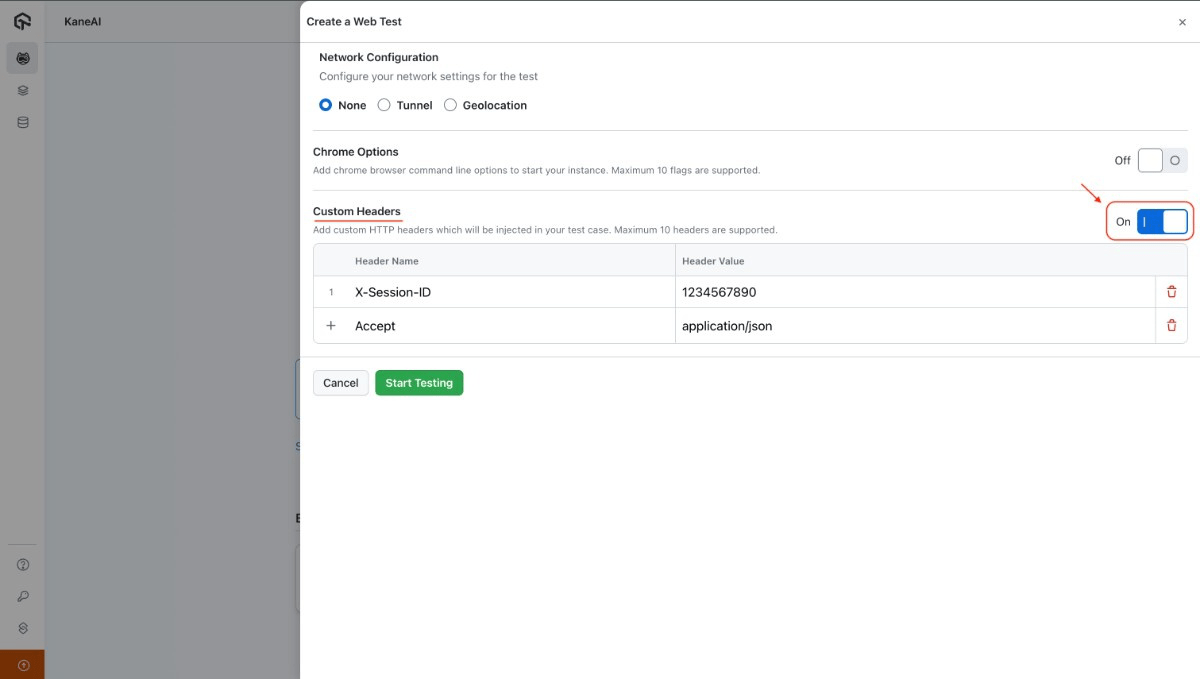
Support for Custom Headers
With custom headers in KaneAI, you can customize your API or web tests at the start of execution:
- Modify HTTP method, body, and URL.
- Add or change headers before test execution begins.
Scroll Until, Wait Until, and Failure Conditions
Improve execution stability and control with new features:
- Scroll Until Element: Scroll until the target element becomes visible.
- Wait Until Element: Use custom timeouts for elements.
- Failure Conditions: Define how failed steps impact the test flow and status.
To get started, check out this guide on KaneAI commands.
Global Variables, Parameters, and Environments
Create flexible, reusable, and environment-aware tests with variable scoping in KaneAI.
- Global by Default: All new parameters are global unless scoped otherwise.
- Scoped for Efficiency: Use variables across multiple tests or isolate them to a single test.
Manual Interaction for Android App Test Authoring
KaneAI manual interaction feature now supports native Android app test authoring. You can directly interact with the mobile app, and KaneAI captures each action, converting it into clear, natural language steps.

New Features in Test Manager
Here are some latest features and enhancements we rolled out in TestMu AI Test Manager:
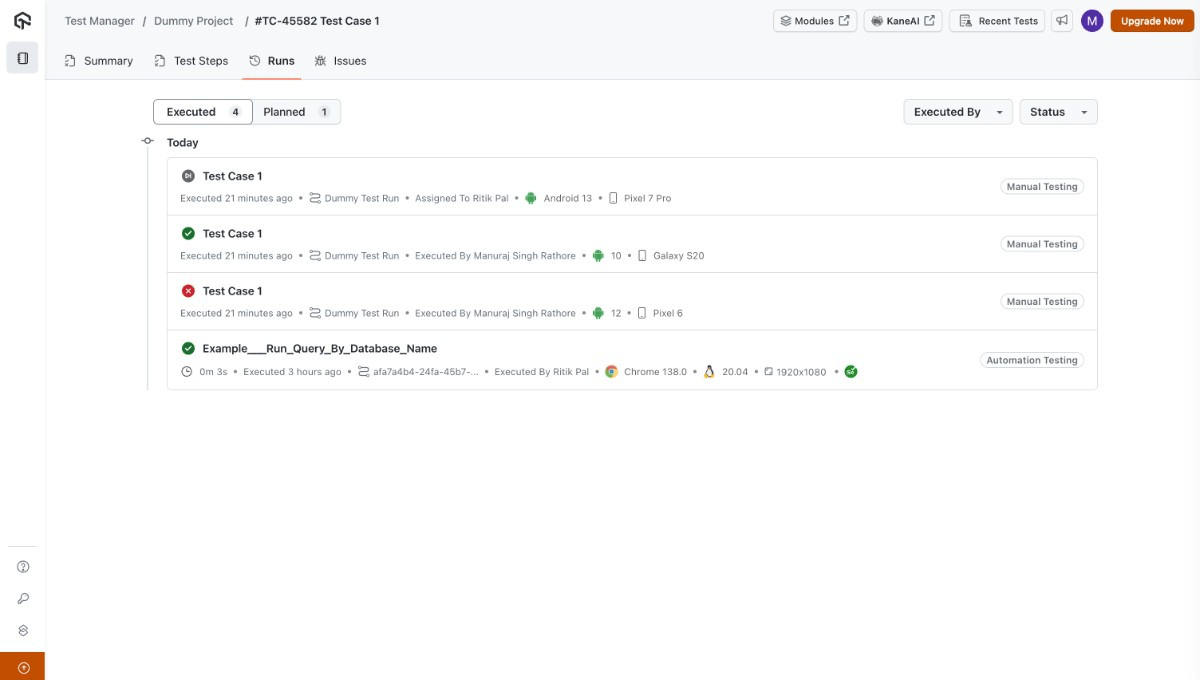
Planned Instances in Test Case Runs
Managing test case executions can be confusing when all instances are grouped together, making it hard to track tests that haven’t started.
The Runs section now displays all associated test instances, including a distinct Planned section for “Not Started” instances. Enhanced filters let you quickly locate the tests that need attention.
For more details, check out this documentation on manual test case creation.
Select Specific Fields While Exporting Test Cases
Exporting test cases often includes unnecessary information, making reports harder to use.
Now, in Test Manager, you can choose specific fields to include when exporting test cases to CSV files, allowing exports to be tailored to the exact information needed.
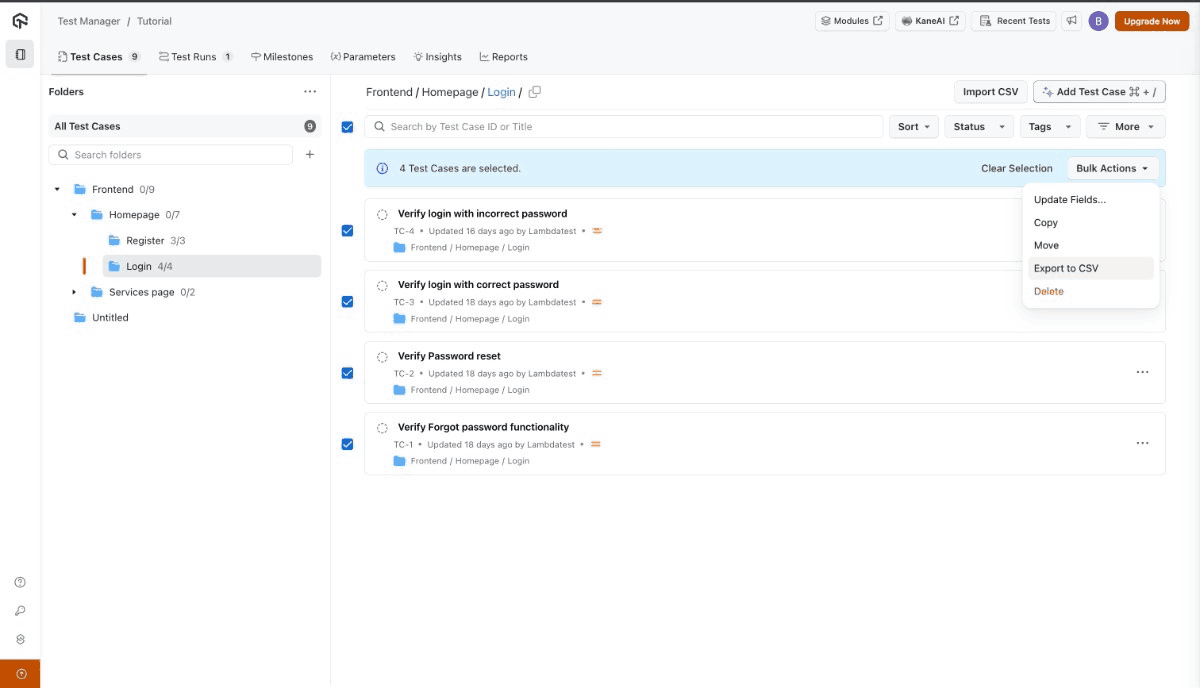
Learn how to customize test case exports for efficient reporting and analysis.
TestMu AI AI Test Manager Extension for Azure DevOps
We have rolled out the AI Test Manager Extension on the Azure DevOps marketplace that provides:
- Native ADO integration for managing tests directly in Azure DevOps.
- AI test case generation from work items, stories, or attached files.
- Bidirectional work item linking for complete traceability.
- Real-time execution visibility of test progress within Azure DevOps.
Latest Features and Enhancements in HyperExecute
We’ve rolled out several enhancements in HyperExecute to make your test automation faster, cleaner, and more adaptable. From capability overrides to real device support, these updates remove bottlenecks and keep your workflow smooth.
Direct Capability Overrides for Selenium in YAML
No more digging into test scripts for environment tweaks. With the new ltOptions flag in your hyperexecute.yaml, you can set or modify Selenium capabilities like browser type, version, video recording, tunnel, and logs, right from your config file.
Benefits:
- Adapt instantly to new environments without touching code.
- Reuse the same tests across multiple setups.
- Keep scripts clean and focused on logic, not infrastructure.
Playwright on Real iOS Devices
Your Playwright tests can now run directly on real iOS devices via HyperExecute. This means you get the accuracy of native device testing combined with the speed and parallelism of our cloud platform.
Use the runson: ios and framework flags in your YAML file.
runson: ios

framework:
  name: appium
  args:
    playwrightRD: true
    mobileDC: true
Dynamic Report Discovery with Regex Support
Reports don’t always live in static folders. With wildcard ** pattern support in the partialReports parameter, HyperExecute can now automatically locate reports inside nested or dynamically generated directories.
The result:
- No more “path not found” errors when using date-based or unique run folders.
- Reports are uploaded without extra file moves or manual path edits.
Detox Testing for React Native Apps
Running end-to-end tests for React Native apps just got easier. HyperExecute now supports Detox on real Android devices and iOS simulators in the cloud, no local device farm needed.
Benefits:
- Trigger Detox runs directly from your CLI.
- Test at scale on multiple devices in parallel.
- Get instant access to logs, video recordings, and analytics.
To get started, check this documentation on Detox testing with HyperExecute.
Enhanced UI Inspector for iOS
We’ve expanded the capabilities of the TestMu AI UI Inspector with support for iOSPredicateString and iOSClassChain selectors.
Why this matters:
- iOSPredicateString lets you target elements using advanced attribute-based queries.
- iOSClassChain allows fast and efficient navigation through complex element hierarchies.
These selector types give you more precise control when locating UI elements, making your test authoring faster and more reliable, especially for complex or deeply nested iOS app screens.
New Integrations: ServiceNow and Zoho Project
We’re expanding TestMu AI Integrations to help you integrate testing directly with your project management and IT service workflows. These new integrations remove the friction between finding an issue and getting it into the right hands for resolution.
- Zoho Project Integration With TestMu AI: Log bugs directly from your TestMu AI test sessions into Zoho Project, complete with screenshots, environment details, and notes. This helps QA and development teams collaborate efficiently without switching between platforms.
- ServiceNow Integration With TestMu AI: Create incidents in ServiceNow directly from your TestMu AI sessions, with all relevant test data and environment information automatically attached. Available on both freemium and premium plans, this integration streamlines IT service management and improves cross-team communication.
Summing Up!
This release expands TestMu AI’s capabilities across testing, insights, and integrations. The Playwright SDK and KaneAI updates simplify test execution and live step editing. Test Manager and HyperExecute provide improved tracking, real iOS device support, and Detox testing. Insights dashboards offer dynamic data retention and centralized project views. New Zoho Project and ServiceNow integrations enable seamless bug tracking and incident management.


Did you find this page helpful?
More Related Hubs
TestMu AI forEnterprise
Get access to solutions built on Enterprise
grade security, privacy, & compliance
- Advanced access controls
- Advanced data retention rules
- Advanced Local Testing
- Premium Support options
- Early access to beta features
- Private Slack Channel
- Unlimited Manual Accessibility DevTools Tests