

Next-Gen App & Browser Testing Cloud
Trusted by 2 Mn+ QAs & Devs to accelerate their release cycles


On This Page
- About The Ghost Platform
- Technical Aspects and Key Features of Ghost
- What Needs To Be Tested in Websites Created Using Ghost Testing Platform?
- What can be ignored while testing websites created using Ghost Platform?
- Testing Custom Themes of Your Ghost Website
- Mobile-Friendly Website Testing
- Visual UI Testing of Ghost Websites

Getting Started With Ghost Testing
Ghost testing isn't too exhausting if you have the most reliable CMS testing cloud to run a mobile or web app built on Ghost. In this article, you'll learn what needs to be tested in the case of websites built on the Ghost platform and how the testing can be planned and executed.

Gifthiya Begum
January 30, 2026
Hello World!!! In this article, you will get the answers to what needs to be tested in the case of websites created using the Ghost framework and how the Ghost testing can be planned and executed. To begin with, you will be introduced to a brief overview of the platform, Ghost, its goals, its adoption rate, and its popularity in the present market.
Followed by that, you will get to know the technical aspects and the key features offered by the Ghost testing platform. Together these will serve as the foundation for us to get into the aspects of Ghost based websites.
In this article, we look at what ghost testing is, its features and technical aspects and how to perform ghost testing of websites.
So, without further ado, let’s get started!
About The Ghost Platform
Ghost is a simple yet powerful platform for creating blog sites, sites to serve media and newsletters.
Before we dive into the details of how to go about testing the websites built using Ghost testing, let me give you a quick overview of Ghost and its ecosystem.

Ghost is an open-source blogging platform originally created to give independent publication options for bloggers in journalism. The company was founded during the month of April 2013, and today it powers a large number of websites by individual bloggers who want to start their own blogs on the largest corporations in the world.
Ghost supports both on-prem installations of its core product and managed service-based offering, Ghost(Pro) – a paid version, for launching the dream websites of publishers. Those who are tech-savvy and need to have control over the entire site’s customization shall prefer Ghost open-source. On the contrary, those who are content creators with no or minimal coding experience shall prefer Ghost PRO.
With Ghost’s starter-friendly user console and several hundreds of themes and integration possibilities, it had soon become one of the popular options for creating websites or blogs. There are now over 12,700+ active customers (including NASA, Apple, OpenAI, and Mozilla) for the Ghost platform, with more than three million downloads of the Ghost core engine.
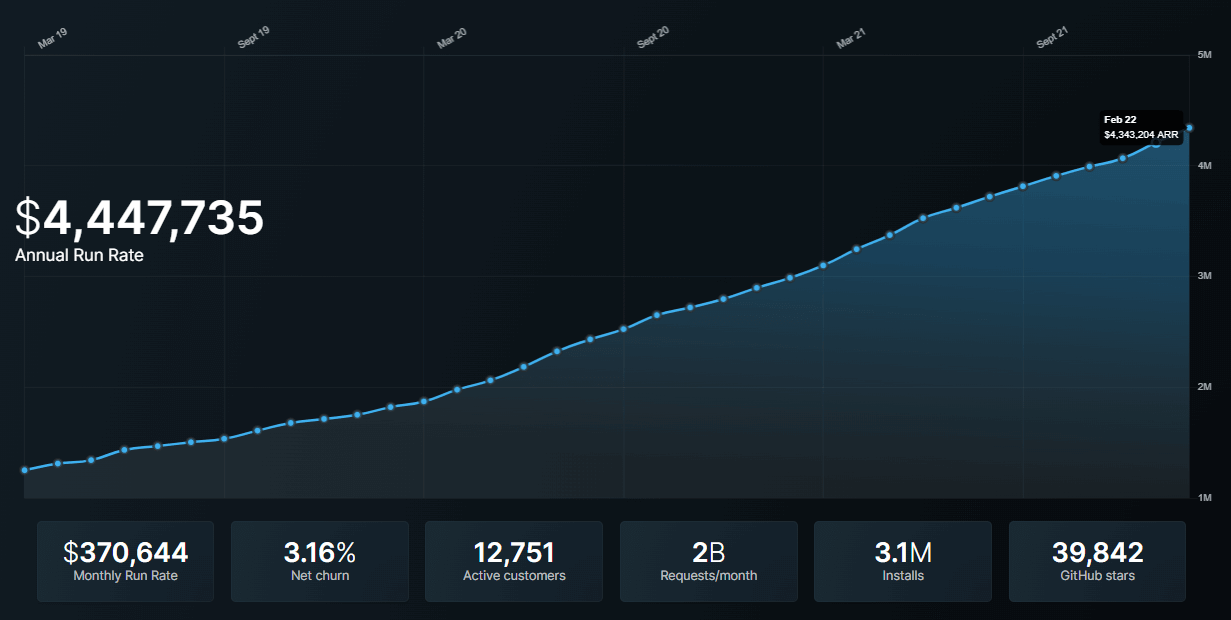
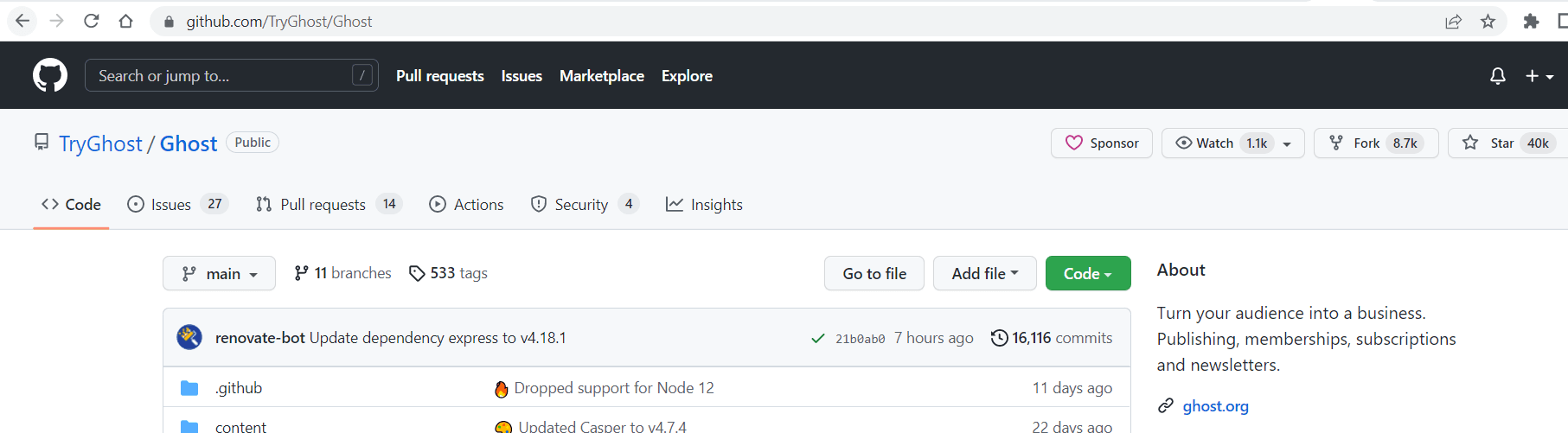
The GitHub repo of the Ghost platform has earned 40K stars by the time of this writing.
There are several CMS (Content Management System) software available in the market to choose from for creating your websites or blog posts. Some of such key CMS are:
- WordPress
- Joomla
- Drupal
- Ghost
- Medium, and so on
To start a website or blog site using CMS, the key decision you have to make is choosing the right CMS software based on your strength(if you are going to work as an individual) or on your team’s strength (if you are part of a team in an Organization). In most cases, a simple, easy-to-learn, and trusted platform can help you a lot. Ghost falls into such a category, and it won’t fail you in your website creation journey.

Note: Start Testing Your CMS Applications. Try TestMu AI Now!
Technical Aspects and Key Features of Ghost
Let’s understand the technical aspects and some of the key features offered by Ghost. Getting to know about these aspects will help in getting the answers to:
- What needs to be tested in the sites created using Ghost?
- How to go about testing those aspects/features?
Ghost CMS is developed based on the Node.js platform. Express JS, MySQL, and Markdown are some of the key components in the Ghost Tech stack. Together these components help one to create content and publish it in the form of websites using the Ghost platform.
Ghost is a fantastic fit for beginners as it uses Markdown in place of the WYSIWYG editing feature that is usually adopted in other popular CMS platforms. Also, the fast and performance characteristics of Node.js make Ghost very attractive for websites requiring to handle a minimal and large volume of user traffic.
Ghost platform offers attractive themes out-of-the-box to its users to achieve the below in the websites.
- Typography,
- Headers,
- Footers,
- Backgrounds, and
- Page layouts
Ghost CMS also gives you the power to create and upload your own themes using the Handlebar templating language. This capability is available for use in both the Managed Ghost service version and in the self-hosted version of Ghost. Handlebars templating language separates out templates (HTML part of the website) from the JavaScript logic. This isolation is achieved with the use of helpers. This enables themes built with Handlebars to be super performant.
Ghost also offers features such as:
- SEO settings
- Social media sharing
- Native REST APIs
- Built-in membership
- Subscription enablement
Websites created based on the Ghost platform can work with any static site framework or front-end framework.
What Needs To Be Tested in Websites Created Using Ghost Testing Platform?
It is quite natural that the beginners of the Ghost testing platform place their trust in their software creators and believe that the sites created out of the Ghost testing platform are free from errors. Although in most cases, it is true and OK to believe so. The team of Ghost.org and community contributors has developed a lot of test scripts to ensure the core engine of their open-source platform is robust and reliable. However, there are certain areas in your websites created out of the Ghost platform that should be tested for correctness.
You as an owner of your website, need to ensure that your users find it very intuitive to use your site and free from errors or rendering issues.
If testing such sites created using the Ghost testing platform is mandatory, You might have the following questions in mind:
- Do such websites created out of the Ghost testing platform have common problems?
- What are some typical issues that arise out of such a platform?
- What are some common testing aspects that are applicable?
Here are the answers in line to the above questions from my point of view:
- If your website is designed based on some custom themes developed by you as an individual or your team, then ensure that your custom theme is tested individually and when integrated with the site. This scenario can be treated as a common use case for any sites created using the Ghost testing platform.
- Some of the standard/official themes of the Ghost testing platform, such as Casper, allow one to upload photos to show as part of an avatar, which then gets displayed in line with your cell content. It would be good to have test cases covered to ensure that photo resolution and size uploaded do not look bad when displayed in line with your post content or short description.
- Common Testing aspects:
- Testing your website in browsers: Open different browsers and see if your website renders properly on each of those browsers. After all, end-users of your site access it through these various browsers.
- Testing your website on multiple devices: Ensure to test your website on different devices, including but not limited to computers, laptops, smartphones, tablets, etc., to see if it is working fine.
- Functional Testing: Perform functional testing of your website to see if it meets the functional aspect of your website.
- Performance Testing: Run performance testing of your websites to identify performance issues when the traffic to your site increases.
- Mobile-friendly website testing: Carry out the mobile-friendly test to ensure that your website does not require manual zooming or scrolling to view multiple areas of your web page. Ensures the look and feel of your Ghost website is preserved across all sorts of mobile devices.
Although the site designed by the Ghost testing platform is responsive in nature, it is better to have a test plan to cover such aspects. This is to ensure that the version upgrade of the Ghost testing platform does not introduce any regression. This is an example scenario for common issues that might arise out of websites created using such a platform.
Based on your website design and customizations that you bring to your site, you could prepare a list of items to be tested and have it included in your test coverage plan.
What can be ignored while testing websites created using Ghost Platform?
Now that we have seen what can be tested, let’s see an example of what aspects can be ignored when the website is created using the Ghost platform. After all, the site is developed using a much more reliable Ghost platform. Not every incorporated page or feature needs to be tested, and you can save time by correctly identifying those ignorable areas from testing.
If you remember, in an earlier section of this article, I had listed Native REST APIs of the Ghost platform as one of its key features. Using the Ghost’s RESTful Content API, clients can consume the published website content in a read-only manner, which in turn can be rendered in another website or app.
The testing of such Ghost-provided APIs shall be ignored by you as an owner of your website. Instead, the client application owners can read the API documentation to design their application or website accordingly. This is one such example that can be ignored for testing websites created using Ghost Platform. Based on your website goals, you could tailor-made such a list and skip it from the test plan.
Testing Custom Themes of Your Ghost Website
GScan is an authorized tool for checking the compatibility of your Ghost theme. GScan generates a detailed report of any faults that require theme modifications to make them compatible with a given Ghost version.
The error levels in the returned list can vary:
- warning = usually used for deprecations, and items that will be mistakes in the next version.
- Issue = renders the theme incorrect or incompatible with the current version of Ghost is considered an error.
Unit Testing and Browser Testing need to be performed once completed with the custom theme creation for your Ghost website.
Unit Testing
For performing the Unit testing, you could use Mocha in combination with Chai and Sinon. Mocha is one of the top JavaScript test frameworks that can be used for defining your test cases/suite. Chai library can be used for assertions, whereas Sinon library can be used for creating mocks, stubs, and spies.
You could use a popular test platform such as TestMu AI to meet the goals of automated execution of your test scripts. With TestMu AI’s cloud Selenium Grid, the Quality assurance team members could carry out end-to-end testing on highly available, secure, and scalable infrastructure.
You can execute your Mocha test scripts developed to test the custom themes of the Ghost website on an online device farm of 3000+ real browsers, devices, and operating systems. This is an indication to achieve a larger percentage in test coverage of your website.

Here’s a quick video of the online Selenium Grid offered by TestMu AI for performing automation testing.
You can also Subscribe to the TestMu AI YouTube Channel and stay updated with the latest tutorials around Selenium testing, Cypress E2E testing, CI/CD, and more.
Browser Testing
Once the unit testing of your website’s custom theme is covered, you can integrate the custom theme with your website. Do this integration first on a staging region and then plan on how to carry out web-based browser testing in less time, less cost, and with more productivity.
It is very important to carry out browser testing in order to ensure that the rendering aspect of your website is right. Also, it is not enough to carry out browser testing in just one browser as an end-user of your website might use any popular browser to gain access.
This is where the importance of cross browser testing comes in. Cross browser testing is a test approach that ensures a website performs uniformly across different browsers.
Such cross browser testing strategy verifies that all the components belonging to a custom theme, such as header, footer, page layout, background, and so on, are working as expected. User experience is the key aspect to indicating the success or failure of a website. Hence, you, as an owner of your website, need to ensure that your website performs well in cross browser testing.
Since cross browser testing involves the need to set up different combinations of browsers and operating systems, it is more meaningful to use a testing platform provided by TestMu AI. The TestMu AI cloud platform offers out-of-the-box a plethora of browser options, operating systems, and devices to carry out such cross browser testing. Once subscribed to the TestMu AI platform, in no time, you will have such a powerful infrastructure at your fingertip.
Automation testing tools like TestMu AI provide real-time browser testing, a must-try feature to carry out live testing of your web pages. I would highly recommend enrolling for an account in TestMu AI (if you have not done so already) and trying the features offered in their test platform.
Shared below is the screenshot captured from the Real-Time Browser testing interface of the TestMu AI platform. Note that there are plenty of options available to perform cross-browser and cross-operating system testing of your Ghost website. Just provide your Ghost-based website URL as an input, then select which device you want to test your changes, such as Desktop or Mobile. If it is the desktop, select the choice of Browsers along with its version, select the OS version, and the desktop screen resolution. You have plenty of options to choose from as per the test case requirements and once you have finalized your options, click START.
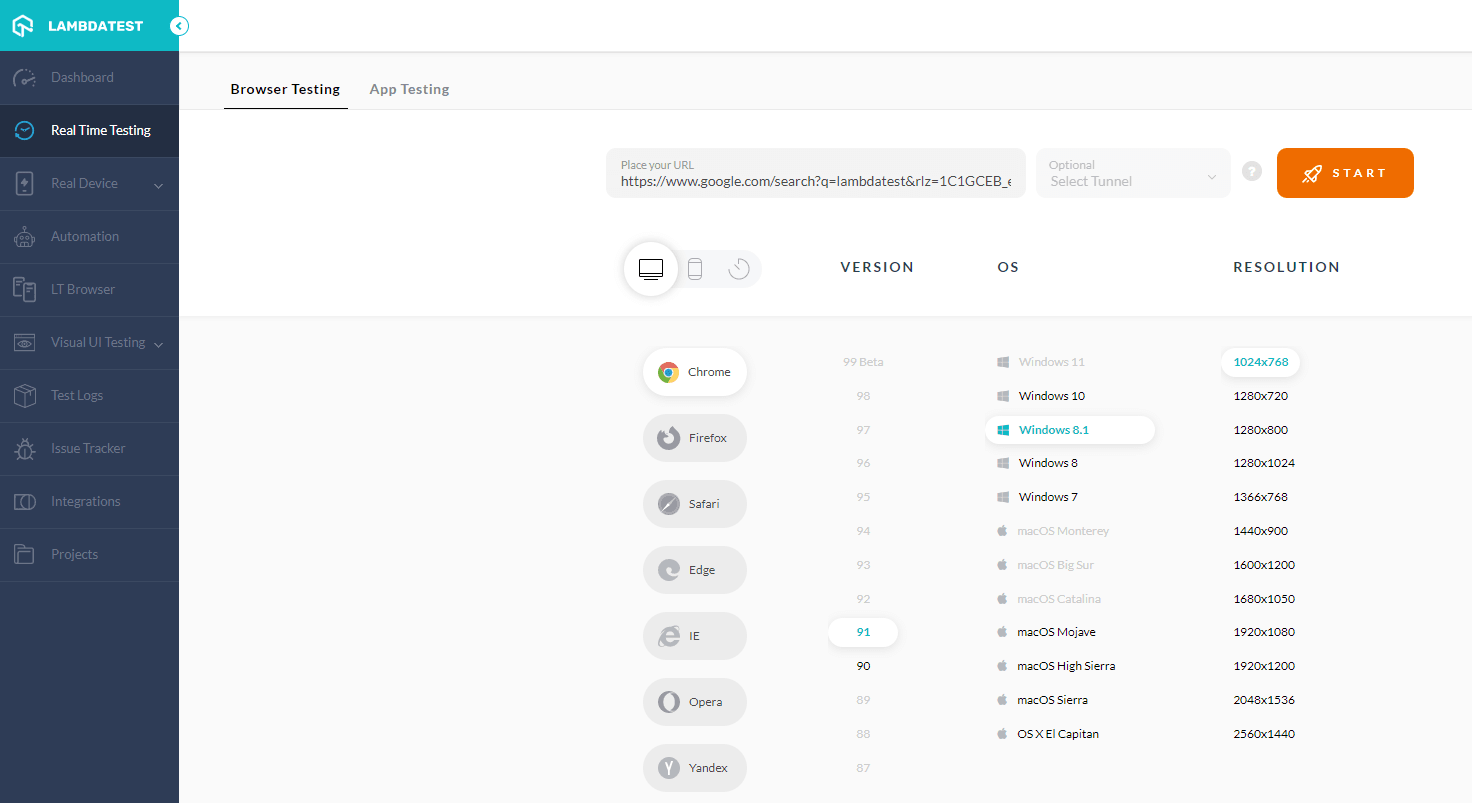
The START button will initiate the environment setup actions in an automated manner by allocating an instance in the cloud with selected hardware and software choices made. Once the environment is ready, you will be presented with a screen session containing your Ghost website. The testers shall perform manual testing on the browser as they deem necessary to complete their test scenarios.
End your current session by clicking the End session button.
Mobile-Friendly Website Testing
It is important to measure your Ghost site’s mobile usability based on its responsive behavior and compatibility on smartphones or mobile devices. LT Browser, offered by TestMu AI, besides aiding you in the process of carrying out mobile-friendly testing of your Ghost website, also allows you to build, test, and troubleshoot a website on mobile devices right from the same window.
You can test your Ghost website on a variety of mobile device viewports. With LT Browser, you will have the power to view your websites on Android and iOS resolutions, thereby ensuring that your site renders properly on both Android and Apple smartphones. If you can’t find your device from the given list, using LT Browser, you can make your custom device viewport and save it for further use. You don’t have to switch between smartphones to carry out mobile website testing. Instead, you get the ability to test two smartphones simultaneously with the LT Browser. That’s how easy and timesaving it is.

Learn more about LT Browser in the video tutorial below.
Visual UI Testing of Ghost Websites
It is crucial to carry out the Visual UI testing of your website created using custom themes. The reason is that only with Visual UI testing we can assert the following aspects:
- Image alignment with text content
- Shape/size of objects when the website is zoomed in or out
- Ensure there are no overlaps of UI elements when seen on different settings
- UX distortion on change of device resolution, and so on
Introducing TestMu AI Smart UI — your go-to smart visual regression testing platform that provides pixel-to-pixel comparison combined with high-performance infrastructure and deep analytics. Start FREE Testing: https://accounts.lambdatest.com/register
In production, the users of your website shall face both functional as well as visual problems, so we have to plan for effective testing strategies that cover both these aspects.
With the help of the Visual UI Testing module available in the TestMu AI platform, the testers could spot visual changes introduced with the new changes done on your website, and the amazing thing is, it is achievable with a single button click. Whatever the website changes are related to, be it Header, Color used in the background, page layout, font size or style, the position of the UI element, and so on, can be easily spotted.
You can take screenshots of your Ghost website involving custom themes using different browsers, OS versions, and resolutions and later compare it against the base reference snapshot to list the issues identified by the TestMu AI platform.
Shared below is the screenshot of the TestMu AI platform, which can aid in achieving this testing aspect.
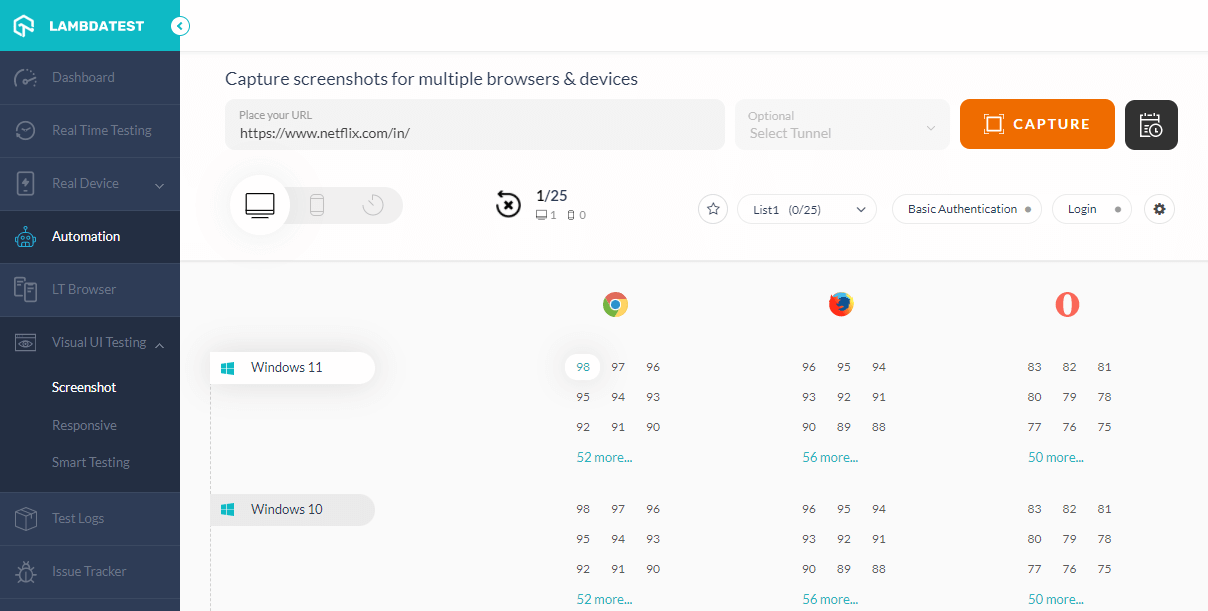
You can even schedule a time period to take the visual snapshots and send them to the designated email distribution list. This greatly overcomes the need to sit around and wait for such a test suite to complete.
With this Screenshot Testing Tutorial, you will learn how to perform Automated Screenshot Testing on the TestMu AI platform.
Conclusion
Millions of content creators, organizations, and startups create and publish using Ghost. If you had chosen or planned to use Ghost for your website creation, I hope this article has given you an idea of how to go about testing for websites created using Ghost.
In this article, you were introduced to a brief overview of the Ghost platform and its popularity in the market. Followed by that, you got to know the technical aspects and the key features offered by the Ghost platform. Together these served as the foundation to explain the Testing aspects of Ghost based websites that include what needs to be tested and what shall be ignored while testing the sites created using Ghost.
We then progressed further to see how to approach testing for the sites created using the Ghost platform. We also explored the capabilities of the TestMu AI platform on how it could help you test your Ghost websites in a smart, cost-effective, and increased productivity manner.
With this, we have come to an end of this article, but your journey on testing Ghost websites shall continue or begin from here. Happy Testing!!!



Frequently asked questions
Did you find this page helpful?
More Related Hubs
TestMu AI forEnterprise
Get access to solutions built on Enterprise
grade security, privacy, & compliance
- Advanced access controls
- Advanced data retention rules
- Advanced Local Testing
- Premium Support options
- Early access to beta features
- Private Slack Channel
- Unlimited Manual Accessibility DevTools Tests