

Next-Gen App & Browser Testing Cloud
Trusted by 2 Mn+ QAs & Devs to accelerate their release cycles


What Is Autonomous Testing: A Complete Guide
Autonomous testing uses AI and machine learning to independently handle the full software testing lifecycle, from generating test cases to executing them and filing reports, with minimal human involvement.
According to Fortune Business Insights, the AI-enabled testing market was valued at $856.7 million in 2024 and is projected to reach $3,824 million by 2032. Understanding how this works, and where it differs from traditional automation, has become a practical concern for most QA teams today.

Harish Rajora
March 13, 2026
Overview
What Is Autonomous Testing?
Autonomous testing uses AI and ML to handle the full testing lifecycle independently, from generating test cases to filing reports, with minimal human involvement.
What Are the Core Elements of Autonomous Testing?
- Test Case Design: AI generates test scenarios by analyzing the application's interface, user flows, or underlying code.
- Test Execution: Scripts run automatically within a CI/CD pipeline, continuously validating the application as new changes are introduced.
- Self-Healing: When the UI changes, the system adapts broken tests automatically without manual intervention.
- Test Result Analysis: AI identifies failure patterns and surfaces root causes rather than just flagging errors.
- Reporting: Findings are delivered through dashboards or alerts, giving teams actionable data rather than raw logs.
Which Tools Support Autonomous Testing?
- KaneAI: A GenAI-native testing agent that lets teams plan, author, and evolve tests using natural language.
- Functionize: AI-driven test creation, execution, and maintenance with built-in self-healing.
- SeaLights: Risk-based test optimization that identifies untested code and cuts unnecessary execution.
- Worksoft: Enterprise-grade, no-code autonomous testing for complex ERP and CRM environments.
What Is Autonomous Testing?
Autonomous testing is a software testing approach where AI, machine learning, and other advanced technologies enable testing processes to run independently, without significant human involvement. The testing infrastructure handles test case creation, modification, optimization, execution, and final reporting on its own.
For this to work, intelligent decision-making has to be baked in at every layer. That is where AI and machine learning come in. The algorithms powering autonomous systems can perform predictive analysis, identify failure patterns, and self-heal broken tests. The goal is a system that does not just run tests but makes correct, context-aware choices about what to test, when, and how.
Testers deal with complex applications requiring broad coverage, flaky tests, tight release deadlines, and high maintenance overhead. Traditional testing methods do not scale well under that pressure. Autonomous testing is designed to absorb most of that overhead so teams can focus on decisions that actually require human judgment.
Autonomous Testing vs. Automation Testing
These two terms get used interchangeably but they describe meaningfully different things. Automation testing runs scripts that humans write. Autonomous testing decides what scripts to run, writes them, and fixes them when they break.
| Dimension | Automation Testing | Autonomous Testing |
|---|---|---|
| Test Creation | Written manually by testers or developers | Generated automatically by AI from application behavior or natural language input |
| Script Maintenance | Requires manual updates when the UI or code changes | Self-healing: tests adapt to changes automatically |
| Intelligence | Executes predefined logic only | Uses ML to learn from past test runs and improve coverage over time |
| Human Involvement | Needed for setup, maintenance, and failure triage | Minimal; humans set objectives and review edge cases |
| Scope | Covers specific tasks: running scripts, generating reports | Covers the full lifecycle: planning, authoring, execution, analysis, reporting |
| Adaptability | Static; breaks when the application changes unexpectedly | Dynamic; adjusts to application updates without manual intervention |
| Best For | Stable applications with predictable regression suites | Fast-moving applications with frequent UI changes and rapid release cycles |
Think of automation testing as a well-trained employee who follows a fixed checklist. Autonomous testing is more like an employee who rewrites the checklist each sprint based on what changed.
Benefits of Autonomous Testing
Integrating autonomous testing into an existing QA infrastructure touches almost every part of the delivery pipeline. Here is where it makes the most practical difference.
Improves Efficiency
Autonomous testing absorbs the repetitive work: writing tests, running regression suites, filing basic bug reports. That frees QA engineers to work on test strategy, edge case design, and the exploratory work that actually requires human judgment.
Faster Testing and Delivery
AI algorithms execute test sequences in a fraction of the time a manual process would take. Combined with parallel execution across environments, this compresses testing cycles significantly and removes testing as a bottleneck before production.
Higher Software Quality
When AI is trained on quality datasets, it can detect failure patterns that manual testers miss, generate test cases covering edge cases systematically, and push software quality across a broader surface area than a human team can maintain.
Fewer Human Errors
Manual testing introduces inconsistency: different testers interpret the same scenario differently, miss steps when fatigued, and forget to test edge conditions on a deadline. Autonomous systems apply the same logic every run.
Richer Test Reporting
AI-generated reports surface patterns that are hard to spot in individual test logs. Failure clustering, root cause analysis, and trend data over time give QA and engineering leads a more accurate picture of application health.
Lower Long-Term Cost
Traditional testing scales by hiring. Autonomous testing scales by configuration. As the application grows, the AI adapts without requiring a proportional increase in headcount or manual maintenance overhead.

Note: Leverage the potential of autonomous testing with the cloud. Try TestMu AI Today!
Key Components of Autonomous Testing
Autonomous software testing depends on several interconnected components that together replace what a manual testing cycle would require.
Test Case Design
Test cases are created to reflect real user interactions with the application. They can be written manually or generated automatically by analyzing the application's interface, user flows, or underlying code. AI systems often combine both approaches: learning from manual test history to build more accurate generated cases.
Test Script Creation
Scripts interact with the application through testing frameworks. In traditional automation, developers write these in Python, Java, or C#. In autonomous systems, scripts can be generated from natural language instructions, reducing the technical barrier significantly.
Test Execution
Scripts run automatically through a test engine or within a CI/CD pipeline. Test execution is continuous: every time new code is committed, the system validates the application's behavior across browsers, devices, and environments.
Test Result Analysis
The testing framework compares actual outputs against expected results. AI layers on top to identify failure patterns, cluster related issues, and flag areas of regression risk before they reach production.
Debugging and Reporting
AI tools identify defects, trace root causes, and suggest fixes. Results are delivered to development teams through dashboards or notifications so that resolution can happen without waiting for a triage cycle.
From Manual to Autonomous Testing
The shift from manual to autonomous testing is not a single switch. It happens in stages, with human involvement decreasing and AI responsibility increasing at each level. The Autonomous Software Testing Model (ASTM) defines six levels of testing autonomy.
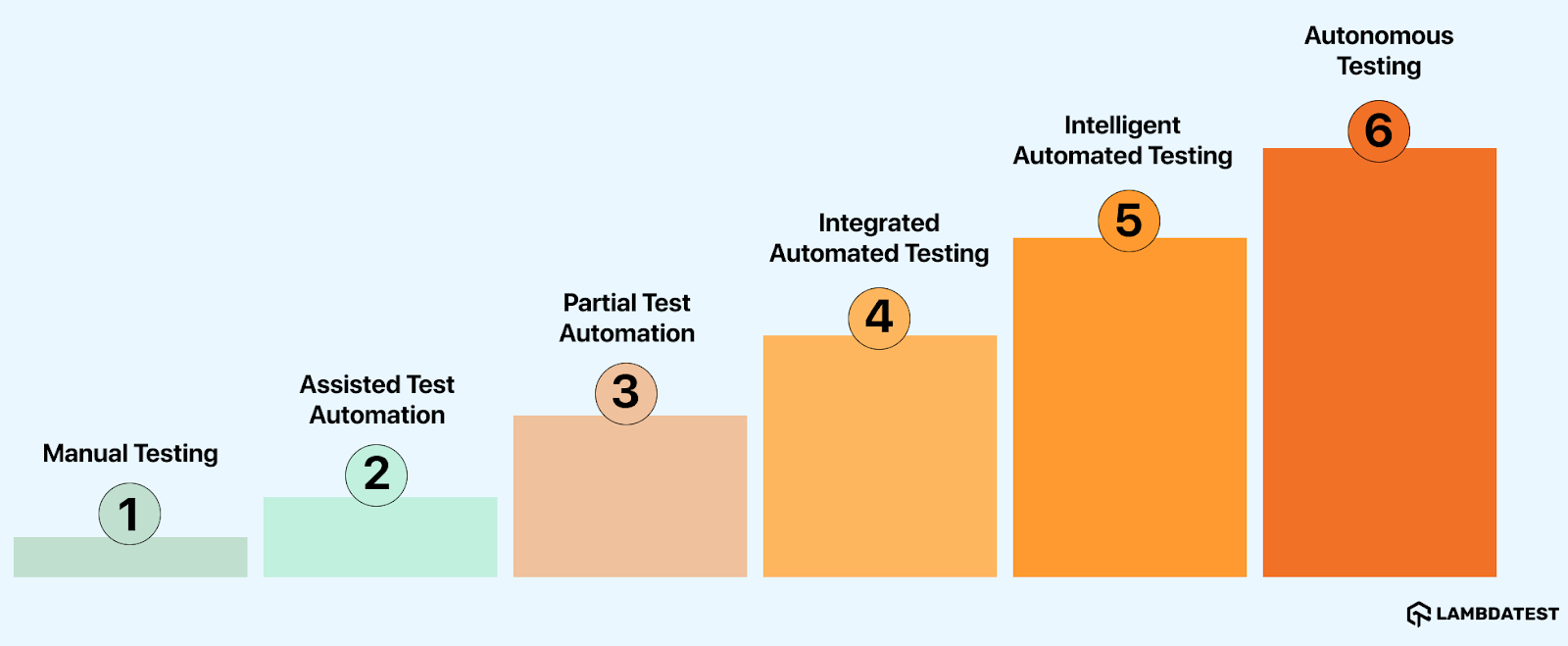
- Manual Testing: Testers make every decision and handle every aspect of testing, from writing test cases to executing them and recording results.
- Assisted Test Automation: Automation tools help testers run tests, but testers still create and maintain all scripts. Human involvement is heavy at the design stage.
- Partial Test Automation: Automated tools and testers share the workload. Most strategic decisions still rest with the tester.
- Integrated Automated Testing: AI-capable tools generate suggestions and insights, but a tester reviews and approves them before any execution happens.
- Intelligent Automated Testing: AI tools generate, evaluate, and run tests independently. Tester involvement is optional but still available.
- Autonomous Testing: AI controls the full testing lifecycle, including decision-making, execution, and reporting, with no human involvement required.
Most organizations today sit somewhere between levels three and five. Full autonomy at the enterprise level remains a near-term goal rather than a current standard.
How to Implement Autonomous Testing
Moving to autonomous testing does not require throwing out existing infrastructure. Most teams phase it in alongside what they already have. Here is a practical path for getting started.
Step 1: Audit Your Current Test Coverage
Before adding AI, understand your current test coverage and where the gaps are. Identify the highest-risk areas of the application, the most frequently failing tests, and the test suites that consume the most maintenance time. These are the best candidates for autonomous tooling.
Step 2: Choose the Right Tooling for Your Stage
Not every team needs a fully autonomous platform from day one. If your team is still running mostly scripted automation, start with a self-healing layer like KaneAI to reduce maintenance overhead. If you are further along, a platform like SeaLights for risk-based test selection can dramatically cut execution time by running only the tests most likely to fail given the current code change.
Step 3: Integrate With Your CI/CD Pipeline
Autonomous testing only delivers value when it runs continuously. Connect your chosen tool to your existing CI/CD pipeline so that test execution triggers automatically on every commit. Most platforms offer native integrations with Jenkins, GitHub Actions, GitLab CI, and similar systems.
Step 4: Define Human Review Checkpoints
Even at higher autonomy levels, human oversight matters for edge cases, UX validation, and high-stakes flows like payment processing or authentication. Define which test categories require human review and which can be handled entirely by the AI.
Step 5: Train the System and Monitor Feedback Loops
AI testing systems improve with data. Feed the system historical test results, known failure patterns, and application usage data. Monitor its decisions early on, correct misclassifications, and let the feedback loop sharpen the model over time.
Step 6: Measure What Changes
Track cycle time, defect escape rate, test maintenance hours, and false positive rate before and after implementation. These numbers tell you whether the autonomy level you have reached is actually delivering value, or whether further tuning is needed.
Autonomous Testing Tools
Several AI testing tools cover different parts of the autonomous testing spectrum. Here is an honest look at the leading options, including what they do well and where they have limitations.
KaneAI by TestMu AI
KaneAI is a GenAI-native QA agent designed for high-speed quality engineering teams. Users create and refine test cases using plain English instructions, removing the scripting barrier that typically slows adoption of test automation.
Key Features:
- Intelligent Test Generation: Creates and evolves tests from NLP-based instructions, with no scripting required.
- Intelligent Test Planner: Converts high-level objectives into detailed, executable test steps automatically.
- Multi-Language Code Export: Converts completed tests into Selenium, Playwright, Cypress, and other framework formats.
- Smart Show-Me Mode: Watches a manual walkthrough and turns it into a reusable automated test.
Pros: Low entry barrier for non-technical testers; fast test authoring; tight integration with TestMu AI's broader platform.
Cons: Best results require well-defined objectives; complex multi-system flows may need supplementary scripting.

With the rapid adoption of AI in testing, the KaneAI Certification validates practical expertise in AI-powered testing and positions engineers as high-value contributors to modern QA teams.
Functionize
Functionize applies AI and ML to streamline test creation, execution, and maintenance. It supports natural language test generation and includes self-healing capabilities that keep tests running when the application changes. Cross-browser and cross-platform coverage is built in, and its cloud architecture handles scaling without manual environment configuration.
Pros: Strong self-healing; good for teams moving away from fragile Selenium scripts.
Cons: Pricing scales steeply for larger teams; the AI-generated tests can miss edge cases in complex workflows.
SeaLights
SeaLights focuses on quality intelligence and risk-based test optimization. Rather than generating tests, it analyzes code changes and identifies which existing tests are most likely to find failures given what changed. This cuts unnecessary execution significantly in large test suites. CI/CD integration is core to how it works.
Pros: Dramatically reduces execution time in mature test suites; provides actionable coverage gap data.
Cons: Adds the most value to organizations that already have extensive test suites; less useful for teams starting from scratch.
Worksoft
Worksoft is aimed at enterprise environments running complex ERP and CRM systems like SAP and Salesforce. It offers end-to-end testing with a no-code interface that allows business analysts and QA teams without deep scripting skills to participate in test creation.
Pros: Strong fit for enterprise business application testing; no-code access broadens team participation.
Cons: Implementation is complex and typically requires specialist support; less suited for modern web or mobile-first applications.
Challenges With Autonomous Testing
Autonomous testing is not plug-and-play. Several real-world complications arise during adoption that teams should plan for.
Training AI Across Different Projects
Traditional test scripts are project-specific. Autonomous tools need to generalize across different application types, tech stacks, and testing objectives. Even when a quality base model is available, training it to perform accurately on a specific application is time-consuming.
Incompatibility With Human-Centered Testing Phases
Most teams focus autonomous tooling on functional testing and regression testing, which maps well to AI-driven approaches. But phases like UX evaluation, exploratory testing, and accessibility assessment depend heavily on human intuition and context. Autonomous systems are not yet equipped to replace those.
Uncertainty About AI Accuracy
Autonomous infrastructure operates largely independently, which means its outputs carry more weight and its errors are harder to catch. While vendors publish benchmark accuracy figures, real-world performance varies by application type, and verifying AI decisions without introducing manual overhead is a genuine challenge.
Integration With Existing Tool Ecosystems
Testing environments involve many third-party tools, from issue trackers to observability platforms to test management systems. Autonomous tools need to integrate with these ecosystems to be useful. Coverage of integrations varies widely across vendors, and security constraints in enterprise environments often restrict what can connect to what.
Lack of Industry Standardization
IEEE 829 and similar testing standards do not yet account for autonomous testing practices. Teams implementing autonomous tooling have to define their own acceptance criteria, coverage thresholds, and governance frameworks without a widely accepted benchmark to reference.
Frequent Maintenance of the Platform Itself
The tools evolve fast. Vendors release updates regularly, and each update can change behavior, require reconfiguration, or introduce new capabilities that need to be evaluated. Cloud-based tools reduce some of this friction since infrastructure updates happen server-side, but teams still need to manage configuration drift.
High Initial Cost
Enterprise-grade autonomous testing platforms require skilled engineers to implement correctly and the infrastructure to run at speed. That investment is significant upfront, and the ROI depends heavily on how well the team adopts and maintains the system. For smaller organizations, the economics can be difficult to justify before scale demands it.
Conclusion
Autonomous testing has reached a point where it can genuinely change how QA teams operate, but it is not yet a technology that works without thought. The tools exist. The capabilities exist. What is still developing is the standardization, the ecosystem maturity, and the organizational readiness to adopt them properly.
Right now, most production implementations sit at what could be called semi-autonomous: self-healing is in place, AI-assisted test generation is being adopted, and risk-based selection is starting to cut execution overhead. Full autonomy at enterprise scale, without meaningful human oversight, is realistically a few years out.
In the near term, expect autonomous tools to improve in three areas: deeper integration with third-party systems, predictive analysis that flags risk before test execution rather than after, and better contextual understanding of application intent from requirements documentation. Over a longer horizon, a fully autonomous testing system would take responsibility from requirements to production validation without human handoffs.
The teams best positioned to take advantage of this shift are the ones building their practice toward it now: standardizing test data, investing in coverage metrics, and evaluating AI-native tools against their current pain points rather than waiting for a future that looks more complete.
For teams ready to explore what current AI testing infrastructure looks like in practice, KaneAI by TestMu AI is a practical starting point for understanding agentic test authoring at production speed.
Citations
- A New Approach Of Software Test Automation Using AI: https://www.researchgate.net/publication/380459206
- Fortune Business Insights, AI in Software Testing Market Size, 2024.


Frequently asked questions
Did you find this page helpful?
More Related Hubs
TestMu AI forEnterprise
Get access to solutions built on Enterprise
grade security, privacy, & compliance
- Advanced access controls
- Advanced data retention rules
- Advanced Local Testing
- Premium Support options
- Early access to beta features
- Private Slack Channel
- Unlimited Manual Accessibility DevTools Tests