

Power Your Software Testing with AI Agents and Cloud
The Native AI-Agentic Cloud Platform to Supercharge Quality Engineering. Test Intelligently and Ship Faster.


- TestMu AI (Formerly LambdaTest)
- /
- Learning Hub
- /
- User Acceptance Testing (UAT): Meaning, Process, Examples
User Acceptance Testing (UAT): Meaning, Process, Examples
User acceptance testing (UAT) explained: what UAT means, who performs it, the 7-step process, acceptance criteria, test case examples, and tools.
Last Updated on:
On This Page
- What is User Acceptance Testing?
- Why Perform User Acceptance Testing?
- Who Performs User Acceptance Testing?
- What Are the Types of User Acceptance Testing?
- How to Perform User Acceptance Testing?
- What Are UAT Acceptance Criteria?
- What Do UAT Test Cases Look Like?
- Which Tools Support User Acceptance Testing?
- What Goes Into a User Acceptance Testing Design Template?
- How Do You Measure UAT?
- How Do You Run User Acceptance Testing on Real Devices in the Cloud?
- How Is AI Changing User Acceptance Testing?
- What Are the Challenges in User Acceptance Testing?
- What Are the Best Practices for User Acceptance Testing?
- What Is the Difference Between User Acceptance Testing and Beta Testing?
- What Is the Difference Between User Acceptance Testing and System Testing?
- Where Should You Start With User Acceptance Testing?
- Which Sources Does This UAT Guide Cite?
User acceptance testing (UAT) is the test level where intended users check whether a finished system meets the business requirements they signed off on, and decide whether to accept it. The ISTQB Certified Tester Foundation Level syllabus lists UAT as one of six forms of acceptance testing, alongside operational, contractual, regulatory, alpha, and beta testing.[1] This guide explains what UAT means, why teams run it, who performs it, the types of acceptance testing, a 7-step UAT process, acceptance criteria, worked test cases, tools, metrics, and how UAT differs from beta and system testing.
Key Takeaways
- UAT full form: UAT stands for user acceptance testing, the acceptance test level that decides whether intended users accept the system.
- Six acceptance forms: ISTQB treats UAT, operational, contractual, regulatory, alpha, and beta testing as sibling forms of acceptance testing rather than synonyms.
- Requirements defects: UAT mostly surfaces gaps between what users asked for and what they actually wanted, which is why passing system testing is not a defense.
- Binary acceptance criteria: Write every criterion before testing starts so it scores pass or fail identically for two different testers.
- Production-like, never production: Populate the UAT environment with realistic synthetic data, because real customer records both breach privacy rules and silently narrow test coverage.
- Defect density signal: Treat a high UAT defect count as evidence of weak upstream testing, not as a reason to extend the UAT window.
What is User Acceptance Testing?
UAT stands for user acceptance testing. The ISTQB glossary defines it as a type of acceptance testing performed to determine if intended users accept the system.[2] UAT runs after system, functional, and regression testing, and it answers a different question than any of them: not whether the software works, but whether it does the job the business asked for.
That distinction decides who runs UAT and what counts as a defect. System testing verifies the specification. UAT verifies the intent behind the specification, so the people running it are the ones who own the business process, and a working feature that solves the wrong problem still fails.
The UAT environment must mirror production in data shape, integrations, and access controls. Without that, UAT scenarios miss the defects that only appear under production-like conditions, and the sign-off certifies an environment nobody will ever use.
Why Perform User Acceptance Testing?
UAT catches requirements defects that every earlier test level is blind to. Unit, integration, and system tests all check the software against the written specification, so a requirement captured wrongly passes all three and still fails the user.
Finding a requirements defect at UAT is already late, and finding it after release is later still. The cost climbs because the fix is no longer a code change: it means re-opening the requirement, re-testing the dependent workflows, retraining the users who learned the wrong process, and correcting whatever bad data the wrong behavior produced in the meantime. Running UAT properly buys four things:
- Requirements validation: Business users confirm the delivered workflow matches the process they actually run, not the process the specification described.
- Release risk reduction: Defects found in UAT are fixed before customers meet them, which avoids the emergency patch and the support-ticket spike that follow a bad release.
- Documented sign-off: UAT produces a dated acceptance record naming who approved what, which is the artifact auditors and contract disputes rely on.
- Upstream quality signal: The UAT defect count tells you how well the earlier test levels are working, because a clean UAT is evidence that system testing did its job.

Who Performs User Acceptance Testing?
The client or end users of the software conduct UAT. That means the people who bought the product or commissioned it, drawn from the organizational groups whose daily work the software changes, so every affected user role is represented.
In practice the job title matters less than a different test: who designed, reviewed, and approved the test cases. A QA engineer executing scenarios that business owners wrote and signed is doing UAT. A business owner executing scenarios QA wrote is doing a second round of system testing with a friendlier audience.
One recruitment rule is worth applying deliberately. Choose testers who were not involved in designing the software, because the people who specified a workflow cannot see the assumptions they built into it.
What Are the Types of User Acceptance Testing?
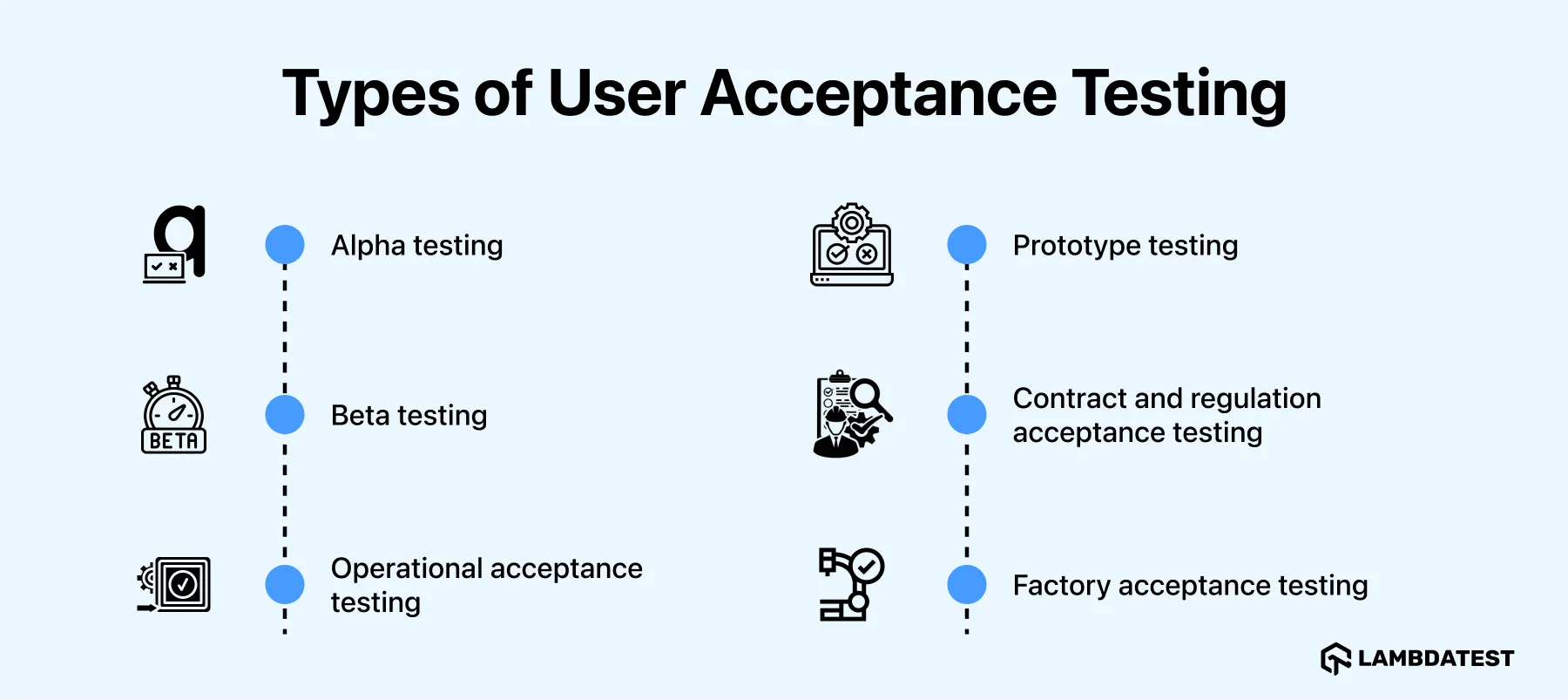
The main types of acceptance testing, alongside UAT, are alpha, beta, operational, contract and regulation, factory acceptance, and prototype testing.
Acceptance testing has six recognized forms, and UAT is one of them rather than an umbrella term for the rest. The ISTQB Foundation Level syllabus names user acceptance testing, operational acceptance testing, contractual acceptance testing, regulatory acceptance testing, alpha testing, and beta testing as the main forms.[3] What separates them is who accepts the system and where the testing happens, not how deep the testing goes.
Two further terms appear constantly in practice without appearing in that syllabus list: prototype testing and factory acceptance testing. Both are covered below because teams genuinely run them, but they are industry practice rather than ISTQB vocabulary. The ISTQB glossary carries no entry for factory acceptance testing or site acceptance testing at all, and contractual acceptance testing, though the syllabus names it, has no standalone glossary definition. Where a term has no standard definition behind it, your contract is what defines it.
Alpha testing
Alpha testing is acceptance testing performed in the developer's own test environment by roles outside the development organization.[4] The development team fixes what alpha testing finds before the build reaches any external audience.
Beta testing
Beta testing is acceptance testing performed at a site external to the developer's test environment, by roles outside the development organization.[5] Location is the discriminator between alpha and beta, not rigor: prospective customers run beta builds on their own hardware, networks, and data, which surfaces environment-specific failures a controlled lab never reproduces.
Operational acceptance testing
Operational acceptance testing determines whether the organization responsible for operating the system can accept it.[6] The acceptor is the operations or SRE team, not the business user, and that changes the entire test set: backup and restore, failover and disaster recovery, patching, monitoring and alerting, and access control.
Calling UAT the last gate before production skips this gate. A system can pass every business scenario and still be unrunnable, because nobody proved the restore path works. Teams that run acceptance testing as a single business-user event tend to discover that on the first bad night in production.
Prototype testing
Prototype testing puts an early build or clickable mock in front of a focus group to validate interface clarity before the final version exists, so design changes land while they are still cheap.
Contract and regulation acceptance testing
Contract acceptance testing validates the product against the criteria written into the contract or service level agreement. Regulatory acceptance testing determines the compliance of the test object against the rules it must satisfy,[7] covering data protection law and industry-specific regulation. Both answer to an external arbiter, so their evidence has to survive an audit rather than a release meeting.
Factory acceptance testing
Factory acceptance testing (FAT) validates software and hardware together inside the supplier's facility before anything ships. FAT is common in industrial, medical, and embedded systems, where it catches integration faults while the whole assembly is still on the supplier's bench.
How to Perform User Acceptance Testing?
The UAT process runs in seven steps, from business requirement analysis through to results recording. Each step produces an artifact the next one consumes, so skipping one leaves the following step guessing.
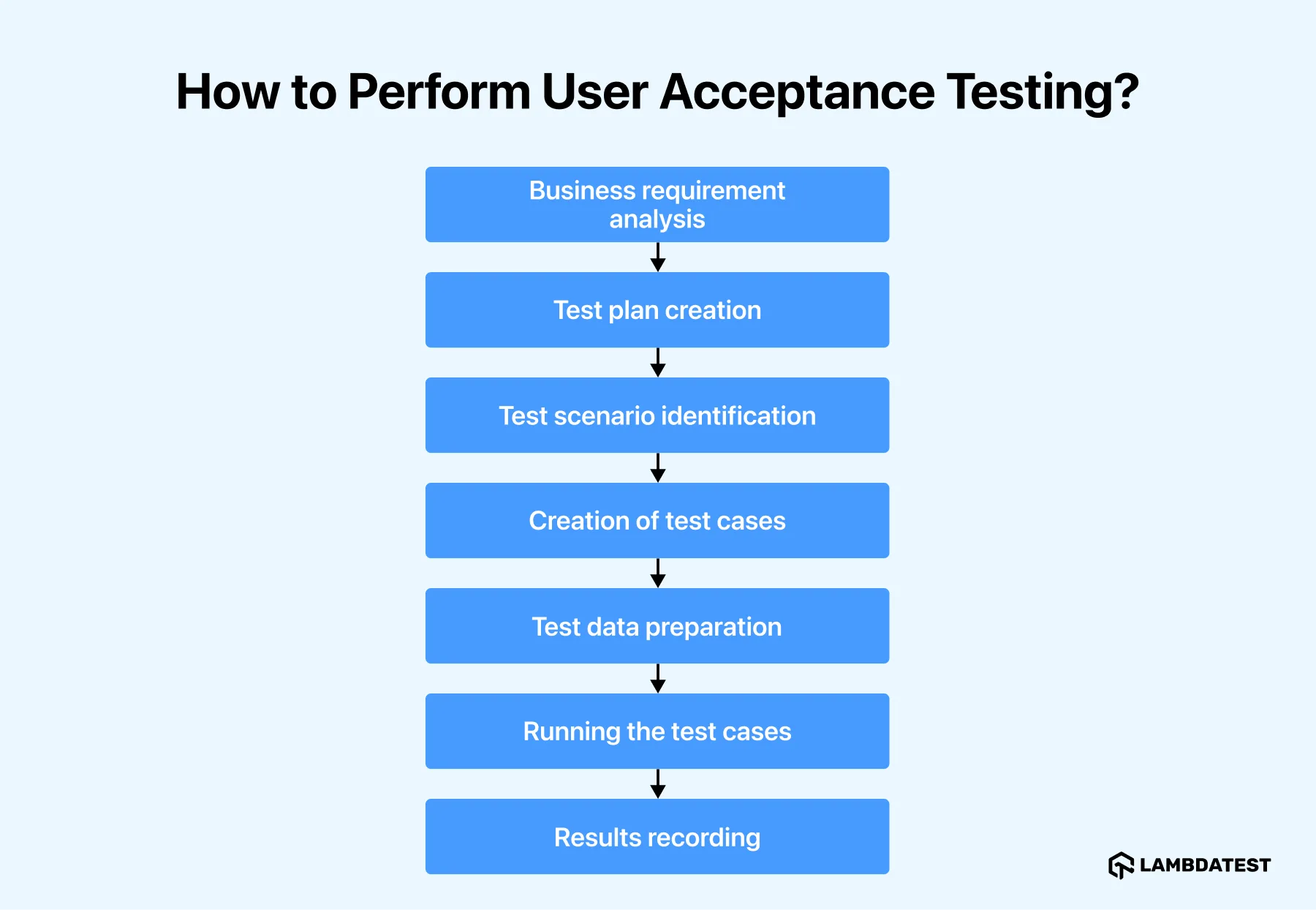
- Business requirement analysis
- Test plan creation
- Test scenario identification
- Creation of test cases
- Test data preparation
- Running the test cases
- Results recording
Derive the scenarios from business use cases, process flow diagrams, and the system requirements specification (SRS). The output is a list of real tasks users perform, not a list of features the build contains.
The plan documents entry and exit criteria, the test case approach, the scenarios, and the timeline. It is the artifact that tells everyone when UAT may start and when it is finished.
Prioritize the business processes that carry money, compliance, or customer commitments. Cover those end to end before spending time on lower-risk paths.
Write each case in business language with its acceptance criterion attached, and give testers the data flow they need to interpret results. See how to write a UAT test script for the step-level format, and test coverage for deciding what the case set must reach.
Build the data set the scenarios need before execution starts. Use production-like synthetic data that matches real volumes, edge cases, and character sets, and never copy live customer records into UAT. Real data breaks privacy rules and also narrows coverage, because your own account history contains only the paths you personally take.
Testers execute each scenario, mark it pass or fail against its acceptance criterion, and log every failure with reproduction steps, environment details, and a screenshot. Failed tests are fixed and re-run, not argued about. Test management tools hold the execution status and the defect trail in one place so the sign-off has evidence behind it.
Record the outcome and issue the acceptance decision. That means confirming no critical defect is still open, checking each business process against its criterion, capturing stakeholder feedback, and sending the dated sign-off that names who accepted what.
The deliverables from this step are the UAT scenarios, the test plan, the executed test cases, the defect log, and the sign-off record. Those five artifacts are what an auditor or a contract dispute asks for later.
What Are UAT Acceptance Criteria?
Acceptance criteria are the conditions a work product must satisfy to be accepted by the stakeholders.[8] In UAT they are the pass or fail rule for every scenario, and they are written and agreed before testing starts, not negotiated once a defect is in dispute.
A criterion is testable when two different testers reach the same verdict from it. That is the whole bar, and it is the one most criteria fail:
- Not testable: The checkout page loads quickly. Two testers will disagree, because neither has a threshold.
- Testable: The checkout page renders the payment form within 3 seconds on a 4G connection. The verdict is identical for anyone who runs it.
- Not testable: Invalid card details are handled gracefully. Graceful is an opinion.
- Testable: A declined card keeps the user on the payment step, shows the issuer decline reason, and preserves the cart contents.
Entry criteria and exit criteria bracket the UAT window. Entry criteria state what must be true before UAT starts: system testing complete, the UAT environment provisioned with test data, no open critical defects carried over, and the test scenarios signed off. Exit criteria state what must be true before sign-off, and they rest on four numbers: scenario pass rate, open defects by severity, defect density, and acceptance criteria coverage.
Who writes the criteria is a scope-control decision, not an administrative one. When business users derive their own scenarios from requirements they already approved, UAT stays a check against the agreed scope. When testers arrive without written criteria, UAT turns into a feature-request channel, and unrequested functionality gets logged as defects.
What Do UAT Test Cases Look Like?
A UAT test case describes a complete business task in the user's own language, with the data to use and the outcome that counts as acceptance. It never names a CSS selector, an API endpoint, or a database table, because the person running it is testing the business process rather than the implementation.
These illustrative examples cover a retail checkout release. Each one maps a scenario to the acceptance criterion that decides it:
| ID | Business scenario | Test data | Acceptance criterion |
|---|---|---|---|
| UAT-01 | A returning customer completes a purchase with a saved card | Account with 1 saved card, cart of 2 in-stock items | Order confirmation number displays and the confirmation email arrives within 5 minutes |
| UAT-02 | A customer applies a valid promotional code at checkout | Code SAVE10, cart subtotal of $80 | Order total drops to $72 and the discount line itemizes as SAVE10 |
| UAT-03 | A customer's payment is declined by the issuer | Test card that forces a decline response | User stays on the payment step, the decline reason shows, and the cart still holds both items |
| UAT-04 | A customer orders the last unit of a product | Product with stock quantity of 1 | Order completes and the product then displays as out of stock to a second customer |
| UAT-05 | A finance user exports the daily settlement report | Trading day with 3 refunds and 1 partial refund | Export totals reconcile to the order ledger for that date with no manual adjustment |
Notice what UAT-04 and UAT-05 have in common. Both cross a system boundary, into inventory and into finance, and both are the kind of case that passes in isolation and fails in an integrated environment. Those are the scenarios worth spending UAT time on, because the single-screen happy paths were already covered by system testing.

Which Tools Support User Acceptance Testing?
Common user acceptance testing tools include TestMu AI for real device and browser coverage, Tricentis Tosca for model-based business tests, and TestComplete for record-and-replay UI tests.
UAT tooling has to serve non-technical testers, so the selection criteria differ from an automation stack. What matters is how easily a business user can record a defect with evidence attached, and whether the team can put testers on the device and browser the customer actually uses.
TestMu AI
A recurring UAT constraint is device access: business testers sign off on whatever laptop they were issued, so defects that only appear on a customer's phone reach production unseen. TestMu AI is a cloud testing platform that gives testers a remote test lab reachable from a browser, with 10,000+ real Android and iOS devices for mobile app testing and 3,000+ real browser and OS combinations for web. Sessions record video and console logs, so a UAT defect report carries reproduction evidence instead of a description.
Tricentis Tosca
Tricentis Tosca is a model-based tool that builds automated tests from business processes rather than from scripts. It covers API testing, GUI testing, mobile testing, and data-driven testing, and the model-based approach is aimed at teams whose UAT scenarios map to documented process flows.
TestComplete
TestComplete is an automated testing environment that supports Windows, .NET, WPF, Visual C++, Visual Basic, Delphi, C++Builder, Java, and web applications and services. The breadth of desktop technology support makes it a fit where the system under acceptance is a thick client rather than a web app.
What Goes Into a User Acceptance Testing Design Template?
A UAT design template records the project name, testing objectives, test items, environment requirements, entry and exit criteria, the UAT team, and a change log for each release.
A UAT design template documents the plan for a given release so the same structure is reused every cycle. A ready-made UAT test case template with worked examples covers the case-level format; the sections below are what the plan document itself needs:
- Project name: The project and the software version under acceptance.
- Testing objectives: What this cycle must prove before sign-off.
- Test items: The features and processes in scope, and what is explicitly out.
- Environment requirements: The hardware, browsers, devices, and data set testers need.
- Entry criteria: The conditions that must hold before testing may begin.
- UAT team: The named testers and the named approver, by role.
- Exit criteria: The thresholds that signify testing is complete.
- Change log: Amendments made to the plan mid-cycle, dated.
Keep the template in business language throughout. A UAT document written in QA vocabulary gets skimmed by the people who are supposed to sign it, and a signature on a document nobody read does not represent a real acceptance decision.
How Do You Measure UAT?
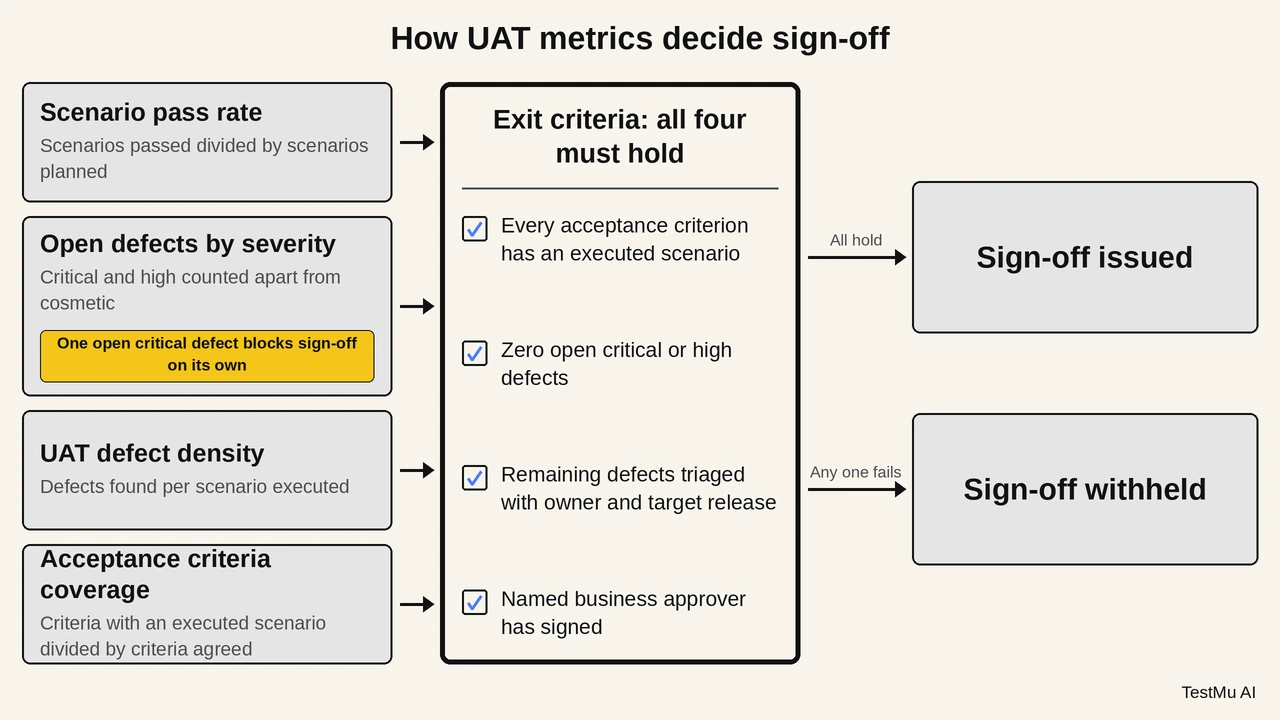
Measure UAT on four numbers: scenario pass rate, open defects by severity, defect density, and acceptance criteria coverage. Together they answer the only question sign-off asks, which is whether the remaining risk is acceptable to the people who own the process.
- Scenario pass rate: Executed scenarios that passed, divided by scenarios planned. Computing it against executed rather than planned scenarios hides the ones nobody got to.
- Open defects by severity: Count critical and high separately from cosmetic. A single open critical defect blocks sign-off regardless of how good the pass rate looks.
- UAT defect density: Defects found per scenario executed. This number measures the earlier test levels, not UAT.
- Acceptance criteria coverage: Criteria with at least one executed scenario, divided by criteria agreed. Anything below 100% means part of the signed scope was never checked.
Read defect density as an upstream signal. A UAT cycle that surfaces dozens of functional defects shows system testing let them through. Extending the UAT window treats the symptom. The response is to fix the earlier stage, because UAT is sized to confirm business fit rather than to act as a second QA pass.
Exit criteria turn those numbers into a decision. A workable set is: every agreed acceptance criterion has an executed scenario, zero open critical or high defects, all remaining defects triaged with an owner and a target release, and the named business approver has signed. Fix the thresholds before UAT starts, for the same reason acceptance criteria are written early.
One scaling caveat applies to multi-tenant products. UAT validates a system against a specific customer's requirements, so 50 enterprise customers with 50 configured workflows can mean 50 separate acceptance cycles rather than one. That arithmetic, not the testing effort itself, is what makes outsourced UAT hard to buy as a single service.
How Do You Run User Acceptance Testing on Real Devices in the Cloud?
Run UAT on a real device cloud so business testers can sign off on the exact phones, browsers, and OS versions customers use, without maintaining a physical device lab.
Business testers rarely have the customer's device on their desk, so acceptance happens on a corporate laptop and mobile-only defects survive to production. Running UAT sessions on a cloud device lab removes that gap without shipping hardware to anyone. The steps below start a real-device browser session on TestMu AI.
Step 1: Select Real Device from the left menu of the dashboard to access Browser Testing on mobile.
Step 2: Under the Real Device menu, click on Browser Testing. On the right side of the screen, you can provide the URL, and select the browser, device, device type, and OS version.
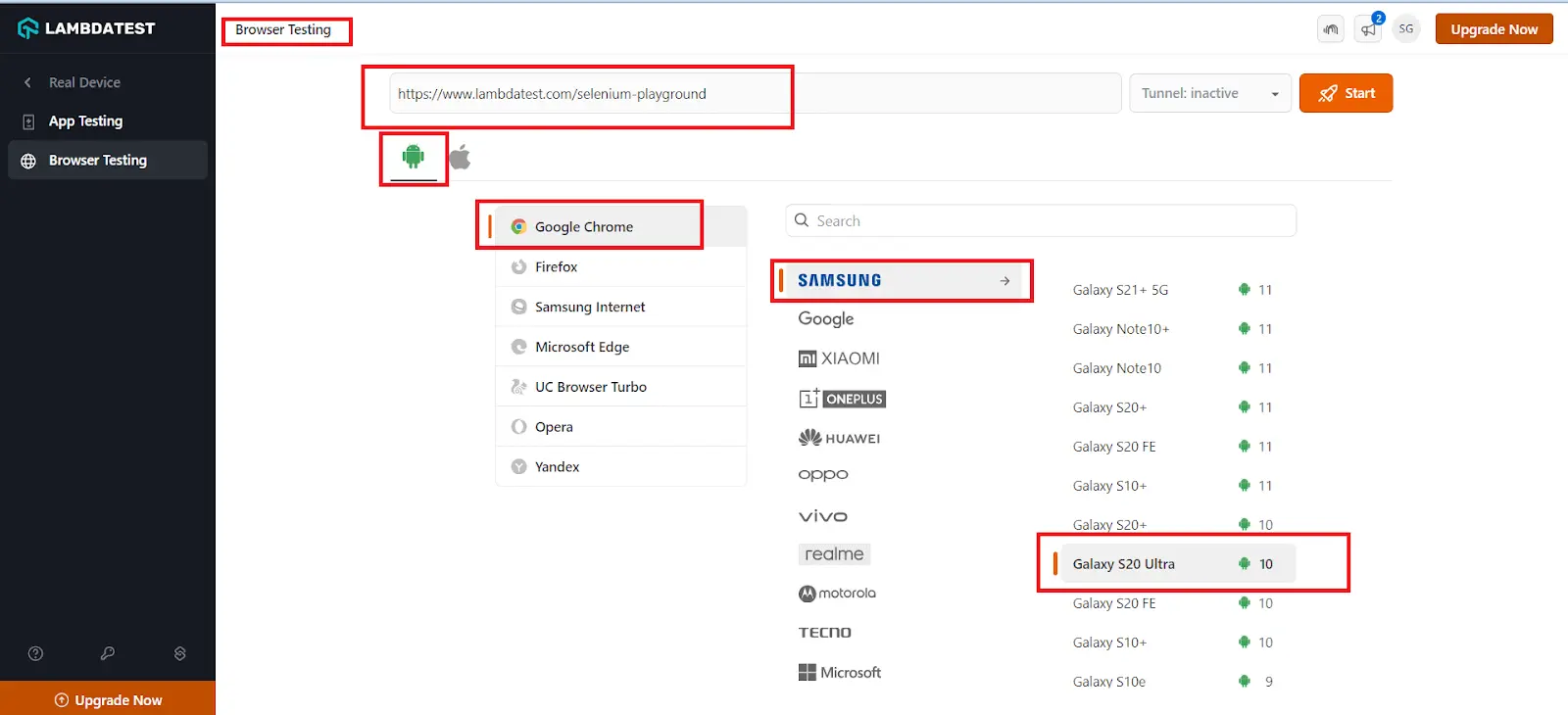
Step 3: Click the Start button and wait for the device to launch based on the configuration.
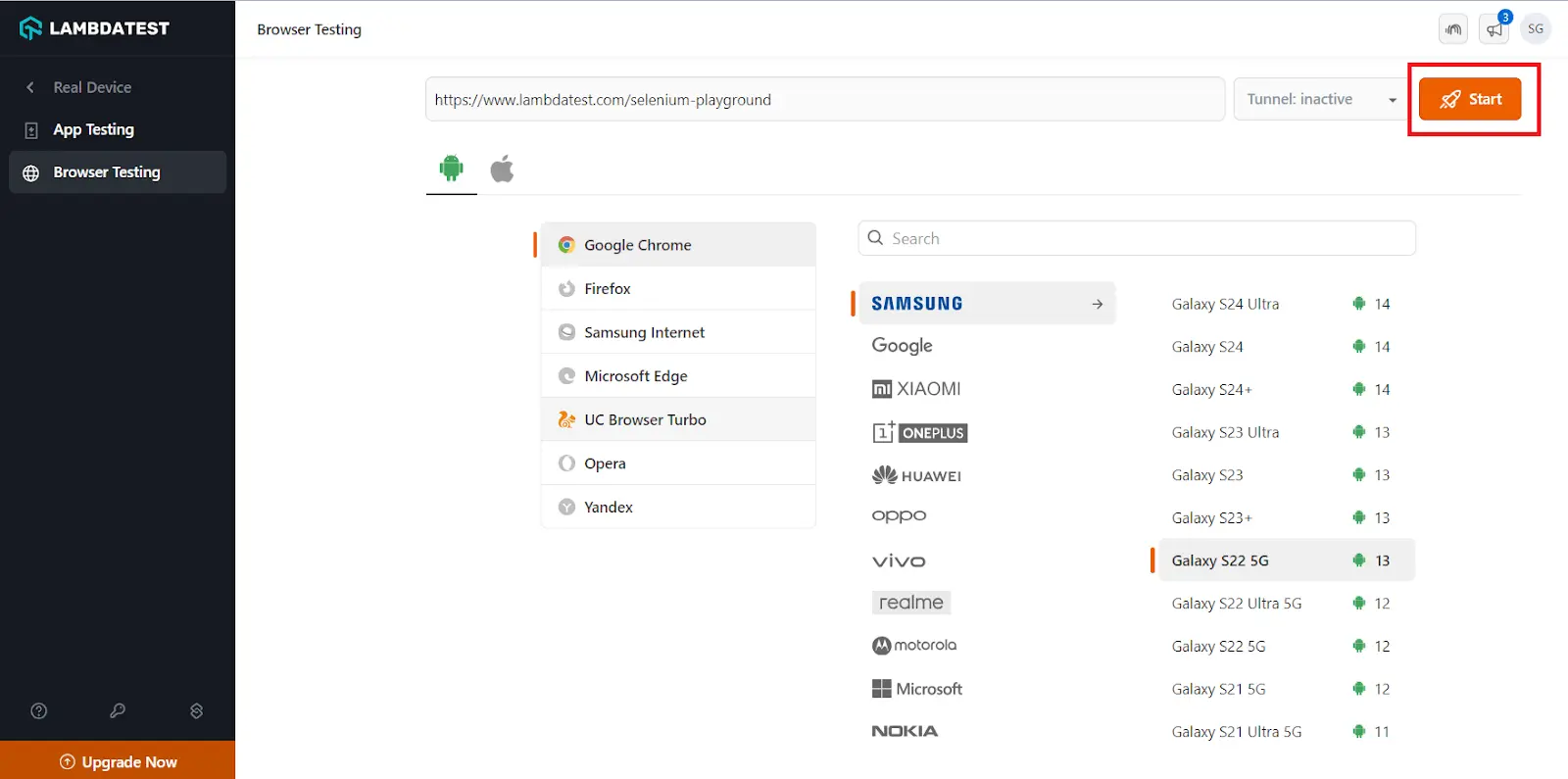
Once the device is launched, you can use various options to help you perform testing effectively. The real time browser testing documentation covers the session controls in detail.
How Is AI Changing User Acceptance Testing?
AI now turns user stories and acceptance criteria into draft UAT scenarios and lets business testers automate them in plain English, but the accept-or-reject decision still belongs to people.
Drafting scenarios: Language models convert acceptance criteria into Given-When-Then scenarios in Gherkin, the plain-text format Cucumber executes, so business users review and correct wording instead of writing every case from scratch.
Plain-English automation: Natural language test tools let business testers save an accepted UAT scenario as a sentence-level test and rerun it on each release, which turns yesterday's sign-off into today's regression check. For the mobile side, see this guide on automating acceptance tests for mobile apps.
Where AI stops: In the World Quality Report 2025-26, 60% of organizations named hallucination and reliability as a barrier to Gen AI in quality engineering. AI can confirm that a flow works; it cannot confirm that the business wants it, so UAT sign-off stays human.
What Are the Challenges in User Acceptance Testing?
Most UAT problems are scheduling and staffing problems, not testing problems. The business owns the testers, the developers own the fix window, and neither owns the calendar, so UAT gets compressed from both ends. The cost of that compression is asymmetric: a requirement rejected in UAT is rework, unscheduled change, and occasionally a cancelled project, which is why acceptance checkpoints belong early enough that rejection is still affordable.
- Lack of communication
- New stakeholder requirements
- Compressed scheduling
- Providing personal opinions
Business testers, analysts, and developers work from different vocabularies, so a defect described as "the report looks wrong" reaches a developer with nothing actionable in it. Route every UAT defect through one tracker with mandatory reproduction steps, environment, and a screenshot.
Testers who meet the system for the first time raise features nobody specified, and those arrive logged as defects. Triage them against the signed acceptance criteria: anything outside that scope becomes a backlog item for a later release, not a blocker for this one.
UAT sits last in the sequence, so every upstream delay eats its window while the release date holds. Plan the UAT slot during requirements and risk analysis, and protect it as a fixed duration rather than a buffer.
Putting UAT inside the definition of done has the same effect from the other direction, because it makes story completion depend on people outside the delivery team. Teams that hit this usually decouple with feature flags and let the business accept on its own schedule. The test strategy is where that decision belongs, alongside risk analysis and management strategies.
Preference feedback arrives mixed in with genuine defects, and dismissing it damages the relationship you need for the next cycle. Ask what task the tester was trying to finish. That reframes a colour complaint into either a usability defect with a criterion behind it, or a backlog item.
What Are the Best Practices for User Acceptance Testing?
The five UAT best practices are knowing your target users, writing a test plan, standardizing bug reports, defining clear acceptance criteria, and watching how users react to visual design.
Five practices separate a UAT cycle that produces a decision from one that produces a discussion:
- Identify and understand your target audience
- Develop the test plan
- Standardize bug reporting
- Define your acceptance criteria correctly
- Observe how your customers react to visual aspects
Map the user roles the release touches, then recruit a tester for each one. A finance approver and a warehouse operator hit different failure modes in the same order-management release, so a tester pool drawn from one department certifies one slice of the system. Keep the development team out of the tester pool entirely.
The plan names the objectives, the scenarios, the entry and exit criteria, and the schedule. Write it so a tester who has never seen the system can follow it unaided, because that is the actual reading level of your audience.
Require reproduction steps, environment details, and a screenshot or screen recording on every report. Session recording removes the argument entirely, because the developer watches what the tester did instead of reconstructing it.
Agree the criteria before testing starts, phrase them in business language, and make each one score pass or fail identically for two different testers. Criteria negotiated after a defect is raised no longer decide the outcome; they argue it.
Ask open-ended questions about layout, visual hierarchy, and color rather than asking whether the design looks good. Visual defects that testers notice but cannot articulate show up as hesitation, so watch where they pause. An automated visual testing tool catches the pixel-level regressions across browsers separately, which keeps the human session focused on comprehension instead of rendering bugs.

Note: Run UAT sessions on 3,000+ real browser and OS combinations with TestMu AI. Try it free
What Is the Difference Between User Acceptance Testing and Beta Testing?
UAT has clients or business users approve a release in a controlled environment, while beta testing gives a near-final build to real users for feedback at scale.
User Acceptance Testing (UAT) and beta testing are distinct yet complementary stages within the software development life cycle. Explore those differences from the table below.
| Aspects | User Acceptance Testing | Beta Testing |
|---|---|---|
| Core function | Verifies the system meets the signed business requirements. | Exposes a pre-release build to real-world use. |
| Participants | Named end users and stakeholders from the customer. | A selected group of external beta testers. |
| Location | A controlled UAT environment the project team provisions. | The testers' own environments, hardware, and networks. |
| Validation focus | Business fit, workflow completeness, acceptance criteria. | Bugs, performance, and usability under uncontrolled conditions. |
| Timing | Final validation before the release decision. | Pre-release, before general availability. |
| Exit signal | A dated sign-off naming who accepted the system. | Defect volume and feedback trending down to an acceptable level. |
What Is the Difference Between User Acceptance Testing and System Testing?
System testing checks the integrated system against its specification. UAT checks the same system against the business intent behind that specification, which is why the two differ on who runs them and what counts as a failure.
| Aspect | User Acceptance Testing | System Testing |
|---|---|---|
| Purpose | To check whether the software meets the user's requirements. | To check whether the software or product meets the specified requirements. |
| Performed by | It is performed by testers, stakeholders, and clients. | Developers and testers perform it. |
| Testing Type | Mostly functional, plus any non-functional criterion the business agreed to. | Both functional and non-functional testing. |
| Related Forms | A sibling of alpha, beta, and operational acceptance testing. | Constitutes system and integration testing. |
| Sequence | Done after system testing. | Done before acceptance testing. |
| Test Cases | Business scenarios covering expected paths and known failure paths. | Constitutes positive and negative test cases. |
| Input Checks | The system is checked against pre-agreed test data and acceptance criteria. | The system is checked for dummy inputs. |
Where Should You Start With User Acceptance Testing?
Start your next user acceptance testing cycle by writing the acceptance criteria before anyone opens a test case. Criteria that two testers score identically are what turn UAT from an opinion-gathering exercise into a decision, and they take an afternoon to agree on.
From there, provision a UAT environment with production-like synthetic data, put testers on the devices your customers actually use, and hold sign-off against the four metrics in this guide. The real device cloud covers the device side, and browser testing on real devices walks through the first session setup. Teams automating the regression layer underneath UAT can compare options in automation testing tools.
Which Sources Does This UAT Guide Cite?
The numbered sources below back the bracketed references in this UAT guide, including the ISTQB glossary definitions of user acceptance and acceptance testing.
- [1] Certified Tester Foundation Level Syllabus v4.0.1, Section 2.2.1 Test Levels - ISTQB (September 2024)
- [2] User Acceptance Testing - ISTQB Glossary
- [3] Certified Tester Foundation Level Syllabus v4.0, Section 2.2.1 Test Levels - ISTQB, GASQ mirror (April 2023)
- [4] Alpha Testing - ISTQB Glossary
- [5] Beta Testing - ISTQB Glossary
- [6] Operational Acceptance Testing - ISTQB Glossary
- [7] Regulatory Acceptance Testing - ISTQB Glossary
- [8] Acceptance Criteria - ISTQB Glossary
Author

Nazneen Ahmad
Blogs: 39


Nazneen Ahmad is a freelance Technical Content SEO Writer with over 6 years of experience in crafting high ranking content on software testing, web development, and medical case studies. She has written 60+ technical blogs, including 50+ top-ranking articles focused on software testing and web development. Certified in Automation Basic and Advanced Training - XO 10, she blends subject knowledge with SEO strategies to create user focused, authoritative content. Over time, she has shifted from quick, keyword-heavy drafts to producing content that prioritizes user intent, readability, and topical authority to deliver lasting value.
Reviewer

Abhishek Mishra
Reviewer
Abhishek Mishra is a Technical Product Manager at TestMu AI, where he owns Test Manager, the test management product. He has over 8 years of experience in product management and market analysis. His expertise spans across AI-native software testing, product strategy, and analytics. Previously, Abhishek served as the Product Lead at IndiaClan and co-founded Gartley618 Technologies, where he led innovative projects in quantitative trading and blockchain. He holds a B.Tech degree.


User Acceptance Testing FAQs
Did you find this page helpful?
More Related Learning Hubs
TestMu AI forEnterprise
Get access to solutions built on Enterprise
grade security, privacy, & compliance
- Advanced access controls
- Advanced data retention rules
- Advanced Local Testing
- Premium Support options
- Early access to beta features
- Private Slack Channel
- Unlimited Manual Accessibility DevTools Tests