
Power Your Software Testing with AI Agents and Cloud
The Native AI-Agentic Cloud Platform to Supercharge Quality Engineering. Test Intelligently and Ship Faster.


- TestMu AI (Formerly LambdaTest)
- /
- Learning Hub
- /
- Selenium WebDriver Tutorial: Commands & First Test (2026)
Selenium WebDriver: Architecture, Commands, and Your First Test
Selenium WebDriver drives real browsers through the W3C protocol. Learn the architecture, commands, locators, waits, and how to run your first test.
Last Updated on:
Selenium WebDriver is an open-source browser automation library that controls real browsers, including Chrome, Firefox, Safari, and Edge, by sending commands over the W3C WebDriver protocol.
You write tests in Java, Python, JavaScript, C#, Ruby, or PHP, and a browser driver such as ChromeDriver translates those commands into native browser actions.
That one design decision, talking to the browser through its own driver instead of injecting JavaScript into the page, is what separates WebDriver from the tools that came before it.
It is also why WebDriver became a W3C standard rather than staying one project's private API.
Overview
Do You Need to Install ChromeDriver Separately
No. Selenium 4 ships Selenium Manager, which detects your browser version, downloads the matching driver, and caches it automatically the moment you instantiate the driver.
What Skills Do You Need Before Learning Selenium WebDriver
Four fundamentals carry most of the learning curve.
- A programming language: Java or Python covers most jobs; the WebDriver API stays consistent across bindings.
- HTML and the DOM: you cannot locate an element reliably without reading page structure.
- CSS selectors and XPath: the two locator syntaxes every real suite depends on.
- A test framework: TestNG, JUnit, or pytest supplies assertions, reporting, and parallel runs.
This tutorial covers what WebDriver is, how the protocol works, how to install it and run a first test, the commands and locators you use daily, and the exceptions that break most suites.
What Is Selenium WebDriver?
Selenium WebDriver is the Selenium component that drives a browser natively, exposing an object-oriented API for finding elements, clicking them, typing into them, and reading what the page returns.
It ships as two halves that are easy to confuse. The language bindings are the library you install into your project.
The browser drivers are separate executables, one per browser, that receive commands and carry them out. Neither works without the other.
The word WebDriver also names the W3C WebDriver specification, the standard that defines the wire protocol. Selenium implements that standard, and so do other tools, which is why the term shows up outside Selenium entirely.
What you get from that design:
- Real browser behaviour. Commands run through the browser's own automation interface, so rendering, JavaScript, and cookies match what a user gets.
- No intermediate server. Your test talks to the driver directly. The old Selenium RC proxy server and its latency problems are gone.
- Language freedom. Java, Python, JavaScript, C#, Ruby, and PHP are supported with a near-identical API, so web automation knowledge transfers between languages.
- A stable target. Because the protocol is a W3C standard, vendors ship conforming drivers, so your code needs no per-browser branching.
The trade-off is that WebDriver gives you a browser, not a test framework. Assertions, reporting, retries, and parallelism come from tools you bolt on, usually TestNG or JUnit tutorial in Java, or pytest in Python.
Selenium vs Selenium WebDriver: What's the Difference?
Selenium is the umbrella project shipping IDE, Grid, and WebDriver. WebDriver is the library inside it that drives browsers, and W3C WebDriver is the standard it implements but does not own.
| Term | What it actually is | When you mean it |
|---|---|---|
| Selenium | The umbrella open-source project, which ships three tools: IDE, Grid, and WebDriver. | "We automate our tests with Selenium." |
| Selenium WebDriver | The library inside that project which drives browsers. This is what you import and write code against. | "WebDriver threw a StaleElementReferenceException." |
| W3C WebDriver | The browser-automation standard published by the W3C. Selenium implements it, but does not own it. | "The driver conforms to the W3C WebDriver protocol." |
The other two tools in the Selenium suite are worth knowing, because you will eventually reach for both.
Selenium IDE is a record-and-playback browser extension. It is genuinely useful for prototyping a flow or showing a non-coder what a test looks like.
It is not built for maintaining a real suite, because exported scripts are brittle and hard to refactor.
Selenium Grid on TestMu AI is a server that distributes test execution across multiple machines and browsers. WebDriver drives one browser; Grid is how you drive two hundred at once.
One more name you will meet in old tutorials is Selenium RC. It was the pre-WebDriver approach, and it worked by injecting JavaScript into the page through a proxy server.
WebDriver replaced it in Selenium 2 and it was removed entirely in Selenium 3. If a guide tells you to start a Selenium server before running a test, it is out of date.
How Does Selenium WebDriver Work?
Selenium WebDriver sends each command from your test as JSON over HTTP to a browser driver, which runs it in the browser and returns the result.
Every WebDriver command travels one path: your test calls the binding, the binding sends JSON over HTTP to a browser driver, the driver executes it natively, and the response returns as JSON.
Every WebDriver command travels the same four-step path.
- Your test calls the binding. driver.findElement(By.id("username")) is a method in the Java, Python, or C# client library.
- The binding sends an HTTP request. It serialises the command to JSON and posts it to the browser driver.
- The browser driver executes it natively. ChromeDriver drives Chrome through its own automation interface; GeckoDriver uses Marionette for Firefox.
- The response comes back as JSON. The binding deserialises it into a WebElement, a string, or an exception.
Concretely, when you call driver.get("https://example.com"), the binding sends this:
POST /session/8f2a1c9e4b7d/url HTTP/1.1
Host: localhost:9515
Content-Type: application/json

{"url": "https://example.com"}

--- response ---
HTTP/1.1 200 OK
{"value": null}
That 8f2a1c9e4b7d is the session ID. It is created when you instantiate the driver and destroyed when you call driver.quit().
Forgetting to quit is why orphaned browser processes pile up on CI machines. The worst case I cleaned up was a build box carrying nearly three hundred stranded Chrome processes.
Two practical consequences fall straight out of this design.
The driver is a separate program with its own version. ChromeDriver 150 will refuse to drive Chrome 151.
That mismatch is the single most common setup error in Selenium, and it exists because the driver is not part of your test process. Selenium Manager, built into Selenium 4, now resolves this for you.
Every command is a network round trip. A test that calls findElement fifty times makes fifty HTTP requests.
This is why chatty tests are slow, and why locating an element once and reusing the reference beats re-querying it in a loop.
Because the protocol is standardised in the W3C WebDriver specification, the same request works against any conforming driver.
Swapping ChromeDriver for GeckoDriver changes nothing in your test code, only the capabilities you pass at session creation.
The official Selenium WebDriver documentation is the reference for command-level detail. For a deeper breakdown of the client-driver-browser chain, see our guide to Selenium WebDriver architecture.

Note: Automate your web application testing using Selenium WebDriver. Try TestMu AI Now!
What Are the Key Features of Selenium WebDriver?
Selenium WebDriver's key features are native browser control over the W3C WebDriver protocol, official bindings for six languages, and remote execution on grids.
Five features do most of the work in a real WebDriver suite.
- Native browser control. Commands run through each browser's own automation interface, not injected JavaScript, so your test sees what a user sees.
- Six official bindings. Java, Python, JavaScript, C#, Ruby, and PHP, with an API close enough that porting is mostly syntax.
- Cross-browser coverage. Chrome, Firefox, Safari, and Edge ship W3C-conforming drivers, so one suite covers four browsers without branching.
- Explicit waits. WebDriverWait with ExpectedConditions waits for a specific condition instead of sleeping. This is what makes a suite survive CI.
- Remote execution. Swap ChromeDriver for RemoteWebDriver and pass a hub URL, as covered in the Selenium Grid guide.
It is worth being clear about what is not a WebDriver feature.
It does not generate test reports, it has no assertion library, and it has no built-in runner. Those come from TestNG, JUnit, pytest, or a reporter such as Allure.
Why Use Selenium WebDriver in 2026?
Use Selenium WebDriver in 2026 when you need a language other frameworks lack, real Safari on macOS, or the wide W3C ecosystem of grids and tools.
Selenium WebDriver still wins when you need a language Playwright or Cypress lacks, real Safari on macOS, the wide W3C ecosystem of grids and device clouds, or you already run a large suite.
Selenium WebDriver still wins in four situations, and they are common enough that it remains the most widely deployed automation tool in the industry.
- You need a language beyond JavaScript or Python. Playwright omits Ruby and PHP; Cypress is JavaScript only. WebDriver covers six.
- You need real Safari. safaridriver drives the real shipping browser on macOS and iOS, which a WebKit build cannot replicate.
- You want protocol interoperability. Grids, device clouds, Appium, and reporting tools all speak the W3C standard.
- You already have a suite. Rewriting thousands of working tests for a faster runner is rarely a quarter's best investment.
Selenium does trail in places: network interception and browser-context isolation are newer and less ergonomic. And test execution is slower, because every command is an HTTP round trip.
WebDriver BiDi is closing part of that gap by adding a bidirectional channel to the standard, bringing event-driven capabilities such as console-log capture and network interception into the specification itself.
For the full side-by-side, see Playwright vs Selenium vs Cypress.
What Selenium 4 Changed Under the Hood
It uses the W3C standard protocol, which means the way the driver and browser talk to each other follows a set procedure.
Because of this, there's no need for special coding and decoding when they send requests and responses using this protocol.
To learn more about Selenium 4, watch this complete video tutorial to learn what’s new in Selenium 4, its features, and more.

As we keep reading, let's look into more details about Selenium WebDriver, its architecture, features, and more in the further sections.
Selenium 4 WebDriver Architecture
In Selenium 4, the JSON Wire protocol is entirely replaced by the W3C Protocol, marking a shift towards W3C standardization.
Selenium 3 versions 3.8 to 3.141 used both protocols concurrently. Stable Selenium 4 works exclusively on the W3C Protocol, discontinuing the JSON Wire Protocol. The diagram below shows Selenium 4 WebDriver architecture.
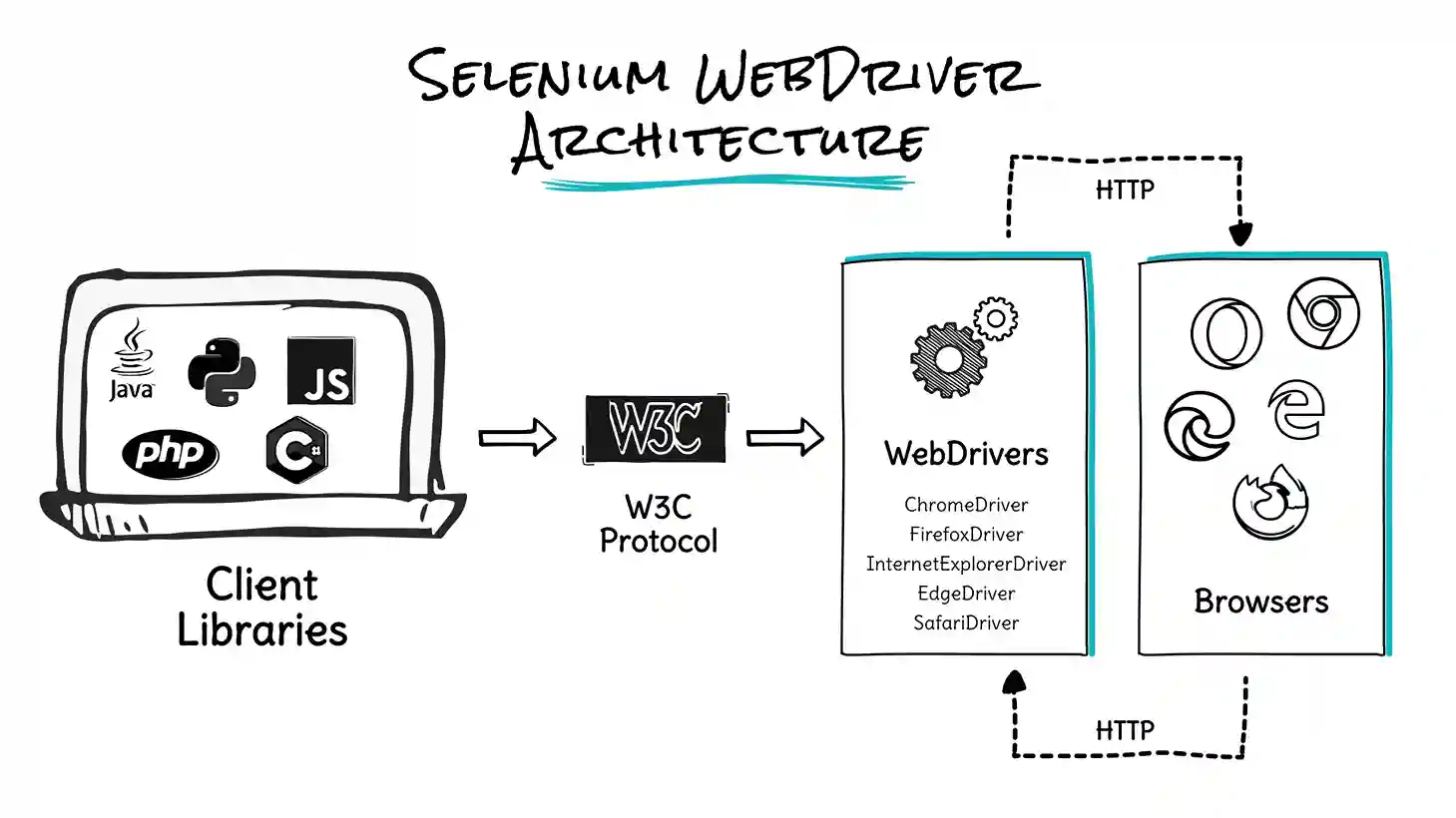
Working of Selenium 4 WebDriver
Selenium WebDriver W3C Protocol architecture reveals a direct exchange of information between the client and server, removing the dependency on the JSON Wire Protocol.
This design aligns with Selenium Web Driver protocols and web browsers, ensuring its text execution is more consistent across various browsers. The use of a standard protocol significantly decreased flakiness in web automation.
With WebDriver W3C Protocol in action, automation testers no longer need to change the automation test scripts to work across different web browsers.
Stability and test consistency are the two significant advantages of WebDriver W3C protocol in Selenium 4.
Now, let us look into the advantages of Selenium 4 WebDriver in detail.
Advantages of Selenium 4 WebDriver using W3C standard protocol
In this section, you will understand the advantages of Selenium 4 WebDriver based on its new W3C standard protocol.
- Consistent Tests Across Browsers
- Stability Assurance
- Relative Locators
- above
- below
- toLeftOf
- toRightOf
- near
- Native Support for Chrome DevTools Protocol
- The CDP Endpoint suits simple tasks, but needs magic strings for domains and methods, and is only temporarily supported.
- The CDP API allows asynchronous actions and works with supported classes and methods rather than a String and Map. Also temporary.
- The BiDi API is preferred. It abstracts implementation details and works whether Selenium uses CDP or moves away from it.
Maintaining tests across multiple browsers ensures a smooth user experience. Selenium's WebDriver interface and browser-specific drivers facilitate uniform test script creation, allowing you to efficiently identify and address compatibility issues across various browsers.
Selenium 4's standard protocol ensures stable test automation. It enhances reliability by optimizing browser interactions, leading to consistent and dependable test execution.
Selenium 4.0 added a locator type first called Friendly locators, later renamed Relative locators. These find WebElements by their position relative to other elements on the webpage.
Selenium uses the JavaScript function getBoundingClientRect() to figure out the size and location of elements on a webpage. This information is then used to find the following elements.
Selenium 4 introduces five new locators that help us to locate the web elements by their position concerning other web elements such as above, below, toLeftOf, toRightOf, and near.
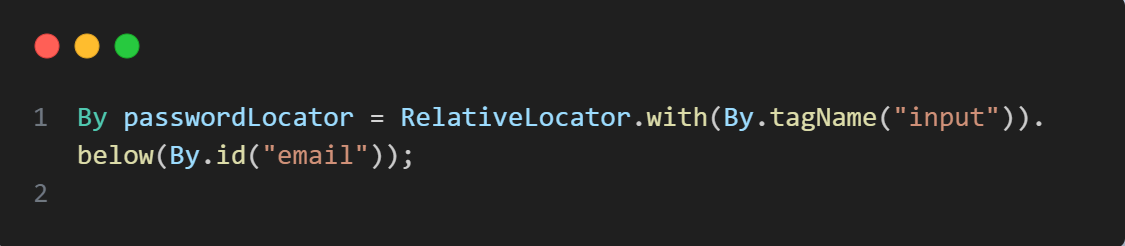
To understand better, take the example of a relative locator shown below.
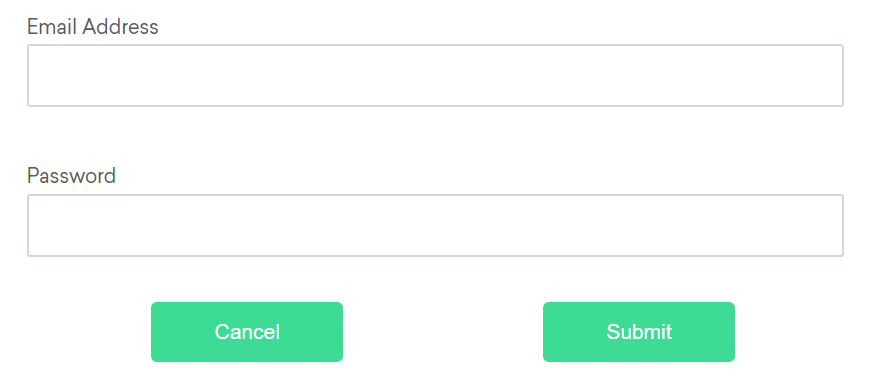
Selenium 4 ships five relative locators, each describing a position against a known element.
The email text field cannot be identified, but the password text field is easily identifiable.
In that case, we can locate the email text field by recognizing the input field of the password and using the above function to identify the email text field.

If it is difficult to identify the password text field but more straightforward, we can find the password input files using the below element of the email input field.
Suppose it's challenging to find the cancel button for any reason, but the submit button is easy to identify.
In that case, we can locate the cancel button by recognizing that it is a "button" to the LeftOf the submit button.
That relative locator resolves as the screenshot below shows.

Suppose it's challenging to find the submit button, but the cancel button is still easily identifiable. In that case, you can locate it by noting that it is a "button" positioned RightOf the cancel element.
In the image below, the cancel button anchors the lookup.

If the position of an element isn't clear or changes with the window size, you can use the near method. This helps identify an element at most 50 pixels away from the given location.
A practical scenario for this is when dealing with a form element that lacks a straightforward locator, but its associated input label can be used.
Below, a form element lacks any straightforward locator of its own.

Many web browsers offer "DevTools," a set of integrated tools for developers to debug web applications and assess page performance.
Google Chrome's DevTools use a protocol known as the Chrome DevTools Protocol (CDP). Unlike being designed for testing, CDP lacks a stable API, and its functionality heavily relies on the browser version.
The WebDriver BiDirectional Protocol is the next generation of the W3C WebDriver protocol. Its goal is to establish a stable API universally implemented by all browsers, although it has yet to develop fully.
In the meantime, Selenium provides access to CDP for browsers like Google Chrome, Microsoft Edge, and Firefox that implement it. This allows testers to enhance their tests in exciting ways.
Here are the three ways to use Chrome DevTools with Selenium.

How Do You Set Up Selenium WebDriver?
Setup needs three things: JDK 17 or later, Maven or Gradle to pull the Selenium dependency, and a local browser. Selenium Manager then resolves and version-matches the browser driver for you.
The examples here use Java, because it is still the most common Selenium stack. You need three things.
- A supported JDK. Selenium publishes the current minimum in its install library documentation. Verify yours with java -version.
- A build tool. Maven or Gradle, to pull the Selenium dependency.
- A browser. Chrome, Firefox, or Edge installed locally.
Step 1: Add the Selenium dependency
In your Maven pom.xml:
<dependency>
    <groupId>org.seleniumhq.selenium</groupId>
    <artifactId>selenium-java</artifactId>
    <version>4.46.0</version>
</dependency>
Check Maven Central for the current release before copying that version number, because Selenium ships often. For Gradle, in build.gradle:
implementation 'org.seleniumhq.selenium:selenium-java:4.46.0'Step 2: Confirm the driver resolves
There is no step 2 for most people. Instantiating new ChromeDriver() triggers Selenium Manager, which detects your Chrome version, fetches the matching ChromeDriver, and caches it.
If your CI runners have no outbound internet access, Selenium Manager cannot download anything.
In that case pin the driver in your image and point Selenium at it with the webdriver.chrome.driver system property, or use WebDriverManager in Selenium with a configured mirror.
How Do You Run Your First Selenium WebDriver Test?
Run your first Selenium WebDriver test by opening a page, finding an element, typing and submitting, waiting for the result, and closing the browser.
A first WebDriver test opens a page, locates an element, types into it, submits, waits for the result with an explicit wait, prints the output, and quits the driver inside a finally block.
import org.openqa.selenium.By;
import org.openqa.selenium.WebDriver;
import org.openqa.selenium.WebElement;
import org.openqa.selenium.chrome.ChromeDriver;
import org.openqa.selenium.support.ui.ExpectedConditions;
import org.openqa.selenium.support.ui.WebDriverWait;
import java.time.Duration;

public class FirstWebDriverTest {

    public static void main(String[] args) {
        WebDriver driver = new ChromeDriver();

        try {
            driver.get("https://www.testmuai.com/selenium-playground/simple-form-demo");

            WebElement messageBox = driver.findElement(By.id("user-message"));
            messageBox.sendKeys("Hello from Selenium WebDriver");

            driver.findElement(By.id("showInput")).click();

            WebDriverWait wait = new WebDriverWait(driver, Duration.ofSeconds(10));
            WebElement output = wait.until(
                ExpectedConditions.visibilityOfElementLocated(By.id("message")));

            System.out.println("Displayed message: " + output.getText());
        } finally {
            driver.quit();
        }
    }
}
Run it. Chrome opens, the form fills itself, and your console prints the displayed message.
What each part is doing
| Line | What it does | Why it matters |
|---|---|---|
| new ChromeDriver() | Starts ChromeDriver as a local server and opens a browser session. | This creates the session described in the protocol walkthrough above. It lives until you quit. |
| driver.get(...) | Navigates to a URL and blocks until the page load event fires. | One of the few commands that waits on its own. Most do not. |
| findElement(By.id(...)) | Locates a single element and returns a reference to it. | Throws NoSuchElementException immediately if the element is not there yet. |
| WebDriverWait | Polls until the condition is true or the timeout expires. | The correct way to handle async pages. Never use Thread.sleep() for this. |
| driver.quit() | Ends the session and kills the driver process. | Placed in a finally block so a failed assertion cannot leak a browser process. |
Two habits are worth forming from the very first test. Put driver.quit() in a finally block or a teardown method, because orphaned Chrome processes are the most common way CI machines run out of memory.
And reach for WebDriverWait the moment something loads asynchronously, rather than adding a sleep and moving on.
To turn this into a real test rather than a main method, wrap it in TestNG or JUnit and replace the println with an assertion.
Note: Run this same script across 3,000+ real browser and OS combinations. Try TestMu AI Now!
Which Languages Does Selenium WebDriver Support?
Six languages have official bindings: Java, Python, JavaScript, C#, Ruby, and PHP. The API stays consistent across all of them, so concepts transfer even though method casing differs per language.
| Language | Package | Typical test framework | Notes |
|---|---|---|---|
| Selenium Java | selenium-java (Maven) | TestNG, JUnit | The most widely deployed stack, with the largest ecosystem of examples and reporters. |
| Selenium Python | selenium (pip) | pytest, unittest | Fastest to get running. Popular for scripting and scraping as well as testing. |
| Selenium JavaScript | selenium-webdriver (npm) | Mocha, Jest | Fully promise-based. Note this is the Selenium binding, not WebdriverIO. |
| Selenium C# tutorial | Selenium.WebDriver (NuGet) | NUnit, MSTest, xUnit | The standard choice in .NET shops. |
| Ruby | selenium-webdriver (gem) | RSpec, Cucumber | A smaller community than it once had, but the binding is actively maintained. |
| Selenium PHP | php-webdriver (Composer) | PHPUnit, Behat | A community-maintained binding rather than a first-party one. |
Pick the language your team already writes production code in.
The argument that one binding is meaningfully faster than another does not survive contact with reality, because the bottleneck is the HTTP round trip to the driver, not the client library.
Selenium 4 vs Selenium 3: What Changed?
Selenium 4 speaks the W3C WebDriver standard natively, while Selenium 3 used the JSON Wire Protocol and needed per-browser translation. Selenium 3 is end of life and no longer maintained.
The headline change is the protocol. Selenium 3 spoke the JSON Wire Protocol and had to translate every command for each browser.
Selenium 4 speaks W3C WebDriver natively, which the browsers themselves implement, so that translation layer and a whole class of flakiness with it are gone.
| Area | Selenium 4 | Selenium 3 |
|---|---|---|
| Protocol | W3C WebDriver standard, spoken natively by browser drivers. | JSON Wire Protocol, requiring per-browser translation. |
| Driver management | Selenium Manager is built in and resolves drivers automatically. | Manual binary downloads, or a third-party WebDriverManager. |
| Locators | Adds relative locators: above(), below(), toLeftOf(), toRightOf(), and near(). | The eight classic strategies only. |
| DevTools access | Native Chrome DevTools Protocol support for network interception, console logs, and geolocation mocking. | Not available. |
| Waits | Duration-based, for example Duration.ofSeconds(10). | Integer plus TimeUnit. Deprecated in Selenium 4. |
| Selenium Grid | Rewritten with a new UI, Docker support, and standalone or hub-and-node modes. | Hub-and-node only, with no Docker support. |
| Window handling | newWindow() opens a tab or window directly. | Required a JavaScript workaround. |
Migration is usually smaller than teams expect. The changes that actually bite are the Duration-based waits and the removal of the old DesiredCapabilities constructors.
Both are mechanical fixes. On the last suite I moved across, migration came to an afternoon of find-and-replace and an afternoon of re-running.
See what is deprecated in Selenium 4 and our guide on upgrading from Selenium 3 to Selenium 4.
Looking forward, WebDriver BiDi is the next step. Classic WebDriver is request-response: your test asks, the browser answers.
BiDi adds a persistent bidirectional channel so the browser can push events back, including console messages, network requests, and JavaScript errors. It standardises across browsers what Chrome DevTools Protocol offers on Chromium only.

What Are the Limitations of Selenium WebDriver?
Selenium WebDriver cannot test desktop or native mobile apps on its own, has no built-in reporting or visual checks, and needs explicit waits to avoid flaky timing.
The previous section weighed Selenium against its alternatives. These are the hard boundaries no comparison changes.
Knowing these boundaries is also how you recognise when a Selenium alternative is the better fit.
- Web only. Desktop applications are out of scope. Native OS dialogs such as a file picker need AutoIt or a workaround.
- No reporting, assertions, or test runner. These come from TestNG, JUnit, pytest, or Allure. WebDriver drives the browser only.
- CAPTCHA is a deliberate wall. Disable it in test environments. See how to handle CAPTCHA in Selenium.
- Mobile apps need Appium. WebDriver automates mobile browsers, but native apps and multi-touch gestures need Appium, which extends the protocol.
- You have to write your own waiting. WebDriver does not auto-wait like Playwright. AJAX-heavy pages work fine with deliberate explicit waits.
- It requires real programming. There is no codeless path. Your team needs a language plus working DOM, CSS, and XPath knowledge.
One claim worth correcting, because it is repeated often: WebDriver cannot handle dynamic elements. That is not accurate. WebDriver handles dynamic content perfectly well.
What it does not do is wait for that content automatically, which is a different problem with a known fix.
What Are the Most Used Selenium WebDriver Commands?
WebDriver exposes a few dozen commands. In practice, about fifteen of them cover the overwhelming majority of what a suite does. Here they are in one place, in Java syntax.
| Command | What it does |
|---|---|
| driver.get(url) | Navigate to a URL and wait for the page load event. |
| driver.getTitle() | Return the current page title. |
| driver.getCurrentUrl() | Return the current URL, useful after a redirect. |
| driver.findElement(By) | Locate one element. Throws if nothing matches. |
| driver.findElements(By) | Locate all matches. Returns an empty list if none. |
| element.click() | Click an element. |
| element.sendKeys(text) | Type into an input. |
| element.clear() | Empty an input field. |
| element.getText() | Return the rendered text of an element. |
| element.getAttribute(name) | Read an attribute or property value. |
| element.isDisplayed() | Check visibility. Also isEnabled() and isSelected(). |
| driver.navigate().back() | Browser history navigation. Also forward() and refresh(). |
| driver.switchTo().frame(x) | Move context into an iframe. Also alert() and window(). |
| driver.manage().window() | Resize, maximise, or reposition the window. |
| driver.quit() | End the session and close every window. |
One distinction catches people out early. findElement throws a NoSuchElementException when nothing matches, while findElements returns an empty list.
If you want to check whether something exists without failing the test, use the plural form and check the size. See findElement and findElements in Selenium.
The rest of this section breaks the commands into groups with worked examples. These methods are called on the driver variable, as driver.methodName().
Browser Initialization Commands
You can initiate any browser of your choice by following the commands below. In this case, we have covered the commands based on the most popular browsers like Firefox, Chrome, and Edge.
Firefox Syntax
WebDriver driver = new FirefoxDriver();This code builds a link between your Selenium test script and the Firefox web browser, allowing for smooth communication. As a mediator, the WebDriver enables your script to interact with the browser effortlessly.
By naming this intermediary as a driver and utilizing the new FirefoxDriver(), we instruct the code to connect to Firefox, enabling us to automate tests.
Google Chrome Syntax
WebDriver driver=new ChromeDriver();This code builds a link between your Selenium test script and the Firefox web browser, allowing for smooth communication. As a mediator, the WebDriver enables your script to interact with the browser effortlessly.
By naming this intermediary as a driver and utilizing the new ChromeDriver(), we instruct the code to connect to Chrome, enabling us to automate tests.
Edge Syntax
WebDriver driver=new EdgeDriver ();This code builds a link between your Selenium test script and the Firefox web browser, allowing for smooth communication. As a mediator, the WebDriver enables your script to interact with the browser effortlessly.
By naming this intermediary as a driver and utilizing the new EdgeDriver(), we instruct the code to connect to Edge, enabling us to automate tests.
Browser Commands
Now that we've set up the browser, the next step is to perform operations like opening a website, closing the browser, getting the page source, and more.
The commands below make the browser do these tasks.
get(): The Selenium command above opens a new web browser and goes to the provided website. It needs a single piece of information, usually the website's address.
driver.get("https://www.testmuai.com");getCurrentUrl(): This Selenium command tells us the web address (URL) of the page currently displayed in the browser.
String url = driver.getCurrentUrl();getTitle(): This command helps you retrieve the title of the current web page.
String pageTitle = driver.getTitle();getPageSource(): The command above allows you to retrieve the source code of the last loaded page. Additionally, you can use it to check if specific content is present by using the contains method.
String j=driver.getPageSource();
boolean result = driver.getPageSource().contains("String to find");
getClass(): If you want to get the runtime class name of an object, you can use the above command to achieve it.
driver.getClass();Browser Navigation Commands
There are various navigation commands like back(), forward(), and refresh(). This command helps in traversing back and forth in the browser tabs.
navigate().to(): This command opens a new browser window and loads a new webpage. It requires a String (usually a URL) as input and doesn't return any value.
driver.navigate().to("http://www.testmuai.com");refresh(): If you want to test how a page responds to a refresh, you can use the following command to refresh the current window.
driver.navigate().refresh();back(): This command is frequently used for navigation, allowing you to return to the previous page you visited.
driver.navigate().back();forward(): Just like the "back" action, the "forward" action is commonly used for navigation. You can employ the above command to move to the page you were on before using the back button.
driver.navigate().forward();Web Elements Commands
Now that we've learned how to open the browser and execute different browser actions, let's move on to Selenium commands for identifying and interacting with WebElements, such as text boxes, radio buttons, checkboxes, and more.
WebElements play a crucial role in automating test scripts.
findElement(): This enables you to locate a web element on the web page and find the first occurrence of a web element using a specified locator.
WebElement searchBox = driver.findElement(By.id("search"));To learn more about it, follow this guide on Selenium locators.
click(): This command allows you to simulate a mouse click operation on specified buttons web element
driver.findElement(By.xpath("//div//input[@id='search']")).click();sendKeys(): This command simulates typing keyboard keys into a web element, mainly input fields such as username or password, or any field accepting string, number, or alphanumeric input.
driver.findElement(By.xpath("//input[@id='id_q']")).sendKeys("pass your text here"); If you're a beginner and want to learn more about sendKeys() functionality, explore this blog on sendKeys() in Selenium.
This will give you valuable insights into efficient and effective use within your Selenium test automation projects.
clear(): This command helps you clear the data entered in the input field via sendKeys().
driver.findElement(By.xpath("//input[@id='search']")).clear();getLocation(): This command lets you find out where an element is located on a web page. You can use it to retrieve a specific component's position or interact with the textbox area using coordinates.
- To retrieve the position of a specific element:
org.openqa.selenium.Point location;
location = driver.findElement(By.xpath("//input[@id='search']")).getLocation();org.openqa.selenium.Point location;
action.moveByOffset(location.x, location.y).click().sendKeys("pass your text here").perform();getSize(): This command helps you get the height and width, in other words, the dimensions of an object. You can use the command below.
Dimension dimension=driver.findElement(By.id("GmailAddress")).getSize();
System.out.println("Height of webelement--->"+dimension.height);
System.out.println("Height of webelement--->"+dimension.width);
getText(): This command helps retrieve the visible text of the specified web element.
String elementText = searchBox.getText();getAttribute(): This command helps retrieve the value of the specified attribute of a web element.
String attributeValue = searchBox.getAttribute("get the attribute of the element");To know the workings of getAttribute() using Selenium, refer to the following blog on Selenium getAttribute(), and learn where it can be used and why to use getAttribute().
Radio Button/Check Box Commands
Selenium provides commands for working with Radio Buttons and Checkboxes, the next set of web elements.
isDisplayed(): This command determines whether the specified web element is visible and consists of boolean values.
boolean isVisible = searchBox.isDisplayed();isEnabled(): This command also consists of boolean values (true, false); it determines whether the specified web element is enabled or not.
boolean isEnabled = searchBox.isEnabled();isSelected(): this command helps check whether the specified checkbox or radio button is selected. If the checked element returns true or false, this method returns the boolean value.
boolean isSelected = checkBox.isSelected();Windows Handling Commands
The next step is to automate actions across various browser windows to achieve efficient automation. Let's learn how to switch to another window and pass the driver instance to it.
Please note that to switch to another window, we must first identify the tab we intend to switch to.
windowHandles(): Enables you to retrieve the handles of all currently open browser windows.
Set<String> windowHandles = driver.windowHandles();Explore this guide on handling multiple windows using Selenium WebDriver and better understand its functionality.
switchTo().window(): This command enables you to Switch the focus of WebDriver to a different browser window.
driver.switchTo().window(windowHandle);Frames Handling Commands
Frame commands carry out operations on frames, enabling us to switch from one frame to another and perform actions within specific frames.
switchTo().frame(): This command in Selenium WebDriver enables you to switch the focus of the WebDriver to a specified frame within the current page.
driver.switchTo().frame("frameName");switchTo().defaultContent(): This command in Selenium Web Driver enables you to switch the focus back to the page's default content.
driver.switchTo().defaultContent();parentFrame(): To switch to the parent frame, use the following command.
driver.switchTo().parentFrame();Iframe(): This command switches the focus of the WebDriver to a specific iframe (inline frame) within the web page.
driver.switchTo().frame(driver.findElements(By.tagName(“iframe”).get(FRAME_INDEX));New to Selenium and want more on advanced commands like switchTo().windows() and switchTo().frame()? Watch this video tutorial on handling windows and iframes in Selenium WebDriver.

Subscribe to the TestMu AI Youtube Channel and access tutorials on Selenium testing, and also learn more on Cypress testing, Playwright testing, Appium testing, and more.
Actions Commands
Commands in the Actions class are generally categorized into two types:
- Mouse-Controlled Actions
- Keyboard Actions
The Actions class offers various methods, most of which return an action object unless specified otherwise. Automating mouse and keyboard actions is essential for replicating a user's real interactions. The commands below achieve this.
build(): This command is important for creating a sequence of actions you want to execute.
Actions action = new Actions(driver);
WebElement  e= webdriver.findElement(By.linkText(“XPATH"));
action.moveToElement(e).moveToElement(driver.findElement(By.xpath(“XPATHVALUE"))).click().build().perform();clickAndHold(): If you want to click and keep holding at the current mouse position, you can do it with this command.
// Locate the element C by By.xpath.
WebElement titleC = driver.findElement(By.xpath("//li[text()= 'C']"));


// Create an object of actions class and pass reference of WebDriver as a parameter to its constructor.
Actions actions = new Actions(driver);


// Call clickAndHold() method to perform click and hold operation on element C.
actions.clickAndHold(titleC).perform();
contextClick(WebElement onElement): Context click means clicking the right mouse button at the current location.
Actions action= new Actions(driver);
action.contextClick(productLink).build().perform();
release(): After holding the click, you eventually need to release it. This command releases the pressed left mouse button at the current mouse position.
Actions builder = new Actions(driver);
WebElement canvas = driver.findElement(By.id("id of the element"));
Action dragAndDrop = builder.clickAndHold(canvas).moveByOffset(100, 150).release(canvas).build().perform();
doubleClick(): You can use this command to double-click.
Actions action = new Actions(driver);
WebElement element = driver.findElement(By.id("id of the element"));
action.doubleClick(element).perform();
dragAndDrop(WebElement source, WebElement target): Drag and drop involves clicking and holding the source element, moving to the target location, and releasing. This command will help you achieve it.
Actions action= new Actions(driver);
WebElement Source=driver.findElement(By.id("draggable"));
WebElement Target=driver.findElement(By.id("droppable"));
act.dragAndDrop(Source, Target).build().perform();
dragAndDropBy(WebElement source, int xOffset, int yOffset): Similar to regular drag and drop, the movement is based on a defined offset.
dragAndDropBy(From, 140, 18).perform();moveByOffset(int xOffset, int yOffset): You can shift the mouse position by maintaining the current position or using (0,0) as the reference.
Actions builder = new Actions(driver);
WebElement canvas = driver.findElement(By.id("id of the element"));
Action dragAndDrop = builder.clickAndHold(canvas).moveByOffset(100, 150).release(canvas).build().perform();
moveToElement(WebElement toElement): Move the mouse to the middle of a web element with this command.
Actions action = new Actions(driver);
action.moveToElement(driver.findElement(By.xpath("XPATHVALUE").click().build().perform();
moveToElement(WebElement toElement, int xOffset, int yOffset): Move the mouse to an offset from the element's top-left corner using this command.
Actions builder = new Actions(driver);
builder.moveToElement(knownElement, 10, 25).click().build().perform();
perform(): Execute actions without needing to call the build() command first.
Actions action = new Actions(driver);
action.moveToElement(element).click().perform();
keyDown(), keyUp(): These Selenium commands are used for single key presses and releases
Actions action = new Actions(driver);
action.keyDown(Keys.control).sendKeys("pass your string here").keyUp(Keys.control).
sendKeys(Keys.DELETE).perform();
To learn about Selenium mouse actions in detail, explore this guide on How to perform Mouse Actions in Selenium WebDriver.
Synchronization Commands
We have covered nearly all the necessary Selenium commands for completing automation tasks. Consider scenarios like a page reloading or a form being submitted; in such cases, the script needs to wait to ensure the action is completed. This is where Selenium commands for synchronization become important.
Thread.sleep(): This command pauses the script for a specified time, measured in milliseconds.
Thread.sleep(5000);implicitlyWait(): With this command, the script will wait for a specified duration before moving on to the next step.
driver.manage().timeouts().implicitlyWait(15, TimeUnit.SECONDS);ExplicitWait(): Instead of setting a fixed time for every command, this command offers adaptability by waiting for specific conditions to be met. It involves using different ExpectedConditions.
WebDriverWait wait = new WebDriverWait(driver, 10);
WebElementele=wait.until(ExpectedConditions.elementToBeClickable(By.id(“XPATH")));
To learn about waits in Selenium, explore this guide on Selenium Waits, which will provide you with valuable information with examples for better understanding.
visibilityOfElementLocated(): Wait until a located element becomes visible using this command.
wait.until(ExpectedConditions.visibilityOfElementLocated(By.id(“XPATH VALUE"));elementToBeClickable(): This command waits for an element to become visible and clickable.
wait.until(ExpectedConditions.elementToBeClickable(By.xpath(“/XPATH VALUE”)));textToBePresentInElement(): Use this command to make the execution wait until an element contains a specific text pattern.
wait.until(ExpectedConditions.textToBePresentInElement(By.xpath( XPATH VALUE”), “text to be found”));alertIsPresent(): If you want the script to wait until an alert box appears, use this command.
wait.until(ExpectedConditions.alertIsPresent()) !=null); FluentWait(): This command controls two crucial aspects:
- The maximum time to wait for a condition to be satisfied and the frequency of checking for the condition.
- You can configure the command to ignore specific exceptions during the waiting period.
Wait wait = new FluentWait(driver);
withTimeout(30, SECONDS);
pollingEvery(5, SECONDS);
ignoring(NoSuchElementException.class);
Screenshot Commands
Capturing screenshots in Selenium WebDriver is essential for detecting code bugs. Developers and testers can quickly identify potential issues by visually analyzing the application's state in various testing scenarios. Moreover, Selenium WebDriver can automatically take screenshots during test execution, offering a convenient overview of the application's appearance.
getScreenshotAs(): In Selenium 4, the getScreenshotAs() method enables capturing a screenshot of a specific WebElement. This is useful when you want to focus on a particular element.
// Assuming 'driver' is your WebDriver instance
TakesScreenshot screenshot = (TakesScreenshot) driver;
File sourceFile = screenshot.getScreenshotAs(OutputType.FILE);


// Now, you can copy the screenshot file to your desired location
FileUtils.copyFile(sourceFile, new File("path/to/your/destination/screenshot.png"));
getFullPageScreenshotAs(): In Selenium 4, the getFullPageScreenshotAs() function allows you to capture full page screenshots.
// Assuming 'driver' is your WebDriver instance
File fullPageScreenshot = ((FirefoxDriver) driver).getFullPageScreenshotAs(OutputType.FILE);


// Copy the full page screenshot file to your desired location
FileUtils.copyFile(fullPageScreenshot, new File("path/to/your/destination/fullPageScreenshot.png"));
That's all! You can take and save a screenshot with these two statements.
To improve your testing approach further, consider using visual testing. This valuable addition allows testers to inspect the application's appearance on various browsers and operating systems and identify inconsistencies like layout breaks, styling issues, or UI glitches. Visual testing lets testers and developers spot and address these issues quickly, improving user experience.
When combined with Selenium WebDriver's screenshot capabilities, visual testing becomes essential for ensuring a visually consistent and enhanced user interface across diverse platforms. The ability to capture, compare, and analyze screenshots empowers teams to deliver a smooth user experience, irrespective of the device or operating system users use to access the application.
How Do Locators and Waits Work in Selenium WebDriver?
Locators find elements and waits decide when. Use a stable test attribute, then an id, then a CSS selector, and pair them with explicit waits matching the action you are about to perform.
The eight locator strategies
| Strategy | Example | Use it when |
|---|---|---|
| By.id | By.id("username") | Always, if a stable id exists. Fastest and least brittle. |
| By.name | By.name("email") | Form fields without ids. |
| By.className | By.className("btn-primary") | Rarely. Class names change whenever styling does. |
| By.tagName | By.tagName("a") | Collecting all elements of one type. |
| By.linkText | By.linkText("Sign in") | Anchors, when the copy is stable. |
| By.partialLinkText | By.partialLinkText("Sign") | Anchors with dynamic trailing text. |
| By.cssSelector | By.cssSelector("[data-test='submit']") | The default for most work. Faster than XPath. |
| By.xpath | By.xpath("//button[text()='Submit']") | When you must traverse upward or match on text. |
The hierarchy is short. Use a test attribute such as data-test where your team controls the markup, then a stable id, then a CSS selector. Reach for XPath only when CSS falls short.
For the full set of strategies with examples, see Selenium locators.
Three kinds of wait, and when each is right
| Wait | Behaviour | Verdict |
|---|---|---|
| Implicit | Set once on the driver. Every findElement polls for up to N seconds before throwing. | Convenient but blunt. Mixing it with explicit waits causes unpredictable timeouts, so pick one. |
| Explicit | WebDriverWait plus an ExpectedCondition, applied to one specific check. | The right default. Waits for the actual condition rather than an arbitrary duration. |
| Fluent | An explicit wait with a custom polling interval and ignored exception types. | For awkward cases such as slow polling or elements that flicker in and out. |
// Explicit wait: the one you should reach for by default
WebDriverWait wait = new WebDriverWait(driver, Duration.ofSeconds(10));
WebElement submit = wait.until(
    ExpectedConditions.elementToBeClickable(By.cssSelector("[data-test='submit']")));
submit.click();
Note the condition: elementToBeClickable, not presenceOfElementLocated. An element can be present in the DOM while still invisible or covered by an overlay, and clicking it then throws.
Matching the condition to what you are about to do removes a large class of flaky failures.
Never use Thread.sleep() as a wait. It is slower than necessary when the page is fast and still too short when the page is slow.
There is deeper treatment in implicit and explicit wait in Selenium and Selenium WebDriverWait.
What Are Common Selenium WebDriver Exceptions and How Do You Fix Them?
Six exceptions account for most of the time people lose to WebDriver. Each has a specific cause, and once you know the cause the fix is usually one line.
| Exception | What actually happened | Fix |
|---|---|---|
| NoSuchElementException | The locator matched nothing at the moment you looked. Usually the element had not rendered yet, or it sits inside an iframe. | Wrap the lookup in an explicit wait. If the element is in an iframe, call switchTo().frame() first. |
| StaleElementReferenceException | You held a reference to an element and then the DOM re-rendered, so the reference points at a node that no longer exists. | Re-locate the element after the action that triggered the re-render. Do not cache WebElement references across page changes; this one cost me most of a day before I understood that the reference, not the element, had gone stale. |
| ElementClickInterceptedException | The element is there, but something sits on top of it, such as a cookie banner, a sticky header, or a modal. | Dismiss the overlay or scroll the element into view. Wait for elementToBeClickable rather than presence. |
| TimeoutException | An explicit wait expired without the condition ever becoming true. | Check that you are waiting for the right condition before raising the timeout. A longer wait for a condition that will never be true only makes the suite slower. |
| SessionNotCreatedException | The driver could not start a session, almost always because of a driver-to-browser version mismatch. | Upgrade to Selenium 4 and let Selenium Manager resolve the driver. On pinned CI images, match the driver to the browser explicitly. |
| ElementNotInteractableException | The element exists and is visible but cannot receive the interaction, because it is disabled, zero-sized, or off-screen. | Wait for it to be enabled, or scroll it into view. If it is genuinely disabled, your test just found a real bug. |
The version-mismatch error, specifically
If you see a message like "This version of ChromeDriver only supports Chrome version 150", Chrome auto-updated and your pinned driver did not.
This is the single most common Selenium setup failure, and it exists because the driver is a separate program from your test process.
On Selenium 4 the fix is to stop pinning the driver at all and let Selenium Manager resolve it at session creation.
On CI images where Chrome is installed at build time, pin the browser and the driver together in the same image so they cannot drift apart.
A broader catalogue is in 49 common Selenium exceptions in automation testing.
When Should You Use Selenium WebDriver?
Use Selenium WebDriver for functional testing, cross-browser testing, regression suites, data-driven testing, and smoke checks in CI. Skip it for unit tests, API checks, and load testing.
- Functional testing
- Cross-browser testing
- Regression testing
- Data-driven testing
- Smoke checks in CI
Drive a user journey end to end, such as log in, add to cart, and check out, then assert that the application behaved. This is the bulk of what most suites do.
Run one suite against Chrome, Firefox, Safari, and Edge to catch rendering and behaviour differences. The same suite also covers cross-platform checks on Windows, macOS, and Linux.
Re-run the existing suite on every change so new work does not quietly break shipped features. This is where automation pays for itself.
Run one test against many datasets pulled from a spreadsheet, CSV, or database, instead of writing near-identical tests by hand.
A short suite gating every deploy. Fast, high-signal, and the first thing most teams automate. See smoke testing.
Where it is the wrong tool: unit tests belong in your unit framework, API checks belong in an API client, and load testing belongs in k6 or JMeter.
Driving a real browser to test something that has no UI is slow and buys you nothing.

How Do You Run Selenium WebDriver on the Cloud?
Running on a cloud grid means swapping ChromeDriver for RemoteWebDriver, pointing it at a hub URL, and passing capabilities for the browser and operating system you want to target.
The code change is small. Swap ChromeDriver for RemoteWebDriver, point it at a hub URL, and pass capabilities describing the browser and OS you want. Everything after session creation is identical.
Running WebDriver Suites on Automation Cloud
Automation Cloud is a zero-infrastructure cloud grid that runs your existing Selenium, Cypress, Playwright, and Puppeteer scripts across 3,000+ real browser and OS combinations in parallel.
It runs the tests you already wrote rather than a proprietary DSL, so migrating off a self-hosted grid costs you a hub URL and a capabilities block, not a rewrite.
- Zero-infrastructure grid: no nodes to patch or drivers to version-match, removing the maintenance that sinks self-hosted grids.
- Parallel execution: a suite that ran sequentially in hours runs concurrently across hundreds of configurations in minutes.
- Full session artifacts: network logs, console logs, video, screenshots, and command logs captured automatically on every run.
- Auto Healing and SmartWait: locator and timing failures are repaired at runtime instead of surfacing as flaky reds.
- LT Tunnel: route the grid at localhost or a private staging environment without exposing it publicly.
Setup details are in the support doc on running Java automation scripts on the TestMu Selenium Grid.
Setting up TestMu AI
Before running the test on TestMu AI, we need to create an account and set up some configurations to help run the test on TestMu AI.
Step 1: Create a TestMu AI account.
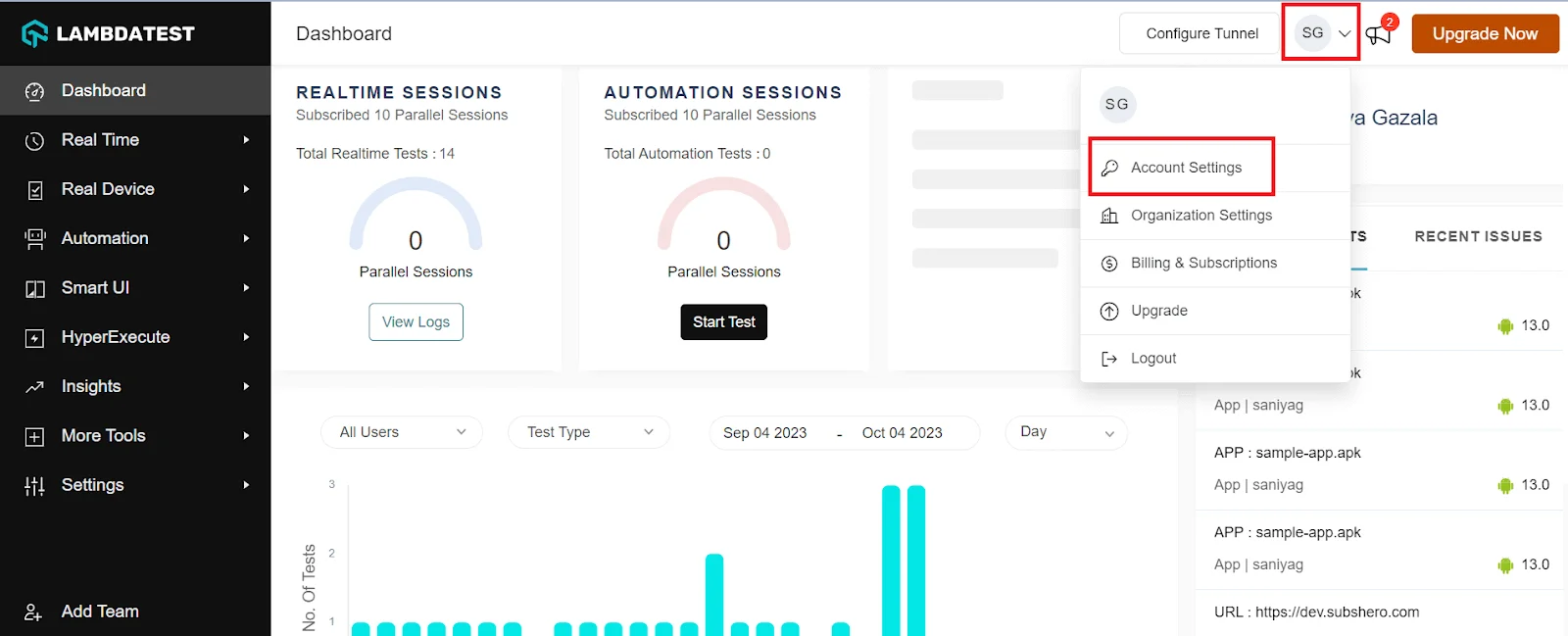
Step 2: Get your Username and Access Key by going to your Profile avatar from the TestMu AI dashboard and selecting Account Settings from the list of options.
The screenshot below shows where Account Settings sits in the dashboard.
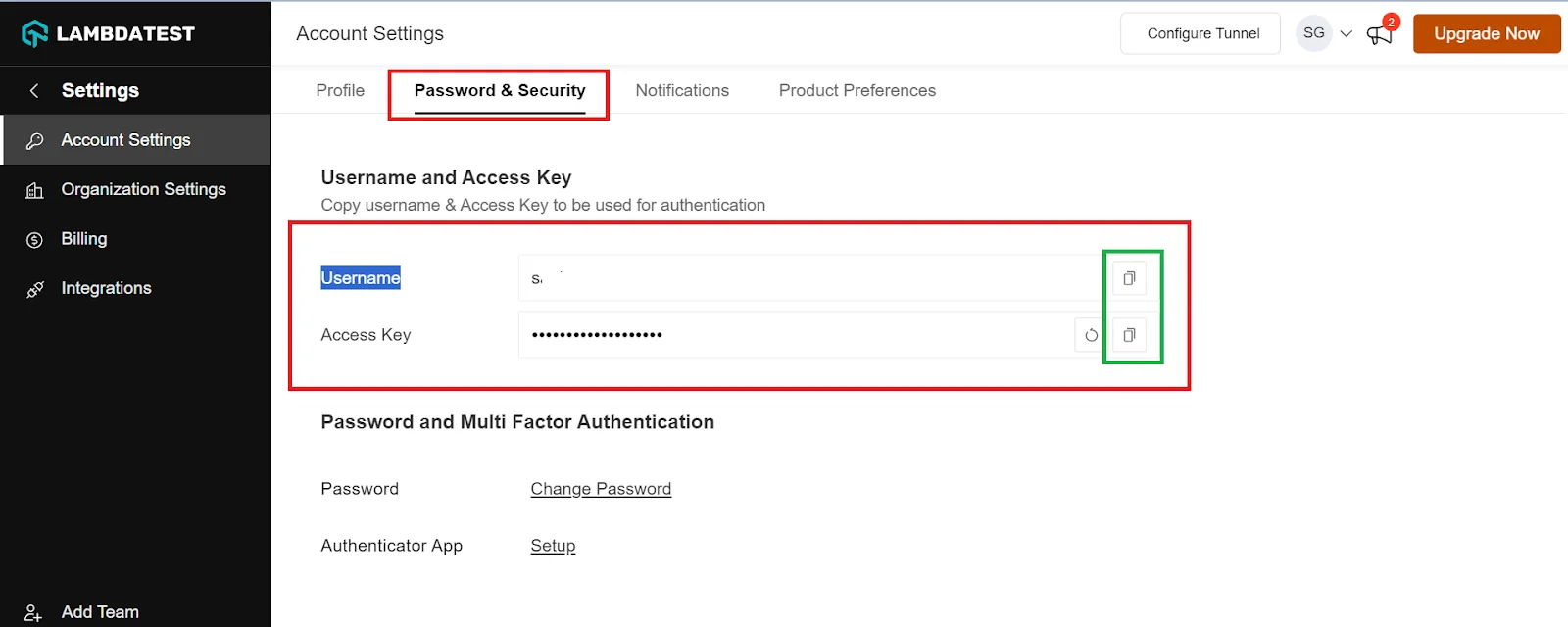
Step 3: Copy your Username and Access Key from the Password & Security tab. The tab is shown below.
Step 4: Generate Capabilities containing details like your desired browser and its various operating systems and get your configuration details on TestMu AI Capabilities Generator.
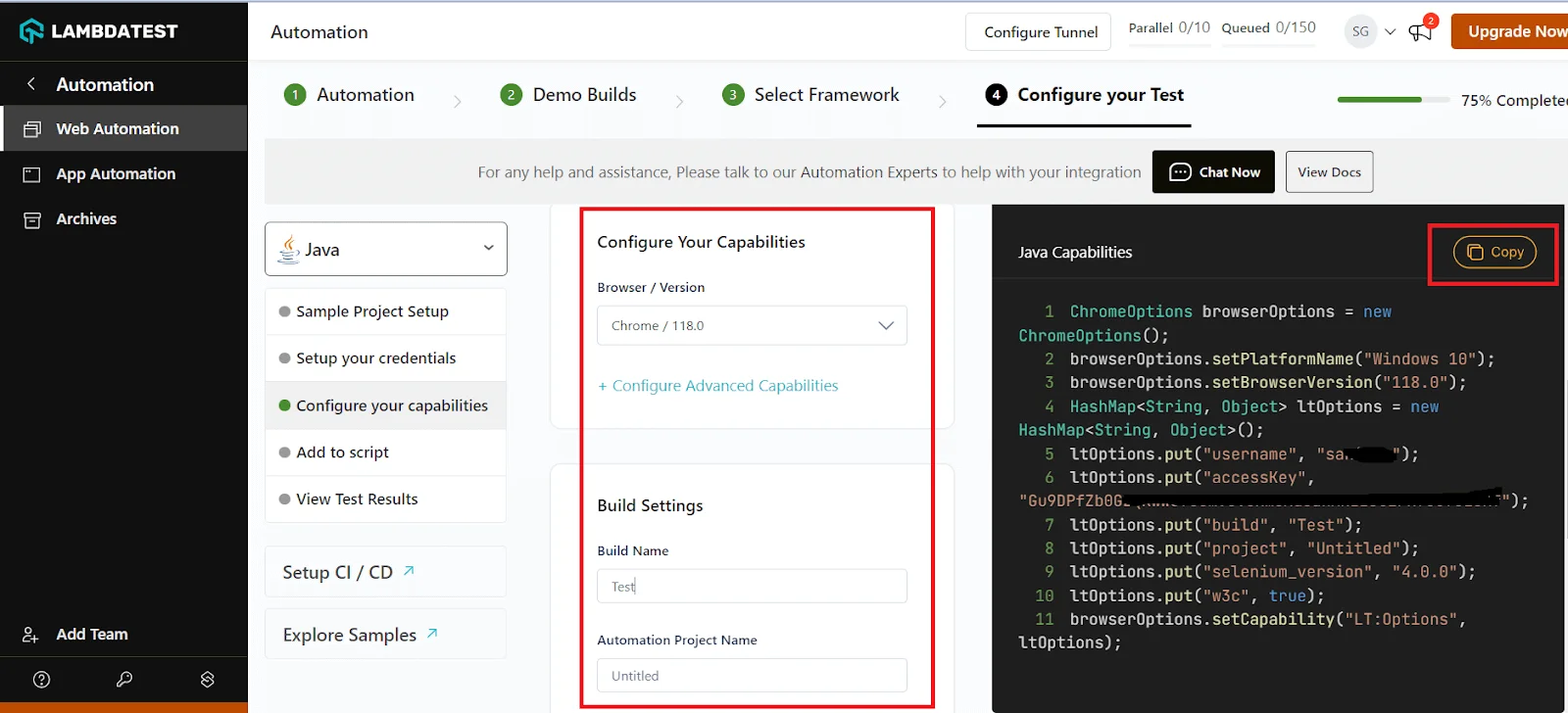
Capabilities Generator output looks like the screenshot below.
Step 5: Now that you have both the Username, Access key, and capabilities copied, all you need to do is paste it into your test script.
Note: These capabilities will differ for each programming language and testing framework you choose.
In the example below, we will run the same test case on Chrome (latest) + Windows 10 combination. The below test scenario will remain the same for all the programming languages.
Let us look into some examples based on popular programming languages like Java, JavaScript, Python, C#, Ruby, and PHP.
Running Selenium WebDriver on the Cloud with Java
Java is a popular programming language for developing web applications, gaming applications, and more. Selenium works well with Java for running automated tests on various web browsers. Many professionals prefer Java for their everyday Selenium tasks. Also, programs run faster in Java compared to other programming languages.
This section will help you learn to automate web application testing using Selenium WebDriver with Java.
Test Scenario:
|
Consider implementing the above scenario with the Cucumber testing framework using the code below:
import org.openqa.selenium.By;
import org.openqa.selenium.WebDriver;
import org.openqa.selenium.WebElement;
import org.openqa.selenium.remote.DesiredCapabilities;
import org.openqa.selenium.remote.RemoteWebDriver;
import cucumber.api.CucumberOptions;
import cucumber.api.testng.CucumberFeatureWrapper;
import cucumber.api.testng.TestNGCucumberRunner;


import java.net.MalformedURLException;
import java.net.URL;


public class LambdaTestExample {


public static final String USERNAME = "<your_username>";
public static final String ACCESS_KEY = "<your_access_key>";
public static final String GRID_URL = "https://" + USERNAME + ":" + ACCESS_KEY + "@hub.lambdatest.com/wd/hub";


public static void main(String[] args) {
// Desired capabilities for Chrome on Windows 10
ChromeOptions browserOptions = new ChromeOptions();
browserOptions.setPlatformName("Windows 10");
browserOptions.setBrowserVersion("121.0");
HashMap<String, Object> ltOptions = new HashMap<String, Object>();
ltOptions.put("username", "Enter your username");
ltOptions.put("accessKey", "Enter your access key");
ltOptions.put("build", "LambdaTest Sample");
ltOptions.put("project", "LambdaTest Sample");
ltOptions.put("name", "LambdaTest Sample");
ltOptions.put("w3c", true);


// Initialize the remote WebDriver with LambdaTest capabilities
WebDriver driver = null;
try {
driver = new RemoteWebDriver(new URL(GRID_URL), capabilities);
} catch (MalformedURLException e) {
e.printStackTrace();
}


if (driver != null) {
try {
// Step 1: Launch Chrome browser on Windows 10
// This step is already covered by initializing the remote WebDriver


// Step 2: Open the LambdaTest sign-up page
driver.get("https://www.testmuai.com/");


// Step 3: Click on the Sign In button
WebElement signInButton = driver.findElement(By.xpath("//a[contains(text(),'Sign In')]"));
signInButton.click();


// Add additional steps here if needed for the sign-in process


} finally {
// Step 4: Close the web browser
driver.quit();
}
}
}
}
Replace <your_username> and <your_access_key> with your actual TestMu AI credentials.
If you are using an editor or IDE for running your tests, you can build and run your configured Java file in your editor/IDE.
If you are using a terminal/cmd, you would need to execute the following commands
cd to/file/location
#Compile the test file:
javac -classpath ".:/path/to/selenium/jarfile:" <file_name>.java
#Run the test:
java -classpath ".:/path/to/selenium/jarfile:" <file_name>
For Selenium automation testing using Java on TestMu AI, you can check the TestMu AI support document on getting started with Selenium Java on TestMu AI.
Running on the Cloud in Other Languages
The same pattern works in every supported language. Only the capabilities syntax and the remote-driver constructor differ, so the test body you already wrote stays as it is.
- Selenium Python uses webdriver.Remote() with an options object. Setup guide: getting started with Selenium Python on TestMu AI.
- Selenium JavaScript uses Builder().usingServer() with promise-based chaining. Setup guide: getting started with Selenium JavaScript on TestMu AI.
- Selenium C# uses RemoteWebDriver with a ChromeOptions instance. Setup guide: getting started with Selenium C# on TestMu AI.
- Selenium Ruby uses Selenium::WebDriver.for :remote with a capabilities hash. Setup guide: getting started with Selenium Ruby on TestMu AI.
- Selenium PHP uses RemoteWebDriver::create() from php-webdriver. Setup guide: getting started with Selenium PHP on TestMu AI.
Whichever language you use, keep the username and access key in environment variables rather than in the source file. An access key committed to a repository is a live credential.
What Are Advanced Selenium WebDriver Use Cases?
Below is one full worked example in Java, followed by the API you need for every other common scenario with a link to the detailed guide.
Worked Example: Automating a Registration Page With Selenium WebDriver
When starting with Selenium automation testing for your online platform, focusing on automating either the Registration or Login Page is crucial. The Signup page is the gateway to your web application, making it a vital component to test, especially for platforms like eCommerce or Software-as-a-Service (SaaS) products. It's a fundamental yet significant page, beginning various user journeys that need testing.
Let us take a scenario better to understand the automation registration page with Selenium WebDriver.
Test Scenario:
Visit the website of your choice. In this case, we will use the TestMu AI website as an example of registration page automation.
|
Below is the code implementation to automate the registration page.
package com.lambdatest;
import org.openqa.selenium.By;
import org.openqa.selenium.JavascriptExecutor;
import org.openqa.selenium.Platform;
import org.openqa.selenium.WebDriver;
import org.openqa.selenium.WebElement;
import org.openqa.selenium.remote.DesiredCapabilities;
import org.openqa.selenium.remote.RemoteWebDriver;
import org.testng.Assert;
import org.testng.annotations.AfterClass;
import org.testng.annotations.BeforeClass;
import org.testng.annotations.BeforeMethod;
import org.testng.annotations.Parameters;
import org.testng.annotations.Test;
import org.testng.asserts.Assertion;


import com.beust.jcommander.Parameter;


import java.net.MalformedURLException;
import java.net.URL;
import java.util.Set;
import java.util.concurrent.TimeUnit;

public class SignUpTest{

public String username = "your username";
public String accesskey = "Your accesskey";
public static RemoteWebDriver driver = null;
public String gridURL = "@hub.lambdatest.com/wd/hub";
boolean status = false;
//Setting up capabilities to run our test script
@Parameters(value= {"browser","version"})
@BeforeClass
public void setUp(String browser, String version) throws Exception {
DesiredCapabilities capabilities = new DesiredCapabilities();
capabilities.setCapability("browserName", browser);
capabilities.setCapability("version", version);
capabilities.setCapability("platform", "win10"); // If this cap isn't specified, it will just get any available one
capabilities.setCapability("build", "LambdaTestSampleApp");
capabilities.setCapability("name", "LambdaTestJavaSample");
capabilities.setCapability("network", true); // To enable network logs
capabilities.setCapability("visual", true); // To enable step by step screenshot
capabilities.setCapability("video", true); // To enable video recording
capabilities.setCapability("console", true); // To capture console logs
try {
driver = new RemoteWebDriver(new URL("https://" + username + ":" + accesskey + gridURL), capabilities);
} catch (MalformedURLException e) {
System.out.println("Invalid grid URL");
} catch (Exception e) {
System.out.println(e.getMessage());
}

}

//Opening browser with the given URL and navigate to Registration Page
@BeforeMethod
public void openBrowser()
{
driver.manage().deleteAllCookies();

driver.get("https://www.testmuai.com/");

driver.manage().timeouts().implicitlyWait(15, TimeUnit.SECONDS);
driver.manage().timeouts().pageLoadTimeout(15, TimeUnit.SECONDS);

WebElement signUpButton = driver.findElement(By.xpath("//a[contains(text(),'Start Free Testing')]"));
signUpButton.click();

}
//Verifying elements on Registration page
@Test
public void verifyElemntsOnPageTest()
{
WebElement lambdaTestLogo = driver.findElement(By.xpath("//p[@class='signup-titel']"));
lambdaTestLogo.isDisplayed();

WebElement signUpTitle = driver.findElement(By.xpath("//p[@class='signup-titel']"));
signUpTitle.isDisplayed();

WebElement termsText = driver.findElement(By.xpath("//label[@class='woo']"));
termsText.isDisplayed();
WebElement loginLinkText = driver.findElement(By.xpath("//p[@class='login-in-link test-left']"));
loginLinkText.isDisplayed();

}
//Verifying redirection to the terms and conditions page
@Test
public void termsRedirectionTest()
{
WebElement termsLink = driver.findElement(By.xpath("//a[contains(text(),'Terms')]"));
termsLink.click();

Set <String> allWindows = driver.getWindowHandles();

for(String handle : allWindows)
{
driver.switchTo().window(handle);
}

String expectedURL = "https://www.testmuai.com/legal/terms-of-service/";
String actualURL = driver.getCurrentUrl();
//System.out.println(actualURL);
Assert.assertEquals(actualURL, expectedURL);

String expectedTitle = "Terms of Service - LambdaTest";
String actualTitle = driver.getTitle();
//System.out.println(actualTitle);
Assert.assertEquals(actualTitle, expectedTitle);
}

//Verifying Privacy policy page redirection
@Test
public void privacyPolicyRedirectionTest()
{
WebElement privacyPolicyLink = driver.findElement(By.xpath("//a[contains(text(),'Privacy')]"));
privacyPolicyLink.click();

Set <String> allWindows = driver.getWindowHandles();

for(String handle : allWindows)
{
driver.switchTo().window(handle);
}

String expectedURL = "https://www.testmuai.com/legal/privacy/";
String actualURL = driver.getCurrentUrl();
//System.out.println(actualURL);
Assert.assertEquals(actualURL, expectedURL);

String expectedTitle = "Privacy Policy | LambdaTest";
String actualTitle = driver.getTitle();
//System.out.println(actualTitle);
Assert.assertEquals(actualTitle, expectedTitle);
}
//Verifying redirection to the Login page from Registration page
@Test
public void loginRedirectionTest()
{
WebElement loginLink = driver.findElement(By.xpath("//a[contains(text(),'Login')]"));
loginLink.click();

String expectedURL = "https://accounts.lambdatest.com/login";
String actualURL = driver.getCurrentUrl();
//System.out.println(actualURL);
Assert.assertEquals(actualURL, expectedURL);

String expectedTitle = "Login - LambdaTest";
String actualTitle = driver.getTitle();
//System.out.println(actualTitle);
Assert.assertEquals(actualTitle, expectedTitle);
}

//Verifying redirection to the landing page
@Test
public void landingPageRedirectionTest()
{
WebElement lambdaTestLogo = driver.findElement(By.xpath("//p[@class='logo-home']//a//img"));
lambdaTestLogo.click();

String expectedURL = "https://www.testmuai.com/";
String actualURL = driver.getCurrentUrl();
Assert.assertEquals(actualURL, expectedURL);


}

// Registration with all valid data
@Test
public void validRegistrationTest(){

WebElement companyName = driver.findElement(By.name("organization_name"));
companyName.sendKeys("TestCompany");

WebElement fullName = driver.findElement(By.name("name"));
fullName.sendKeys("TestName");

WebElement email = driver.findElement(By.name("email"));
email.sendKeys("test6.lambdatest@gmail.com");

WebElement password = driver.findElement(By.name("password"));
password.sendKeys("Enter your LambdaTest password here");

WebElement phone = driver.findElement(By.name("phone"));
phone.sendKeys("Enter your number");

WebElement termsOfServices = driver.findElement(By.id("terms_of_service"));
termsOfServices.click();

WebElement signUp = driver.findElement(By.xpath("//button[contains(@class,'btn sign-up-btn-2 btn-block')]"));
signUp.click();

String expectedURL = "https://accounts.lambdatest.com/email/verify";
String actualURL = driver.getCurrentUrl();
Assert.assertEquals(actualURL, expectedURL);

String expectedTitle = "Verify Your Email Address - LambdaTest";
String actualTitle = driver.getTitle();
Assert.assertEquals(actualTitle, expectedTitle);


}
// Registration without providing Company Name field
@Test
public void emptyCompanyNameTest()
{
WebElement companyName = driver.findElement(By.name("organization_name"));
companyName.sendKeys("");

WebElement fullName = driver.findElement(By.name("name"));
fullName.sendKeys("TestName");

WebElement email = driver.findElement(By.name("email"));
email.sendKeys("test7.lambdatest@gmail.com");

WebElement password = driver.findElement(By.name("password"));
password.sendKeys("Enter your LambdaTest account password");

WebElement phone = driver.findElement(By.name("phone"));
phone.sendKeys("Enter your phone number here");

WebElement termsOfServices = driver.findElement(By.id("terms_of_service"));
termsOfServices.click();

WebElement signUp = driver.findElement(By.xpath("//button[contains(@class,'btn sign-up-btn-2 btn-block')]"));
signUp.click();
/*
* Set <String> allWindows = driver.getWindowHandles();
*
* for(String handle : allWindows) { driver.switchTo().window(handle); }
*/

String expectedURL = "https://accounts.lambdatest.com/email/verify";
String actualURL = driver.getCurrentUrl();
Assert.assertEquals(actualURL, expectedURL);

String expectedTitle = "Verify Your Email Address - LambdaTest";
String actualTitle = driver.getTitle();
Assert.assertEquals(actualTitle, expectedTitle);
}

// Registration without providing Name field
@Test
public void emptyNameTest()
{
WebElement companyName = driver.findElement(By.name("organization_name"));
companyName.sendKeys("TestCompany");

WebElement fullName = driver.findElement(By.name("name"));
fullName.sendKeys("Enter  your name ");

WebElement email = driver.findElement(By.name("email"));
email.sendKeys("test@test.com");

WebElement password = driver.findElement(By.name("password"));
password.sendKeys("Enter your LambdaTest account password"");

WebElement phone = driver.findElement(By.name("phone"));
phone.sendKeys("Send your number here");

WebElement termsOfServices = driver.findElement(By.id("terms_of_service"));
termsOfServices.click();

WebElement signUp = driver.findElement(By.xpath("//button[contains(@class,'btn sign-up-btn-2 btn-block')]"));
signUp.click();

String expectedErrorMsg = "Please enter your Name";

WebElement exp = driver.findElement(By.xpath("//p[contains(text(),'Please enter your Name')]"));
String actualErrorMsg = exp.getText();

Assert.assertEquals(actualErrorMsg, expectedErrorMsg);

}

// Registration without providing user email field
@Test
public void emptyEmailTest()
{
WebElement companyName = driver.findElement(By.name("organization_name"));
companyName.sendKeys("TestCompany");

WebElement fullName = driver.findElement(By.name("name"));
fullName.sendKeys("test");

WebElement email = driver.findElement(By.name("email"));
email.sendKeys("");

WebElement password = driver.findElement(By.name("password"));
password.sendKeys("Enter your LambdaTest account password"");

WebElement phone = driver.findElement(By.name("phone"));
phone.sendKeys("Enter your phone number here");

WebElement termsOfServices = driver.findElement(By.id("terms_of_service"));
termsOfServices.click();

WebElement signUp = driver.findElement(By.xpath("//button[contains(@class,'btn sign-up-btn-2 btn-block')]"));
signUp.click();

String expectedErrorMsg = "Please enter your Email Address";

WebElement exp = driver.findElement(By.xpath("//p[contains(text(),'Please enter your Email Address')]"));
String actualErrorMsg = exp.getText();

Assert.assertEquals(actualErrorMsg, expectedErrorMsg);
}
// Registration with email id which already have account
@Test
public void invalidEmailTest()
{
WebElement companyName = driver.findElement(By.name("organization_name"));
companyName.sendKeys("TestCompany");

WebElement fullName = driver.findElement(By.name("name"));
fullName.sendKeys("TestName");
WebElement email = driver.findElement(By.name("email"));
email.sendKeys("test@test.com");

WebElement password = driver.findElement(By.name("password"));
password.sendKeys("Enter your LambdaTest account password");

WebElement phone = driver.findElement(By.name("phone"));
phone.sendKeys("Enter your phone number here");
WebElement termsOfServices = driver.findElement(By.id("terms_of_service"));
termsOfServices.click();

WebElement signUp = driver.findElement(By.xpath("//button[contains(@class,'btn sign-up-btn-2 btn-block')]"));
signUp.click();

String expectedErrorMsg = "This email is already registered";
WebElement exp = driver.findElement(By.xpath("//p[@class='error-mass']"));
String actualErrorMsg = exp.getText();

Assert.assertEquals(actualErrorMsg, expectedErrorMsg);
}

// Registration without providing password field
@Test
public void emptyPasswordTest()
{
WebElement companyName = driver.findElement(By.name("organization_name"));
companyName.sendKeys("TestCompany");

WebElement fullName = driver.findElement(By.name("name"));
fullName.sendKeys("TestName");

WebElement email = driver.findElement(By.name("email"));
email.sendKeys("test@test.com");

WebElement password = driver.findElement(By.name("password"));
password.sendKeys("Enter the password");

WebElement phone = driver.findElement(By.name("phone"));
phone.sendKeys("Enter your phone number here");

WebElement termsOfServices = driver.findElement(By.id("terms_of_service"));
termsOfServices.click();

WebElement signUp = driver.findElement(By.xpath("//button[contains(@class,'btn sign-up-btn-2 btn-block')]"));
signUp.click();

String expectedErrorMsg = "Please enter a desired password";

WebElement exp = driver.findElement(By.xpath("//p[contains(text(),'Please enter a desired password')]"));
String actualErrorMsg = exp.getText();

Assert.assertEquals(actualErrorMsg, expectedErrorMsg);
}

// Registration with invalid password
@Test
public void inValidPasswordTest()
{
WebElement companyName = driver.findElement(By.name("organization_name"));
companyName.sendKeys("TestCompany");

WebElement fullName = driver.findElement(By.name("name"));
fullName.sendKeys("TestName");

WebElement email = driver.findElement(By.name("email"));
email.sendKeys("test@test.com");

WebElement password = driver.findElement(By.name("password"));
password.sendKeys("T");

WebElement phone = driver.findElement(By.name("phone"));
phone.sendKeys("Enter the phone number");

WebElement termsOfServices = driver.findElement(By.id("terms_of_service"));
termsOfServices.click();

WebElement signUp = driver.findElement(By.xpath("//button[contains(@class,'btn sign-up-btn-2 btn-block')]"));
signUp.click();

String expectedErrorMsg = "Password should be at least 8 characters long";

WebElement exp = driver.findElement(By.xpath("//p[contains(text(),'Password should be at least 8 characters long')]"));
String actualErrorMsg = exp.getText();

Assert.assertEquals(actualErrorMsg, expectedErrorMsg);
//Password should be at least 8 characters long
}

// Registration without providing user phone number field
@Test
public void emptyPhoneTest()
{
WebElement companyName = driver.findElement(By.name("organization_name"));
companyName.sendKeys("TestCompany");

WebElement fullName = driver.findElement(By.name("name"));
fullName.sendKeys("TestName");

WebElement email = driver.findElement(By.name("email"));
email.sendKeys("test@test.com");

WebElement password = driver.findElement(By.name("password"));
password.sendKeys("Enter your LambdaTest account password"");

WebElement phone = driver.findElement(By.name("phone"));
phone.sendKeys("");

WebElement termsOfServices = driver.findElement(By.id("terms_of_service"));
termsOfServices.click();

WebElement signUp = driver.findElement(By.xpath("//button[contains(@class,'btn sign-up-btn-2 btn-block')]"));
signUp.click();

String expectedErrorMsg = "The phone field is required.";

WebElement exp = driver.findElement(By.xpath("//p[contains(text(),'The phone field is required.')]"));
String actualErrorMsg = exp.getText();

Assert.assertEquals(actualErrorMsg, expectedErrorMsg);
}

// Registration with providing invalid user phone number field
@Test
public void inValidPhoneTest()
{
WebElement companyName = driver.findElement(By.name("organization_name"));
companyName.sendKeys("TestCompany");

WebElement fullName = driver.findElement(By.name("name"));
fullName.sendKeys("TestName");

WebElement email = driver.findElement(By.name("email"));
email.sendKeys("test@test.com");

WebElement password = driver.findElement(By.name("password"));
password.sendKeys("Enter your LambdaTest account password");

WebElement phone = driver.findElement(By.name("phone"));
phone.sendKeys("98");

WebElement termsOfServices = driver.findElement(By.id("terms_of_service"));
termsOfServices.click();

WebElement signUp = driver.findElement(By.xpath("//button[contains(@class,'btn sign-up-btn-2 btn-block')]"));
signUp.click();

String expectedErrorMsg = "Please enter a valid Phone number";

WebElement exp = driver.findElement(By.xpath("//p[contains(text(),'Please enter a valid Phone number')]"));
String actualErrorMsg = exp.getText();

Assert.assertEquals(actualErrorMsg, expectedErrorMsg);

//Please enter a valid Phone number
}

// Registration without accepting terms and condition tickbox
@Test
public void uncheckedTerms()
{
WebElement companyName = driver.findElement(By.name("organization_name"));
companyName.sendKeys("TestCompany");

WebElement fullName = driver.findElement(By.name("name"));
fullName.sendKeys("TestName");

WebElement email = driver.findElement(By.name("email"));
email.sendKeys("test@test.com");

WebElement password = driver.findElement(By.name("password"));
password.sendKeys("Enter your LambdaTest account password");

WebElement phone = driver.findElement(By.name("phone"));
phone.sendKeys("Enter your phone number");

//WebElement termsOfServices = driver.findElement(By.id("terms_of_service"));
//termsOfServices.click();

WebElement signUp = driver.findElement(By.xpath("//button[contains(@class,'btn sign-up-btn-2 btn-block')]"));
signUp.click();

String expectedTermsErrorMessage = "To proceed further you must agree to our Terms of Service and Privacy Policy";
WebElement uncheckedTermCheckbox = driver.findElement(By.xpath("//p[@class='error-mass mt-2']"));
String actualTermsErrorMessage = uncheckedTermCheckbox.getText();
//To proceed further you must agree to our Terms of Service and Privacy Policy
Assert.assertEquals(actualTermsErrorMessage, expectedTermsErrorMessage);
}

// Closing the browser session after completing each test case
@AfterClass
public void tearDown() throws Exception {
if (driver != null) {
((JavascriptExecutor) driver).executeScript("lambda-status=" + status);
driver.quit();
}
}
}
You can watch the video below to learn automating the registration page with Selenium WebDriver, gain valuable details, and start your automation journey with Selenium WebDriver.

Handling Everything Else
Real applications present cases a form-and-a-button example never covers: iframes, file uploads, cookie banners, modals that steal focus.
Each has a standard WebDriver answer, and each is worth knowing before you meet it in a failing build.
| Scenario | The API you need | Full guide |
|---|---|---|
| Iframes | Use driver.switchTo().frame(...), then defaultContent() to get back out. Elements inside an iframe are invisible to a normal findElement. | Switch iframes in Selenium |
| JavaScript alerts | Use driver.switchTo().alert(), then accept() or dismiss(). Native dialogs are not DOM elements. | Handle JavaScript alert in Selenium WebDriver |
| Modal dialogs | Standard findElement works, because modals are DOM elements. Wait for elementToBeClickable rather than mere presence. | Handle modal dialog box in Selenium WebDriver Java |
| Login popups | Basic-auth popups accept credentials in the URL; in-page popups are ordinary elements. | Handling login popup in Selenium WebDriver using Java |
| Multiple windows and tabs | Use getWindowHandles() to enumerate and switchTo().window(handle) to move between them. | Handle multiple windows in Selenium WebDriver using Java |
| File upload and download | Send the absolute file path with sendKeys() to the input[type=file]. Never click it, because that opens an OS dialog WebDriver cannot touch. | Download and upload files using Selenium with Java |
| Cookies | Use manage().addCookie(), getCookies(), and deleteAllCookies(). Injecting a session cookie is the fastest way to skip a login step. | Handling cookies in Selenium WebDriver |
| Dropdowns | Use the Select class for real select elements. Custom dropdowns are div soup, so treat them as ordinary elements. | Handling dropdowns in Selenium WebDriver Java |
| Checkboxes and radio buttons | Use findElements() with isSelected() before clicking, so you do not toggle something that is already checked. | Select multiple checkboxes in Selenium WebDriver |
| Web tables | Locate rows first, then cells by index or relative XPath. Iterate rather than hardcoding positions. | Handle web table in Selenium WebDriver |
| Mouse and keyboard actions | Use the Actions class for hover, drag-and-drop, right-click, and key chords. | Perform mouse actions in Selenium WebDriver |
| Screenshots | Use TakesScreenshot for the viewport, or per-element screenshots introduced in Selenium 4. | Screenshots with Selenium WebDriver |
| CAPTCHA | Not solvable by design. Disable it in test environments, or use a test-only bypass token. | Handle CAPTCHA in Selenium |

What Are the Selenium WebDriver Best Practices for 2026?
Eight practices separate a suite people trust from one they learn to ignore.
- Use explicit waits, never Thread.sleep(). Wait for the condition you care about, matching it to the action: elementToBeClickable before a click.
- Do not mix implicit and explicit waits. Combining them produces timeouts that follow neither setting. See implicit and explicit wait in Selenium.
- Adopt it early. Keep locators in one class per page, so markup changes touch one file. See Page Object Model.
- Locate on stable attributes. Ask developers for data-test hooks, then ids, then CSS selectors. Absolute XPath from DevTools breaks easily.
- Always quit the driver in teardown. Put driver.quit() in @AfterMethod or finally. Orphaned processes are why CI runners exhaust memory.
- Keep tests independent. Each test creates its own state and cleans up. Order-dependent tests cannot run in parallel, where the savings live.
- Capture a screenshot on failure. Assertions say what broke; a automated screenshot says why. Wire it into your listener once.
- Run headless in CI, headed locally. Headless is faster and needs no display server. Keep headed mode for debugging.
On the locator point specifically: a single wrapper div added by a designer once took out forty of my tests in an afternoon.
Two habits sit above the list. Shift testing left so failures surface while the change is fresh, and write tests against behaviour rather than implementation. Both are covered in shift left testing.
On browser coverage, resist the urge to test everything. Build a browser compatibility matrix from your own analytics and test what your users actually run.
A online Selenium Grid then lets you cover that matrix in parallel instead of sequentially.
A browser matrix template is available for download if you want a starting point.
Where Can You Learn More About Selenium WebDriver?
You can learn more about Selenium WebDriver from the TestMu AI blog and hub guides below, grouped by what you are trying to do.
Where to go next, grouped by what you are trying to do.
Learn a language binding
- Selenium Java tutorial
- Selenium Python tutorial
- Selenium JavaScript tutorial
- Selenium C# tutorial
- Selenium PHP tutorial
- Selenium Ruby
- Selenium with Java
- Build and execute Selenium projects
Core WebDriver concepts
- Selenium WebDriver architecture
- Selenium WebDriver tutorial with examples
- Selenium locators
- Locators in Selenium WebDriver with examples
- Using XPath in Selenium with examples
- findElement and findElements in Selenium
- Find element by text in Selenium
- Selenium waits
- Selenium WebDriverWait
- Implicit and explicit wait in Selenium
- Synchronization in Selenium WebDriver
- Assert and verify in Selenium WebDriver
- Page Object Model
- WebDriverManager in Selenium
Handle specific scenarios
- 49 common Selenium exceptions in automation testing
- Element is not clickable at point exception
- Handle multiple windows in Selenium WebDriver using Java
- Handling cookies in Selenium WebDriver
- Handle CAPTCHA in Selenium
- Automate login page using Selenium WebDriver
- Selenium Java tutorial: test the login process
- Selenium wait for page to load
Scale, migrate, and compare
- Selenium Grid tutorial
- Selenium Grid 4 tutorial for distributed testing
- Parallel testing in Selenium WebDriver with Python
- Upgrade from Selenium 3 to Selenium 4
- What is deprecated in Selenium 4
- Playwright vs Selenium vs Cypress
- Selenium interview questions
- Selenium automation testing basics
How Is AI Changing Selenium WebDriver Testing?
AI is changing Selenium WebDriver testing through self-healing locators, AI-generated test code, and agents that drive browsers through WebDriver-compatible protocols.
The newer WebDriver BiDi standard adds two-way, event-driven communication with the browser, which suits agents that need to watch console logs and network traffic as they act. Selenium 4 already exposes BiDi features across bindings.
AI-written Selenium code still needs review for brittle XPath locators and missing explicit waits. Pair it with self healing test automation so locator changes do not break the suite.
Is Selenium WebDriver Still Worth Learning?
Yes. Selenium WebDriver remains worth learning because it is the W3C standard for browser automation, supports six languages, and runs on every major browser and cloud grid.
Selenium WebDriver has lasted because it got one decision right: drive the browser through its own driver, over a protocol the browser vendors themselves implement.
That is why it became a W3C standard, why it works in six languages, and why an ecosystem of grids, device clouds, and mobile tools all speak it.
It also explains the friction. Every command is a network round trip, the driver is a separate program with its own version, and nothing waits for you automatically.
Once those three facts are in your head, most WebDriver errors stop being mysterious.
If you are starting today: use Selenium 4, let Selenium Manager handle drivers, write explicit waits from your very first test, and move to the Page Object Model before your suite reaches thirty tests.
Then run it across a real browser matrix rather than only the browser on your machine.
Author

Saniya Gazala
Blogs: 44


Saniya Gazala is a Product Marketing Manager and Community Evangelist at TestMu AI with 2+ years of experience in software QA, manual testing, and automation adoption. She holds a B.Tech in Computer Science Engineering. At TestMu AI, she leads content strategy, community growth, and test automation initiatives, having managed a 5-member team and contributed to certification programs using Selenium, Cypress, Playwright, Appium, and KaneAI. Saniya has authored 15+ articles on QA and holds certifications in Automation Testing, Six Sigma Yellow Belt, Microsoft Power BI, and multiple automation tools. She also crafted hands-on problem statements for Appium and Espresso. Her work blends detailed execution with a strategic focus on impact, learning, and long-term community value.
Reviewer

Srinivasan Sekar
Reviewer
Srinivasan Sekar is Director of Engineering at TestMu AI, where he leads engineering and open-source initiatives behind the Selenium and Appium automation grid and owns TestMu AI's MCP Server. A committer to Appium and a contributor to Selenium, WebdriverIO, Taiko, and AppiumTestDistribution, he brings over 15 years of experience in quality engineering and open-source technologies. He is the author of the Apress book 'The MCP Standard: A Developer's Guide to Building Universal AI Tools with the Model Context Protocol,' a Certified Kubernetes and Cloud Native Associate, and an international conference speaker. Before TestMu AI he spent over eight years at Thoughtworks as a Principal Consultant and Quality Architect. Srinivasan holds a B.Tech in Information Technology from Anna University.
On This Page
- What Is Selenium WebDriver?
- Selenium vs Selenium WebDriver: What's the Difference?
- How Does Selenium WebDriver Work?
- What Are the Key Features of Selenium WebDriver?
- Why Use Selenium WebDriver in 2026?
- How Do You Set Up Selenium WebDriver?
- How Do You Run Your First Selenium WebDriver Test?
- Which Languages Does Selenium WebDriver Support?
- Selenium 4 vs Selenium 3: What Changed?
- What Are the Limitations of Selenium WebDriver?
- What Are the Most Used Selenium WebDriver Commands?
- How Do Locators and Waits Work in Selenium WebDriver?
- What Are Common Selenium WebDriver Exceptions and How Do You Fix Them?
- When Should You Use Selenium WebDriver?
- How Do You Run Selenium WebDriver on the Cloud?
- What Are Advanced Selenium WebDriver Use Cases?
- What Are the Selenium WebDriver Best Practices for 2026?
- Where Can You Learn More About Selenium WebDriver?
- How Is AI Changing Selenium WebDriver Testing?
- Is Selenium WebDriver Still Worth Learning?
Selenium WebDriver FAQs
Did you find this page helpful?
More Related Learning Hubs


TestMu AI forEnterprise
Get access to solutions built on Enterprise
grade security, privacy, & compliance
- Advanced access controls
- Advanced data retention rules
- Advanced Local Testing
- Premium Support options
- Early access to beta features
- Private Slack Channel
- Unlimited Manual Accessibility DevTools Tests