

Next-Gen App & Browser Testing Cloud
Trusted by 2 Mn+ QAs & Devs to accelerate their release cycles


- Home
- /
- Learning Hub
- /
- 60+ CI/CD Interview Questions That Actually Get Asked [2026]
60+ CI/CD Interview Questions That Actually Get Asked [2026]
This is the only guide you need to crack any CI/CD or DevOps Interviews in 2026. It covers 65+ questions from beginner to advanced, including AI-based CI/CD, scenario-based problems, and pipeline security, each with direct, interview-ready answers that interviewers actually ask.

Mythili Raju
February 19, 2026
This is the only guide you need to crack any CI/CD or DevOps Interviews in 2026. It covers 65+ questions from beginner to advanced, including AI-based CI/CD, scenario-based problems, and pipeline security, each with direct, interview-ready answers that interviewers actually ask.
Overview
What foundation-level CI/CD questions are asked?
- What is CI/CD? CI involves frequently integrating code into a shared repository, triggering automated builds and tests. CD ensures code is always deployable to production, while Continuous Deployment automatically deploys every change that passes tests.
- What are the benefits of CI/CD? Faster time-to-market, early bug detection, consistent deployments, and reduced rollback risks.
- What is a CI/CD Pipeline? It is a series of stages (build, test, deploy) that automate the software delivery process.
- Continuous Delivery vs. Deployment: Continuous Delivery requires manual approval for production releases, whereas Continuous Deployment is fully automated.
What are the technical CI/CD questions asked?
- Deployment strategies: Blue-green, canary, and rolling deployments with trade-offs for downtime, rollback speed, and infrastructure cost.
- Pipeline security: Secrets management, SAST/DAST scanning, dependency checks (SCA), supply chain security, and least-privilege access.
- Pipeline optimization: Test parallelization, dependency caching, incremental builds, smart test selection, and fail-fast strategies.
CI/CD Interview Questions for Beginners
These questions cover foundational CI/CD concepts that every candidate must know, regardless of experience level.
1. What Is CI/CD?
CI/CD stands for Continuous Integration and Continuous Delivery (or Continuous Deployment). Continuous Integration (CI) is the practice of merging code changes into a shared repository multiple times a day, with each merge triggering automated builds and tests. Continuous Delivery (CD) automatically prepares tested code for release, requiring manual approval for production.
Continuous Deployment removes this manual gate, deploying every passing change directly to production. CI/CD pipelines reduce manual errors, accelerate release cycles, and provide rapid feedback.
2. What is Continuous Integration (CI)?
Continuous Integration is a development practice where developers merge code changes into a shared repository multiple times per day. Each merge triggers an automated build and test sequence to detect integration issues early. CI requires three things: a version control system (Git), an automated build process, and a suite of automated tests. The CI server monitors the repository, runs the pipeline on every commit, and provides immediate feedback if a build or test fails. The goal is to catch bugs within minutes of introduction, not weeks later.
3. What is the difference between Continuous Delivery and Continuous Deployment?
Continuous Delivery automatically builds, tests, and prepares code for production release, but requires manual approval before deploying. Continuous Deployment removes this manual gate and deploys every passing change directly to production. The key difference is the human approval step. Continuous Delivery suits regulated industries where manual sign-off is required. Continuous Deployment suits SaaS products with robust automated testing, where speed to market is the priority.
| Aspect | Continuous Delivery | Continuous Deployment |
|---|---|---|
| Production deployment | Manual trigger | Fully automated |
| Human approval | Yes | No |
| Testing requirement | Comprehensive | Extremely robust |
| Release frequency | On-demand | Every passing commit |
| Best for | Regulated industries, enterprise | SaaS, web apps |
4. What are the benefits of CI/CD?
- Faster releases: Automation eliminates manual steps. Teams ship multiple times per day instead of monthly.
- Early bug detection: Automated tests catch defects within minutes of introduction.
- Lower deployment risk: Smaller, frequent deployments are easier to debug than large batch releases.
- Better collaboration: Frequent merges force early conflict resolution.
- Consistent environments: Pipelines build and test the same way every time.
- Faster feedback: Developers get test results in minutes, not days.
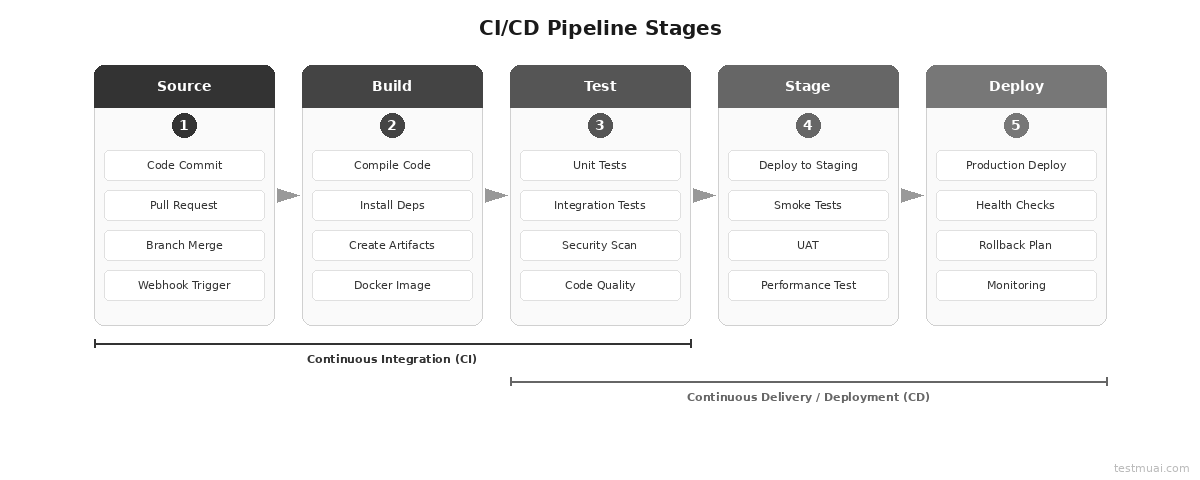
5. What are the key components of a CI/CD pipeline?
A CI/CD pipeline has five key components:
- Source control (Git): Manages code and triggers builds on every commit or merge.
- Build automation: Compiles code, installs dependencies, and creates deployable artifacts.
- Automated testing: Validates functionality through unit, integration, and E2E tests.
- Deployment automation: Releases artifacts to staging and production environments.
- Monitoring: Tracks application health and performance post-deployment.
These components form an automated workflow that transforms a code commit into a production release.
6. What is a build server?
A build server is a dedicated machine or service that automatically compiles code, runs tests, and creates deployable artifacts when code changes are detected. Examples: Jenkins agents, GitHub Actions runners, GitLab CI runners. The build environment should mirror production to catch environment-specific issues early.
7. What is version control and why is it critical for CI/CD?
Version control tracks every change to code over time, enabling collaboration, rollback, and audit trails. Git is the standard. It is critical for CI/CD because it serves as the pipeline trigger: every commit or merge to a monitored branch initiates the automated build-test-deploy sequence. Without version control, CI/CD cannot function.
8. What are build artifacts?
Build artifacts are files produced by the build process: compiled binaries, Docker images, JAR/WAR files, or static bundles. They are versioned and stored in artifact repositories (JFrog Artifactory, Nexus, Amazon ECR). Versioned artifacts enable consistent deployments and rollback by redeploying a previous version.
9. What is a deployment pipeline?
A deployment pipeline is the automated sequence of stages code passes through from commit to production. Each stage acts as a quality gate: if any stage fails, the pipeline halts and notifies the team. Typical stages: build, unit test, integration test, security scan, staging deploy, acceptance test, production deploy.
10. What is pipeline as code?
Pipeline as code defines CI/CD configurations in version-controlled files (Jenkinsfile, .github/workflows/*.yml, .gitlab-ci.yml) instead of GUI-based configuration. Benefits:
- Pipeline changes are reviewable through pull requests
- Builds are reproducible across environments
- Pipeline modifications can be rolled back via Git history
- Consistent workflows across teams
11. What role does automated testing play in CI/CD?
Automation testing is the backbone of CI/CD. Without it, a pipeline can only verify that code compiles, not that it works. Tests run in layers following the test pyramid:
- Unit tests: Validate individual functions. Run in milliseconds.
- Integration tests: Verify module interactions.
- E2E tests: Simulate real user workflows.
- Security tests: SAST scans for code vulnerabilities.
- Performance tests: Validate response times under load.
Target: CI feedback in under 10 minutes.
12. What is a build trigger?
A build trigger is the event that starts a CI/CD pipeline. Common triggers:
- Code commits to a monitored branch
- Pull request creation or update
- Scheduled cron jobs (nightly builds)
- Manual dashboard triggers
- Webhook events from external systems
- Git tag creation for releases
13. What is trunk-based development?
Trunk-based development is a branching model where all developers commit to a single main branch (trunk) or use short-lived feature branches that merge within 1-2 days. It reduces merge conflicts, enables continuous integration, and supports frequent deployments. It requires strong automated testing and feature flags to hide incomplete features from users.
14. What is a feature branch workflow?
Developers create a separate branch for each feature/bug fix, develop on that branch, then merge back through a pull request. The CI/CD pipeline runs on every feature branch push, providing feedback before code reaches main. The PR triggers code review checks, integration tests, and quality gates.
15. What is a webhook in CI/CD?
A webhook is an HTTP callback that notifies one service when an event occurs in another. In CI/CD, webhooks connect Git platforms (GitHub, GitLab) to CI servers. When code is pushed, the Git platform sends an HTTP POST to the CI server, triggering the pipeline in real-time without polling.
16. What is containerization in CI/CD?
Containerization packages an application with all its dependencies into a standardized unit (Docker container) that runs consistently across any environment. In CI/CD, containers ensure identical build and test environments, eliminate "works on my machine" issues, and enable immutable deployments where each release creates new container instances.
CI/CD Interview Questions for Intermediate Level
These questions target candidates with 1-3 years of experience who have built and maintained CI/CD pipelines. Expect implementation details, CI/CD testing concepts, and trade-off discussions.
17. How do you set up a CI/CD pipeline from scratch?
- Select a CI/CD tool: Choose based on your ecosystem. Jenkins for self-hosted control, GitHub Actions for GitHub-native projects, GitLab CI for GitLab users.
- Configure source control webhooks: Set up triggers on commits and pull requests to initiate pipeline runs automatically.
- Define the build stage: Install dependencies, compile code, and produce deployable artifacts.
- Add automated tests: Layer tests following the test pyramid: unit, integration, then E2E.
- Configure staging deployment: Deploy to a staging environment that mirrors production for validation.
- Add quality gates: Enforce code coverage thresholds, security scans, and linting before promotion.
- Configure production deployment: Select a deployment strategy (blue-green, canary, rolling) based on risk tolerance.
- Set up monitoring and alerting: Track application health post-deploy with automated rollback triggers.
- Store pipeline as code: Version-control the pipeline config in the repository for reproducibility.
18. What are the stages of a typical CI/CD pipeline?
A typical CI/CD pipeline has five stages:
- Source: Detects code changes via webhooks and triggers the pipeline.
- Build: Compiles code, installs dependencies, and creates artifacts (Docker images, binaries).
- Test: Runs unit tests, integration tests, security scans, and code quality checks.
- Stage: Deploys to a staging environment for smoke tests, UAT, and performance testing.
- Deploy: Pushes to production using a deployment strategy (blue-green, canary, rolling) with health checks and automated rollback triggers.
19. How do you handle database migrations in CI/CD?
- Use a migration tool (Flyway, Liquibase, Alembic) that tracks and executes pending migrations in order
- Make migrations backward-compatible: add columns as nullable, create tables before referencing them
- Run migrations as a separate pipeline stage before deploying application code
- Test migrations against a production data copy in staging
- Maintain rollback scripts for every migration
- Use expand-and-contract pattern for breaking changes
20. How do you manage secrets and credentials in a pipeline?
Never hardcode secrets in source code or pipeline configs. Store them in dedicated secrets managers: HashiCorp Vault, AWS Secrets Manager, Azure Key Vault, or built-in CI/CD secret stores (GitHub Secrets, GitLab CI Variables).
Inject secrets as environment variables at runtime. Use least-privilege IAM policies. Rotate credentials on a schedule. Prefer short-lived tokens over long-lived API keys. Mask secrets in pipeline logs to prevent accidental exposure in build output.
21. What is blue-green deployment?
Blue-green deployment maintains two identical production environments. One (Blue) serves live traffic; the other (Green) runs the new version. After testing Green, traffic switches instantly. If issues arise, switch back to Blue for immediate rollback.
- Pros: Zero downtime, instant rollback
- Cons: 2x infrastructure cost, database sync complexity
- Best for: Mission-critical apps, financial systems
22. What is canary deployment?
Canary deployment routes a small percentage (1-5%) of production traffic to the new version. Monitor error rates, latency, and business metrics. If healthy, gradually increase traffic (10%, 25%, 50%, 100%). If issues appear, roll back with minimal user impact.
- Pros: Low risk, real user validation
- Cons: Complex routing, monitoring overhead
- Best for: High-traffic apps, user-facing services
23. What is rolling deployment?
Rolling deployment replaces instances one at a time with the new version. The load balancer removes an instance, updates it, verifies health, and returns it to the pool.
- Pros: Zero downtime, no extra infrastructure
- Cons: Both versions serve traffic simultaneously during rollout
- Best for: Stateless apps, microservices
The table below summarizes deployment strategy trade-offs:
| Strategy | Downtime | Rollback Speed | Infra Cost | Risk Level | Best Use Case |
|---|---|---|---|---|---|
| Blue-Green | Zero | Instant (traffic switch) | 2x (dual environments) | Low | Mission-critical, financial systems |
| Canary | Zero | Fast (route back) | 1.05x (small canary pool) | Very Low | High-traffic, user-facing apps |
| Rolling | Zero | Moderate (redeploy previous) | 1x (same infra) | Medium | Stateless microservices |
| Immutable | Zero | Fast (route to old infra) | Temporary 2x | Low | Container/serverless workloads |
| Recreate | Yes | Slow (full redeploy) | 1x | High | Dev/staging, non-critical apps |
24. How do you implement rollback in CI/CD?
- Artifact-based: Redeploy the previous artifact version. Fastest approach.
- Blue-green: Switch traffic back to previous environment. Achievable in seconds.
- Git revert: Create a revert commit and run the pipeline. Slower but maintains audit trail.
- Feature flag: Disable the flag controlling the new code path. No deployment needed.
- Automated triggers: Set error rate or latency thresholds to trigger rollback automatically.
25. What is Infrastructure as Code (IaC)?
Infrastructure as Code defines and manages infrastructure (servers, networks, databases) using machine-readable configuration files instead of manual processes. Tools: Terraform, AWS CloudFormation, Pulumi, Ansible.
In CI/CD, IaC means infrastructure changes go through the same pipeline as application code: version controlled, peer reviewed, tested in staging, deployed automatically. IaC eliminates configuration drift between environments, makes changes auditable, and enables teams to recreate entire environments from code.
26. How do you handle flaky tests in CI/CD?
- Quarantine: Move flaky tests to a separate suite that does not block the pipeline
- Auto-retry: Retry failed tests 1-2 times before marking as failed
- Root cause fix: Track patterns (timing, order, resource dependencies) and fix them
- Test isolation: Each test creates/cleans its own data, no shared state
- Stable environments: Use containerized test environments with fixed dependency versions
27. What is dependency caching in CI/CD?
Dependency caching stores downloaded packages (npm, Maven, pip, Docker layers) between pipeline runs to avoid re-downloading on every build. Significantly reduces build time. Cache keys should be based on lock file hashes (package-lock.json, Gemfile.lock) so the cache invalidates when dependencies change. GitHub Actions: actions/cache. GitLab CI: cache keyword.
28. What is artifact versioning?
Artifact versioning assigns unique identifiers to each build output. Common strategies: semantic versioning (1.2.3), Git commit SHA, timestamp-based. It enables reliable rollbacks (deploy a specific previous version), audit trails (track exactly what runs in production), and parallel deployments (different versions in staging vs production).
29. What are feature flags in CI/CD?
Feature flags are conditional code statements that enable or disable features at runtime without deploying new code. They decouple deployment from release:
- Merge incomplete features behind flags (trunk-based development)
- Enable features for a subset of users (canary/A/B testing)
- Instant rollback by disabling a flag (no deployment needed)
- Tools: LaunchDarkly, Flagsmith, Unleash
30. What is a monorepo CI/CD strategy?
A monorepo stores multiple services in one repository. CI/CD must handle this efficiently:
- Path-based triggers: Only run pipelines for changed directories
- Dependency graph: Rebuild downstream services when shared libraries change
- Build tools: Bazel, Nx, Turborepo understand project boundaries
- Scoped caching: Cache per project, not per repo
31. What is the difference between declarative and scripted pipelines?
In Jenkins, declarative pipelines use a structured syntax with predefined blocks (pipeline { stages { stage { steps {} } } }) that enforces best practices and is easier to read. Scripted pipelines use Groovy code with full programmatic flexibility but are harder to maintain. Declarative is recommended for most use cases. Scripted is for complex conditional logic or custom functions.
32. What is a build agent/runner?
A build agent (Jenkins) or runner (GitHub Actions, GitLab CI) is the compute instance that executes pipeline jobs. Agents can be permanent (always running) or ephemeral (spun up per job, destroyed after). Ephemeral agents provide cleaner environments and better isolation. Teams configure agent pools with specific capabilities (OS, runtimes, Docker) and assign jobs via labels or tags.
Advanced CI/CD Interview Questions for Experienced Engineers
These CI/CD interview questions target candidates with 3-5+ years of experience. Expect deep architectural knowledge, DevOps automation strategies, and real-world CI/CD pipeline problem-solving.
33. What are DORA metrics?
DORA (DevOps Research and Assessment) metrics measure software delivery performance through four metrics:
- Deployment Frequency: How often you deploy to production.
- Lead Time for Changes: Time from commit to production.
- Mean Time to Recovery (MTTR): How quickly you restore service after an incident.
- Change Failure Rate: Percentage of deployments causing failures.
According to the 2024 Accelerate State of DevOps Report (Google Cloud/DORA)[1], high-performing teams deploy on demand, have lead times under one hour, recover in under one hour, and maintain change failure rates below 5%.
34. What is GitOps?
GitOps uses Git repositories as the single source of truth for both application code and infrastructure configuration. A GitOps operator (ArgoCD, Flux) continuously monitors the Git repo and automatically reconciles the live environment to match the declared state. All changes happen through Git commits and pull requests. GitOps eliminates direct access to production, provides complete audit trails via Git history, and enables declarative infrastructure management across the DevOps lifecycle. It is particularly effective for Kubernetes-based deployments.
35. How do you implement CI/CD for microservices?
- Independent pipelines: Each service has its own pipeline. Changes to Service A do not trigger Service B.
- Contract testing: Use Pact for consumer-driven contracts to verify inter-service communication.
- Service mesh: Istio or Linkerd for traffic routing, canary deployments across services.
- Shared libraries: Publish as versioned packages. Downstream services pin and upgrade explicitly.
- Integration testing: Use test containers or service virtualization during pipeline execution. See microservices testing for detailed strategies.
- Expand-and-contract: For breaking API changes, maintain backward compatibility across deployments.
36. What is shift-left testing in CI/CD?
Shift-left testing moves testing earlier in the development lifecycle. In CI/CD, this means:
- Developers write unit tests alongside code
- Static analysis and security scans run on every commit
- Integration tests run in feature branch pipelines
- Test cases are generated during development, not after
- Acceptance tests validate requirements before coding begins
Creating comprehensive test suites for shift-left testing is resource-intensive, especially when test scripts lag behind sprint velocity. Platforms like TestMu AI offer KaneAI, which enables teams to create and run test cases using natural language prompts, requiring no programming expertise. Key capabilities:
- Natural Language Test Creation: Creates complex test cases from plain English instructions, making automation accessible to all skill levels.
- Framework Flexibility: Exports code in Playwright, Selenium, Cypress, and Appium, integrating directly into existing CI/CD pipelines without vendor lock-in.
- JIRA Integration: Converts Jira ticket descriptions into executable test cases, enabling shift-left testing from requirements.
You can explore the official documentation to get started with KaneAI.
37. How do you secure a CI/CD pipeline?
- Secrets management: Store credentials in Vault or cloud-native secret managers. Never in code or logs.
- SAST: Scan source code for vulnerabilities on every commit (SonarQube, Semgrep, CodeQL).
- DAST: Test running applications for vulnerabilities (OWASP ZAP, Burp Suite).
- SCA: Scan dependencies for known CVEs (Snyk, Dependabot, OWASP Dependency-Check).
- Supply chain security: Sign container images with Cosign or Notary. Verify artifact integrity.
- Least-privilege: CI/CD service accounts get minimum permissions. Use RBAC.
- Audit logging: Track who deployed what, when. Immutable logs.
38. What is immutable deployment?
Immutable deployment means never modifying running infrastructure. Instead of updating an existing server, provision entirely new infrastructure with the new version and decommission the old. Benefits: no configuration drift, predictable state, easy rollback (route traffic back), clear audit trail. This is the foundation of container-based and serverless architectures.
39. How do you implement CI/CD in multi-cloud environments?
- Use cloud-agnostic IaC tools (Terraform, Pulumi) instead of provider-specific services
- Containerize applications with Docker; orchestrate with Kubernetes for portability
- Use a single CI/CD platform that deploys to multiple providers
- Store cloud-specific configs separately; inject at deployment time
- Test deployments across all target providers in the pipeline
40. What is chaos engineering in CI/CD?
Chaos engineering intentionally introduces controlled failures (server crashes, network latency, disk failures) to test system resilience. In CI/CD, it runs as a pipeline stage after staging or production deployment. Tools: Chaos Monkey, Gremlin, Litmus. The pipeline monitors system behavior during chaos experiments and fails if recovery exceeds acceptable thresholds.
41. What is progressive delivery?
Progressive delivery combines deployment strategies (canary, blue-green) with feature flags, A/B testing, and observability to gradually roll out changes based on real-time metrics. Progression: internal users, then beta users, then percentage of production, then all users. At each stage, automated metric analysis decides whether to proceed or roll back. Requires service mesh, feature flag management, and real-time monitoring.
42. How do you implement CI/CD for containerized applications (Docker/Kubernetes)?
- Build the Docker image: Use multi-stage builds to minimize image size and reduce attack surface.
- Tag the image: Use commit SHA or semantic version for traceability. Never overwrite latest.
- Scan for vulnerabilities: Run container security scans (Trivy, Snyk) before pushing to the registry.
- Push to container registry: Store in ECR, GCR, or Docker Hub with access controls.
- Deploy to Kubernetes: Use Helm charts or Kustomize for templated, repeatable deployments.
- Configure rolling updates: Set rolling update strategy in deployment specs with health checks.
43. How do you optimize pipeline execution time?
- Parallelize tests: Split suites across multiple runners
- Cache dependencies: npm, Maven, pip, Docker layers
- Incremental builds: Only rebuild changed modules
- Smart test selection: Run only tests affected by code changes
- Fail-fast: Run fastest tests first; abort on first failure
- Right-size runners: Use appropriate compute; consider spot instances
Slow test execution is the most common pipeline bottleneck, particularly when running thousands of tests across multiple browsers and environments. Platforms like TestMu AI offer HyperExecute, an AI-native test orchestration platform that accelerates execution by up to 70% faster than traditional grids by eliminating network latency. Key capabilities:
- Smart Test Distribution: Auto-Split and Matrix strategies distribute tests across resources for maximum parallelization, reducing suite execution from hours to minutes.
- Native CI/CD Integration: Integrates with Jenkins, GitHub Actions, GitLab CI, CircleCI, and Azure DevOps with webhook triggers and real-time status reporting.
- AI-Native Intelligence: Automatic retries, fail-fast mechanism, test reordering based on failure history, and AI-powered root cause analysis.
You can explore the getting started guide to learn more about HyperExecute.

44. What are ephemeral environments?
Ephemeral environments are temporary, isolated environments spun up per pull request and destroyed after merge. Each contains the full application stack with the feature branch code. Benefits: parallel development without environment conflicts, production-like testing for every PR, faster code review. Tools: Vercel, Netlify (frontend), custom Kubernetes solutions (full stack).
45. How do you handle compliance and audit trails in CI/CD?
- Enforce signed commits (GPG) to verify author identity
- Require code review approvals via branch protection rules
- Maintain immutable pipeline logs for every build, test, and deployment
- Use artifact signing to verify deployed artifacts came from the official pipeline
- Implement approval gates for production in regulated environments
- Generate compliance reports mapping artifacts to source commits, test results, and security scans
46. What is the role of observability in CI/CD?
Observability (metrics, logs, traces) closes the CI/CD feedback loop by showing how deployments affect production. Post-deployment, the pipeline monitors error rates, latency, and throughput. Automated rollback triggers if metrics exceed thresholds. Tools: Prometheus, Grafana, Datadog, New Relic. Without observability, continuous deployment is blind.
AI-Based CI/CD Interview Questions
AI is transforming CI/CD pipelines in 2026. These questions cover how AI and machine learning integrate with continuous testing and delivery. Interviewers increasingly ask these to assess awareness of modern tooling.
47. How is AI used in CI/CD pipelines?
AI is applied across CI/CD pipelines in several areas:
- Intelligent test selection: Running only tests affected by code changes, cutting feedback time significantly.
- Flaky test detection: Identifying inconsistent tests through pattern analysis of historical results.
- Root cause analysis: Diagnosing failure causes from logs and stack traces automatically.
- Predictive pipeline optimization: Reordering stages based on historical execution data for fail-fast behavior.
- AI-powered code review: Detecting bugs, security issues, and code quality problems before merge.
- Self-healing tests: Auto-updating selectors when UI changes, reducing test maintenance.
- Automated test generation: Creating test cases from requirements, PRs, or code changes.
These capabilities reduce pipeline time, improve reliability, and lower manual maintenance.
48. What is intelligent test selection?
Intelligent test selection uses ML models trained on historical test data and code change patterns to run only tests likely to fail for a given change. Instead of the full suite on every commit, only relevant tests execute. This cuts CI feedback from 30+ minutes to under 5 minutes while maintaining defect detection above 99%. Tools: Launchable, Gradle Predictive Test Selection.
49. What are self-healing tests?
Self-healing tests automatically detect and fix broken test selectors (CSS, XPath) when the UI changes. Instead of failing with "element not found," the test engine identifies the new selector using ML-based element matching, updates the test, and continues. This reduces test maintenance by up to 40-60% and prevents false failures from blocking pipelines.
50. How does AI assist with root cause analysis in CI/CD?
AI-powered RCA analyzes failed test logs, error messages, stack traces, and historical patterns to identify why a pipeline failed. It classifies failures into categories:
- Infrastructure issue: Resource limits, network failures, or environment misconfiguration.
- Flaky test: Inconsistent results due to timing, ordering, or external dependencies.
- Real bug: Genuine code defect introduced by recent changes.
- Dependency failure: Broken external service or updated library causing incompatibility.
It pinpoints the likely cause, suggests fixes, and cuts mean time to resolution from hours to minutes.
51. What is AI-powered code review in CI/CD?
AI code review tools analyze pull requests for bugs, security vulnerabilities, performance issues, and code quality before human review. They run as a pipeline stage on every PR, flagging issues like SQL injection, race conditions, and memory leaks that manual review often misses. They complement human reviewers, not replace them.
52. How does GenAI change CI/CD workflows?
- Pipeline generation: Creates YAML configs from natural language descriptions
- Test generation: Produces test cases from code changes, PRs, or Jira tickets
- Incident summarization: Generates human-readable reports from pipeline failures
- Release notes: Auto-generates from commit history
- Debugging: Analyzes logs and suggests fixes for failed builds
53. What is MLOps and how does it relate to CI/CD?
MLOps applies CI/CD principles to machine learning. An ML pipeline automates data ingestion, model training, evaluation, versioning, deployment, and monitoring. Key differences from standard CI/CD:
- Artifacts: Models instead of binaries, requiring specialized versioning and storage.
- Testing: Includes data quality checks and model performance validation, not just code correctness.
- Deployment: Requires A/B testing with statistical significance to compare model versions.
Tools: MLflow, Kubeflow, DVC, SageMaker Pipelines.
54. What is AI-based flaky test detection?
AI-based flaky test detection analyzes historical test results across multiple runs to identify tests that pass and fail inconsistently. ML models classify tests by flakiness probability, detect patterns (time-dependent, resource-dependent), and prioritize fixes by impact on pipeline reliability. More effective than simple pass/fail analysis because it accounts for environmental factors.
55. How do you test AI agents in a CI/CD pipeline?
- Conversation testing: Validate multi-turn dialogue flows against expected responses
- Hallucination detection: Check AI responses for fabricated information
- Bias testing: Run test sets detecting biased or harmful outputs
- Regression testing: Ensure model updates do not degrade existing quality
- Performance testing: Measure latency, token usage, cost per inference
56. What is AI-driven pipeline optimization?
AI-driven pipeline optimization uses historical execution data to reorder stages, allocate resources, and predict build times automatically. ML models learn which stages fail early and reorder them for fail-fast behavior. They predict queue times and scale runners during peak hours. Result: reduced average pipeline time and better resource utilization without manual tuning.
CI/CD Scenario-Based Interview Questions
Scenario-based CI/CD interview questions test practical problem-solving. Interviewers evaluate structured thinking, DevOps testing awareness, and hands-on experience.
57. Your CI/CD pipeline takes 45 minutes. How do you reduce it to under 10?
- Profile the pipeline: Identify the slowest stages.
- Parallelize tests: Split the suite across multiple runners. Use smart test selection.
- Cache dependencies: npm, Maven, Docker layers. Use lock files as cache keys.
- Optimize Docker builds: Multi-stage builds, cache intermediate layers.
- Convert sequential to parallel: Run independent stages concurrently.
- Remove low-value stages: Move slow linting to pre-commit hooks.
- Upgrade infrastructure: Faster runners, SSD storage, or cloud-based test orchestration.
58. A deployment fails in production. Walk through your rollback process.
- Detection (automated): Monitoring detects error rate spike. Pages on-call engineer.
- Assessment (2 min): Determine blast radius. Correlate with deployment timing.
- Rollback decision (5 min): If deployment-related, roll back immediately. Do not debug under pressure.
- Execute: Blue-green: switch traffic. Container: redeploy previous artifact. Feature flag: disable flag.
- Verify: Confirm error rates normalize, health checks pass.
- Communicate: Update status page. Notify affected teams.
- Post-mortem: Investigate root cause. Add checks to prevent recurrence.
59. Your team merges 3 times per week. How do you increase to daily?
- Long-lived branches: Switch to trunk-based development. Short branches (1-2 days). Feature flags for incomplete work.
- Slow pipeline: If 30+ min, developers batch changes. Optimize to under 10 min.
- Manual QA gate: Replace with automated tests. Reserve manual for exploratory only.
- Fear of breaking prod: Implement canary deployments and automated rollback.
- Track progress: Measure DORA metrics (deployment frequency, lead time) weekly.
60. Design a CI/CD pipeline for a monorepo with 5 microservices.
- Change detection: Compare changed files against service directories. Only trigger affected pipelines.
- Shared library handling: If /libs/common/ changes, trigger all dependent services.
- Parallel execution: Run affected service pipelines concurrently.
- Independent deployment: Each service deploys independently with own versioning.
- Contract tests: Consumer-driven contracts between services.
- Integration tests: After individual pipelines pass, run cross-service tests.
61. A critical CVE is found in a dependency. How does your pipeline handle it?
- Automated detection: SCA tools (Snyk, Dependabot) flag the CVE and create a PR.
- Pipeline gate: Security scan stage fails builds with critical/high CVEs.
- Hotfix workflow: Create hotfix branch, update dependency, run full pipeline, deploy.
- Verification: Security scan confirms CVE is resolved before deployment.
- Retrospective: Review detection timing. Improve SAST rules.
62. You need to migrate from Jenkins to GitHub Actions. What is your plan?
- Audit: Document all Jenkinsfile stages, plugins, shared libraries, credentials.
- Map concepts: Stages to jobs. Plugins to Actions. Shared libraries to reusable workflows. Credentials to Secrets.
- Start non-critical: Migrate CI-only pipelines first.
- Run parallel: Both systems simultaneously. Compare results.
- Migrate CD: After CI parity, migrate deployment stages.
- Decommission: Shut down Jenkins after stability confirmed.
CI/CD Tools Comparison
Understanding tool trade-offs is a common CI/CD interview topic.
| Feature | Jenkins | GitHub Actions | GitLab CI | CircleCI | Azure DevOps |
|---|---|---|---|---|---|
| Hosting | Self-hosted | Cloud-native | Cloud or self-hosted | Cloud-native | Cloud or self-hosted |
| Config | Groovy (Jenkinsfile) | YAML | YAML | YAML | YAML |
| Plugins | 2,000+ | 10,000+ Actions | Built-in | Orbs | Extensions |
| Free tier | Open source | 2,000 min/mo | 400 min/mo | 30,000 credits/mo | 1,800 min/mo |
| Containers | Via plugins | Native | Native | Native | Native |
| Best for | Enterprise custom | GitHub projects | GitLab projects | Fast Docker builds | Microsoft stack |
| Learning curve | Steep | Low | Moderate | Low | Moderate |
CI/CD Pipeline Code Examples
Interviewers frequently ask candidates to write or explain pipeline configs.
GitHub Actions Workflow
name: CI/CD Pipeline
on:
  push:
    branches: [main]
  pull_request:
    branches: [main]

jobs:
  build-and-test:
    runs-on: ubuntu-latest
    steps:
      - uses: actions/checkout@v4
      - uses: actions/setup-node@v4
        with:
          node-version: '20'
          cache: 'npm'
      - run: npm ci
      - run: npm run build
      - run: npm test -- --coverage
      - uses: actions/upload-artifact@v4
        with:
          name: build-output
          path: dist/

  deploy-staging:
    needs: build-and-test
    if: github.ref == 'refs/heads/main'
    runs-on: ubuntu-latest
    environment: staging
    steps:
      - uses: actions/download-artifact@v4
      - run: ./deploy.sh staging

  deploy-production:
    needs: deploy-staging
    runs-on: ubuntu-latest
    environment: production
    steps:
      - uses: actions/download-artifact@v4
- run: ./deploy.sh production- Trigger: Runs on push to main and PRs targeting main
- Caching: cache: 'npm' caches node_modules
- Artifacts: Build output shared between jobs
- Environments: Enable secrets and approval gates
- Sequence: Staging must pass before production
Jenkinsfile (Declarative)
pipeline {
    agent any
    stages {
        stage('Build') {
            steps { sh 'npm ci && npm run build' }
        }
        stage('Test') {
            parallel {
                stage('Unit') { steps { sh 'npm run test:unit' } }
                stage('Integration') { steps { sh 'npm run test:integration' } }
            }
        }
        stage('Docker') {
            steps {
                sh "docker build -t registry.io/app:${BUILD_NUMBER} ."
                sh "docker push registry.io/app:${BUILD_NUMBER}"
            }
        }
        stage('Deploy') {
            input { message 'Deploy to production?' }
            steps {
                sh "kubectl set image deployment/app app=registry.io/app:${BUILD_NUMBER}"
            }
        }
    }
    post {
        failure { slackSend channel: '#deploys', message: "Failed: ${env.JOB_NAME}" }
    }
}- Parallel tests: Unit and integration run simultaneously
- Docker: Image tagged with BUILD_NUMBER for traceability
- Manual gate: input pauses for approval (Continuous Delivery)
- Notifications: Slack alert on failure
GitLab CI YAML
stages: [build, test, deploy]

build:
  stage: build
  image: node:20
  cache:
    key: ${CI_COMMIT_REF_SLUG}
    paths: [node_modules/]
  script:
    - npm ci && npm run build
  artifacts:
    paths: [dist/]
    expire_in: 1 hour

test:
  stage: test
  parallel: 3
  script:
    - npm run test -- --shard=$CI_NODE_INDEX/$CI_NODE_TOTAL
  coverage: '/Lines\s*:\s*(\d+\.?\d*)%/'

deploy_production:
  stage: deploy
  environment: production
  script:
    - kubectl apply -f k8s/production/
  when: manual
only: [main]- Test sharding: parallel: 3 splits tests across 3 runners
- Coverage: Regex extracts percentage for MR widgets
- Manual deploy: when: manual for Continuous Delivery
- Artifact expiry: Cleans up after 1 hour
Tips to Prepare for CI/CD Interviews
- Build a real pipeline: Set up CI/CD for a personal project. Deploy to a cloud free tier.
- Know DORA metrics: Understand each metric, elite benchmarks, and improvement strategies.
- Whiteboard deployments: Draw and explain blue-green, canary, rolling with trade-offs.
- Study security: SAST, DAST, SCA, secrets management are standard topics.
- Know your tools: If your resume says Jenkins, write a Jenkinsfile from memory. Also review Jenkins interview questions separately.
- Use STAR method: Structure scenario answers: Situation, Task, Action, Result.
- Stay current: GitOps, progressive delivery, AI in CI/CD, chaos engineering are 2026 trends.


Frequently asked questions
Did you find this page helpful?
More Related Hubs
TestMu AI forEnterprise
Get access to solutions built on Enterprise
grade security, privacy, & compliance
- Advanced access controls
- Advanced data retention rules
- Advanced Local Testing
- Premium Support options
- Early access to beta features
- Private Slack Channel
- Unlimited Manual Accessibility DevTools Tests