

Next-Gen App & Browser Testing Cloud
Trusted by 2 Mn+ QAs & Devs to accelerate their release cycles


A 34 Step Website Design Checklist To Follow In 2023
This article lists down the web design checklist every web designer and developers should use to simplify and organize the web development process.

Mehul Gadhiya
January 20, 2026
In the current world scenario, where websites have become an essential part of any business, you want yours to stand out. While every website is different in its way, what remains unchanged is designing, developing, and launching it successfully. A good website design sets a strong impression in users’ minds.
According to a recent study, the average failure rate in online businesses and eCommerce is around 80%, and some common reasons are not having a complete proof strategy or plan for an online business, they fail to impress their customers, or they are not able to stand out uniquely from their competitors.
If you want your website to stand out, you need to build a website considering the latest web design trends that can create a unique personality. For building such a website, let’s look at the website design checklist so that you don’t miss out on any crucial aspect of web design.
What is a website design checklist?
A website design checklist is a document or list that helps the design team to keep track of the web designing process. It can be flexible as per the team’s requirements. However, it includes common points such as research, planning, standards, etc.
While designing your website, striking a balance between how it looks (visual) and how it performs (functionality) acts as a catalyst to build a strong personality that users recall.
Having said that, it’s time to create a website that is intuitive, fast, and not cluttered with irrelevant information. The website should be SEO friendly with a clear CTA, and most importantly, a SALES machine and much more.

Why is a website design checklist important?
A website design checklist helps the designer address all necessary tasks and considerations. Many tasks are in the flow during website design and development, and many designers and developers are working on different elements; a website design checklist helps them keep their tasks clear and organized.
- Web design production will become easy, well-distributed, and manageable.
- Website design checklist helps the team and employer to ensure that all stakeholders are on the same page and nothing falls through the cracks.
- With a website design checklist, you identify potential issues before deployment, and by following the checklist thoroughly, you can minimize errors or technical issues.
- A website design checklist can help ensure that all required elements are present and functioning well on the website, which makes the user experience better.
After understanding the website design checklist, let’s learn how to create an accurate website design checklist for your successful launch.

Note: Test your website designs across 3000+ real devices. Try TestMu AI Now!
Research
Before starting your project for the website, it is vital to research your product, its importance, possible use cases, target audience, and competitors in-depth. Once you understand the problem statement your audience is facing and how other competitors are approaching will make the purpose of business more robust and the requirements for website design more transparent.
1. Carry out user and market research
Users may interact with some features of your website more, and some features might confuse them. With the help of consolidated data, your team can clearly understand modifications and updates that will save time, effort, and money. You can use the following method for your research.
- Survey: It’s the most commonly used method where you ask open-ended questions to potential users via online forms.
- Interview: In this method, you ask potential customers various insightful questions about their problems, their current approach, and possible solutions; it could be in person or via video conferences as well.
- Competitor analysis: You can learn a lot from competitors, so that’s why having a clear idea about who your competitor is, what their approach is, and their strong points and weak points can help to understand why users prefer your competitor’s website.
2. Competitor research
Conducting a competitive analysis is an important phase in the website creation process since it allows you to understand your industry’s online ecosystem and find areas where you can differentiate your brand.
You can follow the below points for competitor analysis:
- Make a list of your top competitors and their websites to start. Take note of any features or functionality that stand out in the general design and layout of their websites.
- Consider the customer experience and how simple it is to navigate the site’s navigational tools to find the necessary information.
- Examine the content on the websites and what goods and services they offer, and take note of overall brand tonality and way of communication with the users.
- Pay attention to the extra features they offer, such as chatbots, contact forms, and other services relevant to your industry.
- It is also important to look at search engine optimization of competitors’ websites. Examine what keywords they target and the content they are creating to rank.
Research helps to understand the market of your online business, you can narrow down your target audience, and you can establish yourself uniquely among the vast crowd, which will make your website a revenue generator.
Project Planning
Before diving into website design, specific groundwork must be carried out to ensure all the stakeholders are on the same page and no point is missed. Project planning defines the overall strategy, and direction your website design project will take. Here are the checklists you need to check during project planning:

3. Project Definition
The first step is to determine the website’s goal. This is where a project brief, also called a creative and technical brief, comes into the picture. For a project brief, you need to have answers to these questions:
- What does your organization do? What is the value you provide to your customers?
- What is the primary aim of the website you are creating? What problem is this website going to solve?
- What does your target audience look like? Audience analysis should be carried out scientifically and by creating your perfect customer avatar or user persona. To create a user persona, you need to consider the following points.
- Demography: If you create a website aimed at the B2C audience, you need to find details like age, gender, education, location, employment status, needs, hobbies, etc. When you create a website for B2B, you need to find answers to the ideal customer company size, position, and company role.
- Psychographic: Find answers to the goals, tasks, and motivation of your user.
- Webographics: Which operating system does your customer use, what are the favorites, on which social media is he to be found, what is the usage location, and other preferences on the Internet.
- What are the specifics of the industry in which you are creating the website? What are the current trends in that industry?
- Who is your competitor within the market? What sets your venture apart from your competitors?
An important note is to iterate and reiterate the stakeholders’ doubts until everybody agrees and is on the same page.
4. Project Effort and Estimation
The next step is project effort and estimation. Setting up a realistic timeline and milestones is a crucial part of the project estimation phase. Other than all the stakeholders, it is recommended to have a designer, developer, copywriter, and SEO strategist on board during this phase.
Now is the time to focus on the following things.
- Development efforts: To get total development effort for the entire project, including the designer, developer, copywriter, SEO strategist, domain hosting, etc.
- Technical details: To decide technical details like a programming language, tech stacks preference, content management system, etc.
- Content and SEO strategy: To understand and decide content and SEO strategy, including copywriting effort, marketing collaterals, marketing strategy, keyword and keyword phrase targeting, etc.
- Sitemaps and wireframes: To create documentation of sitemap and wireframes that can be used as a website elements checklist during the development phase. Create website structure, page hierarchy, content silos, etc.
- Design style: To decide the design style aspects like a brand style guide, design prototypes, screen flows, design assets, etc. Visual content: To decide the visual content, like photos and videos, the effort required. Decide the visual content’s quality and relevance, whether it aligns with the brand identity, etc.
- Hosting and domain: To decide what kind of hosting and domain you will have for your website. Do you have specialized hosting requirements like VPS, cloud hosting, or other environmental requirements?
- Web Security: To decide on website security details. Some questions that need an answer include an SSL required for your website, password protection required, etc.
Project Initiation
As the first step in your ultimate website design checklist, you need to set up a deadline along with daily and weekly deadlines. It will serve two purposes: you will not be overwhelmed, and you will be able to finish creating your website on time. Send a kick-off email to all the stakeholders, including developers, designers, etc. You can initiate your project by following the checklists listed below.
5. Choose a Domain Name
This will be followed by choosing a domain name. To choose a domain name/URL for the website, consider these four perspectives:
- Human perspective: Choose a domain name that is easily readable, easy to speak, and recall.
- Brand perspective: Choose a unique domain name to stand out and have an extension depending upon your business’s nature, the country you are based in, and the category of your business.
- SEO perspective: When choosing a domain name, its relevance to your business is of utmost importance. As far as possible, try to include one or more business keywords.
- Legal perspective: An important point to pay attention to is to check if the domain name you have chosen is not copyrighted or trademarked. Sometimes, a website with a name may not exist, but someone may block the domain.
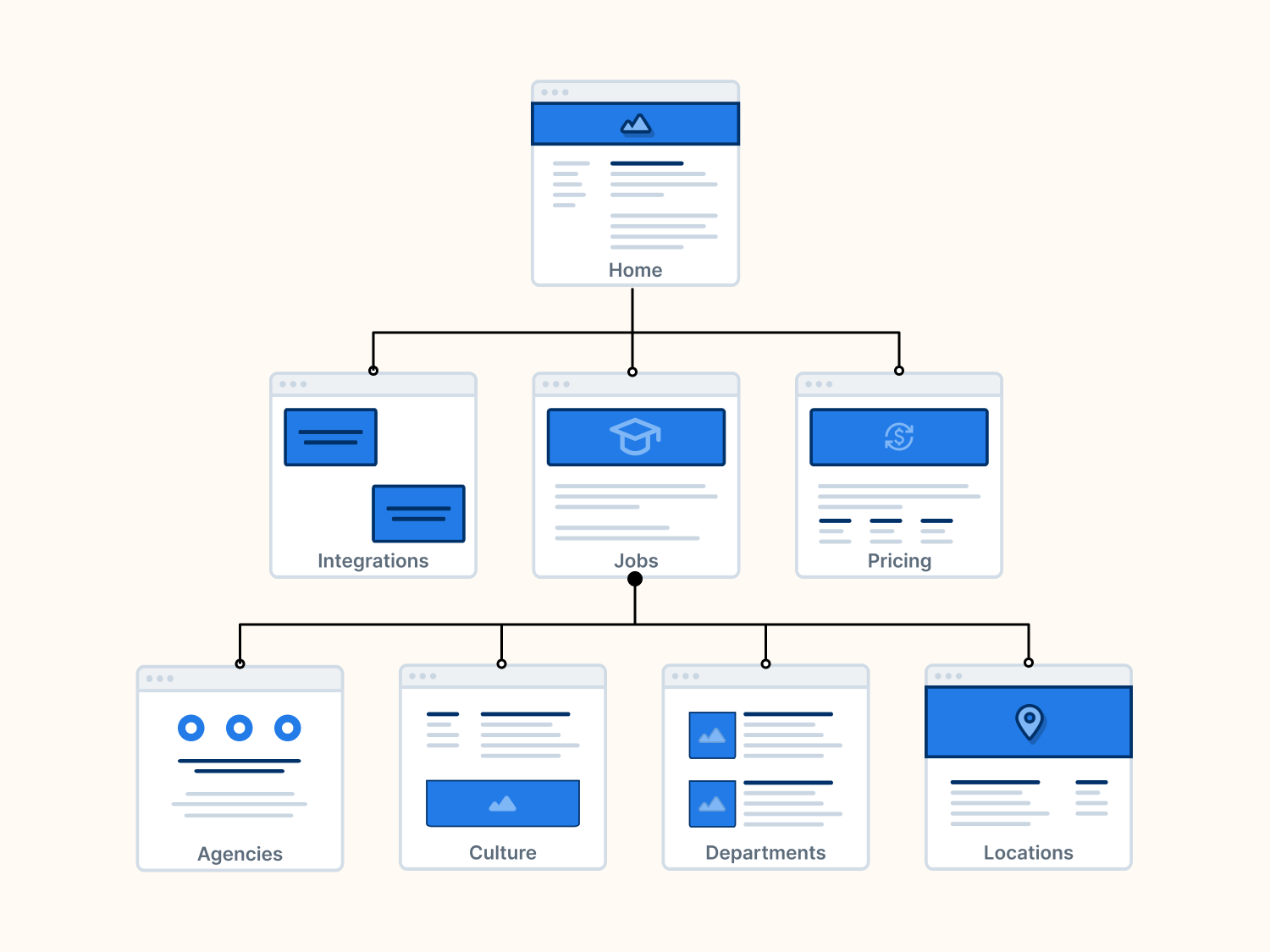
6. Generate Sitemap
Finally, Create a Sitemap for the website using the sitemap and wireframe document. Follow it up by creating various pages of the website and proposed sections of the pages. Here are some points to consider while creating a sitemap for your website:
- Hierarchy: Make sure that your website’s sitemap is structured logically and in hierarchical order. Users find it easy to comprehend when your website is well organized.
- URLs: Ensure that your website URL for each page is clear and easier to track. Avoid using dynamic URLs as much as possible and insert important keywords in URLs for best SEO practice.
- Navigation: Assure your sitemap contains links to all of the key pages on your website and that the navigation is simple to use. Users will find what they’re looking for more quickly and simply as a result.
- Keyword optimization: Ensure your sitemap contains the keywords and phrases you want your website to rank in search engines.
- Accessibility: Further, you can check whether users with disabilities can use your sitemap. This involves ensuring that photos have alternative text and that the sitemap can be accessed using the keyboard.
Design
The next step in our website design checklist is to kick off the design process. The website design would be based on multiple factors and also be influenced by the brand elements. After the blueprint is ready, the best option would be to develop and design collaboratively for a smoother development process.
7. Choose Design Template and Wireframing
Depending on the platform chosen for hosting the website; you can research to find an appropriate design template for your website or create one. The design template will act as a basis of design for the website. You can choose from existing sources offering paid templates or get them designed by the in-house team.
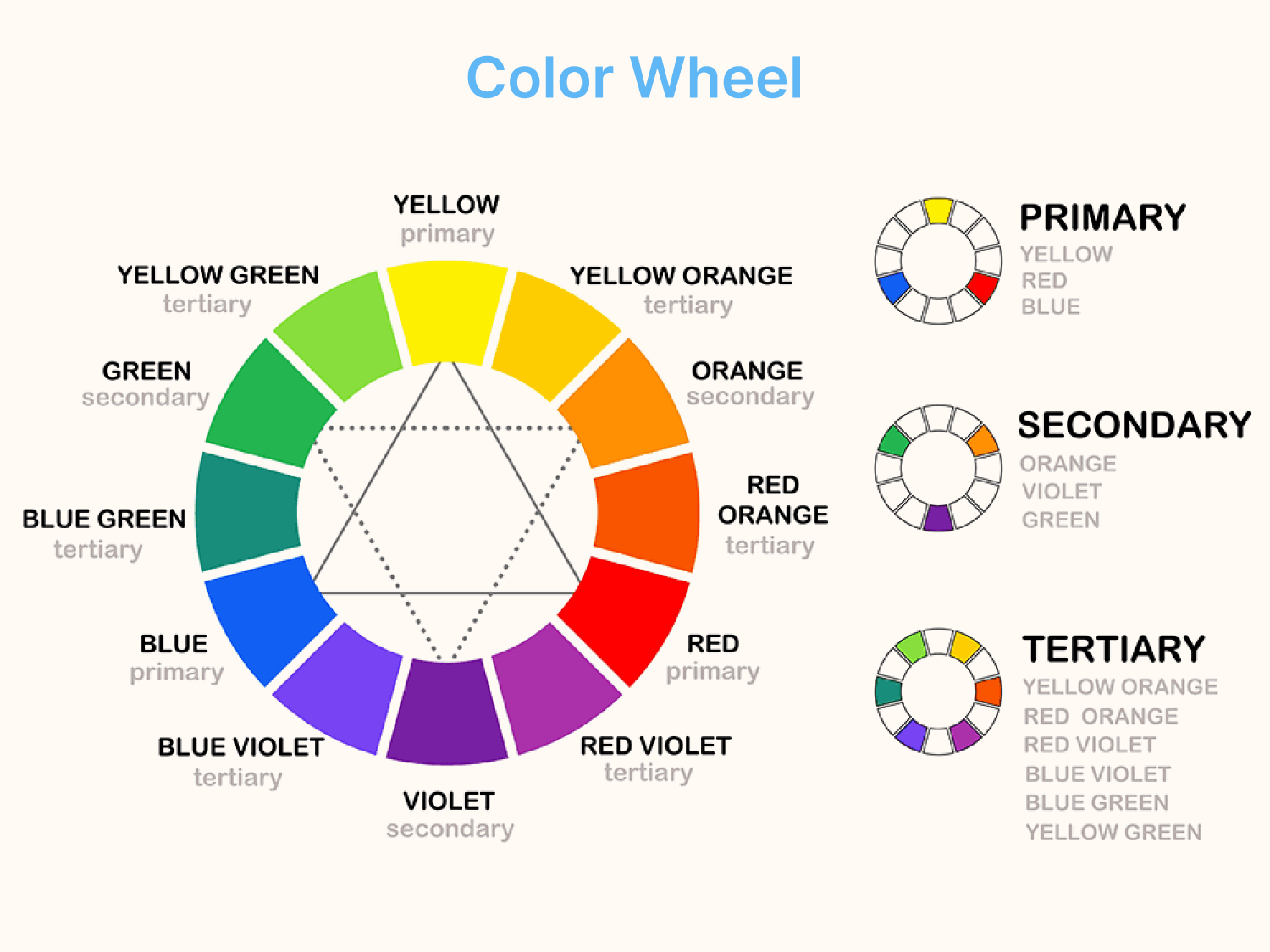
8. Choose Colors and Fonts
Colors are the crucial factors of your website elements checklist. Choosing the right set of colors can increase brand recognition by 80%. The choice of colors plays a big part in the success of a website.
There is a lot of emphasis on using color psychology to identify the optimal colors as they impact increasing website conversions. Once the color has been decided, check out a complementary color palette to enhance the website’s beauty. The website design checklist for colors includes the following.
- Text color
- Background color
- Headings color
- Links color
- Navigation color
- Logo color
- Banner color
Choose a maximum of 2-3 website fonts for the entire website. Fonts that make reading easier should be chosen for the main content. Fonts like cursive are better avoided. The font used to create the logo differs from the one used for the content.
9. Create a Prototype
Designing a prototype is a significant step in your web design checklist, followed by all development methodologies. With advanced technologies, interactive prototypes can be created, giving the feel of the actual website.
The prototype shows the hierarchy of various pages according to the sitemap. An important point to note is that the prototype is iterative, and the number of iterations should be limited. Else it is a never-ending process.
10. Decide Keywords
While the prototype is being created, the SEO team can create a list of keywords and phrases your website will target. These words should be what the audience might use to search for products or services like yours. A note to remember is to put yourself in your customer’s shoes.
Researching competitor websites is a good idea to understand the keywords they are targeting. Also, tools like Moz, Ahrefs, and Semrush will help conduct keyword research. This list should be used to create content for your website.
11. Content Strategy
Content is king in today’s world. When a potential client lands on the website, they come to find an answer to only one question: “How can you solve their problem.” Therefore, you must show them with your content how you can help them and an essential aspect of your website design checklist.
The essential pages for a website include the Homepage, Products/Services page, About Us, Contact, Testimonials, and FAQ Page. Depending on your business’s nature, the other pages you can consider adding our Blog, News, Pricing, Resources, Links, etc.
12. Content Creation
Give the list of targeted or SEO keywords to your content creation team to help them create content keeping your target customer in consideration. The content should be created using the keywords, but avoid keyword stuffing.
Creativity should be reserved for non-SEO pages. Each page of the website should have an optimum word count. As far as possible, content should be created in natural language to support voice search.
Decide your messaging priorities. The Call-to-Action (CTA) should motivate the target audience to take action. However, it is recommended to have SEO elements after the CTA.
If you have a team of content creators, you can create the content internally or seek help from content-creating professionals. It is recommended to enlist the help of either a partial or full-time copywriter to make sure your website fetches you a sale with its copy.
A few pointers to make the website copy compelling are.
- Talk about the problem: Grabbing the reader’s attention from the word fuels his curiosity. Write about the problems and take him on a journey he identifies with.
Creating vivid mental images makes them want to read and know more. One way of grabbing the audience is to ask them relevant questions. Your audience should react to themselves either by nodding, agreeing, or trying to find an answer to your question. A concise and challenging opening sentence makes the copy engaging.
- Answer the question – What is in it for me: Let’s accept the fact that only one question drives the customer. And it is “What’s in it for me.” They want to know how your product/service can help them solve a problem they are facing.
To do this, it is essential to carry out a detailed market survey to know what motivates your target audience and drives them to buy a service or product.
- Keep it short and crisp: It’s best to avoid using fluff words, sales words, or phrases. As far as possible, be specific and avoid generalization. Keep it direct and simple.
- Clear CTA: Once a reader arrives on your website, there should be no ambiguity, and he should understand exactly what you want them to do. Some examples of CTA are: Subscribe to the newsletter, sign up for an upcoming webinar, book a webinar, request a quote, etc.
13. Creating Visual Content
A survey shows – for a user to form an opinion about your website, it takes just 100 milliseconds. That’s it! You have a small opportunity to strike a connection with users. As humans, we crave visually appealing things, and it’s easy to remember, which makes it pretty clear that you need to work on the visuals and ensure that it attracts more and more users.

Development
After prototype approval, development is the next important part of your website design checklist. Ideally, the first step to start development would be sending the finalized website design to developers.
14. Design Shifting
The approved final design is shifted into Photoshop, Illustrator, or similar designing software. It is this design that provides the simulation of final web pages. Once this is done, the design is shared with the developers.
15. Coding
In the coding stage, source code development will be carried out. For website development to stay within the timelines, it is best to agree with the development team’s time frame for a beta version. Follow this up with allocating development checklists to the development team.
A part of the website elements checklist is also to have coding guidelines in place. Some coding practices include:
- Keep the code clean by removing unconventional and unwanted code. An example could be the usage of the correct indentations to improve code readability and ease in modifications.
- Insert only essential comments to make the code comprehensive for web developers of any skill and level.
- Decide on naming conventions applicable to the entire website.
- Make the code portable and avoid hard-coded value practices.
- Follow DevOps testing at set intervals.
17. Create Hosting Account and Database
Buy hosting space for the website. If your website requires a database or uses CMS, create a new database(s) and database users.
18. Setup SSL Certificate
SSL certificates stand for Standard Security Technology certification that establishes encrypted connections between servers and users. It allows transmitting sensitive information such as passwords and credit card details securely. It protects the sensitive data of users from hackers.
Additionally, due to its trustworthiness, it increases the credibility of the website. Many web browsers use indicators such as a green address bar or padlock icon to present that website is SSL verified. That encourages customers to make a purchase decision or share sensitive information.
Website Quality
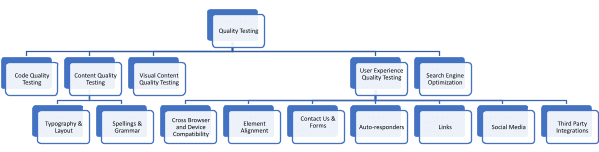
Having a quality assurance check ensures that the end-user will get a seamless experience while using your website. To fix the flaws early so that your customer experience doesn’t get affected, quality assurance is vital in your website design checklist. It should be a continuous process to attain better usability, functionality, and performance of your website.
19. Code Quality Testing
As part of the code quality check, carry out HTML and CSS validation using HTML Validators and for various browsers. Run quality checks on JavaScript, too.
20. Content Quality Testing
An important part of content testing is ensuring all the critical content from the website appears on all devices. Supporting content should be visible when the user clicks to know more. The order of content appearing is crucial, so the visitor does not miss important content.
Before the website goes live, content on the website has to be run through a spelling and grammar checker and proofread to ensure it’s error-free. If you use a template, ensure the web copy is free of any generic content.
An essential part of the website elements checklist has a content checklist in place. Consider the below-mentioned points for the same:
Typography and Layout
- Check punctuations – apostrophes, commas, hyphens
- Headings Size
- Capitalization
- Keyword Density
Spellings and Grammar
- Style of writing
- Recurring words and phrases
- The difference in spellings. For example, American spellings vs. British Spellings
- A single bulleted list ends with a period or a comma at each item’s end.
21. Visual Content Quality Testing
Next on the website design checklist is carrying out a visual content quality check.
- Check all the images are optimized and placed in the correct placeholders.
- Confirm the images are formatted and compatible with various devices by specifying image dimensions for each image.
- Check that the video and audio files are compatible with different devices and formatted appropriately.
- Verify relevant Alt tags are added to every image.
- All images can be combined using CSS Sprites.
Note: Content and visual content quality check should ideally be carried out by someone not a part of the content creation. The same goes for checking layouts, buttons, links, etc.
22. Cross Browser and Device Compatibility
As different browsers render websites differently, you need to ensure uniformity across different browsers that your target audience would use. Ensuring cross browser compatibility by performing multi-browser tests using website design testing tools is an essential step in your website design checklist.
Modern problems require modern solutions! Considering the sheer amount of websites we have, doing this by manually setting up the test infrastructure is a daunting task. Different cloud-based platforms like TestMu AI can help you scale up your cross browser testing efforts. It helps you test web and mobile applications across on-demand 3000+ real browsers, devices, and operating systems, thus allowing you to find bugs faster and before your website or mobile app goes live.
It also provides a real device cloud and virtual testing platform for your web and mobile app testing needs.
Subscribe to our TestMu AI YouTube Channel to get the latest updates on tutorials around Selenium, Cypress, and more.
23. Page Load Speed
As per one of the researches, your online business can lose 46% of customers if the website load speed is more than 4 seconds, and 16% of people feel dissatisfied if the website is delayed for 1 second. This data is enough to give you an idea about how much page load speed matters. Here are some essential reasons.
- According to a study by Shopify, in mobile devices, only an improvement of one second in page load speed can increase conversion by 27%.
- Google search engines use website load speed as a ranking factor. So page load speed directly affects website SEO ranking.
24. Website Elements Alignment
As it stands today, more than 50% of internet users use smartphones to access different websites. If your website elements are not aligned to suit smaller screens, then the chances are high that you will turn away a number of your valuable customers. Hence, testing element alignment is vital for smaller screen devices to ensure all the elements are proportionally aligned appropriately.
25. Checking the website design responsiveness
With smartphones replacing desktops in usage, creating a responsive design is now crucial for any business. Google introduced a policy called ‘Mobile-First’ for website rankings, whereby for non-mobile-optimized websites, the chances of ranking well are very low.
Having a mobile-first web design is the way to go, where the website adapts to different screen sizes and presents information on a screen, no matter how small or big it is. The approach for a mobile-friendly website is to create a non-bloating website and not force the user to pinch and zoom while accessing the website from a handheld design.
Some points to consider for mobile optimization include:
- Prioritization: Design in a way the most important elements are displayed to the user as soon as he lands on your website. CTA buttons should be visible easily when using a mobile to access the website.
- Content is important: Content displayed on the website should be easily readable and accessible. All the other elements usually seen on a desktop version should not take up screen space.
- Easy navigation: A user should find it easy to navigate from one page to another and come back to the homepage with ease and not get lost in the pages. One way of doing it is to have scroll-to-top widgets.
- Reduce page size: Resize images, compress files to reduce file size, use alternative image formats like SVG file format, etc., to trim off some KBs from your web page.
- Use Google’s AMP: Google’s AMP format enables super-fast loading by loading only basic essential information and prioritizing content readability.
Ideally, the better option is to use responsive testing tools during the development phase to reduce the chances of rework at a later stage. Mobile-friendly tester tools like LT Browser help you with 53+ pre-built device viewports and the option to create custom screens to test your website faster. You can test the responsiveness of the web design locally without any extensions and get the performance score of a website powered by Google Lighthouse, network simulations, and more.
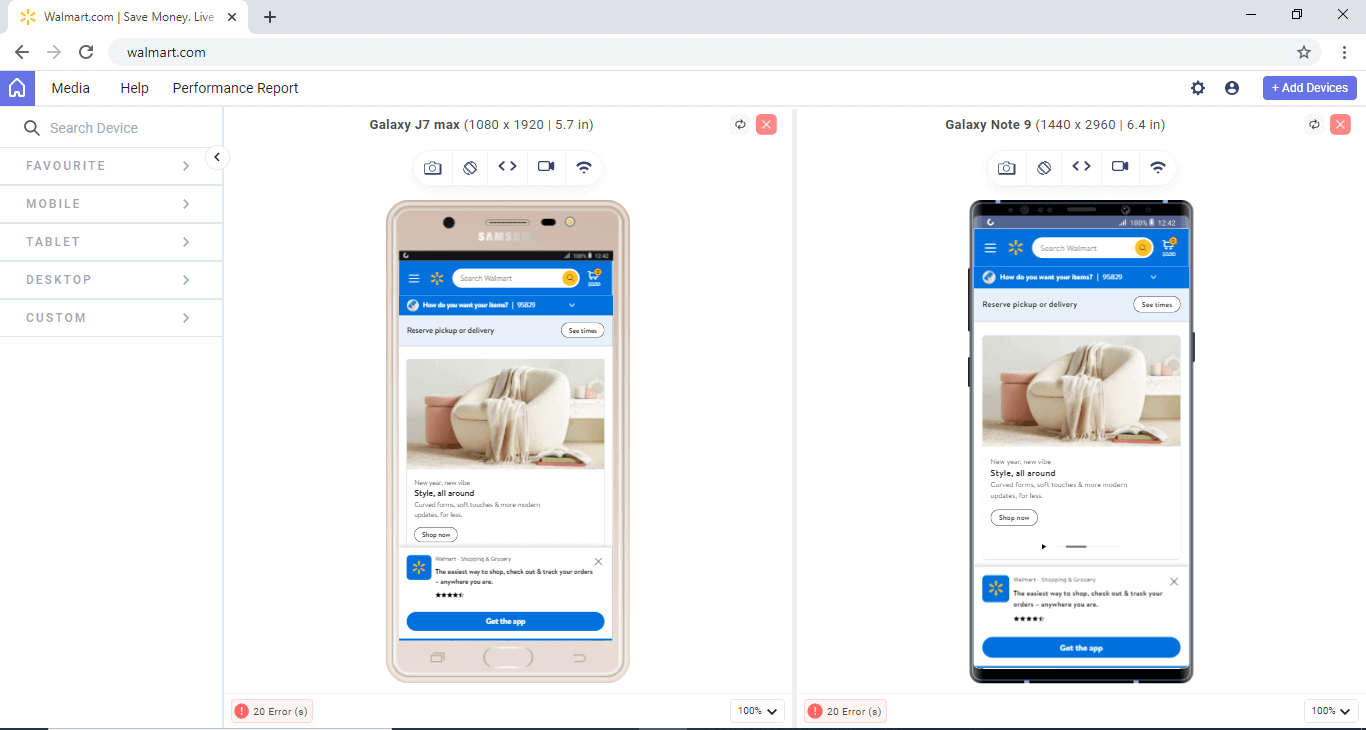
Recently, we introduced the all-new LT Browser 2.0 with several new features that help you create responsive websites for various screen resolutions.

26. Contact Us and Forms
The next in line is the Contact Us and any other forms submitting data to the website. The information filled in is recorded accurately into the database. If the form is sent to an email, monitor the mailbox to confirm receipt of the said email. Confirm that the page after form submission works as expected.
27. Auto-responders
If there are autoresponders on the website, verify they are performing. In the case of multiple auto-responders, check appropriate auto-responders are sent to the correct part of the database. Confirm these messages have also been proofread and are free of any mistakes.
28. Links
Ensure external and internal links on all the website pages are correctly linked and working as expected. The links should open in the same tab or a new tab depending on the condition set. Typically, external links open in a new tab, and internal links open in the same tab. It is recommended that the company logo be linked to the homepage.
29. Third-Party Integrations
If you use third-party tools like CRM, marketing plugins or tools, e-commerce tools, etc., correctly integrate them with your website.
30. Search Engine Optimization
For the website to rank on search engines, search engine optimization has a huge role to play. Every page on the website should have a unique page title with no more than 70 characters. The website must pass Google’s mobile-friendly test.
Likewise, every page should have unique metadata, no longer than 156 characters. Although metadata should have keywords, it should also be aligned with the user intent.
Ensure the load time for your website is optimized. Between www and no-www, it is best to opt for www. Ensure only one of them is working, else the website might be penalized for duplicate content. After the selection, redirect the option not selected to the selected one.
Post Launch
As you are done with all the testing and required optimizations, it is time to get your design to life.
31. Analytics
Submit the website to Google Search Console. First, create a new property and then implement Google Analytics code. The next step is to link Google Search Console and Google Analytics to get better insights into the Analytics. Depending on your business’s nature, you can set up Google Adwords for your website. Set up funnels (sales or marketing), goals, or tracking events into the analytics software.
Visitor tracking software will help you track traffic to your website. However, to know genuine organic traffic, ensure to exclude your office IP from analytics tracking.
32. Tracking of Website Traffic
Tracking your website traffic data will give you insight into where traffic is coming from, the sources of traffic, the behavior of customers, and what digital marketing strategies are working. So you can improve your efforts and planning according to data. Also, keeping track of competitors’ website traffic will give other ideas for which channel gives them more traffic and for which keywords they rank.
You can add tracking codes to your website. Tracking code is a snippet made of JavaScript code that allows you to track website users’ activity and collect it in an analytics module.
33. Performance
Testing your website performance is one of the most important aspects of ranking better on search engines. Also, considering Google Core Web Vitals while rolling out performance as one of the ranking signals shouldn’t be missed.
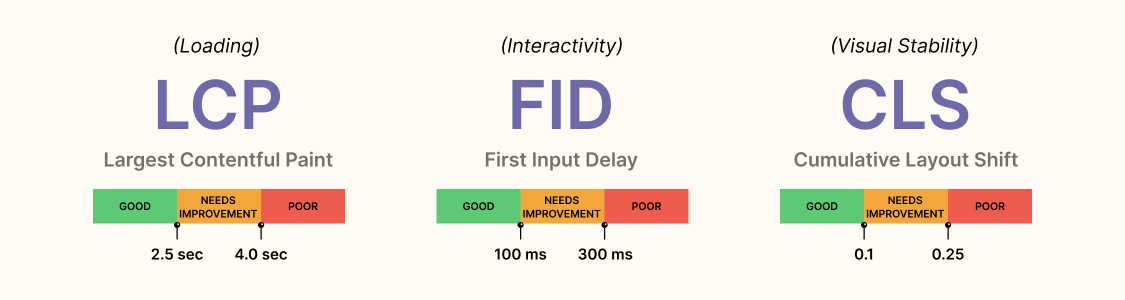
Having a page score of 90+ on Google PageSpeed Insights will go a long way toward getting traffic to the website. Minify and combine JavaScript and CSS files into fewer files. It will help reduce the number of HTTP requests.
34. Back-Up
Having an automated backup tool is necessary! If different stakeholders give any changes, make the changes and provide access to all the relevant parties. Send updates to the stakeholders and sign off on the project.

Wrapping Up
For businesses having a unique website that could strike a connection with the audience is the key to success. Following a website design checklist will ensure all the aspects are taken care of and everything works as expected.
Also, it’s not just the visual aesthetics that work but the website’s functionality too. You need to ensure that there aren’t any leakages in the user experience. Your web design might work perfectly fine across one browser, but users have multiple browser options to access the website. Thus, it’s crucial to test your website’s browser compatibility.
This web design checklist considers everyone who will be a part of the website design process, creating an effective working synergy from the initial phase to a successful website launch.


Frequently asked questions
Did you find this page helpful?
More Related Hubs
TestMu AI forEnterprise
Get access to solutions built on Enterprise
grade security, privacy, & compliance
- Advanced access controls
- Advanced data retention rules
- Advanced Local Testing
- Premium Support options
- Early access to beta features
- Private Slack Channel
- Unlimited Manual Accessibility DevTools Tests