

Next-Gen App & Browser Testing Cloud
Trusted by 2 Mn+ QAs & Devs to accelerate their release cycles


Vue vs React: What Developers Need to Know in 2025
Explore Vue vs React in 2025: core differences, syntax, state, performance, SEO, tooling, mobile, scalability, community, and how to choose the best fit.

Salman Khan
January 12, 2026
In 2025, the Vue vs React debate is more relevant than ever. Both frameworks have released major updates like React 19, Vue 3.4, Next.js 14, and Nuxt 3 that bring faster performance, smoother workflows, and robust ecosystems.
For developers, the choice between them isn’t just about preference; it’s about picking the frameworks that will shape how your software scale, perform, and evolves over time.
Overview
Deciding between Vue and React depends on the project’s requirements and the development team’s preferences. Both are widely used JavaScript frameworks for building user interfaces, each with unique features.
Comparison: Vue vs React
- Learning Curve: Vue has a gentler learning curve compared to React.
- Rendering: React relies heavily on a virtual DOM; Vue combines virtual DOM with templates for rendering.
- Backing: React is backed by Facebook, whereas Vue is community-driven.
- Data Binding: Vue supports two-way data binding, but React primarily uses one-way data flow.
- State Management: Vue’s state management (Vuex) is simpler; React commonly uses Redux or Context API.
- Ecosystem: React has a larger ecosystem and community than Vue.
- Documentation: Vue’s documentation is generally more beginner-friendly.
What Is Vue?
Vue is a JavaScript framework used for building user interfaces, particularly single-page applications. It focuses on making the process of creating interactive, reactive web components simpler and more intuitive.
It allows you to bind data to HTML and update the view automatically when that data changes. You write components that combine HTML, CSS, and JavaScript logic in one place, making them modular and reusable.
When developing Vue projects, VueJS testing plays an important role in ensuring that components remain reliable and responsive across browsers and devices.
What Is React?
React is a JavaScript library for building user interfaces, especially dynamic, interactive web apps. It was developed by Meta and is widely used in modern front-end development.
It focuses mainly on the view layer, the part of your app that renders UI and updates it when data changes. You can pair React with other libraries for routing, state management, or API handling, depending on your needs.
For developers new to React, following a structured React testing tutorial can provide guidance on best practices for unit, integration, and end-to-end testing.
Vue and React: A Quick Comparison
Here is a quick comparison of Vue vs React, summarizing key aspects like architecture, learning curve, performance, tooling, and community support.
| Criteria | Vue | React |
|---|---|---|
| Learning Curve | Easier | Moderate to Hard |
| Default Tooling | Integrated | Requires setup |
| Syntax | HTML + JS directives | JSX |
| Mobile Development | Weaker (Quasar, NativeScript) | Strong (React Native) |
| Ecosystem | Curated | Vast and Flexible |
| State Management | Pinia | Redux, Zustand, Context |
| SSR/SSG | Nuxt 3 | Next.js 14 |
| Community | Growing | Massive |
| Performance | Faster hydration, smaller bundle | High performance with Fiber/Server Components |

Note: Test Vue and React applications across 3000+ real environments. Try TestMu AI Today!
Vue vs React: Core Differences
React vs Vue often comes down to what your project needs and what your team is comfortable with. Below are the core differences that can shape your decision-making process.
Developer Experience and Learning Curve
Vue
Vue is often praised for its gentle learning curve. Its use of HTML-based templates, clear documentation, and single-file components makes it highly accessible for newcomers. The official tooling (like Vite and Vue Devtools) works cohesively.
React
React has a steeper learning curve. Developers must understand JSX, React Hooks, and often combine third-party libraries to build complete solutions. While this adds flexibility, it also introduces complexity, especially for new teams.

Syntax and Templating
Vue
Vue uses HTML-based templates by default. Logic is expressed with directives (v-if, v-for, etc.), making it more intuitive for those coming from traditional web development.
Example:
<template>
   <div>
      <p v-if="isLoggedIn">Welcome back!</p>
      <button @click="logout">Logout</button>
   </div>
</template>

<script setup>
 import { ref } from 'vue'
 const isLoggedIn = ref(true)
 const logout = () => isLoggedIn.value = false
</script>
React
React uses JSX, a syntax that mixes HTML and JavaScript logic. While expressive and powerful, JSX can feel unnatural to those with strong HTML/CSS backgrounds.
Example:
function App() {
   const [isLoggedIn, setIsLoggedIn] = useState(true);
   return (
      <div>
        {isLoggedIn && <p>Welcome back!</p>}
        <button onClick={() => setIsLoggedIn(false)}>Logout</button>
      </div>
   );
}
Reactivity and State Management
Vue
Vue’s reactivity engine in Vue 3 is based on proxies and offers fine-grained dependency tracking. Combined with Pinia, Vue’s modern state management solution, you get a modular, TypeScript-friendly, and intuitive global state tool.
Example:
import { defineStore } from 'pinia'

export const useUserStore = defineStore('user', {
   state: () => ({
      name: 'Jane Doe',
      isLoggedIn: false
   }),
   actions: {
      login(name) {
         this.name = name
         this.isLoggedIn = true
      }
   }
})
React
React offers Hooks like useState, useEffect, and useReducer. For global state, developers often reach for Redux, Zustand, or Context API.
Example:
const UserContext = createContext();

function UserProvider({ children }) {
   const [user, setUser] = useState({ name: '', isLoggedIn: false });

   const login = (name) => setUser({ name, isLoggedIn: true });

   return (
      <UserContext.Provider value={{ user, login }}>
         {children}
      </UserContext.Provider>
   );
}
If you’re working with React, it’s worth understanding how its Virtual DOM behavior can affect the way your UI tests run. This guide on React Virtual DOM walks through techniques to make your tests more reliable and maintainable.
Both frameworks emphasize reactivity. Vue’s system uses proxies and dependency tracking, while React relies on state and hooks.
For Vue, running tests in a VueJS testing cloud can help verify global states managed by Pinia across multiple devices. Similarly, React developers can run tests on React testing cloud to ensure their React applications works across different environments.
Performance and Bundle Size
Vue
Vue generally delivers smaller bundle sizes (~80KB for the core) and faster hydration thanks to its template compiler and reactivity model.
React
React continues to innovate with React 19, introducing Server Components, enabling leaner client bundles and improved performance on the server side.
For UI-heavy apps, visual verification is important. Tools supporting VueJS visual testing and React Native visual testing allow teams to catch design and rendering issues before they reach production.
SSR, SSG and SEO Optimization
Vue
Vue has Nuxt 3, a full-fledged meta-framework for SSR/SSG. It offers automatic routing, SEO-friendly configurations, and tight integration with Vue’s ecosystem.
React
React pairs with Next.js 14, which leads the industry in server rendering, edge rendering, and image optimization.
Ecosystem, Tooling and Developer Productivity
Vue
Vue offers a more curated experience. Its ecosystem, including Vite, Vue Router, Pinia, and Nuxt, is officially maintained, tightly integrated, and consistent.
Developer tooling is another area where Vue shines:
- Volar enables better TypeScript support in SFCs than many React toolchains.
- Vue Devtools offers a polished debugging experience.
React
React boasts the largest ecosystem in frontend development. It integrates seamlessly with React Router, React Query, React Hook Form, and is deeply supported by third-party plugins.
Mobile Development
Vue
Vue has alternatives like NativeScript-Vue, Capacitor, and Quasar, but they’re niche and less adopted. If mobile is core to your roadmap, React is the clear choice.
React
React wins here, hands down. React Native is a mature, high-performance solution for cross-platform mobile apps. Major companies like Facebook, Instagram, and Uber rely on it.
Following React Native best practices can help you build apps that are not just functional, but also scalable and maintainable long-term.
Once you build a React Native app, it’s equally important to ensure it works seamlessly across devices. You can test React Native apps to verify compatibility, functionality and user experience across different platforms.
Scalability and Use at Scale
Vue
Vue is highly scalable too, especially with the Composition API and Nuxt 3. It excels in small-to-medium apps and is seeing increased adoption in enterprise spaces, particularly in Asia and Europe.
React
React powers some of the biggest web apps in the world, including Facebook, Netflix, and Airbnb. Its ecosystem supports complex enterprise needs, custom architectures, and large development teams.
Community, Popularity and Job Market
Vue
Vue has a passionate, fast-growing community and strong traction among indie developers, startups, and digital agencies.
React
React remains the most popular JavaScript framework in 2025. It dominates job listings, GitHub stars, and Stack Overflow questions.
If you’re preparing for a React-related role, these React interview questions can give you a solid edge in the hiring process.
Making the Right Choice: Vue vs React
According to the survey by State of JavaScript 2024, React remains the most used front-end framework among survey respondents. On the other hand, Vue.js consistently holds a strong position in terms of usage.
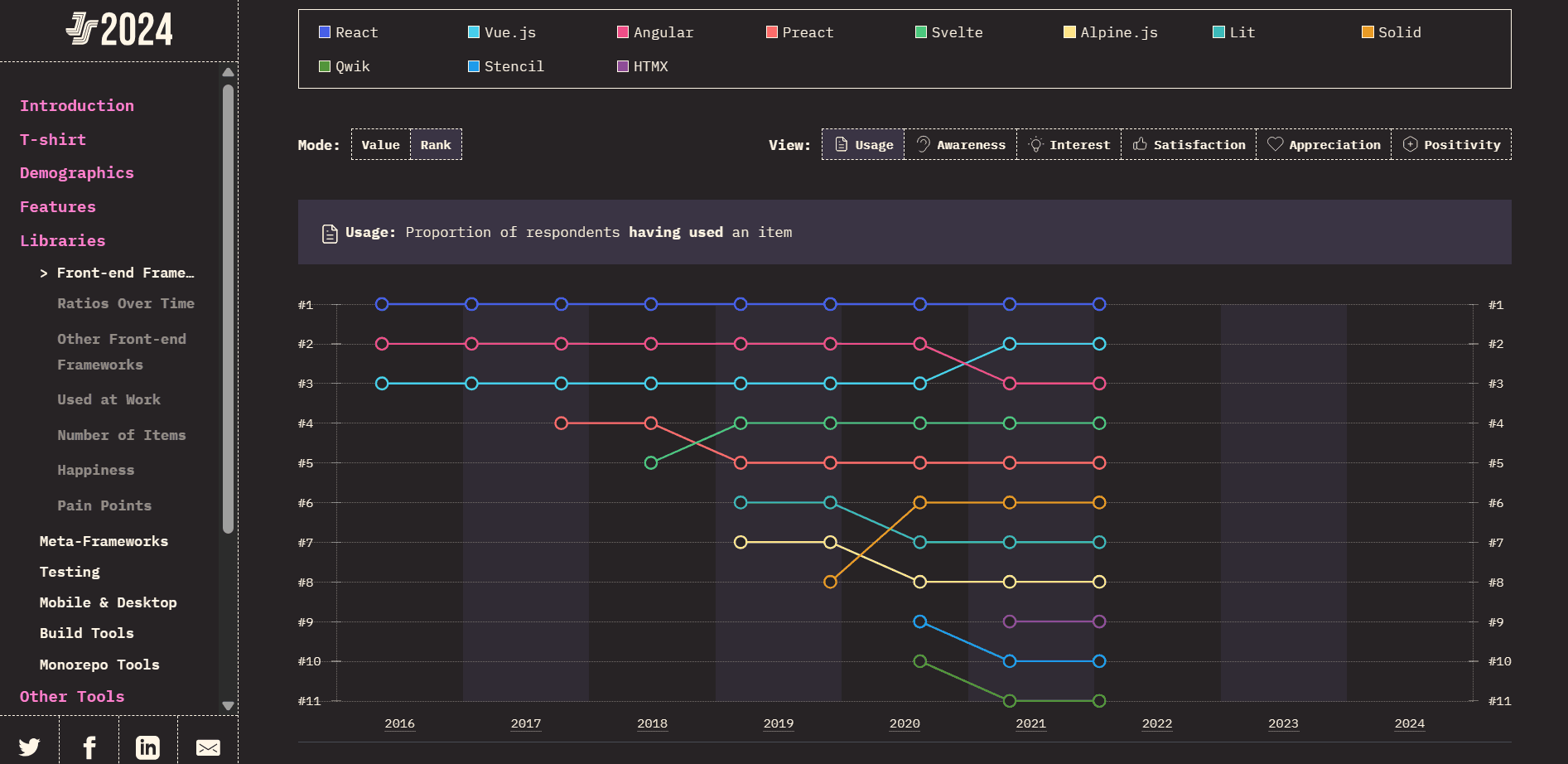
However, when choosing between Vue.js and React.js, the optimal path depends on project scale, team expertise, and long-term goals.
Vue: Ideal for Fast, Lightweight Projects
- Faster Onboarding and Simplicity: Vue’s intuitive syntax and opinionated structure let teams ramp up quickly. This is good for small to medium-sized projects or rapid prototyping.
- Efficient Performance: Vue apps often deliver smaller bundle sizes, translating to faster load times and better responsiveness.
- Consistent Core Ecosystem: Built-in tools like Vuex/Pinia and Vue Router eliminate the overhead of selecting external libraries and reduce cognitive load.
React: Built for Complexity and Enterprise Scale
- Scalability and Flexibility: React excels in large-scale, enterprise-grade applications where component modularity, architecture control, and performance tuning matter most.
- Vast Ecosystem and Support: Backed by Meta and a massive global developer community, React offers extensive libraries, tooling, and hiring talent, including React Native for seamless mobile integration.
- Long-Term Maintainability: React’s stability and corporate backing provide confidence for enterprise deployments that evolve over the years.
Key Similarities Between Vue and React
Here are some nuanced similarities between Vue and React that are not only technically significant but strategically important for teams building scalable web or mobile applications.
- Modern JavaScript Foundation with TypeScript Support: Both Vue and React are built on ES6+ JavaScript and offer first-class support for TypeScript. It enables scalable, maintainable codebases, especially important for enterprise applications and long-term projects.
- Component-Based Architecture: Both frameworks use a component-driven model where UIs are built using self-contained, reusable blocks. It promotes consistency, testability, and modular development across teams and projects.
- Declarative and Reactive UI Rendering: Vue and React embrace a declarative style; developers describe what the UI should look like, and the framework handles how to update it. This is powered by reactivity: Vue’s reactivity system and React’s state-based rendering both enable dynamic, real-time interfaces.
- Virtual DOM Optimization: Both use a Virtual DOM to enhance performance. By minimizing direct interaction with the real DOM, they efficiently batch updates and improve rendering speed, crucial for high-interaction apps.
- Thriving Ecosystems and Community Support: Vue and React boast large, active communities and extensive ecosystems. From dev tools to UI libraries, state management solutions to testing frameworks, both ecosystems reduce development friction and speed up delivery.
Why Should You Test Vue and React Applications?
Even your well-written Vue or React code can break under the right (or wrong) conditions. A small UI change in one component can unintentionally impact another. Without tests, those issues often go unnoticed until they surface in production, where they’re harder (and more expensive) to fix.
Testing helps you stay ahead of them. That’s where AI testing platforms like TestMu AI can help, letting you run manual and automated tests across a wide range of browsers and operating systems without maintaining a complex infrastructure yourself.
Features:
- Real-Time Testing: Instantly test your websites and mobile apps on real browsers and OS combinations in the cloud.
- Automation Testing: Run Selenium, Playwright, Appium and other automation scripts in parallel across multiple environments.
- Smart Visual UI Testing: Identify design bugs with smart visual regression testing across screen sizes and resolutions.
- Real Device Cloud: Test your mobile apps on real Android and iOS devices.
- Debugging Tools: Access logs, screenshots, videos, and dev tools to quickly diagnose and fix test failures.
- CI/CD Integrations: Easily integrate TestMu AI into your CI/CD pipelines for fully automated testing workflows.
To get started, check out this documentation on web browser testing with TestMu AI.

Conclusion
React vs Vue remains one of the common comparisons in frontend development. However, both are excellent choices in 2025. Vue offers a cohesive, developer-friendly experience that favors speed, readability, and productivity. React offers unmatched flexibility, community support, and scalability for ambitious applications.
There is no “one best” framework, only the best for your context. Choose Vue if you want focus and flow. Choose React if you need control and scale. And if you go with the React framework, make sure to perform React end-to-end testing to ensure your React application works seamlessly together.
Ultimately, the best frontend stack is the one your team can master, maintain, and use to build exceptional products.
Citations
- React: https://react.dev/
- Vue: https://vuejs.org/


Frequently asked questions
Did you find this page helpful?
More Related Hubs
TestMu AI forEnterprise
Get access to solutions built on Enterprise
grade security, privacy, & compliance
- Advanced access controls
- Advanced data retention rules
- Advanced Local Testing
- Premium Support options
- Early access to beta features
- Private Slack Channel
- Unlimited Manual Accessibility DevTools Tests