

Next-Gen App & Browser Testing Cloud
Trusted by 2 Mn+ QAs & Devs to accelerate their release cycles


On This Page
- What Is Microsoft Teams App?
- Why Use Microsoft Teams App?
- TestMu AI Integration With Microsoft Teams App
- New Browsers In Real Time Testing
- New Browsers In Screenshot Testing
- New Browsers In Automation Testing
- iOS 14.2 Support In Real Time Testing
- New Pre-Installed Devices In Automation Testing
- Generate Lighthouse Reports In Automation For Windows
- Live With TestMu AI TestNG Certifications
- Live With Cross Browser Compatibility Learning Hub!
- Wrapping Up!

Live With MS Teams App Integration, New Browsers, and More!
TestMu AI has integrated with MS Teams App to make your cross browser testing experience more seamless than ever. This blog will help you leverage the features of MS Teams App with TestMu AI, and more.

Salman Khan
March 7, 2026
Every year, the tech market develops better and more effective collaboration tools. But hardly it covers all the collaboration aspects that virtual teams need. At TestMu AI, we believe in enabling seamless collaboration scenarios. So to improve your teamwork and productivity, we’ve partnered with Microsoft Teams App so that you can improve your team’s communication and collaboration.
With TestMu AI and MS Teams integration, you can initiate quick real-time tests and screenshot tests at a click of a button and collaborate with your team members in real-time. Let’s understand what role Microsoft Teams App plays and how you can leverage it with TestMu AI. You’ll also find some bonus additions to make your cross browser testing experience more seamless.
What Is Microsoft Teams App?
Microsoft Teams App, also known as MS Teams App, is an online collaboration application designed for online meetings, conversations with teams, channels, and individuals, document sharing, voice calling, video conferencing, and marketing communications. MS Teams App provides integration with different apps to keep you organized and have interactions in one place.

Why Use Microsoft Teams App?
The secret to making creative decisions and communicating with each other is to have an incredible team space. It can be possible only by having a collaborative workspace tool, mainly if a particular team is dispersed or has many remote workers.
Microsoft Teams Apps is straightforward and user-friendly, with no setup needed. It is equipped with a robust set of features that makes it stand out from other collaboration tools.
- Easy to use: It provides an intuitive interface to grasp things quickly and increase your work-effectiveness. Also, it offers an easy-to-use channel for group chats, the ability to create multiple channels, and threads are pretty easy to follow.
- Video conferencing & Screen Sharing: It provides a fast and smooth video conferencing feature for your organization with screen sharing functionality for technical queries and presentations.
- Audio Conferencing: With the audio conferencing feature, you can join an online meeting via phone without an internet connection.
- Document Sharing: MS Teams App has a secure cloud space known as SharePoint Online that will automatically save all your documents and files shared across the conversation. It helps to store all your files in a single place.
TestMu AI Integration With Microsoft Teams App
TestMu AI now integrates with Microsoft Teams App to scale up the level of your cross browser testing. Now capitalize the real power of testing by using our latest integration to perform Real-Time Testing and Screenshot Testing of your websites and web apps. The TestMu AI and Microsoft Teams App integration help you with:
- Enriched cross browser testing experience on the cloud across 2000+ browser versions.
- Easily collaborate over UI issues, integrated web debugging, streamline your feedback loops, and much more.
- Initiate your Real-time test and Screenshot tests right from inside the team channel, group, or direct conversations in a single click.
- Allow you to launch your test from any channel or personal chats.
- Save your time with reusable test cards and launch the test with the same configurations. You can even pin up the test cards to use at your finger-tips.
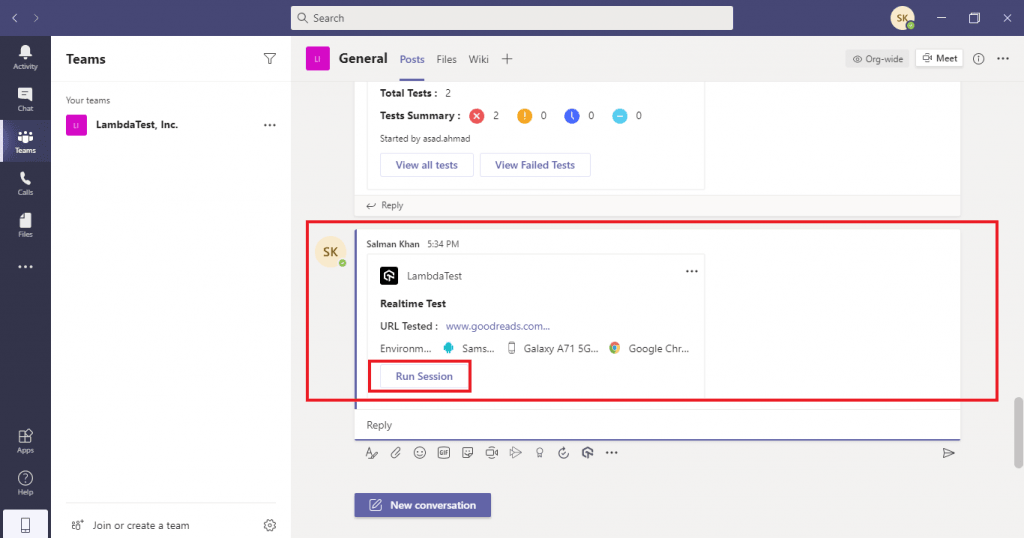
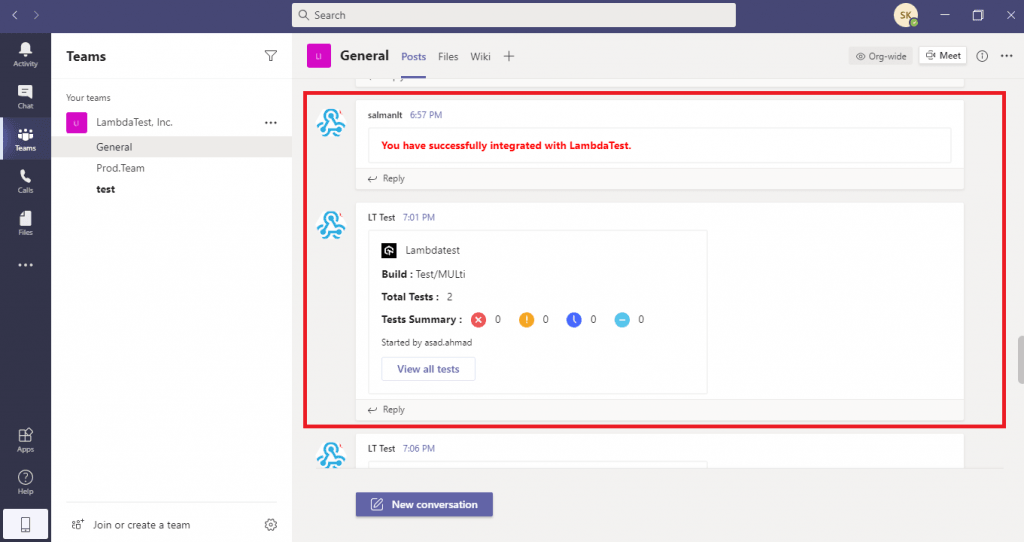
With TestMu AI-Microsoft Teams App Integration, whenever you perform automated cross browser testing you can share your UI bugs directly to your team channel or groups. You can view your test build name, number of test runs, test summary, and the failed test and collaborate on the website issues.
Reusable test cards allow you to view all your tests and the failed tests instantly.
New Browsers In Real Time Testing
Now scale your cross browser testing efforts a one step further with a range of newly added browser versions for Real time testing.
- Chrome 89 Beta, 88
- Firefox 86 Beta, 85, 84
- Edge 88
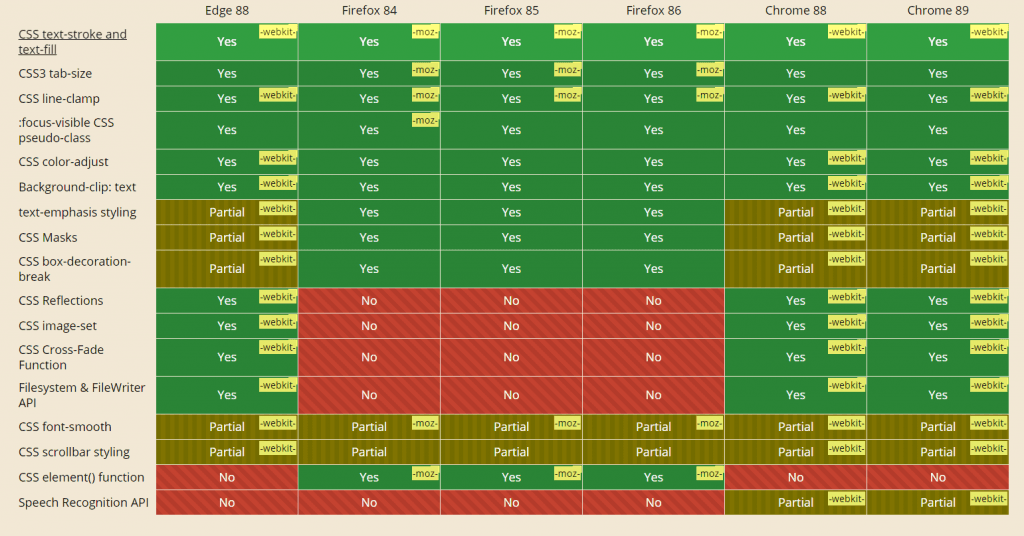
Let’s evaluate the cross browser compatibility of the latest versions between Chrome 89 Beta, Chrome 88, Firefox 86, Firefox 85, Firefox 84, and Edge 88.
New Browsers In Screenshot Testing
We have added new browser versions in Screenshot testing. You can now capture bulk screenshots and test the browser compatibility on the latest browser for Chrome, Firefox, Opera and Edge.
- Chrome 87
- Firefox 84, 83, 82
- Opera 73
- Edge 87
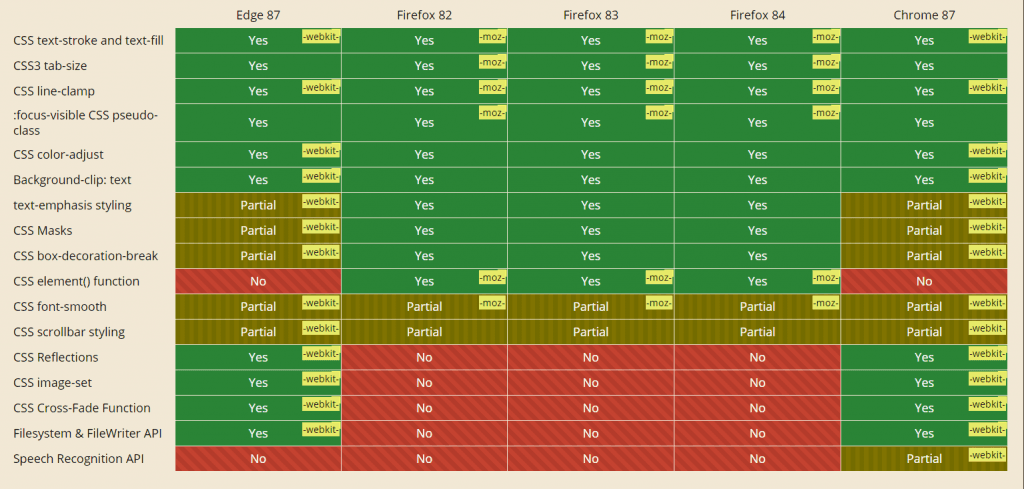
Let’s evaluate the cross browser compatibility of the latest versions between Chome 87, Firefox 84, Firefox 83, Firefox 82, and Edge 87.
New Browsers In Automation Testing
Now enhance your automation testing over desktops, we have added the latest browser versions for Chrome, Firefox and Edge.
- Chrome 89 Beta, 88
- Firefox 86 Beta, 85, 84
- Edge 88 Beta, 87
Let’s evaluate the cross browser compatibility of the latest versions between Chrome 89, Chrome 88, Firefox 86, Firefox 85, Firefox 84, Edge 88 and Edge 87.
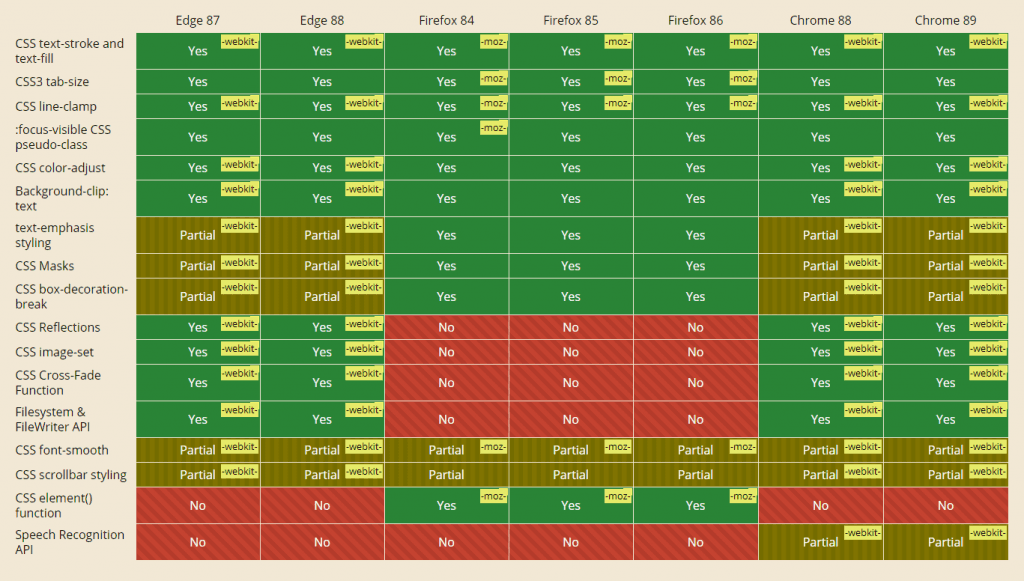
You can find the capabilities for these browsers in our Desired Capabilities Generator.
iOS 14.2 Support In Real Time Testing
You can now perform live interactive testing of your websites on iOS 14.2. Here is the list of new pre-installed devices supporting iOS 14.2 on TestMu AI.
List of pre-installed iPhone devices:
- iPhone 12 Pro Max, 12 Pro
- iPhone 12 Mini, 12
- iPhone 11 Pro Max, 11 Pro, 11
- iPhone XS Max, XS
- iPhone XR, X
- iPhone 8 Plus, 8
- iPhone SE 2nd Gen
List of pre-installed iPad devices:
- iPad (6th Generation), (7th generation)
- iPad Mini (5th generation)
- iPad Pro (11-inch), Pro (11-inch) (2nd generation)
- iPad Pro (12.9-inch) (3rd generation), Pro (12.9-inch) (4th generation)
- iPad Air 3 /iPad Air (3rd generation)
- iPad Pro (9.7-inch)
- iPad 8th Gen
- iPad Air 4/ iPad Air (2020)
We have also added new pre-installed iPad devices for iOS 14.1:
- iPad (6th Generation), (7th generation)
- iPad Mini (5th generation)
- iPad Pro (11-inch), (11-inch) (2nd generation)
- iPad Pro (12.9-inch) (3rd generation), (12.9-inch) (4th generation)
- iPad Air 3 /iPad Air (3rd generation) 9.7-inch
- iPad Pro
- iPad 8th Gen
- iPad Air 4/ iPad Air (2020)
New Pre-Installed Devices In Automation Testing
Now capitalize the real power of automation testing and test your websites and web apps on the newly added pre-installed devices in iOS 14.1 & iOS 14.2.
List of new pre-installed iPhone Devices:
- iPhone SE
- iPhone 7, 7 Plus
- iPhone 8, 8 Plus
- iPhone X
- iPhone XS, XS Max
- iPhone XR
- iPhone 11, 11 Pro, 11 Pro Max
List of new pre-installed iPad Devices:
- iPad (6th Generation)
- iPad Air 2
- iPad Air (3rd generation)
- iPad Pro (9.7-inch), (10.5-inch), (12.9-inch)
- iPad Pro (11-inch), (12.9-inch) (3rd generation)
You can generate the Selenium capabilities for both the iOS versions from our Desired Capabilities Generator.
Generate Lighthouse Reports In Automation For Windows
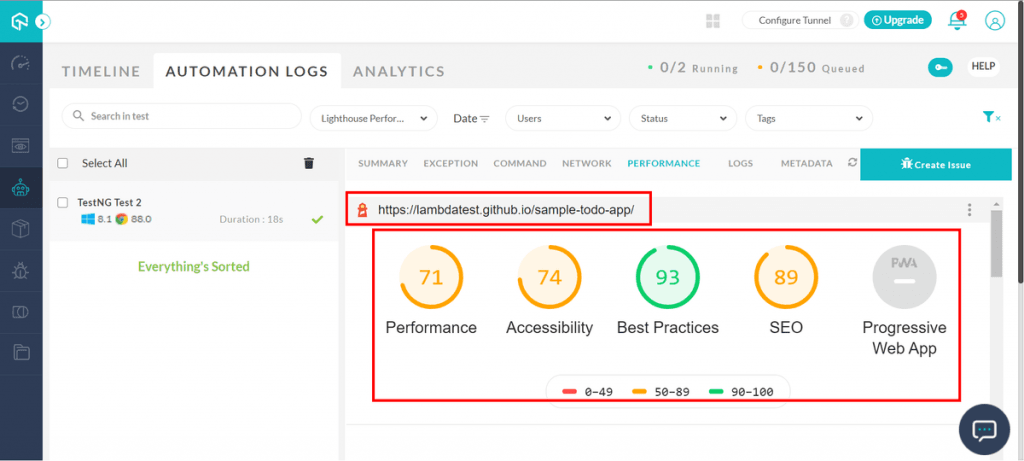
After adding performance metrics powered by Google Lighthouse for the MAC operating system. We have now added the performance reports for Windows OS as well. You can now generate the performance reports on Windows 8.1 and Windows 8.
Live With TestMu AI TestNG Certifications
With TestMu AI Certification, flaunt your Selenium test automation skills and take your career to the next level. TestMu AI TestNG Certification is a must-have for all TestNG learners who want to get certified and stay ahead among professionals who are growing their career in automation testing.

Enroll for TestMu AI TestNG Certification and become TestNG certified!
Live With Cross Browser Compatibility Learning Hub!
The TestMu AI Learning Hub is a free platform for all users, readers, and students who want to gain foundational knowledge of every excellent tool or framework, including Selenium, CI/CD, and more. Today, we are glad to announce that we are LIVE with the Cross Browser Compatibility learning hub. Here you will get to know everything about cross browser compatibility, right from how the browser works to browser compatibility issues and its solutions.
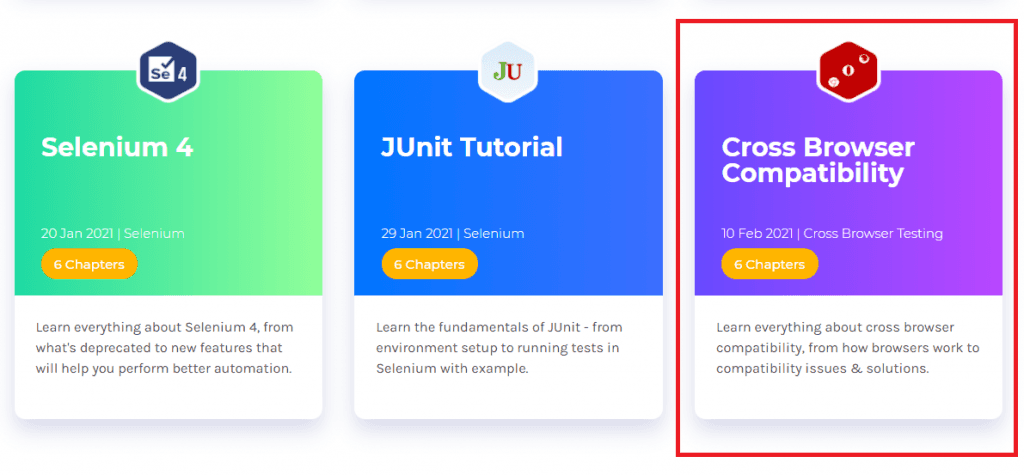
We at TestMu AI tirelessly work to create a more comprehensive hub for you to get a deep insight. You can also check out our existing hubs on Protractor tutorial, WebdriverIO tutorial, Jenkins Tutorial, Selenium 4, and JUnit tutorial.
Wrapping Up!
At TestMu AI, we’re steadily working on getting more integrations onboard to assist you. This time, we’ve added the Microsoft Teams App to better collaborate with your team and fasten your testing workflows. We hope that the integration of TestMu AI + Microsoft Teams App will surely benefit you to scale your cross browser testing experience.
Already started using this integration and want to share your feedback? Drop your suggestions in the comments or on the TestMu AI Community. If you have any questions or concerns, please feel free to reach out to us through our 24/7 customer chat support, or you can drop us a mail at [email protected].
Happy Testing! 🙂



Did you find this page helpful?
More Related Hubs
TestMu AI forEnterprise
Get access to solutions built on Enterprise
grade security, privacy, & compliance
- Advanced access controls
- Advanced data retention rules
- Advanced Local Testing
- Premium Support options
- Early access to beta features
- Private Slack Channel
- Unlimited Manual Accessibility DevTools Tests