

Next-Gen App & Browser Testing Cloud
Trusted by 2 Mn+ QAs & Devs to accelerate their release cycles


On This Page
- Ensure App Functionality with Flutter Dart Testing
- Install and Uninstall Apps in App Automation Scripts
- Biometric Authentication with on Real Android Devices
- REGEX for Device Name in Playwright Android
- Google Lighthouse Report for Playwright Tests
- Identify and Highlight CDP Errors in Command Logs
- All In All

New Features And Enhancements: Real Devices And Playwright Testing
Check out these latest Real Device testing updates and improved CDP Playwright features that can take your testing workflows to the next level.

Devansh Bhardwaj
February 10, 2026
Hola Testers!
To deliver a seamless user experience, organizations need to test how their products and software would perform in the hands of actual users. Emulators and simulators often fall short of capturing the complex details of how devices behave in the real world. They may not accurately replicate the diverse range of hardware capabilities, network conditions, and software configurations that users encounter.
In this product update, we have introduced some exciting features that bring even more flexibility and precision to your testing workflows. From installing and uninstalling apps within your app automation scripts to testing biometric authentication on real Android devices, we have you covered.
Along with this, our integration with Google Lighthouse lets you view comprehensive performance metrics while running Playwright tests, empowering you to optimize your web applications across different browsers. If you’re looking to improve your playwright interview skills, check out our curated list of questions and answers at Playwright interview questions.
We are excited to unveil these new features and upgrades. Let’s explore them together!

Ensure App Functionality with Flutter Dart Testing
Flutter, with its Dart programming language, enables developers to create mobile apps quickly and efficiently. Now, developers can utilize the strengths of Flutter Dart and TestMu AI’s Real Device Cloud to ensure their Android apps perform excellently across different devices and platforms. By combining real devices and Flutter testing, developers can guarantee flawless app performance on various devices and platforms.
TestMu AI offers a diverse collection of real devices for testing, enabling developers to save time and resources. The convenience of parallel testing and detailed reports further enhances the testing process, allowing developers to thoroughly evaluate their Flutter apps and provide a seamless user experience across numerous mobile devices.
Check out our detailed support documentation to perform Flutter Dart Testing On TestMu AI Android Real Devices.
Install and Uninstall Apps in App Automation Scripts
Within your app automation scripts, you can install and uninstall specific applications through webhooks. This convenient feature is accessible using the script execution functionality of WebDriver.
To install an app, simply run the command lambda-install-app followed by the app’s ID. The ID can be either the app’s unique identifier generated by TestMu AI or a custom ID provided during the app upload process.
Furthermore, during the execution of your automation tests, you can effortlessly uninstall apps using the command lambda-uninstall-app along with the app’s package name (for Android apps) or bundle ID (for iOS apps). This level of control enables you to manage app installations and removals within your automation testing workflow seamlessly.
Check out this detailed support documentation to learn how to install and uninstall apps in app automation scripts.
Biometric Authentication on Real Android Devices
Now test your application’s biometric authentication functionality with utmost precision. With this latest feature, TestMu AI enables you to verify and optimize your app’s performance across a diverse range of real devices, providing users with an optimal and secure authentication experience.
With this addition, enhance security and elevate the user experience of your Android apps like never before. Check out this detailed support documentation to use Biometric Authentication With Real Devices For Android.
REGEX for Device Name in Playwright Android
Regular expressions, commonly known as REGEX, are crucial in searching and locating specific characters within a string. When conducting tests on TestMu AI with a particular device in mind, there may be instances where the selected device is unavailable. In such situations, REGEX comes to the rescue by expanding the search criteria for alternative devices to execute the test.
To illustrate, let’s consider a scenario where you specifically require a Pixel device for your test, regardless of the specific model. By utilizing REGEX, you can precisely specify this requirement. As a result, any available Pixel device will be allocated to you, significantly broadening the scope of device options for testing purposes. REGEX empowers you to achieve your desired test environment effectively and efficiently.
Check out this detailed support documentation to learn how to use REGEX for deviceName.
Google Lighthouse Report for Playwright Tests
With the latest integration between TestMu AI and Lighthouse, developers and QA can now view the performance metrics (Lighthouse Audits) while running Playwright tests on the TestMu AI cloud. By generating the Lighthouse report, you can view the following performance metrics:
- Performance
- Accessibility
- Best Practices
- SEO
- Progressive Web App
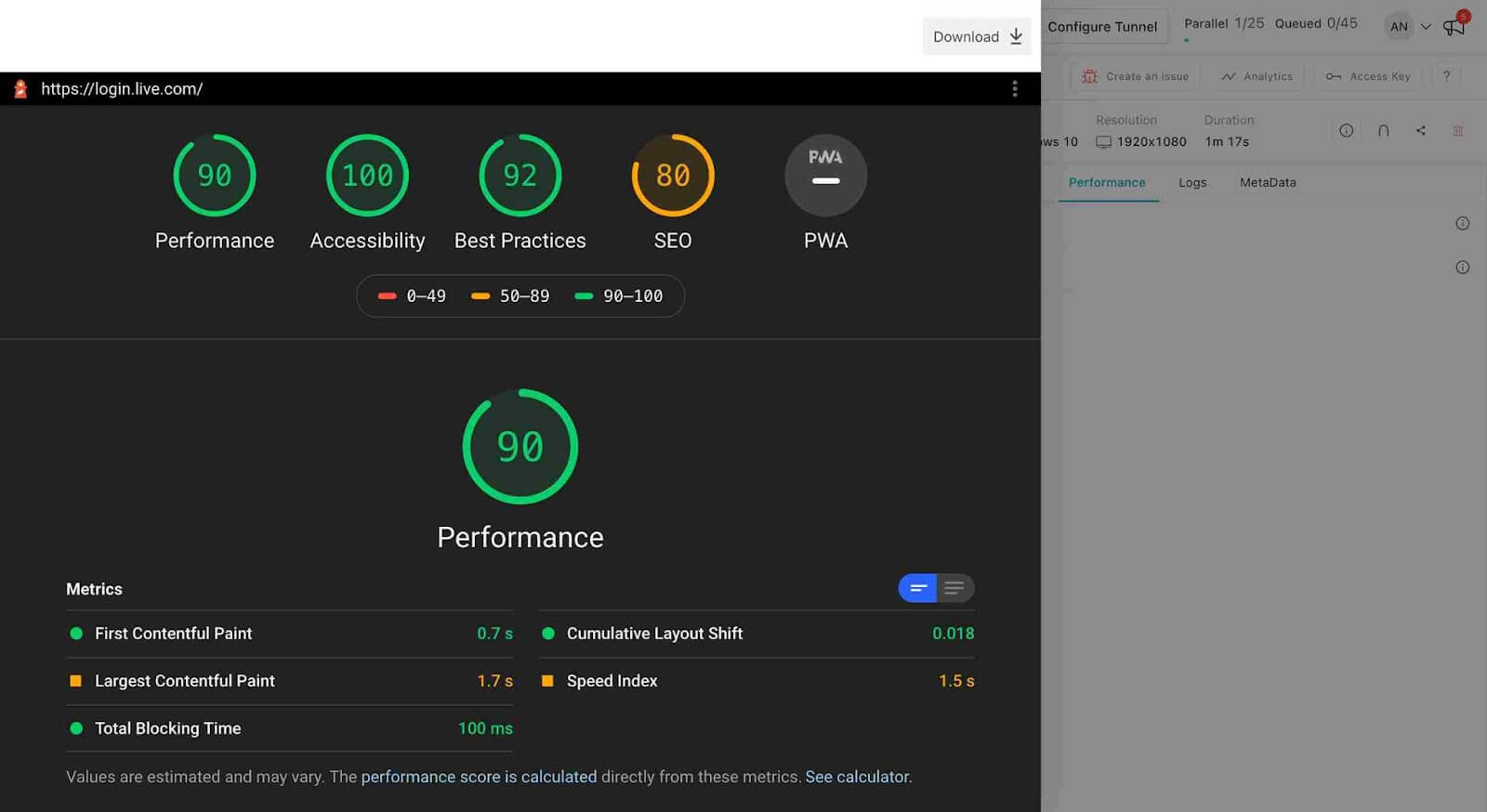
Now, easily add the Lighthouse Performance Metrics of the website you want to test by executing the lighthouseReport action via the test. Currently, TestMu AI supports Lighthouse on Chrome, Microsoft Edge, and Chromium browsers.
Check out our detailed support documentation to know how to view Lighthouse performance metrics on TestMu AI.
Identify and Highlight CDP Errors in Command Logs
Now identify failed command logs at a glance with the latest update, allowing you to highlight error command logs directly on the test dashboard. You can view the result for the passed and failed status of command logs for Playwright, Puppeteer, Taiko, and k6 framework tests. With this addition, troubleshooting and debugging become more efficient, as you can quickly pinpoint the specific command that encountered an error.
All In All
We are excited to unveil the latest enhancements to TestMu AI’s Real Devices and CDP Playwright, designed to take your real device testing and Playwright testing to new heights. These cutting-edge features empower developers and QA professionals to seamlessly ensure app functionality, make informed decisions and foster collaboration within their testing workflows.
Try out this latest addition and provide us with your feedback through our round-the-clock in-app Chat Support, or email us at [email protected].
Interested in exploring our previous features? Check out our Product Updates.
Happy Testing!


Did you find this page helpful?
More Related Hubs
TestMu AI forEnterprise
Get access to solutions built on Enterprise
grade security, privacy, & compliance
- Advanced access controls
- Advanced data retention rules
- Advanced Local Testing
- Premium Support options
- Early access to beta features
- Private Slack Channel
- Unlimited Manual Accessibility DevTools Tests