

Next-Gen App & Browser Testing Cloud
Trusted by 2 Mn+ QAs & Devs to accelerate their release cycles


On This Page
- What is Mobile App Usability Testing?
- Why is Mobile App Usability Testing important?
- Benefits of Mobile App Usability Testing
- Different types of Mobile App Usability Testing
- Key steps to perform successful Mobile App Usability Testing
- Challenges of Mobile App Usability Testing
- How to perform Mobile Usability Testing of your applications
- Best practices of Mobile Usability Testing for apps

Quick Guide To Mobile App Usability Testing
In this article, we discuss Mobile App Usability Testing, its benefits and importance, and how to test the usability of mobile apps.

Salman Khan
December 30, 2025
With over 3.2 billion smartphone users worldwide, it’s no surprise that the mobile industry is thriving at lightning speed. And it will only continue to grow steadily, with no signs of a slowdown in sight. The majority of organizations use smartphones rather than desktops to conduct their business. This, in turn, has led to an increase in mobile app usage.
As per a survey, the global mobile application market was worth USD 154.05 billion in 2019 and is projected to grow at a Compound Annual Growth Rate (CAGR) of 11.5% between 2020 to 2027. These statistics show how mobile apps dominate our daily lives.
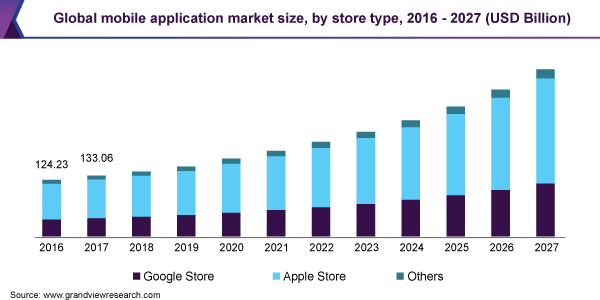
According to Toptal – 90% of users stopped using an app due to poor performance. Therefore, developing an intuitive mobile UX that drives customer engagement and reduces churn is crucial.
However, before heading towards mobile application development and management, it’s essential to consider Mobile App Usability to build successful and functional mobile apps. Here the term ‘ Usability’ is a quality attribute (QA) that analyzes how simple it is to use a user interface. It enhances the performance, reliability, and satisfaction with which specific users achieve their objectives.
A successful app should be intuitive and take users very little time to become familiar with the interface. When a user gets stuck, a solution should be readily available. Using mobile app onboarding, you can guide users through a mobile app, improve its usability, and fix errors.
But how do you improve the usability of your mobile app?
Mobile App Usability Testing is the best way to build successful and functional apps and ensure the ultimate mobile experience. It allows you to gain deeper valuable insights before developing your app and determine which enhancements are necessary to implement in your app’s design.
In this article, we will explore what is Mobile App Usability Testing, its importance, its benefits, types of Mobile App Usability Testing, and how to perform it.
Let’s begin!
What is Mobile App Usability Testing?
Mobile App Usability Testing is a type of non-functional testing that evaluates an app for user-friendliness, modern web design, and whether it’s meeting the end-user requirements as expected.
It focuses primarily on mobile UX, testing design glitches, improving usability, and providing users with mind-blowing user experiences on different browsers and operating systems. Check our blog to learn how cross browser testing ensures a better UX.
The application’s success relies on the end-user. So the ideal approach to conducting Mobile App Usability Testing is with actual users representing the target audience interacting with your app. You can then observe their interactions and behavior, collect qualitative and quantitative data based on your observations, determine user satisfaction and critical usability issues, and make UI tweaks accordingly. You can also involve highly-skilled software testers to run user test cases that simulate actual user interaction and behavior.
Want to run usability tests of your websites? Please check our blog on Usability Testing of websites.
Why is Mobile App Usability Testing important?

The primary objective of Mobile App Usability Testing is to deliver user satisfaction, lower time on customer support, and boost business sales and revenue. For example, there may be instances where your product or application works fine from the functionality perspective but lacks user-friendliness. Therefore, it will eventually impact your business revenue.
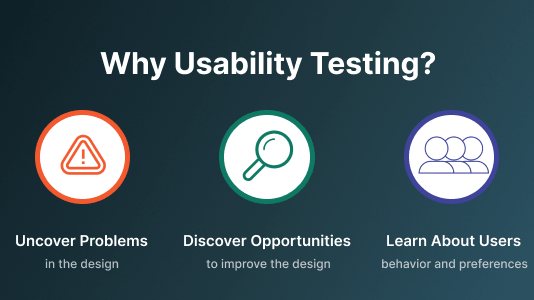
Conducting Usability Testing of mobile applications helps reduce anomalies and improve user experience. Below are the main reasons why to perform Usability Testing of mobile apps.
- Discovering Problems: One of the most important aspects of Usability Testing is user preferences and satisfaction. Running Mobile App Usability tests with various real users allows you to gather feedback and identify user-experience challenges. This feedback will equip you to mirror your product to user preferences.
- Identifying Opportunities: Performing Mobile App Usability Testing of apps helps minimize design inconsistencies and enhance UI design per user requirements.
- Explore User Preferences: Learn about user-specific preferences and behavior and the devices and screen sizes you currently support.
Benefits of Mobile App Usability Testing
Usability Testing of mobile apps help you identify product glitches and fix them before shipping to the market. Actual user feedback helps improve your product based on the real user requirements.
Testing the usability of mobile apps has many benefits. Let’s take a look at some of them.
- Cost reduction: Incorporating Usability Testing earlier can reduce the costs.
- Identifies unnoticed bugs: There can be a scenario where developers may overlook some bugs. Conducting Mobile Usability Testing for apps helps identify the unnoticed bugs, estimates the time required to complete a specific task, and reports if it differs from the anticipated time.
- Actual user feedback: Mobile App Usability Testing with actual users helps in getting honest feedback from the users rather than relying on a false assumption.
- Fresh insights: A user without knowledge and experience of your app can provide honest feedback and uncover unaware issues.
- Evaluate user satisfaction: It helps evaluate user satisfaction, i.e., how happy your users are with your app.
- Identify user needs: By running usability tests, you can discover the user’s needs, such as the features or services they desire, as well as several other aspects that your application does not support yet. It also helps increase your retention rate.
- Minimize onboarding bottlenecks: It helps optimize your onboarding process by identifying potential customer issues and reducing the overall churn rate.

Different types of Mobile App Usability Testing
Before selecting the different Mobile App Usability Testing types, you need to specify your target audience, their behavior, and interests. After that, you need to set your objectives, the task you wish to perform, and their expected outcomes. Based on this, you can choose the appropriate type of testing that matches your requirements.
Check out some of the different methods of Usability Testing for mobile apps –
Moderated testing
Moderated Usability Testing is carried out in a lab setting. It involves a moderator who guides and helps test participants if they have questions about user interactions and behavior. One can perform Moderated testing both in-person or remote. Moderated testing provides in-depth feedback and qualitative data but is time-consuming and expensive. Also, this type of testing consumes a lot of resources, so it is generally used by large organizations.
Unmoderated testing
Unmoderated Usability Testing can be carried out in the lab or remotely without supervision. This type of testing doesn’t involve any moderator; therefore, test participants don’t have the opportunity to ask questions. Unmoderated testing is generally less costly, saves time, and helps you gain a lot of quantitative data on your app’s performance in real-user scenarios.
Lab Usability Testing
Lab Usability Testing involves a moderator and is carried out in a Usability Testing environment. The moderator asks questions, gives instructions, and responds to feedback while participants complete tasks on their devices. Although Lab Usability Testing provides comprehensive information, it is typically time-consuming since it is limited to a small group of people.
Guerilla Usability Testing
Guerilla Usability Testing is a type of Usability Testing technique in which random people are selected from the mall, airport, or coffee shop to perform a usability test in exchange for a small gift or coupons. This type of testing lets you generate a huge amount of qualitative data to understand the design and functionality-related changes of the product. However, Guerilla Usability Testing doesn’t get you extensive information about the product or application as people usually spend less time running ad-hoc tests .
Contextual inquiry
Contextual inquiry involves asking participants their feedback about using the app in their natural environments like home or workplace. It helps you gain relevant information about users like working preferences, interactions, and behaviors. This testing is needed when you are in the initial stage of product development.
Key steps for successful Mobile App Usability Testing
Here are a few key steps to implement Usability Testing for mobile apps effectively.
- Setting Test objective: The first and most important thing is to set your test objectives like app roadmap, target audience, competitors, etc., and choose metrics to measure them. You can ask various questions to app stakeholders to explore the app’s various aspects. It will help you formulate your test objectives, select practical approaches, and estimate the budget early in the development process, making the entire process seamless.
- Task planning: After setting the test objectives, you need to plan tasks around these objectives to carry out effective Mobile App Usability Testing. For example, Usability Testing scenarios like registration, login, navigation, etc.
- Test documentation: It’s vital to have test documentation like post-test questionnaires and consent forms when performing Usability Testing for mobile apps. Test documentation can help you identify and fix issues while running Mobile Usability tests.
- Selecting participants: Select participants based on your target audience for adding value to your product. However, you require additional resources and efforts to get accurate results.
- Test environment: Select the platform on which you want to run the tests, i.e., in a lab or remotely. You can perform lab testing in a controlled environment, whereas Remote testing is carried out in a cloud-based environment.

Note: Test your websites on 3000+ remote browser environments. Try TestMu AI Now!
Challenges of Mobile App Usability Testing
Following are some of the challenges associated with Mobile App Usability Testing –
- Target audience: Selecting the right target users for your app might be tedious and time-consuming.
- Require manual efforts: Mobile App Usability Testing is a type of non-functional testing; therefore, it is time-consuming and requires manual efforts from the QA side.
- Expensive: Usability Testing is costly as it can extend for a longer time.
- Execution hiccups: Conducting Usability Testing manually and data analysis takes ample time and effort.
- Achieving 100% real-user experience is impossible: Since the users are selected randomly to run usability tests, the expected result may be compromised. To achieve 100% real-user experience, all users or participants should give valuable or accurate feedback, which is impracticable to achieve.
Read More: Mobile UI Testing Tutorial: A Comprehensive Guide With Best Practices
How to perform Mobile Usability Testing of your applications
The ultimate aim of conducting usability tests of mobile applications is to get real-user feedback. To ensure the real-world success of your applications, it’s recommended to test mobile applications on real mobile devices in real-world conditions.
However, setting up an in-house physical device is costly and comes with on-premise challenges & scalability issues. Therefore, a better and more cost-effective method to test Mobile App Usability is using real device cloud by eliminating the need for an in-house device lab and reducing operational costs instantly. You can check our blog on Physical Device vs Real Device Cloud testing for more details.
Test orchestration and execution platforms like TestMu AI enable you to perform Mobile Usability Testing of your applications on a real device cloud. Therefore, you have the complete flexibility to test applications manually in a remote environment across an online device farm of 3000+ real devices and OS combinations. You can also use the TestMu AI Virtual testing platform to test apps on cloud-based Android Emulators and iOS Simulators based on your requirements.

Following are the benefits of real device cloud testing on the TestMu AI platform:
- Test web and native apps on real Android and iOS devices.
- Zero setup and maintenance charges.
- Integrate the best CI/CD tools to accelerate your test execution cycles.
- Test native device features like Camera, Touch Screen, Gestures, etc.
- Geolocation testing of your apps.
Below are steps to perform Mobile App Usability Testing on TestMu AI. Before testing apps, ensure access to the TestMu AI real device cloud. In case you don’t have one, please Contact Sales.
1. Login to your TestMu AI account. If you don’t have a TestMu AI account, sign up for free.
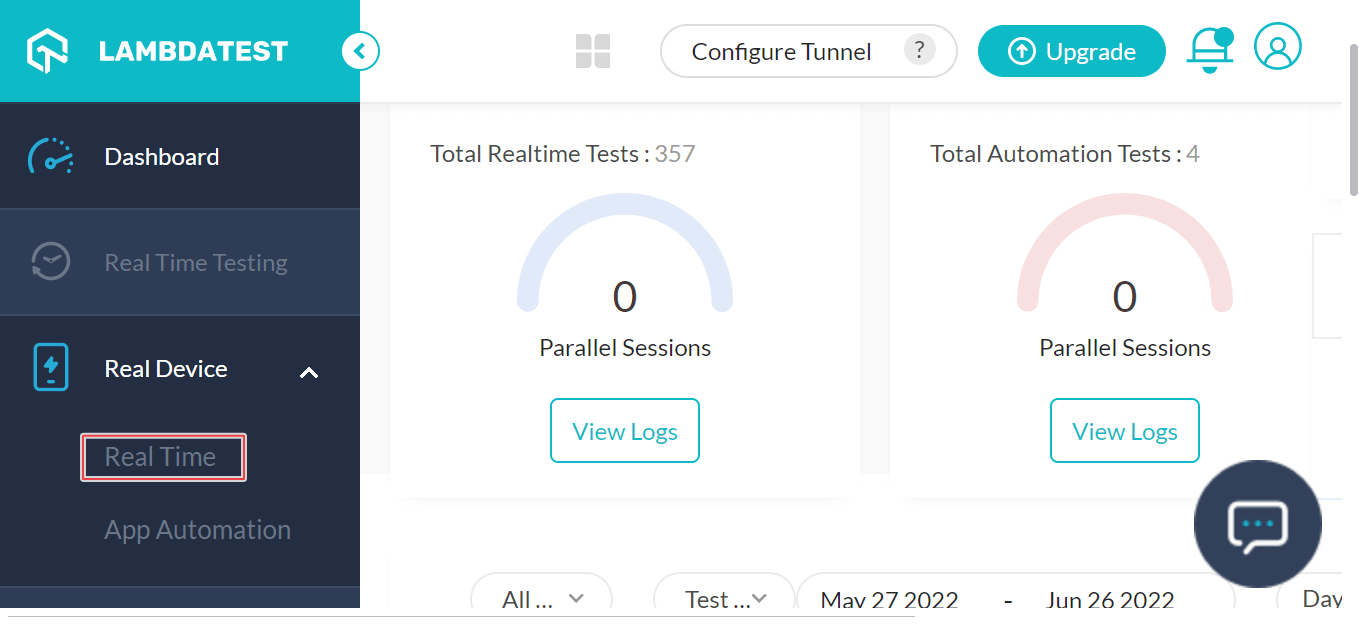
2. Once you are in the user Dashboard, select the Real Device dropdown from the left sidebar and choose Real Time.
3. From the App Testing tab, upload your app. Next, choose OS type (Android or iOS), BRAND, and DEVICE/OS. Then click START.
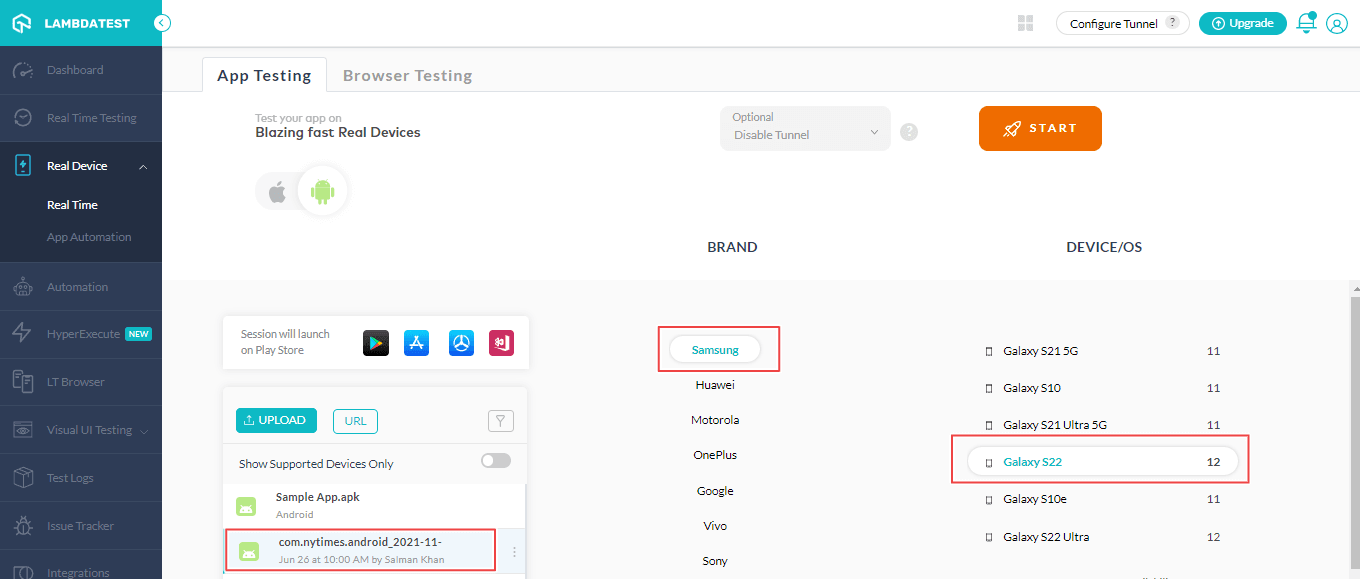
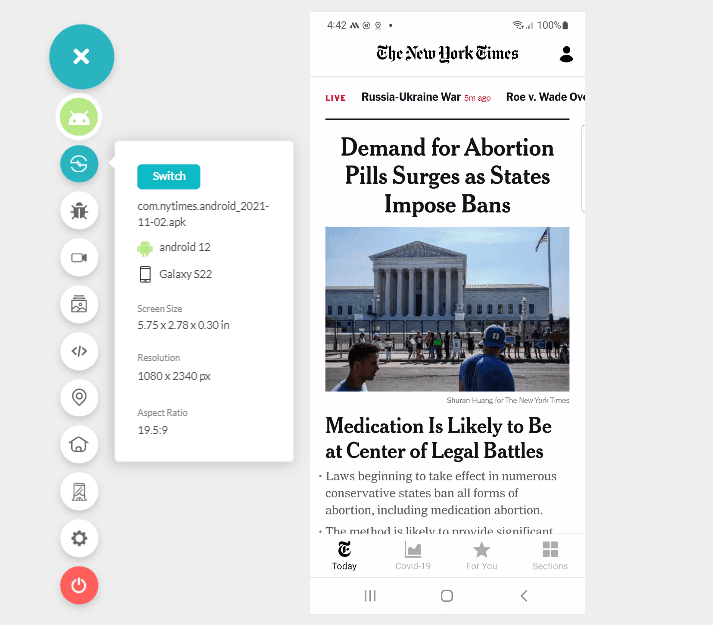
A real device cloud will fire up where you can perform Usability Testing of your mobile applications. The installed – The New York Times app on Galaxy S22 running Android 12 will function the same as it would on a physical device.
Watch the video below on conducting real device testing on the TestMu AI platform.
Subscribe to the TestMu AI YouTube Channel and get the latest tutorial around Selenium testing, Cypress UI testing, Playwright testing, Mobile App testing, and more.
Best practices of Mobile Usability Testing for apps
The primary objective of Usability Testing is simple: ask users to test the application, collect quantitative data from the test results, and figure out how to optimize the application. However, common Usability Testing mistakes can lead to a critical defect, from which recovering the application can be time-consuming and costly.
Below are the best practices to keep in mind when running usability tests for mobile applications –
- Test apps on real devices: To get actual user experience of mobile applications, perform mobile app testing on real devices across different Android and iOS devices to test apps in real-world scenarios.
- Select the right target audience: While testing apps for usability, make sure you have the right set of audience that represents your app. Choosing folks with zero knowledge and experience of your application is recommended to get accurate and reasonable results.
- Testing environments: Run usability tests of your app in multiple environments like homes and offices to gain diverse user feedback.
- Identify loopholes: You can ask participants to figure out what features need enhancements and what features to add. It will help make your user interface even more intuitive.
- Select right Usability Testing tools: Various remote testing requires SDK installation, so you should choose the right Usability Testing tools to avoid slowing down your app.
Note: Run Mobile App Usability tests across 3000+ real devices. Try TestMu AI Now!
Summing Up!
Mobile App Usability Testing helps improve your business sales and revenue by finding users’ intents and behavior and deciding on fixing faulty components of your mobile UX. You must perform Mobile App Usability Testing if you dream of a million revenues.
Is your mobile app usable? Test it on TestMu AI’s scalable cloud of real devices and streamline your mobile UX design.
Happy testing!


Frequently asked questions
Did you find this page helpful?
More Related Hubs
TestMu AI forEnterprise
Get access to solutions built on Enterprise
grade security, privacy, & compliance
- Advanced access controls
- Advanced data retention rules
- Advanced Local Testing
- Premium Support options
- Early access to beta features
- Private Slack Channel
- Unlimited Manual Accessibility DevTools Tests