

Next-Gen App & Browser Testing Cloud
Trusted by 2 Mn+ QAs & Devs to accelerate their release cycles


On This Page
- MCP Server Support for Automation, SmartUI, and Accessibility
- Test on ChromeOS and With Dark Mode in Real-Time
- Debug Mobile Apps With DevTools on Real Devices
- Automate Video Injection Testing for Mobile Apps
- Automate Camera Injection Testing on Android
- Explore the Latest Features in SmartUI
- New Features in HyperExecute
- Latest Feature Rollouts in Test Insights
- Fresh Set of Features in Accessibility Testing
- Use Modules in Test Manager
- Mark and Report Bugs With Taiga Integration

- Home
- /
- Blog
- /
- May’25 Updates: Live With MCP Server, Test on ChromeOS, Camera Injection Testing, and More!
May’25 Updates: Live With MCP Server, Test on ChromeOS, Camera Injection Testing, and More!
Explore the TestMu AI May update with MCP Server support expansion and new features across HyperExecute, SmartUI, Test Insights, and more.

Saniya Gazala
January 10, 2026
Hey there! Missed the latest TestMu AI updates? You’re in for a treat – May was packed with powerful features.
After introducing MCP Server support on HyperExecute, we have now extended this support to Automation, SmartUI, and Accessibility. Next, we went live with a plethora of new features in SmartUI, Test Insights, HyperExecute, and App Automation.
The list doesn’t end here – let’s take a closer look at what’s new at TestMu AI in May.
MCP Server Support for Automation, SmartUI and Accessibility
We are now live with the MCP Server for Automation, SmartUI, and Accessibility.
Let’s look at how this support benefits you:
- Improve Test Failure Triage by Connecting Automation MCP Server: With this feature, you can connect your server with automation tests and AI assistants, giving you direct access to test execution data right from your IDE.
- Detect and Resolve Visual Regression Issues With SmartUI MCP Server: The SmartUI MCP Server lets you debug visual regressions effortlessly by connecting your MCP server to SmartUI comparison runs.
- Run In-Depth Accessibility Checks Using Accessibility MCP Server: The Accessibility MCP Server lets you run deep accessibility audits across public URLs and in-development React apps by connecting your MCP server with TestMu AI Accessibility infrastructure.
The Automation MCP Server enhances your testing capabilities by helping you quickly pinpoint why tests fail, analyzing command, network, and console logs, so troubleshooting becomes faster and easier.
You can analyze screenshots, layouts, and DOM changes to automatically detect UI shifts and receive clear, human-like summaries explaining what changed and why.
It automatically generates detailed accessibility (a11y) reports that highlight issues and offer clear, actionable remediations, right inside your dev workflow.
Test on ChromeOS and With Dark Mode in Real-Time
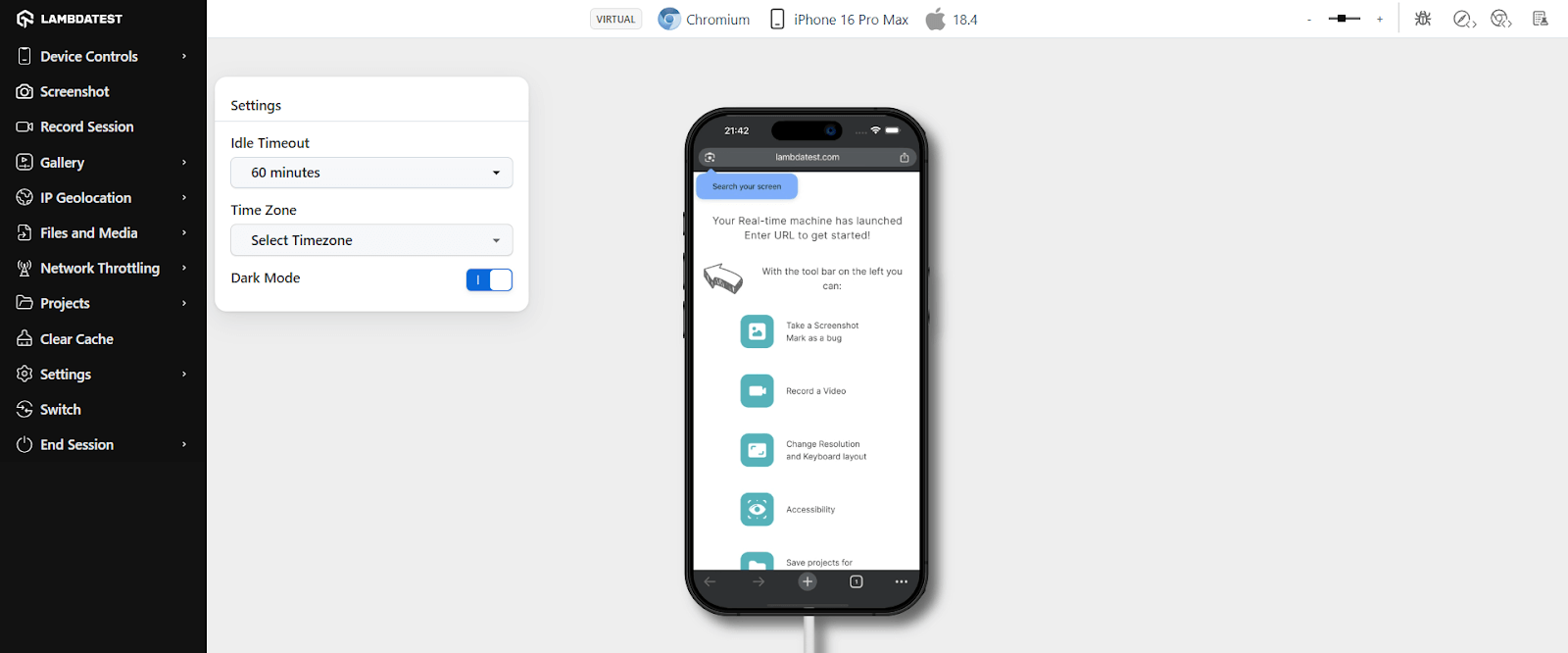
You can now run real-time tests on virtual ChromeOS devices and with dark mode on Android emulators and iOS simulators.
- Run Real Time Tests on ChromeOS: You can now test how your websites and Android apps perform on ChromeOS, without needing a physical Chromebook.
- Perform Dark Mode Testing on Android and iOS: With this option, you can test how your web and native apps behave and appear when enabling dark mode on real Android and iOS devices.
With ChromeOS web and app testing, you can check responsiveness, UI, and functionality across screen sizes, debug live using native dev tools, and capture issues instantly.
To get started, check out the documentation:
Debug Mobile Apps With DevTools on Real Devices
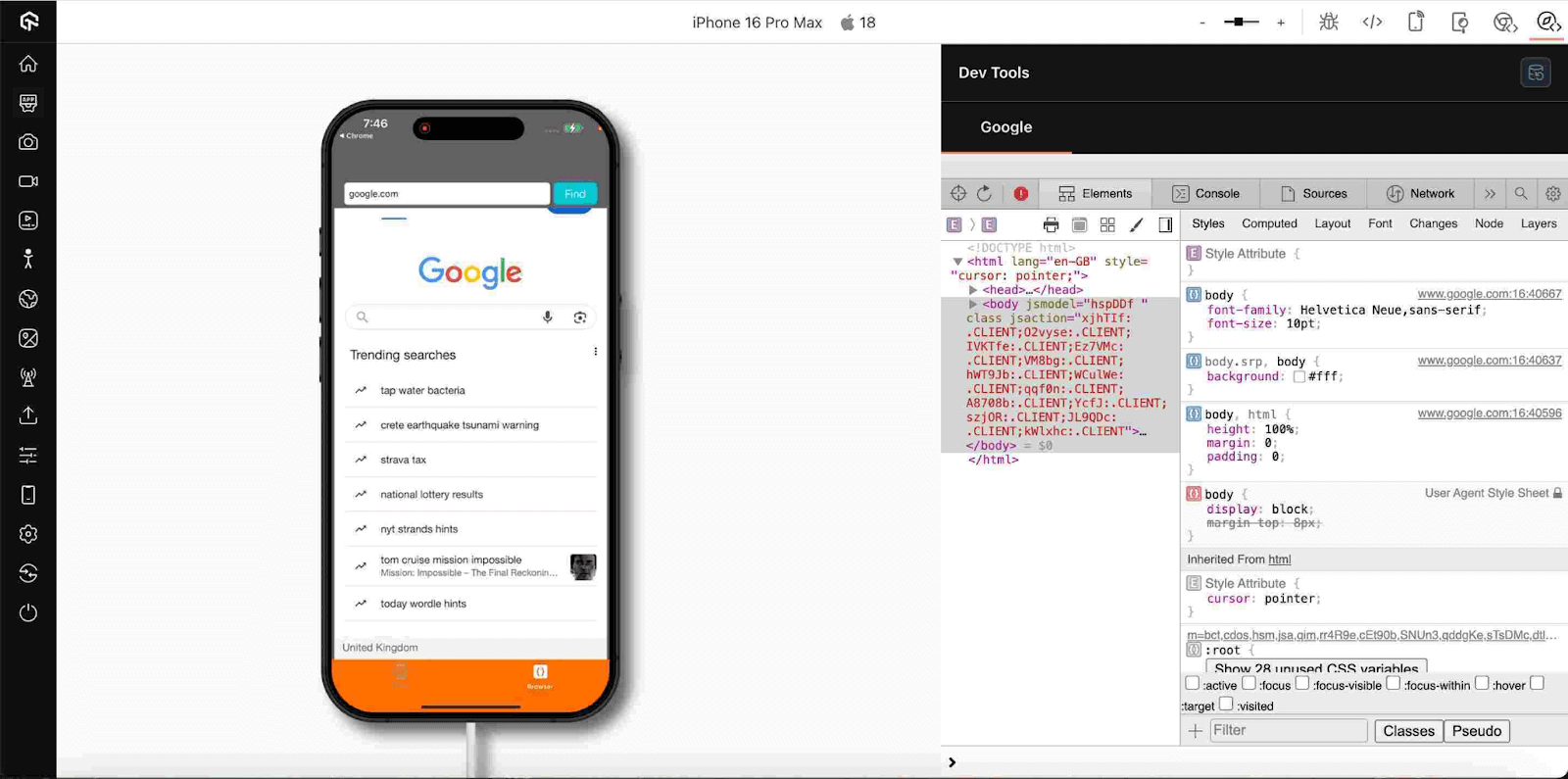
Now you can debug hybrid apps and mobile websites just like you would on a desktop. With DevTools on real devices, you can inspect the WebView using Chrome DevTools or Safari Web Inspector.
So, whether you’re tracking down layout bugs, tracking JavaScript errors, or analyzing network calls, everything’s at your fingertips in real time.
Automate Video Injection Testing for Mobile Apps
This feature enhances your testing capabilities by enabling more accurate and flexible validation of camera-dependent app functions. It tests camera-based features in your mobile apps by injecting custom videos into your Appium sessions on real Android and iOS devices.
By using video injection testing for app automation, you can simulate camera input using uploaded MP4 files (up to 50MB), helping you validate use cases like document scans, QR code detection, or face verification, without needing physical recordings.
Automate Camera Injection Testing on Android
This new capability streamlines testing for camera-centric mobile apps by allowing direct image injection into Android emulators, no physical devices needed.
You can easily simulate camera input (like selfies, QR codes, or document scans) in your mobile app using image injection APIs.
With this feature, you can inject static images into your Appium sessions, enabling automated validation of use cases like face recognition, barcode scanning, or AR workflows, across a range of emulator devices and OS versions. Just upload the image, enable image injection, and run your test, all in the cloud.
Explore the Latest Features in SmartUI
From dynamic Git strategies to Figma mobile design validation, explore how SmartUI is evolving to make your visual testing faster, smarter, and more collaborative.
- Share Your SmartUI Builds Screenshots Publicly: You can now share your visual testing projects, builds, or individual screenshots securely with anyone. This feature removes sharing roadblocks and speeds up feedback.
- Test Figma-Developed Mobile Designs With SmartUI CLI: The SmartUI CLI helps you catch visual mismatches early by comparing screenshots for your Figma mobile designs.
- Automate Visual Comparisons Using Dynamic Git Strategies in SmartUI: The Smart Git feature helps you compare builds against the latest approved version on the same branch, automatically. That means faster reviews, cleaner diffs, and zero manual baseline headaches.
- Dynamic Git Strategy: You can compare builds against the latest approved version; no need to manage static baselines anymore.
- Smart Branch Comparison: Each branch keeps its visual history, so your comparisons stay relevant and focused.
- Branch-Level Merge: You can handle visual changes independently across branches, making parallel workflows smoother.
- Build-Level Merge: Every new build you trigger gets compared to the last approved one on that branch, automatically.
- Dynamic Baseline Merge: As your UI evolves, so do your baselines. You get clean, contextual feedback without extra effort.
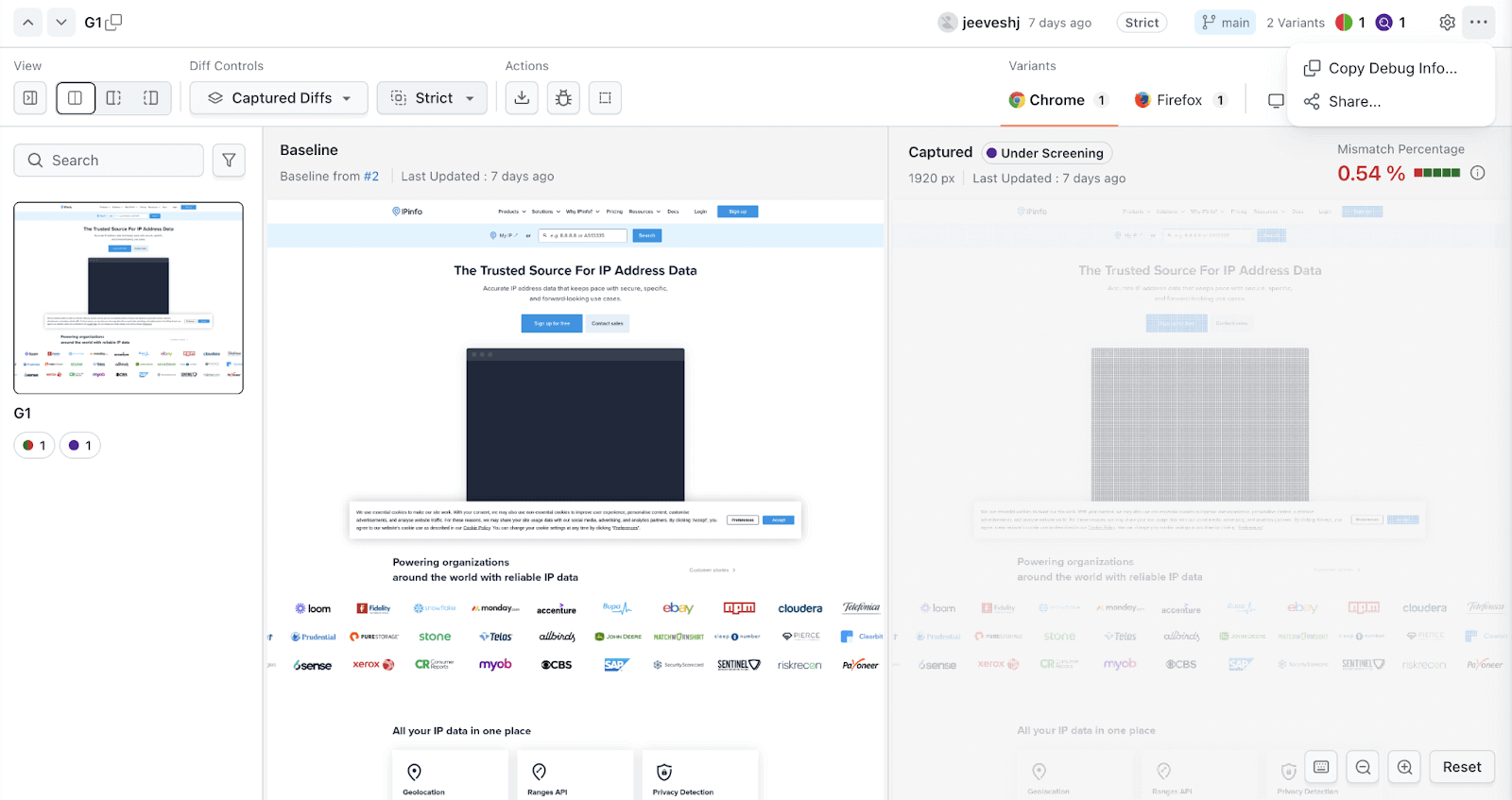
You get flexible sharing options, share entire builds or just specific screenshots, with customizable access durations from 1 to 30 days. Also, you can invite stakeholders directly via email and share links manually, all with secure read-only access.
This sharing helps you streamline collaboration, accelerate feedback cycles, and reduce communication overhead by providing exact visual context without compromising security.
You can use the SmartUI CLI for Figma mobile designs as a standalone tool or integrate it into your CI pipeline to run comparisons on every build. It’s perfect for keeping your mobile app UI pixel-perfect across both Android and iOS.
Here’s how these dynamic Git strategies in SmartUI work for you:
New Features in HyperExecute
You can now make your HyperExecute testing faster with a clearer Cypress build status view and additional enhancements in the HyperExecute MCP Server.
- Track Cypress Build Status with Left-Side List View: With the new left-side test list view for Cypress in your HyperExecute dashboard, you’ll get a clearer, faster, and more organized way to track and debug your test runs.
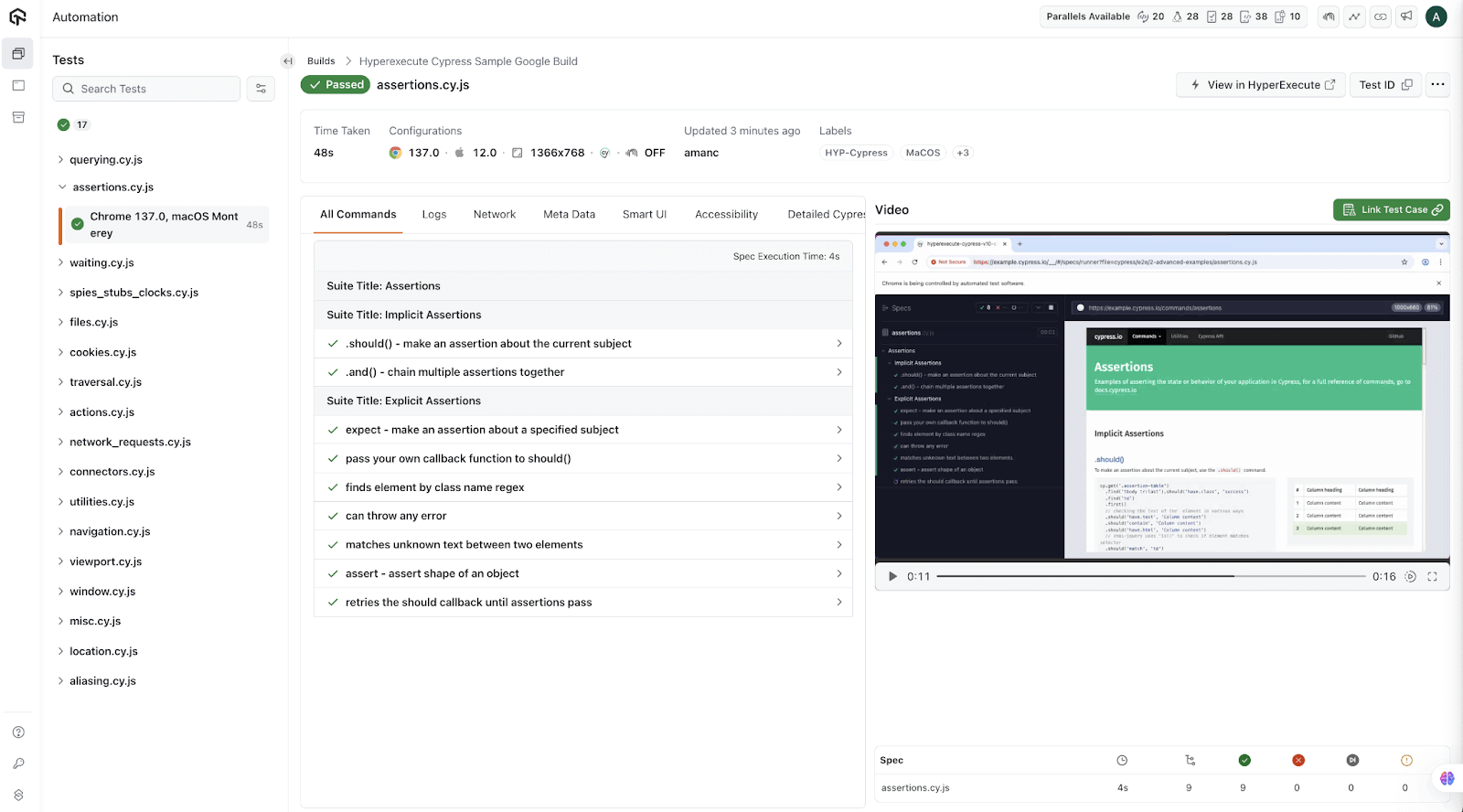
With this new feature, you’ll be able to:
- See all your Cypress spec files neatly listed on the left, grouped by build and sorted by start time, making it easier to follow execution flow.
- Instantly spot what passed, failed, skipped, or is still running.
- Know exactly how long each test took with clean time formats (like 35s or 2m 59s) right beside each file, which is great for identifying slowdowns.
- Type into the “Search Tests” bar to instantly filter and jump to the file you need.
- Enhancements in MCP Server: With the latest enhancements in HyperExecute MCP Server, you’ll notice a smoother, faster, and more secure experience, whether you’re connecting locally or remotely.
- In this release, we have rebranded HyperExecute MCP Server to TestMu AI MCP Server to better reflect everything now available to you.
- You can now choose between two connection methods: use StreamableHTTP for remote access or run the STDIO server locally via the new mcp-lambdatest NPM package.
To get more details about these enhancements, please refer to the HyperExecute MCP Server release notes.
Bonus: HyperExecute AI-native integration on Azure is now available for the general public. Try HyperExecute on Azure now!
Latest Feature Rollouts in Test Insights
The new Insights features offer deeper visibility into your automated tests, highlighting flaky or failing tests with smart tags, providing test case-level data on HyperExecute, and delivering beta analytics on performance trends to boost reliability, speed, and release quality.
- Use Smart Tags to Analyze Test-Level Insights: This feature helps you analyze test automation results faster by automatically labeling your test runs using smart tags. These system-generated tags, such as Flaky Test, Always Failing, New Failure, and Performance Anomaly, highlight patterns and anomalies across executions, helping you quickly prioritize and stabilize your test suite.
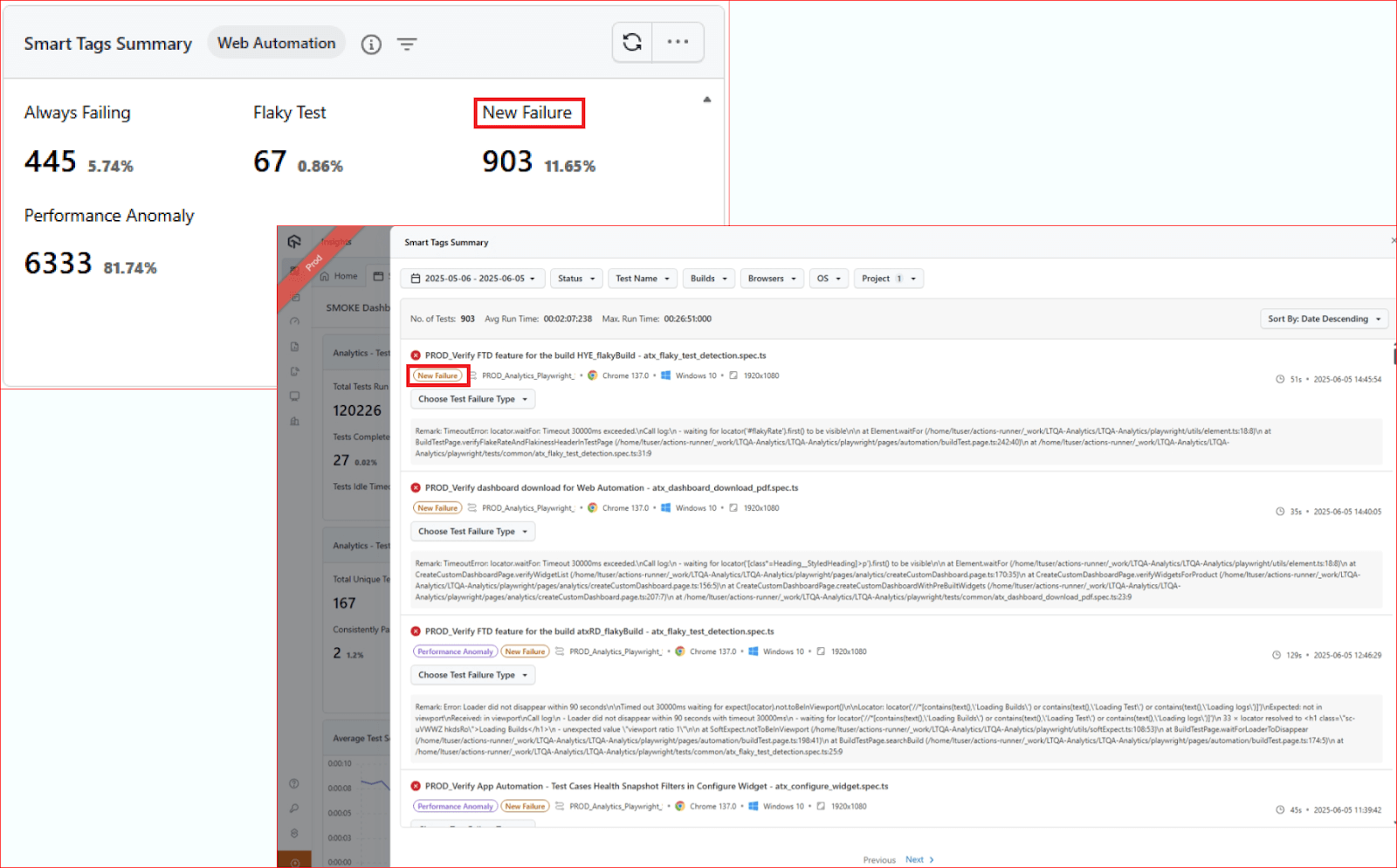
Using smart tags in Test Intelligence for your insights also allows you to simply categorize tests, detect unstable behavior, and prioritize fixes, making it easier to optimize your test automation strategy.
- Capture Test Case Insights on HyperExecute With Playwright Reporter: You can track individual test case details on HyperExecute using Playwright Reporter. With this, you can log test start and end points, fetch test IDs dynamically, and visualize insights directly on the dashboard.
To get started, check this documentation on capturing test case insights with Playwright Reporter.
- Get Advanced Test Insights With Test Intelligence: With Test Insights in Test Intelligence, you can go beyond high-level dashboards and monitor execution time, flakiness, and failure trends for each automated test.
Use these granular insights to identify tests slowing down your pipeline, understand which failures are blocking releases, and evaluate infrastructure usage by test.It also highlights performance regressions and unstable tests over time, helping you make smarter decisions on test maintenance and boost overall delivery efficiency.
Fresh Set of Features in Accessibility Testing
These accessibility enhancements let you run focused keyboard scans and catch issues efficiently, while providing comprehensive build-level reports that simplify tracking overall accessibility without losing detailed insights.
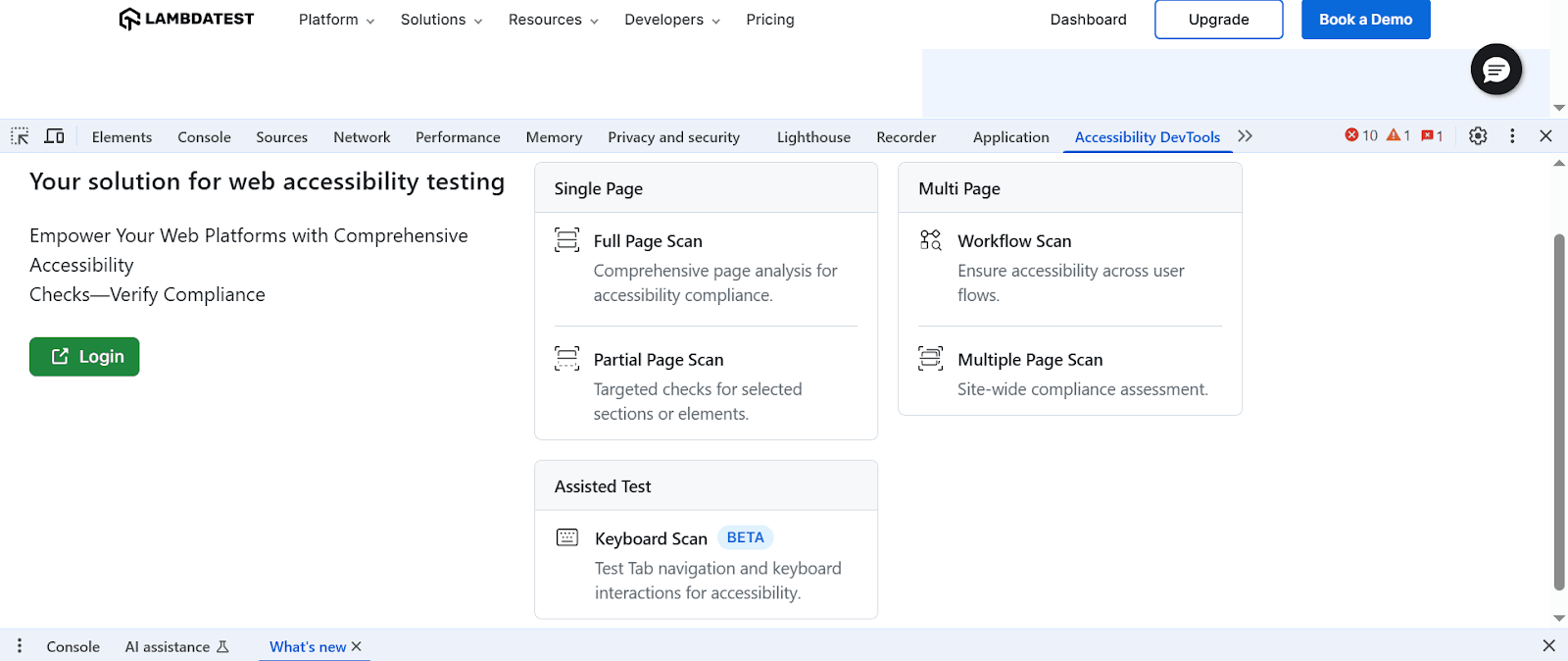
- Run Keyboard Scans for Accessibility Checks: You can use the Keyboard Scan in Accessibility DevTools. This is a semi-automated feature that helps you quickly evaluate how a website handles keyboard navigation.
It ensures the website is usable for individuals who rely on keyboards instead of a mouse, such as users with motor impairments or those using screen readers.
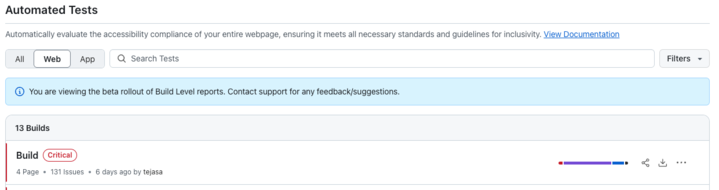
- Get Accessibility Reports for Your Automation Builds: With this feature, you can now receive complete automated accessibility reports generated at the build level. This means you won’t have to sift through hundreds of individual tests.
Use Modules in Test Manager
The latest enhancements cover creating and managing Test Manager modules with easy creation, duplication, and automatic versioning.
You can seamlessly link projects for both manual and automated tests. Plus, importing and managing modules within test cases improves control and efficiency.
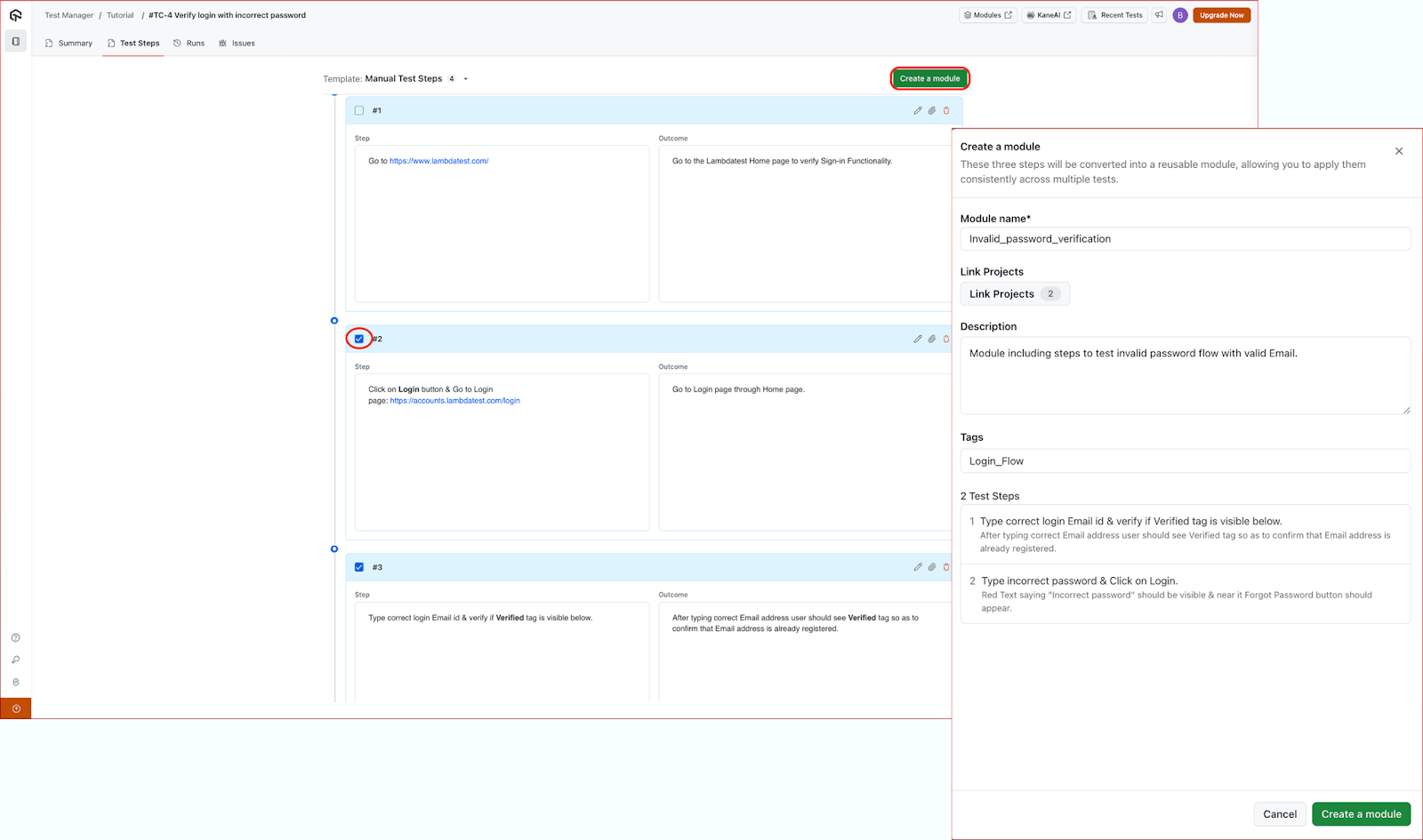
- Create or Duplicate Modules: You can quickly create modules in Test Manager and also duplicate them by defining the test steps and adding a description. Each module needs at least one test step, and while you can update or duplicate modules anytime, deleting them isn’t possible.
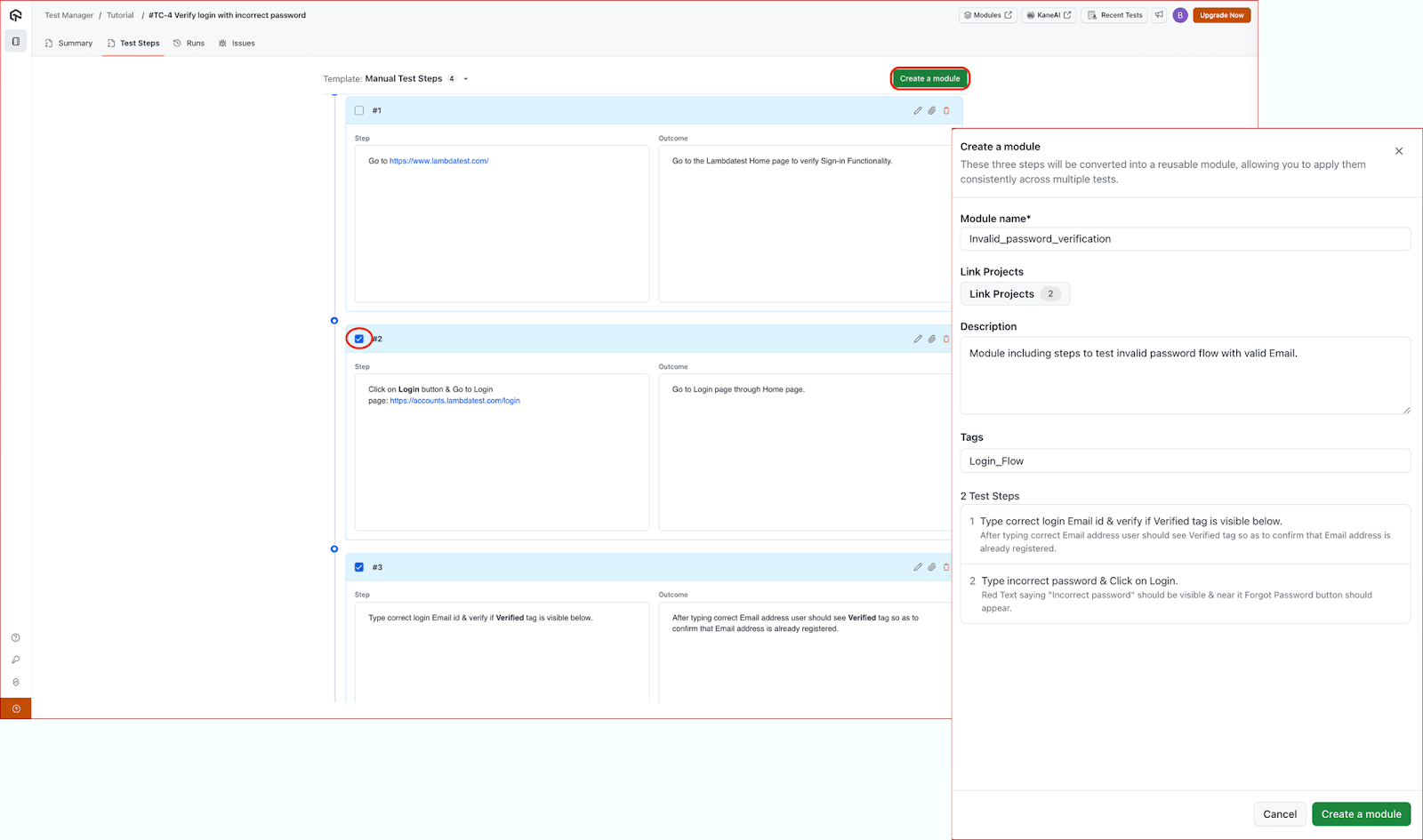
You can easily update a module, and versioning happens automatically to track all changes. Also, you can revert to previous versions or compare different ones anytime.
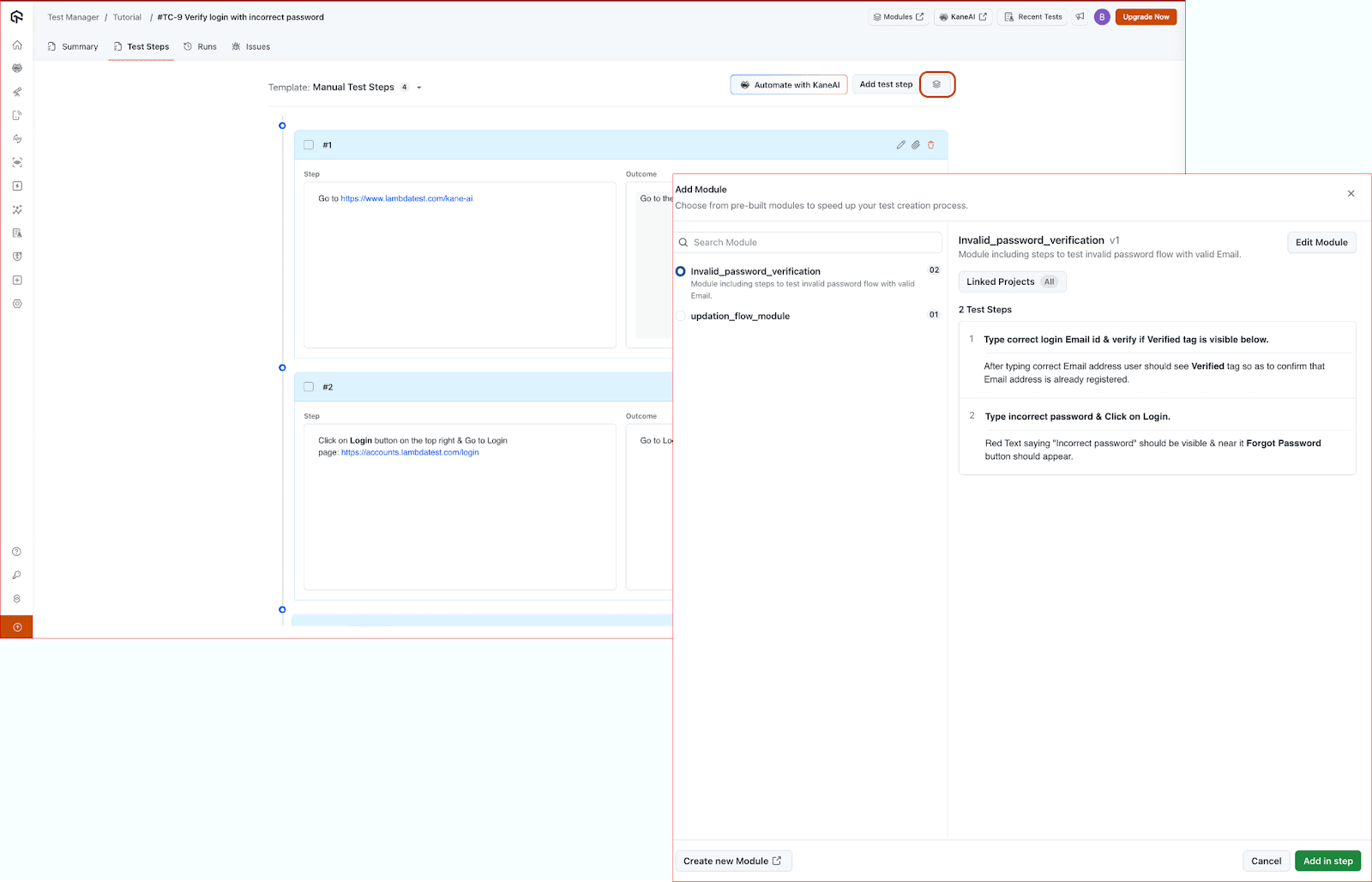
- Import Modules: You can easily import modules in Test Manager that are linked to your project by clicking the modules icon and selecting the one you need. Only modules connected to your project will appear for import.
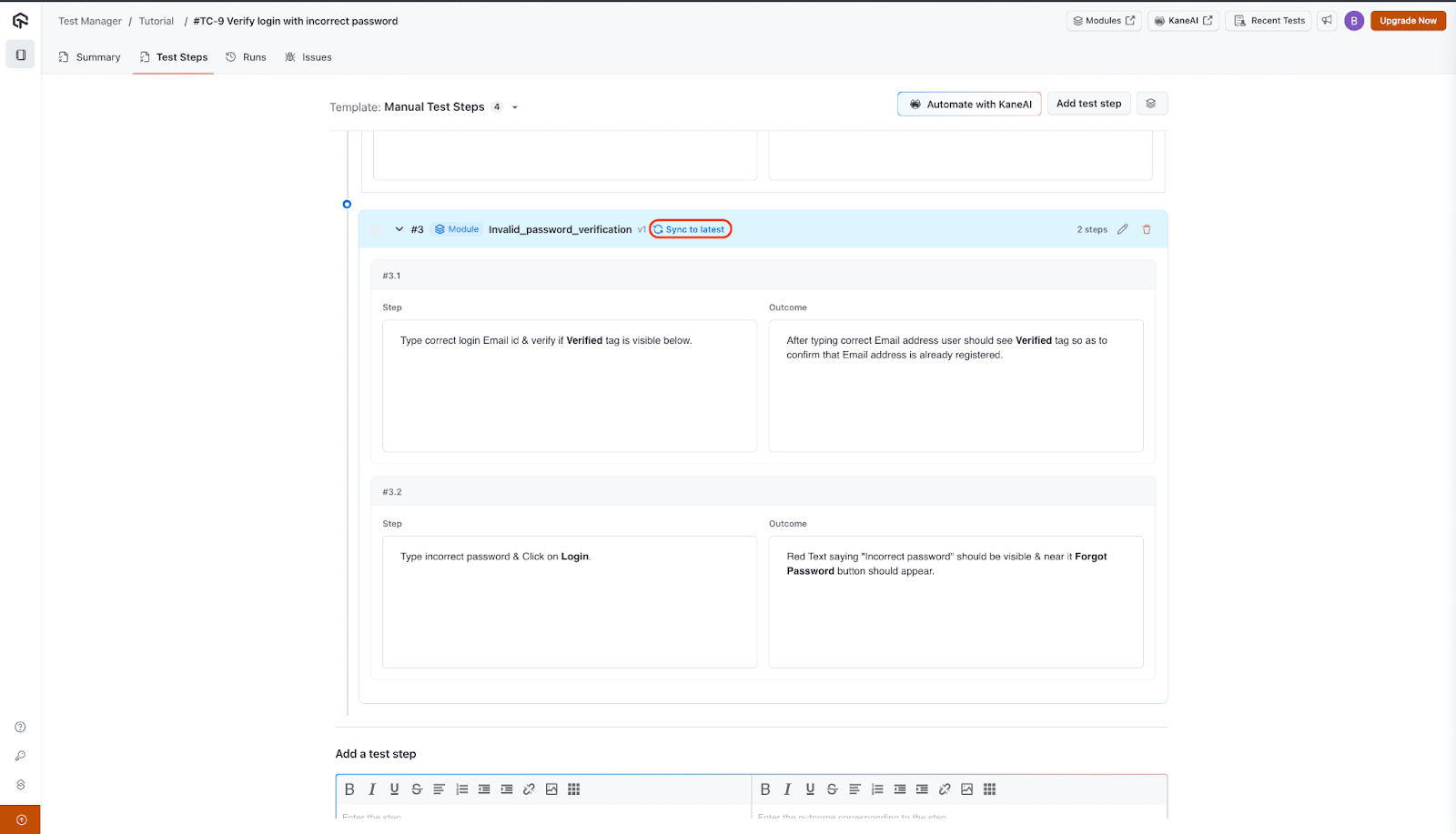
Once you’ve imported a module, you can easily edit or delete it from your test case. Any changes you make will create a new version automatically. And not to worry about your existing test steps, it will keep using the old version until you choose to sync to the latest, so you can review updates before making them live.
Mark and Report Bugs With Taiga Integration
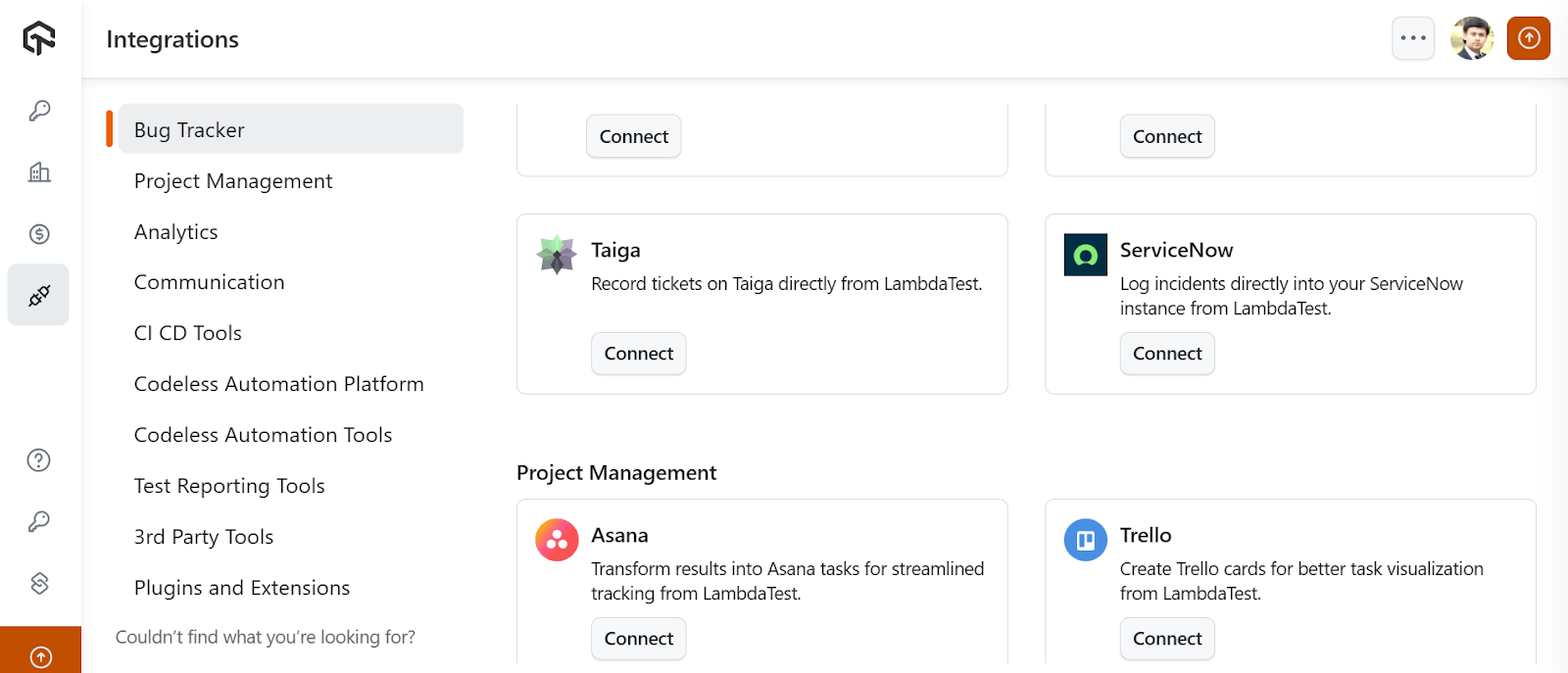
Integrating Taiga with TestMu AI lets you effortlessly log and manage bugs while streamlining your workflow and keeping your team aligned on what matters most.
By simply integrating Taiga with TestMu AI, you can easily connect from your account, provide your credentials, and start logging bugs with key details like subject, description, project, and assignee. You can also resync to update projects and users or uninstall the integration anytime.
Conclusion
That’s all for this round of updates. You can now expand your MCP Server Suite for smarter test triage, run real-time tests on ChromeOS and dark mode UI, and enhance debugging on real devices with DevTools.
Plus, automate video injection testing for mobile apps, explore new SmartUI capabilities, and optimize your QA workflow with the latest enhancements in HyperExecute.
You can also gain deeper automation insights, advance accessibility testing, and improve collaboration by integrating Taiga with TestMu AI.
Go try out these features, see what works best for you, and share your feedback.
And we’re just getting started – more updates are on the way, so stay tuned!


Did you find this page helpful?
More Related Hubs
TestMu AI forEnterprise
Get access to solutions built on Enterprise
grade security, privacy, & compliance
- Advanced access controls
- Advanced data retention rules
- Advanced Local Testing
- Premium Support options
- Early access to beta features
- Private Slack Channel
- Unlimited Manual Accessibility DevTools Tests