

Next-Gen App & Browser Testing Cloud
Trusted by 2 Mn+ QAs & Devs to accelerate their release cycles


On This Page
- Live with TestMu AI’s AI-Native Test Intelligence Platform
- Automated Browser Testing with Grafana k6
- Playwright Browser Testing on Real Android Devices
- Track your Test Progress using Build Inactivity Time
- Local Testing with TestMu AI Tunnel Docker Extension
- Manage logged bugs using TestMu AI and Webex Teams
- It’s a Wrap

- Home
- /
- Blog
- /
- May’23 Updates: AI-Native Test Intelligence Platform, Playwright Automation On Real Android Devices, And More
May’23 Updates: AI-Native Test Intelligence Platform, Playwright Automation On Real Android Devices, And More
Introducing our May 2023 Product Update, packed with an array of new features like TestMu AI AI-powered Intelligence Platform, k6 browser testing, and others. Read more!

Salman Khan
January 29, 2026
Hey there, testers! Throughout the last few weeks, we have been hard at work to stay on top of some incredible updates, and we can’t wait to tell you all about them! There are tons of awesome new features in this release that will transform your testing experience.
First up, we are thrilled to announce the TestMu AI AI-Native Test Intelligence Platform in private beta. With the Test Intelligence Platform, we aim to boost productivity, accelerate delivery rates, enhance software quality, and expedite release cycles. By detecting inconsistencies and anomalies across multiple test executions, it improves the reliability of your results.
In addition, we’ve rolled out a host of new features in automation testing, including support for Playwright browser testing on real Android devices, automated browser testing with k6, and much more.
Here are some exciting new product updates we have in store for you!
Live with TestMu AI’s AI-Native Test Intelligence Platform
TestMu AI consistently delivers excellence in orchestrating and executing tests at scale for businesses across the spectrum. The Test Intelligence Platform marks a significant new step in our journey.
With AI at its core, our newly launched Test Intelligence Platform is set to revolutionize software testing. With each test run, it refines its recommendations and improves its predictive capabilities. This means you can focus more time and effort on developing comprehensive tests and getting actionable feedback more quickly.
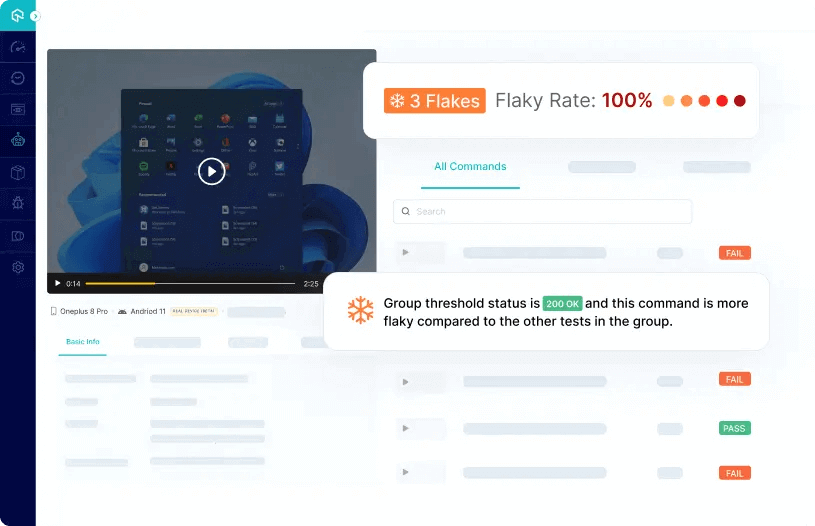
If you are interested in learning more about Test Intelligence, you can get involved in the following ways:
- Sign up and stay updated about the TestMu AI Test Intelligence platform. Be the first to learn about new features, webinars, and other events.
- Start testing right away. Dive into our platform to learn about the power of Test Intelligence.

Note: Mitigate future issues with AI-Native Test Intelligence insights. Join the Waitlist
Automated Browser Testing with Grafana k6
Grafana k6 is an open-source load testing tool created by Grafana Labs and its community. It simplifies and helps engineering teams to conduct performance testing. As k6 is a developer-focused adaptable solution, you can quickly evaluate the stability and efficiency of your software applications.
TestMu AI integrates with k6 to help you perform automated testing with k6 on real browsers and operating system combinations. Currently, we offer support for k6 Browser Testing on Chrome and Edge.
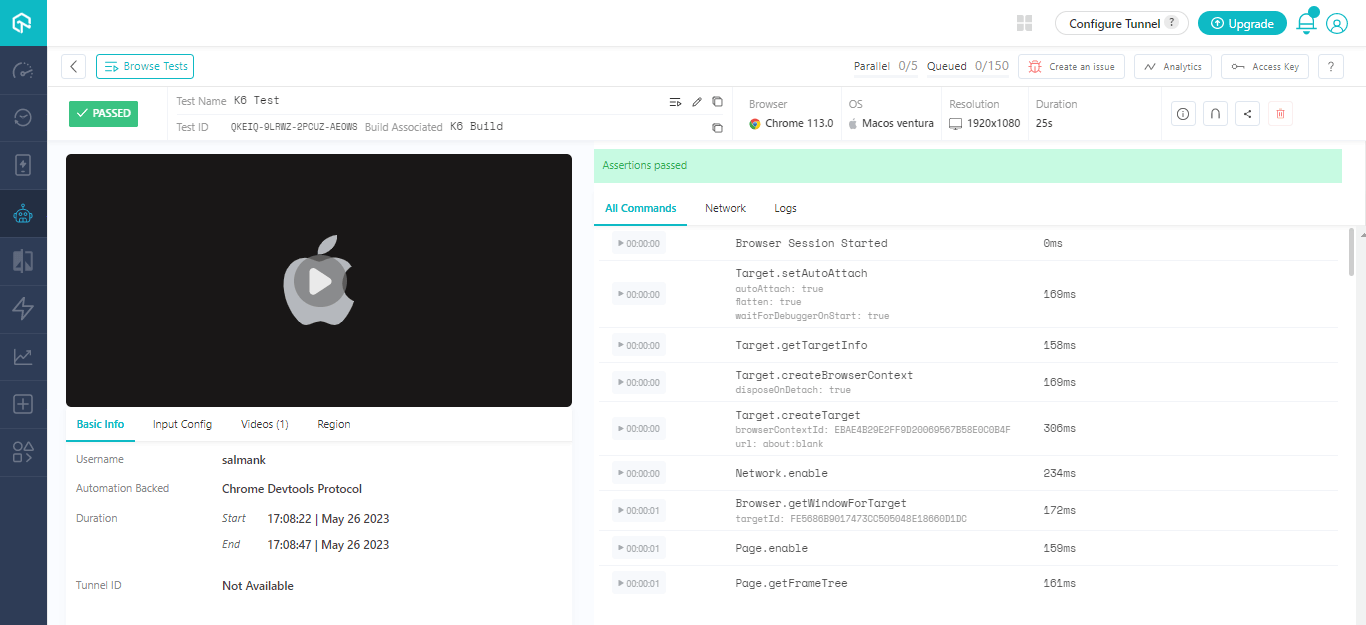
Note: Check out our guide to get started with k6 Browser Testing get started with k6 Browser Testing
Playwright Browser Testing on Real Android Devices
To make your mobile browser automation even more productive, we are pleased to announce support for the Playwright framework for Android automation testing.
With this, you can now perform Playwright web testing on over 100+ real Android devices from a wide range of OEMs, including Samsung, Xiaomi, Google, and more. This way, you can avoid the pain point of setting up in-house Android device labs.
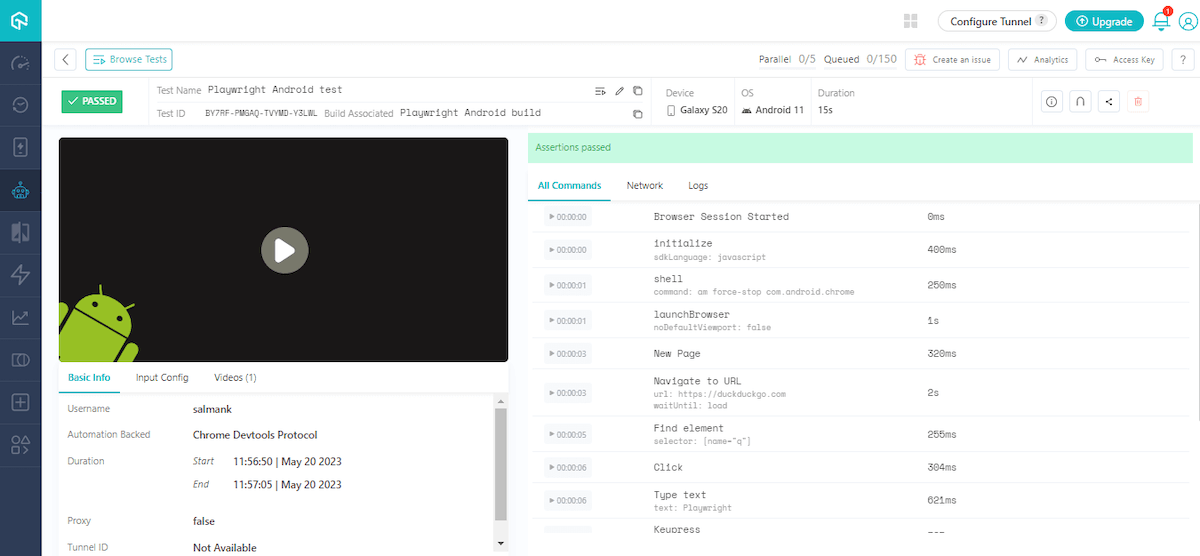
Note: Currently, support for Playwright Android testing is in the Beta phase.
The TestMu AI platform provides comprehensive device coverage, effortless integration, and vast testing capabilities, making it a great fit for Playwright Android automation. You can ensure the quality and browser compatibility of Android web apps by testing them on a real device cloud of real Android smartphones, thereby cutting testing time and effort.
Note: Visit our guide to get started with Playwright Testing on Real Android Devices
Track your Test Progress using Build Inactivity Time
Earlier, when you ran a build on TestMu AI, all tests were combined into a single build, posing a challenge to distinguish the tests conducted at particular intervals. Therefore, we have now introduced Build Inactivity Time, also known as the Build Splitting logic feature, which assists you in effectively organizing your tests.
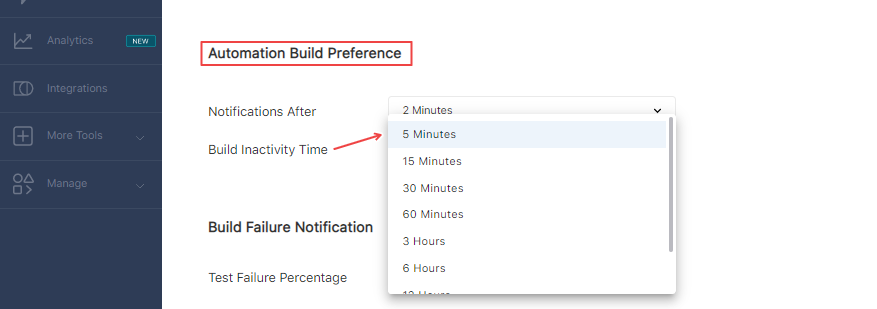
Build Inactivity Time is a feature that helps you organize tests effectively. It enables you to monitor tests performed at regular intervals. You can use the Build Splitting feature to specify a time interval, after which the system will wait for the specified amount of time before marking the build as completed. After this time period, all fresh builds you run will be generated as new builds.
Note: Check our guide to set up your Build Inactivity Time
In addition, we released some other features for web automation as well. Take a look at them:
- New Lambda Hooks to interpret test execution results. It includes skipped, ignored, unknown, and error.
- The Live Interaction feature is now supported on macOS Monterey and macOS Ventura.

Local Testing with TestMu AI Tunnel Docker Extension
To jazz up your local testing experience, we are introducing the TestMu AI Tunnel Docker Extension. This extension enables you to perform real-time cross browser testing of locally hosted websites and web applications across 3000+ browser environments.
With this extension, you no longer have to manually initiate the tunnel via the command-line interface (CLI). Instead, you can launch the TestMu AI Tunnel in a single click directly from within the Docker Desktop.
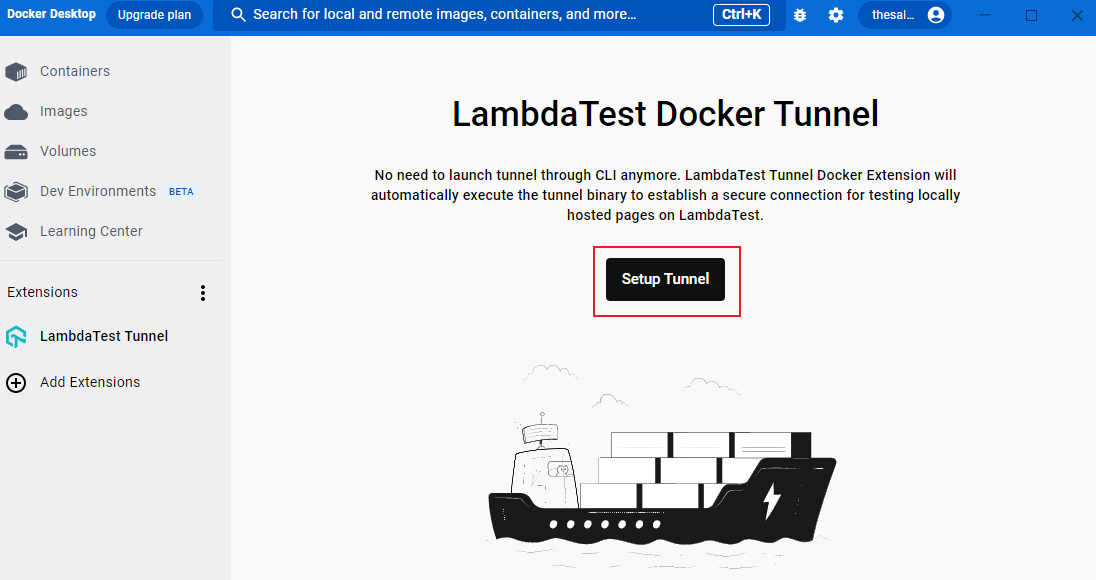
Some of the benefits you can leverage with TestMu AI Tunnel Docker Extension are:
- Wide range of access to real browsers, devices, and operating systems.
- Hassle-free setup in a single click without requiring it to launch from the CLI.
- Secure SSH Tunnel that provides a secure tunnel between your local machine and the TestMu AI cloud servers.
- Advanced Configurations to use advanced tunnel features like Proxy Port, Environment, Local File Server Directory, and more.
Note: Head over to our guide to configure TestMu AI Tunnel Docker Extension
Additionally, we have added the latest web browsers for real time and screenshot testing to our online browser farm. These latest browsers not only enhance your testing capabilities but also ensure comprehensive browser coverage for all your web testing requirements. Here are the ones:
Real Time Browser Testing
- Chrome 114 Beta, 113, 112, 111
- Firefox 114 Beta, 113, 112, 111
- Edge 114 Beta, 113, 112, 111
- Opera 99, 98, 97, 96
Automated Screenshot Testing
- Chrome 112, 111, 110, 109
- Firefox 111, 110, 109
- Edge 112, 111, 110, 109
- Opera 97, 96, 95
Manage logged bugs using TestMu AI and Webex Teams
Developed by Cisco, Webex Teams is a collaboration platform that enables effective communication, collaboration, and project management for remote and globally distributed teams. It delivers a single workspace for a smooth collaboration with multiple features and functionalities.
With our latest TestMu AI Integration with Webex Teams, you and your team members can easily log bugs while performing live interactive cross browser testing on the TestMu AI platform and share your logged bugs in your Webex Teams Space with a single click.
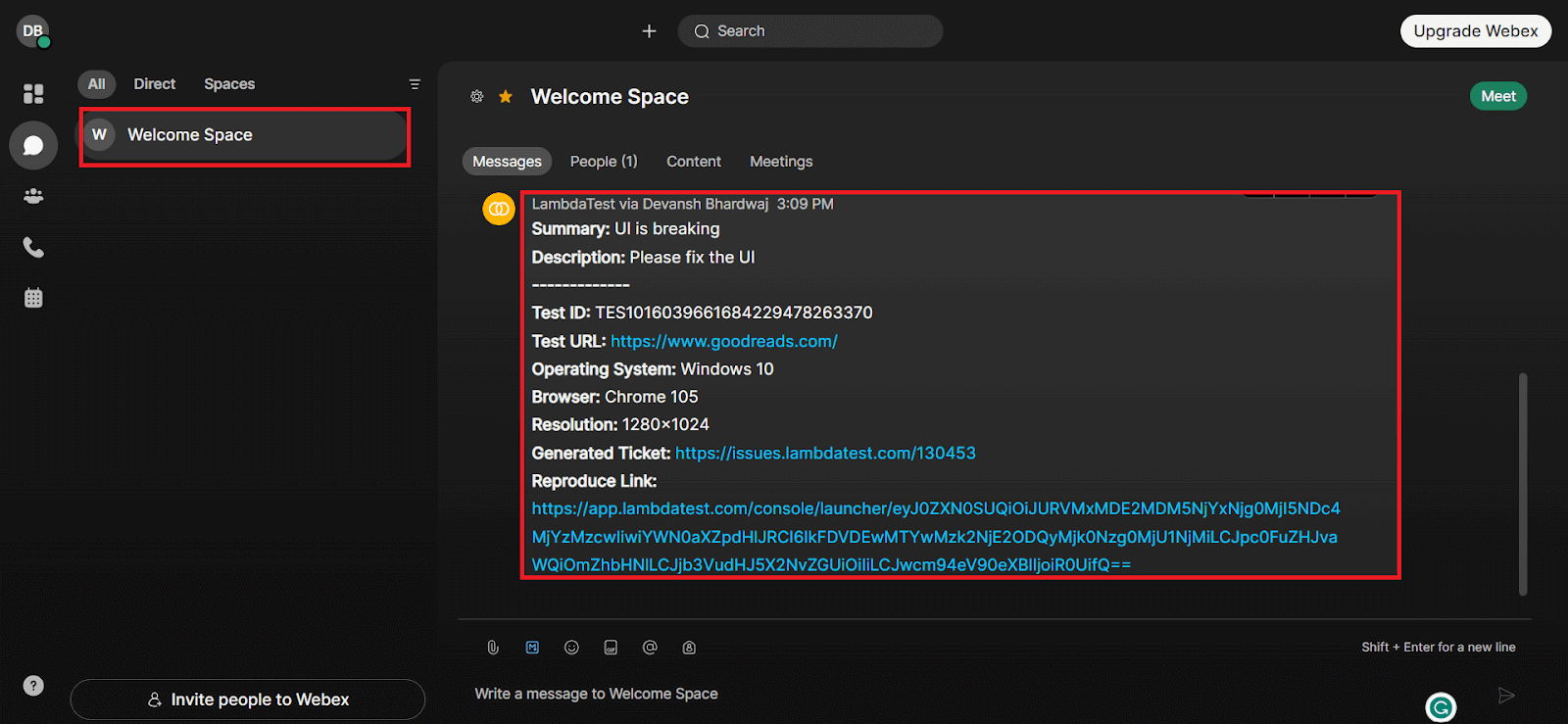
Note: Refer to our guide to log bugs using TestMu AI and Webex Teams Integration
It’s a Wrap
It’s time to TestMu AIYourApps and leverage these new features. You can let us know with your valuable feedback about these features through the TestMu AI Community or by emailing us at [email protected].
Until then, to stay up-to-date with new enhancements and features, visit TestMu AI Changelog.



Did you find this page helpful?
More Related Hubs
TestMu AI forEnterprise
Get access to solutions built on Enterprise
grade security, privacy, & compliance
- Advanced access controls
- Advanced data retention rules
- Advanced Local Testing
- Premium Support options
- Early access to beta features
- Private Slack Channel
- Unlimited Manual Accessibility DevTools Tests