

Next-Gen App & Browser Testing Cloud
Trusted by 2 Mn+ QAs & Devs to accelerate their release cycles


- TestMu AI (Formerly LambdaTest)
- /
- Blog
- /
- Intelligent Automation Testing: Build a Practical Framework
Intelligent Automation Testing: Build a Practical Framework
A practical guide covering what intelligent automation testing is, its core components, and how to build a self-healing, CI/CD-integrated framework using AI and ML.

Naima Nasrullah
May 26, 2026
Intelligent automation testing uses AI, machine learning, and self-healing to keep test suites stable as applications change. According to Capgemini's World Quality Report 2024-25, 72% of organizations report faster automation after integrating Gen AI into their workflows, yet most teams still run brittle suites where a renamed button breaks 30 tests unnoticed until release day.
This guide covers the five core components, a step-by-step framework setup, CI/CD integration, and real results from teams that have already made the switch.
AI Overview
What is intelligent automation testing and how does it work?
- Intelligent automation testing uses AI and ML to make test scripts adapt to application changes instead of breaking.
- Self-healing: AI detects UI element changes and updates locators automatically.
- ML test selection: Models predict which tests to run per commit, cutting pipeline time.
- NLP authoring: Plain-English steps convert into executable test code without coding skills.
- Visual regression: Computer vision catches unintended layout changes across builds.
- Synthetic data: ML generates realistic test datasets without exposing production records.
What are the key benefits of intelligent automation testing?
- Lower maintenance: self-healing absorbs routine script upkeep.
- Faster releases: risk-based selection runs only high-impact tests per commit.
- Broader coverage: NLP authoring removes the coding barrier for QA teams.
- Better defect detection: AI clusters failures by root cause and predicts high-risk areas.
What Is Intelligent Automation Testing?
Intelligent automation testing applies AI, machine learning, self-healing, and NLP to test automation so scripts adapt to changes instead of breaking. In conventional automation, a renamed field ID or moved button breaks the test; a developer has to fix it manually. Here, the AI detects the change, recalculates the correct selector, and continues executing.
The same logic applies to test selection: ML models predict which tests are most likely to catch the specific changes in each build, cutting execution time without reducing coverage. It sits on top of your existing frameworks (Selenium, Playwright, or Cypress) rather than replacing them. See our overview of types of automation testing for the broader landscape this builds on.
What Are the Key Components of Intelligent Automation Testing?
The CISQ 2022 report puts poor software quality in the US at $2.41 trillion, with $1.52 trillion in accumulated technical debt. The five components below target that cost directly.
AI and Machine Learning in Test Execution
ML models trained on historical test results learn which tests fail most often for which types of code changes. Applied to a CI pipeline, this produces three concrete gains:
- Risk-based test selection: Only the tests most likely to catch the current build's changes run on each commit, reducing pipeline time without cutting defect detection.
- Failure pattern recognition: AI clusters similar failures together so a team sees "14 tests failed from the same root cause" rather than 14 separate incidents to investigate individually.
- Flaky test detection: Tests that alternate between passing and failing without any code change are flagged and quarantined automatically so they do not contaminate results or block deployments.
Self-Healing Tests
Self-healing is the most directly impactful component for teams with large UI test suites. When a test targets an element by ID, class, or XPath and that element's attributes change in a deployment, a conventional test fails.
A self-healing test fails too - but then the AI evaluates the element's surrounding DOM context, identifies the most likely match, updates the locator in the test record, and re-runs automatically.
The test reports the heal event for human review. The goal is not to hide failures - it is to separate "the application broke" from "a developer renamed a class." Your team handles each appropriately instead of treating every failure as a production defect.
NLP-Driven Test Design
NLP test authoring lets team members write test steps in natural language, which the AI translates into executable test code. A step like "Navigate to the checkout page, add item to cart, and verify the order total includes tax" becomes a runnable test without the author writing a single line of Selenium or Playwright code.
This matters because most QA teams blocked from automation are held back not by tool access but by the coding skill gap. NLP authoring removes that bottleneck without sacrificing test specificity.
AI-Driven Test Data Generation
ML models generate synthetic test data that mimics real-world patterns without exposing production records. Instead of manually crafting datasets, the AI produces valid edge-case inputs, boundary values, and load test payloads on demand.
This matters most in regulated environments where using real user data in test systems creates compliance exposure. Synthetic data closes the coverage gap without the privacy risk.
Visual Regression Testing
Computer vision models compare UI screenshots pixel-by-pixel across builds to detect unintended layout changes. A button that shifts position, a font that renders differently on Safari, or a component that breaks at 1280px - all caught without writing assertions.
The AI learns approved baseline visuals per environment, so planned UI updates do not trigger false failures. Only deviations from the approved baseline raise an alert.

Note: TestMu AI's KaneAI brings NLP authoring, self-healing maintenance, and AI-driven execution together across 10,000+ real devices and browsers. Try it free.
How Does Intelligent Automation Testing Differ from Traditional Automation?
Intelligent automation testing is not a replacement for traditional automation - it is what traditional automation evolves into as AI capabilities mature.
The table below shows where the two approaches diverge in practice. For a more definition-focused comparison of the underlying concepts, see our article on intelligent test automation.
| Attribute | Traditional Automation | Intelligent Automation Testing |
|---|---|---|
| Test maintenance | Manual - every UI change requires a developer to update selectors and scripts | AI detects element changes and self-heals locators without human intervention |
| Script brittleness | High - one renamed class or moved button breaks multiple tests | Low - self-healing adapts to structural changes automatically |
| Test selection | Run all tests on every build, or rely on manual tagging to define subsets | ML selects high-impact tests per commit, cutting pipeline time |
| Test authoring | Requires coding skills - QA must write Selenium, Playwright, or Cypress scripts | NLP authoring converts plain-English steps into executable test code |
| Failure analysis | Each failure investigated manually with no automated pattern grouping | AI clusters failures by root cause, reducing investigation time significantly |
| CI/CD fit | Runnable in CI but slow - full regression suites take 30-60+ minutes per build | Risk-based selection reduces per-commit test time without losing meaningful coverage |
| Cost over time | Maintenance cost grows proportionally as the application and test suite grow | Maintenance cost stabilizes as AI absorbs routine script upkeep |
Where Does Intelligent Automation Testing Work Best?
It delivers the highest return where change frequency, scale, or data complexity make manual maintenance impractical. The five scenarios below are where those conditions show up most consistently:
- Regression testing: The highest-volume, highest-maintenance test type. ML-based selection cuts execution time. Self-healing absorbs UI churn between releases.
- Large-scale UI testing: Cross-browser and cross-device matrices that would take days manually. AI parallelizes execution and catches visual regressions across environments.
- API testing: AI detects schema drift, generates boundary-value test cases, and flags broken contracts between microservices without manual updates.
- Continuous testing in CI/CD: Risk-based selection makes it practical to test on every commit without blocking pipelines. High-impact tests run per commit. The full suite runs on schedule.
- Repetitive rule-based workflows: Form validations and data entry flows are ideal for NLP authoring - write once in natural language, run across environments.
How to Build an Intelligent Automation Testing Framework
Building this framework is not a single-tool purchase - it is a sequence of decisions that layer AI on top of your existing test infrastructure. The steps below work whether you are starting from a legacy Selenium suite or a modern Playwright setup.
For context on the ML components specifically, our guide on machine learning for automation testing covers the underlying models in depth.
- Audit your current test suite for maintenance hotspots. Identify which tests break most often, take longest to run, or have never caught a real defect - pull this from CI failure logs. Most teams find 20-30% of tests account for 80% of maintenance time; those are your first candidates.
- Define the scope of your AI layer. Not every test needs self-healing. Stable API tests and database validation rarely need it. Focus self-healing and NLP authoring on UI tests and end-to-end flows where element churn is highest and maintenance burden is felt most.
- Set self-healing confidence thresholds. AI-powered tools assign a confidence score when proposing a healed locator. Set a threshold (typically 0.85-0.95) above which heals apply automatically and below which a human reviews. This prevents silent misidentification of wrong elements.
- Connect ML-based test selection to your CI/CD pipeline. Configure it to receive the changeset for each commit and return a ranked list of tests to execute. Start with a 70% coverage target per commit (the 70% most likely to catch regressions) and tune as you collect data on any missed defects.
- Route all failure data back to the ML model. The model improves only if it sees outcomes. Every test result - pass, fail, heal, flaky - should feed back to your test intelligence layer so predictions sharpen with each build cycle.
- Set up a test intelligence dashboard. Teams using AI test intelligence get failure clustering, flaky test identification, and error forecasting in one view. Without visibility into what the AI is deciding, you cannot validate its recommendations or catch model drift over time.
How Do You Integrate Intelligent Automation Testing with CI/CD?
Running a full regression suite on every commit blocks the pipeline. The fix is not to run fewer tests - it is to run the right tests. ML-based selection analyzes each commit's changeset and returns only the tests most likely to catch regressions in that specific build.
The GitHub Actions workflow below integrates AI-powered test selection and runs high-impact tests in parallel on TestMu AI's cloud grid. For the full pipeline setup context, see our guide on automation testing in CI/CD pipelines.
name: Intelligent Automation Testing

on:
  push:
    branches: [main, develop]
  pull_request:
    branches: [main]

jobs:
  intelligent-test:
    runs-on: ubuntu-latest
    steps:
      - name: Checkout code
        uses: actions/checkout@v4

      - name: Set up Node.js
        uses: actions/setup-node@v4
        with:
          node-version: '20'

      - name: Install dependencies
        run: npm ci

      - name: Run AI-selected tests on TestMu AI cloud
        env:
          LT_USERNAME: ${{ secrets.LT_USERNAME }}
          LT_ACCESS_KEY: ${{ secrets.LT_ACCESS_KEY }}
        run: |
          npx playwright test --grep @high-impact \
            --reporter=json \
            --output=test-results/

      - name: Upload test results
        uses: actions/upload-artifact@v4
        if: always()
        with:
          name: test-results
          path: test-results/
Configure playwright.config.js to connect to TestMu AI's cloud grid so tests run in parallel across browser and OS combinations without local infrastructure:
// playwright.config.js
const { defineConfig } = require('@playwright/test');

const LT_OPTIONS = {
  platform: 'Windows 11',
  build: 'Intelligent Automation Testing Build',
  name: 'CI Regression Run',
  username: process.env.LT_USERNAME,
  accessKey: process.env.LT_ACCESS_KEY,
  network: true,
  console: true,
  visual: true,
};

module.exports = defineConfig({
  use: {
    connectOptions: {
      wsEndpoint:
        'wss://cdp.lambdatest.com/playwright?capabilities=' +
        encodeURIComponent(
          JSON.stringify({
            browserName: 'Chrome',
            browserVersion: 'latest',
            'LT:Options': LT_OPTIONS,
          })
        ),
    },
  },
  workers: 5,
  reporter: [['json', { outputFile: 'test-results/results.json' }]],
});
How Does KaneAI Enable Self-Healing Tests?
KaneAI is TestMu AI's GenAI-native testing agent. It brings NLP authoring and self-healing into a single workflow: author in natural language, run on TestMu AI's cloud, and let KaneAI handle maintenance when the UI changes.
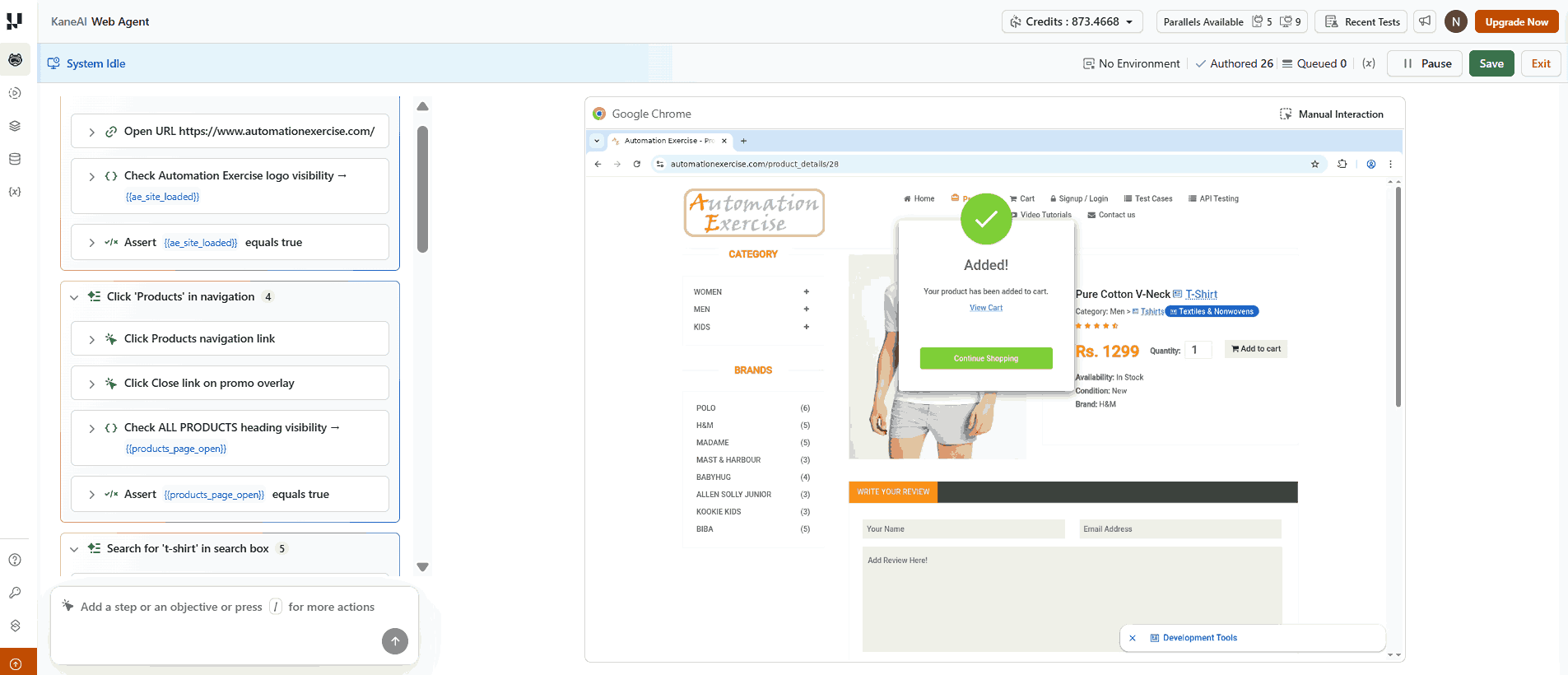
Here is what a KaneAI authoring session looks like for a product search flow:
Test: Verify Product Search and Add to Cart

Step 1: Navigate to https://www.automationexercise.com/
Step 2: Click on "Products" in the navigation
Step 3: Search for "t-shirt" in the search box
Step 4: Click the first product result
Step 5: Verify the product name and price are visible
Step 6: Click "Add to Cart"
Step 7: Verify the cart modal appears with the product
KaneAI converts these steps into executable test code and runs the test on TestMu AI's cloud. If the "Add to Cart" button's selector changes in the next deployment, KaneAI detects the mismatch and resolves the correct selector from the surrounding DOM context. It updates the affected step and continues. The build does not fail because of a renamed attribute.
A Canadian fintech company running 100,000+ merchants saw this directly. Before KaneAI, almost half of QA time went to fixing broken scripts. After switching to NLP-authored tests with self-healing, results over six months included:
- 3X faster test creation: from 30 minutes to 10 minutes per test
- 65% reduction in maintenance: monthly manual update hours dropped from 85 to 30
- 6X test velocity: new tests created monthly rose from 40 to 240
"KaneAI actually let us describe our payment flows in plain English and get reliable tests out of it." - QA team, fintech customer story
For context, I have an economics background and had never written a test before trying this. Those seven steps above were enough. KaneAI ran the test without me touching any code, and the screenshot below is from that session.
The KaneAI getting started guide walks through setup on an existing TestMu AI account in under 10 minutes, including how to connect to a real device or browser configuration for the first run.
Real-World Results from Intelligent Automation Testing
Organizations across retail, enterprise software, and creative tools have published concrete results. Each example below started from a different problem and reached measurable gains within months.
Boohoo (e-commerce retail)
Boohoo's in-house Mac Mini device farm could not scale with new device and OS releases. The team moved to TestMu AI's cloud platform for native app, web, and real-device testing across their existing Selenium and Appium stack.
- 9X increase in test coverage across devices, browsers, and OS combinations
- 67% cost reduction compared to their previous cloud solution
- 4-day-a-week release cycle supported by daily automated test deployments
Full details in the Boohoo customer story.
Microsoft (enterprise software)
Across Windows, Office 365, and Azure, Microsoft faced brittle scripts breaking with every UI change and regression suites too large to run efficiently. According to DigitalDefynd's AI testing case study analysis, after implementing intelligent test automation combining ML-based risk analysis, self-healing scripts, and predictive failure detection:
- Regression testing time reduced by over 60%
- Test script maintenance efforts dropped by 50%
- High-risk defect detection improved by 40% through predictive ML models
Adobe (creative software)
Adobe needed consistent UI quality across hundreds of screen resolutions and operating systems. The same DigitalDefynd analysis reports that after combining computer vision for visual inconsistency detection, self-healing automation, and ML-based test prioritization:
- 50% fewer UI defects escaping to production
- Test maintenance efforts reduced by 70%
- Regression cycles shortened by 60%
What Are the Main Challenges with Intelligent Automation Testing?
Each challenge below comes with a concrete mitigation.
- AI misidentifying a healed element: Self-healing can pick the wrong element when two share similar DOM attributes. Set a threshold of 0.90 or above and require human approval for any heal below it.
- ML models needing training data you do not have yet: New setups lack the historical data ML models need. Tag smoke and critical path tests manually first, then let the model learn from outcomes over 4-6 weeks before trusting its predictions.
- Automating without a coverage strategy: Most teams automate before defining what sufficient coverage means. Set targets per risk tier before enabling AI-based selection - otherwise the ML model optimizes toward an undefined goal.
- NLP test steps becoming ambiguous over time: Plain-English steps drift as the UI evolves - "click submit" breaks when a redesign adds three buttons. Include element context from the start and review NLP steps each sprint.
Conclusion
Start by auditing which 20% of your test suite is generating 80% of your maintenance alerts. Those tests are the first candidates for self-healing and ML-based selection. You do not need to rebuild your entire test infrastructure - you need to add an intelligence layer to the specific areas that keep breaking.
TestMu AI brings together cloud-based test automation, KaneAI's NLP authoring and self-healing, and test intelligence analytics on a single platform. Tests run across 10,000+ real devices and browsers so you get consistent coverage without managing local infrastructure.
Read the KaneAI getting started guide to author your first intelligent test in under 10 minutes, or explore the full automation testing platform to see how it fits your current stack.
Note: This article was researched and drafted with AI assistance, then reviewed, fact-checked, and published by Naima Nasrullah, Community Contributor at TestMu AI, whose listed expertise includes Automation Testing and Software Testing. Every statistic, link, and product claim was verified against primary sources. Read our editorial process and AI use policy for details.




Intelligent Automation Testing FAQs
Did you find this page helpful?
More Related Hubs
TestMu AI forEnterprise
Get access to solutions built on Enterprise
grade security, privacy, & compliance
- Advanced access controls
- Advanced data retention rules
- Advanced Local Testing
- Premium Support options
- Early access to beta features
- Private Slack Channel
- Unlimited Manual Accessibility DevTools Tests