

Next-Gen App & Browser Testing Cloud
Trusted by 2 Mn+ QAs & Devs to accelerate their release cycles


On This Page
- Mobile applications manual testing – Is it viable?
- Types of Mobile Applications
- Manual vs. Automated Mobile Testing
- What to Test in a Mobile Application
- How to test mobile applications manually?
- Testing Environments: Emulators vs. Real Devices
- How to Write Mobile App Test Cases
- How to perform mobile application manual testing using TestMu AI?

How To Test Mobile Applications Manually
Learn how to test mobile applications manually using TestMu AI with this comprehensive guide.

Harish Rajora
March 24, 2026
Manual mobile app testing is the process of evaluating a mobile application by hand, without automated scripts, to identify bugs, usability issues, and performance problems before release. With 63.92% of global users now accessing the web via mobile devices (as of January 2025), a broken or sluggish mobile app directly impacts business outcomes.
The number of Android and iOS developers has grown to a record 8.7 million out of 19 million software developers globally. In this blog, we will see why manual testing remains critical and how to test mobile apps manually using cloud-based tools like TestMu AI.

Overview
What Is Manual Mobile App Testing?
Manual mobile app testing is the process of evaluating a mobile application by hand, without automated scripts, to identify bugs, usability issues, and performance problems before release.
What Should You Test in a Mobile App Manually?
Every manual testing session should cover these key areas:
- Functionality, UI, and usability
- Compatibility across devices and OS versions
- Performance, network conditions, and interrupt handling
- Gesture testing and security
How Do You Test a Mobile App Manually?
Follow these steps for every manual testing session:
- Define scope and select target devices
- Write test cases for each user journey
- Execute tests and document results
- Log defects, retest after fixes, and sign off
Mobile applications manual testing – Is it viable?
Before proceeding with the core part on how to test mobile applications manually, it is essential to know if the mobile application manual testing is worthy of our time?
Mobile applications have become quite complex in development and their working. Due to this, the following cases still stand firm on the side of mobile application manual testing.

Better judgement of UI
Mobile application manual testing is performed by a tester manually. Even though automation tools and frameworks have evolved greatly in the UI department (like locating the element accurately and defining its position on the screen), they still cannot be 100% accurate. On the other hand, through mobile application manual testing, we can observe the UI's slightest nuances and notify the development team.
A good use case around mobile application manual testing is while using an iframe type of container in the app, and you might have the image inside it but not by exact proportion (there are chances that it could get cut in one of the sides). Such issues cannot be tested through automation, and one has to rely on mobile application manual testing.
Mimic real user
Mimicking a real user is the toughest and the most important thing in mobile application manual testing. Everything depends on the end-user when it comes to popularity, the business, and even the application's working. If you don't perform mobile app testing in a similar way as the end-user would operate it, you will never be able to perfect it for your audience.
So who is the best for mimicking a real end-user, a real user. Mobile application manual testing takes the upper hand when operating the mobile application like a user and not a robot. Of course, you can also go with automation, but the number of permutations is extremely high. But, with mobile application manual testing, it can be done very quickly. Therefore, in such a case, mobile application manual testing saves time when compared to automation.
Complex use cases can be simplified
Many mobile app testing use cases are complex to be scripted in the form of automation test cases. For example, gaming brings out the most challenging use cases when it comes to mobile app testing.
Also read – Challenges in mobile app testing
The combination of multiple actions such as swiping, moving forward, backward, tapping, or swiping in a different order (like circular) is hard to predict from the user's point of view. Only if we can do these actions ourselves through mobile application manual testing will we notice hidden bugs.
Not only in the situations mentioned above, but even otherwise, we can name scenarios where mobile application manual testing becomes necessary and is the only viable way forward. Also, we should never consider going for 100% automated mobile app testing in the above scenarios as it is a waste of time. For example, UI can be efficiently tested using automation. But we may need the mobile application manual testing for corner cases. So a mix of both is probably the best when it comes to mobile app testing.
Also read: Automating Acceptance Tests For Mobile Apps

Types of Mobile Applications
The type of mobile application you are testing determines which testing approaches and device configurations are most relevant.
Native Apps
Native apps are built for a single platform using Java or Kotlin for Android, and Swift or Objective-C for iOS. They have direct access to device hardware and are distributed through app stores. Testing requires separate coverage for Android and iOS since the codebases are independent.
Web Apps
Mobile web apps are accessed through a browser rather than installed from an app store. They are responsive websites optimized for mobile screens. Testing focus areas include rendering across mobile browsers, responsive layouts, and touch interactions.
Hybrid Apps
Hybrid apps combine a native shell with web-based content rendered inside a WebView. They can be installed from app stores but behave partly like web apps internally. Testing requires attention to both native device interactions and web rendering behavior.
Progressive Web Apps (PWAs)
PWAs use modern browser APIs to deliver app-like experiences including offline functionality, push notifications, and home screen installation. Testing requires validating both the web layer and the native-like features they expose.
Manual vs. Automated Mobile Testing
Neither manual nor automated testing alone is sufficient for a robust mobile QA strategy. Understanding what each does well helps teams allocate effort correctly.
| Dimension | Manual Testing | Automated Testing |
|---|---|---|
| Execution | Performed by a human tester step by step | Executed by scripts with minimal human involvement |
| Speed | Slower; depends on tester availability | Faster; runs in parallel across devices |
| UX Evaluation | Excellent; human judgment catches nuanced UI issues | Limited; scripts validate function, not feel |
| Exploratory Testing | Ideal; testers adapt and investigate dynamically | Not suitable; scripts follow fixed paths |
| Regression Testing | Time-consuming and error-prone at scale | Ideal; same scripts run reliably on every build |
| Complex Gestures | Easy to evaluate naturally | Difficult to script accurately |
| Best For | Exploratory, usability, ad-hoc, new feature testing | Regression, performance, repetitive test suites |
Most mature QA teams use a combination: manual testing for user-centric validation, automation for regression and CI/CD pipelines.
What to Test in a Mobile Application?
The following areas cover what every mobile app tester should validate before signing off on a release:
Functionality Testing
Verify all features work as specified: login flows, core features, form inputs and validation, data saving and retrieval, navigation, and error handling.
UI and Usability Testing
Evaluate layout across screen sizes and resolutions, text readability, button tap targets, scroll behavior, and navigation logic. Check both portrait and landscape orientations.
Compatibility Testing
Test across multiple device models, OS versions, screen sizes, and manufacturers. Pay attention to older OS versions that still have significant user bases.
Performance Testing
Check app launch time, screen transition speed, scroll smoothness, responsiveness under load, and memory usage during extended sessions.
Network Condition Testing
Test across Wi-Fi, 4G, 3G, 2G, and no network. Check how the app handles slow connections, drops mid-session, and recovery after reconnecting.
Interrupt Handling
Simulate incoming calls, SMS, push notifications, alarm triggers, and app switching. The app should resume cleanly without data loss or crashes.
Gesture Testing
Validate single tap, long press, swipe, pinch-to-zoom, two-finger scroll, and drag and drop. Test on both Android and iOS since gesture behavior differs between platforms.
Security Testing
Check that sensitive data is not stored in plain text, authentication flows require correct credentials, and the app does not expose data through unprotected APIs or logs.
How to test mobile applications manually?
Follow these six steps to run a structured manual mobile testing session.
Step 1: Define the Testing Scope
Identify the app type, target devices and OS versions, and features to be tested. Define clear objectives based on release requirements. Determine whether this is a full regression, a focused feature test, or an exploratory session.
Step 2: Select Your Testing Environment
Choose between physical devices, emulators/simulators, or a real device cloud. For final QA before a release, real devices give the most accurate results. Emulators are useful for early development checks but cannot replicate hardware behavior or actual network conditions.
Step 3: Write Test Cases
Create detailed test cases for each feature and user journey. Each should include a test case ID, description, preconditions, step-by-step actions, and expected result. Cover all key paths, edge cases, and device-specific behaviors.
Step 4: Execute the Tests
Run each test case on selected devices, documenting actual results against expected results. Test across screen sizes, OS versions, and network conditions. Note any unexpected behavior even outside formal test cases.
Step 5: Log and Prioritize Defects
Record every defect with steps to reproduce, device model, OS version, screenshots or screen recordings, and severity. Prioritize by impact: crashes and data loss are critical, minor layout issues are low priority.
Step 6: Retest and Sign Off
After fixes are deployed, retest all affected areas and run a final regression check. Document results and provide a clear recommendation on whether the app is ready for release.
Testing Environments: Emulators vs. Real Devices
Emulators and Simulators
Emulators and simulators are cost-effective options for mobile application manual testing. They let you select a device model and run it on your computer screen, giving a gist of how the app will behave on real devices. They come in both free and paid options.
Read more: Differences between emulators and simulators
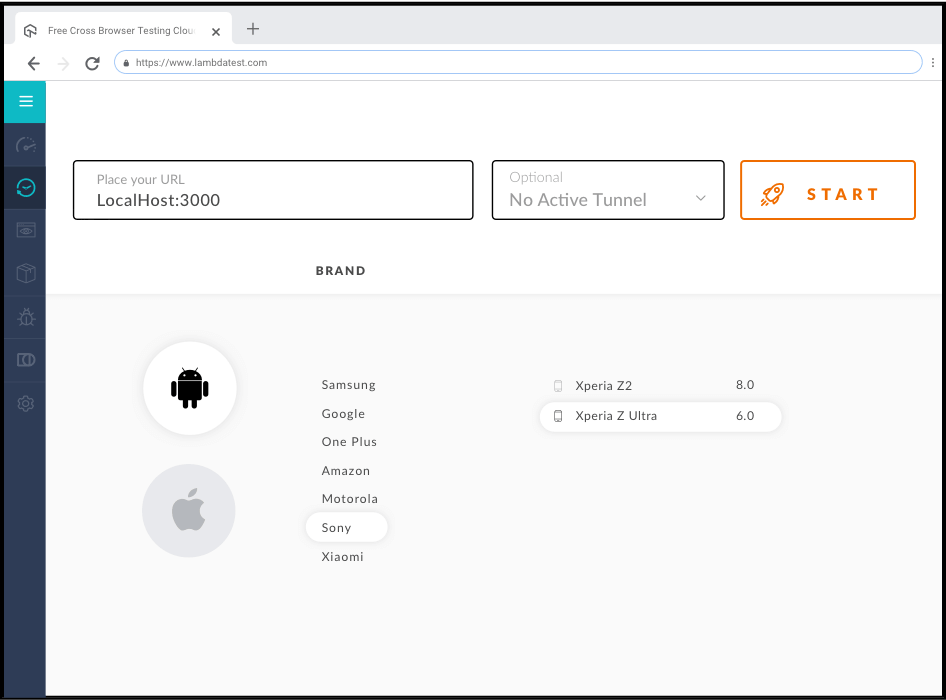
However, emulators cannot accurately replicate hardware behavior, GPS signals, battery drain, camera input, or actual network performance under real carrier conditions. For final quality assurance, real device testing is recommended.
Also read: Getting Started With Mobile App Testing Using Emulators And Simulators

Austin Siewert
CEO, Vercel
Discovered @TestMu AI yesterday. Best browser testing tool I've found for my use case. Great pricing model for the limited testing I do 👏
2M+ Devs and QAs rely on TestMu AI
Deliver immersive digital experiences with Next-Generation Mobile Apps and Cross Browser Testing Cloud

Real Device Cloud
A real device cloud gives teams remote access to a large library of actual physical devices without managing a lab.TestMu AI's Real Device Cloud provides access to 5000+ real Android and iOS devices, making it the most practical option for teams that need broad coverage without physical device management.
How to Write Mobile App Test Cases?
A well-written test case makes testing reproducible and reduces subjectivity between testers. Every mobile app test case should contain these elements:
- Test Case ID: A unique identifier for tracking
- Test Description: What feature or scenario is being tested
- Preconditions: Device state, login status, network condition before the test
- Test Steps: Numbered, specific actions the tester performs
- Expected Result: What the app should do if working correctly
- Actual Result: What the app actually did
- Device and OS: Model and OS version used
- Status: Pass, fail, or blocked
How to perform mobile application manual testing using TestMu AI?
In 2021, the cross browser testing platform TestMu AI joined the club of companies providing emulators and simulators for mobile application manual testing. The mobile app testing module comes integrated into the platform and is free to use for a limited time. It has numerous advantages over other free emulators and simulators, which I have listed down below for your reference.
Here's a short glimpse of TestMu AI mobile app testing features:
Also Read: Mobile App Testing is Now LIVE On TestMu AI!
Cloud-based
Android studio consumes huge memory that slows down the system. If you have a lower primary memory like 4GB or 6GB, it becomes difficult or impossible to perform mobile app testing on different emulators and simulators faster. Popular forums such as Quora and StackOverflow are filled with questions asking for a turnaround in memory consumption. Google has also updated its documentation describing efficient ways to manage memory on app.
TestMu AI eliminates this concept and enables cloud-based mobile app testing using emulators and simulators. Since TestMu AI mobile app testing is cloud-based, you just need a system with a browser and a stable internet connection. The powerful infrastructure of TestMu AI takes care of it all at their end.
Another important point to note is what would happen if we use a native emulator like Android Studio and our PC gets affected by a virus and crashes down? This brings us to the risk of losing all the data and starting all over again. However, the cloud-based platform can be accessed from anywhere, and all your data is kept on the cloud, safe, and the UI's slightest nuances are used from any location and any PC.
Learning Curve
The next issue people face while dealing with benchmark emulators and simulators such as Android studio is the constant change over the years. From MK files to NK to shared libraries, it feels like testers get a new software with the same name each year and start learning all over again.
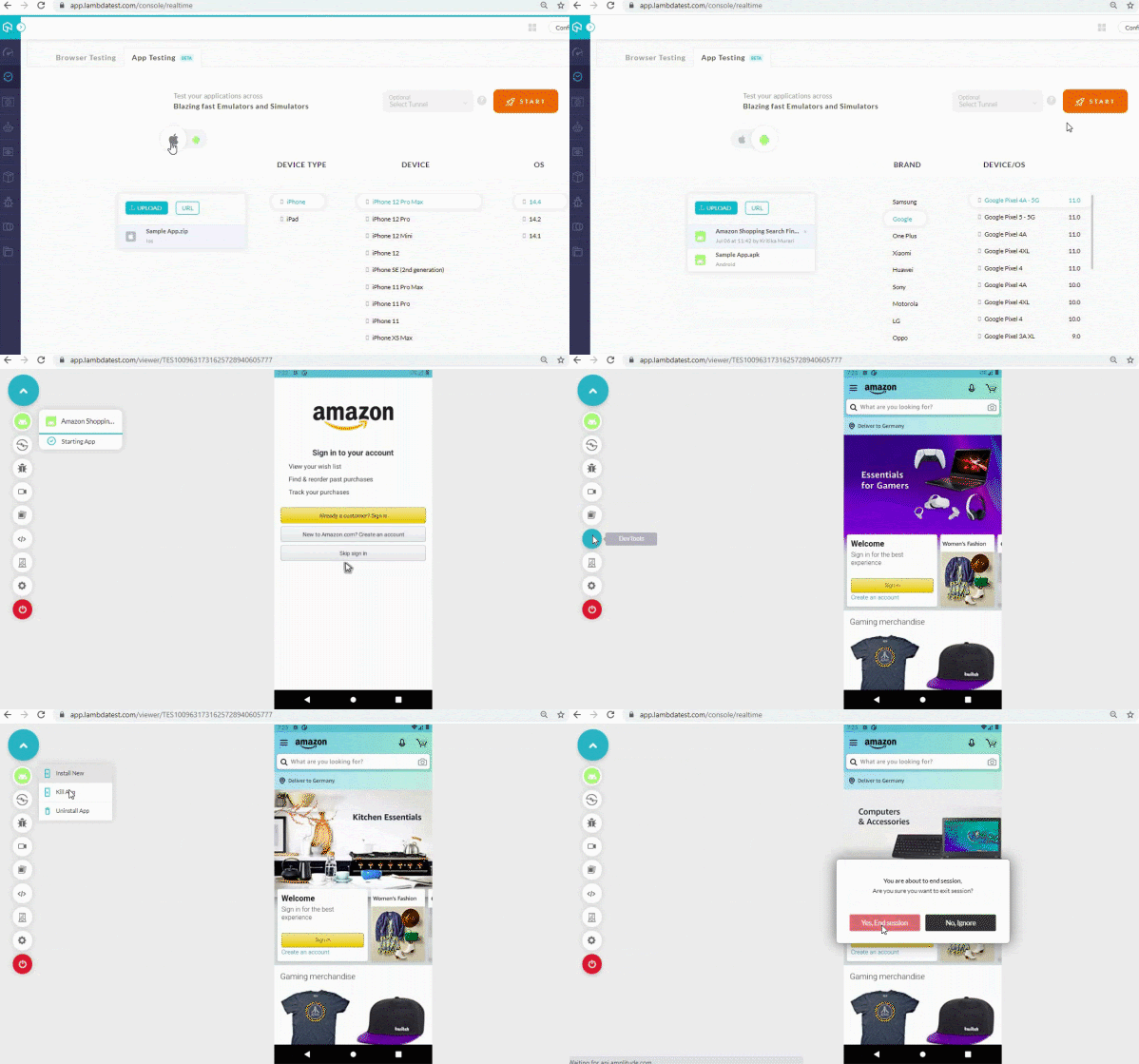
TestMu AI has a very shallow learning curve. A few simple steps of "upload," "launch," "start" (as demonstrated in the later section), and you are done with mobile application manual testing easily.
Easy geo-location
The next difference that gives TestMu AI an edge over Android studio-type emulators is the ease of geo-location testing. Many emulators and simulators do not provide geo-location testing as a part of their executable package. But you can use third-party software and set the location as per your choice. For example, in Android studio, you have to use telnet for geo-location testing. With geo fix <longitude value> <latitude value>, you can fix the latitude and longitude of the location you want your app to open in. Although we all know how third-party support goes in the future.
TestMu AI can save you from all this trouble by providing the geo-location services embedded into their platform to perform mobile application manual testing. In addition, the tester gets a dropdown option while running the emulator on which they can select the country they wish to open their app in.
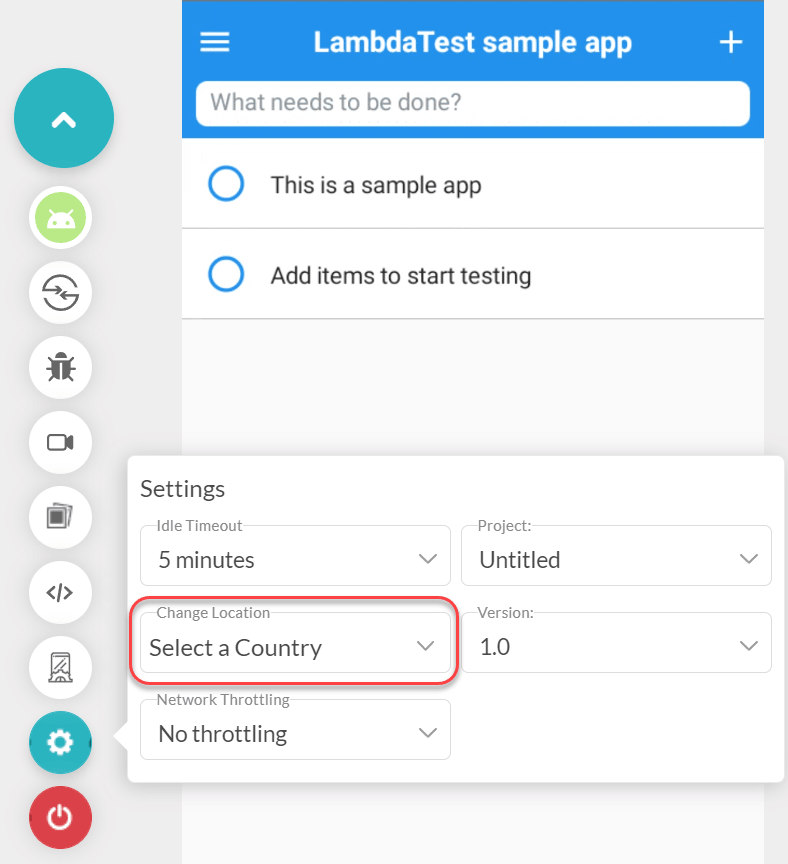
With this, they can view their app and verify if it is geo-blocked or working correctly in different locations in minutes.
Localization testing
TestMu AI's mobile app testing module can be used for localization testing to ensure that the elements in your application changes according to the region or not. These may include regional languages, local time, displaying regional currency, etc.
Android and iOS support
The emulators and simulators provided by the OS developers generally bring the first updates to the most current changes on the OS. So, for example, if Google is thinking about releasing a new API for Android, it will be visible in the Android Studio first (similar to how Google's new OS is always available to the Pixel first). However, they fail at one simple point – serving apps developed to run on other OS.
Looking to perform Android and iOS app testing on Real Device Cloud, check out our video below –
No OS would want to promote other competitors, and therefore they stick to their own platform's application. Nevertheless, many tools have emerged, providing Android and iOS support to the tester at a single location. TestMu AI's collection of emulators and simulators contains Android and iOS supported devices that provide all the functionalities, including real-time logs for detailed debugging. The clearer a bug is seen, the better the end quality of the application.
Apart from all this, TestMu AI gives you support 24×7 when you get stuck (which happens a lot), an extensive document to perform real-time mobile app testing, and many third-party integrations to make your work easier. Here I would like to mention two things based on our discussion to this point. First, it is not that these things are not available for other tools, but you may not find all of the things in a single place. For example, open-source software often troubles us with integrations because there is no specific build for both of them. Sometimes you may have to use two different tools altogether (like integrations) to leverage their power. But these will not be connected, and so the process becomes slow.
Secondly, I have used Android studio many times in this post to reference how TestMu AI's mobile application manual testing module can prove fruitful to you as a tester. This does not mean the points imply only to the Android studio. Most open-source emulators and simulators face similar issues and can even be more on the off-side in providing additional functionality. Having everything on a single dashboard gives flexibility and saves a lot of time in testing.
So, now we are covered up with emulators and simulators and are ready to demonstrate mobile application manual testing through TestMu AI.
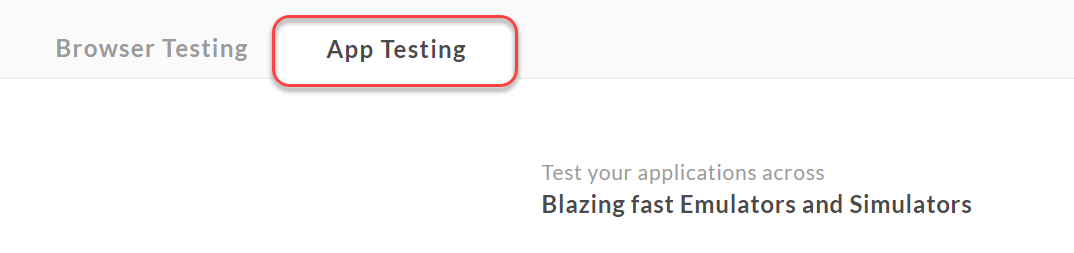
To perform mobile application manual testing, login to TestMu AI and move to real-time testing from the side-panel.
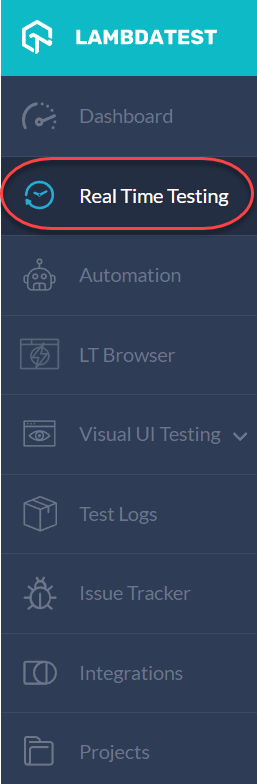
Here, you get an option to perform mobile app testing. Select "App Testing" on the screen:
Select the OS your app is built for and upload the executable file here.
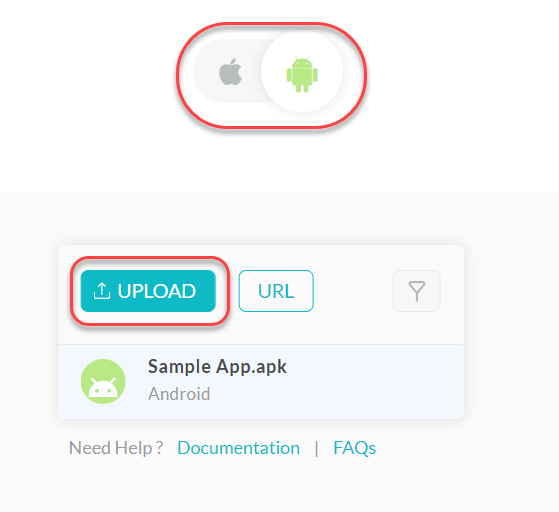
For users who are exploring the platform, a sample app to test is provided. If you intend to run that sample app like me, just move ahead to the next step without pressing UPLOAD.
Next, choose the device from the list on the right on which you want your application to run. You will get devices according to the chosen OS. Since I opted for Android here, I will get devices available with Android OS in the market.
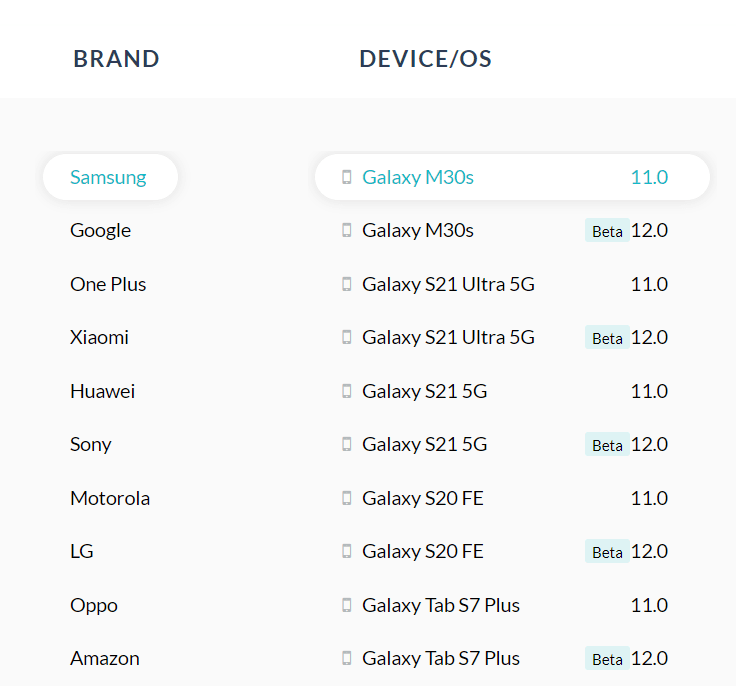
We are all set now to press start and launch an emulator of the device we selected.
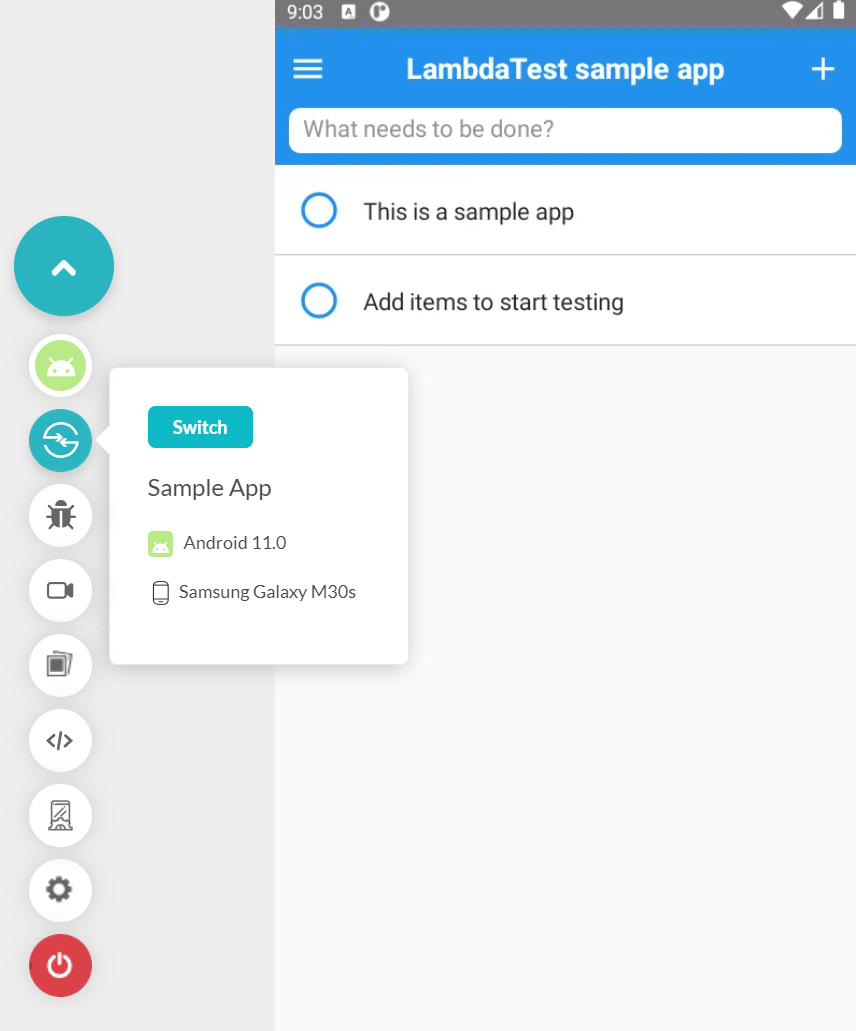
If you have performed cross-browser testing on TestMu AI, the interface of the mobile app testing will look a lot familiar to you. This can also help speed things up. But if this is your first time, you will see a panel on the left side that will contain the tools to enhance your mobile testing experience.
You can also switch your OS from within this panel directly, mark bugs with different shapes and texts, change location and even debug from this screen.
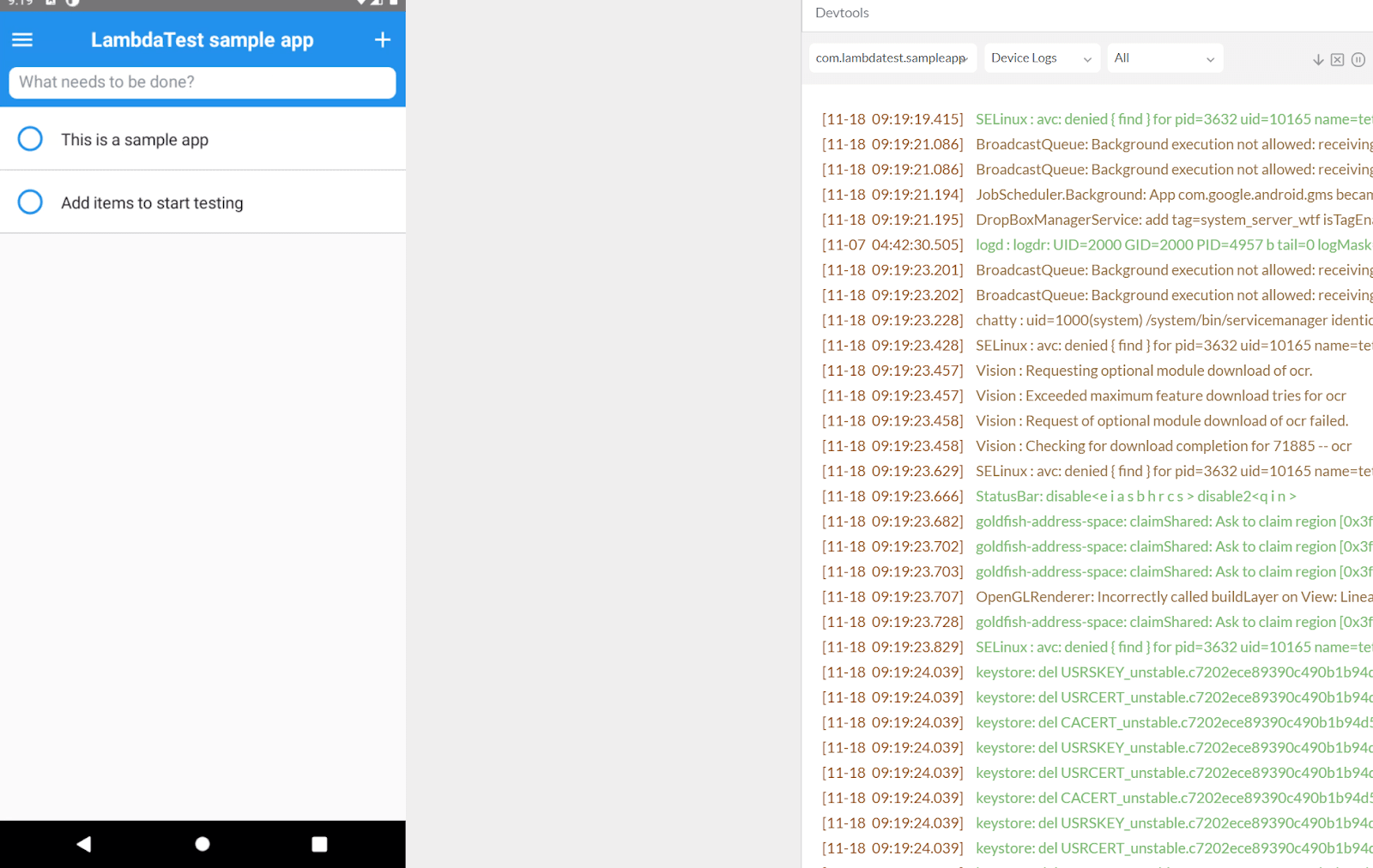
TestMu AI mobile testing with logs for efficient debugging
This tool is free to explore, and you can try with different apks or apple executables and let us know your experience in the comment section.
Also read: The Ultimate Mobile App Testing Checklist
You can also refer to the below video tutorial on how to perform real-time browser testing on TestMu AI.
Summary
Mobile devices have become central to both users and businesses. With users spending more than 200 minutes a day on their devices, a poor mobile app experience directly costs businesses users and revenue. High competition leaves no room for testing gaps.
In this guide we covered everything a tester needs to run effective manual mobile testing sessions: the four types of mobile applications and how testing differs for each, a direct comparison of manual versus automated testing to help teams allocate effort correctly, a complete checklist of what to test covering functionality, UI, compatibility, performance, network conditions, interrupt handling, gestures, and security, and a six-step process from defining scope through retesting and sign-off.
We also covered how to write test cases that are reproducible and unambiguous, the challenges of device fragmentation and scale, and when to use emulators versus a real device cloud. TestMu AI's Real Device Cloud gives teams access to 5000+ real Android and iOS devices without managing a physical lab, making it the most practical option for teams that need broad coverage at speed. If you have never tried it, you can sign up for a free trial.


Frequently asked questions
Did you find this page helpful?
More Related Hubs
TestMu AI forEnterprise
Get access to solutions built on Enterprise
grade security, privacy, & compliance
- Advanced access controls
- Advanced data retention rules
- Advanced Local Testing
- Premium Support options
- Early access to beta features
- Private Slack Channel
- Unlimited Manual Accessibility DevTools Tests