

Next-Gen App & Browser Testing Cloud
Trusted by 2 Mn+ QAs & Devs to accelerate their release cycles


Getting Started With Gatsby Testing
In this article on Gatsby testing, we explore what is Gatsby and why Gatsby testing is important. In addition, we look at different approaches to test Gatsby applications.

Irshad Ahamed
January 22, 2026
Testing is crucial when you are building your websites or even software solutions. Gatsby allows you to create lightning-fast websites with your data, regardless of where it came from. Free your website from old content management systems and leap into the future.
According to the statistics, 22,986 websites are Gatsby customers. It is important that the development and testing teams work in close collaboration to get the desired outcomes, especially when new applications are being introduced to end customers.
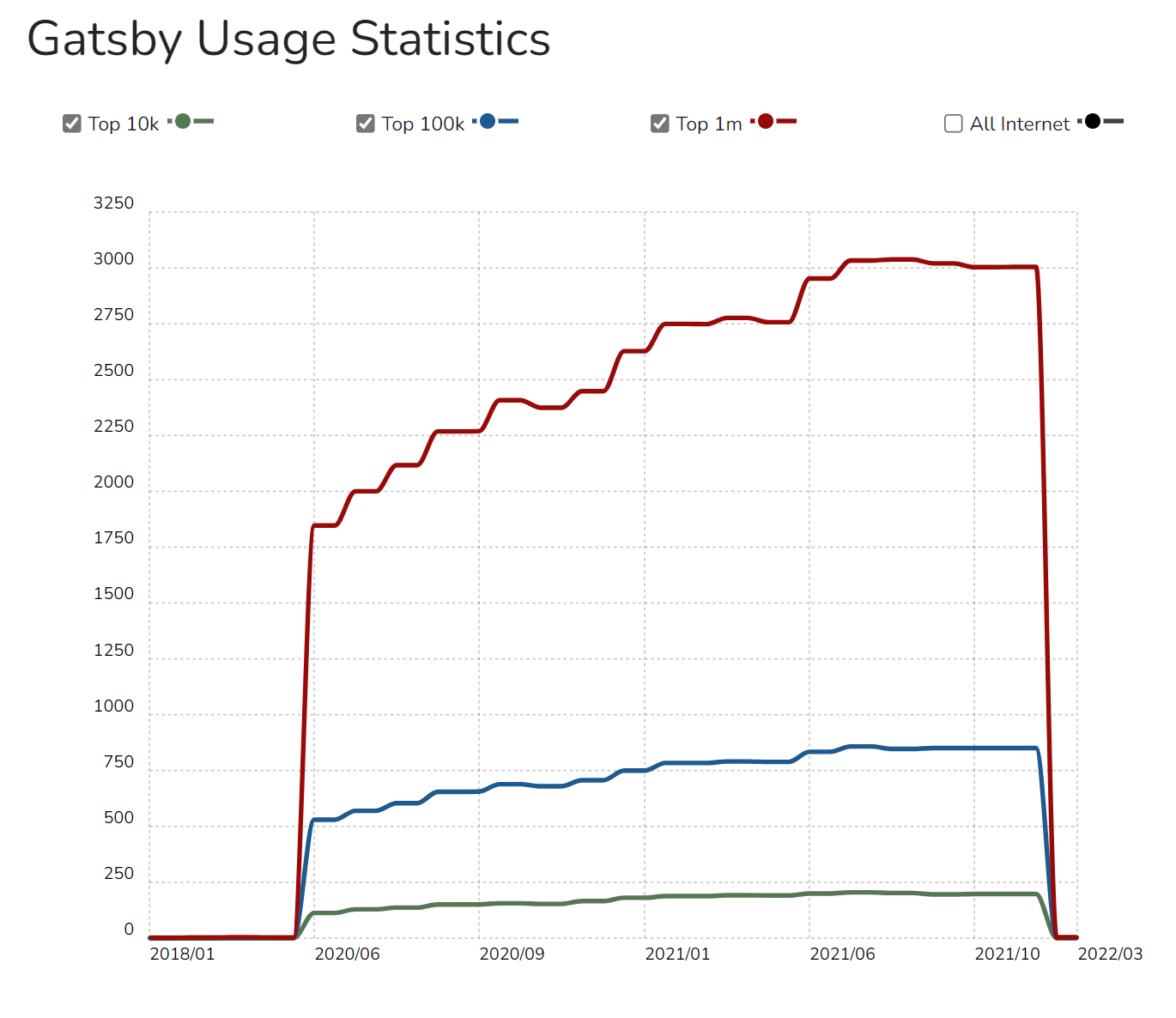
You may want to include Gatsby testing to maintain code quality over time. It ensures that your product requirements are validated, your code is optimized, and you can avoid any unexpected issues or bugs before the code is deployed on the production server.
In this article on Gatsby testing, we explore what is Gatsby and why Gatsby testing is important. In addition, we will look at the A/B testing approach, testing around React and Jest and over a cloud platform like TestMu AI.
Let us first try and understand Gatsby before we try and test the Gatsby application.
What is Gatsby?
Gatsby is a React-based free and open-source framework that allows developers to create lightning-fast web pages and apps. This means that developers can develop and test React applications and work with any data source (Markdown etc.) of their preferred choice.
To sum up, it is a static site generator with more features and capabilities that makes building websites easier than ever. Gatsby allows you to integrate different content, APIs, and services providing a holistic web experience.
Open source is at the core of Gatsby’s success, which means that things are done in the open with a knowledge-sharing approach. This suggests you’re attempting to create an active community with a large number of contributors who continue to provide significant value to the development ecosystem. Gatsby’s vision is to make website development fun by following a simplistic approach.
What makes Gatsby special?
Gatsby has certain unique characteristics that set it apart from other static site generators. First and foremost, Gatsby makes use of React, making it an excellent alternative for individuals who are familiar with and enjoy the framework.
You can easily enable Gatsby to build and deploy your site every time you commit and push to GitHub using technologies like Netlify.
Gatsby also comes with a robust ecosystem of plugins to meet a variety of requirements. These plugins can assist you in obtaining data from CMSs such as WordPress or Contentful, integrating with programs such as Algolia, and managing your photos by lazy-loading and optimizing them.
Gatsby also comes with a slew of APIs that make creating static web pages a breeze, including one that converts markdown files into static pages with a template at build time.
Finally, Gatsby includes a number of useful components that simplify tasks such as routing, linking, and image handling that isn’t available in the main React library.
Top features offered by websites designed using Gatsby
Every day, the number of Gatsby website users climbs. Companies are looking for innovative ways to expand their operations online and outrank competitors in rankings; thus, this was expected. Here are some of the top features offered by websites using Gatsby.
- Build Best in Class Web ExperiencesGatsby works on a unified data layer that allows the developers to easily combine data from different sources and render them as well. You can also add content from different websites without having to think twice with utmost precision and consistency.
- Great Response Time Gatsby works on the concept of intelligent page rendering functionality that preloads the selective content parts of the page. There will always be trouble with response time when you are loading different components of a page simultaneously. This limitation is no longer applicable with Gatsby websites as it is fast and fully optimized when it comes to performance.
- Delightful Developer ExperienceGatsby uses React and cutting-edge technologies like GraphQL, Webpack, etc., to provide a top-notch developer experience. If your developers enjoy working with the frameworks and methodologies that simplify their tasks, they will have to spend less time maintaining and optimizing them.
- High ScalabilityGatsby’s website is deployed using cutting-edge technologies, which means that you can quickly scale your operations despite the vulnerabilities or traffic congestion. Your data is always protected, and the end-user experience improves in the long run.
- Adopt Content Mesh SystemThe Content Management System (CMS) was developed keeping in mind the content-related sites. But it was working on a traditional approach where the content was stored, built, and delivered to the end-users. To tackle the new changes in the modular CMS architecture, Gatsby works on a content-mesh approach. This means that you deliver high performance without manual integrations.

Note: Start Testing your CMS Applications. Try TestMu AI Now!
Static websites have existed for a long time. There are no server-side dynamics or functionality involved. This is where you need a static site generator to generate these static sites. The static site generators help to generate content at build time. This is entirely different from server-side rendering, where the code is available on the server-side. Gatsby does not render any code on the server-side.
Why do you need to test the Gatsby site?
You are required to test the Gatsby site to make sure:
- Functionality changes are working as per the requirements.
- Validate the code changes so that developers can get timely feedback on the code quality.
- Ensure the code quality and code coverage metrics are tracked and followed by development teams.
- The plugin and third-party integrations are working fine.
- Final changes are tested before being pushed to the production server.
Different Approaches for Gatsby Testing
To preserve code quality over time, you may want to add testing to your Gatsby site. There are a number of potential approaches for Gatsby testing.
- A/B Testing Approach for Gatsby Testing
- Testing Your Gatsby Application Using Jest and React Testing Library
- Gatsby Testing using cloud-based platform
A/B Testing Approach for Gatsby Testing
You can use traditional A/B testing tools such as Optimizely for Gatsby testing. This can have a performance impact as the website can observe slowness.
Other ways are gaining traction. One native method of edge-based HTML file serving is to produce multiple copies of a page and serve one or the other from the CDN based on the user. This can be set up in two different ways.
First branch-based edge A/B testing, in which some users are offered a site compiled from the main branch, while others are served a site compiled from a different branch.
- This was an early tool, and it has a following, although it has a few flaws. For starters, it creates technical debt because development teams must maintain two “primary” code branches throughout the test.
- Two, storing and referring to the variant can be inconvenient if the source of truth for content is in a headless CMS rather than version-controlled code.
Second, page-based edge A/B testing involves creating several copies of specific pages on edge based on the A/B test settings. This is a promising strategy, and there are two options for implementing it.
- This enables both A/B testing and content customization at the edge. These methods are currently only available at enterprise-level prices, making them out of reach for most teams.
- Second, teams can do it themselves by building two variations, selecting users at random to view each variant, and persisting the variant decision to the client via cookies or localStorage. While some configuration is required, this may be accomplished without the inclusion of any new vendors. This was used to relaunch our Starters page earlier this quarter.

Gatsby Testing using Jest and React Testing Library
Let us add unit tests to a Gatsby project using the Jest and React testing library. Let us consider that this Gatsby site is your personal website, and you started adding more features and enhancements going forward. We will add basic unit tests to verify different functionalities and make sure that they are working as expected.
Follow these steps to perform unit testing using Jest and React:
Creating a new Gatsby App
We can start our testing by using an out-of-box Gatsby starter template. To use a Gatsby starter, open the Command Line Interface(CLI) and execute the following command:
npx gatsby new my-blog-starter https://github.com/gatsbyjs/gatsby-starter-blog
You can remove npx if Gatsby CLI is already installed on your machine.
Setting up our Testing Environment
Execute the below commands on the CLI to install the required libraries for testing a Gatsby site.
npm install -D jest babel-jest @testing-library/jest-dom @testing-library/react babel-preset-gatsby identity-obj-proxy

    yarn add -D jest babel-jest @testing-library/jest-dom @testing-library/react babel-preset-gatsby identity-obj-proxy
Once all the required dependencies are installed, you can create a new folder TestResults at the root of the project. Here is the folder structure that has been created:
// my-gatsby-project
    ├── jest-preprocess.js
    ├── setup-test-env.js
    └── __mocks__
        ├── file-mock.js
        └── gatsby.js
Once the folder structure is finalized, we will configure Jest. Jest-process.js is the first element in the directory structure.
Writing the Unit Tests
We perform unit testing to ensure that the required module or functionality works as per the expected behavior. For example, if we are trying to test the see component whose corresponding JavaScript file is see.js and the home page is index.js.
You can use .spec or .test to create a testing file or put the required files in the _tests_ folder. Jest will execute only the files that are defined _tests_folder.
// components/sample.js
import React from "react"
import PropTypes from "prop-types"
import { Helmet } from "react-helmet"
import { useStaticQueryParameters, graphql } from "gatsby"

const sample = ({ description, lang, meta, title }) => {
  const { site } = useStaticQueryParameters(
    graphql`
      query {
        site {
          siteMetadata {
            title
            description
            social {
              skype
            }
          }
        }
      }
    `
  )

  const metaDescriptionDetails = description || site.siteMetadata.description
  const defaultTitleDetails = site.siteMetadata?.title

  return (
    <Helmet
      htmlAttributes={{
        lang,
      }}
      title={title}
      titleTemplate={defaultTitle ? `%s | ${defaultTitle}` : null}
      meta={[
        {
          name: `description`,
          content: metaDescriptionDetails,
        },
        {
          property: `og:title`,
          content: title,
        },
        {
          property: `og:description`,
          content: metaDescriptionDetails,
        },
        {
          property: `og:type`,
          content: `website`,
        },
        {
          name: `skype:card`,
          content: `summary`,
        },
        {
          name: `skype:creator`,
          content: site.siteMetadata?.social?.skype || ``,
        },
        {
          name: `skype:title`,
          content: title,
        },
        {
          name: `skype:description`,
          content: metaDescriptionDetails,
        },
      ].concat(meta)}
    />
  )
}

Sample.defaultProps = {
  lang: `en`,
  meta: [],
  description: ``,
}

Sample.propTypes = {
  description: PropTypes.string,
  lang: PropTypes.string,
  meta: PropTypes.arrayOf(PropTypes.object),
  title: PropTypes.string.isRequired,
}

export default Sample
Let us write the unit tests for the Sample component.
// components/__tests__/sample.js
import React from "react"
import { render } from "@testing-library/react"
import { useStaticQuery } from "gatsby"

import Helmet from "react-helmet"
import Sample from "../sample"

describe("Sample component", () => {
  beforeAll(() => {
    useStaticQuery.mockReturnValue({
      site: {
        siteMetadata: {
          title: `Gatsby Starter Blog for Freshers`,
          description: `A starter blog demonstrating what Gatsby can do and the features offered.`,
          social: {
            twitter: `irshad`,
          },
        },
      },
    })
  })

  it("renders the tests correctly", () => {
    const mockTitle = "All posts | Gatsby Starter Blog for Freshers"
    const mockDescription = "A starter blog demonstrating what Gatsby can do and the features offered."
    const mockTwitterHandler = "Irshad"

    render(<SEO title="All posts" />)
    const { title, metaTags } = Helmet.peek()

    expect(title).toBe(mockTitle)
    expect(metaTags[0].content).toBe(mockDescription)
    expect(metaTags[5].content).toBe(mockTwitterHandler)
    expect(metaTags.length).toBe(10)
  })
})
We will import React Testing library and mock the GraphQL query with useStaticQuery to provide the data to the SEE component. We will then rely on the render method to render the required component and pass in the title as props. The helmet.peek() is used to pull the metadata from the mocked GraphQL query that has been passed. It is required to understand the programming language before you execute the above codes provided in the samples.
Finally, we have four test cases as per the sample:
- It tests the title from the metadata to be equal to
“All posts | Gatsby Starter Blog for Freshers". - It checks the description from the metadata to be equal to
“A starter blog demonstrating what Gatsby can do and the features offered”. - It tests if the length from the metadata is equal to
“Irshad”. - It checks if the length of the
metaTags array is equal to 10.
To run the tests, we need to execute the below command on the CLI:
#npm npm test #yarn yarn test
All the required test cases should be in the pass state now. Let us execute the code on the index page now.
//pages/index.js
import React from "react"
import { Link, graphql } from "gatsby"

import Bio from "../components/bio"
import Layout from "../components/layout"
import Sample from "../components/sample"

  const BlogIndexDetails = ({ data, location }) => {
  const siteTitle = data.site.siteMetadata?.title || `Title`
  const posts = data.allMarkdownRemark.nodes
  if (posts.length === 0) {
    return (
      <Layout location={location} title={siteTitle}>
        <SEO title="All posts" />
        <Bio />
        <p>
          No required blogs found. Add markdown posts to "content/blog" (or the
          directory you specified for the "gatsby-source-filesystem" plugin in
          gatsby-config.js).
        </p>
      </Layout>
    )
  }

  return (
    <Layout location={location} title={siteTitle}>
      <SEO title="All posts" />
      <Bio />
      <ol style={{ listStyle: `none` }}>
        {posts.map(post => {
          const title = post.frontmatter.title || post.fields.slug
          return (
            <li key={post.fields.slug}>
              <article
                className="post-list-item"
                itemScope
                itemType="http://schema.org/Article"
              >
                <header>
                  <h2>
                    <Link
                      data-testid={post.fields.slug + "-link"}
                      to={post.fields.slug}
                      itemProp="url"
                    >
                      <span itemProp="headline">{title}</span>
                    </Link>
                  </h2>
                  <small>{post.frontmatter.date}</small>
                </header>
                <section>
                  <p
                    data-testid={post.fields.slug + "-desc"}
                    dangerouslySetInnerHTML={{
                      __html: post.frontmatter.description || post.excerpt,
                    }}
                    itemProp="description"
                  />
                </section>
              </article>
            </li>
          )
        })}
      </ol>
    </Layout>
  )
}

export default BlogIndexDetails
export const pageQuery = graphql`
  query {
    site {
      siteMetadata {
        title
      }
    }
    allMarkdownRemark(sort: { fields: [frontmatter___date], order: DESC }) {
      nodes {
        excerpt
        fields {
          slug
        }
        frontmatter {
          date(formatString: "MMMM DD, YYYY")
          title
          description
        }
      }
    }
  }
We have used data-testid on some elements so that they can be selected from the testing file. Let us write the unit tests for the home page.
//pages/__tests__/index.js
import React from "react"
import { render } from "@testing-library/react"
import { useStaticQuery } from "gatsby"

import BlogIndexDetails from "../index"

describe("BlogIndex component", () => {
  beforeEach(() => {
    useStaticQuery.mockReturnValue({
      site: {
        siteMetadata: {
          title: `Gatsby Starter Blog for Freshers`,
          description: A starter blog demonstrating what Gatsby can do and the features offered. `,
          social: {
            twitter: `Irshad`,
          },
        },
      },
    })
  })
  it("renders the tests correctly", async () => {
    const mockData = {
      site: {
        siteMetadata: {
          author: "xyz",
        },
      },
      allMarkdownRemark: {
        nodes: [
          {
            excerpt: "This is my first attempt at excerpt writing",
            fields: {
              slug: "first-slug",
            },
            frontmatter: {
              date: "May 3, 2022",
              title: "My first blog post for readers",
              description: "My awesome blog description for readers",
            },
          },
          {
            excerpt: "This is my second attempt at excerpt writing",
            fields: {
              slug: "second-slug",
            },
            frontmatter: {
              date: "Nov 12, 2022",
              title: "My second blog post for reader friends",
              description: "My awesome second blog description for reader friends",
            },
          },
        ],
      },
    }

    const { getByTestId } = render(
      <BlogIndex data={mockData} location={window.location} />
    )

    const { nodes } = mockData.allMarkdownRemark
    const post1 = "first-slug-link"
    const post2 = "second-slug-desc"

    expect(getByTestId(post1)).toHaveTextContent(nodes[0].frontmatter.title)
    expect(getByTestId(post2)).toHaveTextContent(
      nodes[1].frontmatter.description
    )
    expect(nodes.length).toEqual(5)
  })
})
We start by mocking the GraphQL query and then create the dummy data and then pass in the object to the BlogIndex component.
We will explain the different test cases that are explained in the above code sample:
- It tests if the title of the Link component of the first article is equal to “My awesome blog description for readers”.
- It tests if the description of the second article is equal to “My awesome second blog description for reader friends”
- It tests if the array of articles is equal to “5”.
The below command is executed on the CLI:
#npm npm test
#yarn yarn test
All the required test cases are passed, and we can test the Gatsby site with Jest and React testing library.
Gatsby Testing using a cloud-based platform
The testing requirements are changing dynamically, and you need a unified platform when it comes to Gatsby testing. This is where cloud-based testing platforms like TestMu AI come into the picture.
TestMu AI, one of the leading cloud platforms for Gatsby testing, allows you to perform browser compatibility testing on an online browser farm of 3000+ browsers and operating systems.
It is also a scalable platform that can assist teams all around the globe in making a transition to cloud infrastructure. Test your Gatsby CSS framework-based websites across 3000+ different desktop and mobile browsers. TestMu AI is a reliable online testing cloud for both manual and automation testing of Gatsby websites.

You can also test responsiveness of web applications and take full page screenshots while performing your unique testing activity.
If you are looking for different testing options for your Gatsby website, you can opt for the following different options that include:
- Real Time Testing: Perform online browser testing and app testing to make sure Gatsby applications are performing exceptionally well on different supported browsers, operating systems, and devices.
- Native Mobile App Testing: You can test your Gatsby apps on Android as well as iOS devices to ensure that the functional aspects are covered on different platforms.
- Testing on Real Devices: You can perform tests on a real device cloud of Gatsby websites and mobile apps to check the overall performance and scalability in real-world scenarios.
- Automation Testing: You can perform automated browser testing or scripts to automate the testing requirements related to the Gatsby website.
Features offered by the TestMu AI platform:
Here are some of the top features which make this platform even more popular from a functionalist perspective:
- Inbuilt Issue Tracker
- Continuous Online Support
- Improved Collaboration
With TestMu AI, you do not have to rely on third-party management tools to detect issues or bugs in web applications. The inbuilt issue tracker allows you to manage bugs effectively. There is a TestMu AI console that provides this functionality and makes this platform even more user-friendly.
Continuous tech support is available 24*7 for all the customers in case of any queries related to the tool or testing requirements. This shows how proactive the team is regarding customer problems or queries.
Being a cloud-based platform, it is very easy for testers to collaborate and share quick status updates easily. This platform also allows smart integrations with bug tracking tools so you can share issues with utmost ease. This not only ensures that different teams are working in collaboration, but they are delivering quality outcomes with a quick turnaround time.
Performing Real Time Gatsby Testing on TestMu AI
For performing real-time Gatsby browser and app testing on the TestMu AI platform, these are the steps you need to follow:
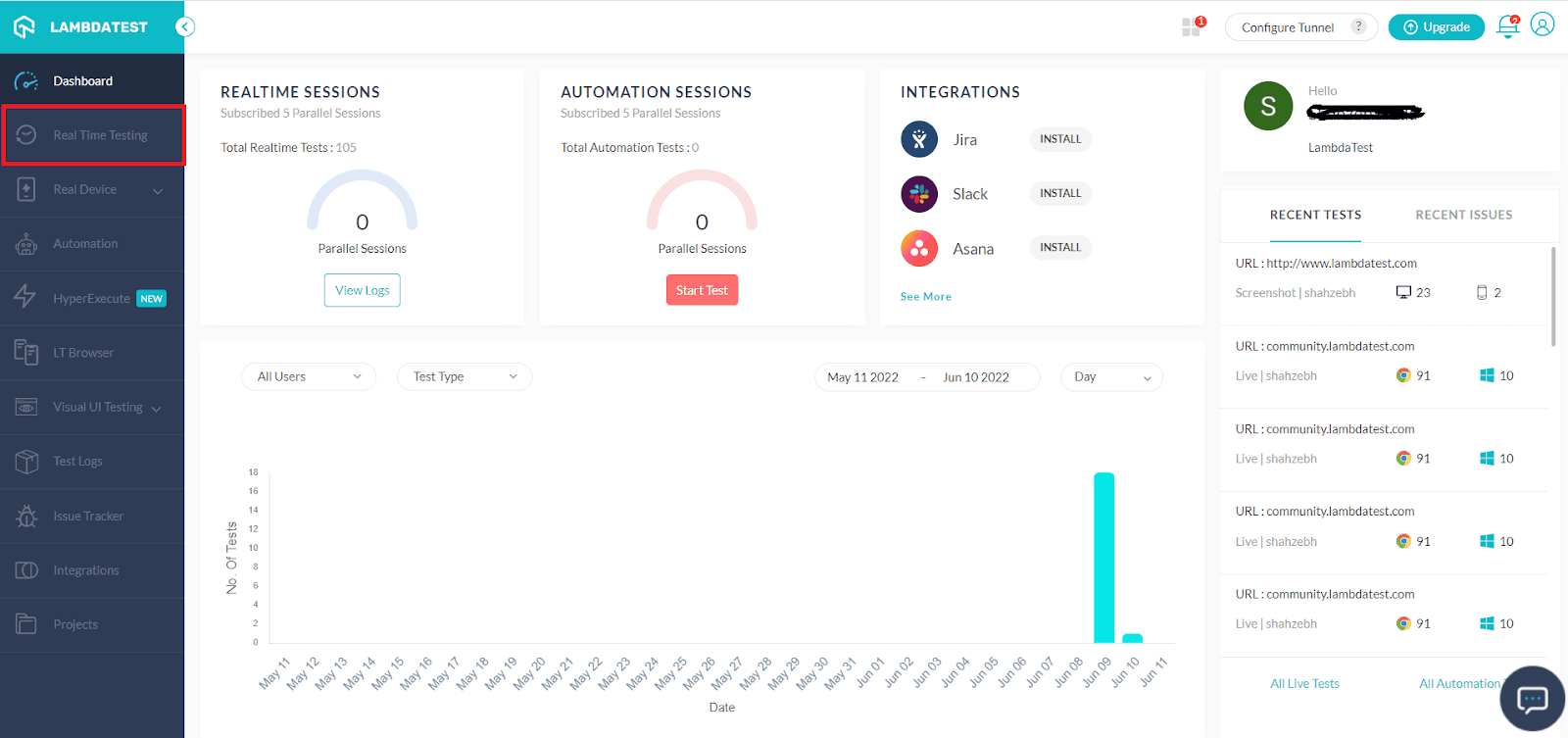
- Go to the Real Time Testing section present in the left menu bar.
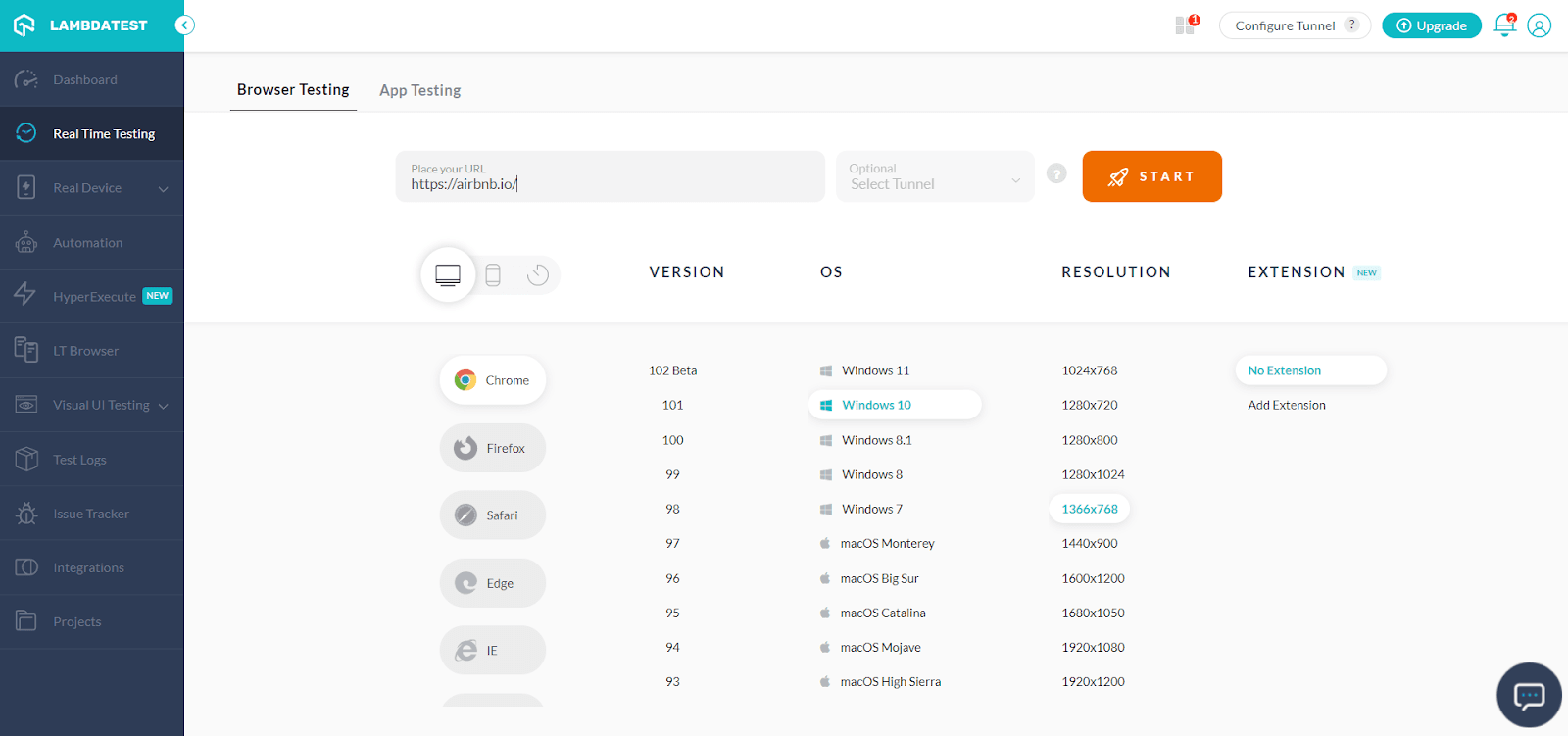
- Type the website URL in the Real Time Testing for testing. Choose the browser, VERSION, OS, RESOLUTION from the below screenshot:
- After you select it, click on START. You can then launch your website on the selected configuration you need.
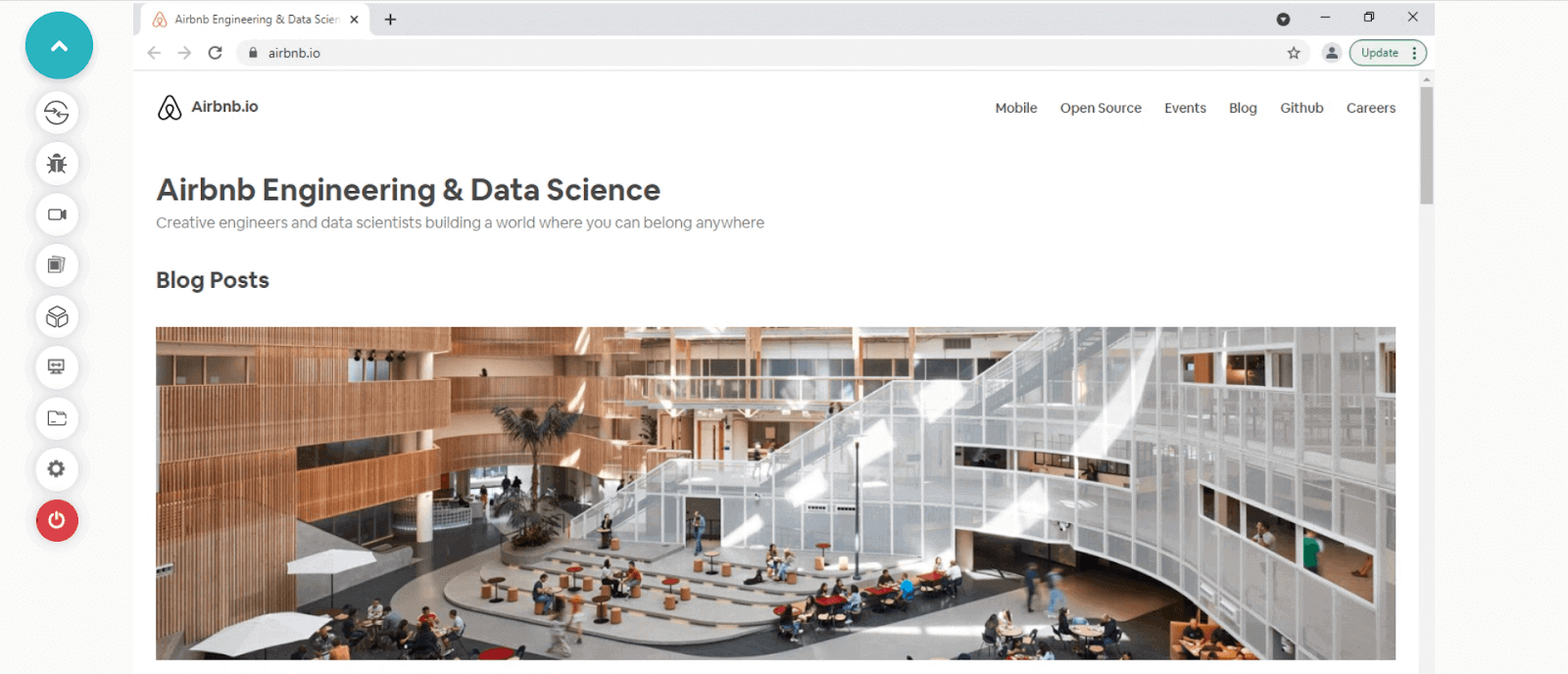
- After launching the website, you get access to a number of features like capture screenshots, video recording of a test session, one-click bug logging, etc.
Take a look at this video to learn more about real-time testing on TestMu AI:
You can also test the website responsiveness using the LT Browser. The browser has been developed to manage mobile-oriented testing. It consists of a number of features such as network throttling, hot reloading, two-device interaction, and much more.
Performing Mobile App Testing of Gatsby Apps on TestMu AI
It’s possible that we’ll need to test our mobile application. There are two methods for Gatsby testing. Emulators and simulators & real device testing are used. To start testing the Gatsby app, move to the TestMu AI Dashboard post logging in.
- Go to the Real Time Testing section from the left menu bar to test your mobile application developed using Gatsby.
- From the App Testing tab, upload the Gatsby app, and select BRAND, DEVICE/OS, which needs to be tested.
- Press START to launch the test session on the selected configuration.
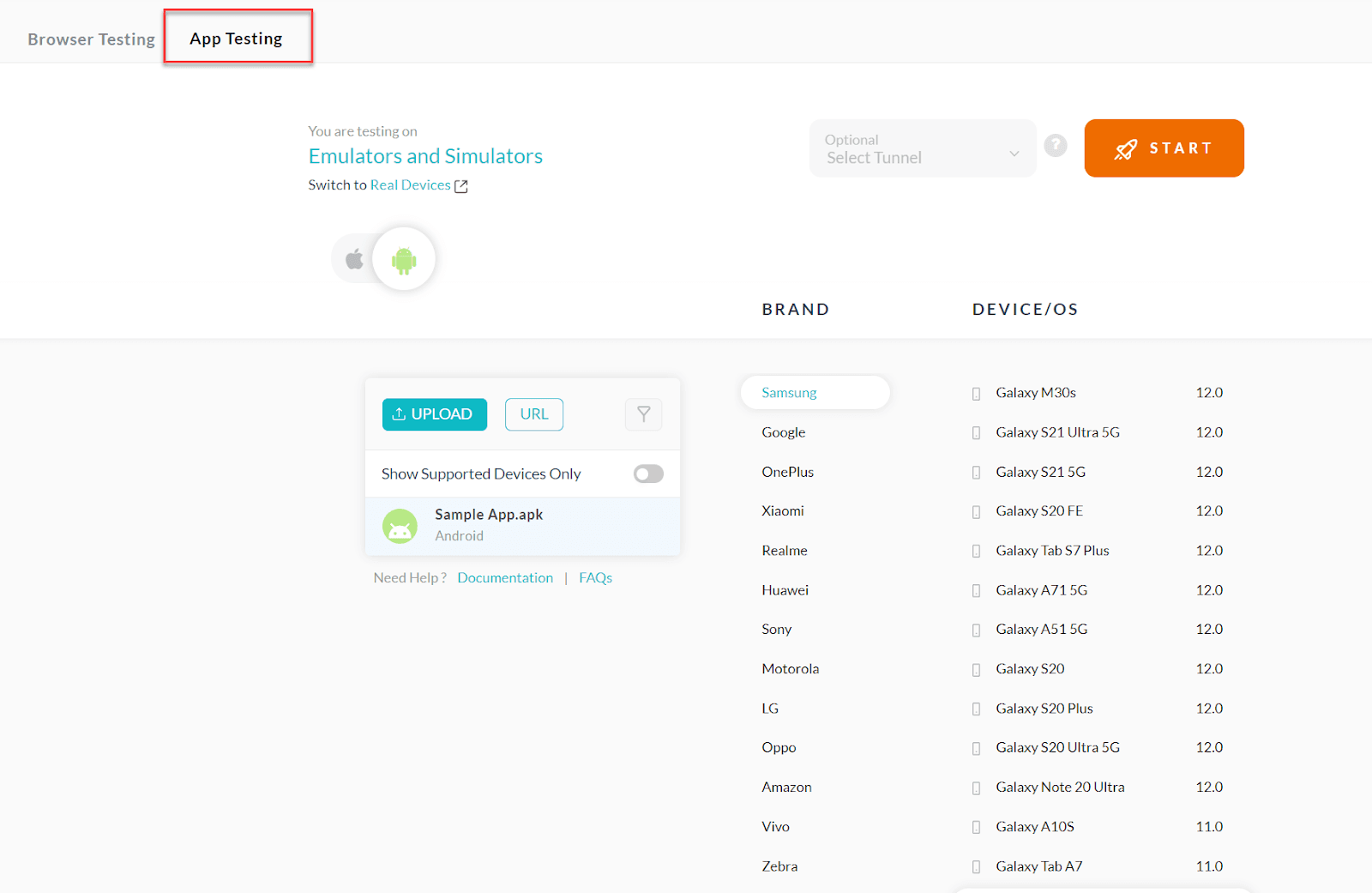
Performing Gatsby Testing on Real Devices using TestMu AI
For testing your mobile app using Gatsby, you have two options:
- Test using emulators and simulators.
- Test using real devices.
TestMu AI supports both of these options thankfully. We have already covered testing the Gatsby app on emulators and simulators in the previous section.
For performing Gatsby testing on real devices:
- Go to Real Device. Choose Real Time or App Automation
- The focus of Real Time is on manual inspection when you install the application on any real device. You can also perform app test automation via multiple mobile app testing frameworks like Appium, Espresso, and more.
- Let’s choose Real Time. You need to choose the needed OS and device version for installing the app.
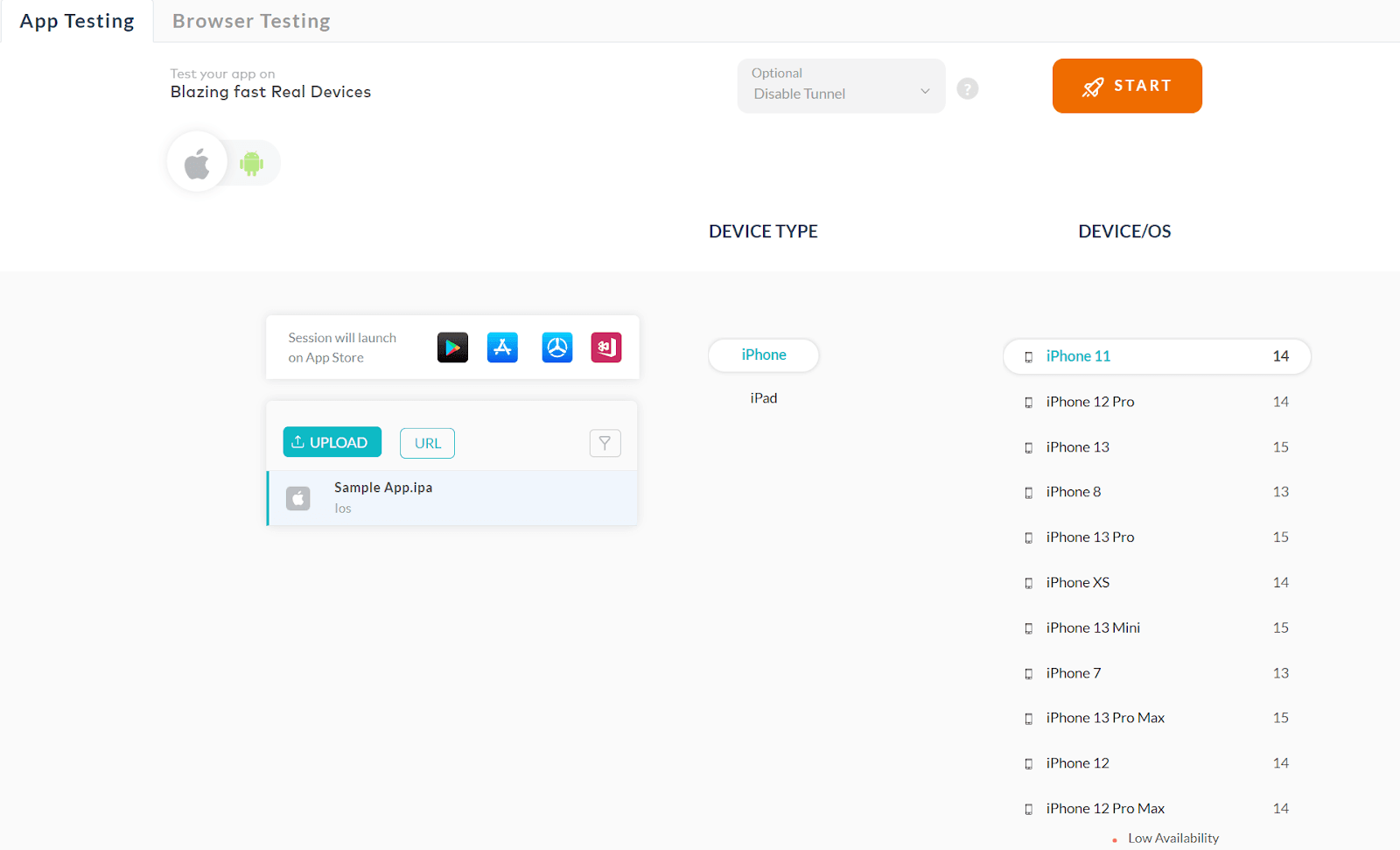
Now the app interaction can happen from your end.
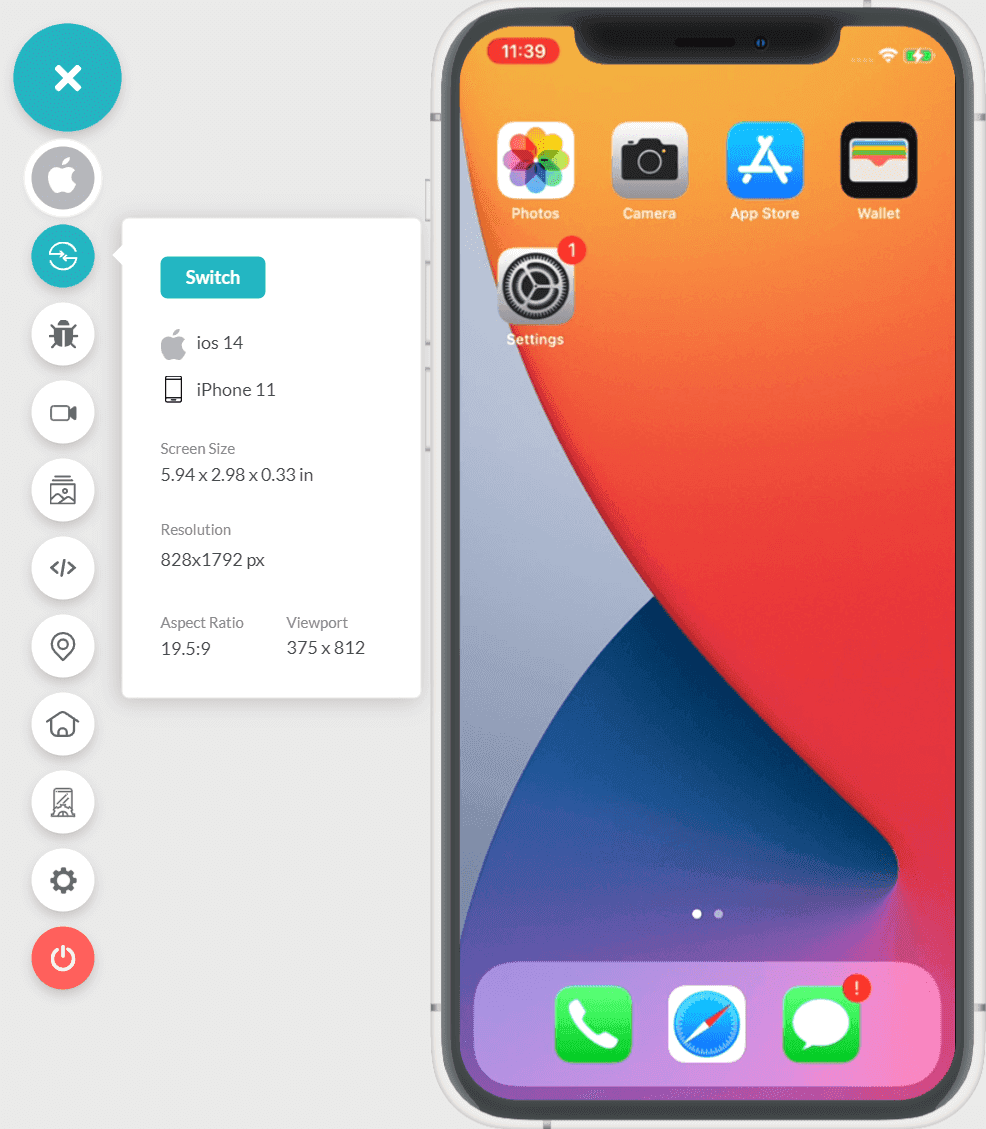
TestMu AI acts as a gateway for you to perform Gatsby testing on a real device cloud using different operating systems and real browsers. Take a look at this video to learn about real-time testing on Cloud:
You can also subscribe to the TestMu AI YouTube Channel to get the latest updates on tutorials and videos on web app testing.

TestMu AI also offers the option to test an unpublished website with the help of a secure tunnel, but with Gatsby, you might not need it. You will get a public IP along with your VMs.
Performing Gatsby Automation Testing on the TestMu AI Platform
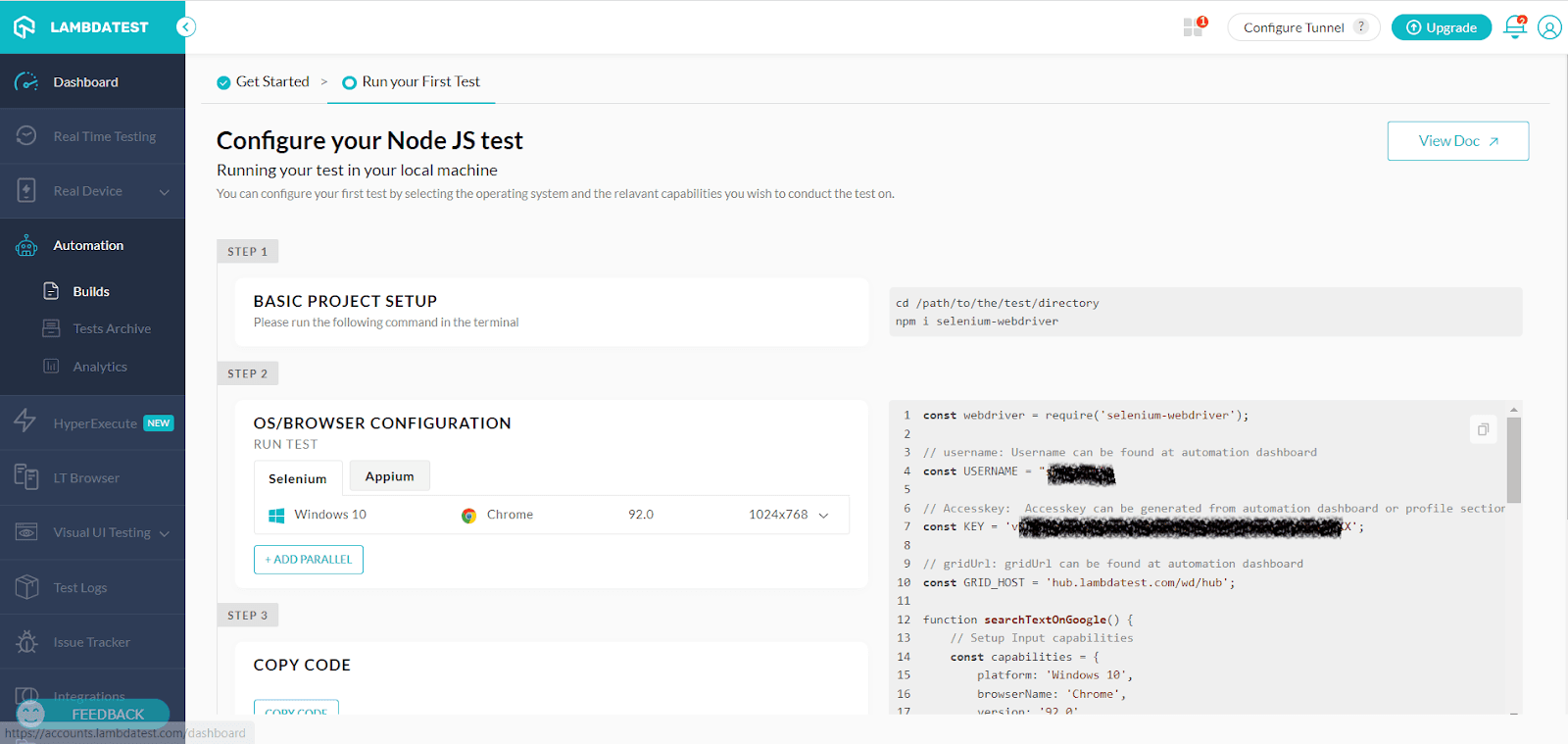
To perform automation testing for Gatsby websites on the TestMu AI platform, follow the below steps:
- Go to the Automation section in the left menu bar to perform Gatsby automation testing.
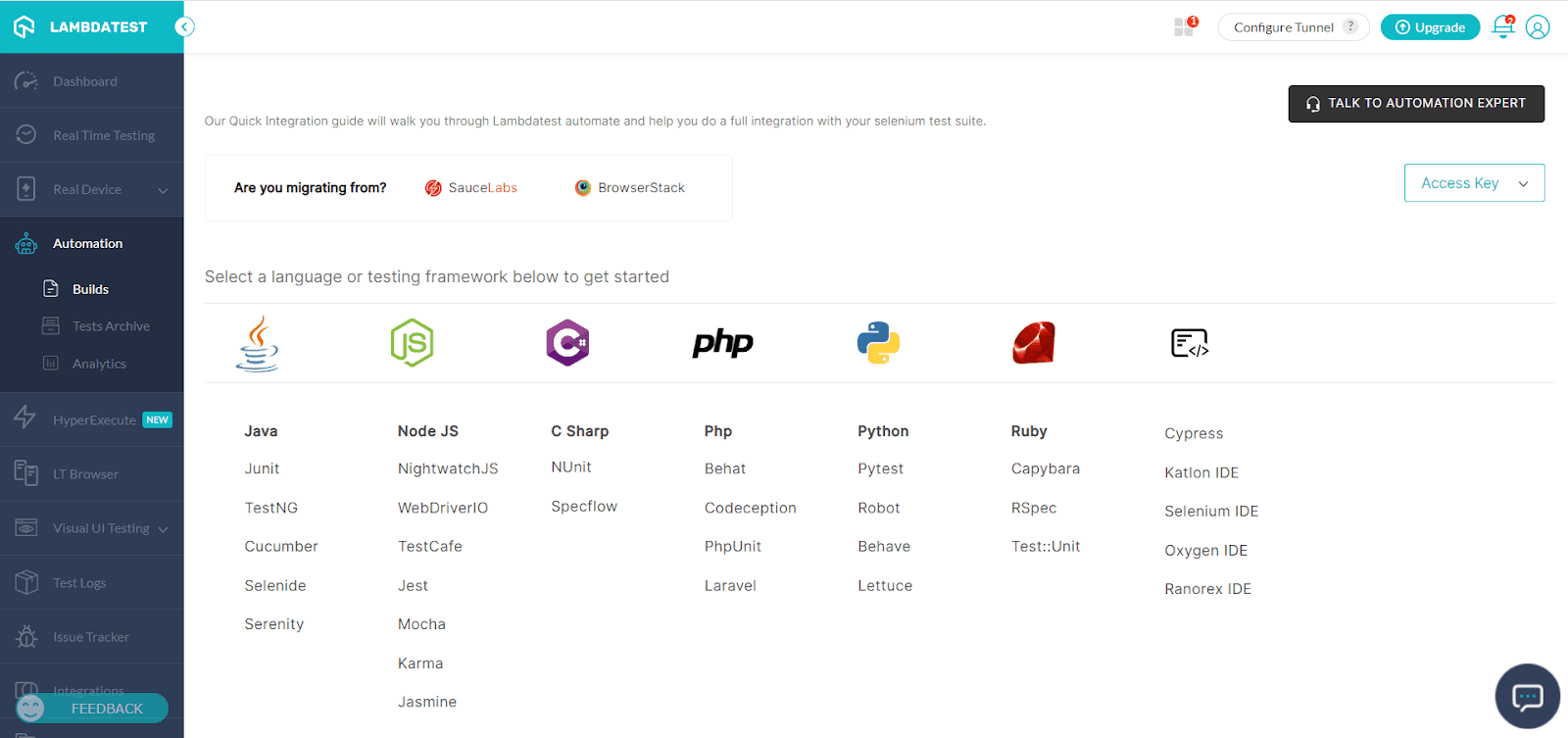
The screenshot above shows the Automation testing that can be done on the TestMu AI platform. You can either migrate from SauceLabs, BrowserStack or HeadSpin to migrate your test suites. If you don’t want to import or migrate your modifications, you can use the options on the screen to select the desired language or testing framework.
- Once you have chosen the desired options, you’ll have to configure the project, add OS/Browser information, set the desired capabilities, and run the test cases.
Wrap Up!
We have discussed different ways to perform Gatsby testing. It is all about using the right methodologies and supported platforms to simplify your requirements. We have moved beyond the traditional ways of testing our web and mobile apps, and automation is rapidly picking up. Organizations around the globe need to improve and improvise their existing Gatsby testing practices to stay ahead of the rest of their competition and serve the end customers better.
Happy Testing!
Wrap Up!


Frequently asked questions
Did you find this page helpful?
More Related Hubs
TestMu AI forEnterprise
Get access to solutions built on Enterprise
grade security, privacy, & compliance
- Advanced access controls
- Advanced data retention rules
- Advanced Local Testing
- Premium Support options
- Early access to beta features
- Private Slack Channel
- Unlimited Manual Accessibility DevTools Tests