

Next-Gen App & Browser Testing Cloud
Trusted by 2 Mn+ QAs & Devs to accelerate their release cycles


- Home
- /
- Blog
- /
- February’25 Updates: Accessibility Test Scheduling, Latest Features in SmartUI, Insights, and More!
February’25 Updates: Accessibility Test Scheduling, Latest Features in SmartUI, Insights, and More!
February brings powerful updates to enhance your testing experience. From scheduling accessibility scans to the latest SmartUI enhancements and new Insights features. Read more!

Salman Khan
January 10, 2026
February might be the shortest month, but we made every day count with new features and improvements tailored just for you.
Check out the below updates that will make your experience smoother, faster, and better than ever.
Schedule Scans With Accessibility Scheduling Feature
Ensuring accessibility is an ongoing activity. However, keeping up with regular accessibility testing can be challenging, and you may miss running checks that can lead to compliance risks, and manual testing takes time, as well. That’s where accessibility scheduling comes in.
It helps schedule accessibility scans, allowing you to stay proactive, catch issues early, and maintain compliance without additional manual effort.
To streamline this process, we have released the Accessibility Scheduling feature. This feature allows you to schedule (or automate) recurring or one-time accessibility scans, reducing your manual effort while ensuring your websites and web applications comply with the Web Content Accessibility Guidelines (WCAG).
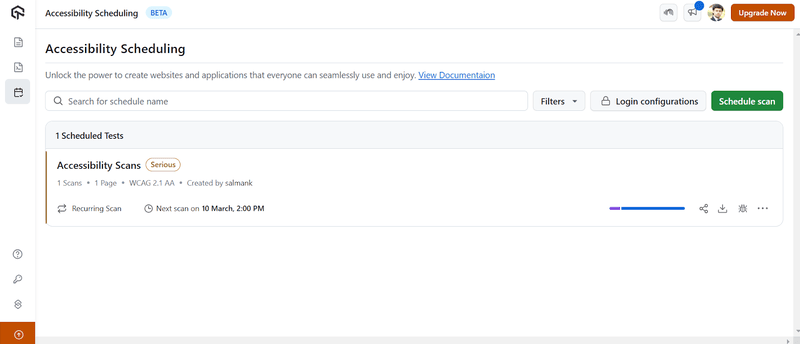
Other than rolling out this feature, we have also added the following support:
- You can schedule accessibility scans for locally or internally hosted web pages with Tunnel.
- While running accessibility tests, you can send bug reports straight to bug-tracking tools like Jira without leaving your accessibility testing workflow.
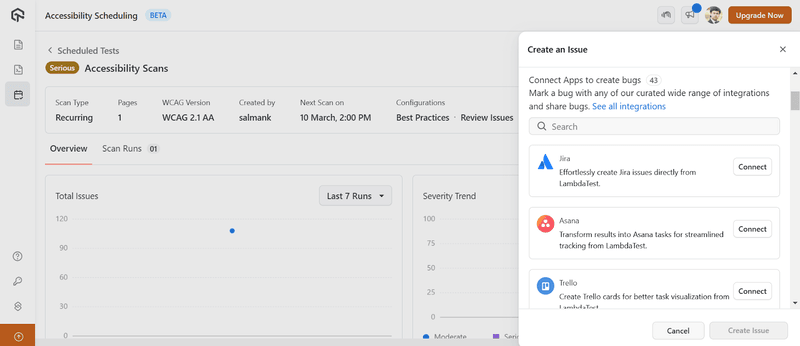

Note: Automate accessibility tests across 5000+ environments. Try TestMu AI Today!
Test Websites in Real Time With Self-Signed Certificates
Some web features work only in a secure environment (HTTPS). When testing HTTPS-only features in an internal or staging environment, teams often rely on self-signed certificates instead of certificates issued by trusted authorities.
To make your testing even more secure, we have added self-signed certificate support in real-time testing to test your locally hosted websites and web applications.
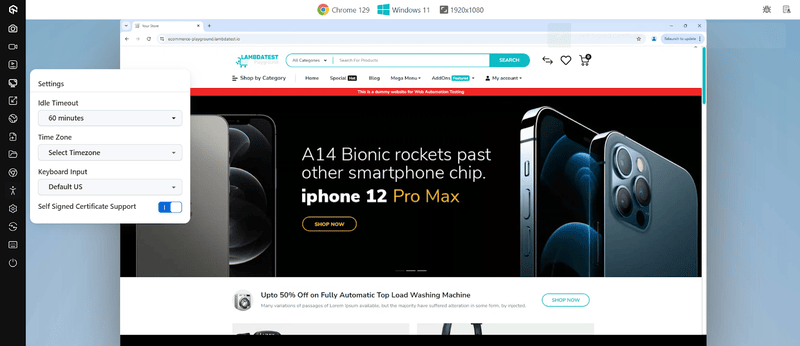
With this update, you can test locally hosted websites and web applications that are in internal, pre-production, or secure environments without interruptions.
Debug Flutter Tests on iOS With Console Logs
Debugging Flutter tests on iOS is now more efficient. You can now view console logs directly for debugging. Earlier, you had to go through lengthy instrumentation logs to troubleshoot issues, which made the process time-consuming.
However, this update makes real Flutter logs available, allowing testers to quickly spot errors and debug without extra hassle.
Looking to test your Flutter apps on iOS? Check this guide on Flutter Dart testing with iOS.
Important Update: Starting February 26th, the support for iOS 12 devices is no longer available on our real device cloud. We will also deprecate the support for iOS 13 devices soon, with at least two months’ notice before removal.
Latest Features Roll-Out in SmartUI
In our continuous effort to enhance your visual testing experience, we’ve rolled out several features in SmartUI.
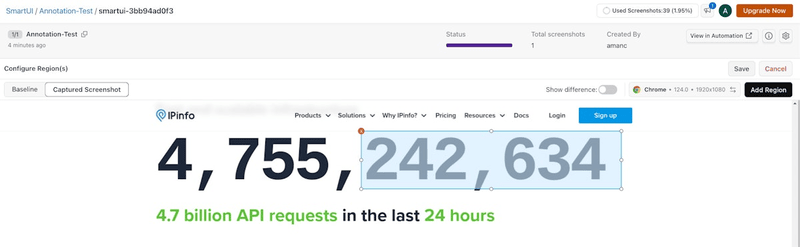
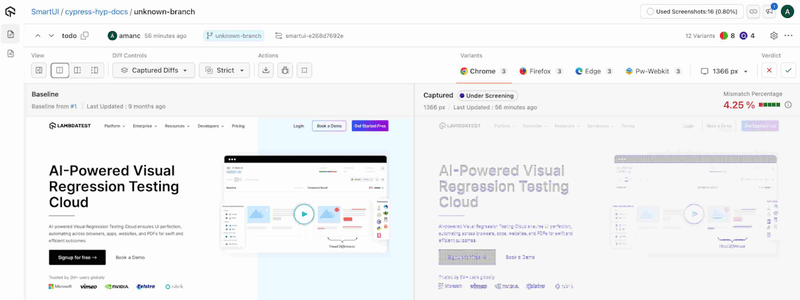
- Improved UX for Drawing Regions on Screenshots: We’ve enhanced our screenshot comparison tool to ignore or select annotated regions. You can now draw directly while zooming, panning, and pinching for seamless navigation.
An enhanced draw cursor improves speed and accuracy and makes it faster and easier for you to highlight differences.
- Bulk Review of Screenshot Variants: The new bulk review feature lets you do a bulk review of screenshot variants. You can accept, reject, or move multiple screenshots variants in a single action.
This will reduce your repetitive work and make the review process more efficient.
- SmartIgnore Now Works With SmartUI Public APIs and Integrations: SmartIgnore now integrates with SmartUI public APIs, giving you more flexibility in visual testing.
You can easily use SmartIgnore with SmartUI fetch APIs to speed up and refine your visual comparison process. It also supports email and Slack, so you get instant updates right where you work.
- Move PDFs and Their Individual Pages to the Baseline: You can now move entire PDFs or select their individual pages to the baseline.
It provides you a better control over approval workflows and simplifies your document-level and page-level verification.
- Execute JavaScript Code on Target URLs With SmartUI CLI: The SmartUI CLI now supports executing JavaScript before capturing snapshots.
You can interact with dynamic elements, modify content, and manage loading states. Refer to the documentation to execute custom JavaScript code with SmartUI.
Refer to the documentation to execute custom JavaScript code with SmartUI.
Enhancements and Features in HyperExecute
We continue our effort to enhance HyperExecute, bringing new capabilities. Here are some of the newly added features:
- Artifact Extraction on Job Abortion: Artifacts will now be extracted even if a test job is aborted midway. Therefore, you can access partial test results and logs to analyze failures, debug more effectively, and review critical test data even if the execution is interrupted.
- afterEachScenario Flag for Test Cleanup: The afterEachScenario flag in HyperExecute lets you automate post-test scenario tasks, helping maintain test isolation and consistency. This flag executes cleanup activities such as clearing cookies, resetting databases, or capturing logs after each test scenario.
- Role-Based Access Control (RBAC) for Projects: We have implemented Role-Based Access Control to improve project security and access management. You can now assign specific roles with predefined permissions so that only authorized individuals can access or modify project settings and resources.
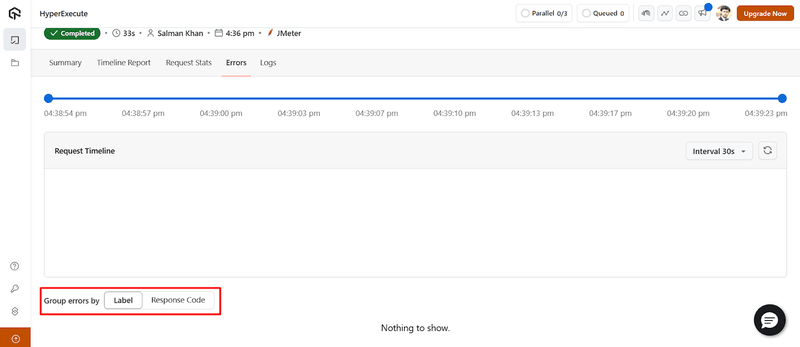
- UI/UX Enhancements for Performance Testing Jobs: We’ve improved the UI/UX for managing and analyzing performance testing jobs, making navigation smoother and more intuitive.
A new group-wise error view categorizes errors for better readability and faster troubleshooting.
- Test on New Browser Versions: You can now test on new browser versions for Microsoft Edge – 133.0.3065.31 and 133.0.3065.39.
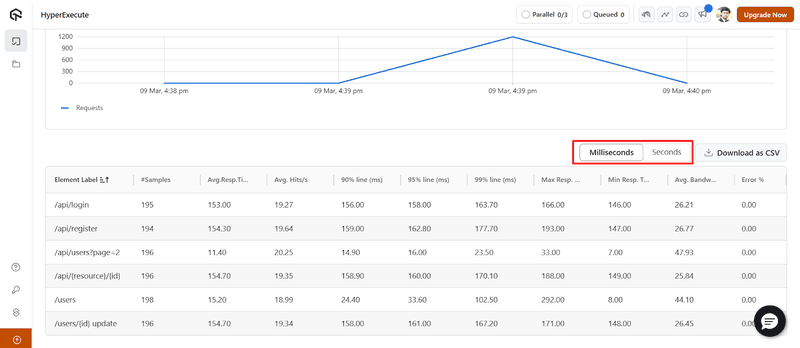
Additionally, we’ve introduced a toggle feature that lets you switch performance metrics between Milliseconds and Seconds, providing more flexibility in analyzing test execution times.

New Features in Insights
To provide deeper visibility into your test execution, we have added some new features in Insights:
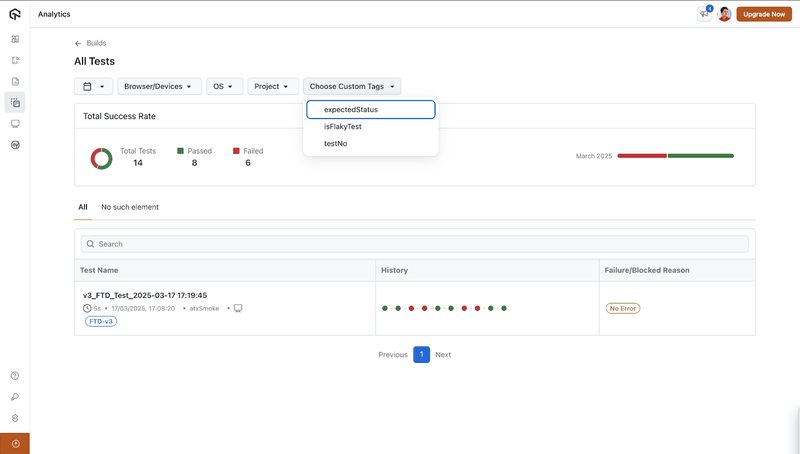
- Filter Custom Data for Builds: We have added the customData capability for Build Comparison that allows you to filter and compare web automation builds. You can also analyze specific test scenarios based on the tags or metadata you’ve defined.
- New Widget for App Automation: We have introduced a new widget for App Automation that provides visibility into your test execution metrics.
- Export Usage Reports in Excel Format: You can now export Insights Usage Reports directly to Excel, making it easier to analyze, share, and integrate data into existing workflows.
- New “Created by” Column for Dashboards: The Dashboard list now includes a “Created by” column that indicates who created a dashboard.
- Sort Insights Data Based on Column: The Insights drill-down experience has been improved with column sorting functionality.
- Admin Controls for Accessing and Managing Dashboards: Admins can now access and manage all Insights dashboards within their organization, irrespective of who created them.
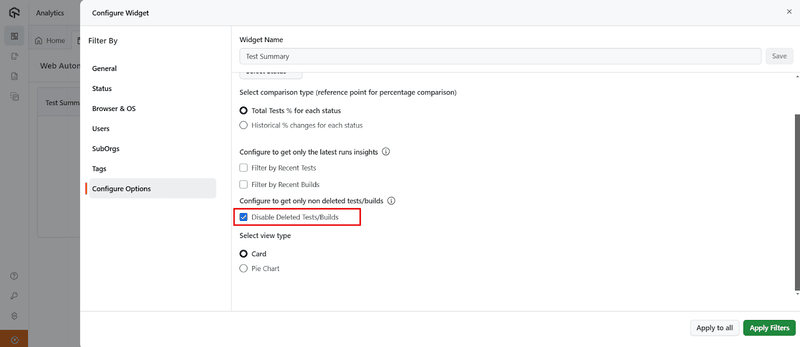
- Filter Deleted/Disabled Test Builds: You can now exclude disabled tests from your dashboards for clearer insights. Removing disabled and deleted tests from your data can help you provide a more accurate view of your current testing workflow.
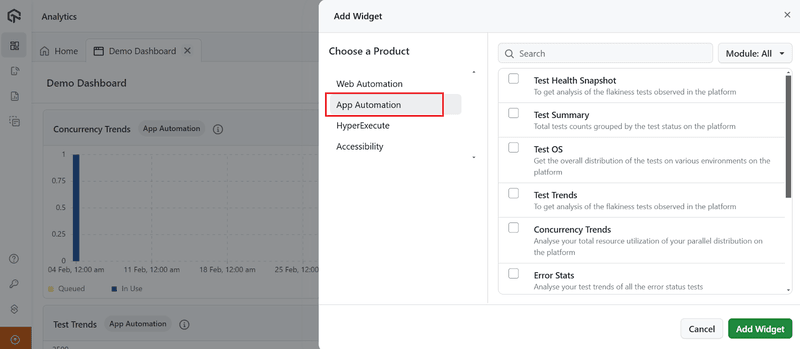
This widget helps you track the total number of unique applications under test and provides valuable insights into test coverage and application performance.
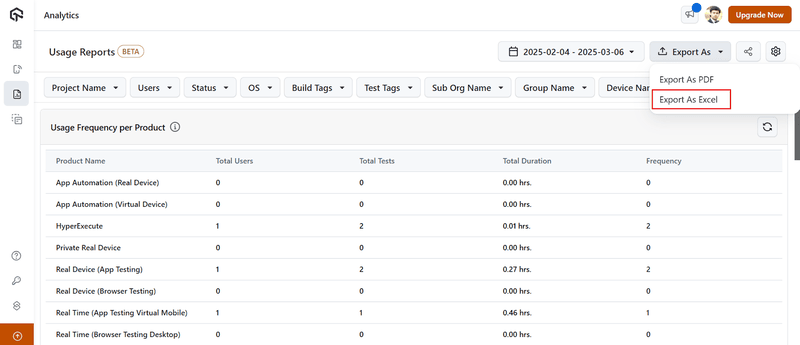
Since all data formatting and structure are preserved, you can seamlessly integrate these reports into your existing Excel-based workflows.
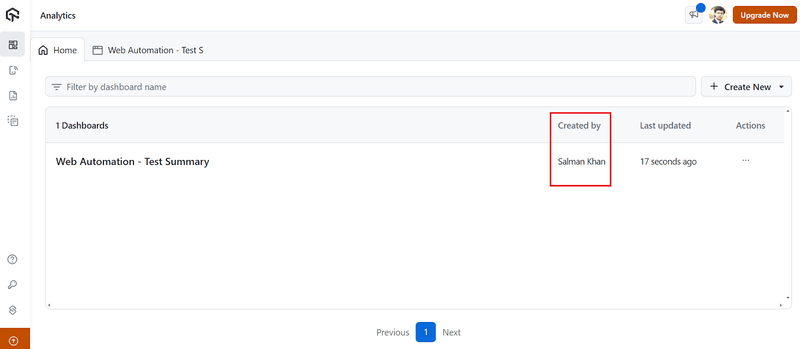
Even if other members modify a dashboard, the original creator’s name remains reflected. This enhancement allows you to better organize dashboards without unnecessary back-and-forth.
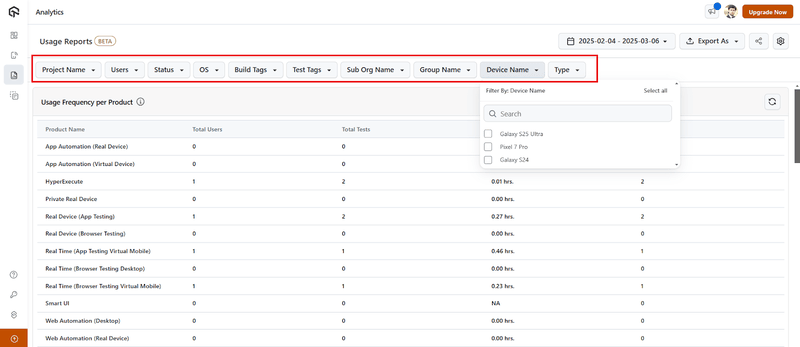
You can now click on any column header to sort data in ascending or descending order. This will make it easier to analyze trends and compare results.
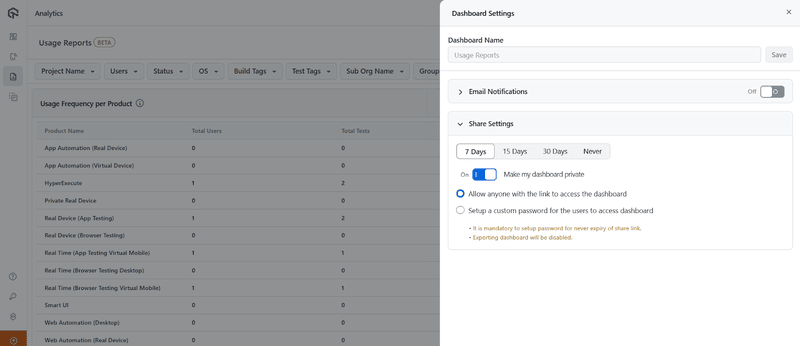
It allows admins to read content, update visualizations, delete outdated information, and modify dashboard settings as needed.
All in All!
February brought a range of enhancements to make testing more efficient and seamless. With features like accessibility test scheduling, SmartUI improvements, and better debugging for Flutter tests on iOS, these updates will simplify your workflow.
Make the most of these new capabilities, and keep your feedback coming!


Did you find this page helpful?
More Related Hubs
TestMu AI forEnterprise
Get access to solutions built on Enterprise
grade security, privacy, & compliance
- Advanced access controls
- Advanced data retention rules
- Advanced Local Testing
- Premium Support options
- Early access to beta features
- Private Slack Channel
- Unlimited Manual Accessibility DevTools Tests