

Next-Gen App & Browser Testing Cloud
Trusted by 2 Mn+ QAs & Devs to accelerate their release cycles


- Home
- /
- Blog
- /
- Feb’23 Updates: Live With HyperExecute Private Cloud, Cypress Testing On macOS Ventura, And More
Feb’23 Updates: Live With HyperExecute Private Cloud, Cypress Testing On macOS Ventura, And More
We are now live with HyperExecute Private Cloud, Cypress Testing on macOS Ventura, and more. Check out what’s new at TestMu AI in February.

Salman Khan
January 29, 2026
Hey, testers! As part of our ongoing effort to help scale your digital experiences, we have released another round of exciting product updates. As we rang in March, we’re giving you a sneak peek at some of the product updates we released last month.
Over the course of last month- we are now live with HyperExecute Private Cloud on Microsoft Azure Marketplace, added macOS Ventura for Cypress testing, and rolled out new browsers and integration for real-time testing and automation testing.
Let’s dive in!
HyperExecute Private Cloud for Smart Test Orchestration
TestMu AI’s HyperExecute is a lightning-fast intelligent smart end-to-end test execution and orchestration platform. It is up to 70% faster than any cloud-based conventional testing grid. Running automation tests with HyperExecute reduces developer friction and helps businesses achieve faster time to market.
We are pleased to announce HyperExecute Private Cloud on Microsoft Azure Marketplace to help you run end-to-end tests on your private cloud.
Here are the prerequisites to leverage HyperExecute Private Cloud.
- Resource Provider
You need to register for the following resource providers to install HyperExecute.
- Microsoft.Compute
- Microsoft.OperationsManagement
Visit this link to register a resource provider.
- Register for EnablePodIdentityPreview
To enable Kubernetes apps to access cloud resources securely with Azure Active Directory, we use the AAD Pod Identity feature. To use the AAD Pod Identity feature, register for the EnablePodIdentityPreview feature.
- CPU Quotas
To deploy HyperExecute, you need to up the VM-family vCPU quotas. Please check out this link to increase CPU quotas.
- Quota name – Standard DSv3 Family vCPUs. vCPU core count – 80
- Quota name – Standard FSv2 Family vCPUs. vCPU core count – 8 * number of parallel licenses.
- Microsoft.Compute
- Microsoft.OperationsManagement
- Quota name – Standard DSv3 Family vCPUs. vCPU core count – 80
- Quota name – Standard FSv2 Family vCPUs. vCPU core count – 8 * number of parallel licenses.
Now below are the post-deployment actions you need to follow.
To access this private setup in your environment, you need to provision a specific public machine inside the Vnet. Due to the security restrictions implemented, this setup cannot directly access your private applications, URLs, or APIs.
To fix this issue, you need to perform Vnet peering from the Vnet generated inside the HyperExecute dedicated resource group to the Vnet that is already present in your account. As the test machines require access to those endpoints, this account must be the one that holds all of your endpoints or your test execution account.
Check our document to activate Vnet peering and Vnet linking in your account.
New Features in TestMu AI Automation
Check out the fresh batch of features added to Cypress testing, Smart UI testing, and Analytics.
Run Cypress Tests on macOS Ventura
TestMu AI’s Automation Testing Cloud now allows you to run Cypress tests on the latest macOS Ventura.
Are your web applications ready for macOS Ventura? Test them now on TestMu AI’s Cypress Cloud running real macOS Ventura across 40+ browsers like Chrome, Firefox, Edge, and Electron.
Below is the syntax for configuring the browser and platform keys in the lambdatest-config.json file to run the Cypress test on macOS Ventura.
"browsers": [{
    "browser": "Chrome",
    "versions": ["110.0"],
    "platform": "MacOS Ventura",
}],
You can also generate Cypress capabilities from TestMu AI Automation Capabilities Generator.
Enhancements in Smart UI Testing
TestMu AI’s Visual Regression Testing Cloud is now live with the following new features.
- Compare your static Storybook build files and run visual tests using CI.
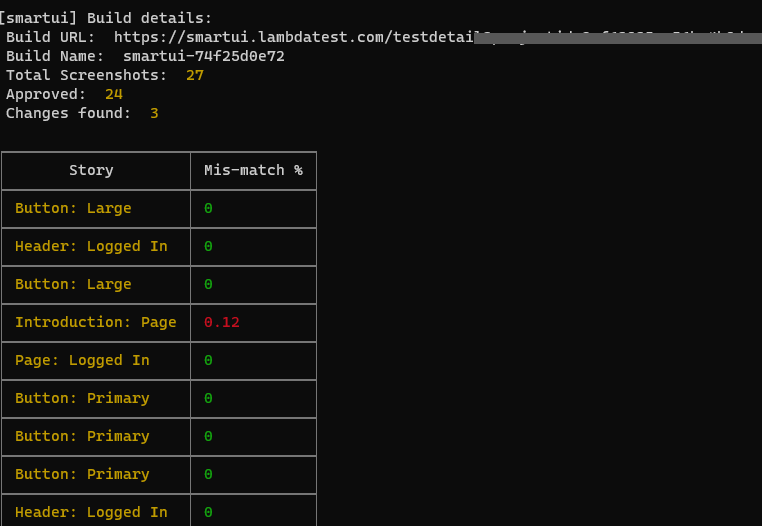
- Added support to print the Build Report on the Terminal Logs once you complete the test run.
Analytics: Support for Inspecting HyperExecute Jobs
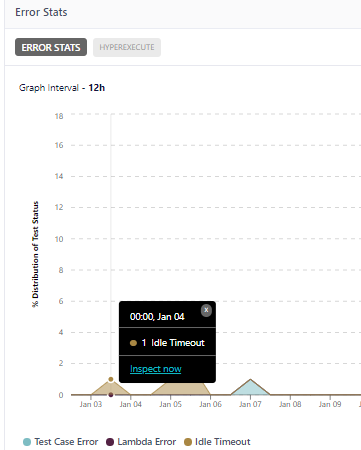
For the Error Stats widget in TestMu AI Test Analytics, you can now inspect HyperExecute Jobs.
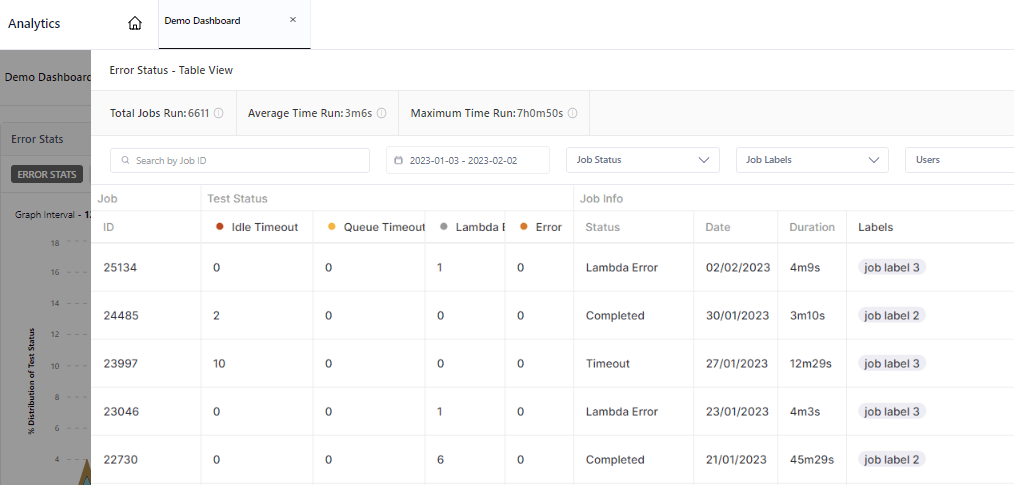
Upon clicking Inspect now on a specific Job, it will display a table view of HyperExecute Error Stats containing Job ID, Test Status, and Job Info.
Test on the Latest Browsers
The fresh browser versions for Chrome, Firefox, Edge, and Opera are now available on TestMu AI’s online browser farm for Real Time Testing and Automation Testing.
- New Browsers for Real Time Testing
- Chrome 110 Beta, 109
- Firefox 110 Beta, 109
- Edge 110 Beta, 109
- Opera 95
- New Browsers for Automation Testing
- Chrome 110 Beta, 109
- Firefox 110 Beta, 109
- Edge 108 Beta, 107
Let’s check how these browsers fares in terms of cross browser compatibility.
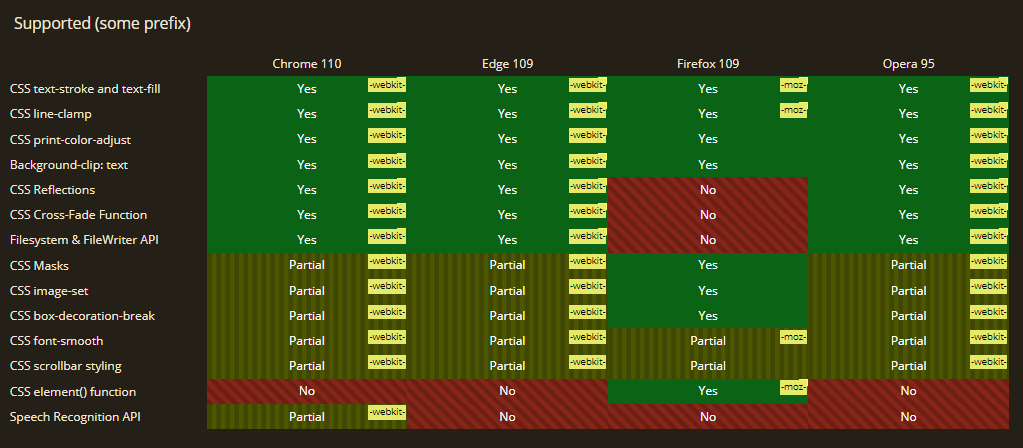
In most popular browsers, properties like CSS element() function and Speech Recognition API are unsupported.
One-Click Bug Logging with FogBugz
The TestMu AI Integrations now has another bug-tracking tool in its kitty – FogBugz.
FogBugz is a web-based project management platform with features like bug and issue tracking, discussion boards, wikis, customer relationship management, and more.
With TestMu AI integration for FogBugz, you can now avoid the pain point of maintaining issues and tasks manually by logging bugs in a single click while performing of your website from the TestMu AI platform to your FogBugz instance.
Additionally, we have also optimized our integration with Zapier for enhanced performance.
Wrapping up
And that’s all!
It’s time to #TestMu AIYourApps and do give these new features a try. You can share valuable feedback on the TestMu AI Community or 24×7 Chat Support or by emailing us at [email protected].
Also, don’t forget to book your seats for our upcoming Forrester Webinar on Digital Experience Testing: Need of the Hour for Enterprises.



Did you find this page helpful?
More Related Hubs
TestMu AI forEnterprise
Get access to solutions built on Enterprise
grade security, privacy, & compliance
- Advanced access controls
- Advanced data retention rules
- Advanced Local Testing
- Premium Support options
- Early access to beta features
- Private Slack Channel
- Unlimited Manual Accessibility DevTools Tests